2009 AUDI S6 steering
[x] Cancel search: steeringPage 162 of 398
• ..__A_ u_ t _o_ m_ a_ t_ i_ c _ t_r _a _n_ s_ m_ is_ s_i o _ n ________________________________________________ _
[ i J Tip s
• When you shift into the next lower gear, the transmission will
downshift only when there is no possibi lity of over -revving the
engine.
• When the kickdown comes on, the transmission will shift down
to a lower gear, depending on vehicle and engine speeds.
• tiptronic ® is inoperative when the transmission is in the fail -safe
mode .•
A pplies to vehicl es: with 6-s peed automatic transmission
Steering wheel with tiptronic ®
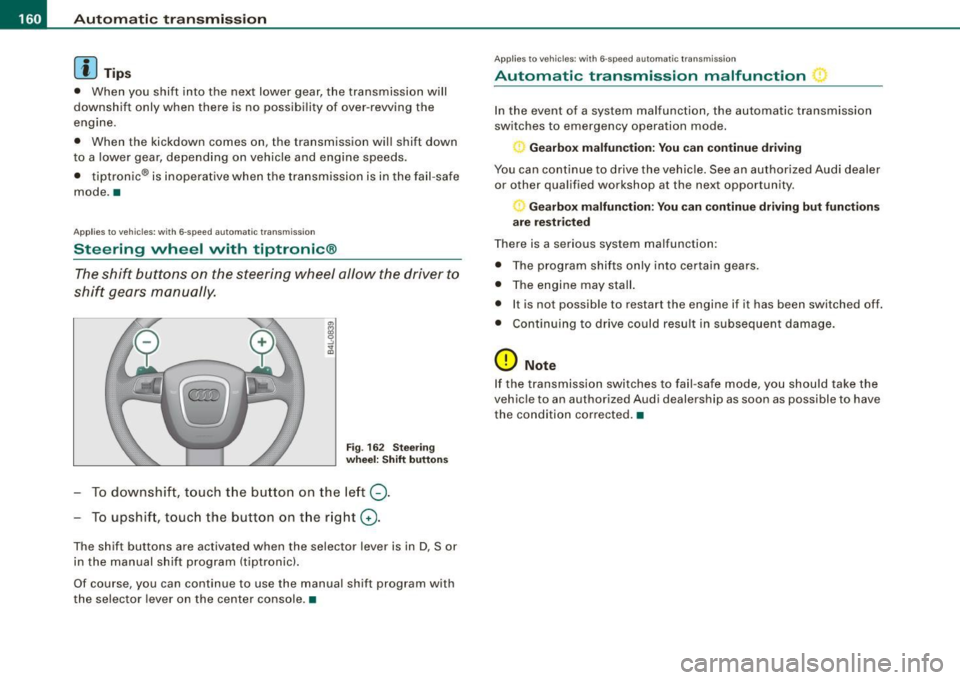
The shift buttons on the steering wheel allow the driver to
shift gears manually.
Fig . 16 2 Stee ring
w heel: Shift button s
To downshift, touch the button on the left Q.
To upshift, touch the button on the right G) .
The shift buttons are activated when the selector lever is in D, Sor
in the manual shift program (tiptronic).
Of course, you can continue to use the manual shift program with
the selec tor lever on the center console. •
Applie s to vehicle s: wi th 6-speed automatic transmiss ion
Automatic transmission malfunction
In the event of a system malfunction, the automatic transmission
switches to emergency operation mode.
Gearbox malfunction : You c an continue driving
You can continue to drive the vehicle. See an authorized Audi dealer
or other qualified workshop at the next opportunity.
Gearbox malfunction: You can continue driving but fun cti ons
a re re st ric ted
There is a serious system malfunction:
• The program shif ts only into certain gears.
• The engine may stall.
• It is not possib le to restart the engine if it has been switched off.
• Cont inuing to drive could result in subsequent damage.
0 Note
If the transmission switches to fail -safe mode, you should take the
vehic le to an authorized Audi dealership as soon as possible to have
the condition co rrected. •
Page 169 of 398
_______________________________________________ A_ u_t _o _m_ a_ t_ i_ c _ t_r _ a _n _s_ m_ i_ s _ s_ i_ o _ n _ ___._
[ i J Tips
• When you shift into the next lower gear, the engine will down
shift only when there is no possibility of over -revv ing.
• When the kick-down comes on , the transmission will shif t down
to a lower gear depending on vehicle and engine speeds.
• The tiptronic® is inopera tive when the t ransmission is in the fail
safe mode .•
Ap plies t o vehi cles: w it h mu lt it ro nic® Co ntin uou sly Va ria ble Tra nsm iss io n (CVT )
Steering wheel with tiptronic ®
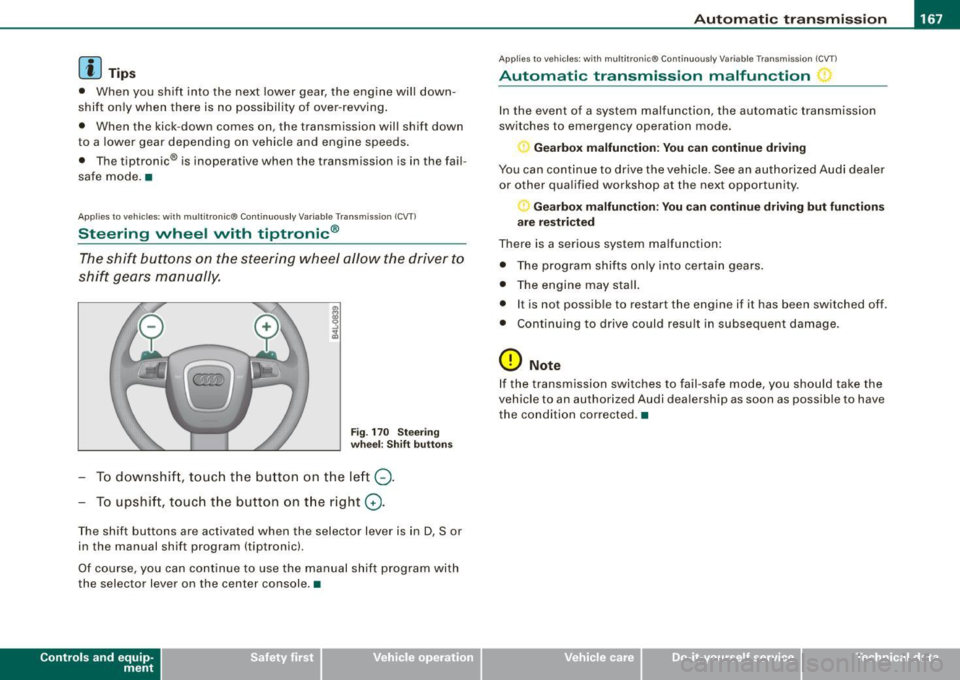
The shift buttons on the steering wheel allow the driver to
shift gears manually.
Fig . 170 Steering
wheel: Shift buttons
To downshift , touch the button on the left Q.
To upshift, touch the button on the right G).
The shift buttons are activated when the selector lever is in D, Sor
in the manual shift program (tiptron ic).
Of course, you can continue to use the manual shift program with
the selec tor lever on the center console .•
Con tro ls and eq uip
ment
A pp lies to vehicles: w it h muh it r on ic® Cont inuous ly Variable Transm iss ion ( CVT)
Automatic transmission malfunction
In the event of a system malfunction, the automatic transmission
switches to emergency operation mode.
Gearbox malfunction: You can continue driving
You can continue to drive the vehicle . See an authorized Audi dealer
or other qualified workshop at the next opportunity .
Gearbox malfunction: You can continue driving but functions
are restricted
There is a serious system malfunction:
• The program shifts only into certain gears.
• The engine may stall.
• It is not possible to res tar t t he engine i f it has been switched off .
• Continuing to drive could result in subsequent damage .
0 Note
If the transmission switches to fail -safe mode , you should take the
vehicle to an authorized Audi deale rship as soon as possible to have
the condition corrected .•
Vehicle care I I irechnical data
Page 177 of 398

Audi Parking System -
----------------=----=------'
Applies to vehicles: with Audi Parking System (r ear) and rea r-v iew came ra
Rear -view camera coverage area
®
Fig . 177 Top view:
Rear-view camera
coverage area
Fig . 178 Side view :
Covered area 0 and
uncovered area
0 of
the rear-view camera
The rear-view camera section appearing in the MMI Display is
approximately the same as the coverage area represented in
=> fig. 177 or
G) in=> fig . 178. Objects located in the rear-view
camera's uncovered area@=> fig . 178 or in the close vicinity of the
bumper are not recognized.
& WARNING
Please note that objects not touching the ground can appear to be
further away than they really are (for example, the bumper of a
parked vehicle, a trailer hitch , or the rear of a truck) . In this case,
Contro ls and eq uip
ment
& WARNING !continued)
you should not use the guide help lines to measure distance -
danger of accident! •
Applies to veh ic les : w ith Aud i Park in g Sys tem (re ar) and rear-view camera
Parking mode 1
"Parking mode 1" can aid when parking in a garage or
parking space, for example .
M I ij
~------------------:
Fig. 179 MMI Display:
Aiming at the parking
spot by adjusting the
steering wheel angle
Fig . 180 MMI Display:
Orienting the vehicle
with aid of the blue
surface
Before parking, switch on the Adaptive Air Suspension*
~ page 20 comfort or automatic mode. .,,_
Vehicle care I I irechnical data
Page 178 of 398

-L-___:.A...:.:; u..:d .:.: i..: P;___;:; a.:..r .:.:k .:.:in .:.. g~ S.::..!. y..:s ..:t ..:e .:..m .:..:.... ___________________________________________ _
-Activate the A udi Parking System~ page 171. "Parki ng
mode 1"
~ page 175, fig . 179 is d isplayed by default .
Dynamic orange orien tation lines
G) and a blue s tat ic
surface
G) are projected into the rear -view camera
picture.
With the vehicle stat ionary, selec t the proper steering
wheel ang le for the parking spot with the aid of the
orange or ie ntation lines.
- While driving in reverse gear, ad just t he steering wheel
angle to fi t the parki ng space with the aid of the orange
orientation lines~
0.
- Align your vehicle corresponding to the blue surface. The
blue s urface should be parallel to the park ing spot lines
~ page 175, fig . 180.
G) Blu e surface
The surface behind the vehic le, identified by various shades of b lue,
represents an extension of the outer vehicle out line by approxi
mately 16 ft (5 ml to the rear. The transitions of the blue surfaces are
distanced approximate ly 3 ft ( 1 ml, 6
ft (2 m), and 16 ft (5 m) away
from the vehicle.
© a nd 0 Orang e orie nta ti on lin es
The orientation lines change direction with the steering wheel
ang le . These lines identify the direction of travel the rear of the
vehic le would be taking, driving in reverse gear with the current
steer ing whee l ang le .
The dynamic orientation lines are provided with markers©-These
markers are each placed at a distance of approx. 3 ft ( 1 m) from one
another. Through these markers, the distance to an obstacle can be
estimated .
©Redli ne
The distance between your rear bumper® and the red line is
approximately 16 inches (40 cm):::::,&. Here, at the latest, you
should stop backing up:::::,
page 179.
® Rear bum per
The rear bumper of your vehicle also appears in the MMI Display, for
better orientation.
& WARNING
Ple ase n ote t hat obje cts n ot tou ch ing th e ground can ap pear to be
fu rther away th an th ey re ally ar e (for example , the bumper of a
p arked vehi cle , a trai ler hit ch, o r th e rea r of a tr uck). In this case,
yo u shou ld not u se th e gu ide h elp lin es to mea sur e di stan ce -
d anger of accident !
0 Note
In the MMI Display, the direction of travel of the vehicle rear is
shown depending on the steering whee l ang le . The vehicle front
swings out more than the vehic le rear.
[ i ] T ip s
• In order for the rear-v iew camera to function proper ly, the
camera lens:::::,
page 171, fig. 174 must be kept clean, and free of
snow and ice. P lease follow the add itional notes on :::::,
page 182.
• The positions of the orientation lines/ surfaces are disp laced up
or down if the parking process is carried out with the rear -view
camera in Adaptive Air Suspension*:::::,
page 20 dynamic, off -road,
or lift mode. Therefore, the accuracy is reduced. •
Page 179 of 398

_____________________________________________ A_u_ d_ i _P _a_ r_ k_ i_n -=g a..- S-=y'--- s_ t_ e_ m __ ....J_
Ap plies to vehic les : w ith Au di Par kin g Sy stem (r ear) and rea r-v ie w came ra
Parking mode 2
"Parking mode 2" can be used as aid when (parallel)
parking on the side of the road , for example.
Fig . 181 MMI Display:
Blue surface aligned
with targeted parking
spot
Fig . 182 MMI Display:
Contact of the blue
curved line with the
curb
- Find a parking spot on the right side of the road, for
example .
- Switch on the Adaptive Air Suspension*=>
page 20
comfort or automatic mode.
- Position your vehicle parallel to the edge of the road,
approximately 3 ft (1 m) away from a parked vehicle
=>
page 173, fig. 176. When parking next to obstacles,
please note=>
page 178.
Contro ls and eq uip
ment
- Activate the Audi Parking System => page 171. "Parking
mode 1" is displayed by default.
- Press the control button with the
mode @=> page 175,
fig. 180 funct ion . "Park ing mode 2" => fig. 181 appears in
the MMI D isplay.
- Back up in reverse gear and adjust the pos ition of your
vehicle in such a way, that the dark blue surface ind icated
in the MMI Display
0 => fig . 181 borders on the vehicle
be hind, or the parking spot line. If you are
not parking
next to any obstacles=>
page 178, the long side of the
dark blue surface should border on the curb. The ent ire
dark blue surface has to fit into the parking spot
=>
page 173 , fig. 176.
- While the vehicle is stationary, turn your steering wheel
to the right as far as it will go.
- Back up into the parking spot. If you are
not park ing next
to any obstac les =>
page 178, the dark blue bend ©
should touch the curb=> fig . 182. Stop your vehicle.
- Wh ile the vehicle is stat ionary, turn your steering whe el
i n the oppos ite direc tion (lef t) as far as it will go .
- Contin ue to back up into the park ing spot until the
vehicle is parked pa rallel to the curb. When backing up,
also keep an eye on the vehicle front=>
0.
With "parking mode 2 ", you can park on th e left a nd right sid e of the
road. Fo r this reason, the blue surfaces and curved l ines are
displ ayed in diffe ren t sh ades of blue . The dark blue surfa ce
0 and
the dark blue curved line© can be used to park on the right side of
t he road . The l igh t blue s urfa ce
G) and the light blue curved lin e G)
can be us ed to park on the left si de of the road . .,
Vehicle care I I irechnical data
Page 180 of 398

• .___A_ u_d_ i _P _a_ r_ k_ i_ n ..:g=-- S_ y=-- s_t _ e _m _____________________________________________ _
When the turn signal is switched on, only the necessary surfaces
and curves are shown. To change the side that is shown, simply
change the turn signal.
The displayed light blue® or dark blue © curved line identifies the
turn-around point when maneuvering to park. If the curved line
touches the curb, the steering wheel turn -around point has been
reached =>
page 177, fig. 182.
The distance from the rear bumper © to the red line@ is approxi
mately
1.3 ft (40 cm). Here, at the latest, you should stop backing up
=>
page 179.
& WARNING
Please note that objects not touching the ground can appear to be
further away than they really are (for example, the bumper of a parked vehicle, a trailer hitch, or the rear of a truck).
In this case,
you should not use the guide help lines to measure distance -
danger of accident!
0 Note
In the MMI Display, the direction of travel of the vehicle rear is repre
sented depending on the steering wheel angle. The vehicle front
swings out more than the vehicle rear .
[ i] Tips
• In order for the rear-view camera to function properly, the
camera lens=>
page 171, fig. 174 must be kept clean, and free of
snow and ice. Please follow the additional notes on=>
page 182.
• The positions of the orientation lines/ surfaces are displaced up
or down if the parking process is carried out with the rear-view
camera in Adaptive Air Suspension*=>
page 20 dynamic, off -road,
or lift mode. Therefore, the accuracy is reduced. •
Special parking situations
Applies to vehicles : with Audi Parkin g System (rea r) and rear-view camera
Parking next to obstacles
When parking next to an obstacle, enough distance must
left on the side.
=
Fig. 183 Top view:
Parking next
to a brick
wall
With "parking mode 2", you can park very closely to a sidewalk curb
with your vehicle=>
page 173, fig. 176.
However, when parking next to an obstacle, such as a brick wall, a
larger side distance must be selected in order to prevent collision
damage to the vehicle. Position the long side of the marked blue
surface so that there is enough distance from the curb; the surface
must not touch the curb=> fig.
183 .
Also, the turning process has to occur considerably sooner. This
means that the corresponding blue curved line=>
page 177, fig. 182
must not touch the curb, but should rather be at a distance far
enough from the curb=>&.
& WARNING
• Keep plenty of distance from an obstacle, so that your outside
mirror or a corner of your vehicle does not collide with any obsta-
cles -danger of accident! ..
Page 196 of 398
........ _o_ r_iv _i_ n""' g::;._ S_ a_f _e _ly =---------------------------------------------------
Driving Safely
General notes
Safe driving habits
Please remember -safety first!
This chapter contains important information , tips, instructions and
warnings that you need to read and observe for your own safety, the
safety of your passengers and others. We have summarized here
what you need to know about safety belts, airbags, child restraints as well as child safety. Your safety is for us
priority number 1. Always
observe the information and warnings in this section -for your own
safety as well as that of your passengers.
The information in this section applies to all model versions of your
vehicle. Some of the features described in this sections may be
standard equipment on some models, or may be optional equip
ment on others. If you are not sure, ask your authorized Audi dealer.
& WARNING
• Always make sure that you follow the instructions and heed
the WARNINGS in this Manual. It is in your interest and in the interest of your passengers.
• Always keep the complete Owner's Literature in your Audi
when you lend or sell your vehicle so that this important informa
tion will always be available to the driver and passengers.
• Always keep the Owner's literature handy so that you can find
it easily if you have questions. •
Safety equipment
The safety features are part of the occupant restraint
system and work together to help reduce the risk of injury
in a wide variety of accident situations.
Your safety and the safety of your passengers should not be left to
chance. Advances in technology have made a variety of features
available to help reduce the risk of injury in an accident. The
following is a list of just a few of the safety features in your Audi:
• sophisticated safety belts for driver and all passenger seating
positions,
• safety belt pretensioners,
• safety belt force limiters for the front seats,
• safety belt height adjustment systems for the front seats,
• automatic safety belt height adjustment for the rear seats,
• front airbags,
• side airbags in the front seats and outer rear seats*,
• side curtain airbags,
• special LATCH anchorages for child restraints,
• head restraints for each seating position,
• adjustable steering column.
These individual safety features, can work together as a system to
help protect you and your passengers in a wide range of accidents.
These features cannot work as a system if they are not always correctly adjusted and correctly used.
Safety is everybody's responsibility! •
Page 198 of 398
___ D_ ri_v _i_n -=g=--- S_ a_ f _e___, ly'---------------------------------------------------
Proper occupant seating positi ·ons
Proper seating position for the driver
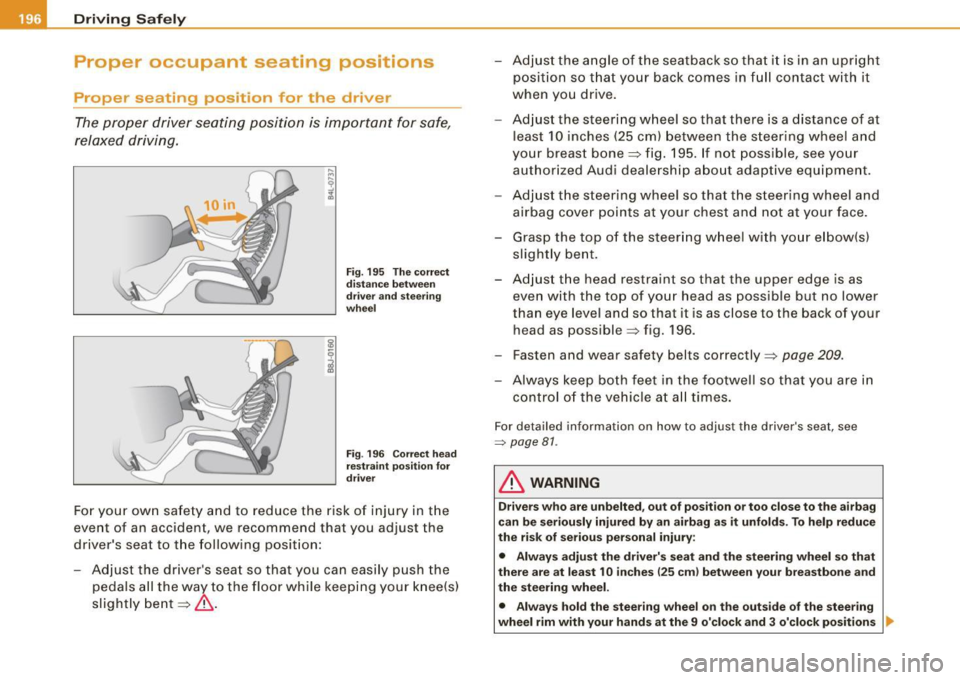
The proper driver seating position is important for safe,
relaxed driving.
Fig. 195 The correct
distance between
driver and steering
wheel
Fig. 196 Correct head
restraint position for
driver
For your own safety and to reduce the risk of injury in the
event of an accident, we recommend that you adjust the
driver's seat to the following position:
- Adjust the driver's seat so that you can easily push the
pedals all the way to the floor while keeping your knee(s)
slightly bent=:>& . - Adjust the angle of the seatback so that it is in an upright
position so that your back comes in full contact with it
when you drive.
- Adjust the steering wheel so that there is a distance of at
least 10 inches (25 cm) between the steering wheel and
your breast bone=:> fig. 195. If not possible, see your
authorized Audi dealership about adaptive equipment.
- Adjust the steering wheel so that the steering wheel and
airbag cover points at your chest and not at your face.
- Grasp the top of the steering wheel with your elbow(s)
slightly bent.
- Adjust the head restraint so that the upper edge is as even with the top of your head as possible but no lower
than eye level and so that it is as close to the back of your
head as possible =:> fig . 196.
- Fasten and wear safety belts correctly=:>
page 209.
- Always keep both feet in the footwell so that you are in
control of the vehicle at all times.
For detailed information on how to adjust the driver's seat, see
=> page 81.
& WARNING
Drivers who are unbelted, out of position or too close to the airbag
can be seriously injured by an airbag as it unfolds. To help reduce
the risk of serious personal injury:
• Always adjust the driver's seat and the steering wheel so that
there are at least 10 inches
125 cm) between your breastbone and
the steering wheel.
• Always hold the steering wheel on the outside of the steering
wheel rim with your hands at the 9 o'clock and 3 o'clock positions ..