2009 AUDI S6 lights
[x] Cancel search: lightsPage 47 of 398

When the function is switched on, the buttons for opening the rear lid and glove compartment have no function. However, please note
the following exceptions :
Exceptions
If the ignition has been switched on using the master key, you can
still open the glove compartment .
As long as the ignition is switched off, you can still open the rear lid
using the rear lid button on the
master key ,c::::s. The same holds true
for using the rear lid release handle in conjunction with the Conve nience key*.
For this reason, be sure to only hand over the
valet key to the person
who will take charge of your vehicle.
[ i] Tips
Be sure to activate the function before handing over the valet key to
someone else. The valet key only fits the lock in the driver's door and
the ignition lock. •
Power locking system
General description
The power locking system locks or unlocks all doors and
the rear lid simultaneously .
The power locking system in your vehicle incorporates the following
functions:
• Central locking function
• Selective unlock feature=>
page 48
• Remote control feature=> page 42
• Convenience key*=> page 52
• Anti-theft alarm system=> page 54
Controls and equip
ment
Opening and closing
All the doors and the rear lid are locked by the central locking
system when you lock the vehicle. You can set whether generally
only the driver's door or all doors and the rear lid should be
unlocked when you open the vehicle in the MMI menu
Central
locking
to suit your individual desires=> page 48.
Unlocking the vehicle
You can unlock the vehicle from outside either by using the remote
control
or by inserting and turning the key in the driver's door lock.
When you
unlock your vehicle:
• The anti -theft alarm system is deactivated briefly .
• The vehicle interior lights illuminate for approximately 30
seconds.
• All turn signal lights will flash twice when the car is unlocked .
• After unlocking the vehicle, you have 60 seconds to open a door
or the rear lid. Aft er 60 seconds, the vehicle automatically locks and
the anti-theft alarm system activates again.
The rear lid can be locked or unlocked either by using the remote
control
or by inserting and turning the key in the driver's door lock.
Unlocking the vehicle with the remote control will only
unlock the
rear lid, to
open it. the lid handle needs to be pressed.
Locking the vehicle
You can lock the vehicle from outside either by using the remote
control
or by inserting and turning the key in the drivers's door lock.
When you
lock the vehicle :
• All doors and the rear lid are locked .
• All turn signal lights will flash once when the car is locked .
• The anti-theft alarm system is activated . The horn of the anti
theft alarm system will sound and the anti -theft alarm system readi
ness light, located in the upper part of the driver's door panel, will
start to blink .
• The vehicle interior lights turn off.
I • •
Page 49 of 398

Whether on ly the driver's door or the entire vehicle is
unlocked w hen the o pen ing button © is pressed once,
depends on the settings in the MMI Central l ocking menu
=> page 48.
To unlock th e vehi cle CD
- Press button @.
- Press button @
two times within two seconds to unlock
all doors and the rear lid .
To lo ck th e vehicle
t'.D
- Press button ® => & in "General description" on
page 45.
- Watch that all turn signal lights flas h once .
To unlo ck r ear lid only
~
- Press button @ for app roximately one second .
PANIC Button
- Push the red button @to activate the panic function . The
horn sounds a nd t he turn signals flash.
- Push the button@ again to deact ivate the pa nic func
t io n.
On vehicles wi th Convenience key *, the sele ctor lever must be in the
P position, otherwise the vehic le cannot be locked.
& WARNING
Read and fo llow all WARNINGS ::::> & in "General de scription " on
page 45.
Con tro ls and eq uip
ment
Op ening and clo sing
[ i ] Tip s
• In order to make sure the locking function is working, you should
always keep your eye on the vehicle to make sure it is proper ly
locked .
• Do no t use the remote control if you are inside the car, otherwise
you may un intent ionally lock the vehicle , and then you would set off
the anti -theft alarm when you try to start the engine or open a door .
In case this happens anyhow, push the un lock button
II).
• Use the panic function only if you are in an emergency
s ituation. •
Operating locks vvith the key
To lock and unl ock the vehicle from the outside, turn the
key in the lock of the driver 's door.
, 1~
ff-= ~;:__, @-i3 ®
To unlock th e veh icle
F ig. 32 Key turn s for
o penin g and clos in g.
- Insert the key into the lock of the driver 's doo r.
- Turn the key
one time to posit ion @ to unlock the driver 's
doo r.
- Turn the key
two times to position @=> fig . 32 to unlock
all doors and the rear l id. .,_
Vehicle care I I irechnical data
Page 65 of 398

Clear vision
Lights
Switching the headlights on and off ·'t!-·
In the "AUTO " position, a light sensor automatically
s w itches t he head- and tailligh ts on and off in response to
l ight con ditio ns.
Fig . 5 1 In strument
p an el: l ight swit ch
The light switch must not be ove rt u rned pas t the stops in
either direction .
Switching on automatic headlight control
-Tu rn the light swi tch to AUTO => fig. 51 .
Switching on the side marker lights
- Turn t he light switch to ~oo~ .
Switching on the headlights and high beam
-Tur n t he light switch to gD.
- Pu sh th e hi gh bea m le v er for ward tow ards t he inst ru-
m ent panel
=> page 67 .
Con tro ls and eq uip
ment
Switching off the lights
- Tu rn the light sw itch to 0. Clear vision
The head
ligh ts only work when the ignitio n is switched on . While
starting the engine or when switching off the ignition, the head
lights wil l go off and only the side marker lights wil l be on.
After starting the engine, the headlights are automatica lly
adjus ted* to the load and ang le of the vehicle (for example, du ring
acceleration, braking) . This prevents oncoming traffic from experi
encing unnecessary headlight glare from you r headlights .
If the system is not operating properly, a warning symbol in the
Auto -Check Contro l is displayed
=> page 35.
With the side marker lights or headlights switched on, t he sym bol
next to the light switch illuminates
coo:.
Daytime running light s
• USA models :
On vehicles with xenon lights the daytime running
ligh ts will come on automa tically when the ignition is tur ned on and
the light switch=> fig. 51 is in the
O position or the AUTO position
(on ly in daylight conditions). The
Daytim e running lights func tion
can be turned on and off in the MMI menu
Exteri or lighting
=> page 6 4. On vehicles with halogen lights there is no daytime
running ligh ts function=> &,.
• Canada models: The daytime running lights wi ll come on au to
matically when the ignition is turned on and the ligh t switch
=> fig. 5 1 is in the O position or the AUTO positi on (only in dayligh t
conditions)
=> &, .
Automatic headlight control
In the switch posi tion AUTO the automatic headlight contro l is
turned on . The low beams are turned on automatica lly through a
light sensor as soon as ambient brightness (e .g. when driving into a
tunnel) fa lls below a value preset at the factory . When ambie nt ..,_
Vehicle care I I irechnical data
Page 66 of 398

Clear vision
brightness increases again, the low beams are turned off again
a uto matically =>& .
In t he
AUTO pos it ion the low b eams ar e switched off automatically
when the ignition is turned off .
Light Sensor Malfunction
In the e vent of a lig ht sensor m alfu n ction, th e drive r is noti fie d in the
instrument cluster display:
e. Automat ic headlights /automatic wipers defective
F or safe ty r eas o ns th e low bea ms are tur ned o n perma nently w ith
th e switch in
AUTO . However, you can continue to tur n the lights on
and off u sing the ligh t switc h. Have the light sen sor checked as s oon
as possib le at a dealership.
& WARNING
• Never use daytime running lights to see where you are going.
They are not bright enough and will not let you see far enough ahead for safety , espe cially at dusk or when it is dark. Always
switch on the low beams at dusk or when it is dark .
• Automatic headlights are only intended to assist the driver .
They do not relieve the driver of his responsibility to check the headlights and to turn them on manually according to the current
light and visibility conditions. For example , fog and rain cannot be
detected by the light sensors . So always switch on the headlights
under these weather conditions and when driving in the dark
tD .
• Crashes can happen when you cannot see the road ahead and
when you cannot be seen by other motorists.
-Always turn on the headlights so that you can see ahead and
so that others can see your car from the back.
[ i ] Tips
• W it h the sw it ch in AUTO front fo g ligh ts and re a r fo g ligh ts
cannot be turned on i n addition . • T
he light sensor for head light control is located in the rear view
mi rror mount . Do no t ap ply a ny s ticker s to th e windshie ld in thi s
area to p revent malfunctions or failures.
• I f you remov e the ignition fr om the ignition l oc k whil e th e he ad
l ights are still on, a buzzer will sound as long as the driver's door is
open to re mind you t o turn off the li g ht s.
• Al ways observe the specific local regulations for your area as to
w he n to u se yo ur ligh ts .•
Adjusting exterior lighting
T he functi o ns are se t in th e MM /.
Fig. 52 MM I d is pl ay:
Exterior lighting
- Pre ss th e [ C AR] fun ction bu tto n.
- Selec t
Exterior lighting. The menu Exterior lighting
a pp ears => fig. 52.
Coming home
The Coming home function ensures that after turning off the igni
tion and opening the driver's door
t h e v ehicle per ip he ry is ill um i
nated in the dark. In addition, the front fog lights, the tail lights and
th e lic ense p la te li g ht are tur ned o n. O n-tim e ca n be set for a pe riod
from
O (off) to 60 seconds. .,,_
Page 67 of 398
Le avi ng hom e
The Leaving home functio ns ensures that when unlocking the
vehicle periphery is i lluminated in the dark . In addition, the fron t fog
lights, the tai l lights and the license plate light are turned on. Th is
function can be turned on and off .
Daytime running light s
USA models : On vehicles with xenon lights the daytime running
lights can be turned on or off using this function . On vehicles with
halogen lights there is no dayt ime running lights function.
Canada models ; The function cannot be turned off. It is activated
automatically each ti me the ignition is t urned on. This menu item is
shown "greyed out" .•
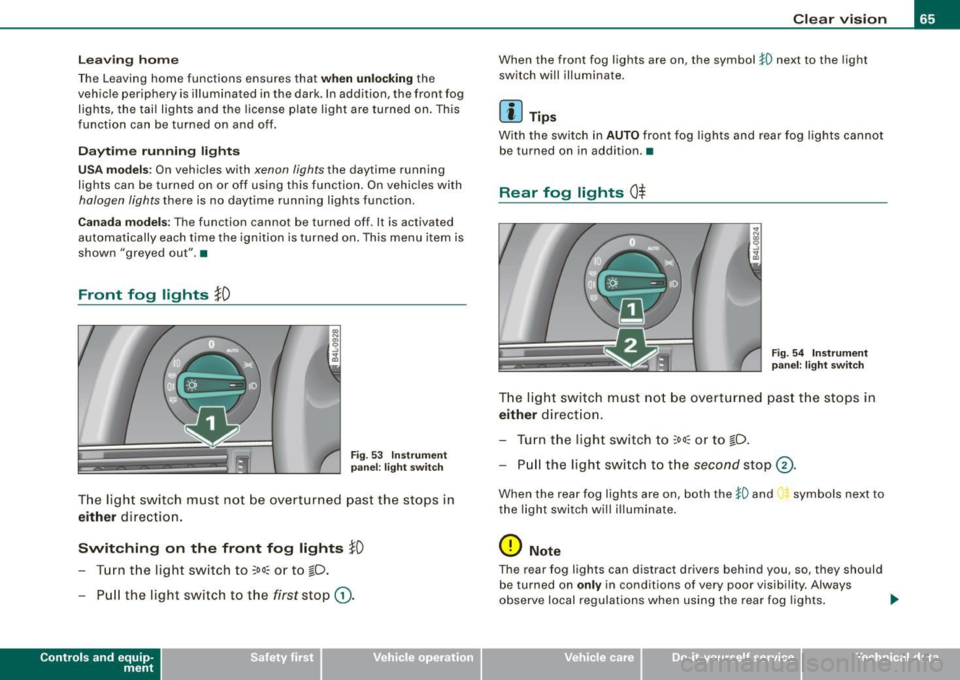
Front fog lights }D
Fig . 53 Ins tru men t
pa nel: lig ht swit ch
The light switch must not be overt urned pas t the stops in
either d ire ction .
Switching on the front fog lights !D
- Turn the light switch to ;oo: or to io.
- Pull the light sw itch to t he first stop G) .
Con tro ls and eq uip
ment
Clear vision
When the front fog lights are on, the symbo l }0 next to the light
switch will illuminate .
[ i ] Tips
With the switch in AUTO front fog lights and rear fog lights cannot
be turned on in addition .•
Rear fog lights 0$
F ig . 54 In stru ment
p ane l: lig ht sw itch
T h e light switch must not be overt urned pas t th e stops in
either direct ion.
Tu rn t he ligh t sw itch to
;oo~ or to io .
Pull the light switch to t he second sto p (v.
When the rear fog lights are on, both the }O and symbols next to
the light switch will i lluminate .
0 Note
The rear fog lights can distract dr ive rs beh ind you, so, they should
be turned on
only in cond itions of very poor visibility. Always
observe local regulations when using the rea r fog lights . ...
Vehicle care I I irechnical data
Page 68 of 398
![AUDI S6 2009 Owners Manual Clear vision
[ i] Tips
With the switch in AUTO front fog lights and rear fog lights cannot
be turned on in addition. •
Applies to vehic les: with Adapt ive Light
Adaptive Light](/manual-img/6/57595/w960_57595-67.png "AUDI S6 2009 Owners Manual Clear vision
[ i] Tips
With the switch in AUTO front fog lights and rear fog lights cannot
be turned on in addition. •
Applies to vehic les: with Adapt ive Light
Adaptive Light")
Clear vision
[ i] Tips
With the switch in AUTO front fog lights and rear fog lights cannot
be turned on in addition. •
Applies to vehic les: with Adapt ive Light
Adaptive Light
When making a turn or driving around tight corners, the
relevant area of the road is better illuminated.
Adaptive Light (making turns)
Fig. 55 Adaptive Light
when turning and driving through curves
An additional bulb in the headlight provides a cornering light@ in
addition to the low beam@:::::, fig. 55. Adaptive Light is switched on
and off automatically depending on driving conditions .
When you activate the turn signal lever, the Adaptive Light for the
same side is switched on. Please note that the turn signal lever must
engage.
Adaptive Light is not switched on if you only move the turn signal
lever to the point of resistance to signal a lane change :::::,
page 67,
"Turn signal ¢i ¢ and high beam lsD lever".
When driving around bends, Adaptive Light is controlled according
to steering wheel angle. • It is switched on in tight corners. • It
is not switched on in long, open bends .
Adaptive Light (in curves)
When driving through curves, the low beams © are automatically
controlled depending on driving speed and the steering wheel
angle.
The two main beams pivot at different angles so that there is no
unilluminated area in front of the vehicle.
[ i] Tips
• The system works up to a speed of about 43 mph (70 km/h). If the
speed is higher, it is not activated.
• Adaptive Light (in curves) functions at a speed of about 6 mph
(10 km/h) and is deactivated at speeds below about 4 mph
(6 km/h). •
Applies to vehi cles: with light pac kage
Perimeter lighting in the mirror housing
LEDs in the exterior mirror housing illuminate the ground
during entry.
This function ensures that when unlocking, the vehicle periphery is
illuminated in the dark. LEDs in the exterior mirror housing are
switched on. The function cannot be turned off separately. •
Page 69 of 398

Emergency flasher ~
The emergency flasher makes other motorists aware that
you or your vehicle are in an emergency situation.
~ -.:.i.t'
Fig . 56 Cente r
conso le: emergency
f lashe r swi tc h
- Press the switch ~~fig . 56 to turn the emergency
flashers on or off.
When the emergency flasher is on, all four turn signals blink at the same time. The turn signal indicator lights¢¢ in the instrument
cluster, as well as the light in the emergency flasher switch~ blink
likewise.
The emergency flashers will turn on automatica lly if you are in an
accident where the airbag has deployed.
[ i ] Tip s
You should turn on the emergency flashers when:
• you are the last vehicle standing in a traffic jam so that any other
vehicles coming can see you, or when
• your vehicle has broken down or you are in an emergency situa
tion, or when
• your vehicle is being towed by a tow truck or if you are towing
another vehicle behind you .•
Con tro ls and eq uip
ment
C lea r v is ion
Turn signal ¢ ¢ and high beam ~D lever
The lever on the left side of the steering column is used to
operate the turn signals and the high beam as well as the
headlight flasher.
-"' M
-w
"' a,
Fig . 57 T urn s igna l and
high beam lever
The turn signal and high beam lever has the follow ing func
tions:
Turn si gnals ¢ ¢
- Lift the lever up all the way~ fig. 57 G) to use the right
turn signals, or push the lever down al l the way @to use
the left turn signals.
Aut o-blink
- Move the lever (up or down) just to t he point of resis
tance to use the turn signals for as long as you need
them, for example when changing lanes.
- Move the lever (up or down) just to t he point of resis
ta nce and then release it right away to make the turn
signals blink
three times. You can use this feature f or
example when changing lanes on highways.
Vehicle care I ' irechnical data
Page 70 of 398

Clear vision
High beam
~D
-Push the lever forward 0 to switch on the high beam.
Pull the lever back towards you to switch off the high
beam.
Headlight flasher
~D
- Pull the lever toward the steering wheel © to use the
headlight flasher.
Notes on these features
• The turn signals only work with the ignition turned on. The indi
cator lights ¢ or¢ in the instrument cluster~ page 16 also blink.
• After you have turned a corner, the turn signal switches off auto
matically.
• The high beam works only when the headlights are on. The indi
cator light ~D in the instrument cluster illuminates when the high
beams are on.
• The headlight flasher works only as long as you hold the lever -
even if there are no lights turned on. The indicator light [Din the
instrument cluster illuminates when you use the headlight flasher.
0 Note
Do not use the high beam or headlight flasher if you know that these
could blind oncoming traffic. •
Interior lights
Front interior lights
The interior lights include reading lights for both the
driver and the front passenger.
@ Interior lights
Fig . 58 Headliner :
Front interior lights
with reading lights
- Door contact switch: place the switch in the middle posi -
tion.
- Interior light switched on: place the switch in position I.
- Interior light switched off: place the switch in position 0.
@ Reading lights
- Press one of the switches
~ to turn the right or left
reading light on or off.
In the door contact switch position (switch@ in the middle posi
tion), the interior lights turn on as soon as you unlock the vehicle or
open the doors. The interior lights are also turned on when the igni
tion key is removed. The light goes out about 30 seconds after the
doors are closed. When the vehicle is locked or when the ignition is
turned on, the interior lights are turned off. ..,_