2009 AUDI S6 tow
[x] Cancel search: towPage 91 of 398
Folding backrest down
-Push forward release lever@~ page 88, fig. 82 in direc -
tion of arrow.
- Fold the backrest down .
Returning backrest to upright position
-Push rear seat backrest up until it engages~ &-You will
know that the seat is properly engaged when you cannot
see the red marking on the lever @.
Locking the backrest
- Insert your key into the lock~ page 88, fig. 83 and turn it
clockwise .
Unlocking the backrest
-Insert the key into the lock and turn it counter-clockwise.
Stowing luggage
-For safe loading and securing of items read and follow
the guidelines on~
page 201.
The rear seatback is divided into two segments -one third/two
thirds. You can fold down either or both parts of the seatback.
The release levers for the folding backrests can be locked when the
backrests are properly engaged in their upright position . This
prevents unauthorized access to the luggage compartment from
within the vehicle. The release levers can only be locked with the
master key or emergency key.
Controls and equip
ment
Seats and storage
& WARNING
• The backrest must always be securely latched so that the
safety belt of the center seating position can work properly to help
protect the occupant.
• The backrest must be securely latched in position so that no
items contained in the luggage compartment can slide forward
upon sudden braking.
• Never allow safety belts to become damaged by being caught
in door or seat hardware.
• Torn or frayed safety belts can tear and damaged belt hardware
can break in a crash. Inspect the belts periodically. Belts showing
damage to webbing, bindings, buckles, or retractors must be
replaced.
& WARNING
Always read and heed WARNINGS ~ & in "Loading the luggage
compartment" on
page 201.
0 Note
When folding the backrest back into place, make sure the safety belt
does not get caught, because it can be damaged. A damaged belt
can fail to provide safe restraint. •
I • •
Page 92 of 398
Seats and storage
Fastening eyelets
The luggage compartment is equipped with four tie-down
eyelets to secure luggage and other items.
Fig . 84 Luggage
compartment
fastening eyelets
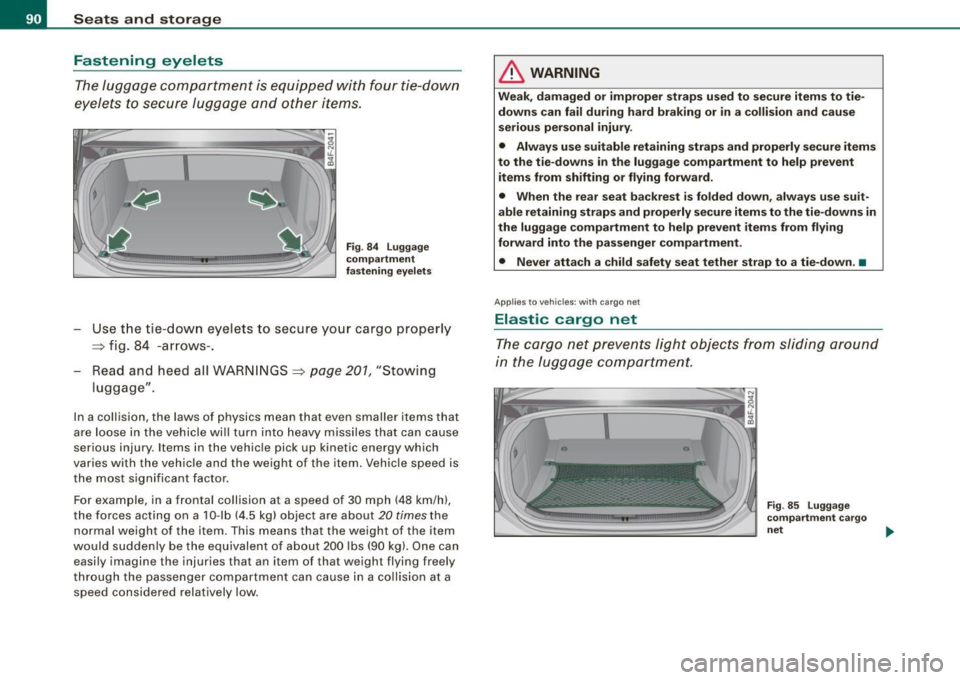
- Use the t ie -down eyelets to secure your cargo proper ly
~ fig. 84 -arrows -.
Read and heed all WARNINGS
~ page 201, "Stowing
luggage" .
In a collision , the laws o f physics mean that even smaller items that
are loose in the vehicle will turn into heavy missiles that can cause
serious injury . Items in the vehicle pick up k inetic energy which
varies with the vehicle and the weight of the item. Vehicle speed is
the most signifi cant facto r.
For example, in a frontal collision at a speed of 30 mph (48 km /h),
the forces acting on a 10-lb (4.5 kg) object are about
20 times the
normal weight of the it em. This means that the we ight of the item
would suddenly be the equivalent of about 200 lbs (90 kg). One can easily imagine the injur ies that an i tem o f that weigh t flying freely
through the passenger compartment can cause in a collision at a speed considered relatively low .
& WARNING
Weak, damaged or improper straps used to secure items to tie
downs can fail during hard braking or in a collision and cause
serious personal injury .
• Always use suitable retaining straps and properly secure items
to the tie-downs in the luggage compartment to help prevent
items from shifting or flying forward.
• When the rear seat backrest is folded down, always use suit
able retaining straps and properly secure items to the tie-downs in
the luggage compartment to help prevent items from flying
forward into the passenger compartment.
• Never attach a child safety seat tether strap to a tie-down. •
Applies to vehicles: with cargo net
Elastic cargo net
The cargo net prevents light objects from sliding around
in the luggage compartment.
Fig . 85 Luggage
compartment cargo
net ..,,
Page 94 of 398

Seats and storage
Fig. 88 Luggage
compartment : DVD
player for the naviga
tion system
- To open, pull the handle forward :::> page 91 , fig. 87.
CD-ROM player for Navigation System*
The CD-ROM player for the navigation system ~ fig. 88 is located in
this storage compartment in the luggage compartment. Operation
is desc ribed in the instruc tions for the audio system. •
App lies to ve hicle s: w ith lo ad-th rough facilit y and removab le ski sack
Ski sack
Use the removable ski sack to transport and protect skis
and other long, light items in the passenger compart
ment.
Fig . 89 Luggage
compartment : ski sack
flap
Loading ski sack
Fig. 90 Ski sack :
securing with rear seat
safety belt
-Fold out center armrest in the rear seat backrest.
- Press the release button -arrow-=> fig. 89 for the ski sack
flap in the passenger compartment and pull down the
flap .
- Open the luggage compartment lid.
- Pull out and unfold the ski sack.
- Load skis or similar objects through the luggage
compartment into the interior of the vehicle=>& .
Securing ski sack
-In sert the ski sack strap©=:> fig. 90 in the center buckle
@.
- Pull the safety belt taut on the free end of the belt@.
Stowing ski sack
- Pull the ski sack through the rear backrest to the rear.
- In the passenger compartment, close the ski sack flap.
- Fold the ski sack carefully. ..,
Page 95 of 398
& WARNING
• The ski sack is intended only for the transportation of skis and
other light objects. To reduce the risk of serious personal injury
never transport heavy or pointed objects in the ski sack.
• When braking rapidly or during an accident the load could be
displaced and cause injury to occupants.
• Sharp edges on the load must be covered for protection.
Always fasten the belt tightly around the sack and its contents
=> page 92, fig. 90.
[ i J Tips
Never stow the ski sack away if it's wet or damp (for example, snow
melting from skis) . Let it dry completely before you stow it away .•
Roof rack
First things first
A roof rack can be fitted to carry additional luggage on
the roof.
-Always read and follow the instructions provided by the
roof rack manufacturer when the roof rack system must
be installed.
If you are transporting luggage or other objects on the roof, please
note the following:
• Your vehicle has specially designed aerodynamic roof rails . Only
install a roof rack specifically designed for your model. Contact the
nearest Audi dealer for information on approved modular roof racks
for your vehicle.
• These approved roof racks are the basis for a complete roof rack
system. Additional attachments for the basic roof rack are neces-
Controls and equip
ment
Seats and storage
sary to safely transport luggage, bicycles, surf boards, skis or small
boats. All necessary hardware for these systems is available at your
authorized Audi dealer.
• We recommend that you keep the installation instructions for
your roof rack system together with your Owner's literature in the
vehicle.
When should the roof rack be removed?
• Before going through an automatic car wash (it is best to ask the
car wash operator for advice).
• When not in use , to reduce fuel consumption, wind noise and to
guard against theft.
& WARNING
• Use of an unapproved roof rack or incorrect mounting of an
approved roof rack can cause the roof rack or the items attached
to it to fall off the roof onto the road.
• Objects falling from the roof of a vehicle can cause a crash and
personal injury.
• Only mount the system between the markings shown in
=> page 94, fig. 91.
• The roof rack system must be installed exactly according to the
instructions provided.
0 Note
• Your vehicle warranty does not cover any damages to the vehicle
caused by using roof racks or mounting structures not approved by
Audi for your vehicle. The same applies to damage resulting from incorrect roof rack installation .
• Always check the roof rack mountings and hardware before each
trip and during a trip to make sure everything is securely tightened.
If necessary, retighten the mountings and check the entire system
from time to time . .,,
I • •
Page 121 of 398
![AUDI S6 2009 Owners Manual On th e road 111111 _________________________________ __::..:....:.......;,;_;_;_ _ __;____,J
Switching the ignition on
- Press t he [ S TART] button once to the first stage to switch
on](/manual-img/6/57595/w960_57595-120.png "AUDI S6 2009 Owners Manual On th e road 111111 _________________________________ __::..:....:.......;,;_;_;_ _ __;____,J
Switching the ignition on
- Press t he [ S TART] button once to the first stage to switch
on")
On th e road 111111 _________________________________ __::..:....:.......;,;_;_;_ _ __;____,J
Switching the ignition on
- Press t he [ S TART] button once to the first stage to switch
on on ly the ignition.
Starting the engine
- Step on t he brake.
- Move the se lector leve r to t he P or N posit ion
~ & .
- Press the [ STA RT ] button to t he second s tage to star t the
engine.
After a cold engine is started, there may be a brief period of
increased noise because oil pressure must first bui ld up in the
hydraulic valve adjusters . This is norma l and not a cause for
concern.
If the engine does not start immed iately, stop trying after 10
seconds and then try to restart the engine about 30 seconds later.
& WARNING
Ne ver all ow the e ngine to run in confined spa ce s -danger of
asphyxi atio n.
0 Note
• Avo id high engi ne rp m, full throttle and heavy engine loads unti l
the engine has reached operating temperature -otherwise you risk
engine damage .
• T he engine cannot be started by pushing or towing the vehic le.
c£> For the sake of the environment
Do not allow the engine to warm up with the vehicle stationary . Start
driving right away . In this way you avo id unnecessary emissions .
Contro ls and eq uip
ment
[ i ] Tip s
If you open the driver's door when t he ign itio n is switched on, a
buzzer sounds and the message
Ign ition i s on appears in the instru
ment cluster display. P lease switch the ignition off. •
Applies to vehic les : w ith C onven ien ce key
Switching engine off with the [STOP] button
Bring yo ur vehicle to a comp le te sto p.
Fig. 11 9 Con veni ence
k ey: E NGIN E STO P
button
Move the se lector lever to the P o r N position .
Press the [
STOP I button ~ fig. 119.
Pressing the ( STO P] button once switches off the engine and the
ignition . If you press the ( S T O P! button again for more than 1
second, the steering is locked, provided that the selector leve r is in
the P position
~ & .
Emergency OFF function
If necessary , the engine can be switched off with the selector leve r
in the R, Dor S positions. To do so, step on the brake peda l and
press and hold the ( STOP] button (vehicle speed must be less than
6 mph/ 10 km /h. .,,_
Vehicle care I I irechnical data
Page 124 of 398
![AUDI S6 2009 Owners Manual -On the road --------------------
[
i] Tips
• You can apply the parking brake at any time - even with the igni
tion turned off. The ignition must be turned on in order](/manual-img/6/57595/w960_57595-123.png "AUDI S6 2009 Owners Manual -On the road --------------------
[
i] Tips
• You can apply the parking brake at any time - even with the igni
tion turned off. The ignition must be turned on in order")
-On the road --------------------
[
i] Tips
• You can apply the parking brake at any time - even with the igni
tion turned off. The ignition must be turned on in order to release
the parking brake .
• Occasional noises when the parking brake is applied and
released are normal and are not a cause for concern .
• The parking brake goes through a self -test cycle at regular inter
vals - when the vehicle is parked . Any associated noises are
normal. •
Parking
To prevent a parked vehicle from rolling away, there are a
few things you should do.
When you park your vehicle, do the following
- Stop the vehicle using the brake pedal.
- Pull the switch to apply the electromechanical parking
brake.
- Move the selector lever into the
P position ~& .
- Switch off the engine and remove the ignition key from
the ignition lock.
When you park your vehicle on hills, do the
following - Stop the vehicle using the brake pedal.
- Pull the switch to apply the electromechanical parking
brake.
- If you are parking headed downhill, turn the front wheels
toward the curb. - If you are
parking headed uphill, turn the front wheels
awayfrom the curb.
- Move the selector lever into the P position .
- Switch off the engine and remove the ignition key from
the ignition lock.
& WARNING
This is how you can reduce the risk of injury when leaving your
vehicle.
• Never park the vehicle where it can come in contact with dry
grass, spilled fuel or any other flammable materials.
• When parking on hills, always turn the wheels so that the front
wheels will first roll into the curb, if the vehicle should start to roll.
• Never allow anyone -especially small children -to remain in the
vehicle when it is locked. Locked doors make it more difficult for
rescuers to access the passenger compartment in the event of an
emergency. Danger to life!
• Never leave children unsupervised in the vehicle. Children
could release the parking brake or move the gearshift lever out of
gear. The vehicle could start to roll away and cause an accident.
• No matter what the season is, the temperature in a parked
vehicle can reach dangerous levels.
0 Note
• Please exercise care when you park your vehicle in parking areas
with parking barriers or curbs. Parking barriers and curbs vary in height and could damage your bumper and related components as
the front of your vehicle moves over a barrier or curb that is too
high, as you park or as you back out of a parking spot. In order to be
sure that no such damage can occur, you may wish to stop short of
having the front tires of your car touch the parking barrier or curb . ..,_
Page 127 of 398

On the road -
----------------
The display=> page 124, fig. 122 will show the set speed . The
display may vary depending on the type of disp lay in your vehicle .
The ind icator light
CRU ISE (US model) I (')0 (Canadian mode l) wi ll also
light up in the instrument cluster.
The speed is kept constant via an engine output adjust ment or
active brake intervention .
_& WARNING
• Always pay attent ion to traffic even when the crui se control is
s w it ched on. You are alw ays r esp onsi ble for your speed and the
di sta nce b etween your vehi cle and other vehi cle s.
• For s afet y reason s, the crui se control should not be u sed in the
c ity , in stop- and-go traffic , on twi sting roads and when road condi
t ion s a re p oor (s uch a s ice , fo g, gra vel , he avy ra in and h ydro
planing ) - risk of accident.
• Turn off the crui se control tempor arily when e nte ring tu rn
lan es, highway exit lanes or in constru ction zone s.
• Plea se note that in adv ertentl y "re sting " yo ur foot on the accel
erator ped al cau se s the cruise control not to brake . Thi s is b ecau se
the crui se control i s overridden b y the dri ve r's acc eleration .
[ i] Tips
The brake lights il luminate as soon as the brakes decelerate
automatically .•
Ap plie s to v ehicl es: w it h c ruise contro l
Changing speed
-Press lever in the 0 o r Q dir ection => page 124, fig. 121
to increase or decrease you r sp eed.
- Release the lever to s ave that speed.
Controls and equip
ment Change speed in increments of 1 mph (1 km/h) by
lightly pressing
the lever . If you keep the lever pressed down, you will a lter your
speed in 5 mph (10 km /h) increments .
You can a lso press the acce lerator pedal down to increase your
speed, e.g. if you want to pass someone. The speed you saved
earlier will resume as soon as you release the accelerator pedal.
If , however, you exceed your saved speed by 5 mph (10 km/h) for
longer than 5 minutes, the cruise control will turn off temporarily .
The symbol wi ll go ou t bu t the saved speed wi ll be retained. •
Applie s to v ehic le s: with c ru ise cont ro l
Presetting your speed
You can prese t your desire d speed while the vehicle is not
moving.
- Turn o n the ignition .
Pu ll lever into pos ition
G) => page 124, fig. 12 1.
Press the lever in the
0 or Q direction to increase or
decrease your speed .
- Release the lever to save that speed .
This function makes it possible, for example, to save the speed you
want before driving on the highway. Once on the highway , activate
the cruise contro l by pu lli ng the lever toward
G) . •
Ap plies to ve hic les: with c ruise contro l
Switching the system off
Temporary dea ctivation
- Press the brake pedal, or
I • •
Page 132 of 398

• ..__A_ d_ a-:.. p_t _iv _ e_ C_r_ u_ i _s _ e_ C_ o_n_ t_ r_ o_ l _____________________________________________ _
toward you=> page 132, "Turning Adaptive Cruise Control off
t emporarily". •
Applies t o ve hicles: with Adapt ive Cruis e Control
Switching the system on and off
Fig . 12 5 Con tro l l eve r:
Sw itchin g on and o ff
Swit ching th e sy stem on
- Pull the lever to position G) ~ fig. 125 .
Switching the s ystem off
- Press the lever to position 0 (latched). •
Applies to vehic les: with Adapt ive Cruise Contro l
How is the speed stored?
Fi g. 12 6 Contr ol l ever :
Stori ng sp ee d
With the system switched on the speed is stored as follows :
Drive at the speed you want . The speed must be between
20 and 95 mph (30 and 150 km/h) .
Pr ess the
I SETI button ~ fig. 126 to sto re the desired
speed .
After the I SETI button is released, the current speed is stored and
maintained .
The saved speed is now shown in the LED display in the speedom
eter by one or two illuminated red light diodes=>
page 135. At the
same time, the saved speed is also shown for a sho rt time in the
Information line=>
page 137.
[ i ] Tips
For sa fety reasons, the stored speed is erased when the igni tion or
the ACC is turned off. •