2009 AUDI S6 mirror
[x] Cancel search: mirrorPage 79 of 398
Depending on the outside temperature, the mirror surfaces are
heated unti l the ignition is switched off -even if the knob is no
longer in posi tion
@ .
We recommend folding * the outside mirrors flat to he lp when
par king your ve hicle or when maneuvering in very tight spaces .
Memory setting for the outside mirrors*
When the seat position is saved in the memory, the position of the
outside mirrors is saved at the same time~
page 84.
If the position o f the mi rror surface is changed o n a ti lted mirror, this
new pos ition wi ll be automatically saved to th e remote key when th e
vehicle is taken out o f reverse gear.
Tilting the passenger 's side out side mirror (on ly with
seat memory )
When you move the selector lever into R (Reverse), the mirror on the
front passenger's d oor (knob t urn ed to@ ~
page 76, fig. 70) will tilt
s lightly downward. This make is easier for you to see the curb when
you are backing into a parking space .
The mirror returns to its initia l position as soon as reverse gear is
disengaged and vehic le speed is above about 9 mph (15 km/h). The
mirror also returns to its initia l position if the switch is moved to the
driver's outside mirror
0 or the ignition is switched off.
Automatic anti -glare for the outside mirror s*
The outside mir ro rs dim at the same time as the inside mirro r. When
the ign ition is switched on, the mirrors automat ically dim
depending on the amount of light striking the mirrors (such as head
lights shining into the vehicle from the rear).
When you turn on the interior light, or wh en you move the selector
lever int o
R (Reverse), the ant i- g lare function stops a nd the mirro rs
return to their original condition (not darkened).
Controls and equip
ment
Cl ea r vision
0 Note
• Curved ( i.e . convex) mirror sur faces increase your fie ld o f view .
Remember that vehicles or other objects w ill appear smal ler and
f arther away than when seen in a flat mirror. If you use th is mi rror to
estimate distances of fol lowing vehicles when changing lan es, you
cou ld esti mate incor rect ly a nd cause an acc ident .
• I f the mirror housing is moved un intentionally (for example,
wh ile pa rking your veh ic le), then you must first fold the mirror elec
trically . Do not readjust the mirror housing manually. You cou ld
damage the motor which controls the mirror.
[ i ] Tips
If t here s hould be a malfunct io n in the electrica l system, you ca n
sti ll adjust the outside mirrors by pressing the edge of the mirror .•
Ap plies to vehicles: wit h automatic dimm in g for ou tsi de m irr ors
Automatic dimming for outside mirrors
The outside mirr ors are d immed t oge the r with the au tomati c
dimming of the inside mirror. When the ignition is switched on , the
mir ro rs darken automat ically depending on the light s triking the m
(e.g . headlights from the rear) .
When the interior lighting is switched on and when reverse gear is engaged, the mi rrors are switched back to the ir or iginal br ightness
(not dimmed).
_& WARNING
Broken glass of automatic dimming mirror can cause electrolyte
fluid leakage . Electrolyte fluid c an irritate skin , eyes , and respira
tory system .
• Repeated or prolonged exposure to electrolyte can c ause irrita -
tion to the respiratory system , e specially among people with .,_
I • •
Page 80 of 398

Clear vision
& WARNING (continued)
asthma or other respiratory conditions. Get fresh air immediately
by leaving the vehicle or, if that is not possible, open windows and
doors all the way.
• If electrolyte gets into the eyes, flush them thoroughly with
large amounts of clean water for at least 15 minutes ; medical
attention is recommended.
• If electrolyte contacts skin, flush affected area with clean water
for at least 15 minutes and then wash affected area with soap and
water; medical attention is recommended . Thoroughly wash
affected clothing and shoes before reuse.
• If swallowed and person is conscious, rinse mouth with water
for at least 15 minutes. Do not induce vomiting unless instructed
to do so by medical professional . Get medical attention immedi
ately.
0 Note
Electrolyte leaking from a broken mirro r glass attacks the vehicle
paint and plastic surfaces. Clean up spilled electrolyte immediately
with clear water and a sponge.
[ i] Tips
• If automatic dimming for the inside mirror is switched off, the
outside mirrors are also not dimmed automatically.
• Automatic dimming for the mirror only operates properly if the
sunshade* for the rear window is retracted, or the light striking the
inside mirror is not hindered by other objects. •
Digital compass
Applies to vehicles: with digital compass
Activating or deactivating the compass
The direction is displayed on the interior rear view mirror.
Fig . 71 Inside rear
view mirror : digital
compass activated
- To activate or deactivate, hold the@ button down until
the red display appears or disappears.
The digital compass only works with the ignition turned on. The
directions are displayed as initials:
N (North), NE (Northeast), E
(East), SE (Southeast), S (South), SW (Southwest), W (West), NW
(Northwest).
[ i] Tips
To avoid inaccurate directions, do not allow any r emote controls,
electrical systems, or metal parts close to the mirror. •
Page 81 of 398

Applies to vehi cles: wit h dig it al compass
Setting the magnetic deflection zone
The correct magnetic deflection zone must be set in order
to display the directions correctly .
/
@
®
Fig. 72 North America: magnetic deflection zone boundaries
-Hold the@=> page 78, fig. 71 button down until the
number of the set magnetic deflection zone appears on
the interior rear v iew mirror .
- Adjust the magnetic deflection zone by repeatedly
pressing on the @ button. The set mode automatically
deactivates after a few seconds. •
Contro ls and eq uip
ment
Ap plies to vehi cles: with digital compass
Calibrating the compass Clear vision
The
compass has to be recalibrated if the display is wrong
or inaccurate.
Hold the@ button down until the letter C is displayed on
the interior rear view mirror.
Drive in a circle at a speed of about 5 mph (10 km/h) until
a direction is shown on the interior rear view mirror.
& WARNING
The digital compass is to be used as a directional aid only. Even
though you may want to look at it while you are driving, you must
still pay attention to traffic, road and weather conditions as well
as other possible hazards. •
Vehicle care
I I irechnical data
Page 86 of 398

Seats and storage
Seat memory
Applies to vehi cles : w ith seat memo ry
Driver's seat memory
The seat adjustment settings for two drivers can be stored
using the memory buttons in the driver's door.
SET - 1 2 ~
Fig. 77 Driver's door:
Seat memory
In addition to the setting for the driver's seat, the settings for the
steering column* and both exterior mirrors can be stored.
Storing and recalling settings
Using the memory buttons 1 and 2 , you can store and recall the
settings for two different drivers=> fig. 77.
The current settings are also automatically stored on the remote
control key being used when the vehicle is locked. When the vehicle
is unlocked, the settings stored on the remote control key being
used are automatically recalled. This function has to be activated in
the MMI
=> page 85, "Activating remote control key memory".
Turning seat memory on and off
If the [ ON/OFF ) switch is depressed, the seat memory is inoperative.
The word
OFF next to the [ ON /OFF I switch illuminates.
All the stored settings are retained. We recommend using the
I ON/OFF) switch and deactivating the seat memory if the vehicle is only
going to be used
temporarily by a driver whose settings are not
going to be stored. •
Applies to v ehi cle s: wit h seat memory
Storing and recalling a seat position
Before you can store or recall your seat position, the
[ ON /OFF] button must be engaged (down).
Storing settings
-Adjust the driver's seat=> page 81.
- Adjust the steering column*=> page 115.
- Adjust both outside mirrors=> page 76. In the tilt-down
posit ion, the passenger mirror can be adjusted to the
preferred position and saved in the seat memory.
- Press the [SET] button and hold it down. At the same
time, press one of the memory buttons for at least one
second.
- Release the buttons. The settings are now stored under
the corresponding memory button.
Recalling settings
- Driver's door open -press the desired memory button.
- Driver's door closed -press the corresponding memory
button until the stored position is reached.
Successful storage is confirmed audib ly and by the light in the [ SETI
button illuminating .
When the vehicle is
locked , the current settings are stored and
assigned to the remote control key. But the settings stored on
memory buttons 1 and 2 are not deleted. They can be recalled at any .,_
Page 88 of 398
Seats and storage Rear window shelf
You can place light articles of clothing on the rear
window shelf behind the seatback.
& WARNING
Whenever you are driving, do not leave any hard objects on the
rear window shelf or allow your pet to sit on the shelf. These could
become a hazard for vehicle occupants in the event of sudden
braking or a crash!
[ i] Tips
• A vent slot is located between the shelf and the rear window. Do
not block the vent with any items you may place on the rear window
shelf.
• Do not plac e bulky items on the rear window sh elf as they would
restrict or block the driver's vision through the rear view mirror. •
Head restraints
Adjusting head restraints, front seats
The head restraints must be adjusted properly to provide
protection.
Fig. 79 Front seats
head restraints
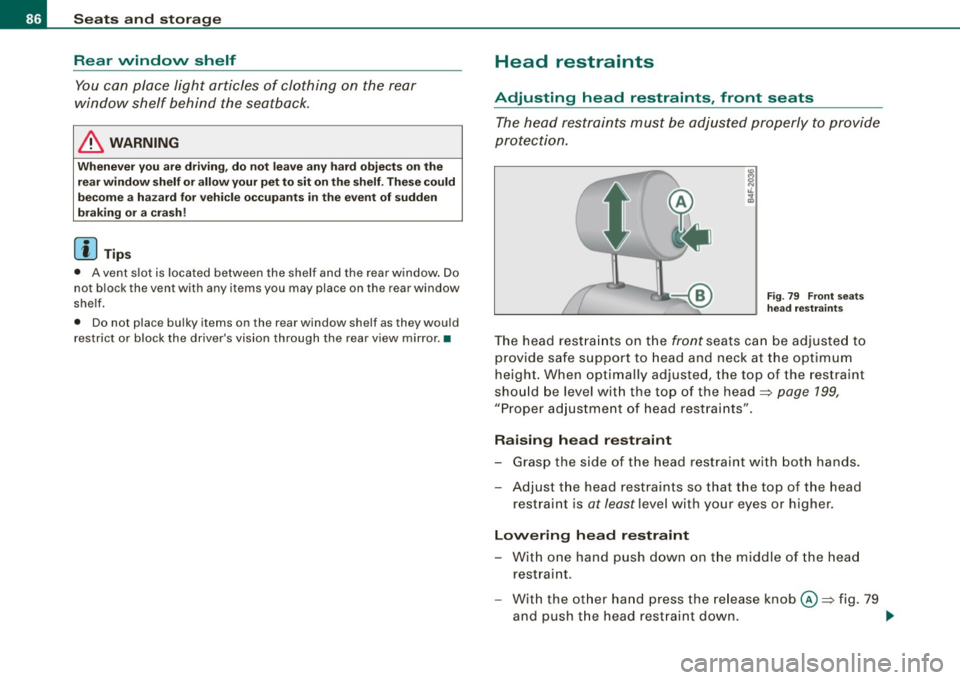
The head restraints on the front seats can be adjusted to
provide safe support to head and neck at the optimum
height. When optimally adjusted, the top of the restraint
should be level with the top of the head~
page 199,
"Proper adjustment of head restraints" .
Raising head restraint
-Grasp the side of the head restraint with both hands.
- Adjust the head restraints so that the top of the head
restraint is
at least level with your eyes or higher.
Lowering head restraint
-With one hand push down on the middle of the head
restraint .
- With the other hand press the release knob@~ fig. 79
and push the head restraint down. .,
Page 148 of 398

• ..__A_ u_ d_ i _s _i_d _e_ a_ s_ s _ is_ t __________________________________________________ _
Audi side assist
Lane Change Assistant
Applies to vehicles: with side ass ist
Description
The side assist helps you when changing lanes.
AUDI
Fig . 146 Rear bumper:
Position of radar
sensors (not visible on
outside)
Fig . 147 Signal light
on the outside mirror -
driver's side
Side assist uses radar sensors (not visible on outside) ::::, fig. 146 to
help the driver check blind spots, and see what is happening in
traffic behind the vehicle::::,
page 148, fig. 149.
Signal lights are built into both outside mirrors::::, fig. 147. The
signal light on the left outside mirror assists when moving over into the left lane and the signal light on the right outside mirror assists
when moving over into the right
lane.
The signal light comes on to tell you that side assist has detected a
vehicle on that side and that the position of this other vehicle
should be taken into account if you were to change lanes. This is
called the
informational stage signal::::, page 148. The informational
stage signal is designed so that you notice it only when you are
looking in the outside mirror.
When you activate the turn signal and side assist detects a vehicle
in a notable location, the corresponding signal on the outside
mirror flashes briefly and brightly several times. This is the
alert
stage signal ::::,
page 148. •
Appl ies to veh icles: wi th side assist
Activating and deactivating
~~ l"I ~ ...
Activating
Fig. 148 Cockpit : Side
assist button
Press the=> fig. 148 button. The indicator on the button
ligh ts up. ..,
Page 149 of 398

_________________________________________________ A_u_ d _ i _s ... i __ d _e:....: a.:..: s:.. s:.. i:..: s :..:t;___ftllll
Deactivating
- Press t he button again . T he ind icato r light on the butto n
goes out.
T he system works at speeds faster than 19 mph (30 km/h) .
& WARNING
• Improper reliance on the side assist system can cause colli
sions and seriou s per sonal injury:
- Never rely only on side assist when changing lanes .
- Always check rear view mirrors to make sure that it is safe to c hange lanes.
• Side assist cannot detect all vehicles under all conditions
danger of accident!
• Side assist cannot detect vehicles in time to alert you when
they approach from behind at very high speed , or fall drop back
very quickly.
• The radar sensor's
vision can be reduced or entirely blocked by
rain , snow, and heavy spray . This can result in side assist not
adequately detecting veh icles or , in some cases, not detecting
them at all . Always keep an eye on the direction you are traveling
and the relevant area around the vehicle.
• Please note that side assi st indicates there are approaching
vehicles, or vehicles in your bl ind spot , only after your vehicle has
reached a driving speed of at lea st 19 mph (30 km /h).
• S ide assist signal does not work around tight corners (turning
radiu s less than 328 feet, or 100 m l.
• Side assist is no replacement for the driver's full attention . The
d river alone is responsible for lane changes and similar driv ing
maneuvers. Always keep an eye on the d ire ction you are travel ing
and the relevant area around the vehicle .
Controls and equip
ment
0 Note
• To e nsu re t hat you do not adverse ly a ffect s ide assist, do not
b lock the area on the rear bumper where the radar sensors are
located w it h f oreign objects (s uch as st ickers or bicycle rac ks).
• M ake su re that the signal light on the o utside mi rror is not
b loc ked by st ic ke rs or ot her items.
[ i ] Tips
• Side ass ist automaticall y deact ivates i f it detects t hat t he ra dar
sensors are blocked=> page
153. The indicator light on the button
goes out.
• The area on the bumper whe re the rada r sen so rs a re loca ted
must cons iste ntly re mai n fr ee o f snow, ice, and heavy so iling so t hat
side assist can function properly. Follow the additiona l notes on
=> page
154.
• Additiona l tinting on the front side windows can make it ha rder
t o see and co rrect ly unde rsta nd the s ignal light o n the outs ide
mirror.
• For Declaratio n of Comp liance to Un ited Sta tes FCC a nd I ndus try
Canada regulations => page
375 . •
I • •
Page 150 of 398

• .___A_ u_ d_ i_s_ i_ d _e_ a_ s_ s_i s_ t __________________________________________________ _
Applies to vehicles: with side ass ist
Sensor detection area
Fig. 149 Schem ati c
illu str ati on : Sens or
d etec tio n area
The detection ~ fig. 149 of the radar sensor detection area is made
up of:
• the approach area !light green area)
0, about 230 feet (70 ml
behind the veh icle, and
• the "blind spot" (dark green areal@.
The radar sensors cover the adjacent left and right lanes. Other
lanes are
not covered by the radar sensors .
[ i ] Tip s
Side assist does not measure actual lane width . The system
assumes a fixed lane width. Detection in the left and right lanes is based on this assumed lane width. When driving on narrow roads or
when driving to the left or right of the center of a travel lane, it is
possible that vehicles wi ll be detected that are
not in the lane next
to the lane you are using~
page 153 . •
Ap plies to vehicl es: with side assist
Operation
Side ass ist compares the distance and difference in speed of
detected vehicles with the speed of your vehicle. Whenever the
difference in speed and distance is registered as notab le if you were
to change lanes, a signal light appears on the respective mirror.
The signal can light up if you are passed by a vehic le or if you are
passing another vehicle.
If you pass another vehicle slowly (difference in speed less than 9 mph, or
15 km/h), the signal light will come on as soon as the other
vehicle is in your blind spot and is detected by side assist. When the
difference in speed is greater, the signa l light will not come on .•
Applies to vehic les : w ith side assist
Informational and alert stage signals
Side assist has two signal stages:
• the informational stage signal, and
• the alert stage signal.
Side assist helps you by using the appropriate signa l stage,
depend ing on whether or not you have act ivated the turn signal,
and thus have indicated that you are or are not changing lanes.
In fo rm ati onal stag e signal
As long as you have not activated the turn signa l, side assist informs
you of detected vehicles that are registered as being in a notable location if you were to change lanes. Whenever the detected
vehic le's difference in speed and distance is registered by side
assist as notable, the signa l light on the respective mirror produces
muted il luminatio n.
The brightness of the informationa l stage signal is designed not to
be as intense, so that it does not interfere with your view of the road
when you are driving and have no intention of changing lanes. .,,,