2009 AUDI S6 ECO mode
[x] Cancel search: ECO modePage 32 of 398

Driver inf ormati on displ ay
• Speed warnings threshold 1 8 (USA modelsl/ 8 (Canada
models) and threshold 2
e , (USA modelsl/ 8 (Canada models) are
a lso shown as red symbols. The warning is always shown as a small
symbo l in the upper area of the display =>
page 36. •
Alternator malfunction 0
If the O symbol in the ins trument pane l disp lay flashes, then there
is a malfunction in the alternator or the vehicle electronics. A
warning to the driver will appear, too . The driver warning goes out
after about 5 seconds, but it can be brought up at any time by
pressing the
( C H ECK ] button again .
Usually, you can sti ll drive to the next dealership . Turn off a ll but the
most necessary electrical consumers, since these drain the vehicle's
battery.
0 Note
If the _t warning symbol (coolant system malfunction) also lights
up on the instrument pane l during the trip=>
page 31, then you
have to stop immediately and turn off the engine . The coolant pump
is not working anymore -danger of damage to the engine! •
Brake system malfunction
A malfunction in the brake system must be repaired as
soon as possible.
If the warning /indi cator light BRAKE (USA models)/ (©)
(Canada models) in the instr ument cl uster flashes, there is
a brake system malfunct io n. By pressing the [ CHECK ]
button, you can bring up a driver message w hich explains
the malfunction in more detail.
Stop v ehi cle a nd ch ec k brak e fluid l eve l
- Pull off the road .
- Stop t he vehicle .
- Tur n o ff the engine .
- Check the brake fluid level=>
page 310.
-Contact your nearest authorized repair facility if neces-
sary .
Warning! Fault in ABS brake syst em . Conta ct
workshop
- D rive carefully to the nearest au thorized repair fac ility
and have the malfunction corrected
=> ,& .
Parking br ake ! Ple ase c onta ct work sh o p
- If the warning/indicator light flashes when the vehicle is
stationary or after the ignition is turned on, c heck to see
if the parking brake c an be released . Dr ive to an aut ho
rized repair facility as soon as possible a nd have the
ma lfunctio n corrected. If the pa rking brake cannot be
released, contac t your nea rest authorized repa ir facil ity .
- If the warning/indicato r light flashes w hile you are
dr iving, i t is possible tha t the traction con tro l or the
emerge ncy brake has ma lfunc tioned . It is poss ib le that
the park ing brake cannot be applied . It is a lso possible
that the pa rking brake cannot be released after it has
been app lied . Drive to an aut horized A udi dealer to have
the malfunction corrected.
If the ABS system malfunctions, the ABS warning/indicator light i llu
minates together with the brake system malfunction warning/indi -
cator light=>& . .,_
Page 35 of 398

Ignition lock malfunction ~
A malfunction in the ignition Jock must be repaired immediately.
If the ~ symbol in the display blinks, there is a malfunction
in the electronic ignition lock. An additional driver message
can also be displayed by press ing the [CHECK] button:
Ign iti on lock defe ctive . C ont ac t wo rkshop !
- Do not turn the engine off.
- Drive immediately to an auth orized A udi dealer to have
the malfunction corrected .
If there is a malfunction in the electronic ignition lock, the ignition
cannot be turned off . Drive immediately to an authorized Audi
dea ler to have the cause of the malfunction corrected .
On vehicles with Convenience key*, the engine should not be
switched off using the [
STOP] button because the engine cannot be
started again after the ignition is switched off. •
Yellow symbols
A yellow symbol means WARNING.
Contro ls and eq uip
ment
Fig . 19 Dis pl ay: low
fu el le ve l wa rning
(pr io rity 2)
Dri ver inf orm atio n di spl ay
Ye llow symbols indicate a priority 2 malfunction -Warning!
When a yellow warning symbol appears,
one warning tone sounds.
A driver message appears as well to explain the malfunction in more detail. The driver warning goes out after about 5 seconds, but it can
be brought up again at any time by pressing the [ CHECK
I button .
Check the displayed function as soon as possible . If
more than one
priority 2 malfunction is detected , a ll symbols will appear one after
the other for about 2 seconds.
Yellow symbols mean:
Convenience key*
~ page 120
Key not in vehicle
USA models: ~ page25
Defective brake light
Canad a mod els: ~ page25
Defective brake light
11 Defective light bulb
~ page25
-
Light/rain sensor defective ~ page34
Windshield washer fluid ~ page34
level low
Low fuel leve l
~ page34
Battery voltage ~ page35
Worn brake pads ~ page35
IIDynamic headlight range ~ page35
control defective
-
Check engine oi l level ~ page35
~ page305 ...
Vehicle care I I irechnical data
Page 38 of 398

Driver inf ormati on displ ay
Ap plies to vehicles : wit h en gine sp eed limitat ion
Engine speed limitation ,-;,,
l.r1 Engine speed maximum XXXX RPM
The )t symbo l illuminates when there is an engine control malfunc
tion. The indicator light
C in the instrument cluster also illumi
nates . The engine speed is limited to the speed displayed in the
driver information system. Keep in mind that the engine speed will
not exceed the va lue displayed in the driver information system, for
example when downshifting.
P lease go to an authorized Audi dealer or other qua lified workshop
to have the ma lfunction repaired .•
Ap plies to vehicles: wit h A dapt ive Li ght
Adaptive Light defective t;: :
Adapti ve Li ght defect ive
When this symbol '" illuminates, it means that Adaptive Light is
defective. Go to an authorized dealership to have the head lights or
the control unit for the Adaptive Light repaired. •
Ignition lock malfunction ..,e
If the symbol in the d isplay c omes on, there is a malfunc -
tion in the e lectronic ignition lock. An additional driver
message can be displayed by press ing the [ CHECK ] button:
D efe ctiv e ignition swi tch
- Drive to an authorized service facility at your earliest
convenie nce to have the malfunction corrected .•
Windshield wipers faulty ->
. W in ds hield wi per m alfun ction
When this symbol il luminates, i t means tha t the electronics for
the windshield wipers are defective . Please go to an authorized
dea lership to have the windshield wiper system repaired .•
Speed warning system
Overview
The speed warning system helps you to keep your driving
speed below a set speed limit.
The speed warning system warns the driver if he exceeds a previ
ous ly stored maximum speed. A warning tone will sound as soon as
the vehicle speed exceeds th e set speed by about 3 mph (3 km/h). At
the same t ime, a warning symbol appears in the display .
The speed warning system has
t w o wa rnin g thr eshol ds that func
tion independent ly of each other and that have somewhat different
purposes:
S peed warnin g 1
You can use speed warning 1 to set the maximum speed while you
are driving. This setting will remain in effect until you turn off the
ignition , assuming that you have not changed or reset the se tting .
The speed warning symbol
0 (USA models) /0 (Canada models) in
the warning 1 display appears when you exceed the maximum speed . It goes out when the speed falls below the stored maximum
speed .
The speed warning symbol wi ll also go out if the speed
e xce eds the
stored maximum speed by more than about 25 mph
(40 km/h) for at
leas t 1 O seconds. The stored maximum speed is deleted .
Setting speed warning 1 :::::,
page 37.
Page 39 of 398

Speed warning 2
Storing warning 2 is recommended if you always want to be
reminded of a certain speed, for example when you are traveling in
a country that has a general maximum speed limit, or if you do not
want to exceed a specified speed for winter tires.
Th e speed warning 2 symbol,
8, (USA models)/ 8, (Canada models)
appears in the display when you exceed the stored speed limit.
Unlike warning 1, it will not go out until the vehicle speed drops
below the stored speed limit.
Setting speed warning 2
~ page 37.
[ i J Tips
Even though your vehicle is equipped with a speed warning system,
you should still watch the speedometer to make sure you are not
driving faster than the speed limit. •
Speed warning 1: setting a speed limit
Warning threshold 1 is set by the (
CHECK) button.
Storing the maximum speed
-Drive at the desired maximum speed.
Fig. 20 CHECK button
in the instrument
cluster
- Briefly press the ( CHECK) button => fig. 20.
Contro ls and eq uip
ment
Driver information display
Resetting the maximum speed
- Drive the vehicle at a speed of at least 3 mph (5 km/h)
- Press the (
CHECK) button for more than 2 seconds.
The speed warning symbol 8 (USA models)/ e) (Canada models) will
appear briefly in the display when you release the button to indicate
that the maximum speed has been stored successfully.
The maximum speed remains stored until it is changed by pressing
the button again briefly or until it is deleted by a lengthy push on the
button. •
Speed warning 2: setting a speed limit
Warning threshold 2 is set, changed and deleted in the
MM/.
Fig. 21 MMI display :
Set warning threshold
2
Switching speed warning on and off
- Press the ( CARI function button.
- Select
Instrument cluster. The Instrument cluster menu
appears=> fig. 21.
- Select Speed warning
On to switch on the warning
threshold or
Off to turn off the warning threshold.
Vehicle care I I Technical data
Page 40 of 398

Driver inf ormati on displ ay
S ettin g and a djustin g th e w arnin g thr eshold
- Press the
I CAR I function button .
- Select
In strum ent cluster . The Instrum ent clust er menu
appears.
Select the second item in the
Sp eed wa rning menu. The
submenu
Sp eed th resh old appears ~ page 37, fig. 21.
- Set t he warning threshold you want.
Warning thresho ld 2 can be adjusted within a speed range of 30 to
200 km/h . Settings can be adjusted in intervals of 10 km/h each. •
Trip computer
Introduction
The trip computer gives you informati on on current and
average fuel mileage, average speed, fuel range and
driving time .
Fig. 22 T rip comput er
d isp lay: Ave rage fuel
mil eage
The following driving information is continuously evaluated by the
t rip computer and can be disp layed sequential ly in the instrument
cluster display.
Fu el ra ng e
The estimated cruising range in miles (km) appears in the disp lay.
This tel ls you how far your vehic le will be ab le to travel on the
current tank of fuel and with the same driving style . The display
changes in increments of 6 miles
(10 km).
The cruising range is calculated based on the fuel consumption for
the last 18 miles (30 km). If you drive conservative ly, the cruising
range will increase.
Ave rage fuel m ileag e
The average fuel economy in MPG (1/100 km) since you last cleared
the memory appears in this display. You can use th is disp lay to
adjust your driving technique to achieve a desired mileage.
C urr ent fu el mi leage
The instantaneous fuel consumption in m iles per gallon 0/100 km)
is shown in this display. You can use th is d isp lay to adjus t your
driving technique to achieve a desired mileage.
Fuel consumption is recalculated at intervals of 33 yards (30
meters) . When the vehicle is stationary, the most recent fuel
consumption is displayed .
Ave ra ge spee d
The average speed in mph (km/h) since the last time the display was
reset appears in the display.
E la p sed time
The length of time that you have been driving since you last reset
the memory appears in this display .
[ i ] Tips
• Fuel consumptions (average and current), range and speed are
displayed in metric units on Canadian models .
• All sto red values will be lost if the vehic le battery is
disconnected .•
Page 67 of 398
Le avi ng hom e
The Leaving home functio ns ensures that when unlocking the
vehicle periphery is i lluminated in the dark . In addition, the fron t fog
lights, the tai l lights and the license plate light are turned on. Th is
function can be turned on and off .
Daytime running light s
USA models : On vehicles with xenon lights the daytime running
lights can be turned on or off using this function . On vehicles with
halogen lights there is no dayt ime running lights function.
Canada models ; The function cannot be turned off. It is activated
automatically each ti me the ignition is t urned on. This menu item is
shown "greyed out" .•
Front fog lights }D
Fig . 53 Ins tru men t
pa nel: lig ht swit ch
The light switch must not be overt urned pas t the stops in
either d ire ction .
Switching on the front fog lights !D
- Turn the light switch to ;oo: or to io.
- Pull the light sw itch to t he first stop G) .
Con tro ls and eq uip
ment
Clear vision
When the front fog lights are on, the symbo l }0 next to the light
switch will illuminate .
[ i ] Tips
With the switch in AUTO front fog lights and rear fog lights cannot
be turned on in addition .•
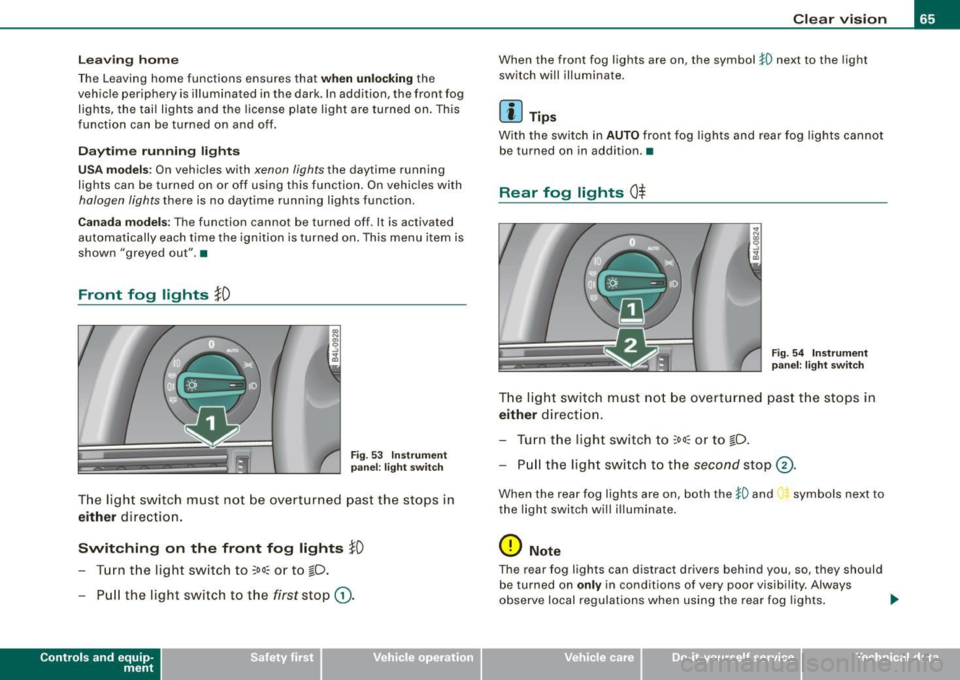
Rear fog lights 0$
F ig . 54 In stru ment
p ane l: lig ht sw itch
T h e light switch must not be overt urned pas t th e stops in
either direct ion.
Tu rn t he ligh t sw itch to
;oo~ or to io .
Pull the light switch to t he second sto p (v.
When the rear fog lights are on, both the }O and symbols next to
the light switch will i lluminate .
0 Note
The rear fog lights can distract dr ive rs beh ind you, so, they should
be turned on
only in cond itions of very poor visibility. Always
observe local regulations when using the rea r fog lights . ...
Vehicle care I I irechnical data
Page 74 of 398

Clear vision
One-touch wiping
- Move the lever to position@, when you want to wipe the
windsh ield
briefly.
Automatic wiper /washer
- Pull the lever to pos ition © (toward the steering wheel)
and ho ld.
- Re lease t he lever. T he wash er stops a nd the wipers keep
g o ing for about fo ur secon ds. Dep ending on h ow long
t h e lever is held, d ifferent numbers of was h cyc les are
performed.
Turning off the wipers
- Move the lever back to position @ .
Gen era l inform ati on
The windshield wipers and the windshield washer system operate
only with the ignition on.
During a temporary stop, e.g. at a traffic signa l, the set wipe speed
is aut omatically reduced by one stage .
The windshield washer nozzles are heated at low temperatures
when the ignition is on .
Removing vv ater drop let s
About 5 seconds after the wash cycle is complete, the wiper system
performs a single automatic wipe cycle to remove any water drop
lets that remain on the windshield .
If you would like to deactivate this delayed wipe cyc le whi le dr iving,
you have to pull the lever to position © again within 10 seconds
af ter this w ipe cyc le .
Water droplet removal is reactivated after the ignition is switched off and then on again .
Rain se nsor
The ra in sensor operates on ly in the interval wiper position . When it
starts to rain, the interval wiper mode is activated automatically .
I f the windshie ld wiper lever is in the interval wipe position with the
ign ition sw itched off, the rain sensor is not activated unt il veh ic le
speed is above 4 mph (6 km/h) .
T o reduce the sens itivi ty of the rain sensor, the swi tch
© must be
moved down. To increase the sensitivity of the rain sensor, the
sw itc h must be moved up .
T he higher the sensitivity sett ing, the sooner the windshield wipers
react to moisture on the windshie ld. Increased sensitivity is
signa led by the windshie ld w ipers making a si ng le pass over the
windshield.
T he rain sensor wiper interva ls depend on the sens itivity setting as
we ll as vehicle speed. During brief stops, wiper motion will adjust in
r elation to the amount of rain on the windshield .
& WARNING
• Wiper blades are crucial for safe driving! Only when they are in
good cond ition are they able to clear the windo ws properly to
provide uncompromised visibility . Worn or d am aged wiper blades
are a safet y hazard ::::> page
74 , "I nst alli ng new wiper blades "!
• The rain sensor is only designed to a ssist and support the
dri ver . It remai ns entirel y the dr iver's respon sibil ity to monitor
out side weather conditions and to manually activate the wiper s as
so on a s rain or dri zzle reduce s vis ibility through the wind sh ield.
• The wind shield must not be treated with water -repellent mate
rials . The y can incre as e g la re under poor visibility condition s su ch
as wetness , darkne ss, or when th e sun is low on t he horizon. In
addition , they can cause the wind shield wiper s to ch att er.
0 Note
In freezing or near freezing conditions :
Page 81 of 398

Applies to vehi cles: wit h dig it al compass
Setting the magnetic deflection zone
The correct magnetic deflection zone must be set in order
to display the directions correctly .
/
@
®
Fig. 72 North America: magnetic deflection zone boundaries
-Hold the@=> page 78, fig. 71 button down until the
number of the set magnetic deflection zone appears on
the interior rear v iew mirror .
- Adjust the magnetic deflection zone by repeatedly
pressing on the @ button. The set mode automatically
deactivates after a few seconds. •
Contro ls and eq uip
ment
Ap plies to vehi cles: with digital compass
Calibrating the compass Clear vision
The
compass has to be recalibrated if the display is wrong
or inaccurate.
Hold the@ button down until the letter C is displayed on
the interior rear view mirror.
Drive in a circle at a speed of about 5 mph (10 km/h) until
a direction is shown on the interior rear view mirror.
& WARNING
The digital compass is to be used as a directional aid only. Even
though you may want to look at it while you are driving, you must
still pay attention to traffic, road and weather conditions as well
as other possible hazards. •
Vehicle care
I I irechnical data