2009 AUDI Q7 steering
[x] Cancel search: steeringPage 99 of 426

Seat memory
Applies to vehicles: w ith seat memory
Driver's seat memory
The seat adjustment settings for two drivers con be stored
using the memory buttons in the driver's door.
Fig . 90 Driver's door :
Seat memory
In addition to the setting for the driver's seat, the settings for the
steering column* and both exterior mirrors can be stored.
Storing and recalling settings
Using the memory buttons 1 and 2, you can store and recall the
settings for two different drivers=> fig. 90.
The current settings are also automatically stored on the remote control key being used when the vehicle is locked. When the vehicle
is unlocked, the settings stored on the remote control key being
used are automatically recalled. This function has to be activated in
the MMI =>
page 98, "Activating remote control key memory".
Turning seat memory on and off
If the [ ON/OFF ! switch is depressed, the seat memory is inoperative.
Th e word OFF next to the [ON/OFF) switch illuminates.
All the stored settings are retained. We recommend using the
I ON/OFF] switch and deactivating the seat memory if the vehicle is
Con tro ls and eq uip
ment
Seats and storage
only going to be used temporarily by a driver whose settings are not
going to be stored. •
Applies to veh icles: w ith seat memory
Storing and recalling a seat position
Before you can store or recall your seat position, the
I ON/OFF] button must be engaged (down).
Storing settings
- Adjust the driver's seat~
page 93.
-Adjust the steering column*~ page 141.
Adjust both outside mirrors~ page 88. In the tilt-down
position, the passenger mirror can be adjusted to the
preferred position and saved in the seat memory.
- Press the
!SET) button and hold it down. At the same
time, press one of the memory buttons for at least one
second.
- Release the buttons. The settings are now stored under
the corresponding memory button.
Recalling settings
- Driver's door open -press the desired memory button.
- Driver's door closed -press the corresponding memory
button until the stored position is reached.
Successful storage is confirmed audibly and by the light in the [ SET]
button illuminating.
When the vehicle is
locked , the current settings are stored and
assigned to the remote control key. But the settings stored on
memory buttons 1 and 2 are not deleted. They can be recalled at any
~
Vehicle care I I irechnical data
Page 140 of 426

• ..__w_ a_ r_m _ a_ n_d_ c_ o_ ld __________________________________________________ _
Fig. 14 8 Center
conso le in fron t:
T urni ng on hea te d rea r
sea ts
Adju sting h eat ed sea t settin gs on rear control
e le m ent
- Press the
Seat heat . Ii_] button on the rear control
element ~
page 137, fig. 147.
Adjust the desired temperature with the control knob .
Adjustin g he ated seat settings on center
console control element
Press the
I SETUP] button on the air conditioning control
element to access the menu.
- Select
Rear operation ~ page 135, fig. 143 to adjus t the
rear a ir condit io ning settings usi ng the center console
control element.
- Press the
Sea t he at. [i_] co ntrol button on the center
console control element~ fig.
148.
Adjust t he desired temperature with the control knob.
In position O the heating for the seats is turned off . The range of
adjustment is between 1 and 6 .
The heater for the outer rear seats can be turned on when the
weight of the particu lar seat's occupant is detected. However, the
rear seats can be pre-heated for about 10 minutes using the acti- vated seat heater. After this time has elapsed, the seat heater auto
matically turns off if it does not detect an occupant's weight for the
particular seat.
0 Note
T o avoid damage to the heating elements in the seats, do not kneel
on the seats or place heavy loads on a small area of the seat.
[ i ] Tips
Please note that the weight of objects placed on the seat will also
be detected. This weight may be enough to cause the seat heater to
turn on. •
Applies t o vehicles: with steering whee l heating
Steering wheel heating (j)
The s teering wheel can be heated electrically.
F ig . 149 Mult ifun ction
ste ering wheel : Bu tto n
for stee ring w hee l
h ea ting
- Press the[~] button to turn t he steering whee l heating on
and off~ fig .
149. The message
Steering wh eel h eating on ! or
Ste ering wheel hea ting off I appears in the instrument
cluster display.
~
Page 141 of 426

_________________________________________________ w_ a_ r_ m __ a_n_ d_ c_ o_ld __ lllll
When the steering wheel heating is switched on, the steering wheel
is heated to about 82 °F (28 °C) and held there.
The last setting se lected for the steering wheel heating (on or off) is
automatically saved when the vehicle is shut off and is assigned to
the remote key. •
Controls and equip
ment I • •
Page 142 of 426

• ..__O_ n_ t_h _e _ r_o _a _ d __________________________________________________ _
On the road
Steering
Applies to vehicles : w ith manua lly ad justab le steering whee l
Manually adjusted steering wheel
The height and reach of the steering wheel can be
adjusted.
First, adjust the driver's seat correctly.
Fig . 150 Lever under
the steering column
Pull the lever~ fig. 150 -Arrow -~&.
Move the steering wheel to the des ired position.
Push the lever against the steering column until it lock s.
There must be at leas t 10 inch es (25 cm) between your chest and the
center of the steering wheel. If you cannot sit more than 10 inches
(25 cm) from the steering wheel, see if adaptive equipment is avail
able to help you reach the pedals and increase the distance from the
steering wheel.
For detailed information on how to adjust the driver's seat, see
=> page 93.
The steering wheel can be adjusted even when the ignition is turned
Off. For vehicles with seat memory, the individual positions for the
steering wheel can be stored along with the seat position.
& WARNING
Improper use of steering wheel adjustment and improper seating
position can cause serious personal injury .
• Adjust the steering wheel column only when the vehicle is not
moving to prevent loss of vehicle control.
• Adjust the driver's seat or steering wheel so that there is a
minimum of 10 inches (25 cm) between your chest and the
steering wheel
=> page 222 , fig . 235 . If you cannot maintain this
minimum distance, the airbag system cannot protect you prop
erly .
• If physical limitations prevent you from sitting 10 inches (25
cm) or more from the steering wheel, check with your authorized
Audi dealer to see if adaptive equipment is available .
• If the steering wheel is aligned with your face , the supple
mental driver's airbag cannot provide as much protection in an
accident . Always make sure that the steering wheel is aligned with
your chest .
• Always hold the steering wheel with your hands at the 9 o'clock
and 3 o'clock positions to reduce the risk of personal injury if the
driver's airbag deploys .
• Never hold the steering wheel at the 12 o'clock position or with
your hands inside the steering wheel rim or on the steering wheel
hub. Holding the steering wheel the wrong way can cause serious
injuries to the hands, arms and head if the driver's airbag
deploys. •
Page 143 of 426
___________________________________________________ O_ n_ t_h _e_ r_o _a_ d _ ___._
Ap plies to v ehi cles : wi th ele ctr ic ally a djuste d steer in g wh eel
Electrically adjusted steering vvheel
The he ight and re ach of the stee ring whe el can b e electr i
cally adj uste d to s uit t he d river .
First, adjust the d river's seat co rrect ly.
Height adjustment
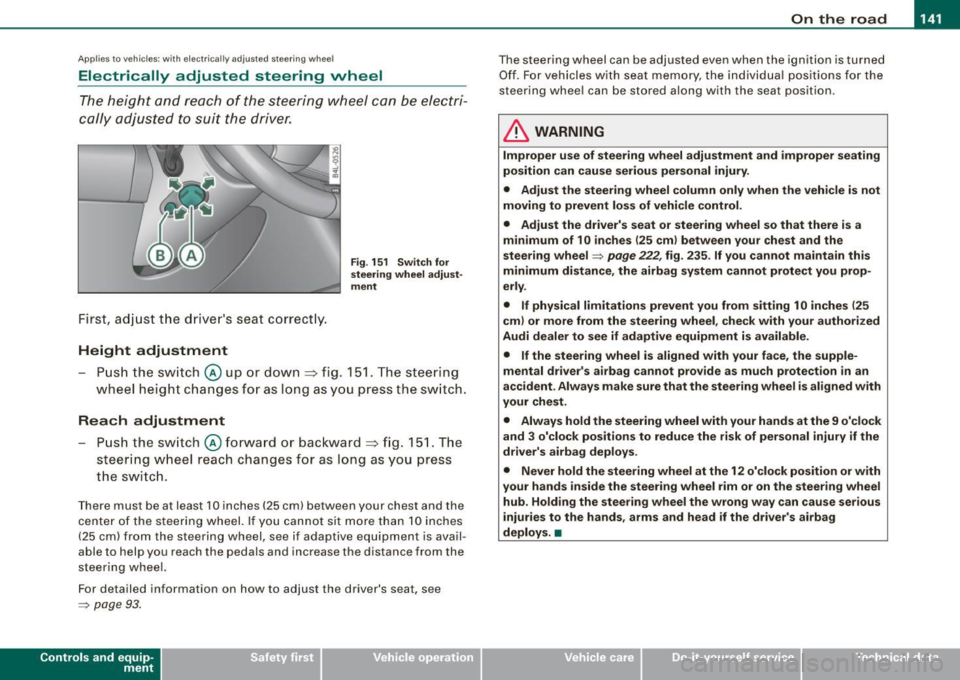
Fig . 151 Switch for
steering wheel adjust ·
ment
- Push the switch@ up or dow n=> fig. 1 51. T he steer ing
w heel he ight cha nges for a s long as you pre ss th e swi tc h.
Reach adjustment
- Push the s witch @ forw ard o r backwar d => fig . 151. Th e
s teer ing whe el reach ch an ges for as lon g as you pr ess
t h e s wit c h.
Ther e must b e at least 1 O in ches ( 25 cml betw een your chest and the
cen te r of th e st eer ing w hee l. If you cannot sit mo re than 1 0 in che s
(2 5 cm) from the stee rin g wh eel, se e if adaptive equ ipm ent is ava il
able to help you reach the pedals and increase the distance from the
st eeri ng whe el.
F or detailed info rmation on how to ad just the drive r's seat, see
~ pa ge 93 .
Con tro ls and eq uip
ment
T he steering whe el can be adj ust ed even when the ignition is turn ed
O ff . F or vehi cle s with seat memory , the i ndividu al p osi tions fo r the
st eer in g w he el can be sto red a lon g w ith th e seat position.
& WARNING
Improper use of steering wheel adjustment and improper seating
position can cause serious personal injury.
• Adjust the steering wheel column only when the vehicle is not
moving to prevent loss of vehicle control .
• Adjust the driver's seat or steering wheel so that there is a
minimum of 10 inches (25 cm ) between your chest and the
steering wheel
~ page 222, fig . 235 . If you cannot maintain this
minimum distance , the airbag system cannot protect you prop
erly .
• If physical limitations prevent you from sitting 1 O inches (25
cml or more from the steering wheel , check with your authorized
Audi dealer to see if adaptive equipment is available.
• If the steering wheel is aligned with your face, the supple
mental driver's airbag cannot provide as much protection in an
accident . Always make sure that the steering wheel is aligned with
your chest .
• Always hold the steering wheel with your hands at the 9 o'clock
and 3 o'clock positions to reduce the risk of personal injury if the
driver's airbag deploys .
• Never hold the steering wheel at the 12 o'clock position or with
your hands inside the steering wheel rim or on the steer ing wheel
hub . Holding the steering wheel the wrong way can cause serious
injuries to the hands, arms and head if the driver's airbag
deploys. •
Vehicle care I I Technical data
Page 144 of 426

• ..__O_ n_ t_ h _e _ ro_ a_d __________________________________________________ _
Easy entry feature
The easy entry feature makes it easier to enter and exit the
vehicle by automatically adjusting the steering wheel.
Press the button @~ page 141, fig. 151 to turn the easy
entry feature on or off.
When the easy entry feature is turned on (button depressed), the
steering wheel moves up to the parked position when the ignition is
turned off. After you enter the vehicle, the steering wheel moves to
the stored position as soon as you turn on the ignition .
Easy entry feature on vehicles with memory seat*
For the stored steering wheel position to be recalled, the driver's
seat memory must be switched on
(I ON OFF I switch in depressed
position).
If the easy entry feature is switched off, the steering wheel moves to
the stored position as soon as you press the seat memory button. •
Ignition lock and ignition switch
Ignition key positions
The engine can be started or turned off with the ignition
key.
Position @
Fig. 152 Ignition
switch positions
The ignition key can be inserted into the ignition switch in this posi
tion. This automatically unlocks the steering column lock. When the
ignition key is removed, the steering column lock is automatically
locked
~ & .
Ignition on 0
Turn the ignition key to this position and release it .
Starting the engine 0
The engine starts with the key in this position. Major electrical loads
are temporarily turned off.
Ignition off @
Turn the ignition key to this position and release it.
Page 145 of 426

___________________________________________________ O_ n_ t_h _e_ r_o _a_ d _ ___.11111
& WARNING
• Ne ver re m ove the ke y from the ignition lo ck wh ile th e ve hicl e is
movin g. The steering wh eel will l ock , cau sing l oss of contr ol.
• I f yo u have t o le ave y our veh icle, e ven for ju st a mi nute , always
r e m ove the ign ition ke y and t ake it with you. T his is es pe ciall y
import ant if y ou are going t o leave c hildren unatt end ed in the
vehic le. The children could start the engin e or use other ve hicle
c ontr ols. Un sup erv is ed u se of veh icle c ontrol s (for e xam ple, pow er
w indow s) can cause se rious per sonal injurie s.
0 Note
• I f the ~ symbol in the display blinks, there is a malfunction in the
e lectronic steering column lock . Follow the instructions in
~ page 34 , "Steering malfunction i".
• If the ~ symbol in the display blinks , there is a malfunction in
the electronic ignition lock . Follow the instructions in~ page
34,
"Ignition lock malfunction ~"-
[ i ] Tip s
• If you release the ignition key in posit ion @, the key automati
cally r eturns to posit ion
G) .
• If you open the driver's door when the ignition is swi tched on , a
buzzer sounds and the message Ignition is on appears in the instru
ment cluster display. P lease switch the ignition off. •
Ignition key safety lock
The ignition key can only be removed when the selector
lever is in the "P" (Park) position.
After turning off the ignition, the ignition key can only be removed
from the ignition lock when the selec tor lever is in the "P" (Park)
Con tro ls and eq uip
ment position. Af
ter you have removed the key , the sele ctor lever is locked
and cannot be moved. •
Starting and stopping the engine
Starting the engine
The engine can only be started with your original Audi
key.
Step on t he brake.
Fig . 153 Ig ni tio n k ey
p osit io n s
Move the selector lever into P or N => &,.
Tu rn the ignition key to pos ition 0 => fig . 153 - do not
depress the gas peda l when start ing the engine.
A co ld engine may sound loud after it has been started . This is due
to the hydrau lic valves building up oi l pressure. This is normal and
is not a n eed for concern .
If the engine does not start immediately, stop trying after 10
seconds and th en try to restart the engine about 30 seconds later . _.,
Vehicle care
I I irechnical data
Page 146 of 426

• ..__O_ n_ t_h _e _ r_o _a _ d __________________________________________________ _
& WARNING
Never start or let the engine run in a confined or enc losed area .
Exhaust fumes from the engine contain carbon monoxide , a color
le ss and odorless gas . Carbon monoxide can be fatal if inhaled .
• Never leave the engine idling unattended . An unattended
vehi cle with a runn ing engine poses a danger of personal injury or
theft.
0 Note
• Avoi d high engine speed s, fa st a ccele rati on or heavy eng ine
loads while the engi ne is sti ll cold. This cou ld damage the engine.
• The e ngi ne canno t be sta rt e d by pushing o r to w ing the vehicle.
~ For the sake of the environment
To avoid unnecessary engine wear and to re duce ex hau st emis
sions, do not let your vehicle stand and warm up. Be ready to drive
off immed iate ly afte r start ing y our veh icle. Maintain modera te
sp eed unt il the engine is completely warm. Remembe r, th e engine
performs best a t operati ng tempe ra ture .•
Stopping the engine
- Turn t he ignit ion key to position ©~ page 1 43, fig. 153 .
& WARNING
• Never turn off the engine until the vehicle has come to a
complete stop.
• The brake booster and servotroni c only work when the engine
is running . With the ignition turned off , you have to apply more
force when steering or braking . Since you cannot steer and stop
normally, this can lead to accidents and serious injuries .
& WARNING (continued )
• The radiator fan can continue to run for up to 10 minutes even
after you have turned off the engine and removed the ignition key .
The radiator fan can also turn on again if the engine coolant heats
up because of inten se sunlight or heat build -up in the engine
compartment .
0 Note
Do not stop the engine immediatel y after hard or extended driving.
Keep the eng ine runn ing f or ap proximate ly t wo minu tes to preven t
excessive heat build -up. •
Starting and stopping the engine
with Convenience key
Ap plies to vehicles: wit h C onvenien ce key
Starting the engine with th e [ START) button
This button s witches on the i gnition and starts the en gine.
Fig. 154 C onvenienc e
key ; EN GINE START
button
T he [ S TA RT ] b utto n is prov ided with two-stage operation
~ fig . 15 4. .,,_