2009 AUDI Q7 center console
[x] Cancel search: center consolePage 132 of 426

• ..__w_ a_ r_m _ a_ n_d_ c_ o_ ld __________________________________________________ _
Air outlets
Air distribution determines the air flow to the individual vents .
•
•
Fig. 1 39 Instru me nt pan el: a ir outlet loca tio ns a nd airfl ow directions
Air outl ets 0 and 0
- Rotate the horizontal thumb wheel located be low the
particular out let to increase, reduce, or shut down t he
air flow from that out let.
- To adjust the direct ion o f the a irflow from the outlet,
move t he tab in t he center of the outlet in the desired
directio n. The direct ion of the air delivered from the
vents can be adjusted horizontally and vertically.
(D Air flows to windshield and to driver and front passenger side
windows
@ Air flows to driver/front passenger or to the driver and front
passenger side windows
G) Air flows to driver/front passenger
© Air flows to footwe ll
You can adjust the air circulation=>
page 127 so that air flows from
specific vents=>
page 127, fig. 136 .
The air out lets are actuated either automatically or manually
depending on the operating mode selected.
[ i ] Tip s
When climate control is working, coo led air wi ll flow primari ly from
outlets @ and
G). To assure adequa te cooling, outlets@ and G)
should never be completely c losed. •
Air outlets in the rear
Outlet s in the center console
- Rotate the thumbwheel located next to the outlet to open
or close it .
- To adjust the direction of the a irflow from the outlet,
move the tab in t he center of the outlet in the des ired
direction. The direction of the air delivered from the
vents can be adjusted horizontally and vertically .
Outlets in the door pillars
-Rotate the hori zontal thumb wheel located be low the
out let to open o r close i t.
Page 133 of 426

Warm and cold -
-------------------'
- To adjust the direction o f the airflow from the o utlet,
move the tab in the cen ter of the o utlet in the desired
direction . The direction of the air delivered from the
vents can be adjusted hor izontally and vertically .
The air outlets are actuated either automatically or manually
depending on the operating mode selected . Heated or unheated
fresh air, or cooled air flows from the vents .
The air outlets to heat the rear footwell are located under the front seats.
[ i ) Tip s
If the climate control system is operating in cooling mode, air flows
primarily from the outlets in the center console and in the door
pillars . To achieve adequate cooling, you should never close the
out lets completely .•
Using climate control economically
Using the climate controls prudently can help save fuel.
When you use the a ir conditioner, engine power is reduced
and fuel consumption increases. To save fuel, you should
use the air conditioner only when necessary . A lso please
note the follow ing po ints:
- If you want to save fuel, activate ECON.
- If yo u are g oing to dr ive wit h the w indows or Panorami c
sliding sunroof* open, use ECON .
- If the ve hicle is e xtremely ho t due to the heat of t he s un,
br iefly open doors and windows .
Contro ls and eq uip
ment
ffi For the sake of th e environm ent
By reducing the amount of fue l you use, you also reduce the amount
of pollutants emitted into the air. •
Rear Air Conditioning
Applies to vehicles: w ith four- zone aut oma tic com fort air co ndit ionin g
Rear air conditioning -controls
This overview is to assist you in familiarizing yourself with
the rear air conditioning controls.
Fi g. 14 0 Rear air
c ond ition in g co ntro ls
The left disp lay indicates the temperature selected for the rear left
passenger, the right display indicates the temperature se lected for
the rear right passenger. If the sett ings for seat heating*, air distri
bution or the air conditioning fan are changed, the relevant indi
cator will appear briefly on the MMI Display.
Each function is turned on or off by briefly p ressing the corre
sponding button. T he indicator light in the button illuminates when
t he function is active. .,
Vehicle care I I Technical data
Page 135 of 426

Warm and cold -
-------------------'
Applies to vehic les: w ith fou r-zo ne automat ic comfort air cond ition ing
Setting rear temperature
The temperature can be separately adjusted for the rear
left and right sides.
Fig . 14 1 Rear a ir
conditio ning co ntro ls:
A djust ing the te mp era
tu re
- Rotate the control knob=:, fig . 14 1 to the left to reduce
the temperature, or to the r ight to increase the tempera
ture.
T he range in temperature can be adjusted from 18 °C (64 °F) to 28 °C
(84 °Fl.•
Applies to vehic les: w ith four -zone automat ic comfort air cond it ioning
Rear air distribution ®
The automatically controlled air distribution can be
changed manually.
- Press the Di stribution (!) button => fig. 14 1.
- Rotate the contro l knob on the rear air conditioning
contro l element to the desi red setting.
You can adjust the air circulation so that air flows from specific
vents .
Contro ls and eq uip
ment
• In position @l, all air flows from the vents in the center console
and the ou tlets to the door pillars.
• In position '\},airflows from the out lets in the door pillars.
• In position
,0., air flows from the outlets under the front seats.
There are additional combinations available to adjust air distribu
tion as needed.
To regulate air distribution automatically , switch to !AUTO] .•
App lie s to veh icles: with fo ur-zone automat ic comfort air condit ioning
Rear fan [8fr ]
The automatically preset fan speed can be reduced or
increased.
Press the Blower [ c9fJ] button => fig. 141.
Rotate the contro l knob to the des ired fan speed.
The climate contro l system automatical ly regulates fan speed
depending on interior temperature. You can adjust the volume of air
produced by the fan to your own requirements .
[ i ] Tips
If the difference between the desired temperature set by you and
the vehicle's inter ior temperature is too great, the fan speed wil l
change automatically. This occurs so that the desired temperature
setting is reached as quickly as possible. •
Vehicle care I I irechnical data
Page 137 of 426

Warm and cold -
-------------------'
concentrations of pollutants, the air conditioning system is
switched automatically to recirculation mode and the supply of
outside air is blocked. As soon as the concentration of pollutants in
the outside air drops , fresh air is supplied to the vehicle interior
again.
In the event that the windows fog up during automatic air recircula
tion, you must press the® button immediately.
Under certain operating conditions, automatic air recirculation is
switched off automatically . With outside temperatures below about
+10 °C, automatic air recirculation is limited to 30 seconds . With
outside temperatures below about -1 °C and in the ECON mode,
automatic air recirculation is limited to 15 seconds. •
Synchronization
One climate control setting for the driver and front
passenger seats.
With synchronization active, the driver's settings are adopted for
the passenger or vice versa. All the other settings that were made are transferred to the other seat. This includes all the clima te control
settings, except for the Seat heating *.
If a different setting is selected at a "synchronized seat", synchroni
z ation is cancelled. •
Applies to vehicles: with four-zone automatic comfort ai r cond itioning
Synchronization
One climate control setting for all seats.
With synchronization active, the driver's settings are adopted for
the front passenger and the rear left and right seats . All the other
settings that were made are transferred to the other seats. This
includes all the climate control settings, except for the Seat
heating*.
Con tro ls and eq uip
ment
If a different setting is selected at a "synchronized seat", synchroni
zation is cancelled. •
Applies to vehicles : wit h fo ur-zone autom atic comfort air co ndi tioning
Rear operation
Using the "Rear operation" function, settings can be made
in the center console control element for the rear left and
right sides of the vehicle.
Fig. 143 MMI Display:
Rear operation
Fig . 144 MMI Display:
Temperature setting
for rear left side
Press the [SETUP) button in the controls to access the
menu.
~
Vehicle care I I Technical data
Page 140 of 426

• ..__w_ a_ r_m _ a_ n_d_ c_ o_ ld __________________________________________________ _
Fig. 14 8 Center
conso le in fron t:
T urni ng on hea te d rea r
sea ts
Adju sting h eat ed sea t settin gs on rear control
e le m ent
- Press the
Seat heat . Ii_] button on the rear control
element ~
page 137, fig. 147.
Adjust the desired temperature with the control knob .
Adjustin g he ated seat settings on center
console control element
Press the
I SETUP] button on the air conditioning control
element to access the menu.
- Select
Rear operation ~ page 135, fig. 143 to adjus t the
rear a ir condit io ning settings usi ng the center console
control element.
- Press the
Sea t he at. [i_] co ntrol button on the center
console control element~ fig.
148.
Adjust t he desired temperature with the control knob.
In position O the heating for the seats is turned off . The range of
adjustment is between 1 and 6 .
The heater for the outer rear seats can be turned on when the
weight of the particu lar seat's occupant is detected. However, the
rear seats can be pre-heated for about 10 minutes using the acti- vated seat heater. After this time has elapsed, the seat heater auto
matically turns off if it does not detect an occupant's weight for the
particular seat.
0 Note
T o avoid damage to the heating elements in the seats, do not kneel
on the seats or place heavy loads on a small area of the seat.
[ i ] Tips
Please note that the weight of objects placed on the seat will also
be detected. This weight may be enough to cause the seat heater to
turn on. •
Applies t o vehicles: with steering whee l heating
Steering wheel heating (j)
The s teering wheel can be heated electrically.
F ig . 149 Mult ifun ction
ste ering wheel : Bu tto n
for stee ring w hee l
h ea ting
- Press the[~] button to turn t he steering whee l heating on
and off~ fig .
149. The message
Steering wh eel h eating on ! or
Ste ering wheel hea ting off I appears in the instrument
cluster display.
~
Page 191 of 426
_________________________________________________ A_ u_t_ o_ m_ a_t _i _ c _ t _ra_ n_s_ m __ is_s_ io_ n _ __.11111
Ap plies to vehi cles : wi th tip troni c-st eerin g wh eel
Steering wheel with tiptronic ®
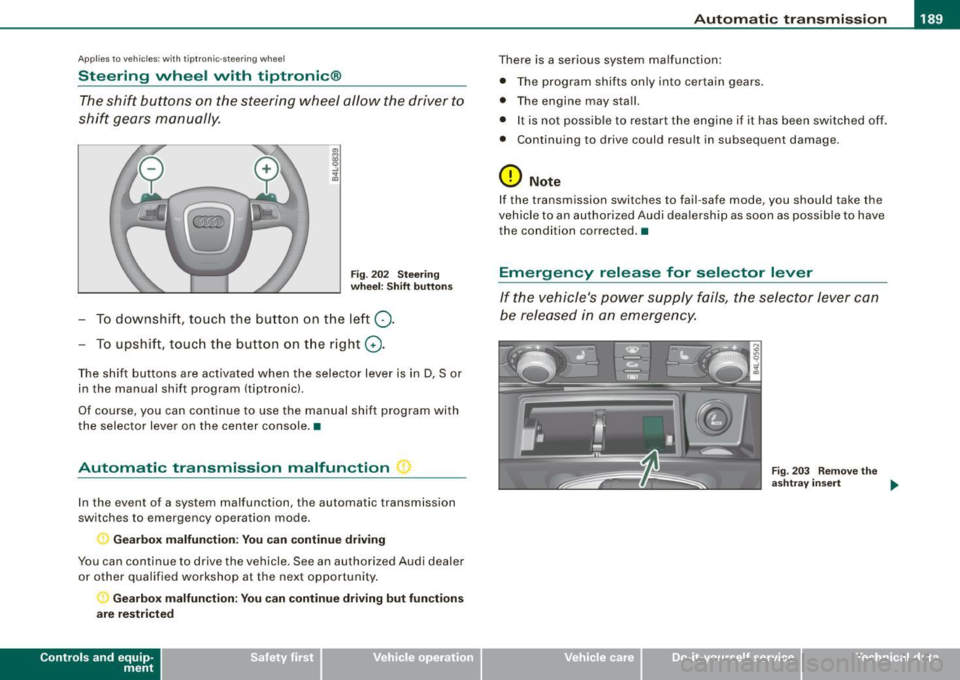
The shift buttons on the steering wheel allow the driver to
shift gears manually.
Fig . 202 Steering
wheel: Shift buttons
- To downshift, touch the button on the left Q.
- To upshift , touch the button on the right G) .
The shift buttons are activated when the selector lever is in D, Sor
in the manual shift program (tip tronic) .
Of course, you can continue to use the manual shift program with
the selector lever on the center console .•
Automatic transmission malfunction ~
In the event of a system malfunction, the automatic transmission
switches to emergency operation mode.
Gearbox malfunction: You can continue driving
You can continue to drive the vehicle. See an authorized Audi dealer or other qualified workshop at the next opportunity.
Gearbox malfunction: You can continue driving but functions
are restricted
Con tro ls and eq uip
ment
There is a serious system malfunction:
• The program shifts only into certain gears.
• The engine may stall.
• It is not possible to restart the engine if it has been switched off .
• Continuing to drive could result in subsequent damage .
0 Note
If the transmission switches to fail -safe mode , you should take the
vehicle to an authorized Audi dealership as soon as possible to have
the condition corrected .•
Emergency release for selector lever
If the vehicle's power supply fails, the selector lever can
be released in an emergency.
Fig . 203 Remove the
ashtray insert
~
Vehicle care I I Technical data
Page 193 of 426
___________________________________________ A_ d_ v_ a_n _ c_ e_ d_ P_a _ r_ k_ i_n -=g=-- S_ yc..,_ s_t _ e _m _ __._
Advanced Parking System
Advanced Parking System with rear
view camera
Applies to veh icles : with Advanced Pa rking System with rear view camera
General information
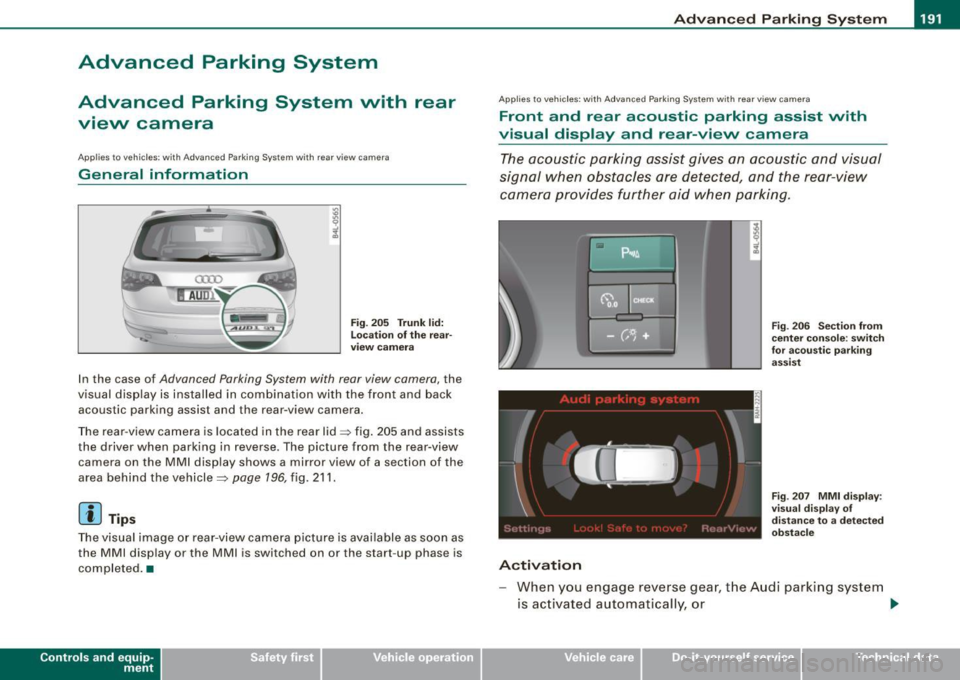
Fig. 205 Trunk lid:
Location of the rear
view camera
In the case of Advanced Parking System with rear view camera, the
visual display is installed in combination with the front and back acoustic parking assist and the rear-view camera.
The rear -view camera is located in the rear lid~ fig. 205 and assists
the driver when parking in reverse . The picture from the rear-view
camera on the MMI display shows a mirror view of a section of the
area behind the vehicle~
page 196, fig. 211.
[ i J Tips
The visual image or rear-view camera picture is available as soon as
the MMI display or the MMI is switched on or the start -up phase is
completed. •
Contro ls and eq uip
ment
App lies to vehicles: with Advanced Parking System w ith re ar view came ra
Front and rear acoustic parking assist with
visual display and rear-view camera
The acoustic parking assist gives an acoustic and visual
signal when obstacles are detected, and the rear-view
camera provides further aid when parking.
Activation
Fig. 206 Section from
center console: switch
for acoustic parking
assist
Fig . 207 MMI display :
visual display of
distance to a detected
obstacle
When you engage reverse gear, the Audi parking system
is activated automatically, or .,.
Vehicle care I I irechnical data
Page 194 of 426

• .___A_ d_v_ a_ n_c_ e_ d_ P _a_r_k _i_ n -=g,_ S-=y"- s_ t_ e_ m __________________________________________ _
-Press the sw itch PJJJ! in the cente r console ~ page 191,
fig. 206 t o activate the A udi pa rking system m anually .
Activation of the acoustic parking system is confirmed by
a brief acknowledgement sound . The indicator light in
the switch lights up.
D ea ctivation
If you drive forwards faster tha n approx. 6 mph (10 km/h),
or
- if you switch the ign ition off, the entire acoustic parking
assist is automatically deactivated, or
- you can press the sw itch
P111! i n the center console
=> page 191, fig. 206 to deact ivate the Audi parking
system. The indicator light in the switch goes out.
You have to turn on the acoustic parking assist m anuall y if you wish
to park the vehicle forwards or if you w ish to approach an obstacle
forwards and want a distance warning .
The range at which the sensors start to measu re is
about:
Front
Rear
W arning ton es side
cen
te r
side
cen ter 3 ft (0
.90 ml
4ft (1.20 ml
2 ft (0.60 ml
5 .2 ft (1.60 ml
Distance warning is given by chimes which are generated by a
signal generator . The volume and the pitch of the chimes can be
adjusted in the MMI => page 201.
Mute In the case of vehic les with automa tic transmission, an acoustic
distance warning is discontinued when the transmission selector lever is moved to the P position. However, the system remains
active
. As soon as the selector lever is moved from the
P posi tion
and the vehicle approaches an obstacle, the acoustic distance
warning resumes .
Dri ving fo rward/ba ckvv ard
Distance warning when driving forward/backward is based o n
detection of an obstacle in the range of the parking assist . As the
distance dec reases, the time interval between the audible tones
becomes shorter.
When the distance is less than approx . 1 ft (0.30 m), the tone
becomes continuous. At this point you shou ld s top backing up or
driving forward .
If the distance to an obstac le remains the same, the vo lume of the
distance warning is gradually reduced after about
4 seconds (does
not app ly to the zone for the cont inuous tone). If you sta rt to
approach the detected obstacle again, the distance warning will
sound at the normal volume again .
P a rk ing
When you selec t ano ther gear when parki ng (e .g . reverse/forward),
the warning tones are temporarily suppressed, but the visual display remains on the MMI display . If you start approaching a
detected obstacle again, the distance warning wi ll sound at the
normal vo lume again .
Vi sual disp lay
T he segments on the MMI display indicate a change in the distance
between the vehicle and an obstacle . The number of segments
displayed depends on the obstacles in front of or behind the
vehic le. The c loser the vehic le comes to the obstacle, the closer the
segments approach the vehic le => page 191, fig. 207. When the
segment before last is disp layed, the veh icle has reached the colli
sion zone. At this point you should stop backing up or driving
forward =>
&,. ..,.