Page 213 of 648

If any map light is lef t on when the
ignition switch is turned of f or the
VEHICLE OFF (LOCK) mode is set,
and all doors are closed, it will turn
of f when the vehicle is locked with
the remote transmitter (the keyless
access remote on models with
keyless access system), or af ter 15
minutes.
The lights also come on when the
key is removed f rom the ignition
switch.
The lights also come on when the
power mode is set to VEHICLE OFF
(LOCK).
All the individual map lights come
on and stay on. Turn on the f ront individual map
lights by pushing each map light
button ( / ). Push the
button again to turn it off. When the
door activated position is selected
with the light control button, the rear
map lights can be turned on by
pushing each map light button
( / ). Push the button
again to turn it off.
ON position:
On models without keyless access
system
On models with keyless access system
Interior Lights
Individual Map L ights
210
Front
Rear
�\f���—�
���—�����y�\f�������������y���
�)� �����\f�\f�y�\f���
���y
2009 TL
Page 214 of 648

�´�µ�Î�Î
Models equipped with the
keyless access system have an
engine start/stop button instead
of an ignition switch. ON Mode
is the equivalent of ON (II). For
more inf ormation, see pages
and . The courtesy light in each f ront door
comes on when the door is opened,
and goes out when the door is closed.
In addition to the courtesy light on
the ceiling, the driver’s ambient f oot
light comes on.
Your vehicle also has a courtesy light
in the ignition switch. This light
comesonwhenyouopenthedriver’s
door. It f ades out in about 30
seconds af ter the door is closed.
Thecourtesylightscomeonwhen
the parking lights are turned on. To
adjust its brightness, press either of
the instrument panel brightness
control buttons ( or ) with the
ignition switch in the ON (II)
position. :
178180
On models without keyless accesssystem
Interior Lights
Courtesy Lights
Inst rument s and Cont rols
211
COURTESY LIGHTS
�\f���—�
���—�����y�\f�������������y���
�)� �����\f�\f�y�\f���
���y
2009 TL
Page 215 of 648
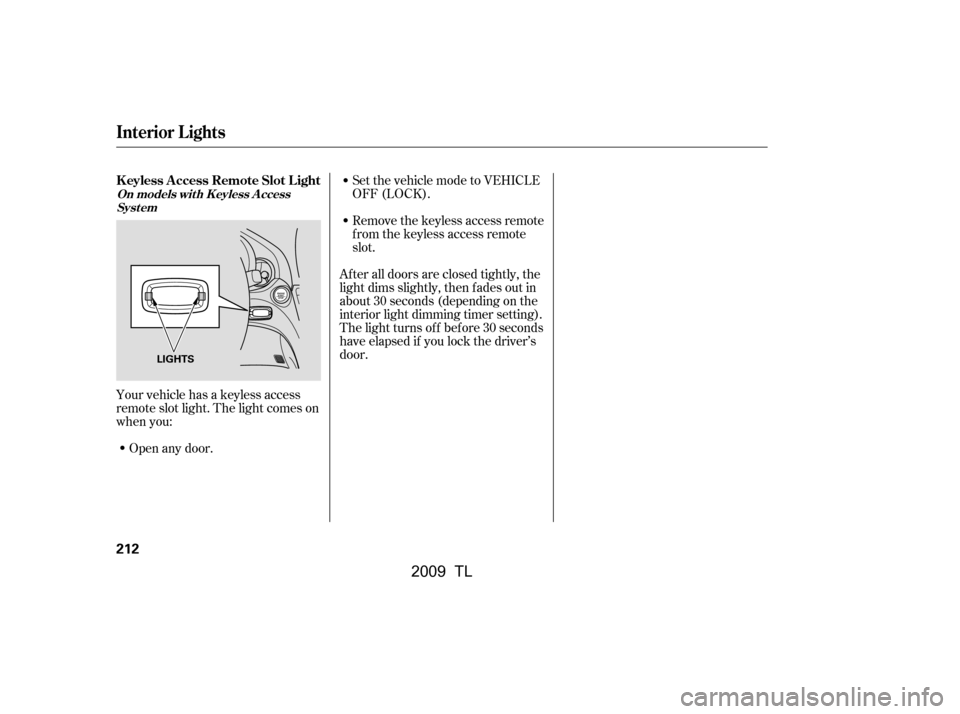
Remove the keyless access remote
f rom the keyless access remote
slot.
Your vehicle has a keyless access
remote slot light. The light comes on
when you: Open any door. Set the vehicle mode to VEHICLE
OFF (LOCK).
After all doors are closed tightly, the
light dims slightly, then f ades out in
about 30 seconds (depending on the
interior light dimming timer setting).
The light turns of f bef ore 30 seconds
have elapsed if you lock the driver’s
door.
Interior Lights
K eyless A ccess Remote Slot L ight
On models wit h K eyless A ccess Syst em
212
LIGHTS
�\f���—�\f���—�����y�
����\f��������y���
�)� �����\f�\f�y�\f���
���y
2009 TL
Page 235 of 648

�´�µ
�µ
The SVC mode controls the volume
based on vehicle speed. The f aster
you go, the louder the audio volume
becomes. As you slow down, the
audio volume decreases.
The SVC has f our modes; SVC OFF,
SVC LOW, SVC MID, and SVC
HIGH. Turn the selector knob to
adjust the setting to your liking. If
you f eel the sound is too loud,
choose low. If you f eel the sound is
too quiet, choose high.
This f unction is set to MID as the
def ault setting when the vehicle
leaves the factory. You can use the instrument panel
brightness control buttons ( or )
to adjust the illumination of the audio
system (see page ). The audio
system illuminates when the parking
lights are on, even if the radio is
turned off.
Adjusts the volume level
basedonthevehiclespeed.
Eachmodeisshowninthedisplayas
it changes. Turn the selector knob to
adjust the setting to your liking.
When the level reaches the center,
you will see ‘‘C’’ in the display.
To return to normal play, push the
RETURN or SETUP button af ter you
stop adjusting a mode. 137
Except SVC adjustment
Playing the A M/FM Radio (Models without navigation system)
A udio System L ighting
SVCSpeed-sensit ive Volume
Compensat ion (SVC)
232
�\f���—�\f���—�\f���y�
���������
���y���
�)� �����\f�\f�y�\f�������y
2009 TL
Page 383 of 648

The security system helps to protect
your vehicle and valuables f rom thef t.
The horn sounds and a combination
of headlights, parking lights, side
marker lights and taillights f lash if
someone attempts to break into your
vehicle or remove the audio unit.
This alarm continues f or 2 minutes,
then the system resets. To reset an
activated system before the 2
minutes have elapsed, unlock the
driver’s door with the key or use the
remote transmitter/keyless access
remote.
You can also turn off an activated
system by grabbing either f ront door
handle while carrying the keyless
access remote to unlock the door.
To enter the clock setting, turn
the selector knob to select ‘‘SET,’’
then press the knob. The display
will return to the menu item
display.
Press either the RETURN or
SETUPbuttontogobacktothe
normal display. The security system automatically
sets 15 seconds after you lock the
doors, hood, and trunk. For the
system to activate, you must lock the
doors f rom the outside with the key,
driver’s lock tab, master door lock
switch, or remote transmitter
(keyless access remote on models
with keyless access system). The
security system indicator on the
instrument panel starts blinking
immediately to show you the system
is setting itself .
11.
10.
On models with keyless access system
Setting the Clock, Security System
Security System
380
SECURITY SYSTEM INDICATOR
�\f���—�
���—�����y�
�\f��
������
�y���
�)� �����\f�\f�y�\f�������y
2009 TL
Page 396 of 648

With a linked phone, HFL allows you
to send and receive calls in your
vehicle without holding the phone.HFL can store up to 50 names and
phone numbers in its phonebook.
Withalinkedphone,youcanthen
automatically dial any name or
number in the phonebook.
The HFL system has a help f unction
to provide instructions f or pairing a
phone, and give hints on how to
operate HFL properly. If your
response or command is not correct,
or the system cannot recognize a
command, the HFL system will give
you an appropriate command or play
the help prompt. You can also store the desired
number to the HFL phonebook
directly f rom your cell phone using
the receive contact f unction in HFL.
For more inf ormation on how to
store the number, see page . To
make a call, see page .
The HFL microphone is on the
ceiling, in f ront of the map lights.When HFL is in use, the sound
comes through the vehicle’s f ront
audio system speakers. If the audio
system is in use while operating
either of the HFL buttons or making
a call, HFL overrides the audio
system. To change the volume level,
use the audio system volume knob or
the steering wheel volume controls.
415
407
BluetoothHandsFreeL ink(Models without navigation system)
Incoming/Outgoing Calls
Help Assistance Phonebook
MicrophoneAudio System
Features
393
�\f���—�\f���—�����y�
������
������y���
�)� �����\f�\f�y�\f�������y
2009 TL
Page 424 of 648

Your vehicle’s HFL system allows
you to import your cellular
phonebook to HFL. Using the
navigation system, you can make a
call directly and store a desired
number in HFL f rom the list shown
on the navigation display. For more
inf ormation on how to import the
phonebook, see page . To make
a call, see page .Your phone may not have
phonebook import f unction. Visit ,orcall
HandsFreeLink
consumer support
at (888) 528-7876. In Canada, visit , or call (888) 9-ACURA-
9. You can also see your phone’s
owner’s manual f or inf ormation. The HFL microphone is on the
ceiling, in f ront of the map lights.
The microphone is shared with the
navigation system.
HFL is operable by interaction with
the navigation screen with the
Interface Dial, the HFL buttons on
the steering wheel, or by voice.
When HFL is in use, the sound
comes through the vehicle’s f ront
audio system speakers. If the audio
system is in use while operating
either of the HFL buttons or making
a call, HFL overrides the audio
system. To change the volume level,
use the audio system volume knob or
the steering wheel volume controls.
455
433
www.acura.com/handsfree link
www.acura.ca
How to Use HFL
Phonebook Microphone
A udio System A ll phones may notoperate identically, and some
may cause inconsistent operation
of HFL .
BluetoothHandsFreeL ink(Models with navigation system)
Features
421
NOTE: NOTE:
�\f���—�\f���—�����y�
�������������y���
�)� �����\f�\f�y�\f�������y
2009 TL
Page 498 of 648

Modif ying your vehicle, or installing
some non-Acura accessories, can
make it unsaf e. Bef ore you make any
modif ications or add any accessories,
be sure to read the f ollowing
inf ormation.
Your dealer has Acura accessories
that allow you to personalize your
vehicle. These accessories have
been designed and approved f or your
vehicle, and are covered by warranty.Bef ore installing any accessory:
Make sure the accessory does not
obscure any lights, or interf ere
with proper vehicle operation or
perf ormance.
Although non-Acura accessories may
f it on your vehicle, they may not
meet f actory specif ications, and
could adversely af f ect your vehicle’s
handling and stability. Bef ore installing any electronic
accessory, have the installer
contact your dealer for assistance.
If possible, have your dealer
inspect the f inal installation.
Do not install accessories on the
side pillars or across the rear
windows. Accessories installed in
theseareasmayinterferewith
proper operation of the side
curtain airbags.
Be sure electronic accessories do
not overload electrical circuits
(see page ) or interf ere with
proper operation of your vehicle.
When properly installed, cellular
phones, alarms, two-way radios, and
low-powered audio systems should
not interf ere with your vehicle’s
computer controlled systems, such
as your airbags, anti-lock brakes, and
tire pressure monitoring system. 599
A ccessories
A ccessories and Modif ications
Bef ore Driving
495
Improper accessories or
modifications can affect your
vehicle’s handling, stability, and
performance, and cause a
crash in which you can be hurt
or killed.
Follow all instructions in this
owner’s manual regarding
accessories and modifications.
�\f���—�\f���—�����y�
�������������y���
�)� �����\f�\f�y�\f���\f�\f�y
2009 TL