Page 115 of 648
�Û�Ý
�Û
�Ý Press the SEL/RESET button to see
the selections.
Select ON or OFF by pressing the
INFO ( / ) button, then enter
your selection by pressing the SEL/
RESET button.
When KEYLESS ACCESS LIGHT
FLASH is set to ON, some exterior
lights blink twice when you unlock
thedoorsbygrabbingthedriver’s
door handle while carrying the
remote.
You can choose this item to
customize f rom ‘‘KEYLESS ACCESS
SETUP’’ by pressing the INFO ( /) button repeatedly.
The same exterior lights blink once
when you lock the doors by pushing
the door lock button while carrying
the remote.
Keyless Access Light Flash
Multi-Inf ormation Display
112
�\f���—�\f���—�����y�
������\f����
�y���
�)� �����\f�\f�y�\f�
�
���y
2009 TL
Page 119 of 648
�Û
�Ý �Û�Ý
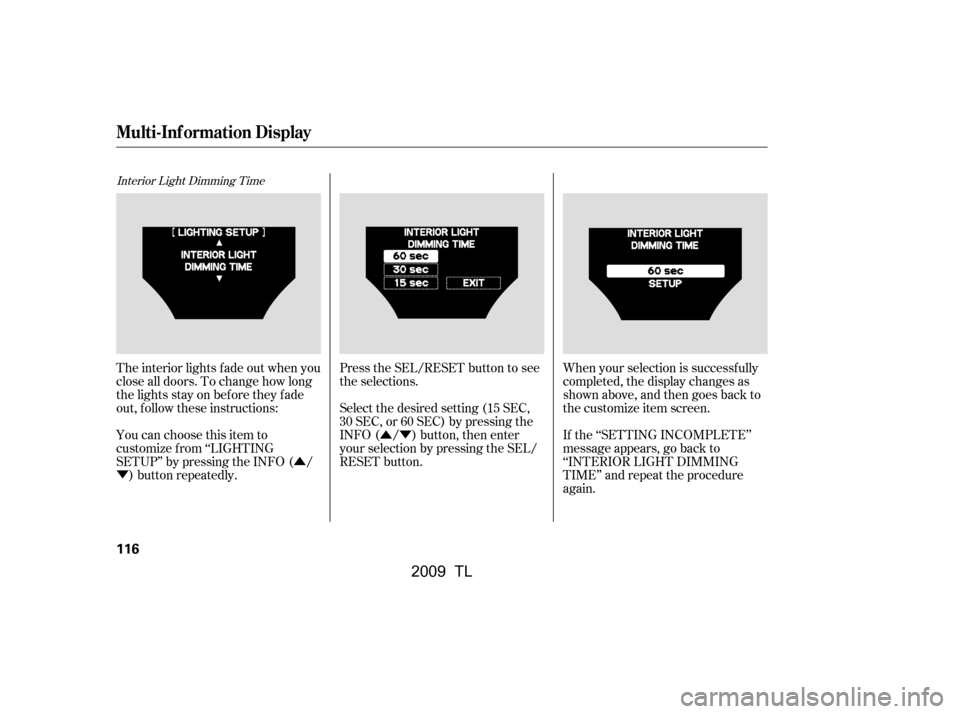
Interior Light Dimming Time
Press the SEL/RESET button to see
the selections.
When your selection is successf ully
completed, the display changes as
shown above, and then goes back to
the customize item screen.
If the ‘‘SETTING INCOMPLETE’’
message appears, go back to
‘‘INTERIOR LIGHT DIMMING
TIME’’ and repeat the procedure
again.
The interior lights f ade out when you
close all doors. To change how long
thelightsstayonbeforetheyfade
out, f ollow these instructions:
You can choose this item to
customize f rom ‘‘LIGHTING
SETUP’’ by pressing the INFO ( /
) button repeatedly. Select the desired setting (15 SEC,
30 SEC, or 60 SEC) by pressing the
INFO ( / ) button, then enter
your selection by pressing the SEL/
RESET button.
Multi-Inf ormation Display
116
�\f���—�\f���—�����y�
������
����\f�y���
�)� �����\f�\f�y�\f�
���
�y
2009 TL
Page 120 of 648
�Û
�Ý
�Û�Ý
Headlight Auto Of f Timer
You can choose this item to
customize f rom ‘‘LIGHTING
SETUP’’ by pressing the INFO ( /) button repeatedly. Press the SEL/RESET button to see
the selections.
Select the desired setting (60 SEC,
30 SEC, 15 SEC or 0 SEC) by
pressing the INFO ( / ) button,
then enter your selection by pressing
the SEL/RESET button.
The headlights, parking lights, side
marker lights, taillights, and license
plate lights go of f af ter the selected
time when you remove the key f rom
the ignition switch and close the
driver’s door. On models with
keyless access system, the lights go
of f af ter the selected time when you
close the driver’s door and take the
remote with you. To change how
longthelightsstayonbeforetheygo
of f , f ollow these instructions:
CONT INUED
Multi-Inf ormation Display
Inst rument s and Cont rols
117
�\f���—�\f���—�����y�
������
������y���
�)� �����\f�\f�y�\f�
�����y
2009 TL
Page 121 of 648
�µ�Û
�Ý
�µ
�µ
�µ �µAuto Light Sensitivity
When your selection is successf ully
completed, the display changes as
shown above, and then goes back to
the customize item screen.
If the ‘‘SETTING INCOMPLETE’’
message appears, go back to
‘‘HEADLIGHT AUTO OFF TIMER’’
and repeat the procedure again. MIN
Theheadlightscomeonwhenitis
dark.
You can choose this item to
customize f rom ‘‘LIGHTING
SETUP’’ by pressing the INFO ( /
) button repeatedly.
The headlights automatically come
on when the headlight switch is in
the AUTO position and the ambient
light reaches a changeable level. You
can select the auto light sensitivity
f rom the f ollowing f ive levels:
MAX
Theheadlightscomeonwhenitis
bright.
HIGH
Theheadlightscomeonwhenitis
somewhat bright.
MID
Theheadlightscomeonwhenitisas
bright as sunset or sunrise.
LOW
Theheadlightscomeonwhenitis
somewhat dark.
Multi-Inf ormation Display
118
�\f���—�\f���—�����y�
������
������y���
�)� �����\f�\f�y�\f�
�����y
2009 TL
Page 129 of 648

�Û�Ý
�Û
�Ý
Keyless Lock Acknowledgment
Select ON or OFF by pressing the
INFO ( / ) button, then enter
your selection by pressing the SEL/
RESET button.
Press the SEL/RESET button to
enter the selecting mode.
You can choose this item to
customize f rom ‘‘DOOR/WINDOW
SETUP’’ by pressing the INFO ( /
) button repeatedly.
When you push the LOCK button on
the remote transmitter or the
keyless access remote, some
exterior lights f lash, and a beeper
sounds when you push the LOCK
button again within 5 seconds to
verify that the doors and the trunk
arelockedandthesecuritysystem
has set (see page ). You can
customize the exterior lights not to
f lash and the beeper not to sound.
When you press the UNLOCK
button on the remote transmitter or
the keyless access remote to unlock
the driver’s door/all the doors
(depending on the customize
setting), the exterior lights blink
twice to verif y that the door(s) is
unlocked and the security system is
turned off.
To turn this feature on or off, follow
these instructions. 380
Multi-Inf ormation Display
126
�\f���—�
���—�����y�
����\f��������y���
�)� �����\f�\f�y�\f�
���
�y
2009 TL
Page 133 of 648
�Î
�Î
�Î
�Î
�Î �Î
�Î �Î
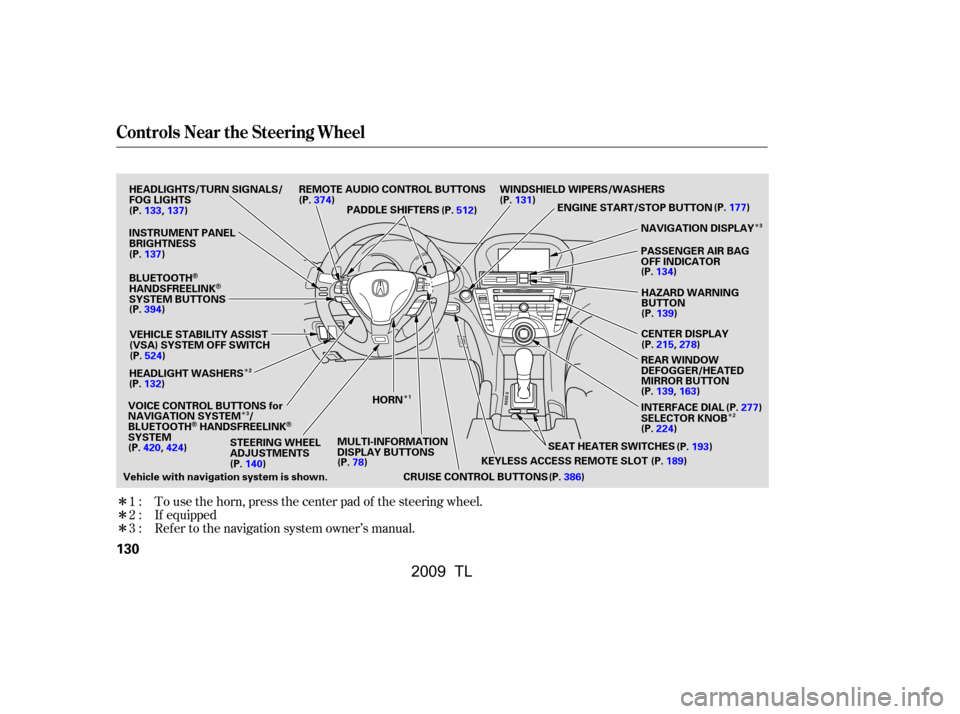
To use the horn, press the center pad of the steering wheel.
If equipped
Ref er to the navigation system owner’s manual.
1:
2:
3:
Controls Near the Steering Wheel
130
SEAT HEATER SWITCHES
PADDLE SHIFTERS
REMOTE AUDIO CONTROL BUTTONS
INSTRUMENT PANEL
BRIGHTNESS
VEHICLE STABILITY ASSIST
(VSA) SYSTEM OFF SWITCH
CRUISE CONTROL BUTTONSPASSENGER AIR BAG
OFF INDICATOR
HAZARD WARNING
BUTTON
CENTER DISPLAY
REAR WINDOW
DEFOGGER/HEATED
MIRROR BUTTON
WINDSHIELD WIPERS/WASHERS
STEERING WHEEL
ADJUSTMENTS
HEADLIGHTS/TURN SIGNALS/
FOG LIGHTS
BLUETOOTH
HANDSFREELINKSYSTEM BUTTONS
HEADLIGHT WASHERS
VOICE CONTROL BUTTONS for
NAVIGATION SYSTEM /
BLUETOOTH
HANDSFREELINKSYSTEM MULTI-INFORMATION
DISPLAY BUTTONS NAVIGATION DISPLAY
HORN
Vehicle with navigation system is shown. KEYLESS ACCESS REMOTE SLOT
(P.189)
ENGINE START/STOP BUTTON
(P.177)
(P.137)
(P.133,137)
(P.394) (P.524)
(P.132)
(P.140) (P.78)
(P.374)
(P.512)(P.131)
(P.134)(P.139)
(P.215,278)
(P.139,163) (P.277)
(P.224) (P.193)
(P.386) INTERFACE DIAL
SELECTOR KNOB
(P.420,424)
2
3 3
1 2
�\f���—�\f���—�����y�
���������\f���y���
�)� �����\f�\f�y�\f�
�����y
2009 TL
Page 135 of 648

�Î
�Î
When you activate the windshield
washer with the headlights turned
on, the headlight washer will be
activated under certain conditions.
For more inf ormation, see
sectioninthenextcolumn. The headlight washers use the same
f luid reservoir as the windshield
washers.
The headlight washers can be
operated at any time by pressing the
headlight washer button located next
to the steering wheel column. The
headlights must be turned on to use
this button. In addition, the headlight
washer operates without pressing
the button at the first time you turn
on the windshield washers af ter you
turn the ignition switch to the ON
(II) position. Models equipped with the
keyless access system have an
engine start/stop button instead
of an ignition switch. ON Mode
is the equivalent of ON (II). For
more inf ormation, see pages
and .
:
178180
Canadian SH-AWD models onlyHeadlight Washers
Windshield Wipers and Washers
Headlight
Washers Canadian SH-A WD models only
132
HEADLIGHT WASHER SWITCH
�\f���—�
���—�����y�
����\f����\f���y���
�)� �����\f�\f�y�\f�
�����y
2009 TL
Page 136 of 648

�µ
�µ �Î
�Î
�Î
Push down on the
lef t lever to signal a lef t turn and up
to signal a right turn. To signal a lane
change, push lightly on the lever and
hold it. The lever will return to the
center when you release it or
complete a turn.
Turning the switch to
the ‘‘ ’’ position turns on the
parking lights, taillights, instrument
panel lights, side-marker lights, and
rear license plate lights.
Turning the switch to the ‘‘ ’’
position turns on the headlights.
When the light switch is in either of
these positions, the lights on
indicator comes on as a reminder.
Turn Signal
Of f
Parking and instrument panel
AUTO
Headlights on
High beams
Flashhighbeams
Fog lights of f
Fog lights on This indicator stays on if you leave
the light switch on and turn the
ignition switch to the ACCESSORY
(I) or LOCK (0) position.
Models equipped with the
keyless access system have an
engine start/stop button instead
of an ignition switch. VEHICLE
OFF (LOCK) Mode is the
equivalent of LOCK (0) and
ACCESSORY Mode is the
equivalent of ACCESSORY (I).
For more inf ormation, see pagesand .
If you leave the lights on with the
key removed f rom the ignition
switch, or with the power mode in
VEHICLE OFF (LOCK), you will
hear a reminder chime when you
open the driver’s door.
1.
2.
3.
4.
5.
6.
7.
8.
9. :
178180
CONT INUED
Turn Signals and Headlights
Turn Signal
Headlights
Inst rument s and Cont rols
133
�\f���—�
���—�����y�
����\f����
���y���
�)� �����\f�\f�y�\f�
�����y
2009 TL