Page 198 of 433
�µ�µ
Each preset button/icon
can store one f requency on AM and
two f requencies on FM. To view the
preset icons on the audio control
display, push the AUDIO button. Select the desired band, AM or
FM. FM1 and FM2 let you store
twosetsof FMfrequencieswith
the preset buttons (on-screen
icons).
To store the f requency on a preset
icon, turn the interf ace dial to
select a desired preset icon. The
selected preset icon will be
highlighted. Press and hold
ENTER on the selector f or more
than 2 seconds to store the
f requency.
Repeat steps 1 through 3 to store a
total of six stations on AM and
twelve stations on FM.
UsetheTUNE,SEEK,orSCAN
function to tune the radio to a
desired station.
Pick a preset number (1 6), you
want for that station. Press the
preset button, and hold it until you
hear a beep.
1.
2.
3.
4.
Audio System
Preset
194
PRESET ICONS
�\f���—�\f���—�
�
�y�
���������
�
�y���
�(�)� �����\f�y�\f�
�����y
2009 RDX
Page 199 of 433

�µTo activate AUTO SELECT, press
the AUDIO button to view the audio
control display. Push the interf ace
selector down to scroll down the
display, turn the knob to A. SEL,
then press ENTER on the interf ace
selector. You will see ‘‘AUTO SEL’’
f lashing in the audio control display,
and ‘‘A. SEL’’ on the upper display.
Then, the system goes into scan
mode f or several seconds.
If you are
traveling far from home and can no
longer receive your preset stations,
you can use the auto select feature to
find stations in the local area. If you do not like the stations auto
select has stored, you can store
other f requencies on the preset
buttons (icons) as previously
described.
The system stores the f requencies of
six AM and twelve FM stations in
the preset buttons. To turn of f auto select, press
ENTER on the interf ace selector
again. This restores the presets you
originally set.
You will see ‘‘0’’ displayed if auto
select cannot f ind a strong station f or
every preset button. For inf ormation on AM/FM radio
f requencies and reception, see page
.
For inf ormation, see page . 221
217
Audio System
AUTO SELECT Radio Frequencies and Reception
Adjusting the Sound
Features
195
AUTO SEL INDICATOR
A.SEL ICON
�\f���—�\f���—�
�
�y�
�����������\f�y���
�(�)� �����\f�y�\f���\f�\f�y
2009 RDX
Page 203 of 433

CONT INUED
To load a single disc:Press and release the LOAD
button on the changer unit. You
will see ‘‘BUSY’’ on the upper
display, and the disc load indicator
turns red and starts blinking.
If you stop loading discs bef ore all
six positions are f illed, the system
will wait f or 10 seconds, stop the load
operation, and begin playing the last
disc loaded. Repeat steps 1 through 3 until all
six positions are loaded. If you are
not loading all six positions, press
the LOAD button again after the
last CD has loaded. ‘‘DISC READ’’
appears on the upper display, then
the system begins playing the last
loaded.
When the disc load indicator turns
green and ‘‘LOAD’’ appears on the
upper display again, insert the
next CD in the slot. Do not try to insert a disc until
‘‘LOAD’’ appears. You could
damage the audio unit.
Insert the disc into the disc slot
when the disc load indicator turns
green and ‘‘LOAD’’ appears in the
upper display at the same time.
Insert it only half way; the drive
will pull it in the rest of the way.
You will see ‘‘BUSY’’ on the upper
display, and the disc load indicator
turns red again and blinks as the
CD is loaded.
Press and hold the LOAD button
on the changer unit until you hear
a beep. You will see ‘‘BUSY’’ on
the upper display, and the disc
load indicator turns red and starts
blinking.
To load multiple discs in one
operation:
‘‘DTS’’ and ‘‘DTS Digital Surround’’
are registered trademarks of Digital
Theater Systems, Inc. 1.
2.
3.4.
1.
Audio System
L oading CDs in the Changer
Features
199
�\f���—�\f���—�
�
�y�
�������������y���
�(�)� �����\f�y�\f���\f���y
2009 RDX
Page 204 of 433

You can also select the empty
position by pressing the appropriate
preset button.
You can load a disc(s) in any mode
(AM, FM, XM, or AUX) if you do not
select an empty position.
You cannot select the empty position
if there is no disc in the changer.
You can load a CD into an empty
position while a CD is playing. Press
the AUDIO button to view the audio
control display. Select the empty
position (‘‘No Disc’’ is shown on the
audio control display) by rotating the
interf ace dial. Then press ENTER on
the selector to enter your selection.
The current CD stops playing and
starts the loading sequence. The CD
just loaded will play.
Insert a disc into the disc slot
when the disc load indicator turns
green, and ‘‘LOAD’’ appears on
the upper display at the same time.
Insert the disc only about half way;
the drive will pull it in the rest of
theway.Youwillseethedisc
number blinking on the upper
display, and the disc load indicator
turns red again and blinks as the
CD is loaded.
Do not try to insert a disc until
‘‘LOAD’’ appears. You could
damage the audio unit.
Youwillsee‘‘DISCREAD’’onthe
upper display, then the system
begins to play the CD.
2.
3.
Audio System
200
EMPTY POSITION
�\f���—�\f���—�
�
�y�
���������\f���y���
�(�)� �����\f�y�\f���\f���y
2009 RDX
Page 205 of 433

�µ
When playing a CD (CD-DA), the
audio control display shows disc
number, album name, track number,
and elapsed time. When playing a
CD without this inf ormation, the
number of the disc and track playing
andtheelapsedtimeareshownon
the audio control display.
If you want to see the list of the discs
in the CD changer, press the AUDIO
button to view the audio control
display. You will see the current disc
position highlighted.
Select the changer by pressing the
DISC/AUX button. You will see the
‘‘CD’’ on the upper display. The
system will begin playing the last
selected CD in the CD changer. To select a disc, press an appropriate
preset button (1 6), or select an
appropriate preset icon by rotating
the interf ace dial, then press ENTER
on the interf ace selector. If you
select an empty position (‘‘No Disc’’
is shown) in the CD changer, the
system will load a CD into the empty
slot (see page ).
When the system reaches the end of
the disc, it will advance to the
beginning of the f irst track/f ile (in
MP3/WMA mode) on the next disc,
then play that track/file.
200
To Play a Disc
Audio System
Features
201
CURRENT DISC
EMPTY POSITION
�\f���—�\f���—�
�
�y�
���������
���y���
�(�)� �����\f�y�\f���\f���y
2009 RDX
Page 206 of 433

�µ
�µ
�µ
�µ
�µ
�µ
�µ
�µ
The CD changer can also play CD-Rs
andCD-RWscompressedinMP3
and WMA format. When playing a
disc in MP3 or WMA, you will see
‘‘MP3’’ or ‘‘WMA’’ on the upper
display. A disc can support more
than 99 folders, and each folder can
hold up to 255 playable f iles.
When there are more than 99 f olders
in a disc, the upper display only
shows two digits.
WhenplayingaCDcompressedin
MP3/WMA format, the audio
control display shows disc number,
f older name, f ile number, and
elapsed time. When playing a CD
without this inf ormation, the disc
number, track number, and the
elapsedtimeareshownontheaudio
control display.
If the disc has a complex structure, it
will take a while to read the disc
before the system begins to play it.
The specif ications f or compatible
MP3 f iles are:
If a f ile on an MP3 or WMA
disc is protected by digital rights
management (DRM), the audio unit
displays FORMAT, and then skips to
the next f ile. Sampling f requency:
32/44.1/48 kHz (MPEG1),
16/22.05/24 kHz (MPEG2)
Bit rate:
32/40/48/56/64/80/96/112/128/
160/192/224/256/320 kbps
(MPEG1),
8/16/24/32/40/48/56/64/80/96/
112/128/160 kbps (MPEG2)
Compatible with variable bit rate
and multi-session.
Maximum layers
(including ROOT): 8 layers
The specif ications f or compatible
WMA f iles are: Sampling f requency:
32/44.1/48 kHz
Bit rate:
48/64/80/96/128/160/192 kbps
Compatible with variable bit rate
and multi-session.
Maximum layers
(including ROOT): 8 layers
Playing an MP3/WMA Disc
Audio System
202
NOTE:
�\f���—�\f���—�
�
�y�
�����������
�y���
�(�)� �����\f�y�\f���\f���y
2009 RDX
Page 207 of 433
�µ
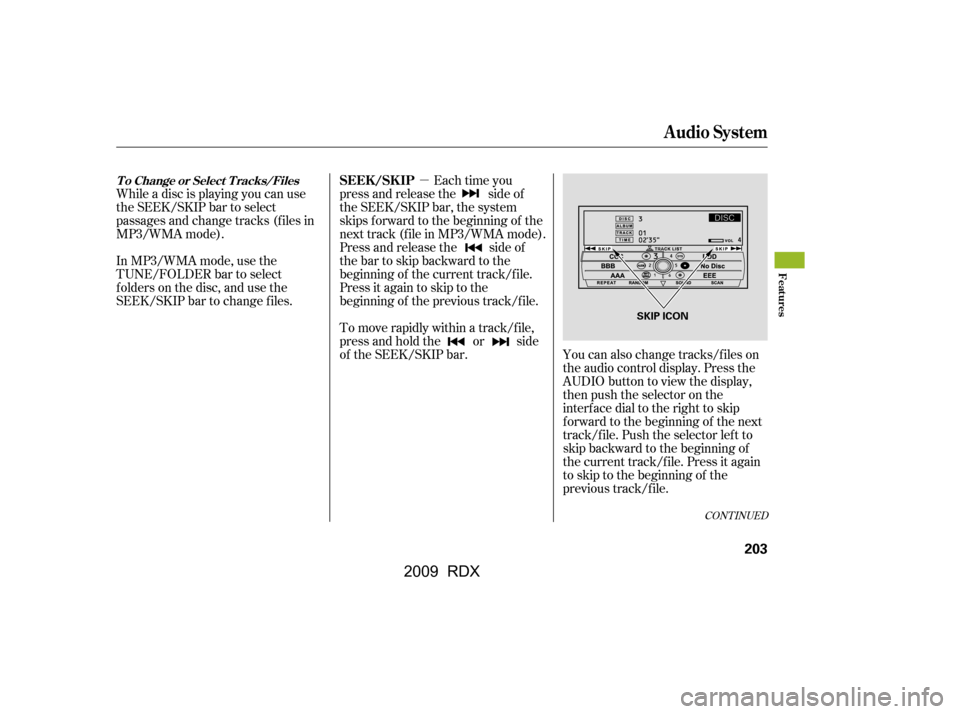
While a disc is playing you can use
the SEEK/SKIP bar to select
passages and change tracks (f iles in
MP3/WMA mode).
In MP3/WMA mode, use the
TUNE/FOLDER bar to select
f olders on the disc, and use the
SEEK/SKIP bar to change f iles. Each time you
press and release the side of
the SEEK/SKIP bar, the system
skips forward to the beginning of the
next track (f ile in MP3/WMA mode).
Press and release the side of
the bar to skip backward to the
beginning of the current track/f ile.
Press it again to skip to the
beginning of the previous track/f ile.
You can also change tracks/files on
the audio control display. Press the
AUDIO button to view the display,
then push the selector on the
interf ace dial to the right to skip
f orward to the beginning of the next
track/f ile. Push the selector lef t to
skip backward to the beginning of
the current track/file. Press it again
to skip to the beginning of the
previous track/f ile.
To move rapidly within a track/f ile,
press and hold the or side
of the SEEK/SKIP bar.
CONT INUED
T o Change or Select T racks/FilesSEEK /SK IP
Audio System
Features
203
SKIP ICON
�\f���—�\f���—�
�
�y�
�������������y���
�(�)� �����\f�y�\f���\f���y
2009 RDX
Page 208 of 433
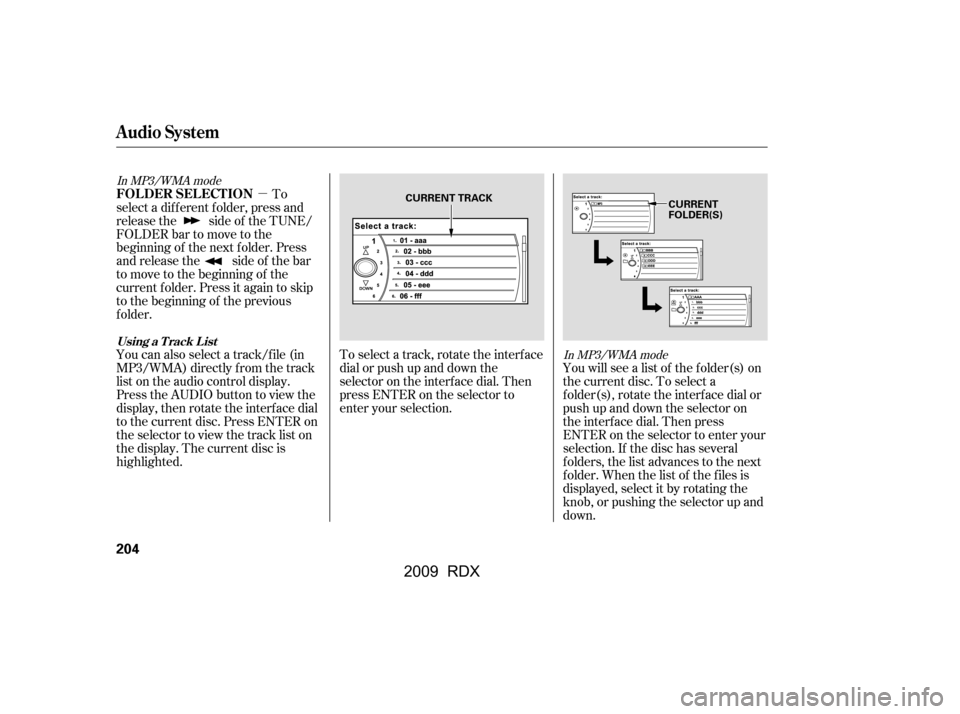
�µTo select a track, rotate the interf ace
dial or push up and down the
selector on the interf ace dial. Then
press ENTER on the selector to
enter your selection. You will see a list of the f older(s) on
the current disc. To select a
folder(s), rotate the interface dial or
push up and down the selector on
the interf ace dial. Then press
ENTER on the selector to enter your
selection. If the disc has several
f olders, the list advances to the next
f older. When the list of the f iles is
displayed, select it by rotating the
knob, or pushing the selector up and
down.
To
select a different folder, press and
releasethe sideof theTUNE/
FOLDERbartomovetothe
beginning of the next f older. Press
and release the side of the bar
to move to the beginning of the
current f older. Press it again to skip
to the beginning of the previous
f older.
You can also select a track/f ile (in
MP3/WMA) directly f rom the track
list on the audio control display.
Press the AUDIO button to view the
display, then rotate the interface dial
to the current disc. Press ENTER on
the selector to view the track list on
the display. The current disc is
highlighted.
In MP3/WMA mode
In MP3/WMA mode
FOLDER SELECTION
Audio System
Using a T rack L ist
204
CURRENT TRACK
CURRENT
FOLDER(S)
�\f���—�\f���—�
�
�y�
�������������y���
�(�)� �����\f�y�\f���\f���y
2009 RDX
