2009.5 Peugeot 308 CC Dag tow
[x] Cancel search: towPage 26 of 256
2
i
i
44
MULTIFUNCTION SCREENS
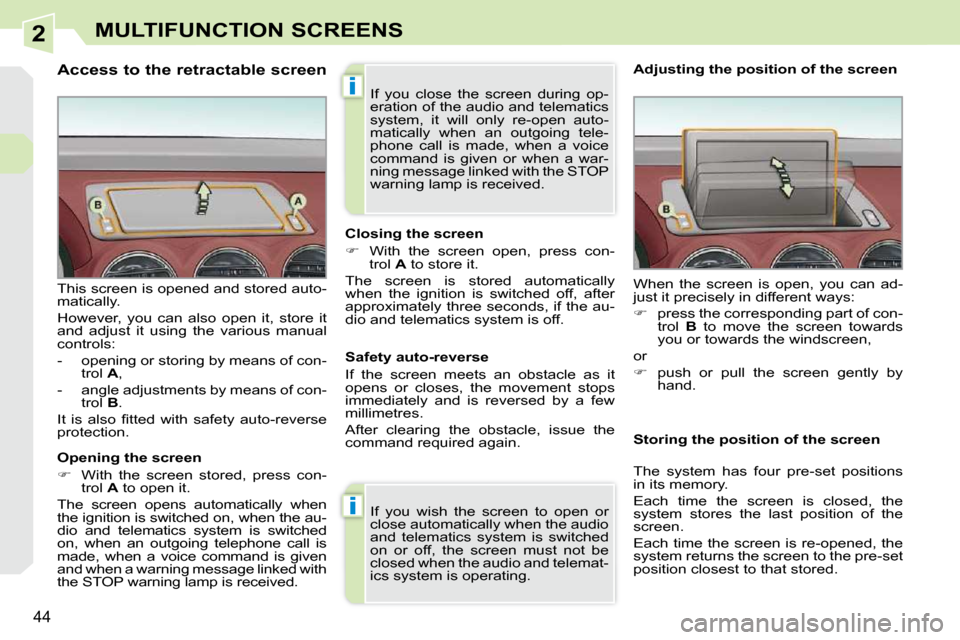
Access to the retractable screen
Opening the screen
With the screen stored, press con-
trol A to open it.
The screen opens automatically when
the ignition is switched on, when the au-
dio and telematics system is switched
on, when an outgoing telephone call is
made, when a voice command is given
and when a warning message linked with
the STOP warning lamp is received.
This screen is opened and stored auto-
matically.
However, you can also open it, store it
and adjust it using the various manual
controls:
- opening or storing by means of con-
trol A ,
- angle adjustments by means of con- trol B .
It is also fi tted with safety auto-reverse
protection. Closing the screen
With the screen open, press con-
trol A to store it.
The screen is stored automatically
when the ignition is switched off, after
approximately three seconds, if the au-
dio and telematics system is off.
If you wish the screen to open or
close automatically when the audio
and telematics system is switched
on or off, the screen must not be
closed when the audio and telemat-
ics system is operating. When the screen is open, you can ad-
just it precisely in different ways:
press the corresponding part of con-
trol B to move the screen towards
you or towards the windscreen,
or
push or pull the screen gently by
hand.
Adjusting the position of the screen
Safety auto-reverse
If the screen meets an obstacle as it
opens or closes, the movement stops
immediately and is reversed by a few
millimetres.
After clearing the obstacle, issue the
command required again. Storing the position of the screen
The system has four pre-set positions
in its memory.
Each time the screen is closed, the
system stores the last position of the
screen.
Each time the screen is re-opened, the
system returns the screen to the pre-set
position closest to that stored.
If you close the screen during op-
eration of the audio and telematics
system, it will only re-open auto-
matically when an outgoing tele-
phone call is made, when a voice
command is given or when a war-
ning message linked with the STOP
warning lamp is received.
Page 31 of 256

3
i
i
49
COMFORT
The condensation created by the
air conditioning results in a dis-
charge of water under the vehicle
which is perfectly normal.
RECOMMENDATIONS FOR VENTILATION AND AIR CONDITIONING
In order for these systems to be fully effective, follow the guidelines on opera-
tion and maintenance below:
To obtain an even air distribution, take care not to obst ruct the exterior air
intake grilles located at the base of the windscreen, the n ozzles, the vents
and the air outlets, as well as the air extractor located in the boot.
Do not cover the sunshine sensor, located on the dashboard ; this is used
for regulation of the air conditioning system.
Operate the air conditioning system for 5 to 10 minutes, on ce or twice a
month to keep it in perfect working order.
Ensure that the passenger compartment fi lter is in good condit ion and
have the fi lter elements replaced regularly (refer to the "Checks" section).
We recommend the use of a combined passenger compartment fi lter .
Thanks to its second special active fi lter, it contributes to t he purifi cation
of the air breathed by the occupants and the cleanness of th e passenger
compartment (reduction of allergic symptoms, bad odours and greasy de-
posits).
To guarantee correct operation of the air conditioning syste m, you are also
advised to have it checked regularly.
If the system does not produce cold air, do not use it and contact a
PEUGEOT dealer.
In the "cabriolet" confi guration, installing the windstop and using the "AIRWAVE"
systems improves comfort.
When towing the maximum load on a steep gradient in high temperatures,
switching off the air conditioning permits the recovery of engi ne power and
therefore improvement of the towing capacity. If the interior temperature remains
very high after the vehicle has been
parked in the sun for a considerable
time, fi rst ventilate the passenger
compartment for a few minutes.
Place the air fl ow control at a suf-
fi cient level to provide an adequate
renewal of air in the passenger
compartment.
The air conditioning system does
not contain chlorine and does not
present any danger to the ozone
layer.
Page 36 of 256

3
!
i
53
COMFORT
Manual operation
If you wish, you can make a different
choice from that offered by the system
by changing a setting. The other func-
tions will still be controlled automati-
cally.
Pressing the "AUTO" button returns
the system to completely automatic
operation.
Press this button to switch
off the air conditioning. 6. Air distribution adjustment
Press one or more but-
tons to direct the air fl ow
towards:
7. Air fl ow adjustment
Turn this control to the left
to decrease the air fl ow or
to the right to increase the
air fl ow.
8. Air intake/Air recirculation Switching the system off
Turn the air fl ow control to the left
until all of the indicator lamps switch
off.
This action switches off all of the func-
tions of the system.
Temperature related comfort is no long-
er guaranteed but a slight fl ow of air,
due to the movement of the vehicle, can
still be felt.
Turn the air fl ow dial to the right or
press the "AUTO" button to reacti-
vate the system with the values set
before it was switched off.
Press this button for recir-
culation of the interior air.
The indicator lamp on the
button comes on.
5. Air conditioning On/Off
Avoid prolonged operation in inte-
rior air recirculation mode or driving
for long periods with the system off
(risk of condensation and of dete-
rioration of the air quality).
- the windscreen and side windows
(demisting or defrosting),
- the windscreen, the side windows and the vents,
- the windscreen, the side windows, the vents and the footwells,
- the vents and the footwells,
- the vents,
- the footwells,
- the windscreen, the side windows and the footwells.
The air fl ow indicator lamps, between
the two fans, come on progressively in
relation to the value requested.
As soon as possible, press this but-
ton again to permit the intake of out-
side air and prevent the formation
of condensation. The indicator lamp
on the button switches off.
For maximum cooling or heating
of the passenger compartment, it
is possible to exceed the minimum
value 14 or the maximum value 28.
Turn control 2 or 3 to the left
until "LO" is displayed or to the
right until "HI" is displayed. 9. Mono-zone/Dual-zone
Press this button to equal-
ise the comfort value on the
passenger side with that
on the driver's side (mono-
zone). The indicator lamp
on the button comes on.
Air recirculation enables the passenger
compartment to be isolated from exte-
rior odours and smoke.
Switching the system off could result in
discomfort (humidity, condensation).
Press this button again to return to
automatic operation of the air con-
ditioning. The indicator lamp on the
"A/C" button comes on.
Page 39 of 256
3COMFORT
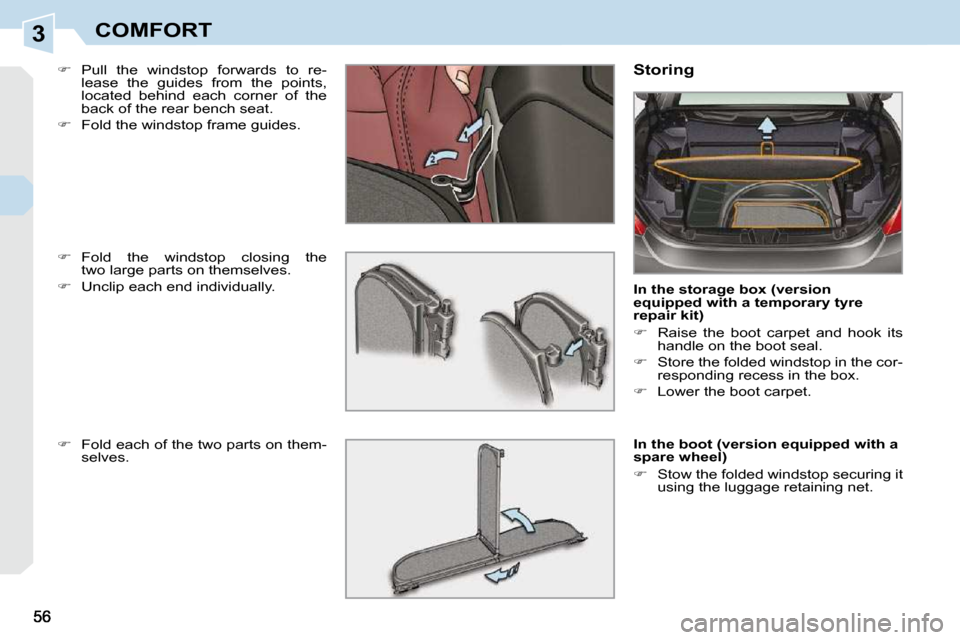
Pull the windstop forwards to re-
lease the guides from the points,
located behind each corner of the
back of the rear bench seat.
Fold the windstop frame guides. Storing
In the storage box (version
equipped with a temporary tyre
repair kit)
Raise the boot carpet and hook its
handle on the boot seal.
Store the folded windstop in the cor-
responding recess in the box.
Lower the boot carpet.
In the boot (version equipped with a
spare wheel)
Stow the folded windstop securing it
using the luggage retaining net.
Fold the windstop closing the
two large parts on themselves.
Unclip each end individually.
Fold each of the two parts on them-
selves.
Page 43 of 256
3
i!
60
COMFORT
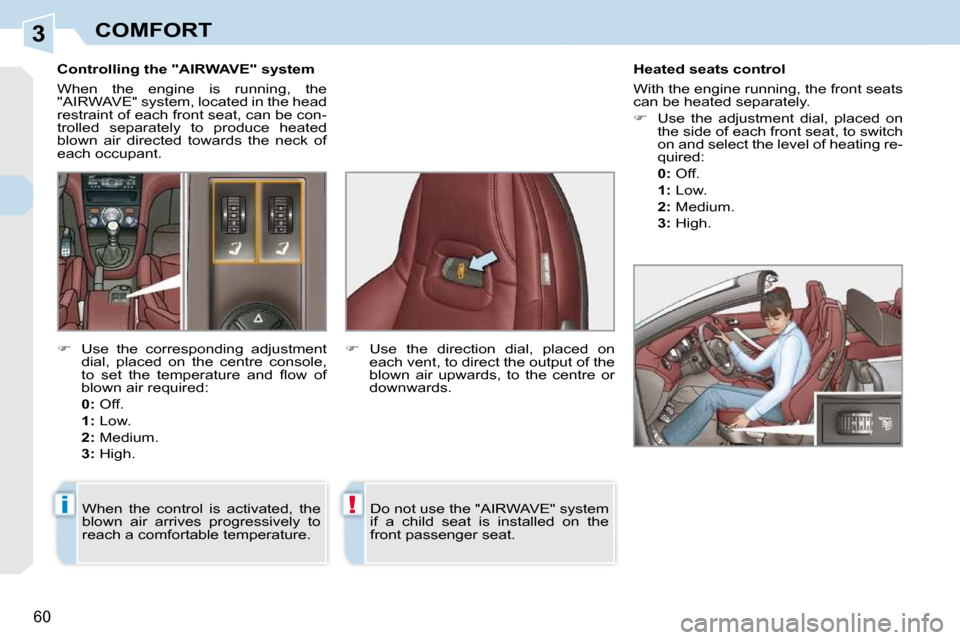
Controlling the "AIRWAVE" system
When the engine is running, the
"AIRWAVE" system, located in the head
restraint of each front seat, can be con-
trolled separately to produce heated
blown air directed towards the neck of
each occupant. Heated seats control
With the engine running, the front seats
can be heated separately.
Use the adjustment dial, placed on
the side of each front seat, to switch
on and select the level of heating re-
quired:
0: Off.
1: Low.
2: Medium.
3: High.
Use the corresponding adjustment
dial, placed on the centre console,
to set the temperature and fl ow of
blown air required:
0: Off.
1: Low.
2: Medium.
3: High.
Use the direction dial, placed on
each vent, to direct the output of the
blown air upwards, to the centre or
downwards.
When the control is activated, the
blown air arrives progressively to
reach a comfortable temperature. Do not use the "AIRWAVE" system
if a child seat is installed on the
front passenger seat.
Page 54 of 256

4
i
68
ACCESS
Starting the vehicle
Insert the key in the ignition switch.
The system recognises the starting code.
Turn the key fully towards the dash-
board to position 3 (Starting) .
When the engine starts, release the
key.
Switching the vehicle off
Immobilise the vehicle.
Turn the key fully towards you to po-
sition 1 (Stop) .
Remove the key from the ignition
switch. Remote control problem
Following disconnection of the vehicle
battery, replacement of the remote con-
trol battery or in the event of a remote
control malfunction, you can no longer
unlock, lock or locate your vehicle.
First of all, use the key in the lock to
unlock or lock your vehicle.
Then, reinitialise the remote control.
If the problem persists, contact a
PEUGEOT dealer as soon as possible. Changing the battery
Battery ref.: CR1620/3 volts.
Reinitialisation
Switch off the ignition.
Turn the key to position 2 (Ignition) .
Press the closed padlock immedi-
ately for a few seconds.
Switch off the ignition and remove
the key from the ignition switch.
The remote control is fully operational
again.
Unclip the casing using a coin at the
notch.
Slide the fl at battery out of its location.
Slide the new battery into its loca-
tion observing the original direction.
Clip the casing.
Reinitialise the remote control.
This replacement battery is available
from PEUGEOT dealers.
If the battery is fl at, you are
informed by lighting of this warn-
ing lamp, an audible signal and
a message on the multifunction
screen.
Key left in the "Ignition"
position
If the key has been left in the ig-
nition switch, the ignition will be
switched off automatically after
one hour.
To switch the ignition back on, turn
the key to position
1 (Stop) , then
back to position 2 (Ignition) .
Page 58 of 256

4
i
68
ACCESS
Starting the vehicle
Insert the key in the ignition switch.
The system recognises the starting code.
Turn the key fully towards the dash-
board to position 3 (Starting) .
When the engine starts, release the
key.
Switching the vehicle off
Immobilise the vehicle.
Turn the key fully towards you to po-
sition 1 (Stop) .
Remove the key from the ignition
switch. Remote control problem
Following disconnection of the vehicle
battery, replacement of the remote con-
trol battery or in the event of a remote
control malfunction, you can no longer
unlock, lock or locate your vehicle.
First of all, use the key in the lock to
unlock or lock your vehicle.
Then, reinitialise the remote control.
If the problem persists, contact a
PEUGEOT dealer as soon as possible. Changing the battery
Battery ref.: CR1620/3 volts.
Reinitialisation
Switch off the ignition.
Turn the key to position 2 (Ignition) .
Press the closed padlock immedi-
ately for a few seconds.
Switch off the ignition and remove
the key from the ignition switch.
The remote control is fully operational
again.
Unclip the casing using a coin at the
notch.
Slide the fl at battery out of its location.
Slide the new battery into its loca-
tion observing the original direction.
Clip the casing.
Reinitialise the remote control.
This replacement battery is available
from PEUGEOT dealers.
If the battery is fl at, you are
informed by lighting of this warn-
ing lamp, an audible signal and
a message on the multifunction
screen.
Key left in the "Ignition"
position
If the key has been left in the ig-
nition switch, the ignition will be
switched off automatically after
one hour.
To switch the ignition back on, turn
the key to position
1 (Stop) , then
back to position 2 (Ignition) .
Page 92 of 256
6
93
FITTINGS
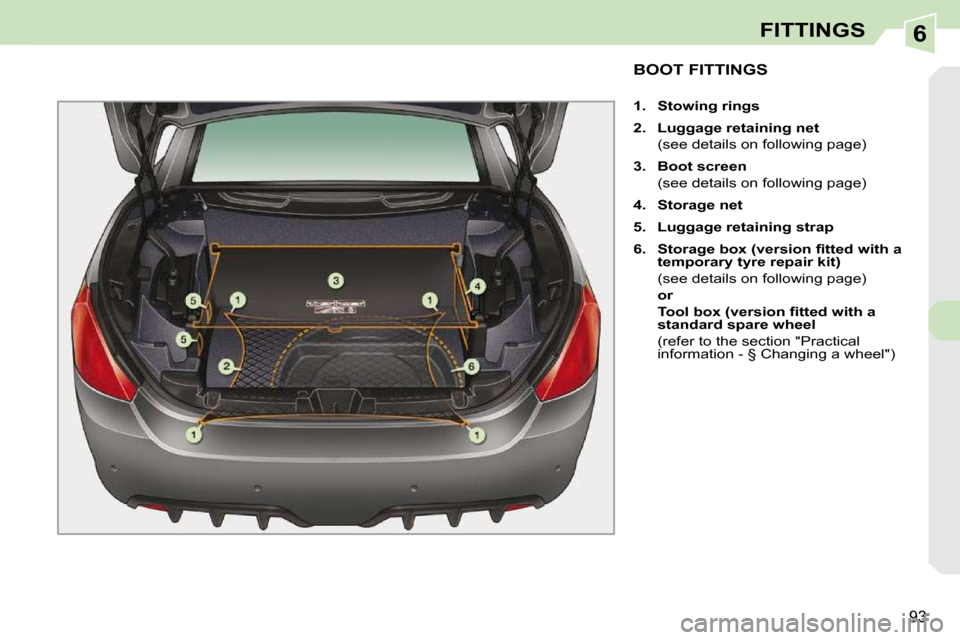
BOOT FITTINGS
1. Stowing rings
2. Luggage retaining net
(see details on following page)
3. Boot screen
(see details on following page)
4. Storage net
5. Luggage retaining strap
6. Storage box (version fi tted with a
temporary tyre repair kit)
(see details on following page)
or
Tool box (version fi tted with a
standard
spare wheel
(refer to the section "Practical information - § Changing a wheel")