2008 VOLVO V70 alarm
[x] Cancel search: alarmPage 58 of 274

The alarm system
The alarm is automatically armed whenever the vehicle is locked with the remote key or optional Personal Car
Communicator.
When armed, the alarm continuously monitors a number of points on the vehicle. The following conditions will trigger
the alarm:
The hood is forced open.
The tailgate is forced open.
A door is forced open.
The ignition slot is tampered with
An attempt is made to start the vehicle with a non-approved key (a key not coded to the car's ignition).
If there is movement in the passenger compartment (if the vehicle is equipped with the accessory movement sensor).
The vehicle is lifted or towed (if the vehicle is equipped with the accessory inclination sensor)
The battery is disconnected (while the alarm is armed).
The siren is disconnected when the alarm is disarmed.
A message will appear in the information display if a fault should occur in the alarm system. Contact an authorized
Volvo service technician.
NOTE
Do not attempt to repair any of the components in the alarm system yourself. This could affect the insurance policy
on the vehicle.
The alarm indicator light
The status of the alarm system is indicated by the indicator light on the dashboard (see illustration):
Indicator light off - the alarm is not armed
The indicator light flashes at one -second intervals - the alarm is armed
The indicator light flashes rapidly before the remote key is inserted in the ignition slot - the alarm has been
triggered.
Arming the alarm
Press the Lock button on the remote key. One long flash of the turn signals will confirm that the alarm is armed.
Alarm confirmation settings can be changed under Car settings
Lock settings Keyless entry . See page 125 for a
description of the menu system.
USA FCC ID: MAYDA 5823(3)
ProCarManuals.com
Page 59 of 274

This device complies with part 15 of the FCC rules. Operation is subject to the following conditions: (1) This device
may not cause harmful interference, and (2) this device must accept any interference received, including interference
that may cause undesired operation.
Canada IC: 4405A-DA 5823(3)
Movement sensor DA5823 by Dynex Operation is subject to the following conditions: (1) this device may not cause
interference, and (2) this device must accept any interference, including interference that may cause undesired
operation of the device.
67 02 Locks and alarm
Alarm
Disarming the alarm
Press the Unlock button on the remote key. Two short flashes from the car's direction indicators confirm that the alarm
has been deactivated and that all doors are unlocked.
Turning off (stopping) the alarm
If the alarm is sounding, it can be stopped by pressing the Unlock button on the remote control or by inserting the
remote key in the ignition slot. Two short flashes from the car's direction indicators confirm that the alarm has been
turned off.
Other alarm-related functions
Automatic re-arming
If the doors are unlocked, the locks will automatically reengage (re-lock) and the alarm will re-arm after 2 minutes
unless a door or the tailgate has been opened.
Audible/visual alarm signal
An audible alarm signal is given by a battery powered siren. The alarm cycle lasts for 30 seconds.
The visual alarm signal is given by flashing all turn signals for approximately 5 minutes or until the alarm is turned
off.
Remote key not functioning
If the remote key is not functioning properly, the alarm can be turned off and the vehicle can be started as follows:
1. Open the driver's door with the key blade. This will trigger the alarm.
2. Insert the remote key into the ignition slot. This will turn off the alarm.
68 02 Locks and alarm
Alarm
Reduced alarm function
Turning off the accessory alarm sensor(s)
ProCarManuals.com
Page 60 of 274

In certain situations it may be desirable to turn off the accessory inclination and movement alarm sensors if, for
example, you drive your vehicle onto a ferry where the rocking of the boat could trigger the alarm or if a pet is left in
the vehicle with the doors locked.
Turning off the alarm sensors with the button
Press the button shown in the illustration (within 1 minute after the ignition has been switched off).
The indicator light in the button will remain on until the vehicle is locked. A message will be also be displayed for 10
seconds or until the vehicle is locked, indicating that the sensors are disconnected.
Turning off the alarm sensors using the menu
Certain models are not equipped with a button for turning off the accessory alarms sensors. On such models, the
vehicle's menu system is used for this purpose (see page 125
for a description of the menu system).
To turn off the sensors:
1. Go into the menu under Car settings .
2. Select Reduced guard (Use the Enter button to make the selection).
NOTE
The accessory sensors are automatically reconnected to the alarm system the next time the vehicle is unlocked and
then locked again.
69 02 Locks and alarm
This page left intentionally blank.
Contents | Top of Page
ProCarManuals.com
Page 166 of 274

The driver will only be warned once for each time the wheels cross a marker line. No alarm will be given if a marker
line is between the wheels.
1A warning will be given even when Increased sensitivity has been selected. See page 125 for more information
177 04 Comfort and driving pleasure
Driver Alert System -option
Symbols and messages in the display
Settings
Settings for Lane Departure Warning can be made in the menu system under Car settings
Lane Departure Warning.
See page 124
for more information on the menu system.
On at startup: This selection puts the function in standby mode each time the engine is started. Otherwise, the system
will be in the mode that it was in when the engine was switched off.
Increased sensitivity: This selection increases the function's sensitivity. Warnings will be given at an earlier stage and
fewer limitations apply.
178 04 Comfort and driving pleasure
Park assist (option)
Introduction
The park assist system is designed to assist you when driving into parking spaces, garages, etc. It utilizes four
ultrasound sensors located in one or both bumpers to measure the distance to a vehicle, object, or a person who may
be close to the front or rear of your vehicle.
This system is available in the rear bumper only, or in both the front and rear bumpers.
Park assist utilizes four ultrasound sensors in the bumper(s) to measure the distance to a vehicle, object, or a person
ProCarManuals.com
Page 262 of 274

2 0 0 8
VOLVO V70
282 Index
12-volt sockets 188, 189
A
Accessory installation warning7
Active Bi -Xenon® headlights90
Active chassis system155
Active yaw control153
Adaptive cruise control158-161
Air conditioning132
Air distribution130
Air distribution table135
Air vents130
Airbags
disconnecting the front passenger's side 22-24
front19- 21
inflatable curtain27
side impact25
Alarm system 66-68
All Wheel Drive114
Anti-freeze194, 226
Anti-lock brake system115
warning light75
Approach lighting 54, 95
Audio system
audio functions 139
CD player/changer140, 141
menu control137
overview136
radio functions143
Sirius satellite radio145- 148
sound settings139
steering wheel keypad136
Auto brake (collision warning) 168
Auto-dim rearview mirror102
Automatic locking64
Automatic locking retractor33
ProCarManuals.com
Page 267 of 274
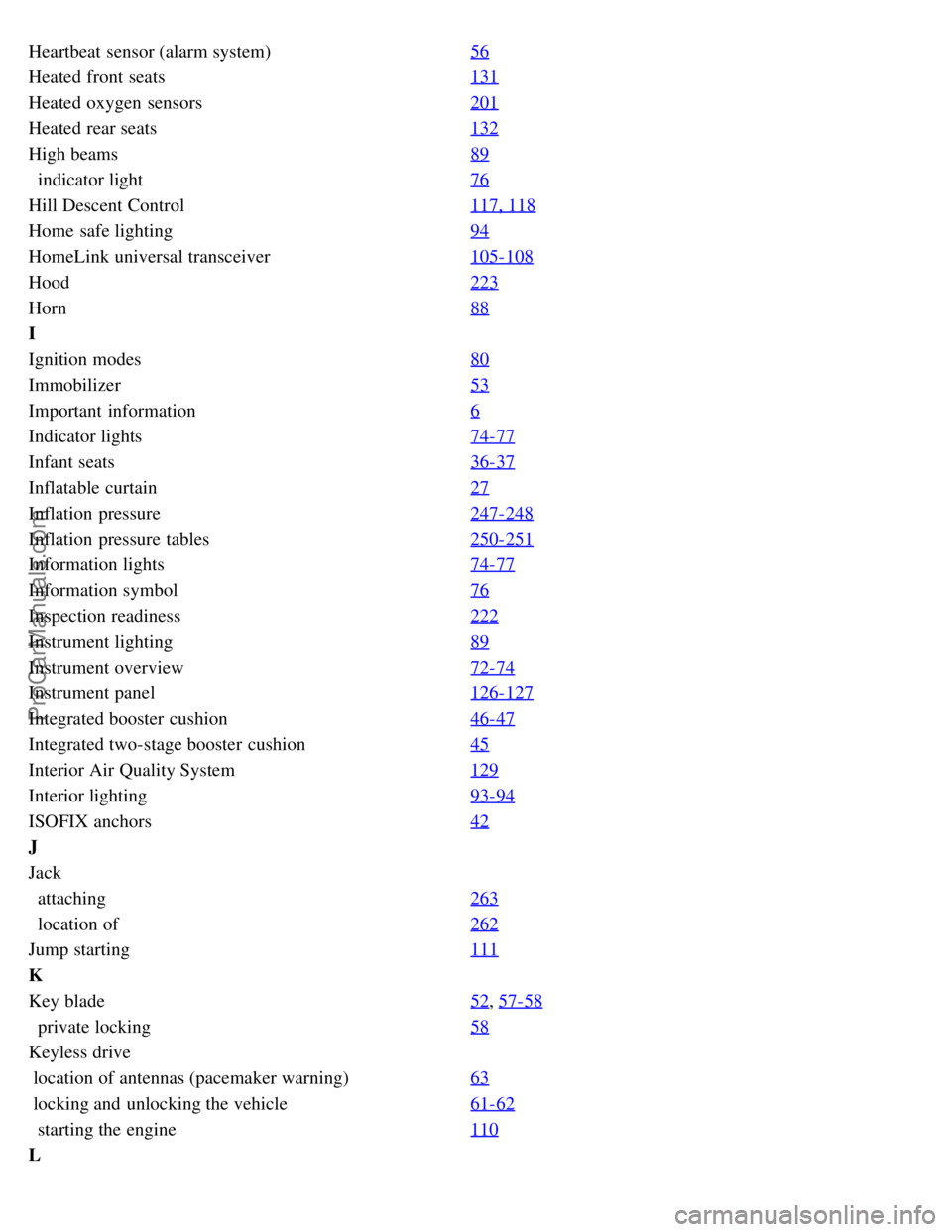
Heartbeat sensor (alarm system)56
Heated front seats131
Heated oxygen sensors201
Heated rear seats132
High beams89
indicator light76
Hill Descent Control 117, 118
Home safe lighting94
HomeLink universal transceiver105-108
Hood223
Horn88
I
Ignition modes80
Immobilizer53
Important information6
Indicator lights74-77
Infant seats36-37
Inflatable curtain27
Inflation pressure247-248
Inflation pressure tables250-251
Information lights74-77
Information symbol76
Inspection readiness222
Instrument lighting89
Instrument overview72-74
Instrument panel126-127
Integrated booster cushion46-47
Integrated two-stage booster cushion45
Interior Air Quality System129
Interior lighting93-94
ISOFIX anchors42
J
Jack
attaching 263
location of262
Jump starting 111
K
Key blade52
, 57-58
private locking58
Keyless drive
location of antennas (pacemaker warning) 63
locking and unlocking the vehicle61- 62
starting the engine110
L
ProCarManuals.com
Page 269 of 274

Net in cargo area210
O
Occupant safety14
Occupant weight sensor22-24
Octane recommendations197
Odometer, trip78
Oil
checking 224
low pressure warning light76
specifications276
volumes278
On Call Roadside Assistance 281
Overhead courtesy lighting93-94
Overheating, engine77
Oxygen sensors, heated201
P
Pacemaker (keyless drive warning)63
Paint, touching up269
Panic alarm55
Park assist178-180
Parking brake
electric, applying/releasing 119
warning light76
Parking lights 90
changing bulbs230
Personal Car Communicator, unique functions 55-56
Polishing the vehicle267
Power front seat
memory function 83
with keyless drive84
Power mirrors 101
defroster102
Power moonroof 103-104
Power steering
fluid 227
, 279
speed-dependent155
Power tailgate (option) 203
Power windows99-100
laminated glass100
Pregnancy, using seat belts during 17
Private locking58
Proposition 65 warning9, 111, 239, 280
R
Radio
ProCarManuals.com
Page 270 of 274

functions143
Sirius satellite radio145- 148
Rails, floor205
Rain sensor96
READ button126
Rear fog light92
Rear park assist178-180
Rear seats
center head restraint 86
folding85
head restraint86
heated132
Rear window defroster 102
Rearview mirror
auto-dim function 102
compass151
Recall, child restraints 44
Refrigerant128, 279
Refueling196-197
fuel filler cap200
fuel filler door198
fuel tank volume279
octane recommendations197
Registering child restraints 44
Remote control52
approach lighting54
common functions54
immobilizer53
key blade52, 57-58
key memory53
locking the vehicle54
panic alarm55
Personal Car Communicator54- 56
private locking58
replacing battery60
unlocking the tailgate55
unlocking the vehicle54
Reporting safety defects 15
Roadside Assistance281
Roof loads211
S
Safety defects, reporting15
Safety, occupant14
Seat belts
ProCarManuals.com