2008 VOLKSWAGEN SCIROCCO LED
[x] Cancel search: LEDPage 104 of 138
Downloaded from www.Manualslib.com manuals search engine th . troductory information and safety warnings & on page 218 First
read and observe e m ·
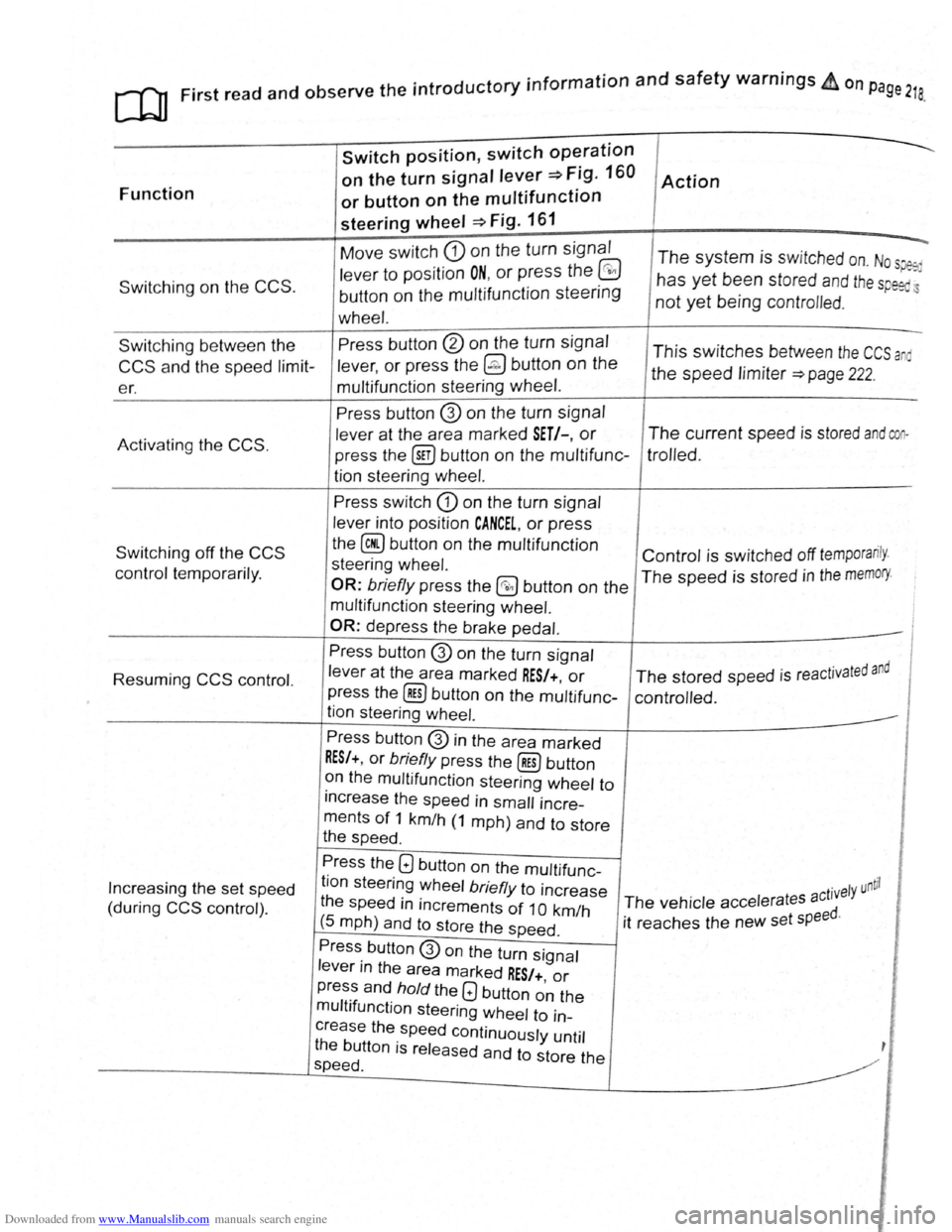
Function
Switching on the CCS .
Switch position, switch op~ration
on the turn signal lever~ Fig. 160
or button on the multifunction
steering wheel ~Fig. 161
Move switch CD on the turn signal
lever to position ON, or press the @
button on the multifunction steering
wheel.
Action
--.
The system is switched on. Nos~
has yet been stored and th e sp eed.
not yet being contro lled .
Switching between the
CCS and the speed limit
er. Press
button
@ on the turn signal
lever,
or press the @ button on the
multifunction steering wheel. This switches between the CCS a
the speed limiter ~page 222.
Activating
the CCS.
Switching off the CCS
control temporarily.
Resuming
CCS control.
Increasing the set speed
(during
CCS control) . Press button
@ on
the turn signal
lever at the area marked
SET/-, or
press the @iJ button on the multifunc
tion steering
wheel.
Press switch CD on the turn signal
lever into position
CANCEL, or press
the
@ button on the multifunction
steering wheel.
OR: briefly press the @0 button on the
multifunction steering wheel.
OR:
depress the brake pedal.
Press button
@ on the turn signal
lever
at the area marked RES/+, or
press the @] button on the multifunc
tion steering wheel.
Press button
@ in the area marked
RES/+, or briefly press the@) button
on the multifunction steering wheel to
increase the speed in
small incre
ments
of 1 km/h (1 mph) and to store
the speed .
The current speed is stored and coo
trolled .
Control is switched off temporarily .
The speed is stored in the memory.
· t d and The stored speed is reactJva e
controlled .
Press the
Q button on the multifunc
tion steering wheel
briefly to increase
the speed
in increments of 1 0 km/h
(5 mph) and to store the speed .
. ntil ct1vely u The vehicle accelerates a
it reaches the new set
speed.
Press button
@on the turn signal
lever in the area marked
RES/+, or
press and hold the Q button on the
multifunction steering wheel to in
crease the speed continuously until
the button is released and to store the
speed .
Page 111 of 138
Downloaded from www.Manualslib.com manuals search engine .... ... ' 1)
' ) ....
m The ACC restricts the speed to 160 km/h
W (100 mph). 0
Repair wor k on the radar sensor will require
• ecial knowled ge and tools. Volkswagen rec
~~mends using a Volkswagen dealership for
m If the ACC is active, unfamiliar noises may be
W heard during the automatic braking proce-
this purpose.
dure. Th ese are caused by the braking system.
W this chapte r, do not use the ACC and have
the system checkd by a qualified workshop . V olks
wagen recommends using a Vol kswagen dealer
ship for this purpose .
Display, warning and indicator lamps
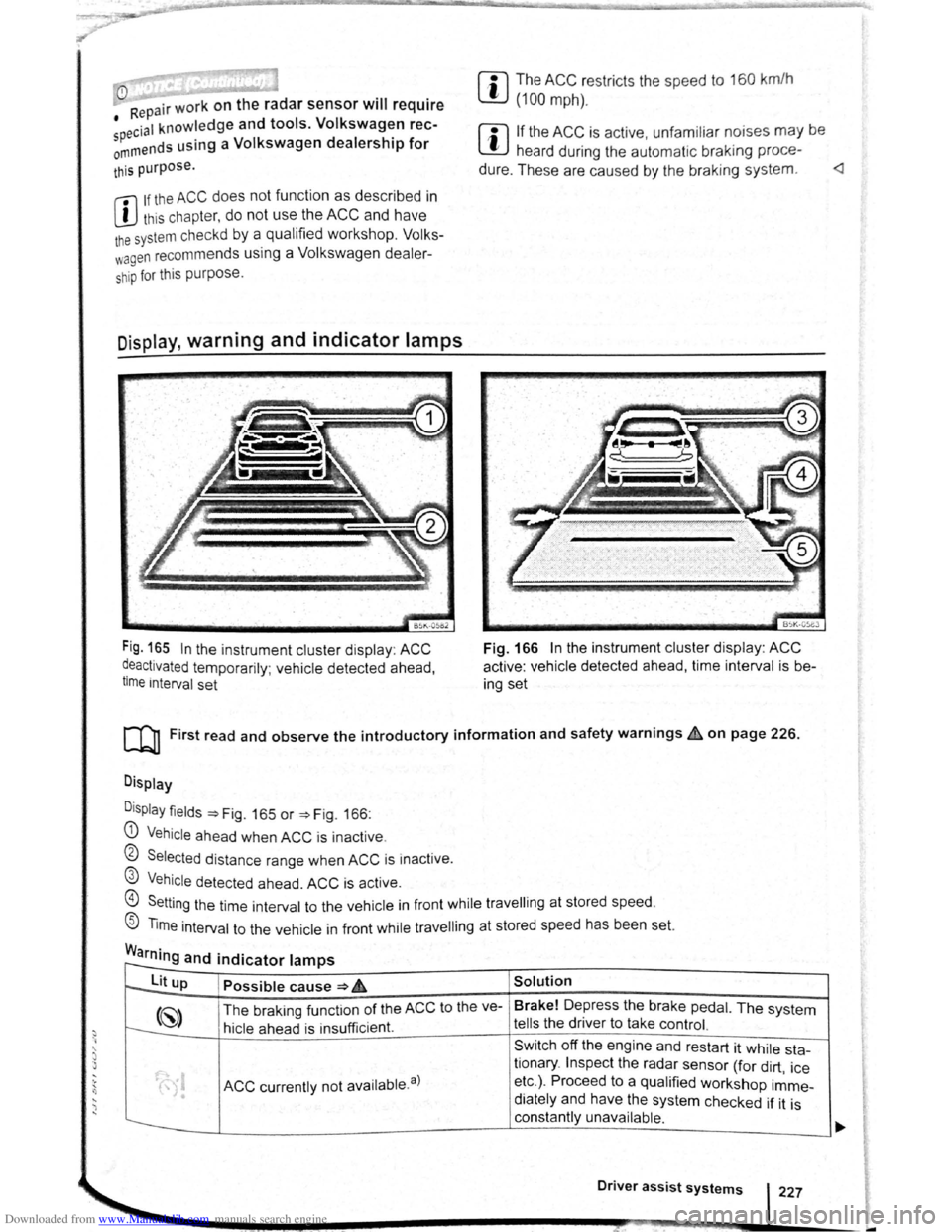
Fig. 165 In the instrument cluster disp lay : ACC
~eactivated temporarily ; vehicle detected ahead,
t1me interval set
BSK-05eJ
Fig. 166 In the instrument cluster display : ACC
active : vehicle detected ahead, time interval is b e
ing set
[Q] First read and observe the introductory information and safety warnings~ on page 226.
Display
D
isplay fields ~Fig. 165 or ~Fig. 166:
G) Vehicle ahea d when ACC is inact ive .
0 Selected distance range when ACC is inactive .
@ Vehicle detected ahead. ACC is active.
@) Setting the time int erval to the vehicle in front while travell ing at stored speed.
® Time interval to the vehicle in front while travell ing at stored speed has been set.
Warning and indicator lamps r--
to--lit up Possible cause ~ 6 Solution
(~) The braking funct ion of the ACC to the ve- Brake!
Depress the brake pedal. The system
t---:. hicle ahead is insu fficient. tells the driver to take control.
Sw itch off the engine and restart it while sta-
ACC currently not availab le. a)
tionary . Inspect the radar sensor (for dirt , ice
• etc.) . Proceed to a qualified workshop imme-
• diately and have the system checked if it is
constantly unavailable .
Driver assist systems 227
-
Page 113 of 138
Downloaded from www.Manualslib.com manuals search engine . ,~~t ral dification s to the vehicle , e .g .
~ :·.
9 t o e i le or making alteration s to the
~.': d tri , can impair the function of the ACC.
~ ·· ra~ od ifict ton s s hould therefore only be
t y a qualified workshop . Vo lkswage n
e s using a Vo lkswagen dealership for
, ec y erformed repair s to the front end of the
·~"· •e can a lter t h e posit ion of the radar sensor ~I
. e re r e im pair the funct ion of the ACC . R e-
.. ~i , should there fore only be carried out by a
,__a11 ed wo shop . Volk swagen recommends us-
1 sv agen dealersh ip for this purpose .
Switch off the ACC if you suspect that the radar
sensor has been damaged or its position has
been altered. This can help to prevent further
damage. Have the radar sensor realigned.
• The radar sensor could be moved if it is hit,
for example in parking manoeuvres. Readjust
ing the sensor could impair the performance of
the system or cause it to be switched off .
• Repair work on the radar sensor will require
special knowledge and tools. Volkswagen rec
ommends using a Volkswagen dealership for
this purpose.
• Remove snow with a brush, and remove ice
preferably with a solvent-free de-icer spray. <1
Operat ing adaptive cruise control (ACC)
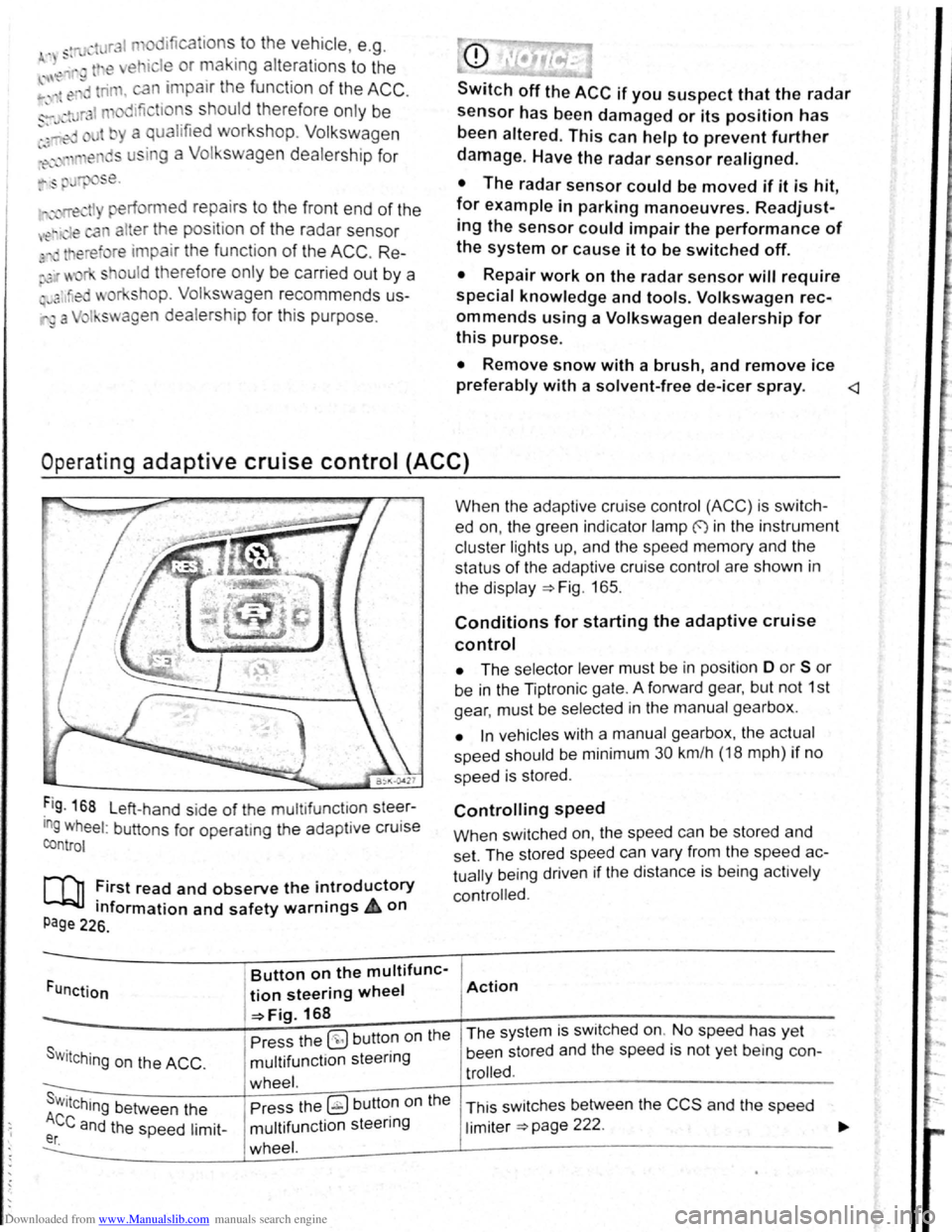
Fig . 168 L eft-hand side of the mu ltifunctlon steer
ing wheel: buttons for operatmg the adaptive cruise
control
[Q] :irst read and observe the i~troductory
tnformation and safety warnrngs 4 on
Page 226.
Funct ion
Button on the multifunc-
tion steering wheel
-=>Fig. 168
Pre ss the
(9 but ton on the
S w i
tching on the ACC . multifunction steering
wheel. s . Press the ~ button on the Wttching between the
Ace and the speed limit-multifunction steering er. wheel.
When the adapt ive cruise control (ACC) is switch
ed on, the green indicator lamp f) in the instrument
c
luste r lights up, and the speed memory and the
status
of the adaptive cruise contro l are shown in
the disp la y ~Fig. 165.
Conditions for starting the adaptive cruise
control
• The selector lever must be in position D or S or
be in the Tiptron ic gate. A forward gear, but not 1st
gear , must be selected
in the manu al gearbox .
• In vehicles with a manual gearbox , the actual
speed should be minimum 30 km /h (18 mph) if no
speed is stored .
Controlling speed
When switched on, the speed can be stored and
set. The stored speed can vary from the speed
ac
tually
being driven if the distance is b ein g act ively
controlled.
Action
The system is switched on. No speed has yet
been stored and the speed is not yet being con-
trolled.
This sw itches between the CCS and the speed
limiter ~page 222 .
Page 114 of 138
Downloaded from www.Manualslib.com manuals search engine Button on the multifunc-
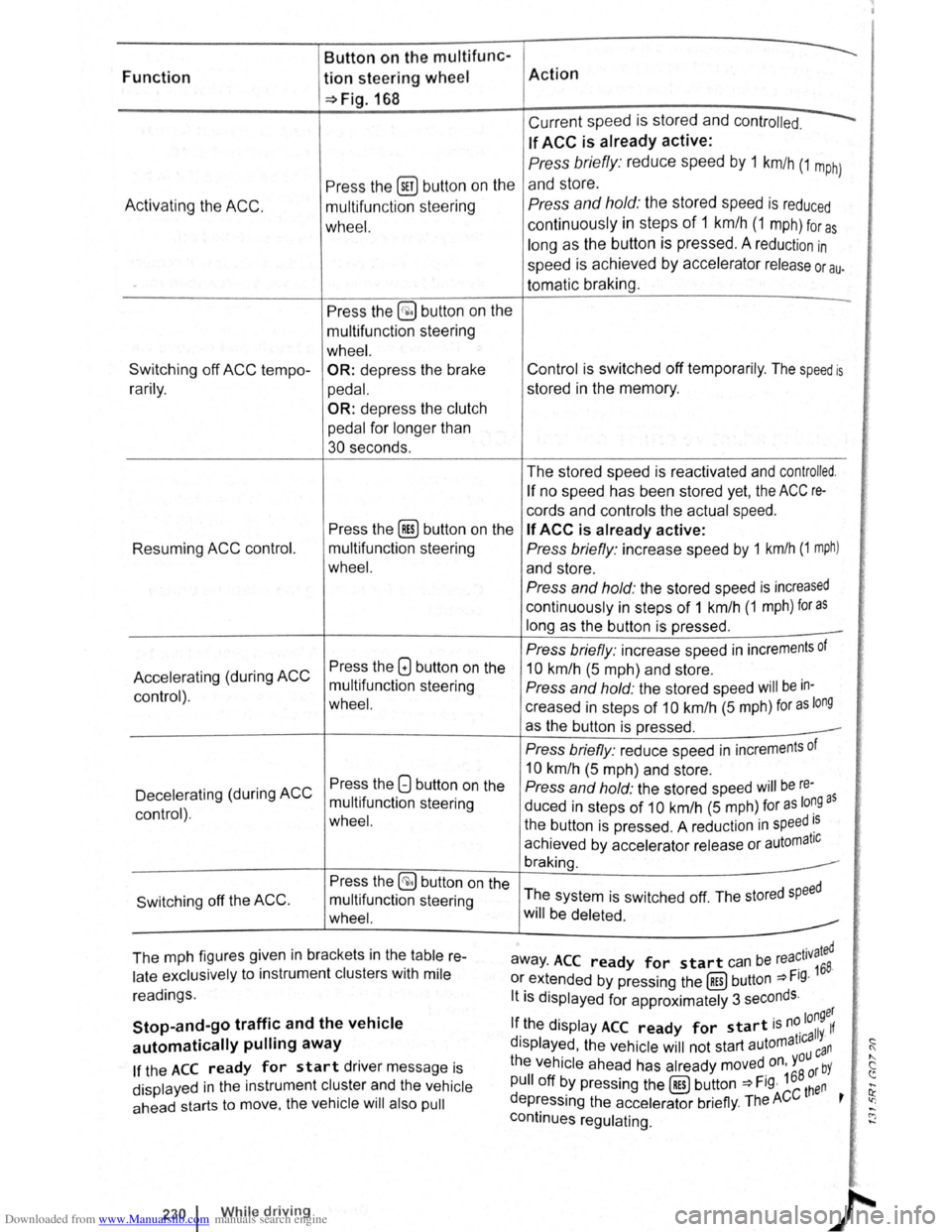
Function tion steering wheel Action
~Fig.168
Current speed is stored and contr olled.
If ACC is already active:
Press the (ill) butt on on the
Press briefly : reduce speed by 1 km/h (1 m ph)
and store.
A c
tivating the ACC. multifun ction stee ring Press and hold: the stored speed is reduced
wh eel. continuously in steps of 1 km /h (1 m ph) for a s
long as the button is pressed . A reduction in
speed is achieved by accelerator release or au.
tomatic braking.
Press the
§;) button on the -
multifunction stee ring
wheel. .'i
Switching off ACC tempo -OR: depress the brake Control is switched off temporarily . The speed is i:::
r a rily . ped al. stored in the memory. 0
:!
OR: depress the clutch
pedal
for longer than <'
30 seconds.
The stored speed is reactivated and
controlled.
If no speed has been stored yet, the ACC re-tr
cords and controls the actual speed. i)
Press the [Res) button on the If ACC is already active: i!:
Resuming ACC control. multifunction steering Press briefly : increase speed by 1 km/h (1 mph) ~· !'·
wheel. and store . [~
Press and hold: the stored speed is increased
continuously in steps of 1 km /h (1 mph) for as
long as the button is pressed . -
Press briefly: increase speed in increments of
l'•
Press the GJ button on the
Accelerating (during ACC 10 km/h (5 m ph) and store .
mult ifunction steering
Press and hold: the stored speed will be in-
control) .
wheel. creased in steps of 10 km/h (5 mph) for as long
as the button is pressed .
Press briefly: reduce speed in increments of ~i
Press the 8 button on the
10 km/h (5 m ph) and store .
Decelerating (during
ACC Press and hold: the stored speed will be re-)
multifunction steering
duced in steps of 10 km/h (5 m ph) for as lo~Q as control) . wheel. the button is pressed . A reduct ion in speed ~s
achieved by accelerator release or automatiC ~f
braking.
Press the
§;) button on the
The system is switched off. The stored
speed Switching off the ACC . multifunction steering
wheel. will be deleted.
The mph figures given in brackets in the
table re-r ated away . ACC ready for start can be rea~ 1v
168.
late exclusively to instrument clusters with mile or extended by pressing the (RES) button ~Fig. :;
readings. lt is displayed for approximately 3 seconds .
,,
Stop-and-go traffic and the vehicle longer
If the display ACC ready for start is n~ 11 If
automatically pulling away d ' t1ca Y· ~ !Splayed , the vehicle will not start automa ca n (
If the ACC ready for start driver message is the vehicle ahead
has already moved on, you bY " c
pull off by pressing the (RES) button ~Fig. 168 ~~n ~
displayed in the instrument cluster and the vehicle ......
ahead starts to move, the vehicle will also pull depressing the accelerator briefly. The ACC t ' ~ .....
continues regulating. C"J ......
~·
f);
230 1 While drivin g
Page 121 of 138
Downloaded from www.Manualslib.com manuals search engine I~
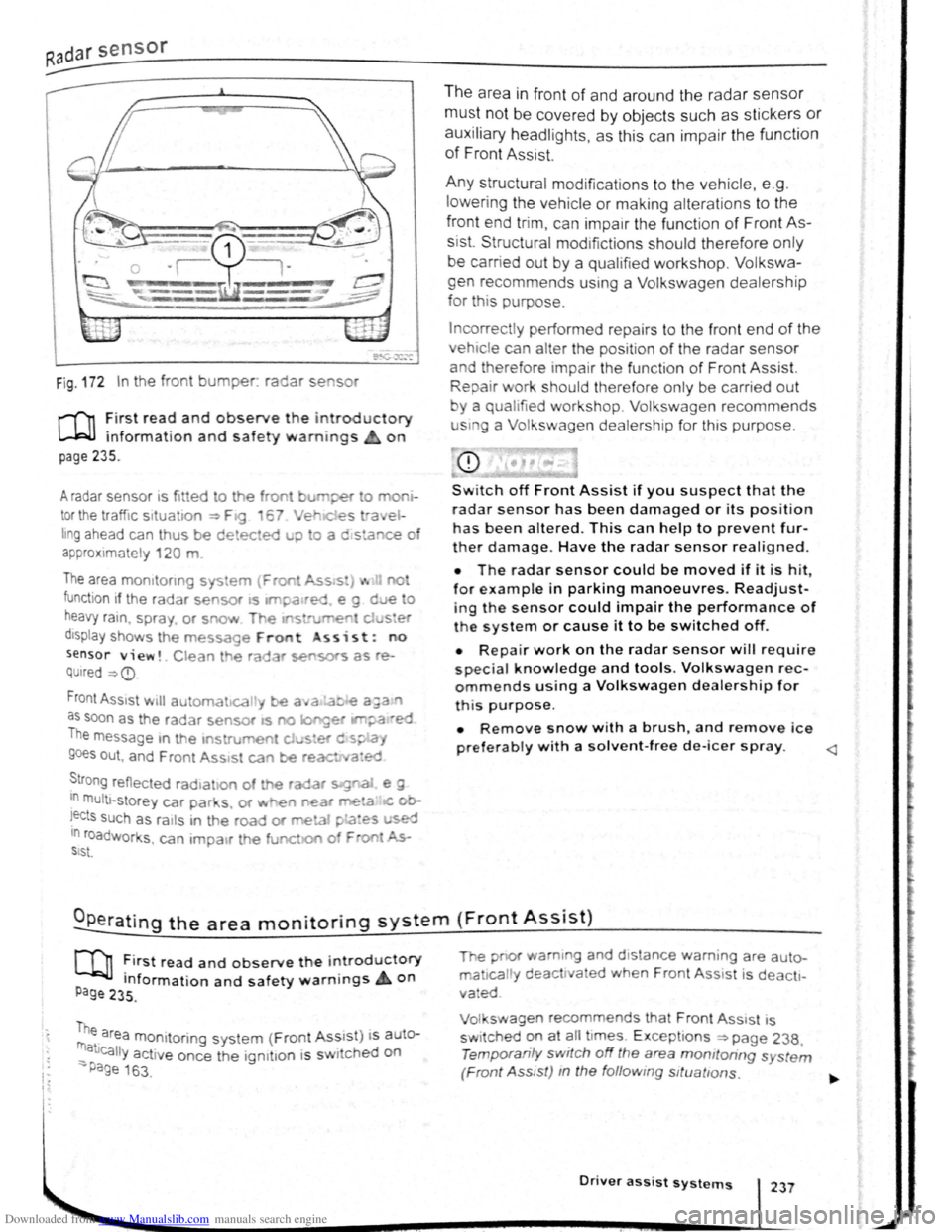
Fig . 172 In the front bumper. radar se sor
r-f'n :irst rea~ and observe the introductory
L....Wl mformat1on and safety warnings on
page 235.
A radar sensor 1s fi tted to the front burr per o mo
tor the traffic situa 1on ~ F19 6 Ver e st-a el
hng ahead can thus be detected u;> o a c stance o
a p
proximate ly 120 m
The area mo mto nng sys em {Fron Ass s:) ... no
function if the radar sensor •s ltl'pa•red e g d e o
heavy ra1n. spra y or snow T~e If'S rurren d ster
d1sptay shows th e message Front ss i s t : no
sensor view!. Clean he ra ar sensors as re
QUired ~
as soon as the radar sensor as no longet IM?a ·ed
The message m the 1ns rument cJ .... s•er d s~.a,
goes out , and F ren t Ass•st can be reac ed
~tro ng reflected rad•ahon of the radar s:g"aJ e g
In multt -storey car par s. or ~ e'l near me!a IC ob
!ects such as ra1ls in t he road or meta1 pLa~es used 10 roadworks , can 1mpa1r th e funct.o of F oo ~ SIS\.
The area in fron t of and around the radar sensor
must not be covered by objects such as stickers or
auxiliary headlights, as this can impair the function
of Front Assist.
Any structural modifications to the vehicle, e .g .
l
owering the vehicle or making alterations to the
front end tri m , can impair the function of Front As
sist. Structural mod1fictions should therefore only
be carried out by a qualifie d workshop. Volkswa
gen recommends using a Volkswagen dealership
for th is purpose.
Incorrectly performed repa irs to the fron t end of the
vehic le can alter the position of the radar sensor
and therefore tmpai r the functi on of Front Assist.
Repair work should therefore only be carrie d out
y a qualified workshop. Volkswagen recommends
u sm g a Volkswagen dealership for this purpose.
CD
Switch off Front Assist if you suspect that the
radar sensor has been damaged or its positio n
has been altered. This can help to prevent fur
ther damage. Have the radar sensor realigned.
• The radar sensor could be moved if it is hit
for example in parking manoeuvres. Readjust-'
ing the sensor could impair the performance of
t h e system or cause it to be switched off.
• Repair work on the radar sensor w ill require
special knowledge and tools. Volkswagen rec
ommends using a Volkswagen dealership for
this purpose.
• Remove snow with a brush, and remove ice
preferably with a solvent-free de-leer spray.
m ~irst read and observe t h e introductory
P Information and safety warnings on age 235 .
me area monitoring system (Front Ass1 s t) i s auter
_ atJcally activ e once the ign1t1on 1s s wi ched on
-Page 163 .
The pnor wam1ng and d 1stance warn ing are auto
ma 1call y deact1va ed when Front Ass 1st i s deacti
vated
Vol swagen recommends that Front Ass1 st is
sw itched
~n at ~11 t imes. E xcept ions ~page 238,
Temporan ly switch off the area momtoring s ystem
(Front Ass tst) m the follow ing sttuattons.
Driver assist systems 237
Page 130 of 138
Downloaded from www.Manualslib.com manuals search engine Tyre monitoring system
Introduction
Th1s ct1,1pt r contnin s inform ation on th e follow1ng
SlllliN~ts.
Tymmomto r in d1ca to r lamp . . . . . . . . . . . . . . 253
T
ro m onito r disp l y . . . . . . . . . . . . . . . . . . . 254
Additional information and warnings:
• Voll-.s w age n Inf orm ation sys te m ~p ag e 26
• lnfotainment sys te m ~page 3 1
• Tmnspo rting c:> page 126
• Brak1ng. stopp rng and parking ~page 179
• C leani ng a nd ca rin g for th e vehicle ex terio r
::-page 294
• Wheels and tyres ~page 308
•
A ccessones, modrficatrons, re parr s and renewal
or parts ~page 320
•
Consumer i nfor mation ~pag e 328
A WARNING ~~-~ ,c_. ""]
Incor rec t handling of the wheels and tyres
can lead to a sudden loss of pressure in the
tyres , trea d separation and even tyre blowout.
• Check tyre pressures regularly and always
keep to the specified tyre pressure value. If
the tyre pressure is too low, the tyre could
warm up to such an extent that the tread may
separate and the tyre could burst
~e monitor indicator lamp
• Always maintain correct cold tyre inflation
pressure as listed on the tyre pressure label
=>page 308 .
• Check tyre inflation pressure regularly
when the tyres are cold. Adjust tyre pressure
in the cold tyre to the recommended tyre
pressure for the tyres installed on your vehi
cle as necessary.
• Check your tyres regularly for signs of
w ea r or damage.
• Never exceed the top speed and load per
mitted for the fitted tyres.
CQ"' Und er-in nated tyres w111 increase fuel con
(Jtf sumption and tyre wear.
m When new tyres are dnven at high speeds for
W the firs t time, they can expand slightly and
trigger a one-off pressure
warn1ng.
m O ld tyres should o nly be re placed by tyres
W tha t have bee n app roved by Vo lkswagen fo r
the vehrcle type.
m Do not rely solely on the Tyr e Pressure Moni
L!J to nng System . Check your tyres regularly to
ensure that th
ey are properly inflated and have no
srgns of damage, such as punc tures, cuts, cracks ,
and bliste rs Remove an y
Objects th at become em
bedded 1n the tyre tread but have not penetrated
into the body
of the tyre itself
r--~~L~it_u_p _____ P_o_s_s_ib_l_e_c_a_u_s_e_~--.----------------T,S--o-lu-t-io_n __________________________ __
(I
The tyre pressure of one tyre or several • ir; Do not drive on! Reduce speed lmmedi
tyres has decreased considerably in com- 1 ately St op the vehic le as soon as possrble
panson to the tyre
pressure set by the I and when safe to do so. Avo1d swerv1ng me-
driver . or the structure of the tyre is dam-1 noeuvres and heavy brakrng'
aged .
An acoustic wamrng wrll also be Check all tyres and the tyre pressures The
sounded ,
and a correspondrng message damaged tyre should be replaced
will appear 1n the mstrument cluster and
infotainment system displays
Driver assi
st systems 253
Page 132 of 138
Downloaded from www.Manualslib.com manuals search engine • If tll ly .
s i
de. n
ch a ng ed manu al-
is t
oo low.
I lo ded more heavily on one
• If tile wh el on one axle are loaded more
heav ily. e .g . high load level.
• If snow chains h ve been fitted.
• If a te mper ry spare wheel ha s been fitted.
• If one wheel per axle has been changed .
In certain circumsta nces. the tyre monitor dis-
play W may become slow or may not display any thing, e .g . with a sporty driv ing style. in winter driving condit ions , on unpaved roads, or when driving
w ith snow chains .
Calibrating
the tyre monitor display
The tyre monitor display will have to be re-ca librated after changing the tyre pressure . or after
c h anging one or more wheels. Th is also applies when wheels are swapped, e.g . from the front to the rear.
-
• Switch on the ignition .
• Open the Tyre monitor display menu option in the infotai nment system display ~page 31.
• Touch the @ID function button .
• If all 4 wheels are se t to the correct va lues,
t o uc h the (Co nfirm ) function button to store the tyre
p ressu re s.
• To uc hing the (cancel) button w ill prevent the cu r
rent tyre pressures from being stored and the system will n ot be cali brated .
During normal ve hi cle operation , the
system cali
br ates itse lf independently to the the fitted tyres
and the tyre pressures filled by the
driver. The cali
brated values are accepted and monitored after a
l ong journey at vari ous speeds .
If the wheels are loaded more heavily than normal,
e .g . if the veh icle is ca rrying hea vy payload, the
tyre press ure must be rais ed to the r
ecommended full-load tyre pressure before calibration =>page 308.
l:l The tyre monitor dis play stops working if W the re is a malfunction in the ESC or ASS =>page 179 .
l:l When using snow chains , an incorre ct disL!J play may be shown as the snow chains in-
crease the tyre circumference .
Page 133 of 138
Downloaded from www.Manualslib.com manuals search engine Engine oil specification
r-T'n First read and observe the introductory
L-WJ information and safety warnings~ on
page 281.
The engine oil used must correspond exactly to
specifications .
The correct engine oil is important for the function
and service l
ife of the engine . A special high quali
ty multigrade oil has been filled at the factory and
th is can
normally be used as an all-season oil.
If possible , only use Volkswagen-approved engine
o il
~CD. To comply with the requirements of the
flexible service, only use approved flexible service
engine oil that
complies with the corresponding
VW standard (~table on page 282). The engine
o ils listed are
multigrade high-lubricity oils.
Engine oils are constantly being developed and
im
proved . A Volkswagen dealership is always kept
up to date on innovations . Volkswagen therefore
recommends having engine oil changes done by a
Volkswagen dealership. The
qu
ality of the engine oil is not only ta ilor ed to
the requirements of engines and exhaust gas treat.
ment systems, but also to fuel quality . Due to the
way
in which a combustion engine works, engine
oil always comes into contact with combustion
resl
dues and fuel, which has a kno ck-o n effect on the
ageing process of the oil.
The quality of fuels can var y gr ea tly between lndl·
vidual markets and this must be take n Into account
when selecting the correct engine oil.
The use of engine oils compliant with the
VW
504 00 und VW 507 00 specific ations requires
a fuel quality compliant with EN 228 (petrol) and
EN 590 (diesel). Engine oils compliant with
VW
504 00 und VW 507 00 are therefore unsult·
able for use in a large number of markets.
--Permitted engine oil specifications ~CD Alternative engine oil
specifications =:P-
Engine type Flexible service Fixed service 011, 012, 013, Only in the EU, switzerd
016 014,
017 (based on time/dis-land, Norway, Japan all
tance travelled) Australia")~
Petrol engines vw 504 00 vw 502 00 VW504~·
Die sel engines with vw 507 00 vw 507 00 diesel particulate filter
------D iesel engines with-
out diesel particulate vw 507 00
filter vw 505 01 vw 507 oo
t ill lit)'
a } Alternat1ve engme 011 spec1ficat1ons may only be used in fixed services 011 0 1 wtl
en fuel of !J Q r
complian t w1th EN 228 (petrol) and EN 590 (diesel) or fuel of an . 1 •
1
2
•.
01~· 014. a nd Ol 7
· and 0~ Y 1 r countrY· ' eqUiva ent qual1ty, IS ava1lable In tl1e partl cu a