2008 VOLKSWAGEN JETTA Com
[x] Cancel search: ComPage 435 of 477
About this booklet
This booklet contains important informati on,
tip s, sugges tions and warning s o n using your ve
hicle . Th e other booklets in th e Owner's Litera
tur e contain more informati on that you should
be aware of for your own safety and for th e safe ty
of your passenger s.
Make sure that you alwa ys kee p the compl ete
Owner 's Literature in the vehicle. Thi s is espe
ciall y important when you lend or sell the ve
hicle.
This manual describes the vehicle equipment at
the time of publicat ion. The content s of this
booklet correspond to the equi pment options
on your vehicle.
Illustratio ns ma y vary from your vehicle. For
this r ea so n you sh ou ld regard illustration s as a
gene ral guide.
At the beginning of
bookle t, you will find a
tab le of con tents sho win g all the item s de
sc ribed in thi s manua l in the ord er th ey appear.
An alphabetical index is at the end of the
bookl et.
Directions and posit ions (for example ri ght , le ft,
front, rear) ar e always relative
10 the direction of
tra vel of the vehicle unl ess stated otherw ise .
So me section s of thi s book let do not appl y
to all
vehicles. If this is the case, a texl at the b eginnin g
of the section indicates which vehicle s it appli es
to , for examp le "Applies to
Models onl y".
Th e section is cont inued on th e nex t p age.
Indicat es the end of a sect ion .
® Reg is tered trad emar ks are mark ed or®.
H owever, t he ab senc e of thi s symbol does
1101 con stitute a waiver of the right s co n
cern ing any te rm.
Cross- re fere nce to a "WARN IN G" within
or ou ts id e of a sec tion.
Cross-refe re nce to a within or side of a sec tion.
W AR NIN G
Tex ts with this symbo l contain impo rtant in
formation on safety and how to reduce t he risk
of persona l injury or death.
No te
Tex ts w ith this sy mbol draw yo ur attent ion to
po tent ial source s of dam age to your vehicl e.
Fo r th e sake of environ men t
with this symbol contain informa tion env ironm ent and how you can he lp
prot ect it.
Tip s
symbol special tips and
o th er inform ation abo ut getting the most out of
your veh icle and its fe ature s.
Page 442 of 477

Booklet 3.4 Premium Sound System
Radio I CD
Radio
ON /OFF Button
88.3 89.1 94.1
Fig. 3 Radio b uttons
Pr ess the knob fig. 3 to turn the unit
on I
Whatever was playing when the uni! was las!
turned off -radio or CD -will automaticall y
come back on when the unit is turned on again.
The foll owing se lling s will b e saved whenever
yo u tu m off the system:
• Rad io: the frequen cy (ra dio s tat ion or
c h an nel) se ttin g.
• Interna l CD c han ger : the se lected CD track.
W hen you
on the again , th e ra di o or the
CD player w ill co me on depend ing on which on
yo u wer e la st li ste nin g
when you turn ed the
unit off .
The uni! turn s off au!Omati ca lly w hen you re
m ove the key fro m the ign ition lock.
The radio can be turn ed on wh ile th e ignition
key is rem oved b y simpl y pressing the kn ob
88,3
about 1 hour. This procedure can be re p eate d as
o ften as des ired .
WARNING
Dri ver distraction causes accid ents, collision s
and ser ious personal injury!
• Never let yourse lf be distr acted by setting,
a djusting or using the Audio System.
• Use the Audio System only if road, traffic
and weather conditions p ermit and you will
not b e distracted from your driving .
• Alwa ys set vo lum e le vel s so that you can
clearly hear horns, sir ens and other warning
s ounds outside the vehicl e.
Tips
If th e radio does not emit any so un d w hen it is
sw itched on and the word SAFE appears in the
display, then the unit i s electronica lly lock ed u p.
See
page 34.
Radio I CD 7
Page 449 of 477
Booklet 3.4 Premium Sound System
Activate your Satellite Radio Service
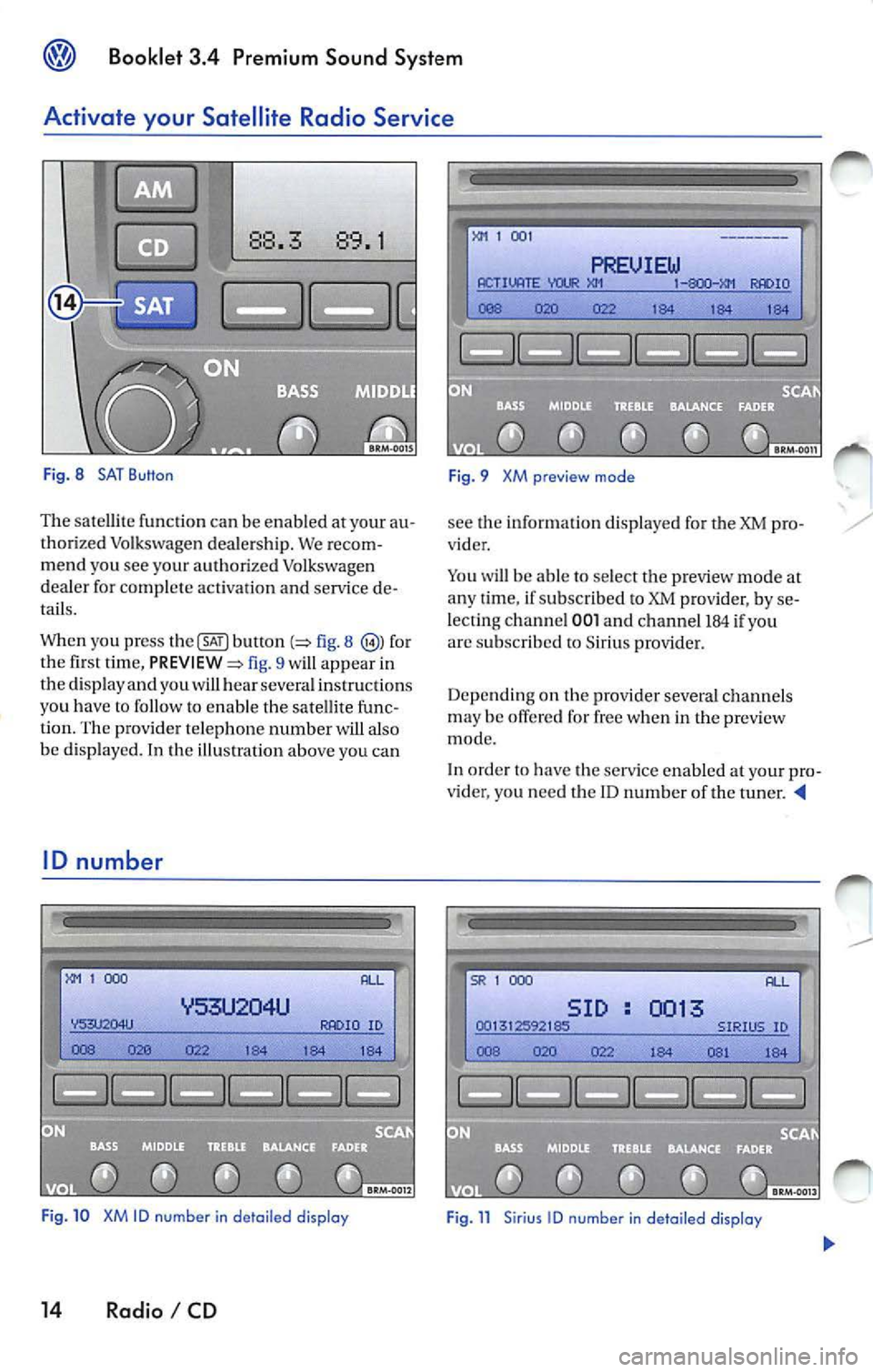
Fig. 8 SAT Button
The sate llite functio n ca n be en abled at your au
tho rized Volkswagen deale rs h ip. We recom
me nd you see your aut horized Volkswage n
de aler for complete activatio n an d service de
tails.
When you press
b utl on fig. 8 for
the fi rst tim e, fig. 9 will app ear in
the disp lay a nd you wi ll hear sever al ins truc tions
yo u h ave
to fo llow to enab le t he sa te lli te fu nc
tion. The prov ide r telep hone number w ill also
be d isp layed. In the illu stratio n above you can
ID number
1 000
ID
Fig . 10 XM ID number in de tail ed display
14 Radio I CD
1 00 1
PREUIEW ACTIVATE IO
184 1 84 184
F ig. 9 XM preview mode
see the informat io n d isplaye d for the XM pro
vider .
Yo u will be able to select t he p review mode at
a n y ti me , if su bscribed to XM prov ider, by se
lecting channel
001 a nd ch an ne l 184 if yo u
arc s ubscribed to Sirius provide r.
Depe nd in g on th e provi der sever al ch an ne ls
m ay be offe red for free w hen i n th e preview
mode.
In order
have the serv ice enable d your pro
v ider, you nee d t he ID n um ber of the t uner.
SR 1 000
SID 0013
Page 454 of 477

Booklet 3.4 Premium Sound System ®
System information
The follow ing sys tem messages can be di s
pla yed:
XM Messages
System messages
ANTENNA
UPDATING
N O SIGNA L
LOADING
OFF AIR
NO SA T
Sirius Messages
AN TENNA
LI NKING
CD
Taking care of your audio CDs
To assure a so und repro ducti on of the hi gh est
qu alit y, qu alit y, m ake su re you r CDs are clean
and fr ee of scratc hes o r any other type of
da mage.
Cleaning yo ur CD s
For routine cleaning, w ipe the playing surf ace
w ith a clea n, soft, lint-free cloth from th e ce nter
of the disc
to th e out er ed ge. If the surfa ce is
h eav ily soiled, dam pe n a clean soft cloth in a so
l ution of mild neutr al commercia l d eterge nt be
fore clea ning th e disc .
Note
• Never use fluid s su ch as benze ne, pa int
thinner or re cord cle aner s, otherw ise yo u may
dama ge the CD surfac e! Preventa tive meas ures
for lase r uni rs .
Meaning
No antenna is connected to tuner, or there
a re loos e plug contac ts on the antenna cable
Your syste m is being updated
The SAT tuner is present ly not receiv ing an y sa t-
e llite signa l
Your provider is se ndin g info rm ation w hich th e
sys tem is cur rentl y storing
Th e station selected h as shut down its program
(e.g. c hildren 's channel at night)
No conne ction can be establish ed to the SAT
tune r No SAT tuner exists
No anten na is co nnected t o th e tuner, or there
are loose plug contacts on the a ntenn a ca ble
You r sys tem is receivi ng s ig n al
• Whe n inse rtin g a CD into the slo t, make sure
th e printed side is facing T hen , gen tly in sert
th e CD into the s lo t until it is pu lled in au tomat
i cally by tl1 e pla yer. Never force the CD into
CD s lot!
• If you are going to ma ke yo ur own CD s, do
not stick an a dhesive lab el on the CD itse lf. The
h eat generat ed by th e CD player can l oosen the
adhesive labe l, w hi ch th en co ud come
and
jam up the unit. This could res ult in a costly re
pa ir. Use a marker to labe l yo ur CDs instead.
• Alwa ys sto re CDs in their cases w hen you ar c
n o t li ste nin g to th em.
• Keep the CD away fro m heat or o ut of dire ct
s un light.
• Avo id getti ng fin gerpr in ts on the CD .
Radio I CD 19
Page 462 of 477
Booklet 3.4 Premium Sound System
Track selecting
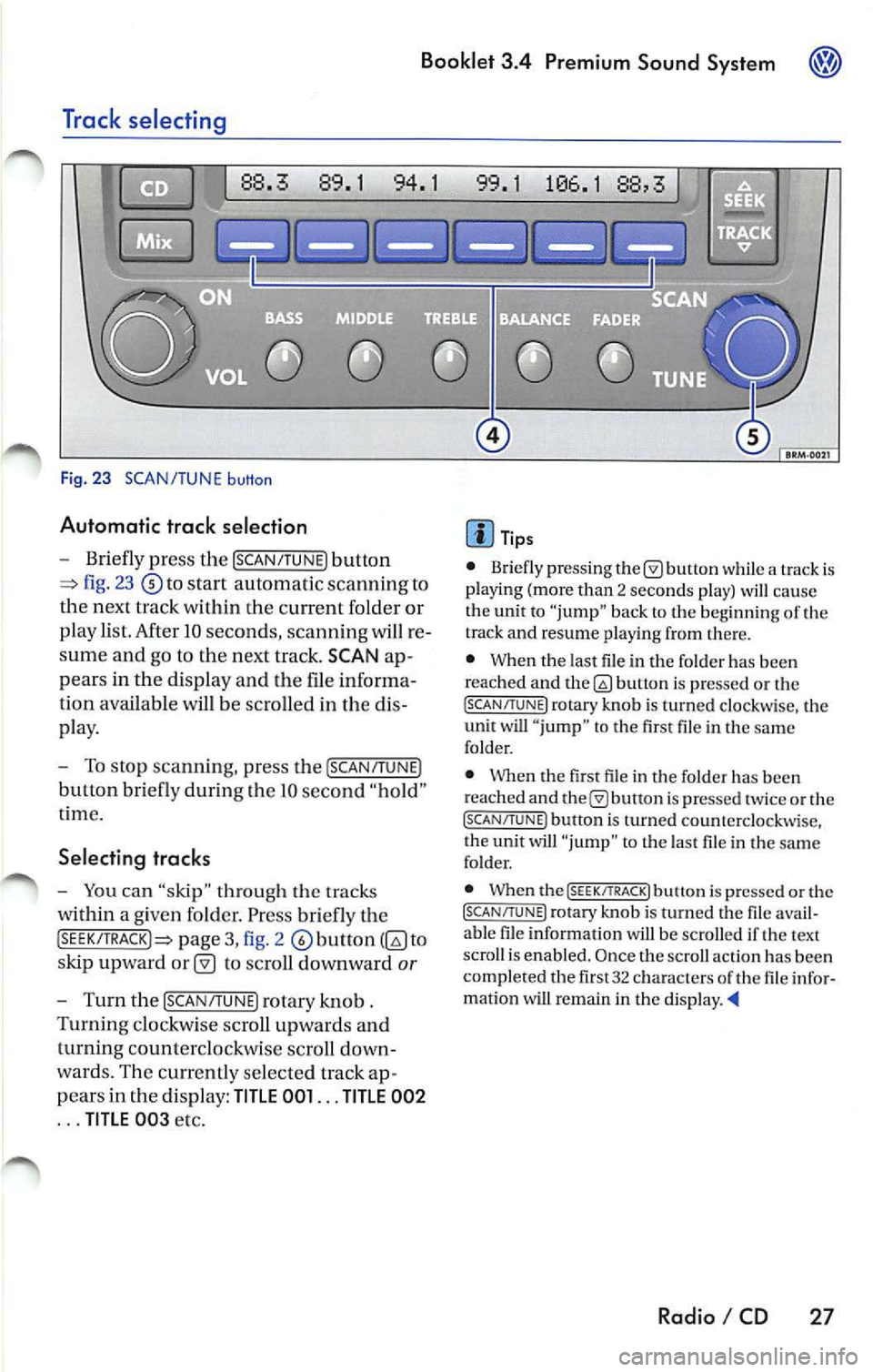
Fig. 23 SCAN/TUNE button
Automatic trac k selection
-Briefly press the !SCAN/TUNE) button
fig. 23 to sta rt automatic scannin g to
the next track within the curre nt folder or
p lay list. After 10 seconds , scannin g will re
sume and go to the next track. SCAN ap
pears in the display and the file informa
tion available
be scro lled in the dis
pla y.
- To stop scannin g, pre ss the [SCAN/T UNE)
button bri efly during Lhe IO seco nd "hold "
t ime.
Selecting tracks
-You can "skip" through th e trac ks
within a given fo lder. Pr ess briefly th e
pag e 3, fig. 2 to
s kip upward
to scroll downward or
- Turn th e !SCAN/TUNE) rotary knob .
Turnin g clo ckw ise sc roll up wards and
turning counterclockwi se scroll down
wa rds. Th e curr en tly se lected track ap
p ears in the di spl ay:
TITLE 001 ... TITLE 002
... TITLE 00 3 etc.
Tip s
• Briefly press ing butt on while a track is
pla ying (mo re than 2 seco nds play) cau se
the unit to "jump" bac k to the beginning of th e
track and resume pla yin g from there.
• When the last file in the fo lder has been
reached and
bu non is pre ssed or th e (SC AN/TUNE! rotary knob is turned clockwi se, the
unit will " jump " to th e first file in th e same
folder.
• Whe n the first fil e in t he folder has been
r eached and
is pr essed tw ice or the (SCAN/TUNE ) button is turned counterclockwise,
t he unit will "ju mp " to t he last file in the sa me
fo lder.
• When the
(SEEK/TRACK! butt on i s pre ssed or the (SCAN/TUNE) rotary kno b is turn ed the fil e avail
a bl e fil e in formation will be scro lled if th e text
scro ll is enabl ed. Once the scroll actio n ha s be en
comp le ted the fir st 32 characters
th e fil e infor
matio n wi U remain in the di sp la y. •
Radio I CD 27
Page 465 of 477

Booklet 3.4 Premium Sound System
Error displays when playing MP3 music with the CD player
The following err or messages can b e displayed:
NOCD
No disc in the CD ch an ge r.
PLEASE CHECK CD
There is a problem with the in serted CD. The CD
i s automatica lly ejec te d .
ROM
A CD ROM has bee n in serte d into the ch anger.
The CD is automatic ally ejected.
About MP3
Except for personal enjoyment, duplicati ng
data or distributing, transferring or copying it, whether for free or for a fee , withou t the permis
sion of the copyright holder i s strict ly prohib
i t ed by the Copyright Act and by internationa l
treaty.
What is
MP3
MP3 (MPEG audio layer 3) is a compress ion
stan dard prescribed by the ISO and MEG.
MP3 files contain compressed audio data. MP3
encoding is capable of compress ing the audio
da ta at extremely hi gh ratios , shrinki ng mu sic
file s by as mu ch as one-tent h their original size.
The MP3 forma t rea lizes su ch high compre ssion
ratios by elimi nating th e sounds that are either
in audible to t he hum an ear or ma sked b y other
sounds.
How to create
MP3 files
The soft wa re use d to create MP3 files is wide ly
so ld from var ious sourc es. For d etail s on cre
atin g MP3 files, re fer to the owner's manual for
t hat so ftwa re.
The MP 3 files that can be played by this device
ha ve the file extension "MP3". Files wit h no ex
tension can not be played back .
Cor respon ding File Syste ms
T hi s unit support s discs formatted
ISO
9660. It a lso can p lay back d iscs in Jolie t standard
30 Radio I CD
FAIL
Th e CD is dirty, scratc hed or inserted upside
down. T he CD is auto mati cally ejected. If the
p roblem pers ist s after reload ing the CD the next
CD avai lable will be reproduced and error mes
s age FAIL will appea r in the correspo nding CD
s lo t in
display.
HARDWARE ERROR
The CD chan ger mechanism is malfunctioning.
Tips
If the unit still malfunctions, contact your au
thori zed Vo lkswagen dealer for assistance.
which conforms to ISO 9660. However , some
time s the file names, fo lder nam es, etc. are not
displayed correct ly.
P lease
in to account the follow ing points:
• When creati ng a CD the burner software
mu st be set up to burn a Mode
1 CD ROM type
disc. Mode 2 CD ROM XA can not b e pla yed
back.
• Multi-session discs can not be played back
by this unit.
• Remembe r tha t th e audio quality depends
o n th e
rate" used to create the MP3
file .
• Make sure the crea ted disc is finalized. Your
CD burner softwar e has an option to fina lize the
disc.
• Whe n nam ing you r MP3 file s, use short file
nam es (no more than 64 char acters).
• We recommend th at you use onl y one word
to name t he folde rs (i.e. Fold er_A) and t hat yo u
do not repeat the same fold er name throughout
the CD. This cou ld cause t he rad io un it not
to recognize the file path .
• When creat ing an MP3 disc, use no more
than 99 fo lder s. Altho ugh thi s unit can support
up
to 255 folders , finding the files yo u wa nt t o
p lay w ill be mor e difficult if you have used man y
Page 466 of 477

Booklet 3.4 Premium Sound System
• A maxi mum n umber of 998 files (plus l file
containing the data t rack ) can be hand led by the
cha nger. If
sum is higher t han 998 files, then
p laylis t files a re ski pped. If p laylis t have to be
skipped, the n the p lay list files with the oldest
t imestamp
be skipped.
• When creat ing play li st fil es, use a program
lhat a utomatica lly creates a play list with
extens io n. Th is un it will n ot play play
lists with a no th er ex tensions or that contain
path info rmation in Un icode.
• A m aximu m of
15 play lists can be su pported.
• Using th e d rag-and-drop me thod prov ided
by W INDOWS XP to move MP3 files to a CD for
Order of tracks
L=:I Playli st
Tra ck
Fi g. 26 Typical CD Structure
The un it plays the files inside a CD in a particu lar
o rder. The fig. 26 is an examp le of
a typ ical C D co ntaini ng file s, p lay lists folders
and s ubor der s. burn
ing doe s no t aJJow the use r to set the appro
pri ate Mode or ID3
versio ns to be compati ble
w ith thi s ch anger. Discs c reated usin g this
method may not pla y in l his unit.
ID 3 togs
Th is uni t supports ID3 tag vi.
If ID3 tag data is in an MP3 file th is unit can d is
play t he t itle (t rack title) and artist name.
If an MP3 fi le contai ns bot h an ID3 tag vl and an
ID3 tagv2 o nly th e in forma tion conta ined in t he
ID3 tag vi will be
• Playing will sta rt with the fi rs t fil e under the
root directory. In the example t here a re two files
i n the root (see number s l and 2).
• Once t he files in the root have bee n played,
the un it w ill access the folde rs in the roo t in the
orde r they appear. In the examp le th ere are two
m ain fo lders in t he root : Fl and F2. Fl appears
firs t in the root, tJ1erefore the two files inside
will be p layed immediately th e ex isting files
u nder th e root dire ctory (see numbers 3 and 4
side Fl).
• Once the files in the firs t fo lder have been
p layed, the u nit wi ll access all th e sub orders
side th e ma in fo lder in the orde r they appea r. In
the example t here are two suborders ins ide Fl
(Fl.I and Fl .2) and one su border ins ide Fl.l
(Fl.1.1) The rad io un it will first p lay all the tracks
i n side suborder Fl.I (see numbers 5). then
access suborder Fl.l.l and it w ill play a ll files side (see number 6). Once a ll the file s in side su b
order Fl.1.1 have bee n played , the un it wi ll
ces s sub order and it will p lay the file s in side
(see numb er 7). If th ere were some s uborder s side Fl.2 they be accessed as describ ed
abo ve.
• Once all files in side t he folder (and its
folde rs) which appears first in the root are
pla yed, the nex t folder w ill be accessed and the
fil es in side will be reprod uced in the pre vio usly
d esc ribed order. See nu mb ers 8 and 9 in side F2
i n the examp le.
• All play lis ts in the di sc s hall be accessed after
the files in the root, folde rs and subo rders . T hey
Radio I CD 31
Page 468 of 477
Booklet 3.4 Premium Sound System ®
Tips
• Whe n
external CD changer is selected
EXT will appear in the radio display.
• The LED s above the slot buttons I to 6 will
stay on
to indi cate that there is a CD inside the
s lo t.
• It is po ssible to reproduce Howeve r the reproduction depends on th e terial quality of the CD .
• Always inser t the CD with the prin ted s ide
fac ing up . •
Make sure the CDs are prop erly install ed in
the CD changer. Also, make su re the CDs are
moved from the slot before you close the rest, otherwise you cou ld damage th e CDs.
• Only use standard
12 cm (4.72 inch) CDs. T he
s h ap ed CDs or 8 cm (3.15 in ch) CDs can not be
played.
• If no CD slot is se lected after pressing the
LOAD button, the radio unit will automatically
select the next empty tray .
• I f the ejected CD is not removed from the slot
in t he next
15 secon ds, it will be pulled back tomat ically into the CD slot to prevent damage
and the eject mod e will be
Tips for operating your internal CD-Changer and external CD
Changer
To assu re a sound reproduction of the highest
quality, u se on ly CDs which are clean and free of
sc ratch es or any other type of damage.
Do not u se tran sparent
Wa re availabl e in the
market. Use of these CDs w ill cause th e changer
improp erl y load.
If yo u are going
to make your own CDs, do not
s tick an adhesive labe l on the CD itself. The heat
Preventive measures for laser units.
Laser devices are divided into safety classes I 4.
Your VOLKSWAGEN CD ch an ger conforms to
safety class I.
The laser used in cla ss l is so low a nd so we ll
s hield ed, that no danger exi sts wi th proper
usage . generated
by the CD play er ca n loosen t he
sive label, which then coud come off and and
jam up the unit. This could result in a costly
pair. Use a marker labe l your CDs in stead.
Always sto re CDs in tl1eir cases whe n you are not
li stening to th em.
Neve r leave CDs in direct
Note
Never remove the cover from the uni t. The unit
doc s not contain any parts that can b e serviced
b y the use r.
Radio I CD 33