Page 181 of 388
181
3-2. Using the audio system
3
Interior features
■
When the battery is disconnected
Stations presets are erased.
■ Reception sensitivity
●Maintaining perfect radio reception at all times is difficult due to the con-
tinually changing position of the antenna, differences in signal strength
and surrounding objects, such as trains, transmitters, etc.
● The radio antenna is mounted on the rear roof. The antenna can be
removed from the base by turning it.
NOTICE
■To prevent damage, remove the antenna in the following cases.
●The antenna will touch the ceiling of a garage.
● A cover will be put on the vehicle.
Page 182 of 388
182
3-2. Using the audio system
Using the cassette player
Selecting a track■ Skip a number of tracks at a time.
Press “ ” on .
Press “ ” until the number you want to skip appears.
9 tracks can be skipped at a time.
■ Rewind a number of tracks at a time.
Press “ ” on .
Press “ ” until the number you want to rewind appears.
9 tracks can be rewound at a time.
Note that the number includes the current track.
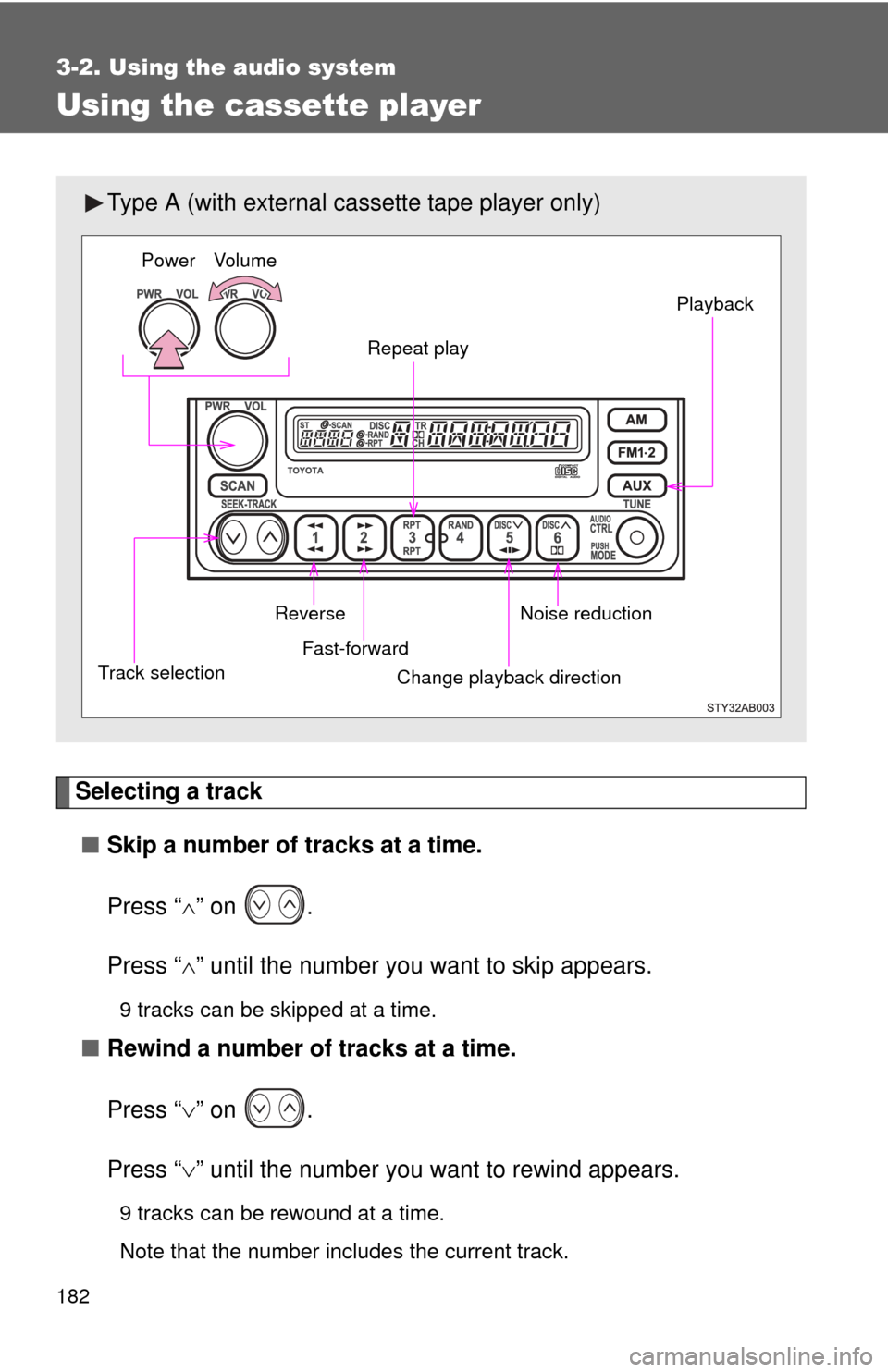
Type A (with external ca ssette tape player only)
Power Volume
Repeat play Playback
Noise reduction
Change playback direction
Fast-forward
Reverse
Track selection
Page 187 of 388
187
3-2. Using the audio system
3
Interior features
■
Scanning loaded CDs
Press and hold or until you hear a beep.
The first 10 seconds of the first track on each CD will be played.
Press the switch again wh en the desired CD is reached.
Repeat play
■ Repeating a track
Press (RPT) or (RPT).
■ Repeating all of the tracks on a CD (with external CD changer
only)
Press and hold (RPT) or (RPT) until you hear a beep.
Random playback
■ Current CD
Press (RAND) or (RAND).
Tracks are played in a random order until the button is pressed once
more.
■All CDs (with externa l CD changer only)
Press and hold (RAND) or (RAND) until you hear a
beep.
Tracks on all loaded CDs are played in a random order until the button is
pressed once more.
Switching the display (Type B only) Press .
Each time the switch is pressed, the display changes in the order of Track
no./Elapsed time CD titleTrack name.
Page 188 of 388
188 3-2. Using the audio system
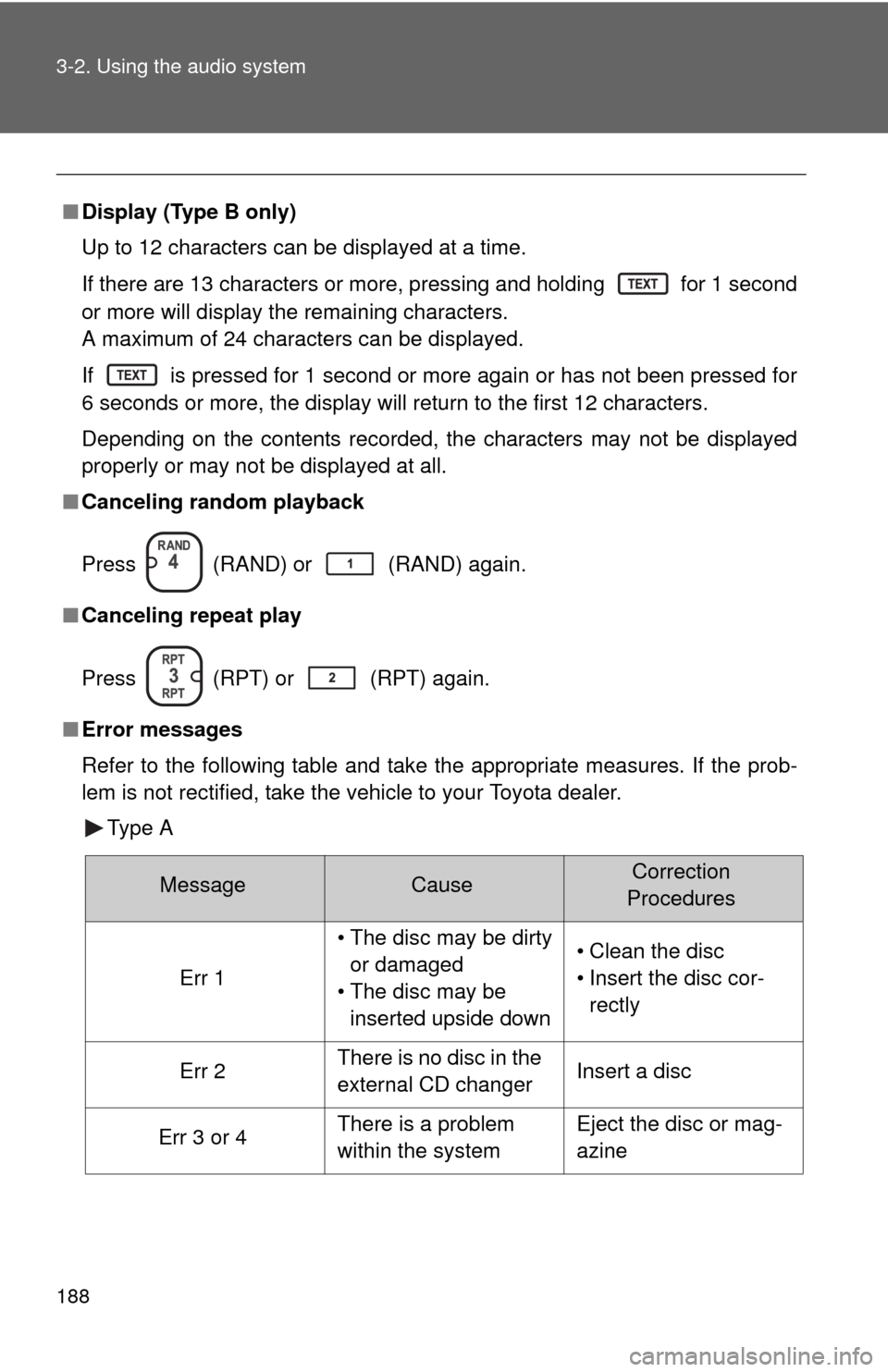
■Display (Type B only)
Up to 12 characters can be displayed at a time.
If there are 13 characters or more, pressing and holding
for 1 second
or more will display the remaining characters.
A maximum of 24 characters can be displayed.
If
is pressed for 1 second or more again or has not been pressed for
6 seconds or more, the display will return to the first 12 characters.
Depending on the contents recorded, the characters may not be displayed
properly or may not be displayed at all.
■ Canceling random playback
Press
(RAND) or (RAND) again.
■ Canceling repeat play
Press
(RPT) or (RPT) again.
■ Error messages
Refer to the following table and take the appropriate measures. If the prob-
lem is not rectified, take the vehicle to your Toyota dealer.
Type A
MessageCauseCorrection
Procedures
Err 1
• The disc may be dirty or damaged
• The disc may be inserted upside down• Clean the disc
• Insert the disc cor-rectly
Err 2There is no disc in the
external CD changerInsert a disc
Err 3 or 4There is a problem
within the systemEject the disc or mag-
azine
Page 192 of 388
192
3-2. Using the audio system
Playing back MP3 and WMA discs
Loading MP3 and WMA discsInsert a disc.
Ejecting MP3 and WMA discsPress and remove the disc.
Selecting a folder■ Selecting folders one at a time
To select the desired folder, press “ ” or “ ” on .
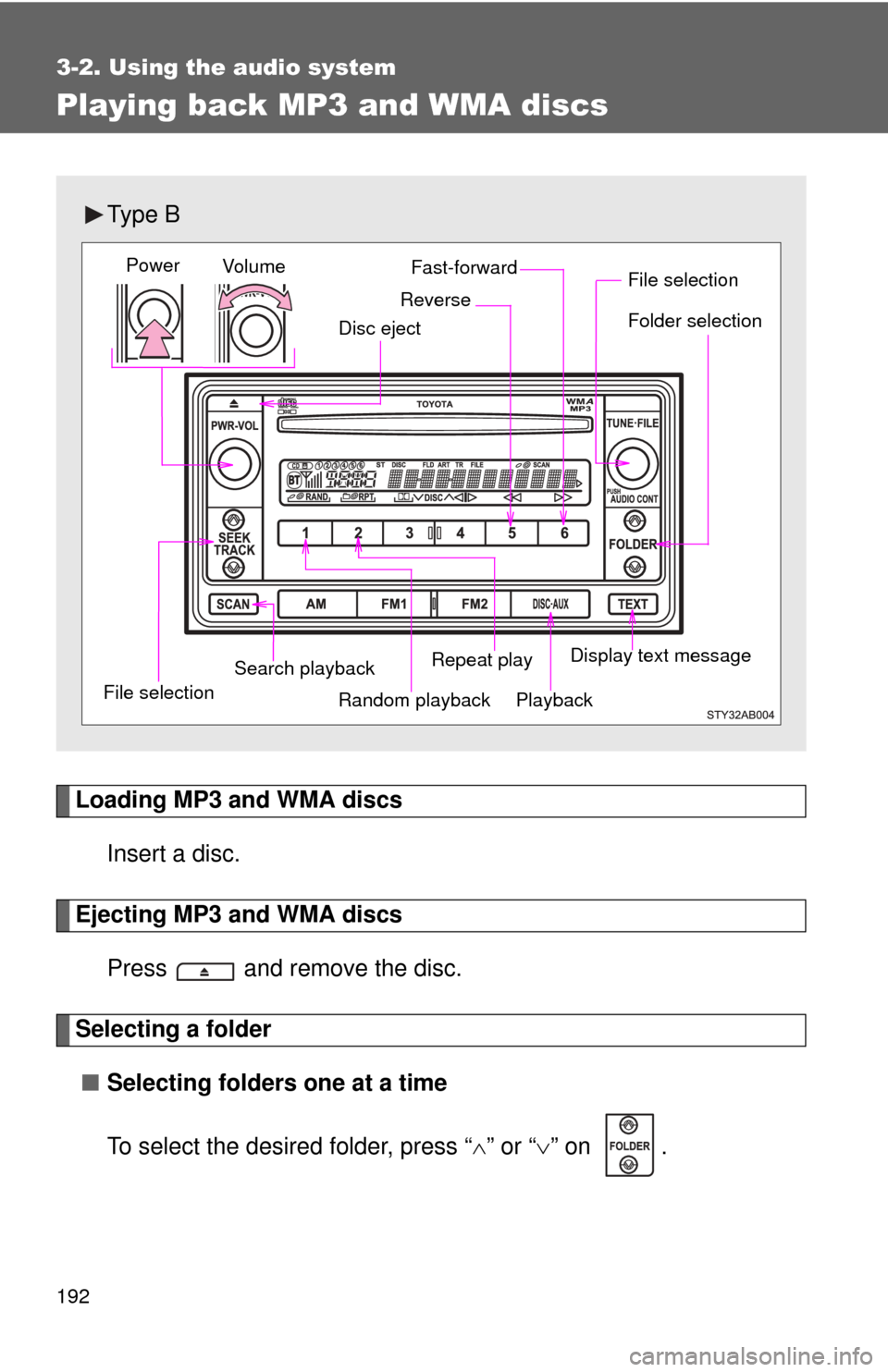
Ty p e B
Vol u m e
Random playback
File selection File selection
Repeat play Playback
Power
Disc eject
Display text message
Folder selection
Search playback
Fast-forward
Reverse
Page 193 of 388
193
3-2. Using the audio system
3
Interior features
■
Selecting the desired folder by cueing the first file of each
folder
Press and hold until you hear a beep.
The first 10 seconds of the first file in the each folder will be played.
When the desired folder is reached, press the switch once again.
■ Returning to the first folder
Press and hold “ ” on until you hear a beep.
Selecting and scanning files
■ Selecting one file at a time
To select the desired file, turn or press “ ” or “ ” on .
■ Selecting the desired file by cueing the files in the folder
Press .
The first 10 seconds of all files in the folder will be played.
When the desired file is reached, press the switch once again.
Fast-forwarding and reversing files
To fast-forward or reverse.
Press and hold ( ) or ( ).
Repeat play■ Repeating a file
Press (RPT).
■ Repeating all of the files in the folder
Press and hold (RPT) until you hear a beep.
Page 194 of 388
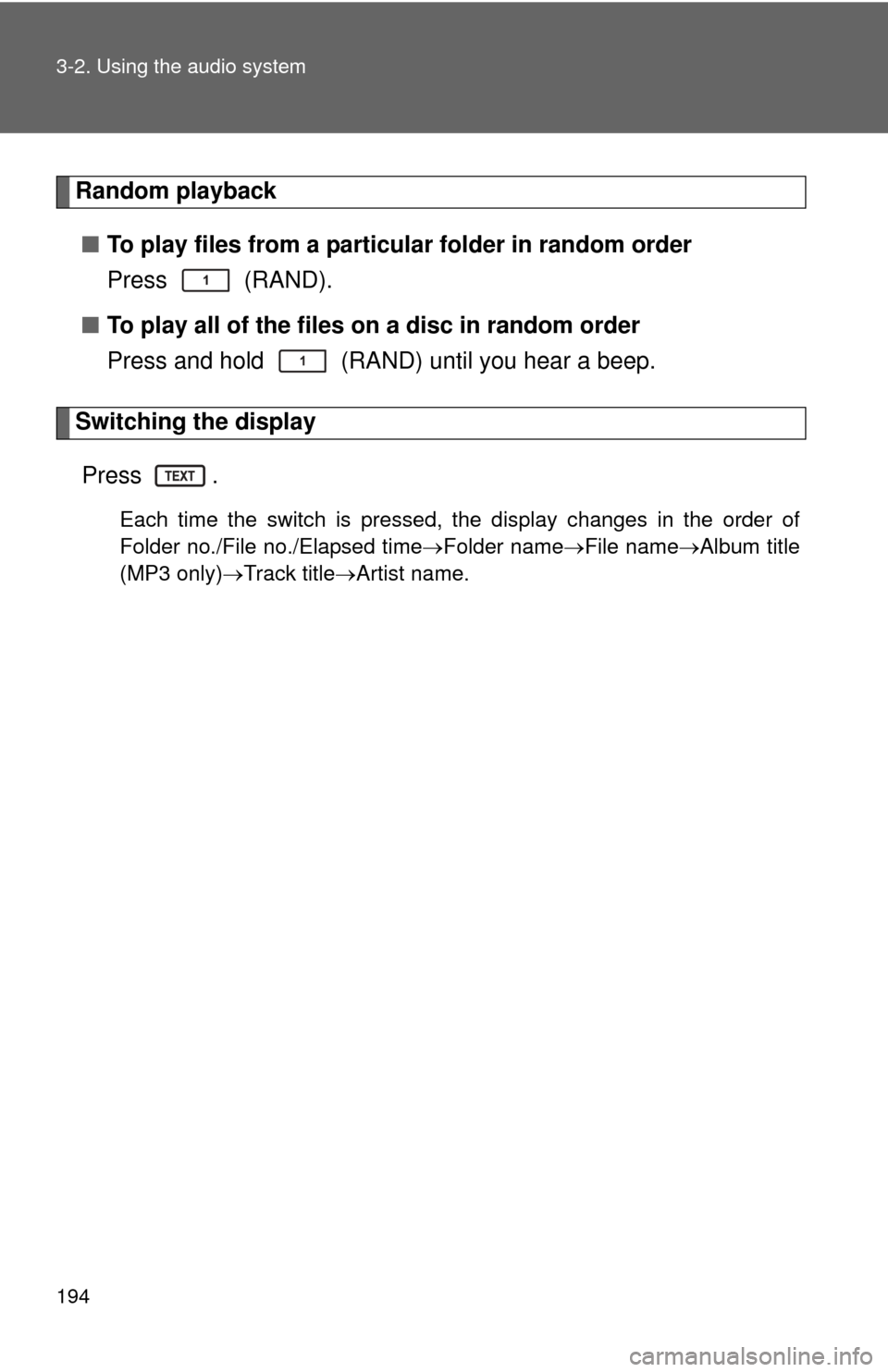
194 3-2. Using the audio system
Random playback■ To play files from a partic ular folder in random order
Press (RAND).
■ To play all of the files on a disc in random order
Press and hold (RAND) until you hear a beep.
Switching the display
Press .
Each time the switch is pressed, the display changes in the order of
Folder no./File no./Elapsed time Folder nameFile nameAlbum title
(MP3 only) Track title Artist name.
Page 195 of 388
195
3-2. Using the audio system
3
Interior features
■
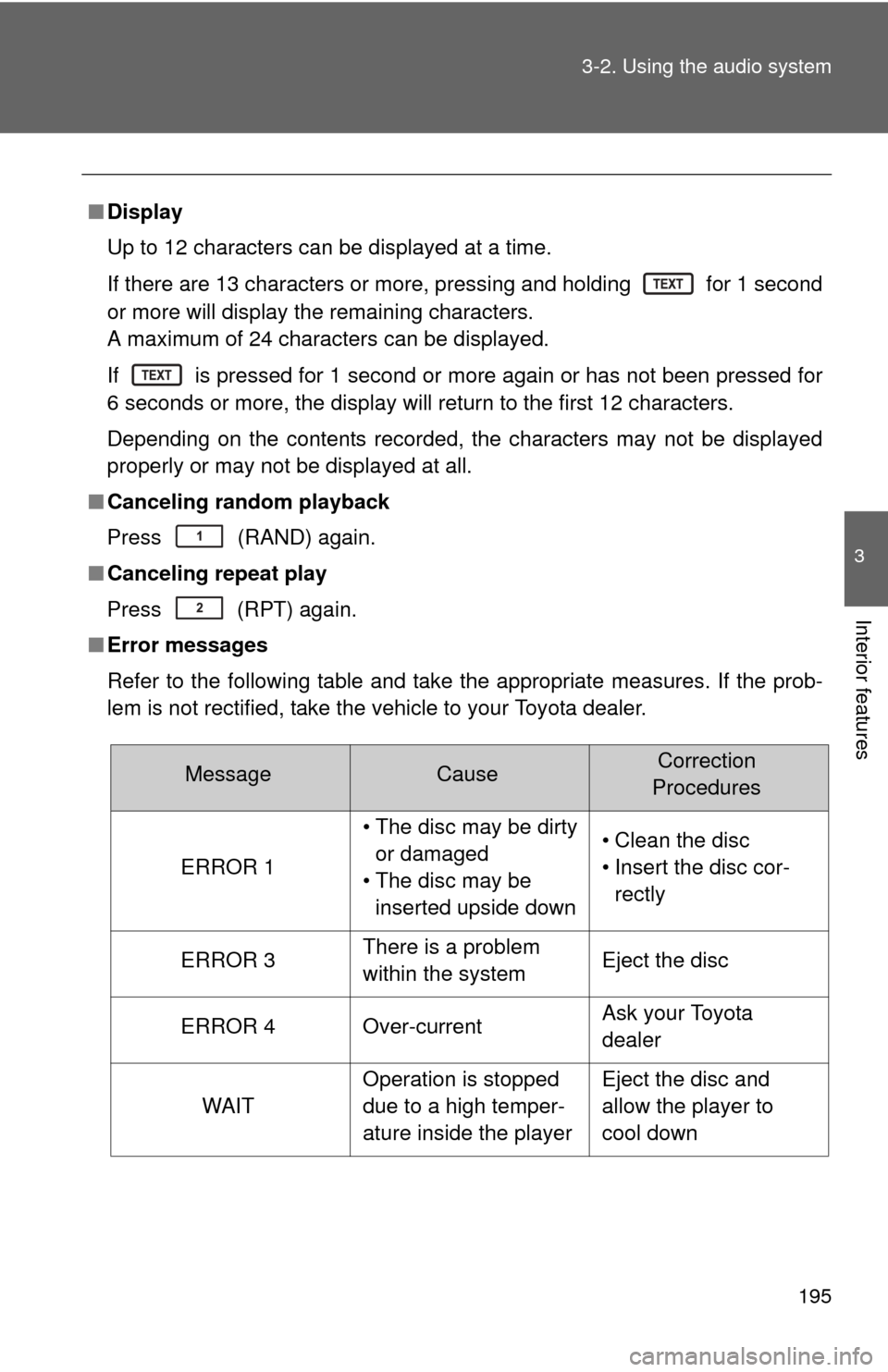
Display
Up to 12 characters can be displayed at a time.
If there are 13 characters or more, pressing and holding for 1 second
or more will display the remaining characters.
A maximum of 24 characters can be displayed.
If is pressed for 1 second or more again or has not been pressed for
6 seconds or more, the display will return to the first 12 characters.
Depending on the contents recorded, the characters may not be displayed
properly or may not be displayed at all.
■ Canceling random playback
Press
(RAND) again.
■ Canceling repeat play
Press (RPT) again.
■ Error messages
Refer to the following table and take the appropriate measures. If the prob-
lem is not rectified, take the vehicle to your Toyota dealer.
MessageCauseCorrection
Procedures
ERROR 1
• The disc may be dirty or damaged
• The disc may be inserted upside down• Clean the disc
• Insert the disc cor- rectly
ERROR 3There is a problem
within the systemEject the disc
ERROR 4Over-currentAsk your Toyota
dealer
WAIT
Operation is stopped
due to a high temper-
ature inside the playerEject the disc and
allow the player to
cool down