Page 271 of 572

08 SIENNA_U (L/O 0801)
263
2008 SIENNA from Aug. ’08 Prod. (OM45455U)
MP3/WMA player
This button is used to change the display
for the MP3/WMA file that contains text
data.
To change the display, quickly push and
release the “TEXT” button while the
MP3/WMA file is playing. The display
changes in the order from the elapsed
time to folder name to file name to album
title to track title to artist name, then back
to the elapsed time.
If this button is pushed while an
MP3/WMA file that does not contain text
data is playing, “NO TITLE” will appear on
the display.
If the entire text data is not displayed,
push and hold it until you hear a beep.
The rest of the text data will appear.TYPE/FOLDER (Type/Folder up/down)
Radio
XM
� Satellite Radio
∗—
When you push the “� ” or “�” side of
the “TYPE/FOLDER” button while receiving
a XM � channel, the current channel cate-
gory appears on the display.
When the channel category appears, push
either “ �” or “ �” side of the
“TYPE/FOLDER” button to switch to the
next or previous category.
∗: Use of satellite radio requires XM �
tuner and service. Contact your Toyota
dealer for details.
MP3/WMA player
To skip up or down to a different folder:
Push either side of the “TYPE/FOLDER”
several times until the number of the fold-
er you want to listen to appears on the
display.
To jump to the first file in the current
folder:
Push and hold the “� ” side of the button
until you hear a beep.
When playing a disc featuring both audio
data (CD −DA) and MP3/WMA files, audio
data (CD −DA) is played. TUNE·FILE (Tuning and File up/down)
Radio
Turn the “TUNE·FILE” knob clockwise to
step up the frequency. Turn the knob
counterclockwise to step down the fre-
quency.
XM
� Satellite Radio
∗—
Turn the “TUNE·FILE” knob clockwise to
step up the channel. Turn the knob coun-
terclockwise to step down the channel.
∗: Use of satellite radio requires XM �
tuner and service. Contact your Toyota
dealer for details.
MP3/WMA player
Turn the knob clockwise to file up. Turn
the knob counterclockwise to file down.
Page 272 of 572
08 SIENNA_U (L/O 0801)
264
2008 SIENNA from Aug. ’08 Prod. (OM45455U)
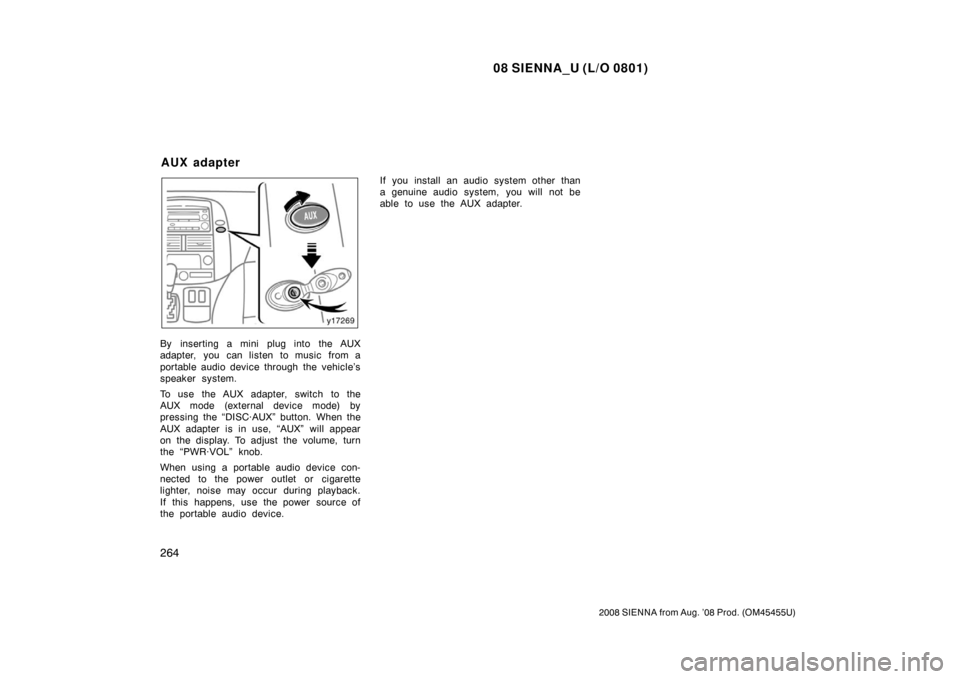
By inserting a mini plug into the AUX
adapter, you can listen to music from a
portable audio device through the vehicle’s
speaker system.
To use the AUX adapter, switch to the
AUX mode (external device mode) by
pressing the “DISC·AUX” button. When the
AUX adapter is in use, “AUX” will appear
on the display. To adjust the volume, turn
the “PWR·VOL” knob.
When using a portable audio device con-
nected to the power outlet or cigarette
lighter, noise may occur during playback.
If this happens, use the power source of
the portable audio device.If you install an audio system other than
a genuine audio system, you will not be
able to use the AUX adapter.
AUX adapter
Page 276 of 572
08 SIENNA_U (L/O 0801)
268
2008 SIENNA from Aug. ’08 Prod. (OM45455U)
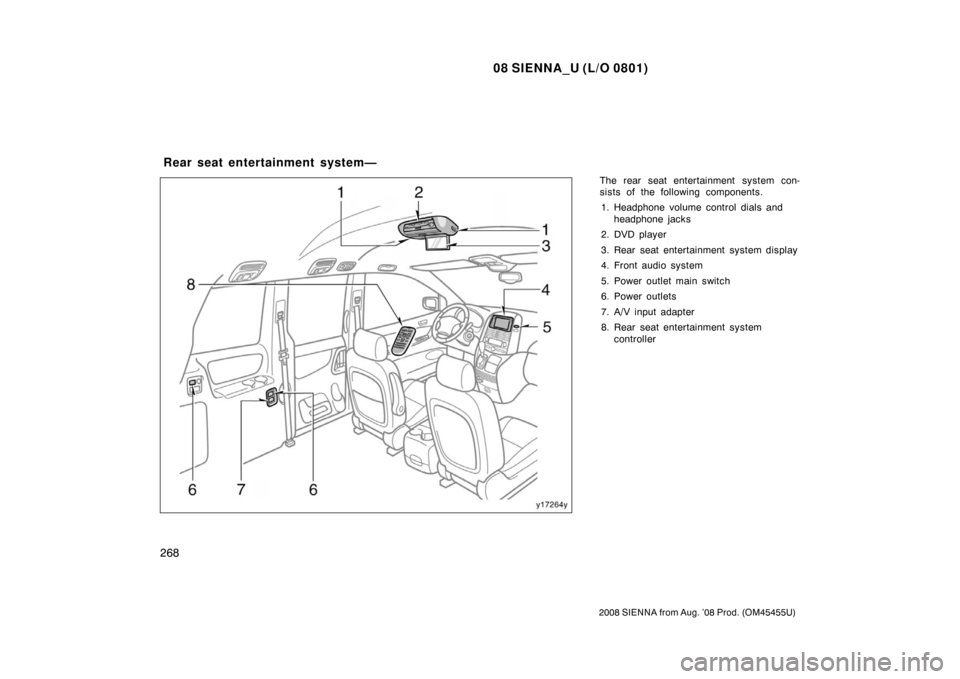
The rear seat entertainment system con-
sists of the following components.1. Headphone volume control dials and headphone jacks
2. DVD player
3. Rear seat entertainment system display
4. Front audio system
5. Power outlet main switch
6. Power outlets
7. A/V input adapter
8. Rear seat entertainment system controller
Rear seat entertainment system—
Page 278 of 572
08 SIENNA_U (L/O 0801)
270
2008 SIENNA from Aug. ’08 Prod. (OM45455U)
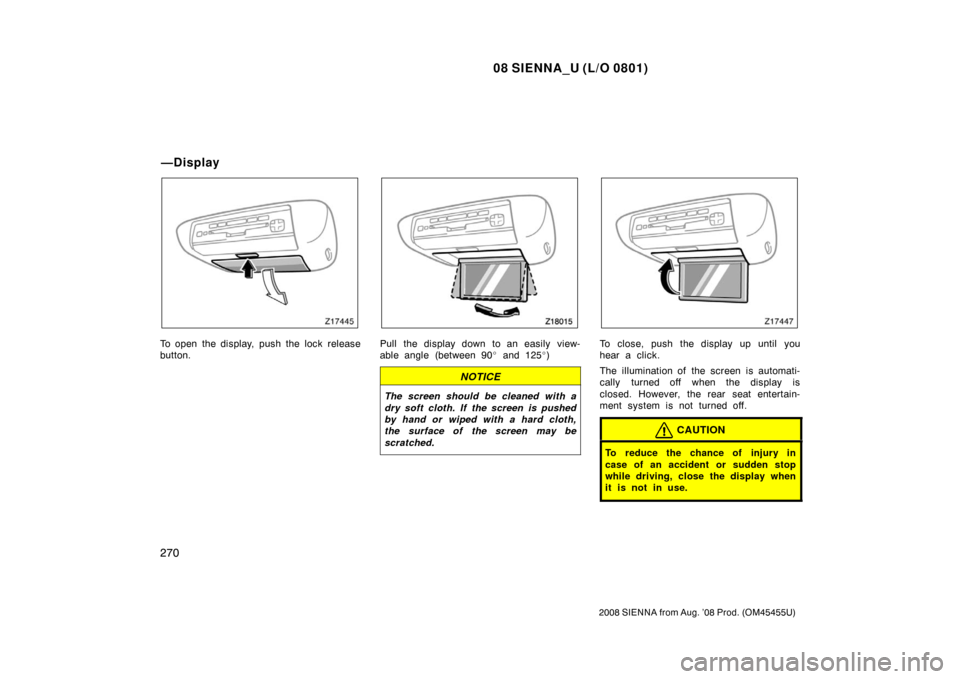
To open the display, push the lock release
button.Pull the display down to an easily view-
able angle (between 90� and 125 �)
NOTICE
The screen should be cleaned with a
dry soft cloth. If the screen is pushed
by hand or wiped with a hard cloth,
the surface of the screen may be
scratched.
To close, push the display up until you
hear a click.
The illumination of the screen is automati-
cally turned off when the display is
closed. However, the rear seat entertain-
ment system is not turned off.
CAUTION
To reduce the chance of injury in
case of an accident or sudden stop
while driving, close the display when
it is not in use.
—Display
Page 281 of 572
08 SIENNA_U (L/O 0801)
273
2008 SIENNA from Aug. ’08 Prod. (OM45455U)
USING THE REMOTE CONTROL
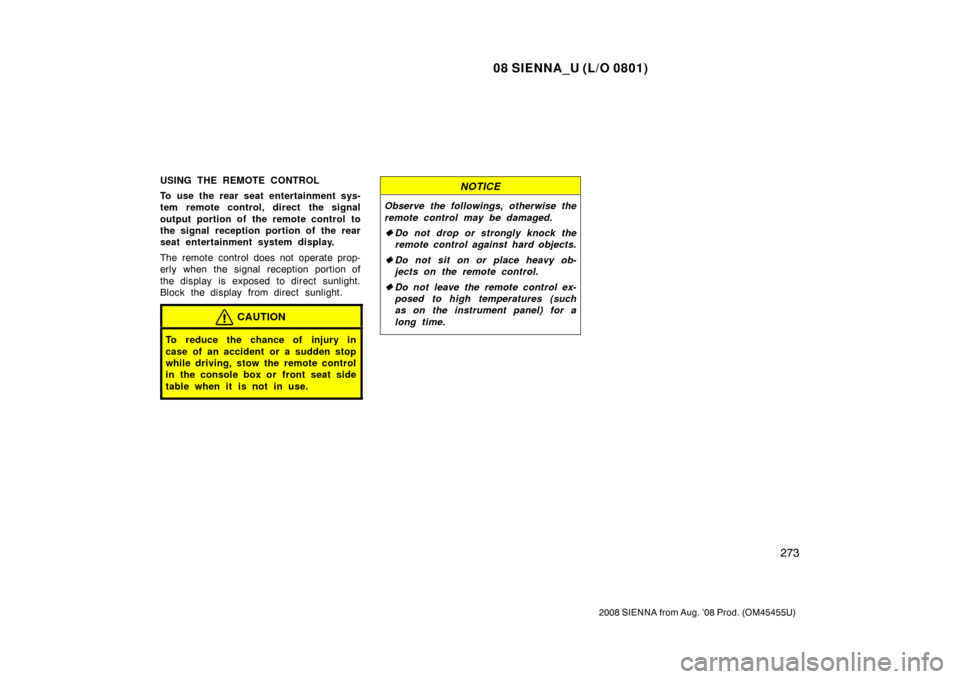
To use the rear seat entertainment sys-
tem remote control, direct the signal
output portion of the remote control to
the signal reception portion of the rear
seat entertainment system display.
The remote control does not operate prop-
erly when the signal reception portion of
the display is exposed to direct sunlight.
Block the display from direct sunlight.
CAUTION
To reduce the chance of injury in
case of an accident or a sudden stop
while driving, stow the remote control
in the console box or front seat side
table when it is not in use.
NOTICE
Observe the followings, otherwise the
remote control may be damaged.
�Do not drop or strongly knock the
remote control against hard objects.
� Do not sit on or place heavy ob-
jects on the remote control.
� Do not leave the remote control ex-
posed to high temperatures (such
as on the instrument panel) for a
long time.
Page 282 of 572
08 SIENNA_U (L/O 0801)
274
2008 SIENNA from Aug. ’08 Prod. (OM45455U)
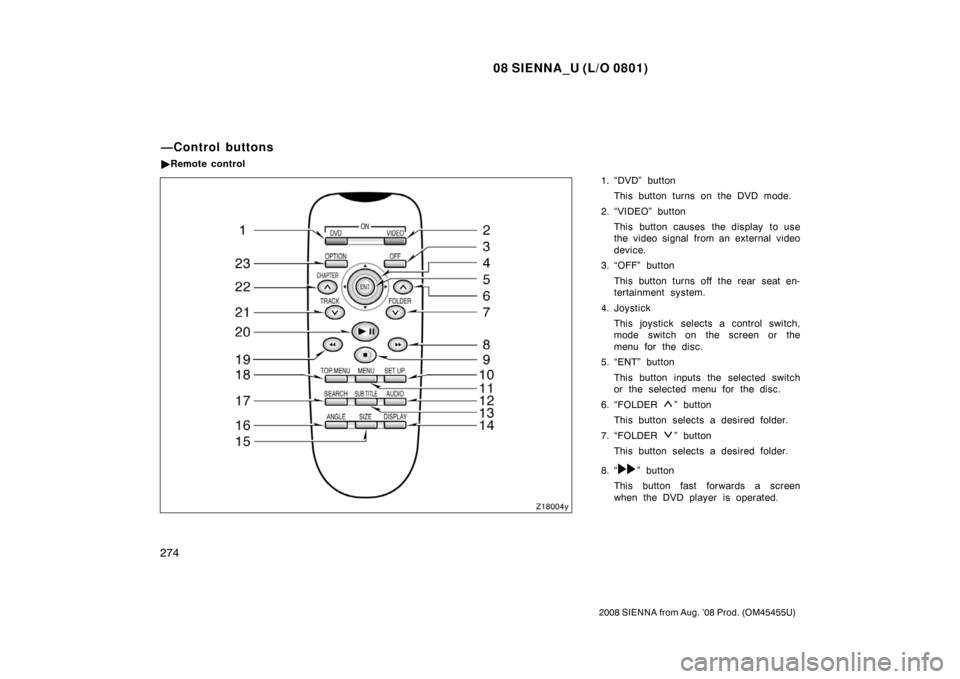
1. “DVD” buttonThis button turns on the DVD mode.
2. “VIDEO” button This button causes the display to use
the video signal from an external video
device.
3. “OFF” button
This button turns off the rear seat en-
tertainment system.
4. Joystick This joystick selects a control switch,
mode switch on the screen or the
menu for the disc.
5. “ENT” button
This button inputs the selected switch
or the selected menu for the disc.
6. “FOLDER
” button
This button selects a desired folder.
7. “FOLDER
” button
This button selects a desired folder.
8. “
” button
This button fast forwards a screen
when the DVD player is operated.
—Control buttons
� Remote control
Page 283 of 572
08 SIENNA_U (L/O 0801)
275
2008 SIENNA from Aug. ’08 Prod. (OM45455U)
9. “” button
This button stops a screen when the
DVD player is operated.
10. “SET UP” button
This button indicates the initial set up
screen when the DVD player is oper-
ated.
11. “MENU” button This button indicates the menu screen
for DVD video when the DVD player is
operated.
12. “AUDIO” button This button indicates the changing au-
dio screen when the DVD player is
operated.
13. “SUB TITLE” button
This button indicates the changing sub-
title screen when the DVD player is
operated.
14. “DISPLAY” button
This button adjusts the color, tone,
contrast and brightness of the screen.
15. “SIZE” button
This button changes the display mode
when the DVD player is operated. 16. “ANGLE” button
This button selects the angle of the
screen when the DVD player is oper-
ated.
17. “SEARCH” button
This button indicates the title search
screen when the DVD player is oper-
ated.
18. “TOP MENU” button This button indicates the title selection
screen for DVD video when the DVD
player is operated.
19. “
” button
This button reverse a screen when the
DVD player is operated.
20. “ �
” button
This button plays or pauses a screen
when the DVD player is operated.
21. “TRACK/CHAPTER
” button
This button selects track/chapter.
22. “TRACK/CHAPTER
” button
This button selects track/chapter.
23. “OPTION” button This button indicates the control
switches on the screen when the DVD
player is operated. REPLACING REMOTE CONTROL
BATTERY
For replacement, use 3 AA batteries.
CAUTION
Special care should be taken to pre-
vent small children from swallowing
the removed battery or components.
NOTICE
�
When replacing the battery, be care-
ful not to lose the components.
� Replace only with the same or
equivalent type recommended by a
Toyota dealer.
� Dispose of used batteries according
to the local laws.
Page 285 of 572
08 SIENNA_U (L/O 0801)
277
2008 SIENNA from Aug. ’08 Prod. (OM45455U)
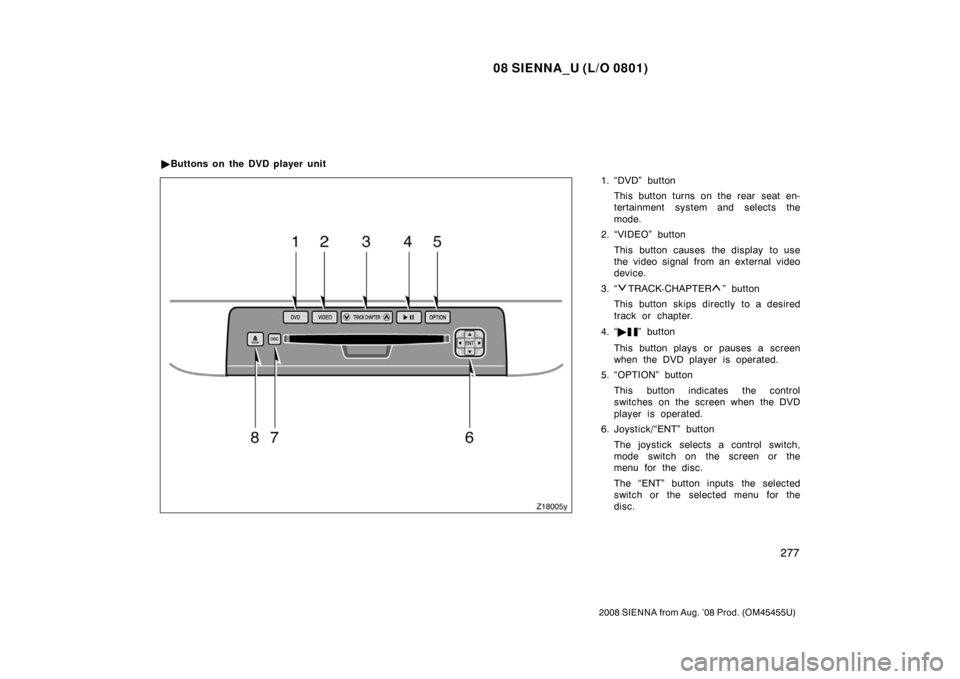
1. “DVD” buttonThis button turns on the rear seat en-
tertainment system and selects the
mode.
2. “VIDEO” button
This button causes the display to use
the video signal from an external video
device.
3. “
TRACK· CHAPTER” button
This button skips directly to a desired
track or chapter.
4. “ �
” button
This button plays or pauses a screen
when the DVD player is operated.
5. “OPTION” button
This button indicates the control
switches on the screen when the DVD
player is operated.
6. Joystick/“ENT” button
The joystick selects a control switch,
mode switch on the screen or the
menu for the disc.
The “ENT” button inputs the selected
switch or the selected menu for the
disc.
�
Buttons on the DVD player unit