Page 138 of 226
OTHER FUNCTIONS
156
(f) Set a Bluetooth� phone
�Selecting a Bluetooth� phone
In case you register more than one
Bluetooth� phone, you need to choose a
favorite one.
1. Touch “Settings” to display “Settings”
screen.
2. Touch “Select Telephone” to display
“Select Telephone” screen. You can se-
lect the Bluetooth� phone from a maxi-
mum of 6 numbers.
“Empty” is displayed when you have not reg-
istered a Bluetooth� phone yet.
Bluetooth� mark is displayed when you
choose the phone.
Although you can register up to 6 Bluetooth�
phones in the system, only one Bluetooth�
phone can function at a time.
3. Touch “OK”.
When the result message is displayed, you
can use the Bluetooth� phone.
Page 139 of 226
OTHER FUNCTIONS
157
When another Bluetooth� phone is trying to
connect, this screen is displayed.
Touch “Yes” or “No”.
�Displaying Bluetooth� information
You can see or set the information of the
Bluetooth� phone on the system.
Device Name The name of Bluetooth� . . . .
phone which is dis-
played on the screen.
You can change it into a
desired name.
Bluetooth
∗ Device Address
The address peculiar to . . . . . . . . . . . . .
the system. You cannot
change it.
1. Select the desired phone and touch
“Information”.
∗: Bluetooth is a registered trademark of
Bluetooth SIG. Inc.
2. Touch “Change”.
3. When you complete the setting, touch
.
Page 140 of 226
OTHER FUNCTIONS
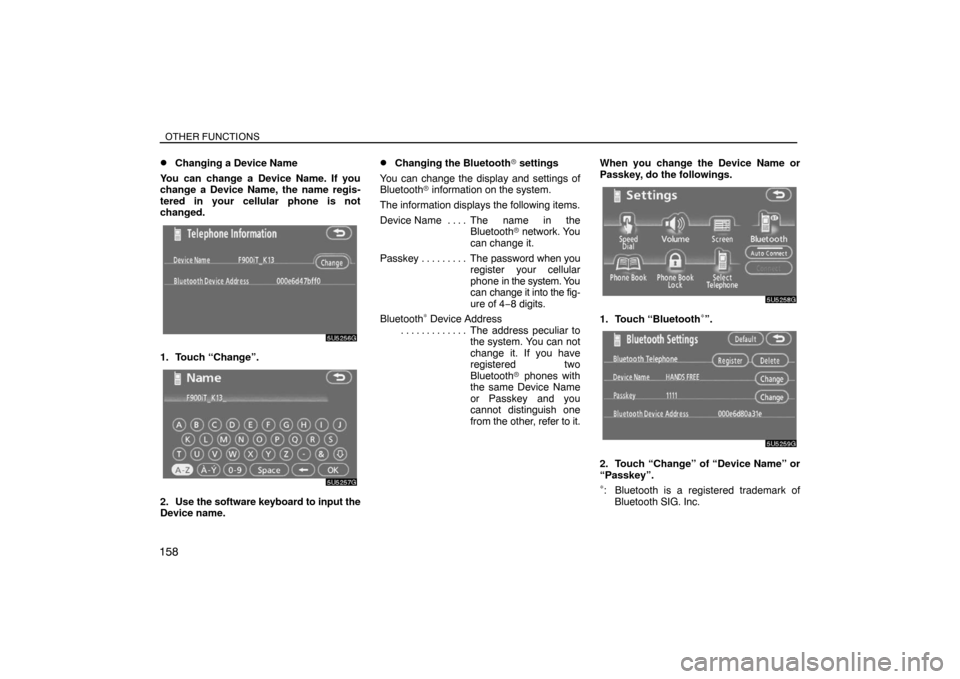
158�
Changing a Device Name
You can change a Device Name. If you
change a Device Name, the name regis-
tered in your cellular phone is not
changed.
1. Touch “Change”.
2. Use the software keyboard to input the
Device name.
�Changing the Bluetooth� settings
You can change the display and settings of
Bluetooth� information on the system.
The information displays the following items.
Device Name The name in the. . . .
Bluetooth� network. You
can change it.
Passkey The password when you . . . . . . . . .
register your cellular
phone in the system. You
can change it into the fig-
ure of 4−8 digits.
Bluetooth
∗ Device Address
The address peculiar to . . . . . . . . . . . . .
the system. You can not
change it. If you have
registered two
Bluetooth� phones with
the same Device Name
or Passkey and you
cannot distinguish one
from the other, refer to it.When you change the Device Name or
Passkey, do the followings.1. Touch “Bluetooth∗”.
2. Touch “Change” of “Device Name” or
“Passkey”.
∗: Bluetooth is a registered trademark of
Bluetooth SIG. Inc.
Page 142 of 226
OTHER FUNCTIONS
160�
Deleting a Bluetooth� phone
1. Touch “Delete” of “Bluetooth∗ Tele-
phone”.
2. Select the telephone you want to delete
and touch “OK”.
∗: Bluetooth is a registered trademark of
Bluetooth SIG. Inc.
3. Touch “Yes”.
�Displaying the information of the
Bluetooth� phone you delete
You can display the information of the
Bluetooth� phone before you delete it and
you can make sure whether the telephone
you delete is correct or not.
1. Select the telephone you want to dis-
play the information about.
Page 144 of 226

OTHER FUNCTIONS
162
�Microphone
It is unnecessary to speak directly into the
microphone when giving a command.
Speech command example: Searching for
a route to your home.
1. Push the talk switch.
2. Say “Home”.
You can also say the street name or address.
∗
(ex. say “Woodridge Avenue”.)
∗: “Hawaii” or Hawaii area is not covered by
the voice recognition.
If your home is not registered, you will hear
“Home is not registered”.
3. If the system recognized the command,
the recognition result “Home” is dis-
played on the top of the screen with the
screen message. (Displayed message
and the switches on the screen depend on
the situation.)
Touch or say “Cancel”, and the system will be
canceled. Touch or say “Help”, and displays
the “Help” screen.4. Touch “Enter” or say “Enter destina-
tion”, and the system starts searching for
a route to your home. (If the destination is
already registered, “Add” or “Replace” is
displayed on the screen.)
Touch or say “Cancel”, and the search will be
canceled.
When you search the destination by “POI
Name”, this screen is displayed.
Touch “Enter” or say “Enter destination”.
Page 149 of 226
OTHER FUNCTIONS
167
(d) Delete personal data
The following personal data can be de-
leted or returned to their default settings:
�Maintenance conditions
�Maintenance information “off” setting
�Memory points
�Areas to avoid
�Previous points
�Route trace
�User selection settings
�Phone book data
�Dialed numbers and received calls
�Speed dial
�Bluetooth� phone data
�Security code
This function is available only when the
vehicle is not moving.
1. Touch “Delete personal data”. The
“Delete personal data” screen appears.2. Touch “Delete”. The “Confirmation to
delete all personal data” screen appears.
3. Touch “Yes”.
Page 165 of 226

Finish
AUDIO/VIDEO SYSTEM
183 �
If the satellite radio tuner malfunctions
When problems occur with the XM� tuner, a message will appear on the display. Referring to the table below to identify the problem, take the
suggested corrective action.
ANTENNA
The XM� antenna is not connected. Check whether the XM� antenna cable is attached securely.
A short circuit occurs in the antenna or the surrounding antenna cable. See a Toyota certified dealer for assistance.
UPDATING
You have not subscribed to the XM� satellite radio. The radio is being updated with the latest encryption code.
Contact the XM� satellite radio for subscription information. When a contract is canceled, you can choose the
“CH000” and all free−to−air channels.
The premium channel you selected is not authorized. Wait for about 2 seconds until the radio returns to the pre-
vious channel or “CH001”. If it does not change automatically, select another channel. If you want to listen to the
premium channel, contact the XM� satellite radio.
NO SIGNALThe XM� signal is too weak at the current location. Wait until your vehicle reaches a location with a stronger signal.
LOADINGThe unit is acquiring audio or program information. Wait until the unit has received the information.
OFF AIRThe channel you selected is not broadcasting any programming. Select another channel.
−−−−−There is no song/program title or artist name/feature associated with the channel at that time. No action needed.
−−−The channel you selected is no longer available. Wait for about 2 seconds until the radio returns to the previous
channel or “CH001”. If it does not change automatically, select another channel.
The XM� Listener Care Center is also available on the phone, please call (800) 967−2346 during the following hours:
Monday — Saturday: 6 a.m. — 2 a.m. Sunday: 8 a.m. — 8 p.m. Eastern Time
Page 195 of 226

Finish
AUDIO/VIDEO SYSTEM
213
Multilanguage feature: You can select a
language of the subtitle and audio.
Region codes: The region codes are pro-
vided on DVD players and DVD discs. If the
DVD video disc does not have the same re-
gion code as the DVD player, you cannot play
the disc on the DVD player. For region codes,
see page 212.
Audio: This DVD player can play liner PCM,
Dolby digital and MPEG audio format DVD.
Other decoded type cannot be played.
Title and chapter: Video and audio pro-
grams stored in DVD video disc are divided in
parts by title and chapter.
Title: The largest unit of the video and audio
programs stored on DVD video discs. Usual-
ly, one piece of movie, one album, or one au-
dio program is assigned as a title.
Chapter: The unit smaller than that of title. A
title comprises plural chapters.
Manufactured under license from Dolby
Laboratories. “Dolby”, “Pro Logic”, and
the doubleD symbol are trademarks of
Dolby Laboratories. Confidential unpub-
lished works.
�19921997 Dolby Laboratories. All
rights reserved.This product incorporates copyright
protection technology that is protected by
method claims of certain U.S. patents and
other intellectual property rights owned
by Macrovision Corporation and other
rights owners. Use of this copyright
protection technology must be authorized
by Macrovision Corporation, and is in-
tended for home and other limited viewing
uses only unless otherwise authorized by
Macrovision Corporation. Reverse engi-
neering or disassembly is prohibited.
“DTS” is a trademark of Digital Theater
Systems, Inc.Audio/video system operating
hints
NOTICE
To ensure correct audio/video system
operations:
�Be careful not to spill beverages over
the audio system.
�Do not put anything other than a disc
into the slot.
�Do not put anything other than ap-
propriate disc into the CD changer or
DVD player.
�The use of a cellular phone inside or
near the vehicle may cause a noise
from the speakers of the audio sys-
tem which you are listening to. How-
ever, this does not indicate a mal-
function.
RADIO RECEPTION
Usually, a problem with radio reception does
not mean there is a problem with your radio —
it is just the normal result of conditions outside
the vehicle.


