Page 75 of 226
ADVANCED FUNCTIONS
93
DISPLAYING MEMORY POINT NAMES
The name of a memory point that may be dis-
played on the map can be set.
To show the name, touch “ON” on the
“Memory Point” screen. To not show it,
touch “OFF”.
�To change “Location”
1. Touch “Location” on the “Memory
Point” screen.
2. Touch the eight directional touch
screen button to move the cursor to the
desired point on the map.
3. Touch “Enter”.
The previous screen will be displayed.
�To change “Phone #” (telephone num-
ber)
1. Touch “Phone #” on the “Memory
Point” screen.
2. Enter the number using numeral keys.
3. Touch “OK”.
The previous screen will be displayed.
Page 91 of 226
OTHER FUNCTIONS
109
OTHER FUNCTIONS
Other functions
Maintenance information11 0 . . . . . . . . . . . . . . . . . . . . . . . . . . . . . . . . . . . . . . . . . . .
Maintenance information setting11 0 . . . . . . . . . . . . . . . . . . . . . . . . . . . . . . . . . . . .
Dealer setting 11 2 . . . . . . . . . . . . . . . . . . . . . . . . . . . . . . . . . . . . . . . . . . . . . . . . . . . .
Calendar with memo11 3 . . . . . . . . . . . . . . . . . . . . . . . . . . . . . . . . . . . . . . . . . . . . . . .
Adding a memo11 5 . . . . . . . . . . . . . . . . . . . . . . . . . . . . . . . . . . . . . . . . . . . . . . . . . . .
Editing a memo11 6 . . . . . . . . . . . . . . . . . . . . . . . . . . . . . . . . . . . . . . . . . . . . . . . . . . .
Memo list11 7 . . . . . . . . . . . . . . . . . . . . . . . . . . . . . . . . . . . . . . . . . . . . . . . . . . . . . . . .
Hands−free system (for cellular phone)11 8 . . . . . . . . . . . . . . . . . . . . . . . . . . . . . . . .
Speech command system161 . . . . . . . . . . . . . . . . . . . . . . . . . . . . . . . . . . . . . . . . . . .
Help screen163 . . . . . . . . . . . . . . . . . . . . . . . . . . . . . . . . . . . . . . . . . . . . . . . . . . . . . . .
Screen adjustment164 . . . . . . . . . . . . . . . . . . . . . . . . . . . . . . . . . . . . . . . . . . . . . . . . .
Screen setting165 . . . . . . . . . . . . . . . . . . . . . . . . . . . . . . . . . . . . . . . . . . . . . . . . . . . . .
Beep setting168 . . . . . . . . . . . . . . . . . . . . . . . . . . . . . . . . . . . . . . . . . . . . . . . . . . . . . . .
Select language168 . . . . . . . . . . . . . . . . . . . . . . . . . . . . . . . . . . . . . . . . . . . . . . . . . . . .
SECTION 5
Page 94 of 226

OTHER FUNCTIONS
11 2
— Dealer setting
It is possible to register a dealer in the system.
With dealer information registered, route
guidance to the dealer is available.
1. Push the “INFO” button.
2. Touch “Maintenance” on the “Informa-
tion” screen.
3. Touch “Set Dealer” on the “Mainte-
nance” screen.
4. If the dealer has not been registered,
enter the location of the dealer in the same
way as for a destination search. (See “Des-
tination search” on page 42.)
When “Set Dealer” registration is finished, the
“Edit Dealer” screen will be displayed.
5. Touch the touch screen button to be
edited.
“Dealer”: To enter the name of a dealer. (See
page 112.)
“Contact”: To enter the name of a dealer
member. (See page 112.)
“Location”: To set a location. (See page
113.)
“Phone #”: To set a telephone number. (See
page 113.)
“Delete Dealer”: To delete the dealer infor-
mation displayed on the screen.
“Enter
”: To set the displayed dealer as a
destination. (See “Starting route guidance”
on page 61.)
�To edit “Dealer” or “Contact”
1. Touch “Dealer” or “Contact” on the
“Edit Dealer” screen.
2. Enter the name using the alphanumeric
keys.
Up to 24 letters can be entered.
3. Touch “OK”.
The previous screen will be displayed.
Page 95 of 226
OTHER FUNCTIONS
11 3 �
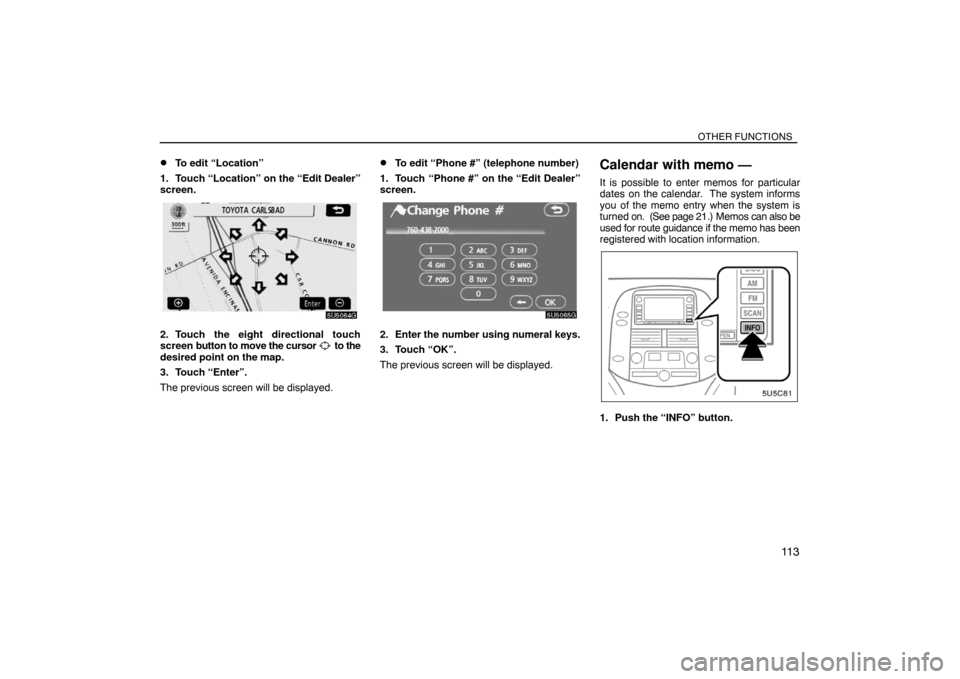
To edit “Location”
1. Touch “Location” on the “Edit Dealer”
screen.
2. Touch the eight directional touch
screen button to move the cursor to the
desired point on the map.
3. Touch “Enter”.
The previous screen will be displayed.
�To edit “Phone #” (telephone number)
1. Touch “Phone #” on the “Edit Dealer”
screen.
2. Enter the number using numeral keys.
3. Touch “OK”.
The previous screen will be displayed.
Calendar with memo —
It is possible to enter memos for particular
dates on the calendar. The system informs
you of the memo entry when the system is
turned on. (See page 21.) Memos can also be
used for route guidance if the memo has been
registered with location information.
1. Push the “INFO” button.
Page 100 of 226

OTHER FUNCTIONS
11 8�
To display memos for a specified peri-
od of time
1. Touch “Period” on the “Memo Search”
screen.
2. Enter the period using the numeral
keys.
The period from January 1, 2005 through De-
cember 31, 2024 can be set for searching.
3. After setting the period, touch “OK”.
The “Memo List” screen will be displayed.
Handsfree system (for
cellular phone)
Handsfree system allows you to make or
receive a call without taking your hands
off the steering wheel by connecting your
cellular phone.
This system supports Bluetooth�. Bluetooth�
is a wireless data system by which you can
call without your cellular phone being con-
nected with a cable or placed on a cradle.
If your cellular phone does not support
Bluetooth�, this system can not function.
CAUTION
While you are driving, do not use a cel-
lular phone or connect the Bluetooth�
phone.
NOTICE
Do not leave your cellular phone in the
car. The temperature indoor may be
high and damage the phone.
INFORMATION
In the following conditions, the system
may not function.
�The cellular phone is turned OFF.
�The current position is outside the
communication area.
�The cellular phone is not connected.
�The cellular phone has a low battery.
Page 101 of 226

OTHER FUNCTIONS
11 9
By pushing the telephone switch above,
you can receive a call or hang up without
taking your hands off the steering wheel.
�MicrophoneYou can use the microphone above when
talking on the phone.
The other party’s voice outputs from the driv-
er’s speaker. When the received calls or re-
ceived voice outputs, the audio from the Au-
dio system or voice guidance from the
Navigation system will be muted.
INFORMATION
�Talk alternately with the other party on
the phone. If you talk at the same time,
the voice may not reach each other. (It
is not a malfunction.)
�Keep the volume of receiving voice
down. Otherwise, echo is coming up.
When you talk on the phone, speak
clearly towards the microphone.
�In the following situations, your voice
may not reach the other party.
�Driving on unpaved road. (Too
much road noise.)
�Driving at high speed.
�Windows are open.
�If airconditioning vents are turned
towards the microphone.
�The sound of the airconditioning
fan is loud.1Indicates the condition of Bluetooth�
connection.
“Blue” indicates an excellent connection to
Bluetooth�.
“Yellow” indicates a bad connection to
Bluetooth�, resulting in possible deterioration
of voice quality.
: no connection to Bluetooth�.
2Indicates the amount of battery
charge left.
Empty Full
It is not displayed while the Bluetooth� is con-
necting or the phone book data is being trans-
ferred.
The amount left does not always correspond
with the one of your cellular phone. This sys-
tem doesn’t have a charging function.
Page 102 of 226

OTHER FUNCTIONS
120
3Indicates the receiving area.
“Rm” is displayed when receiving in Roam-
ing area.
“Hm” is displayed when receiving in Home
area.
4Indicates the level of reception.
Too bad Excellent
The level of reception does not always corre-
spond with the one of your cellular phone.
INFORMATION
This system supports the following ser-
vice.
�HFP (Hands Free Profile) Ver. 1.0
�OPP (Object Push Profile) Ver. 1.1
If your cellular phone does not support
HFP, you cannot enter the Bluetooth�
phone, and take OPP service individual-
ly.
An antenna for the Bluetooth� connection
is built in the display. The indication of the
Bluetooth� connection may turn yellow
and the system may not function when
you use the Bluetooth� phone in the fol-
lowing conditions and places.
�Your cellular phone is hiding behind the
display (behind the seat or in the glove box
and console box).
�Your cellular phone touches or is covered
with metal materials.
Leave the Bluetooth� phone on the place
where “Blue” indication is displayed.
Bluetooth is a trademark owned by Bluetooth
SIG, Inc.When you sell your car:
A lot of personal data is registered when
you use the Handsfree system. When
you sell your car, initialize the system so
your personal information is no longer re-
corded. (See “(d) Delete personal data” on
page 167.)
If you initialize it, the former state will never
come back again. Be careful when initializing
data, because once the data is initialized it
can not be recovered.
You can initialize the following data in the sys-
tem.
�Phone book data
�Dialed numbers and received calls
�Speed dial
�Bluetooth� phone data
�Security code
Page 104 of 226
OTHER FUNCTIONS
122
(a) Enter a Bluetooth� phone
To use the handsfree system, you need
to enter your phone into the system. Once
you have registered it, you can make a
handsfree call.
1. Push the “INFO” button.
2. Touch “Telephone” to display “Tele-
phone” screen.
You can also push the
switch of the steer-
ing wheel to display this screen when the ve-
hicle is stopped.
3. Touch “Settings” to display “Settings”
screen.
4. Touch “Bluetooth∗” to display the
“Bluetooth∗ Settings” screen.
5. Touch “Register” to connect your cel-
lular phone to the system.
∗: Bluetooth is a registered trademark of
Bluetooth SIG. Inc.