Page 194 of 466
’08 Rav4_U (L/O 0802)
194
2008 RAV4 from Feb. ’08 Prod. (OM42726U)
The rear seat entertainment system con-
sists of the following components.1. Front audio system
∗
2. DVD player
3. Rear seat entertainment system display
4. Rear seat entertainment system controller
5. A/V input adapter
6. Power outlet (115 VAC)
7. Audio remote control switches
∗
8. Power outlet main switch
∗: For details, see “—Controls and fea-
tures” on page 176 or “Audio remote con-
trols” on page 191 in this section.
Rear seat entertainment system—
Page 203 of 466
’08 Rav4_U (L/O 0802)
203
2008 RAV4 from Feb. ’08 Prod. (OM42726U)
To turn on the system, push the “DVD”
button or “VIDEO” button.
When the “DVD” button is pushed, the
disc load screen changes to the DVD
player operation screen.
When the “VIDEO” button is pushed, the
images and sounds from the personal au-
dio machine are output.
The “DVD” button is effective only when
a disc is inserted.To turn off the system, push the “OFF”
button.
When the front audio system is turned off,
the rear audio system and the DVD player
will be turned off simultaneously.While the rear DVD player is in operation,
the chapter or track can be changed by
pushing the “
�” or “ �” side of the
“SEEK/TRACK” button.
For details, see “—Controls and features”
on page 176 in this Section.
—Turning the rear seat
entertainment system on and
off —Operating the rear DVD
player using the front audio
system
Page 204 of 466

’08 Rav4_U (L/O 0802)
204
2008 RAV4 from Feb. ’08 Prod. (OM42726U)
The audio system controls in the instru-
ment panel can be used to disable the
operation of the rear seat entertainment
system by rear seat passengers.
Turning on the rear system lock prevents
small children from using the remote con-
troller or operation panel of the DVD play-
er unit to operate the rear seat entertain-
ment system during driving.
Turn the audio system on. Push the
“AUDIO CONTROL” knob repeatedly until
“RSE” is displayed. Next, turn the “AUDIO
CONTROL” knob until “ON” is displayed,
and then push the “AUDIO CONTROL”
knob.
When the rear system lock is on and any
button is pushed on the remote controller
or the operation panel, the screen shown
above is displayed for approximately 6
seconds.
Even when the rear system lock is turned
on during play mode, the images and
sounds continue without interruption.
The condition of the rear system lock is
maintained, even when the engine switch
is turned off.The DVD player can play audio CDs/
MP3 CDs, DVD video discs, CD texts,
dtsCDs and video CDs.
For appropriate discs for this player, see
“Audio/video system operating hints” on
page 232 in this Section.
The DVD player works when the engine
switch is in the “ACC” or “ON” position.
To turn on the DVD player, a disc must
be loaded in the player.
To turn off the player, eject the disc.
Error messages
If the player malfunctions, your audio sys-
tem will display following error messages.
If “DISC CHECK” appears on the
screen:
It indicates that the disc is dirty,
damaged or it was inserted upside down.
Clean the disc or insert it correctly.
If “REGION CODE ERROR” appears on
the screen: It indicates that the DVD re-
gion code is not set properly.
If “DVD ERROR” appears on the
screen: There is a problem inside the
player. Eject the disc. Set the disc again.
If the malfunction still exists, take your
vehicle to your Toyota dealer.
—Rear system lock —DVD player
Page 205 of 466
’08 Rav4_U (L/O 0802)
205
2008 RAV4 from Feb. ’08 Prod. (OM42726U)
INSERTING THE DISC
Insert a disc into the slot with the label
side up.
“DISC” indicator light turns on while the
disc is loaded.
If the label faces down, the disc cannot
be played. In this case, “DISC CHECK”
and disc number appear on the screen.If a disc which is not playable is inserted,
“DISC CHECK” will also appear on the
screen. For appropriate discs for this play-
er, see “Audio/video system operating
hints” on page 232 in this Section.
The player will play the track or chapter,
and it will play from the beginning of the
track or chapter again after it reaches the
end.
NOTICE
Never try to disassemble or oil any
part of the DVD player. Do not insert
anything other than a disc into the
slot.
8 cm (3 in.) compact disc singles
Your compact disc player needs an adap-
tor to play compact disc singles. Compact
disc singles are about 8 cm (3 in.) in
diameter
−smaller than standard di scs.
Page 209 of 466

’08 Rav4_U (L/O 0802)
209
2008 RAV4 from Feb. ’08 Prod. (OM42726U)
To turn off the switches on the screen,
push the “OPTION” button on the control-
ler once again or push the “Hide Buttons”
on the screen.
—DVD player operation
NOTE: The playback condition of some
DVD video discs may be determined by
the DVD video software producer. This
DVD player plays discs as the software
producer intended. Therefore, some
functions may not work properly. Be
sure to read the instruction manual for
the DVD video disc separately provided.
For detailed information about DVD
video discs, see “—DVD video disc
information” on page 229 in this
Section.
Precautions for DVD video discs
When recording on a DVD video, video
CD or audio tracks may not record in
some cases while the menu is displayed.
As audio will not play in this case, verify
that the video tracks are playing and then
activate playback.
The title/chapter number and playback
time display may not appear while playing
back certain DVD video discs.CAUTION
Conversational speech on some DVDs
is recorded at a low volume to em-
phasize the impact of sound effects.
If you adjust the volume assuming
that the conversations represent the
maximum volume level available for
the DVD, you may be startled by
louder sound effects or when you
change to a different audio source.
Loud sounds may have a significant
impact on the human body or pose a
driving hazard. Keep this in mind
when you adjust the volume.
Page 226 of 466
’08 Rav4_U (L/O 0802)
226
2008 RAV4 from Feb. ’08 Prod. (OM42726U)
CHANGING THE INITIAL SETTING (video
CD only)
Push the “Set Up” switch on the screen
and then the initial setting screen will ap-
pear. You can also display the screen by
pushing the “SET UP” button on the con-
troller. You can change the initial setting.
(See “CHANGING THE INITIAL SETTING”
on page 216 in this Section for details.)
After the setting is done, the player plays
from the beginning of the chapter or the
track.
CD Text
CD MP3
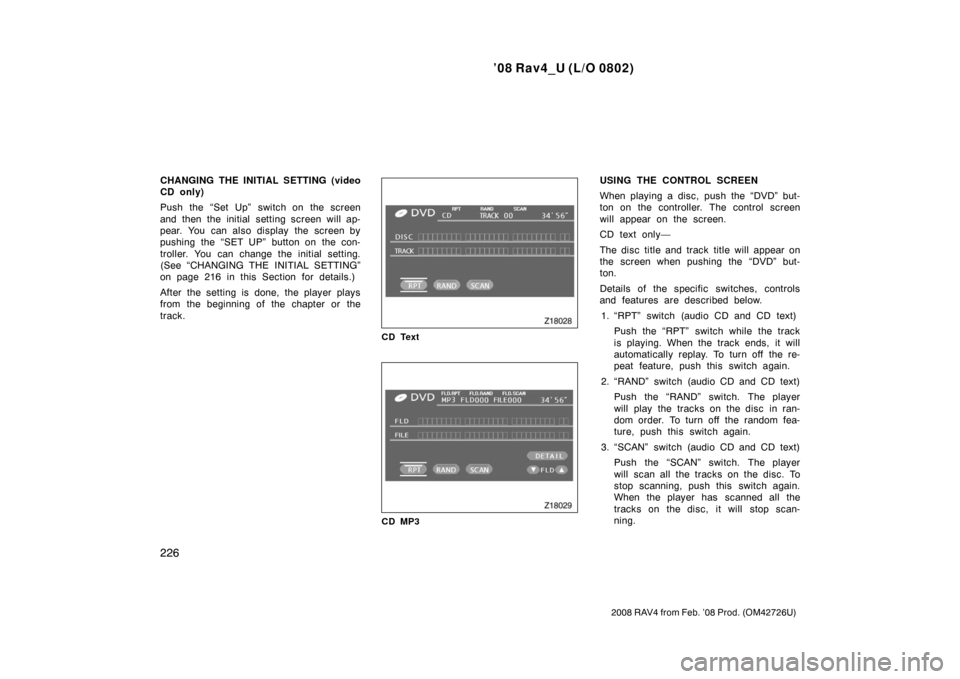
USING THE CONTROL SCREEN
When playing a disc, push the “DVD” but-
ton on the controller. The control screen
will appear on the screen.
CD text only—
The disc title and track title will appear on
the screen when pushing the “DVD” but-
ton.
Details of the specific switches, controls
and features are described below.1. “RPT” switch (audio CD and CD text) Push the “RPT” switch while the track
is playing. When the track ends, it will
automatically replay. To turn off the re-
peat feature, push this switch again.
2. “RAND” switch (audio CD and CD text) Push the “RAND” switch. The player
will play the tracks on the disc in ran-
dom order. To turn off the random fea-
ture, push this switch again.
3. “SCAN” switch (audio CD and CD text) Push the “SCAN” switch. The player
will scan all the tracks on the disc. To
stop scanning, push this switch again.
When the player has scanned all the
tracks on the disc, it will stop scan-
ning.
Page 236 of 466

’08 Rav4_U (L/O 0802)
236
2008 RAV4 from Feb. ’08 Prod. (OM42726U)
NOTICE
�Do not use special shaped, trans-
parent/translucent, low quality or la-
beled discs such as those shown in
the illustrations. The use of such
discs may damage the player or
changer, or it may be impossible to
eject the disc.
� This system is not designed for use
of Dual Disc. Do not use Dual Disc
because it may cause damage to
the player or changer.
Correct Wrong
�Handle the discs carefully, especially
when you are inserting them. Hold
them on the edge and do not bend
them. Avoid getting fingerprints on
them, particularly on the shiny side.
�Dirt, scratches, warping, pin holes, or
other disc damage could cause the
player to skip or to repeat a section of
a chapter or track. (To see a pin hole,
hold the disc up to the light.)
�Remove discs from the compact disc
player when you are not playing them.
Store them in their plastic cases away
from moisture, heat, and direct sun-
light.
To clean a disc: Wipe it with a soft, lint −
free cloth that has been dampened with
water. Wipe in a straight line from the
center to the edge of the disc (not in
circles). Dry it with another soft, lint −free
cloth. Do not use a conventional record
cleaner or anti −static device.
Page 269 of 466

’08 Rav4_U (L/O 0802)
269
2008 RAV4 from Feb. ’08 Prod. (OM42726U)
OPERATION OF INSTRUMENTS AND
CONTROLS
Air conditioning system
Manual air conditioning systemControls 270
. . . . . . . . . . . . . . . . . . . . . . . . . . . . . . . . . . . . .\
. . . . . . . . . . . .
Air flow selector settings 273
. . . . . . . . . . . . . . . . . . . . . . . . . . . . . . . . . .
Operating tips 273
. . . . . . . . . . . . . . . . . . . . . . . . . . . . . . . . . . . . \
. . . . . . .
Automatic air conditioning system Controls 276
. . . . . . . . . . . . . . . . . . . . . . . . . . . . . . . . . . . . \
. . . . . . . . . . . . .
Air flow selector settings 280
. . . . . . . . . . . . . . . . . . . . . . . . . . . . . . . . . .
Operating tips 280
. . . . . . . . . . . . . . . . . . . . . . . . . . . . . . . . . . . . \
. . . . . . .
Side vents 283
. . . . . . . . . . . . . . . . . . . . . . . . . . . . . . . . . . . . \
. . . . . . . . . . . . .
Air conditioning filter 284
. . . . . . . . . . . . . . . . . . . . . . . . . . . . . . . . . . . . \
. . . .
SECTION 1 9


