Page 161 of 512
161
2-3. Operating the lights and windshield wipers
2
When driving
PRIUS_U_(L/O_0802)
■
The windshield wiper and washer can be operated when
The “POWER” switch is in ON mode.
■ Intermittent windshield wiper interval mode
■ If no windshield washer fluid sprays
Check that the washer nozzles are not blocked and if there is washer fluid in
the windshield washer fluid reservoir.
NOTICE
■When the windshield is dry
Do not use the wipers, as they may damage the windshield.
■ When there is no washer fluid spray from the nozzle
Damage to the washer fluid pump may be caused if the lever is pulled
toward you and held continually.
■ When a nozzle becomes block
Do not try to clear it with a pin or other object. The nozzle will be damaged.
Intermittent windshield wiper interval
adjustment (decrease)
Intermittent windshield wiper interval
adjustment (increase)
1
2
ITY23P014
Page 169 of 512
169
2-4. Using other
driving systems
2
When driving
PRIUS_U_(L/O_0802)
CAUTION
■When using the rear view moni tor system, observe these precautions
to avoid an accident that could r esult in death or serious injuries.
● Never depend solely on the monitor system when reversing.
● Always check visually and with the mirrors to confirm your intended path is
clear.
● Depicted distances between objects and flat surfaces differ from actual
distances.
● Do not use the system if the back door is open.
■ Conditions which may affect the rear view monitor system
● If the back of the vehicle is hit, the camera’s position and mounting angle
may change. Contact your Toyota dealer.
● Rapid temperature changes, such as when hot water is poured on the
vehicle in cold weather, may cause the system to function abnormally.
● If the camera lens is dirty, it cannot transmit a clear image. Rinse with
water and wipe with a soft cloth. If extremely dirty, wash with a mild
cleanser and rinse.
● The displayed image may be darker and moving images may be slightly
distorted when the system is cold.
Page 178 of 512
178 2-5. Driving information
PRIUS_U_(L/O_0802)
■Before driving the vehicle
Perform the following according to the driving conditions.
●Do not try to forcibly open a window or move a wiper that is
frozen. Pour warm water over the frozen area to melt the ice.
Wipe away the water immediately to prevent it from freezing.
● To ensure proper operation of th e climate control system fan,
remove any snow that has accumulated on the air inlet vents
in front of the windshield.
● Remove any ice that has accumu lated on the vehicle chassis.
● Periodically check for and remove any excess ice or snow
that may have accumulated in the wheel well or on the
brakes.
■ When driving the vehicle
Accelerate the vehicle slowly and drive at a reduced speed suit-
able to road conditions.
■ When parking the vehicle
Park the vehicle and Push the “P ” position switch without setting
the parking brake. The parking brake may freeze up, preventing
it from being released.
Page 179 of 512

179
2-5. Driving information
2
When driving
PRIUS_U_(L/O_0802)
Regulations on the use of snow chains
● Regulations regarding the use of tire chains vary according to loca-
tion and type of road. Always check local regu lations before install-
ing chains.
● Use SAE Class “S” type radial tire chains, with the exception of
radial cable chains or V-bar type chains.
• Install the chains on the front tires.
• Refer to the explanation that comes with the tire chains for
installation instructions.
● Retighten the chains after driving 1/4 - 1/2 mile (0.5 - 1.0 km).
■Snow chain installation
Observe the following precautions when installing and removing chains.
● Install and remove tire chains in a safe location.
● Install tire chains on the front tires.
● Install tire chains following the instructions provided in the accompanying
instructions.
CAUTION
■Driving with snow tires
Observe the following precautions to reduce the risk of accidents.
Failing to do so may result in a loss of vehicle control and cause death or
serious injury.
● Use tires of the size specified for your vehicle.
● Maintain the specified level of tire inflation pressure.
● Do not drive in excess of 75 mph (120 km/h), regardless of the type of
snow tires being used.
● Snow tires should be installed on all wheels.
Page 195 of 512
195
3-1. Using the touch screen
3
Interior features
PRIUS_U_(L/O_0802)
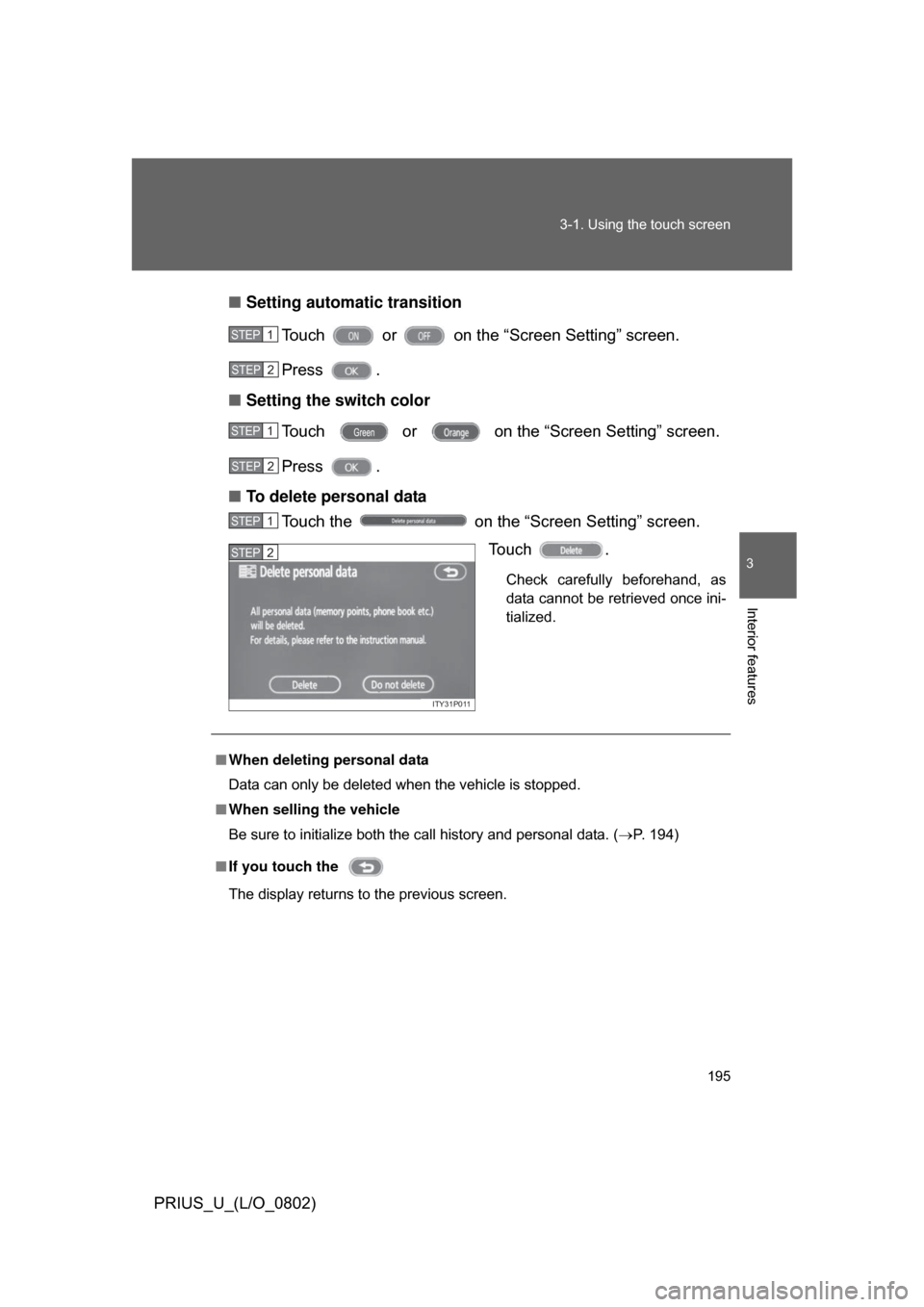
■
Setting automatic transition
Touch or on the “Screen Setting” screen.
Press .
■ Setting the switch color
Touch or on the “Screen Setting” screen.
Press .
■ To delete personal data
Touch the on the “Screen Setting” screen.
Touch .
Check carefully beforehand, as
data cannot be retrieved once ini-
tialized.
STEP1
STEP2
STEP1
STEP2
STEP1
ITY31P011
STEP2
■When deleting personal data
Data can only be deleted when the vehicle is stopped.
■ When selling the vehicle
Be sure to initialize both the call history and personal data. ( P. 194)
■ If you touch the
The display returns to the previous screen.
Page 232 of 512
232 3-3. Using the audio system
PRIUS_U_(L/O_0802)
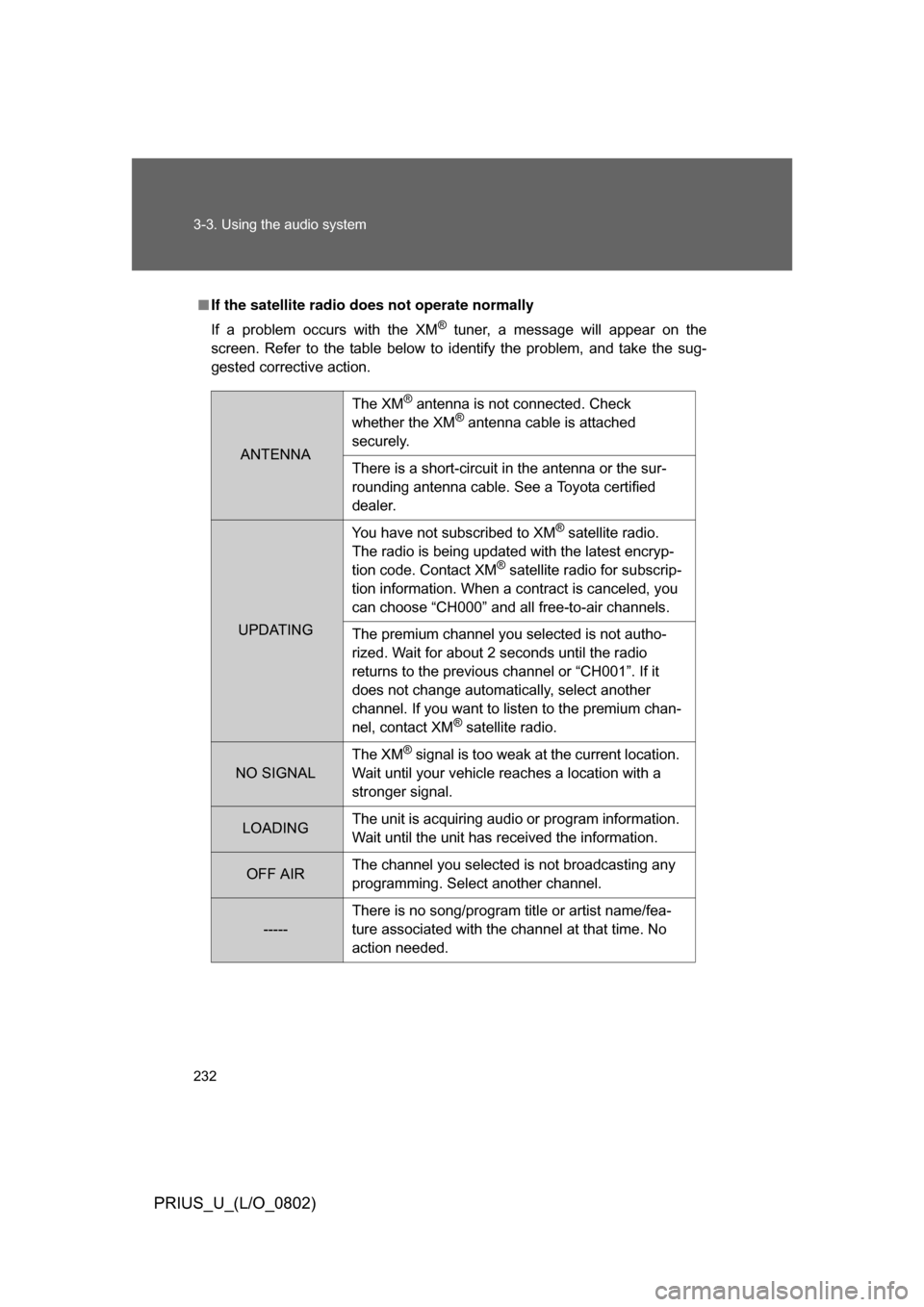
■If the satellite radio does not operate normally
If a problem occurs with the XM
® tuner, a message will appear on the
screen. Refer to the table below to identify the problem, and take the sug-
gested corrective action.
ANTENNA
The XM® antenna is not connected. Check
whether the XM® antenna cable is attached
securely.
There is a short-circuit in the antenna or the sur-
rounding antenna cable. See a Toyota certified
dealer.
UPDATING You have not subscribed to XM
® satellite radio.
The radio is being updated with the latest encryp-
tion code. Contact XM
® satellite radio for subscrip-
tion information. When a contract is canceled, you
can choose “CH000” and all free-to-air channels.
The premium channel you selected is not autho-
rized. Wait for about 2 seconds until the radio
returns to the previous channel or “CH001”. If it
does not change automatically, select another
channel. If you want to listen to the premium chan-
nel, contact XM
® satellite radio.
NO SIGNAL The XM
® signal is too weak at the current location.
Wait until your vehicle reaches a location with a
stronger signal.
LOADING The unit is acquiring audio or program information.
Wait until the unit has received the information.
OFF AIRThe channel you selected is not broadcasting any
programming. Select another channel.
-----There is no song/program title or artist name/fea-
ture associated with the channel at that time. No
action needed.
Page 243 of 512

243
3-3. Using the audio system
3
Interior features
PRIUS_U_(L/O_0802)
■
Canceling random, repeat and scan playback
Touch , , or on the screen once again.
■ Displaying the title and artist name
If a CD-TEXT disc is inserted, the title of the disc and track will be displayed.
Up to 13 letters can be displayed.
■ Error messages
Refer to the following table and take the appropriate measures. If the prob-
lem is not rectified, take the vehicle to your Toyota dealer.
MessageCauseCorrection
Procedures
CD X Check • The disc X is dirty or
damaged
• The disc X is inserted upside down
• The disc X is not play- able with the player • Clean the disc
• Insert the disc correctly
• Confirm the disc is
playable with the player
CD Error • There is a malfunction
within the system
• Operation is stopped due to a high tempera-
ture inside the player • Eject the disc
• Eject the disc and allow
the player to cool down
NO DATA DISC This indicates that no
playable data is
included in the disc Eject the disc
Page 250 of 512
250 3-3. Using the audio system
PRIUS_U_(L/O_0802)
■Canceling random, repeat and scan playback
Touch , , or on the screen once again.
■ Displaying the title and artist name
If a CD-TEXT disc is inserted, the title of the disc and track will be displayed.
Up to 29 letters can be displayed.
■ Error messages
Refer to the following table and take the appropriate measures. If the prob-
lem is not rectified, take the vehicle to your Toyota dealer.
MessageCauseCorrection
Procedures
CD X Check • The disc X is dirty or
damaged
• The disc X is inserted upside down
• The disc X is not play- able with the player • Clean the disc
• Insert the disc correctly
• Confirm the disc is
playable with the player
CD Error • There is a malfunction
within the system
• Operation is stopped due to a high tempera-
ture inside the player • Eject the disc
• Eject the disc and allow
the player to cool down
NO DATA DISC This indicates that no
playable data is
included in the disc Eject the disc