Page 166 of 268

AUDIO/VIDEO SYSTEM
186
CAUTION
For vehicles sold in U.S.A. and
Canada:
�Part 15 of the FCC Rules
FCC Warning:
Any unauthorized changes or
modifications to this equipment
will void the user’s authority to op-
erate this device.
�Laser products
�Do not take this unit apart or at-
tempt to make any changes
yourself. This is an intricate unit
that uses a laser pickup to re-
trieve information from the sur-
face of compact discs. The laser
is carefully shielded so that its
rays remain inside the cabinet.
Therefore, never try to disas-
semble the player or alter any of
its parts since you may be ex-
posed to laser rays and danger-
ous voltages.
�This product utilizes a laser. Use
of controls or adjustments or
performance of procedures oth-
er than those specified herein
may result in hazardous radi-
ation exposure.
�Turning the system on and off
“PWR·VOL”: Push this knob to turn the
audio system on and off. Turn this knob to
adjust the volume. The system turns on in
the last mode used.
“AUDIO”: Push this button to display
touch−screen buttons for audio system
(audio control mode).
You can select the function that enables
automatic return to the previous screen
from the audio screen. See “(a) Automatic
transition” on page 178 for details.
Page 167 of 268
AUDIO/VIDEO SYSTEM
187 �
Switching between functions
Push “AM·SAT”, “FM” or “DISC·AUX”
button to turn on the desired mode. The
selected mode turns on immediately.
Push these buttons if you want to switch
from one mode to another.
If the disc is not set, DVD changer does not
turn on.
You can turn off each player by ejecting the
cassette tape or disc. If the audio system
was previously off, then the entire audio
system will be turned off when you eject
the cassette tape or disc. If another func-
tion was previously playing, it will come on
again.
6U5701T
6U5702T
6U5703T
Page 168 of 268
AUDIO/VIDEO SYSTEM
188
6U5705T
The buttons for radio and DVD changer
operation are displayed on the function
button display screen when the audio con-
trol mode is selected.
Touch them lightly and directly on the
screen.
The selected button is highlighted.
INFORMATION
�If the system does not respond to
a touch of a touchscreen button,
move your finger away from the
screen and then touch it again.
�You cannot operate dimmed
touchscreen buttons.
�Wipe off fingerprints on the sur-
face of the display using a glass
cleaning cloth.
Page 169 of 268
AUDIO/VIDEO SYSTEM
189 �
Tone and balance
How good an audio program sounds to you
is largely determined by the mix of the
treble, midrange, and bass levels. In fact,
different kinds of music and vocal pro-
grams usually sound better with different
levels of treble, midrange, and bass.
A good balance of the left and right stereo
channels and of the front and rear sound
levels is also important.
Keep in mind that if you are listening to a
stereo recording or broadcast, changing
the right/left balance will increase the vol-
ume of one group of sounds while de-
creasing the volume of another.
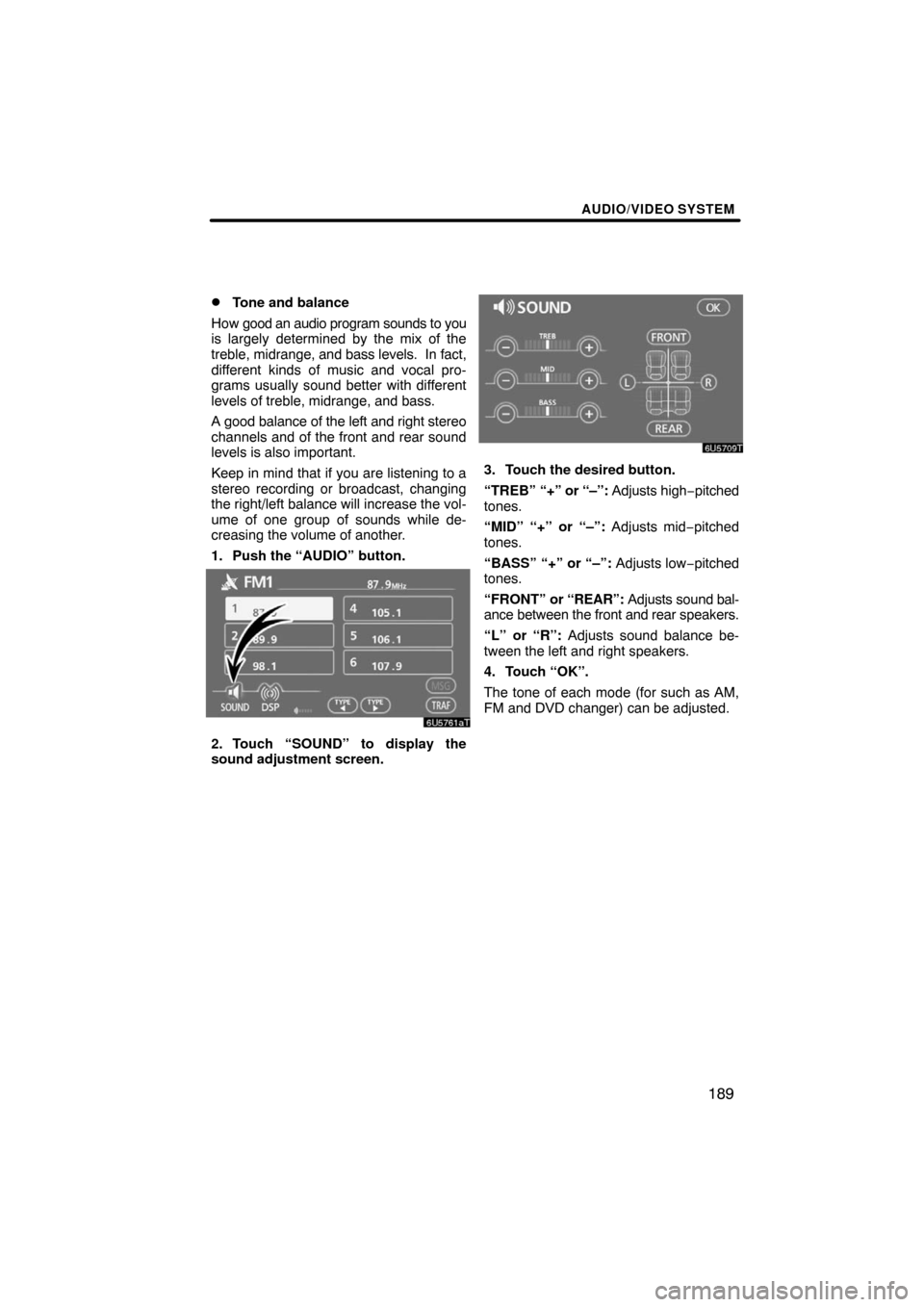
1. Push the “AUDIO” button.
2. Touch “SOUND” to display the
sound adjustment screen.
3. Touch the desired button.
“TREB” “+” or “–”: Adjusts high−pitched
tones.
“MID” “+” or “–”: Adjusts mid−pitched
tones.
“BASS” “+” or “–”: Adjusts low−pitched
tones.
“FRONT” or “REAR”: Adjusts sound bal-
ance between the front and rear speakers.
“L” or “R”: Adjusts sound balance be-
tween the left and right speakers.
4. Touch “OK”.
The tone of each mode (for such as AM,
FM and DVD changer) can be adjusted.
Page 170 of 268

AUDIO/VIDEO SYSTEM
190 �
DSP control
You can change the listening position or
turn on/off the surround function and the
automatic sound levelizer.
1. Push the “AUDIO” button.
2. Touch “DSP” to display the DSP
control mode screen.
Surround function:
Select “ON” of “SURROUND” and touch
“OK”.
The surround function will turn on.
Automatic sound levelizer (ASL):
When the audio sound becomes difficult to
hear due to road noise, wind noise or other
noises while driving, touch “ON”. The
system adjusts to the optimum volume and
tone quality according to the noise level.
When the system is on, the sound adjust-
ment level is displayed on the screen.
�Selecting screen size
The video screen can be changed from
normal mode to wide mode.
1. Push the “AUDIO” button.
2. Touch “WIDE”.
Touching “WIDE” displayed on the
screen in the video control mode will
display the wide mode control screen.
“NORMAL”:When a 3 � 4 screen is dis-
played, the remaining parts
will be in black.
“WIDE 1”:When a 3 � 4 screen is dis-
played, the screen will be
widened horizontally to fill
the display.
“WIDE 2”:When a 3 � 4 screen is dis-
played, the screen will be
widened vertically and hori-
zontally, in the same ratio, to
fill the display.
When a 9 � 16 screen is
displayed, this mode should
be selected.
When you touch
, the previous
screen returns.
Page 171 of 268

AUDIO/VIDEO SYSTEM
191 �
Your DVD changer
Your DVD changer can store up to 6 discs
and play selected discs or continuously
play all the discs load in the changer.
When you load discs into the changer,
make sure their labels are face up. If not,
“DISC � Check” will appear on the screen.
NOTICE
�Do not stack up two discs for in-
sertion, or it will cause damage to
the changer. Insert only one disc
into slot at a time.
�Never try to disassemble or oil any
part of the changer. Do not insert
anything other than discs into the
slot.
The changer is intended for use with 12 cm
(4.7 in.) discs only.
�Listening to the radio
Push these buttons to choose either an
AM or FM station.
“AM”, “FM1” or “FM2” appears on the
screen.
If your vehicle is equipped with a satellite
radio broadcast system, when you push
the “AM·SAT” button, “AM”, “SAT1”,
“SAT2”, “SAT3” station appears on the dis-
play. For details about satellite radio
broadcast, see “— Radio operation (XM�
Satellite Radio broadcast)” on page 196.
— Radio operation
Page 172 of 268

AUDIO/VIDEO SYSTEM
192
Turn the knob clockwise to step up the
station band or counterclockwise to
step down.
Your radio automatically changes to stereo
reception when a stereo broadcast is re-
ceived. “ST” appears on the screen. If the
signal becomes weak, the radio reduces
the amount of channel separation to pre-
vent the weak signal from creating noise.
If the signal becomes extremely weak, the
radio switches from stereo to mono recep-
tion. In this case, “ST” disappears from the
screen.
�Presetting a station
1. Tune in the desired station.
2. Touch one of the channel selector
touchscreen buttons (1 — 6) you want
and hold it until a beep is heard.
This sets the station to the button and the
frequency appears on the touch−screen
button.
Each radio mode can store up to 6 station-
s. To change the preset station to a differ-
ent one, follow the same procedure.
The preset station memory is cancelled
when the power source is interrupted by
battery disconnection or a blown fuse.
Page 173 of 268

AUDIO/VIDEO SYSTEM
193 �
Selecting a station
Tune in the desired station using one of the
following methods.
Preset tuning: Touch the channel selec-
tor touch−screen button (1 — 6) for the sta-
tion you want. The touch−screen button is
highlighted and the station frequency ap-
pears on the screen.
Seek tuning: Push the “
” or “” but-
ton of “SEEK·TRACK”. The radio will be-
gin seeking up or down for a station of the
nearest frequency and will stop on recep-
tion. Each time you push the button, the
stations will be searched automatically
one after another.
To scan all the frequencies: Touch
“SCAN” on the screen or push the
“SCAN” button briefly. “SCAN” appears
on the screen. The radio will find the next
station and stay there for a few seconds,
and then scan again. To select a station,
touch “SCAN” or push the “SCAN” but-
ton again.
To scan the preset stations: Touch
“SCAN” on the screen or push the
“SCAN” button for longer than approxi-
mately a second. “P·SCAN” appears on
the screen. The radio will tune in the next
preset station, stay there for a few se-
conds, and then move to the next preset
station. To select a station, touch “SCAN”
or push the “SCAN” button again.
�RDS (Radio Data System)
Your audio system is equipped with Radio
Data Systems (RDS). RDS mode allows
you to receive text messages from radio
stations that utilize RDS transmitters.
When RDS is on, the radio can
— select only stations of a particular pro-
gram type,
— display messages from radio stations,
— search for a stronger signal station.
RDS features are available for use only on
FM stations which broadcast RDS infor-
mation.
If the system receives no RDS stations,
“NO PTY” appears on the display.

