Page 226 of 476
226 3-2. Using the audio system
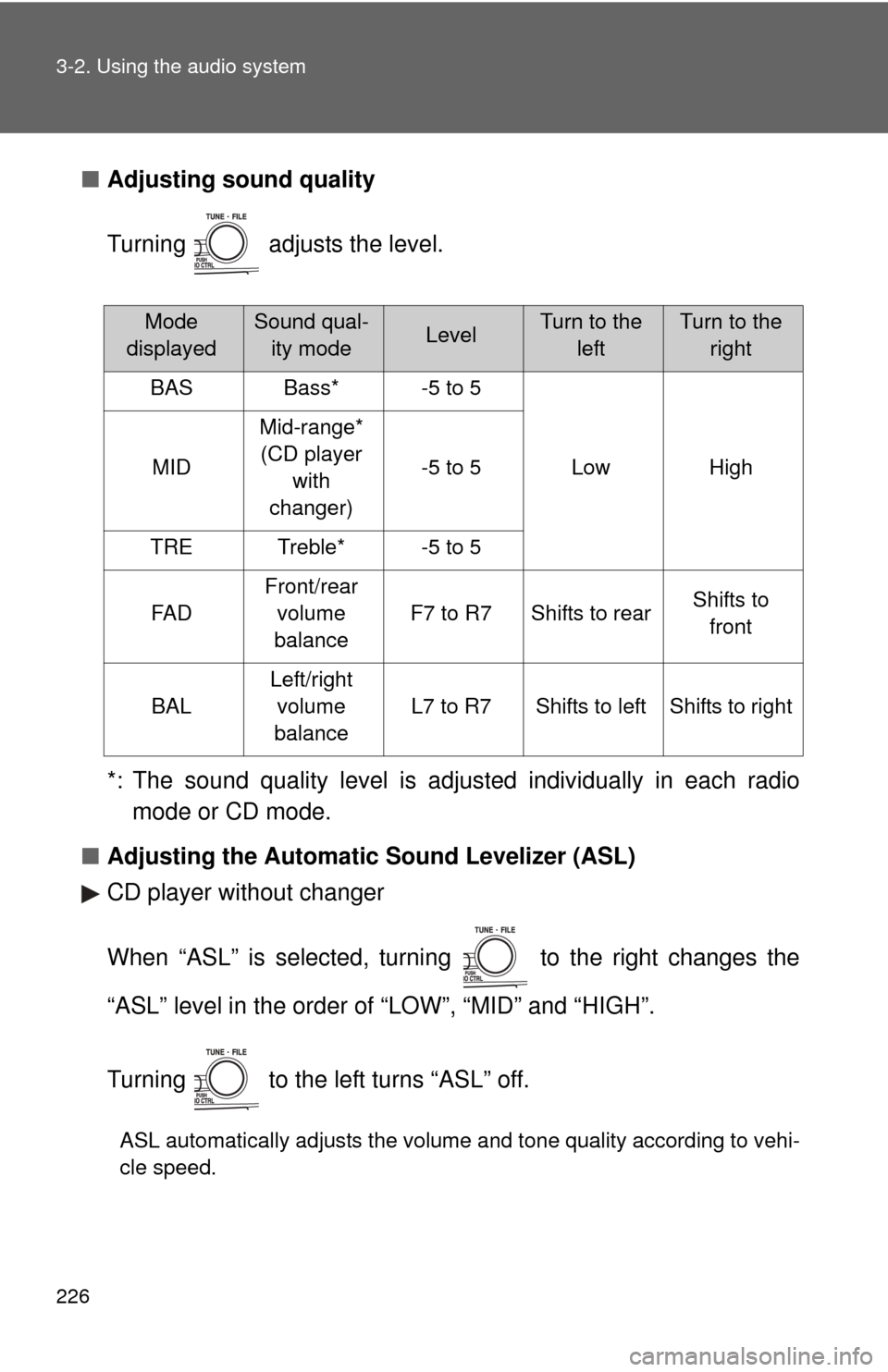
■Adjusting sound quality
Turning adjusts the level.
*: The sound quality level is adjusted individually in each radio
mode or CD mode.
■ Adjusting the Automatic Sound Levelizer (ASL)
CD player without changer
When “ASL” is selected, turning to the right changes the
“ASL” level in the order of “LOW”, “MID” and “HIGH”.
Turning to the left turns “ASL” off.
ASL automatically adjusts the volume and tone quality according to vehi-
cle speed.
Mode
displayedSound qual- ity modeLevelTurn to the leftTurn to the right
BASBass*-5 to 5
LowHighMID
Mid-range*(CD player with
changer)
-5 to 5
TRETreble*-5 to 5
FA D
Front/rear volume
balance
F7 to R7Shifts to rearShifts to front
BAL
Left/right volume
balance
L7 to R7Shifts to leftShifts to right
Page 227 of 476
227
3-2. Using the audio system
3
Interior features
CD player with changer
When “ASL” is selected, turning to the right turns “ASL” on,
and turning to the left turns “ASL” off.
“ASL” automatically adjusts the volume and tone quality according to the
noise level as you drive your vehicle.
■
Trademark owned by SRS Labs, In c. (CD player without changer only)
The audio systems utilize SRS FOCUS
and SRS TruBass audio
enhancement technologies, under license from SRS Labs, Inc., in all modes
except AM radio mode.
FOCUS, TruBass, SRS and
symbols are trademarks of SRS Labs,
Inc.
FOCUS and TruBass technologies are incorporated under license from
SRS Labs, Inc.
Page 239 of 476
239
3-3. Using the hand
s-free phone system (for cellular phone)
3
Interior features
Using the hands-free phone system for the first time
Before using the hands-free phone system, it is necessary to register
a cellular phone in the system. Th e phone registration mode will be
entered automatically when starting the system with no cellular
phone registered. Follow the procedure below to register a cellular
phone:
Press the off-hook switch or the talk switch.
The introductory guidance and phone name registration instructions
are heard.
Register a phone name by either of the following methods.
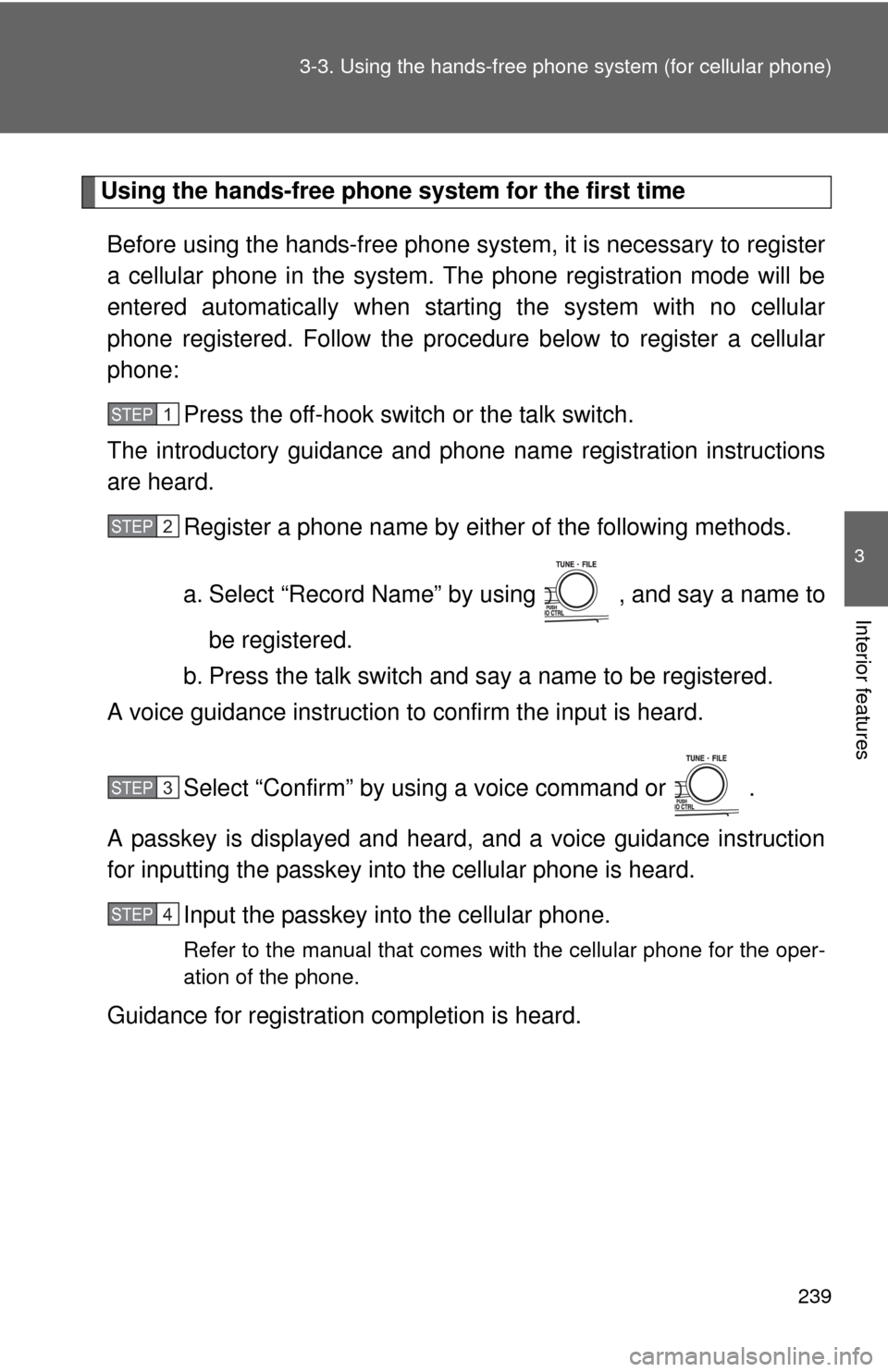
a. Select “Record Name” by using , and say a name to
be registered.
b. Press the talk switch and say a name to be registered.
A voice guidance instruction to confirm the input is heard.
Select “Confirm” by using a voice command or .
A passkey is displayed and heard, and a voice guidance instruction
for inputting the passkey into the cellular phone is heard. Input the passkey into the cellular phone.
Refer to the manual that comes with the cellular phone for the oper-
ation of the phone.
Guidance for registration completion is heard.
STEP1
STEP2
STEP3
STEP4
Page 243 of 476
243
3-3. Using the hand
s-free phone system (for cellular phone)
3
Interior features
■Automatic adjustment of volume
When vehicle speed is 50 mph (80 km/h) or more, the volume automatically
increases. The volume returns to the previous volume setting when vehicle
speed drops to 43 mph (70 km/h) or less.
■ When using a voice command
For numbers, say a combination of single digits from zero to nine, # (pound),
(star), and + (plus).
Say a command correctly and clearly.
■ The system may not recognize your voice in the following situations:
●When driving on a rough road
● When driving at high speeds
● When air is blowing out of the vents onto the microphone
● When the air conditioning fan emits a loud noise
■ The following cannot be performed while driving:
●Operating the system with
● Registering a cellular phone to the system
■ Changing the passkey
P. 251
Page 265 of 476

265
3-4. Using the interior lights
3
Interior features
Interior light
Vehicles without moon roof Door position
Off
On
■Illuminated entry system
The interior light (with the switch in the “DOOR” position) and engine switch
light (vehicles without smart key system) automatically turn on/off according
to “ENGINE START STOP” switch m ode (vehicles with smart key system) or
engine switch position (vehicles without smart key system), the presence of
the electronic key (vehicles with smart key system), whether the doors are
locked/unlocked and whether the doors are open/closed.
■ To prevent the battery from being discharged
If the interior light and engine switch light (vehicles without smart key sys-
tem) remain on when the door is not fully closed and the interior light switch
is in the “DOOR” position, the lights will go off automatically after 20 minutes.
■ Customization that can be co nfigured at Toyota dealer
Settings (e.g. The time elapsed before lights turn off) can be changed.
(Customizable features P. 454)
Interior light
Page 266 of 476
266 3-4. Using the interior lights
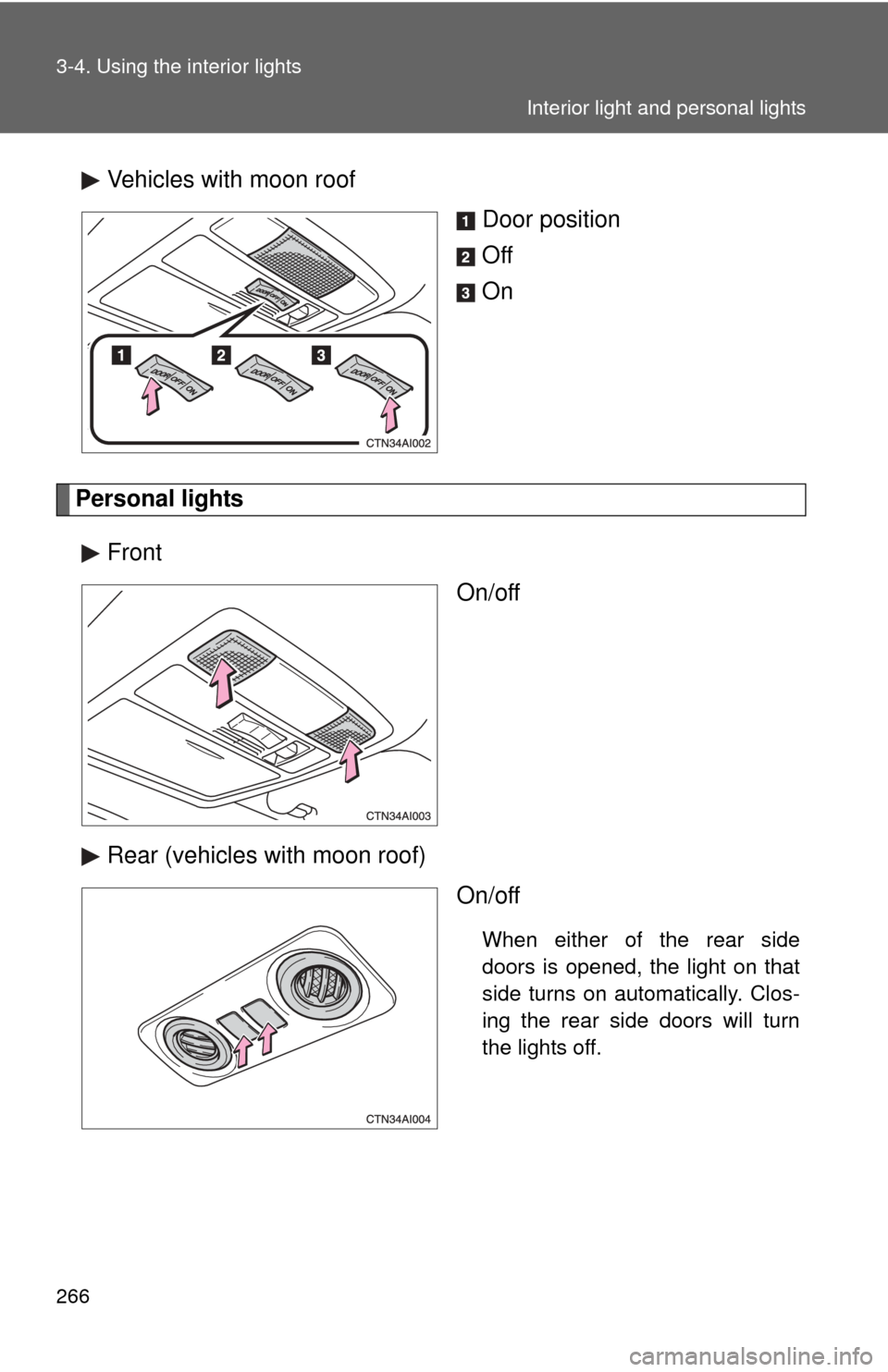
Vehicles with moon roofDoor position
Off
On
Personal lights
Front On/off
Rear (vehicles with moon roof) On/off
When either of the rear side
doors is opened, the light on that
side turns on automatically. Clos-
ing the rear side doors will turn
the lights off.
Interior light and personal lights
Page 270 of 476
270 3-5. Using the storage features
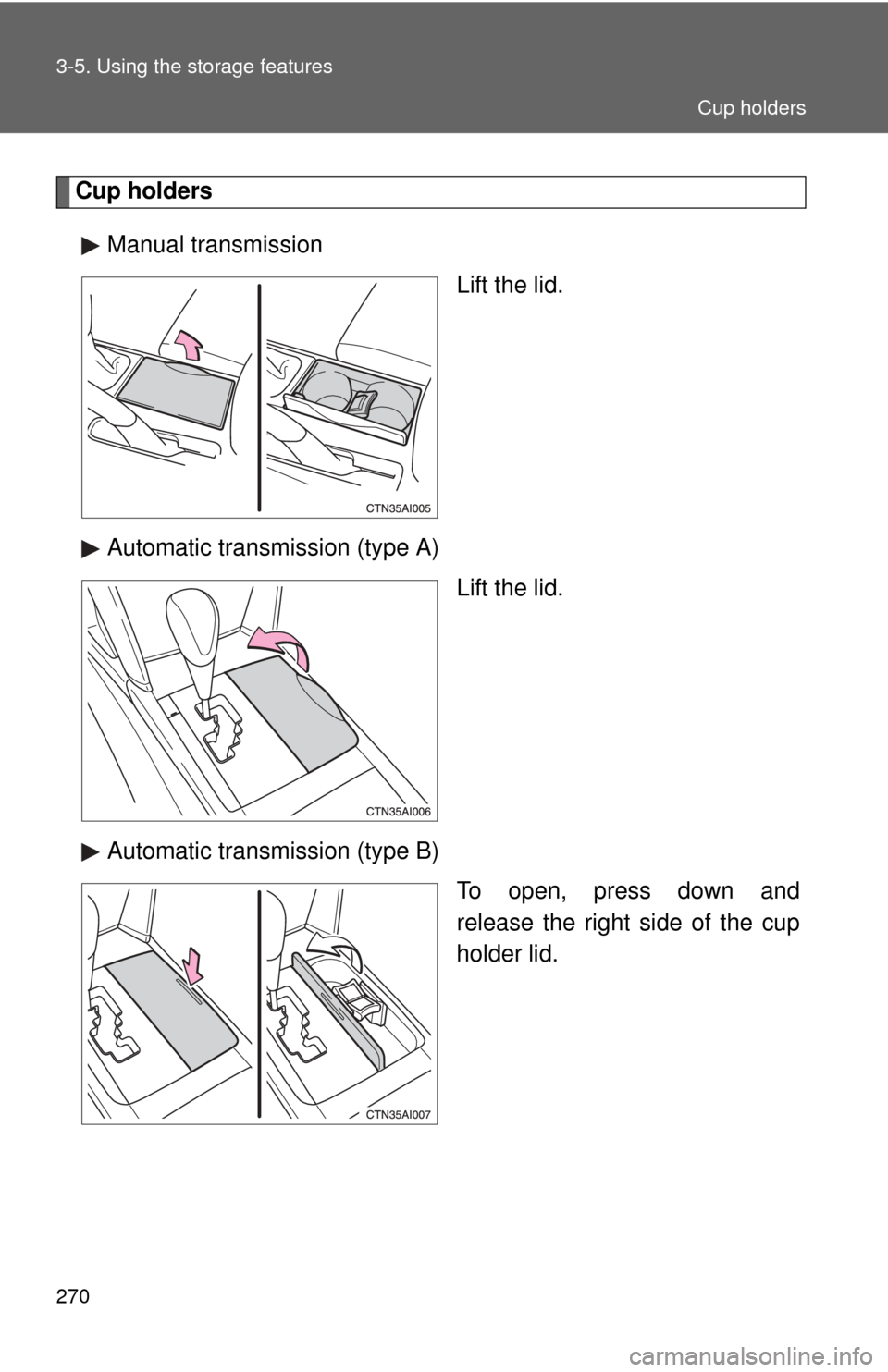
Cup holdersManual transmission Lift the lid.
Automatic transmission (type A) Lift the lid.
Automatic transmission (type B) To open, press down and
release the right side of the cup
holder lid.
Cup holders
Page 271 of 476
271
3-5. Using the
storage features
3
Interior features
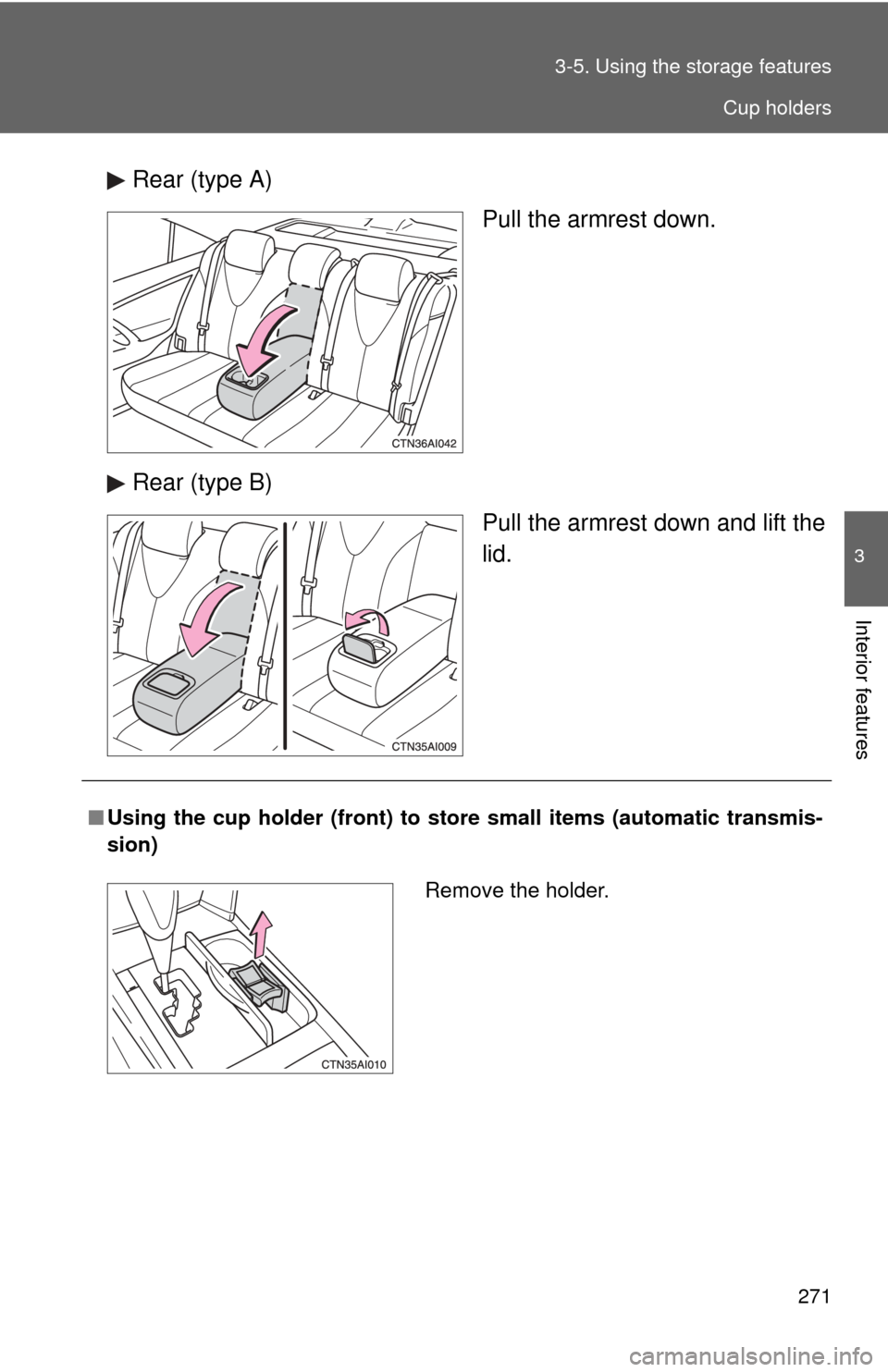
Rear (type A)
Pull the armrest down.
Rear (type B) Pull the armrest down and lift the
lid.
■Using the cup holder (front) to stor e small items (automatic transmis-
sion)
Remove the holder.
Cup holders