Page 124 of 452

124 2-1. Driving procedures
AVALON_U_(L/O_0802)
■When the steering lock cannot be released
■ If the engine does not start
The engine immobilizer system may not have been deactivated. ( P. 75)
■ When the “ENGINE START STOP” switch indicator flashes in amber
The system may be malfunctioning. Have the vehicle inspected by your Toy-
ota dealer immediately.
■ Auto power OFF function
The “ENGINE START STOP” switch will automatically turn OFF when left in
ACC mode for 1 hour or more.
■ Electronic key battery depletion
P. 3 0
■ When the electronic key battery is discharged
P. 340
■ Conditions affecting operation
P. 2 8
■ Leak detection pump
Several hours after the engine is turned off, you may hear a sound coming
from underneath the luggage compartment for several minutes. This is nor-
mal operation and does not indicate a malfunction.
The green indicator light on the “ENGINE
START STOP” switch will flash. Press the
“ENGINE START STOP” switch again
while turning the steering wheel slightly in
either direction.
Page 126 of 452
126
2-1. Driving procedures
AVALON_U_(L/O_0802)
Engine (ignition) switch (without smar t key system)
■Turning the key from “ACC” to “LOCK”
■ Starting the engine
Check that the parking brake is set.
Check that the shift lever is set in “P”.
Sit in the driver’s seat and firmly depress the brake pedal.
Turn the engine switch to the “START” position and start
the engine.
■ Engine (ignition) switch
“LOCK” (OFF)
The steering wheel is locked
and the key can be removed.
“ACC” (ACC mode)
Some electrical components
such as the audio system can
be used.
“ON” (ON mode)
All electrical components can
be used.
“START”
For starting the engine.
STEP1
STEP2
STEP3
STEP4
Shift the shift lever to “P”.
Push in the key and turn to
the “LOCK” position.STEP1
STEP2
Page 127 of 452
127
2-1. Driving procedures
2
When driving
AVALON_U_(L/O_0802)
■
When the steering lock cannot be released
■ If the engine does not start
The engine immobilizer system may not have been deactivated. ( P. 75)
■ Key reminder function
A buzzer sounds if the driver’s door is opened, while the engine switch is in
OFF or ACC mode to remind you to remove the key.
CAUTION
■When starting the engine
Always start the engine while sitting in the driver’s seat. Do not press the
accelerator pedal while starting the engine under any circumstances.
Doing so may cause an accident resulting in death or serious injury.
■ While driving
Do not turn the engine switch to the “LOCK” position.
If in an emergency, you must turn the engine off while the vehicle is moving,
turn the key only to the “ACC” position.
When starting the engine, the engine
switch may seem stuck in the “LOCK”
position. To free it, turn the key while turn-
ing the steering wheel slightly in either
direction.
Page 128 of 452
128 2-1. Driving procedures
AVALON_U_(L/O_0802)
NOTICE
■To prevent battery discharge
Do not leave the key in the “ACC” or “ON” position for long periods without
the engine running.
■ When starting the engine
● Do not crank for more than 30 seconds at a time. This may overheat the
starter and wiring systems.
● Do not race the cold engine.
● If the engine becomes difficult to start or stalls frequently, have the engine
checked immediately.
Page 144 of 452

144 2-3. Operating the lights and windshield wipers
AVALON_U_(L/O_0802)
■Daytime running light system (if equipped)
To make your vehicle more visible to other drivers, the headlights turn on
automatically (at a reduced intensity) whenever the engine is started and the
parking brake is released. Daytime r unning lights are not designed for use at
night.
■ Headlight control sensor
■ Automatic light off system
The headlights and tail lights turn off 30 seconds after a door is opened or
closed if the “ENGINE START STOP” switch or the engine switch has been
switched to ACC or turned OFF while the headlights are turned on. (The
lights turn off immediately if the button on the key is pressed after all
doors are locked.)
To turn the lights on again, switch to ON mode, or turn the light switch OFF
once and then back to the
or position.
■ Customization that can be co nfigured at Toyota dealer
Settings (e.g. light sensor sensitivity) can be changed.
(Customizable features P. 429)
NOTICE
■To prevent battery discharge
Do not leave the lights on longer than necessary if the engine is not running.
The sensor may not function properly if
an object is placed on the sensor, or any-
thing that blocks the sensor is affixed to
the windshield.
Doing so interferes with the sensor
detecting the level of ambient light and
may cause the automatic headlight con-
trol system to malfunction.
Page 226 of 452
226 3-3. Using the hands-free system (for cellular phone)
AVALON_U_(L/O_0802)
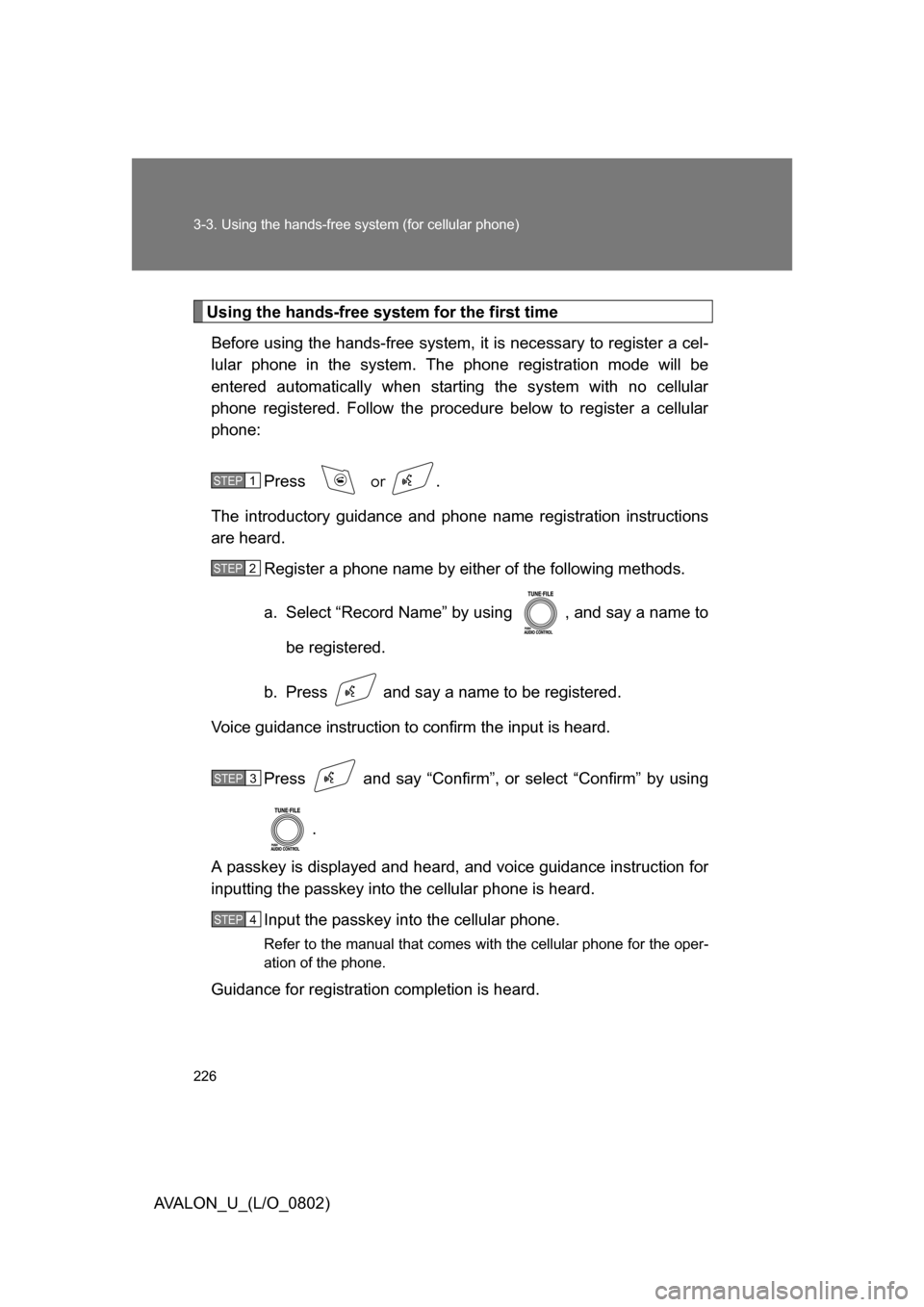
Using the hands-free system for the first timeBefore using the hands-free system, it is necessary to register a cel-
lular phone in the system. The phone registration mode will be
entered automatically when starting the system with no cellular
phone registered. Follow the procedure below to register a cellular
phone:
Press
or .
The introductory guidance and phone name registration instructions
are heard.
Register a phone name by either of the following methods.
a. Select “Record Name” by using , and say a name to
be registered.
b. Press and say a name to be registered.
Voice guidance instruction to confirm the input is heard.
Press and say “Confirm”, or select “Confirm” by using .
A passkey is displayed and heard, and voice guidance instruction for
inputting the passkey into the cellular phone is heard.
Input the passkey into the cellular phone.
Refer to the manual that comes with the cellular phone for the oper-
ation of the phone.
Guidance for registration completion is heard.
STEP1
STEP2
STEP3
STEP4
Page 228 of 452
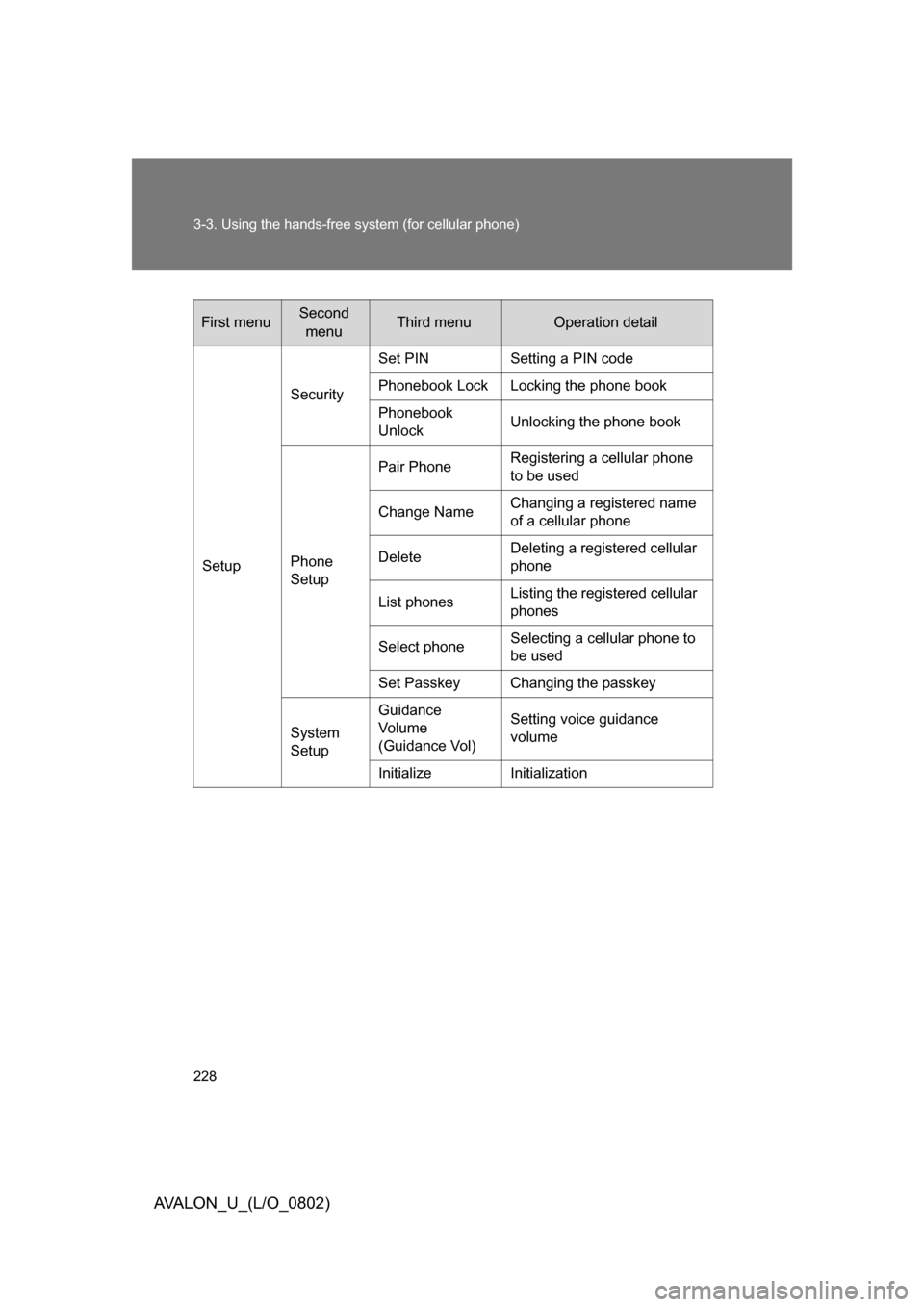
228 3-3. Using the hands-free system (for cellular phone)
AVALON_U_(L/O_0802)
First menuSecond menuThird menuOperation detail
Setup Security
Set PIN Setting a PIN code
Phonebook Lock Locking the phone book
Phonebook
Unlock
Unlocking the phone book
Phone
Setup Pair Phone
Registering a cellular phone
to be used
Change Name Changing a registered name
of a cellular phone
Delete Deleting a registered cellular
phone
List phones Listing the registered cellular
phones
Select phone Selecting a cellular phone to
be used
Set Passkey Changing the passkey
System
Setup Guidance
Vo l u m e
(Guidance Vol) Setting voice guidance
volume
Initialize Initialization
Page 229 of 452
229
3-3. Using the hands-free
system (for cellular phone)
3
Interior features
AVALON_U_(L/O_0802)■
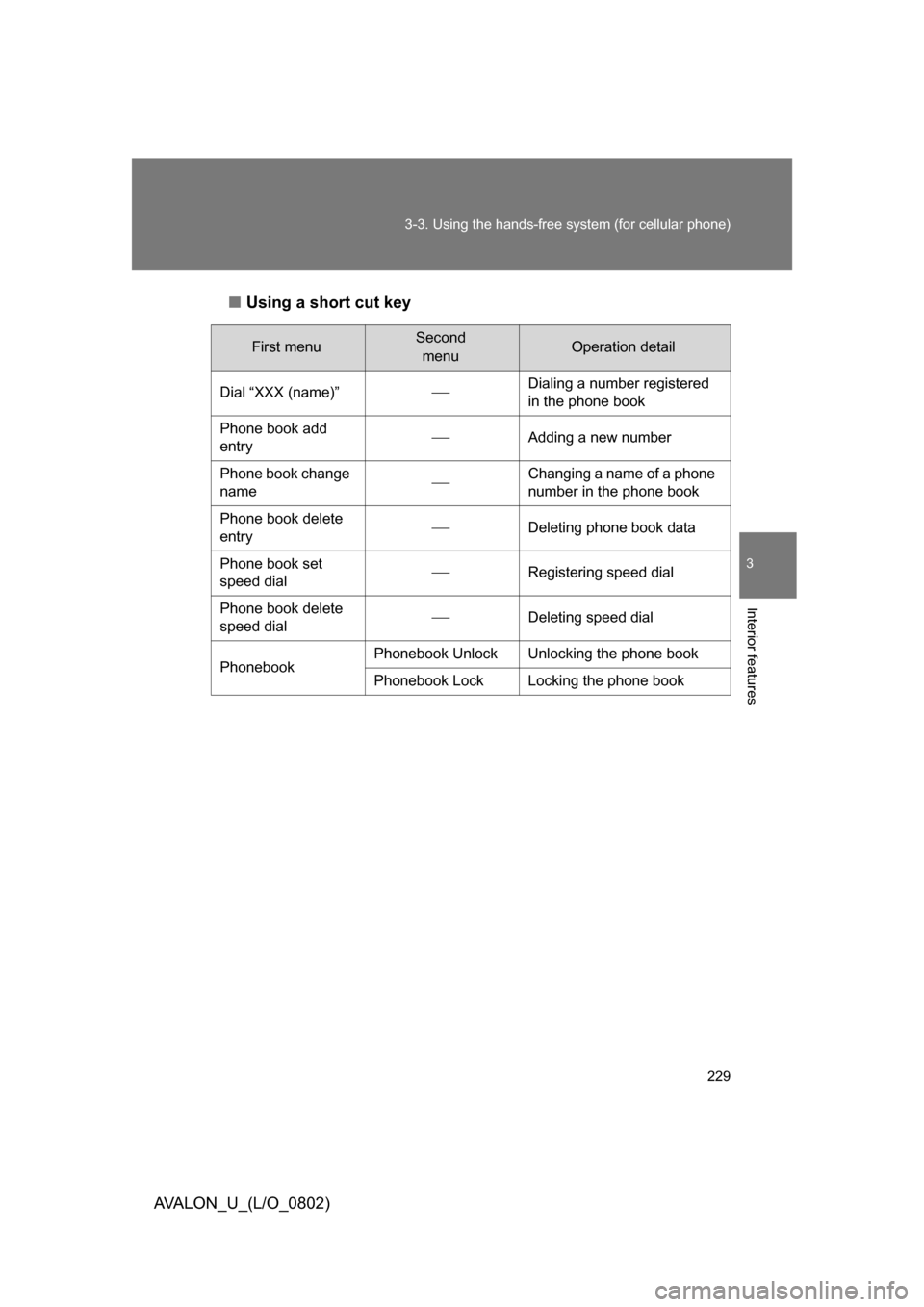
Using a short cut key
First menuSecond
menuOperation detail
Dial “XXX (name)”
Dialing a number registered
in the phone book
Phone book add
entry
Adding a new number
Phone book change
name
Changing a name of a phone
number in the phone book
Phone book delete
entry
Deleting phone book data
Phone book set
speed dial
Registering speed dial
Phone book delete
speed dial
Deleting speed dial
Phonebook Phonebook Unlock Unlocking the phone book
Phonebook Lock Locking the phone book