Page 230 of 452
230 3-3. Using the hands-free system (for cellular phone)
AVALON_U_(L/O_0802)
■Automatic adjustment of volume
When vehicle speed is 50 mph (80 km/h) or more, the volume automatically
increases. The volume returns to the previous volume setting when vehicle
speed drops to 43 mph (70 km/h) or less.
■ When using a voice command
● For numbers, say a combination of single digits from zero to nine, #
(pound), (star), and + (plus).
● Say a command correctly and clearly.
■ The system may not recognize your voice in the following situations:
● When driving on unsealed roads
● When driving at high speeds
● If the window is open
● If the air conditioning is blowing directly on the microphone
● If the air conditioning is set too high
■ The following cannot be performed while driving:
● Operating the system with
● Registering a cellular phone to the system
■ Changing the passkey
P. 240
Page 236 of 452
236
3-3. Using the hands-free system (for cellular phone)
AVALON_U_(L/O_0802)
Setting a cellular phone
Registering a cellular phoneSelect “Pair Phone” by using a voice command or , and do the
procedure for registering a cellular phone. ( P. 226)
Registering a cellular phone in the hands-free system allows the
system to function. The following function can be used for regis-
tered cellular phones:
■ Functions and operation procedures
To enter menu for each function, follow the steps below by using
a voice command or .
●Registering a cellular phone
1. “Setup” 2. “Phone Setup” 3. “Pair Phone”
● Selecting a cellular phone to be used
1. “Setup” 2. “Phone Setup” 3. “Select Phone”
● Changing a registered name
1. “Setup” 2. “Phone Setup” 3. “Change Name”
● Listing the registered cellular phones
1. “Setup” 2. “Phone Setup” 3. “List Phones”
● Deleting a cellular phone
1. “Setup” 2. “Phone Setup” 3. “Delete”
● Changing the passkey
1. “Setup” 2. “Phone Setup” 3. “Set Passkey”
Page 240 of 452
240 3-3. Using the hands-free system (for cellular phone)
AVALON_U_(L/O_0802)
Changing the passkeySelect “Set Passkey” by using a voice command or .
Pattern A
Press , say a four to eight-digit number, and select
“Confirm” by using a voice command or .
Pattern B
Select a four to eight-digit number by using .
The number should be input one digit at a time.
When the entire number to be registered as a passkey has
been input, press again.
■The number of cellular phone that can be registered
Up to 6 cellular phones can be registered in the system.
STEP1
STEP2
STEP2
STEP3
Page 252 of 452
252
AVALON_U_(L/O_0802)
3-4. Using the interior lights
Interior lights list
Illuminated entry system: The various lights automatically turn on/
off according to the presence of the key, whether the doors are
locked/unlocked, whether the doors are open/closed, and the
“ENGINE START STOP” switch or the engine switch mode.
Outer foot light
Front personal lights ( P. 254)
Rear personal light ( P. 254)
Interior light ( P. 254)
Center console light
Engine switch light (if equipped)
Page 256 of 452
256 3-5. Using the storage features
AVALON_U_(L/O_0802)
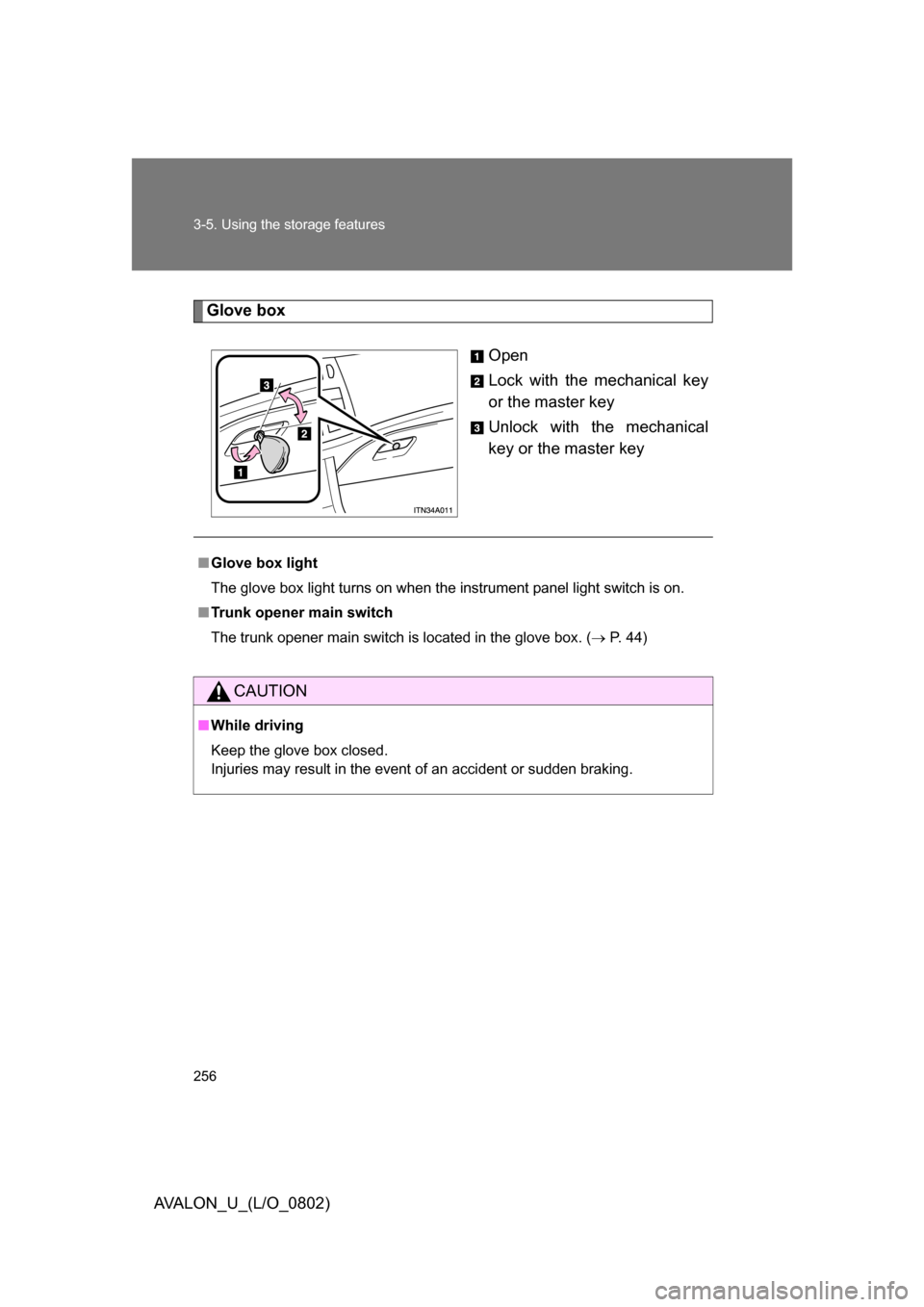
Glove boxOpen
Lock with the mechanical key
or the master key
Unlock with the mechanical
key or the master key
■Glove box light
The glove box light turns on when the instrument panel light switch is on.
■ Trunk opener main switch
The trunk opener main switch is located in the glove box. ( P. 44)
CAUTION
■While driving
Keep the glove box closed.
Injuries may result in the event of an accident or sudden braking.
Page 277 of 452
277
3-6. Other interior features
3
Interior features
AVALON_U_(L/O_0802)
Trunk storage extension
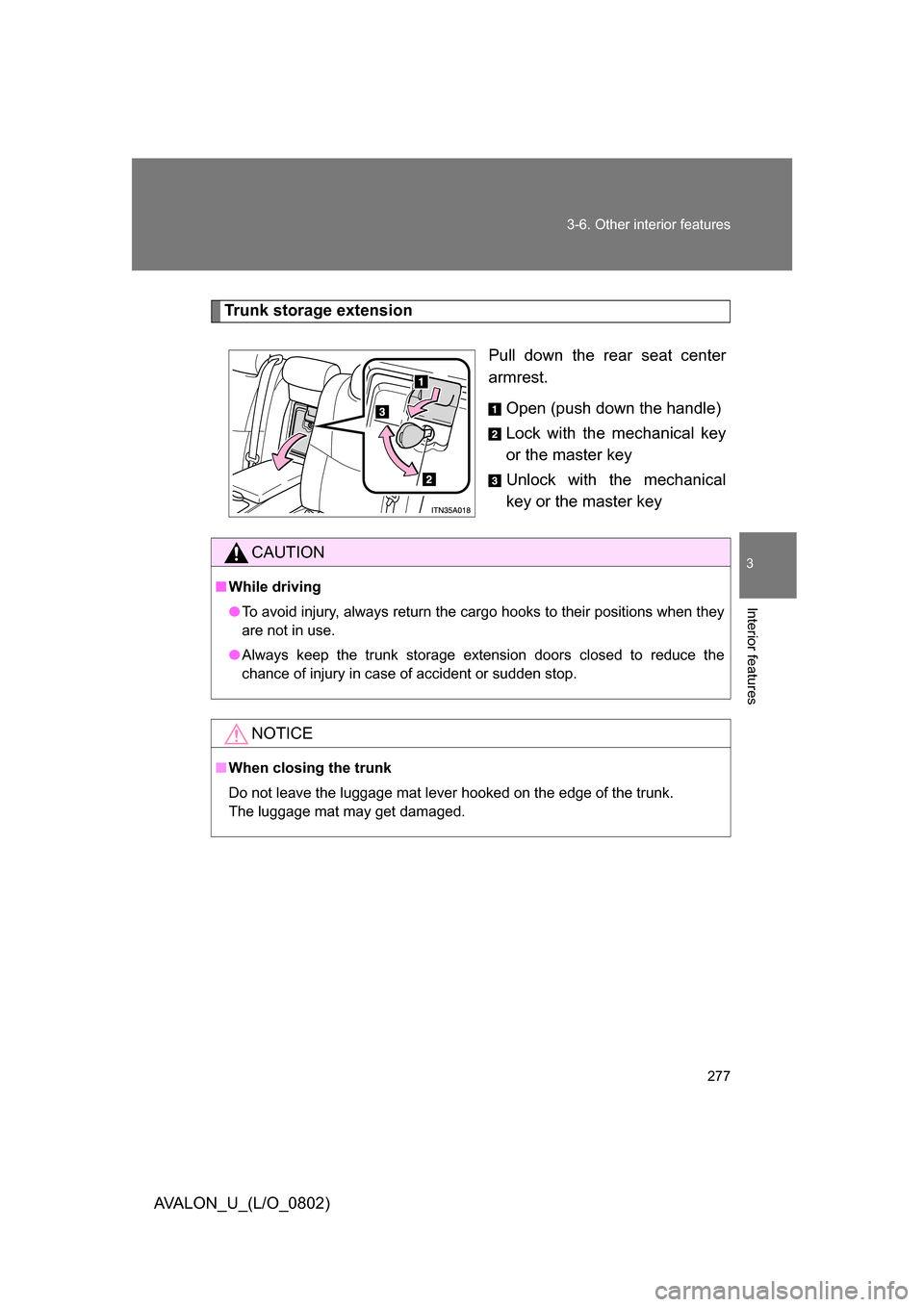
Pull down the rear seat center
armrest.Open (push down the handle)
Lock with the mechanical key
or the master key
Unlock with the mechanical
key or the master key
CAUTION
■While driving
● To avoid injury, always return the cargo hooks to their positions when they
are not in use.
● Always keep the trunk storage extension doors closed to reduce the
chance of injury in case of accident or sudden stop.
NOTICE
■When closing the trunk
Do not leave the luggage mat lever hooked on the edge of the trunk.
The luggage mat may get damaged.
Page 287 of 452

Maintenance and care4
287
AVALON_U_(L/O_0802)
4-1. Maintenance and care ... 288Cleaning and protecting the
vehicle exterior............... 288
Cleaning and protecting the
vehicle interior................ 291 4-2. Maintenance ................... 294
Maintenance
requirements .................. 294
General maintenance....... 296
Emission inspection and
maintenance (I/M)
programs ........................ 299
4-3. Do-it-yourself
maintenance ................. 300
Do-it-yourself service
precautions .................... 300
Hood ................................ 303
Positioning a floor jack ..... 304
Engine compartment ........ 306
Tires ................................. 322
Tire inflation pressure ...... 331
Wheels ............................. 335
Air conditioning filter......... 337
Key battery ....................... 340
Checking and replacing
fuses .............................. 344
Headlight aim (with
discharge headlights) ..... 353
Light bulbs........................ 355
Page 340 of 452
340
4-3. Do-it-yourself maintenance
AVALON_U_(L/O_0802)
Key batter y
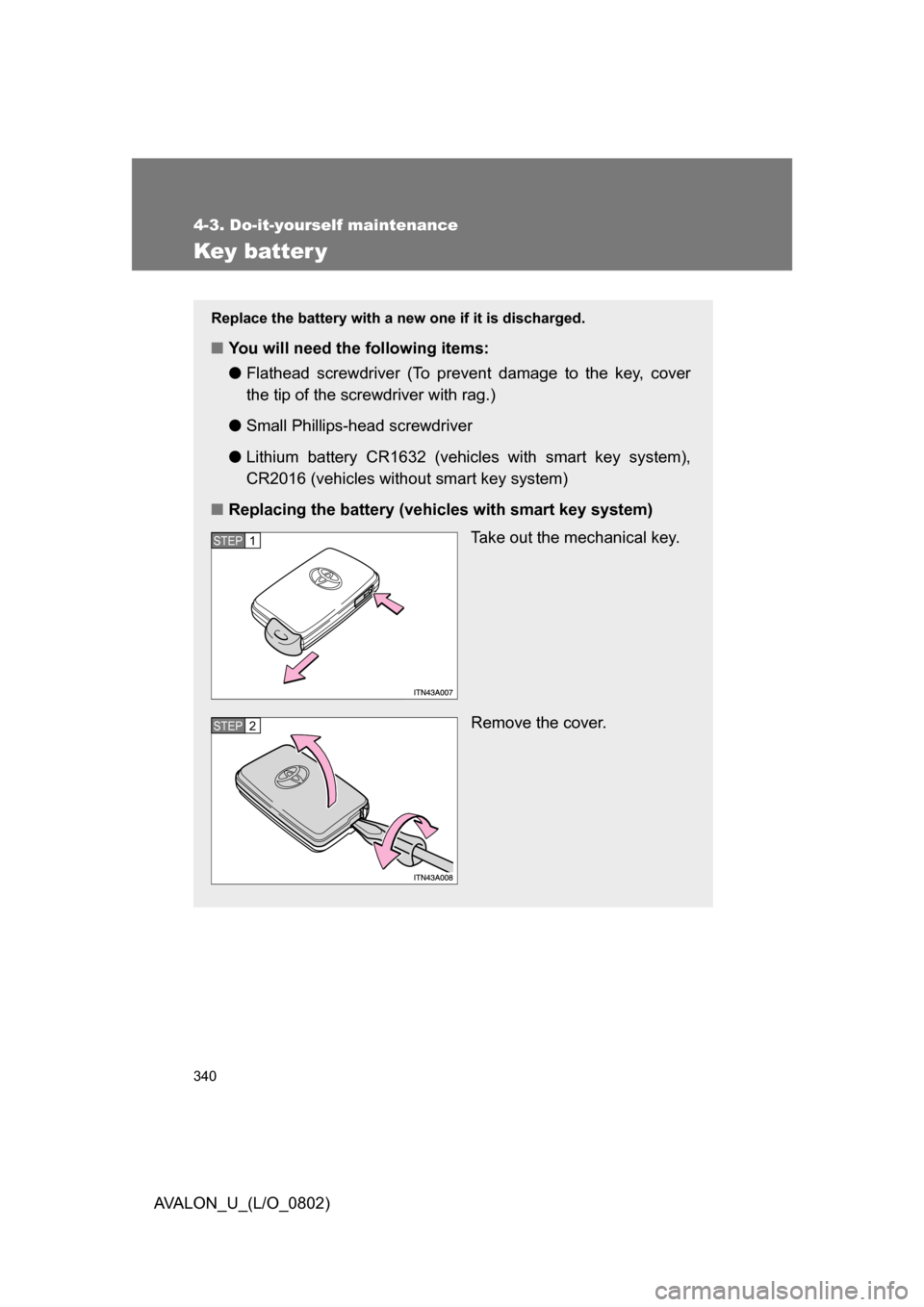
Replace the battery with a new one if it is discharged.
■You will need the following items:
●Flathead screwdriver (To prevent damage to the key, cover
the tip of the screwdriver with rag.)
● Small Phillips-hea d screwdriver
● Lithium battery CR1632 (vehicles with smart key system),
CR2016 (vehicles withou t smart key system)
■ Replacing the battery (vehicles with smart key system)
Take out the mechanical key.
Remove the cover.
STEP1
STEP2