Page 428 of 496
416
Plastic wheel ornaments: The plastic
wheel ornaments are damaged easily by
organic substances. If any organic sub-
stances splash an ornament, be sure to
wash them off with water and check if the
ornament is damaged.
Aluminum wheels: Use only a mild soap
or neutral detergent.
NOTICE
�Do not use corrosive chemical−
based cleaners on your wheels.
(Example: hydrofluoric acid)
� Do not use steam cleaners or the
chemicals therein to clean your
wheels.
� Do not use scouring pads, wire
brushes, or coarse abrasives to
clean your wheels.
� Do not use alcohol, solvents, gaso-
line, or other non−neutral deter-
gents, because they may alter the
wheel’s appearance and resistance
to corrosion.
Plastic bumpers: Wash carefully. Do not
scrub with abrasive cleaners. The bumper
faces are soft. Exterior lights: Wash carefully. Do not use
organic substances or scrub them with a
hard brush. This may damage the sur-
faces of the lights.
Road tar: Remove with turpentine or
cleaners that are marked safe for painted
surfaces.
3. Rinse thoroughly�dried soap can cause streaking. In hot weather you
may need to rinse each section right
after you wash it.
4. To prevent water spots, dry the vehicle using a clean soft cotton towel. Do not
rub or press hard�you might scratch
the paint.
NOTICE
�Do not use organic substances
(gasoline, kerosene, benzine or
strong solvents), which may be tox-
ic or cause damage.
� Do not scrub any part of the ve-
hicle with a hard brush, which may
cause damage.
Automatic car wash
Your vehicle may be washed in an auto-
matic car wash, but remember that the
paint can be scratched by some types of
brushes, unfiltered washing water, or the
washing process itself. Scratching reduces
paint durability and gloss, especially on
darker colors. The manager of the car
wash should be able to advise you wheth-
er the process is safe for the paint on
your vehicle.
Page 429 of 496
417
Waxing your Toyota
Polishing and waxing is recommended
to maintain the original beauty of your
Toyota’s finish.
Apply wax once a month or if the vehicle
surface does not repel water well.1. Always wash and dry the vehicle be- fore you begin waxing, even if you are
using a combined cleaner and wax.
2. Use a good quality polish and wax. If the finish has become extremely weath-
ered, use a car−cleaning polish, fol-
lowed by a separate wax. Carefully fol-
low the manufacturer ’s instructions and
precautions. Be sure to polish and wax
the chrome trim as well as the paint.
Exterior lights: Do not apply wax on the
surfaces of the lights. Wax may cause
damage to the lenses. If you accidentally
put wax on the light surfaces, wipe or
wash it off. 3. Wax the vehicle again when water does not bead but remains on the sur-
face in large patches.CAUTION
�Be careful not to splash water or
spill liquid on the floor. This may
prevent the side airbags and curtain
shield airbags from activating cor-
rectly, resulting in serious injury.
�Do not wash the vehicle floor with
water, or allow water to get onto
the floor when cleaning the vehicle
interior or exterior. Water may get
into audio components or other
electrical components above or un-
der the floor carpet (or mat) and
cause a malfunction; and it may
cause body corrosion.
Vinyl interior
The vinyl upholstery may be easily
cleaned with a mild soap or detergent
and water.
First vacuum over the upholstery to re-
move loose dirt. Then, using a sponge or
soft cloth, apply the soap solution to the
vinyl. After allowing it to soak in for a few
minutes to loosen the dirt, remove the dirt
and wipe off the soap with a clean damp
cloth. If all the dirt does not come off,
repeat the procedure. Commercial foam-
ing−type vinyl cleaners are also available
which work well. Follow the manufacturer ’s
instructions.
NOTICE
Do not use solvent, thinner, gasoline
or window cleaner on the interior.
Cleaning the interior
Page 436 of 496

424
Power steering fluid level
Check the level through the reservoir. The
level should be in the �HOT" or �COLD"
range depending on the fluid temperature.
See page 440 in Section 7−2 for addition-
al information.
Exhaust system
If you notice any change in the sound of
the exhaust or smell exhaust fumes, have
the cause located and corrected immedi-
ately. (See �Engine exhaust cautions" on
page 343 in Section 2.)
INSIDE THE VEHICLE
Items listed below should be checked
regularly, e.g. while performing periodic
services, cleaning the vehicle, etc.
Lights
Make sure the headlights, stop lights, tail
lights, turn signal lights, and other lights
are all working. Check headlight aim.
Service reminder indicators and warning
buzzers
Check that all service reminder indicators
and warning buzzers function properly.
Steering wheel
Check that it has the specified free play.
Be alert for changes in steering condition,
such as hard steering or strange noise.Seats
Check that all front seat controls such as
seat adjusters, seatback recliner, etc. op-
erate smoothly and that all latches lock
securely in any position. Check that the
head restraint move up and down smooth-
ly and that the locks hold securely in any
latched position. For folding−down rear
seatbacks and swing−up rear seat cush-
ions (vehicles without third seats), tum-
bling second seats (vehicles with third
seats), folding−up third seats and detach-
able third seats, check that the latches
lock securely.
Seat belts
Check that the seat belt system such as
buckles, retractors and anchors operate
properly and smoothly. Make sure that the
belt webbing is not cut, frayed, worn or
damaged.
Accelerator pedal
Check the pedal for smooth operation and
uneven pedal effort or catching.
Brake pedal
Check the pedal for smooth operation and
that the pedal has the proper clearance.
Check the brake booster function.
Brakes
In a safe place, check that the brakes do
not pull to one side when applied.
Parking brake
Check that the pedal has the proper travel
and that, on a safe incline, your vehicle
is held securely with only the parking
brake applied.
Automatic transmission �Park" mecha-
nism
On a safe incline, check that your vehicle
is held securely with the selector lever in
�P" position and all brakes released.
OUTSIDE THE VEHICLE
Items listed below should be performed
from time to time, unless otherwise
specified.
Fluid leaks
Check underneath for leaking fuel, oil, wa-
ter or other fluid after the vehicle has
been parked for a while. If you smell fuel
fumes or notice any leak, have the cause
found and corrected immediately.
Page 464 of 496

452
CY73023
Ty p e A
Ty p e B
Ty p e C Good
Good
Good Blown
Blown
Blown
CY73033
If the headlights or other electrical
components do not work, check the
fuses. If any of the fuses are blown,
they must be replaced.
See �Fuse locations" on page 430 in Sec-
tion 7−1 for locations of the fuses.
Turn the engine switch and inoperative
component off. Pull the suspected fuse
straight out and check it.
Determine which fuse may be causing the
problem. The lid of the fuse box shows
the name of the circuit for each fuse. See
page 468 in Section 8 for the functions
controlled by each circuit. Type A fuses can be pulled out by using
the pull−out tool. The location of the pull−
out tool is shown in the illustration.
If you are not sure whether the fuse has
blown, try replacing the suspected fuse
with one that you know is good.
If the fuse has blown, push a new fuse
into the clip.
Only install a fuse with the amperage rat-
ing designated on the fuse box lid.
If you do not have a spare fuse, in an
emergency you can pull out the �PWR
OUTLET" or �HEATER NO.2" fuse, which
may be dispensable for normal driving,
and use it if its amperage rating is the
same.
If you cannot use one of the same amper-
age, use one that is lower, but as close
to the rating as possible. If the amperage
is lower than that specified, the fuse
might blow out again but this does not
indicate anything wrong. Be sure to get
the correct fuse as soon as possible and
return the substitute to its original clip.
It is a good idea to purchase a set of
spare fuses and keep them in your ve-
hicle for emergencies.
Checking and replacing fuses
Page 466 of 496
454
The following illustrations show how to
gain access to the bulbs. When replacing
a bulb, make sure the engine switch and
light switch are off. Use bulbs with the
wattage ratings given in the table.
The stop/tail and rear side marker lights
consist of a number of LEDs. If any of
the LEDs burn out, take your vehicle to
your Toyota dealer to have the light re-
placed.
CAUTION
�To prevent burning yourself, do not
replace the light bulbs while they
are hot.
�Halogen bulbs have pressurized gas
inside and require special handling.
They can burst or shatter if
scratched or dropped. Hold a bulb
only by its plastic or metal case.
Do not touch the glass part of a
bulb with bare hands.
NOTICE
Only use a bulb of the listed type.
The inside of the lens of exterior lights
such as headlights may temporarily fog up
when the lens becomes wet in the rain or
in a car wash. This is not a problem
because the fogging is caused by the
temperature difference between the outside
and inside of the lens, just like the
windshield fogs up in the rain. However, if
there is a large drop of water on the
inside of the lens, or if there is water
pooled inside the light, contact your
Toyota dealer.
Replacing light bulbs�
Page 467 of 496
455
A: HB3 halogen bulbs
B: H11 halogen bulbs
C: HB4 halogen bulbs
D: Wedge base bulbs (amber)
E: Single end bulbs
F: Wedge base bulbs (clear)
G: Double end bulbs
9005
Ty p e
WBulb No.Light bulbs
Headlights (high beam)
Headlights (low beam)
Front fog lights
Parking and front side marker lights
Front turn signal lights
Rear turn signal lights
Back−up lights
License plate lights
High mounted stoplight
Interior light
Personal lights
Vanity lights
Door courtesy lights
Glove box light
Luggage compartment light
Running board lights �
9006 168
�
�
�
�
921
�
�
� �
921
168
1156NA 60
55
51
5
27
21
18 5
18 8
5
3
3.8
1.2 8
3.8 A
B
C
D E
D F
F
F
G F
G
F
F
G F
Page 468 of 496
456
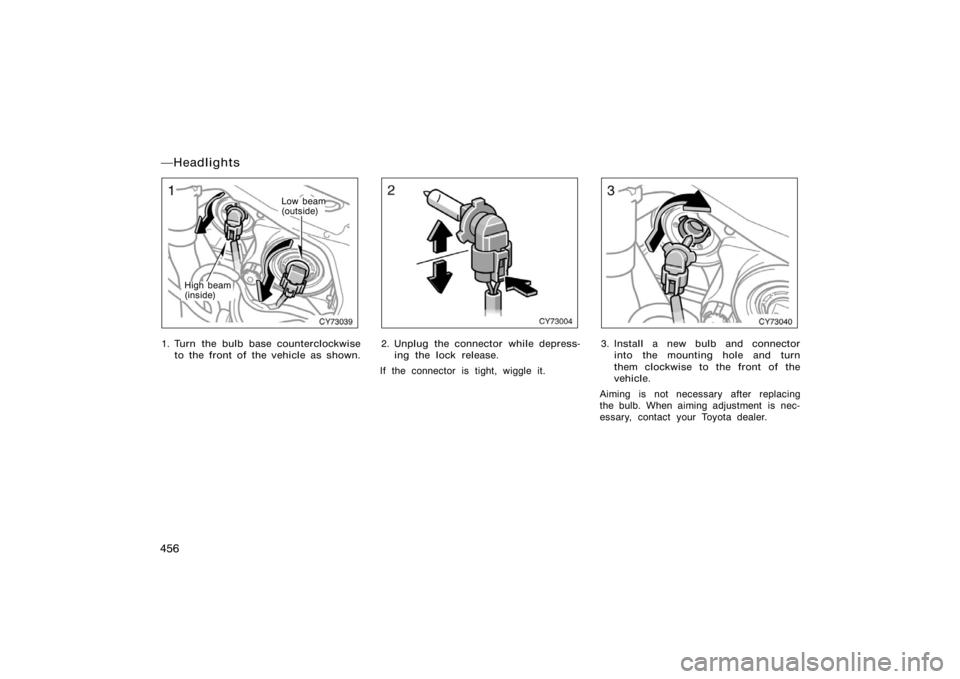
CY73039
High beam
(inside)
Low beam
(outside)
1. Turn the bulb base counterclockwiseto the front of the vehicle as shown.
CY73004
2. Unplug the connector while depress-ing the lock release.
If the connector is tight, wiggle it.
CY73040
3. Install a new bulb and connector into the mounting hole and turn
them clockwise to the front of the
vehicle.
Aiming is not necessary after replacing
the bulb. When aiming adjustment is nec-
essary, contact your Toyota dealer.
�Headlights
Page 469 of 496
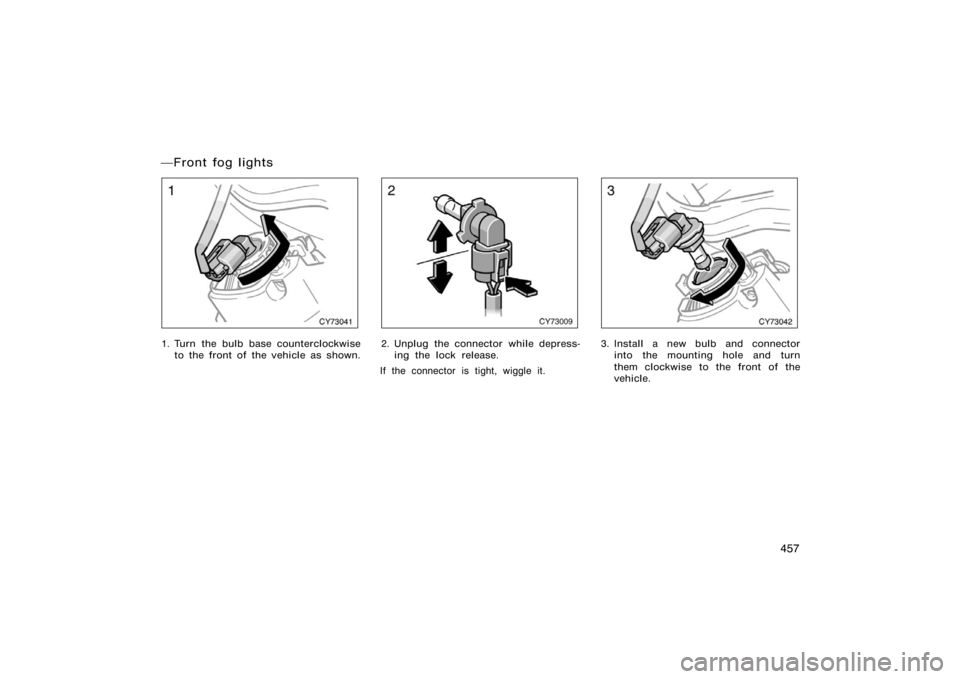
457
CY73041
1. Turn the bulb base counterclockwiseto the front of the vehicle as shown.
CY73009
2. Unplug the connector while depress-ing the lock release.
If the connector is tight, wiggle it.
CY73042
3. Install a new bulb and connector into the mounting hole and turn
them clockwise to the front of the
vehicle.
�Front fog lights