2008 SUBARU OUTBACK ESP
[x] Cancel search: ESPPage 264 of 444
“D ”position. Use the brake instead.
. The engine may, on rare occasions,
knock when the vehicle rapidly acceler-
ates or rapidly pulls away from a standstill.
This phenomenon does not indicate afault.
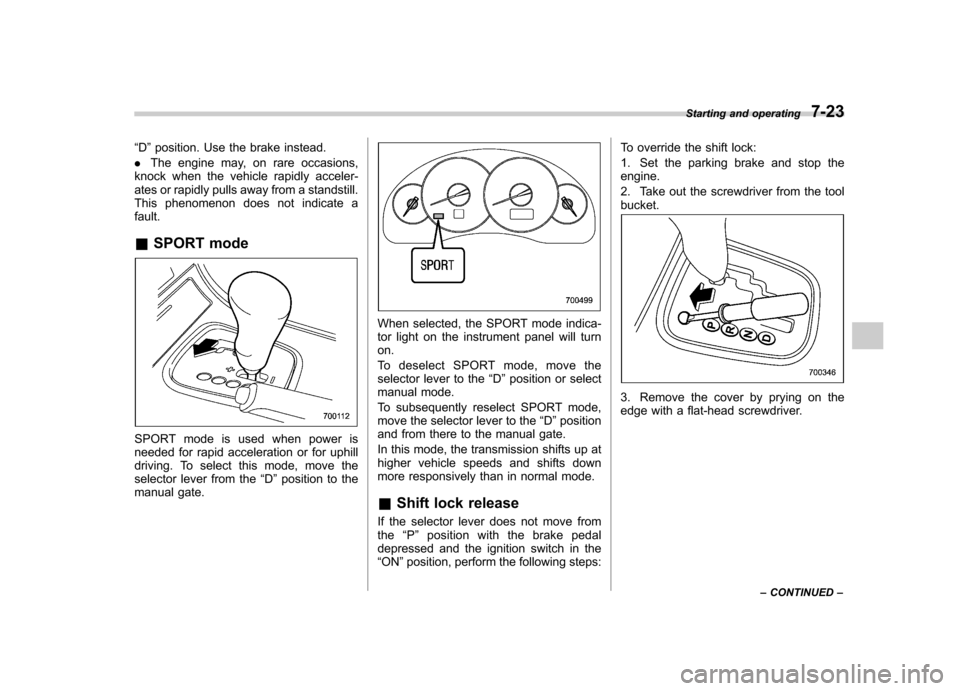
& SPORT mode
SPORT mode is used when power is
needed for rapid acceleration or for uphill
driving. To select this mode, move the
selector lever from the “D ”position to the
manual gate.
When selected, the SPORT mode indica-
tor light on the instrument panel will turnon.
To deselect SPORT mode, move the
selector lever to the “D ”position or select
manual mode.
To subsequently reselect SPORT mode,
move the selector lever to the “D ”position
and from there to the manual gate.
In this mode, the transmission shifts up at
higher vehicle speeds and shifts down
more responsively than in normal mode. & Shift lock release
If the selector lever does not move from
the “P ” position with the brake pedal
depressed and the ignition switch in the“ ON ”position, perform the following steps: To override the shift lock:
1. Set the parking brake and stop the engine.
2. Take out the screwdriver from the tool bucket.
3. Remove the cover by prying on the
edge with a flat-head screwdriver.
Starting and operating
7-23
– CONTINUED –
Page 269 of 444
7-28Starting and operating
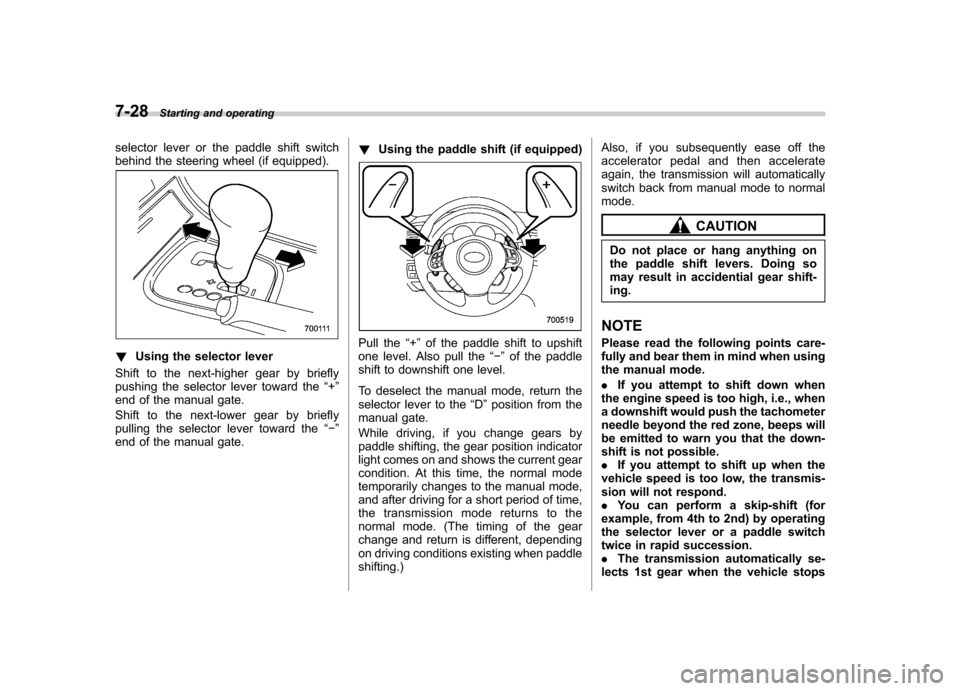
selector lever or the paddle shift switch
behind the steering wheel (if equipped).
!Using the selector lever
Shift to the next-higher gear by briefly
pushing the selector lever toward the “+ ”
end of the manual gate.
Shift to the next-lower gear by briefly
pulling the selector lever toward the “ ”
end of the manual gate. !
Using the paddle shift (if equipped)Pull the “+ ” of the paddle shift to upshift
one level. Also pull the “ ” of the paddle
shift to downshift one level.
To deselect the manual mode, return the
selector lever to the “D ”position from the
manual gate.
While driving, if you change gears by
paddle shifting, the gear position indicator
light comes on and shows the current gear
condition. At this time, the normal mode
temporarily changes to the manual mode,
and after driving for a short period of time,
the transmission mode returns to the
normal mode. (The timing of the gear
change and return is different, depending
on driving conditions existing when paddleshifting.) Also, if you subsequently ease off the
accelerator pedal and then accelerate
again, the transmission will automatically
switch back from manual mode to normalmode.
CAUTION
Do not place or hang anything on
the paddle shift levers. Doing so
may result in accidential gear shift-ing.
NOTE
Please read the following points care-
fully and bear them in mind when using
the manual mode. . If you attempt to shift down when
the engine speed is too high, i.e., when
a downshift would push the tachometer
needle beyond the red zone, beeps will
be emitted to warn you that the down-
shift is not possible.. If you attempt to shift up when the
vehicle speed is too low, the transmis-
sion will not respond.. You can perform a skip-shift (for
example, from 4th to 2nd) by operating
the selector lever or a paddle switch
twice in rapid succession.. The transmission automatically se-
lects 1st gear when the vehicle stops
Page 272 of 444
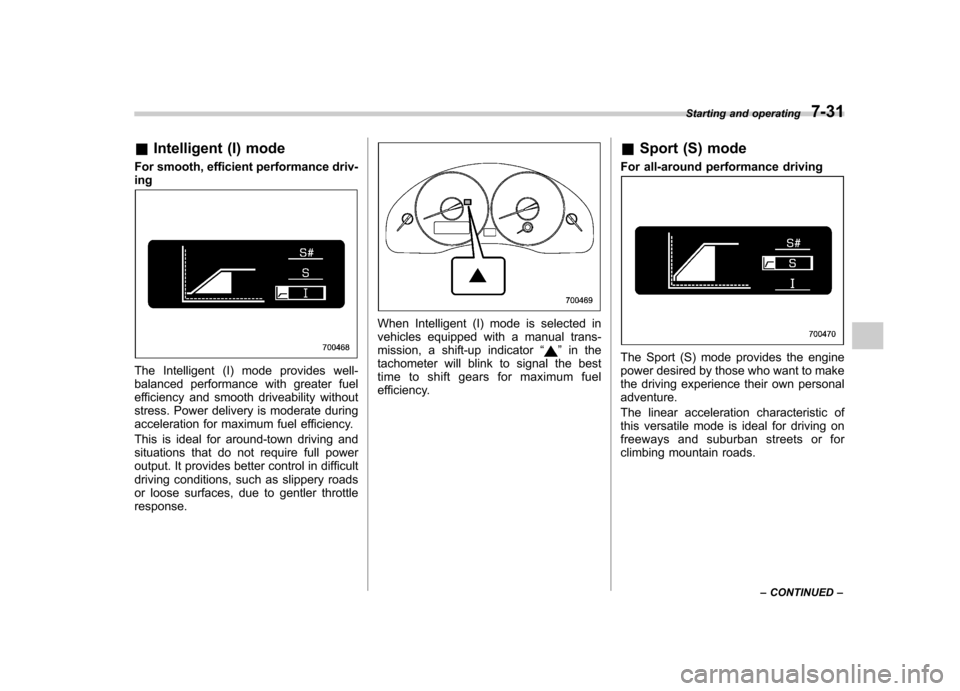
&Intelligent (I) mode
For smooth, efficient performance driv- ing
The Intelligent (I) mode provides well-
balanced performance with greater fuel
efficiency and smooth driveability without
stress. Power delivery is moderate during
acceleration for maximum fuel efficiency.
This is ideal for around-town driving and
situations that do not require full power
output. It provides better control in difficult
driving conditions, such as slippery roads
or loose surfaces, due to gentler throttleresponse.
When Intelligent (I) mode is selected in
vehicles equipped with a manual trans-
mission, a shift-up indicator “
”in the
tachometer will blink to signal the best
time to shift gears for maximum fuel
efficiency. &
Sport (S) mode
For all-around performance drivingThe Sport (S) mode provides the engine
power desired by those who want to make
the driving experience their own personaladventure.
The linear acceleration characteristic of
this versatile mode is ideal for driving on
freeways and suburban streets or for
climbing mountain roads. Starting and operating
7-31
– CONTINUED –
Page 273 of 444
7-32Starting and operating
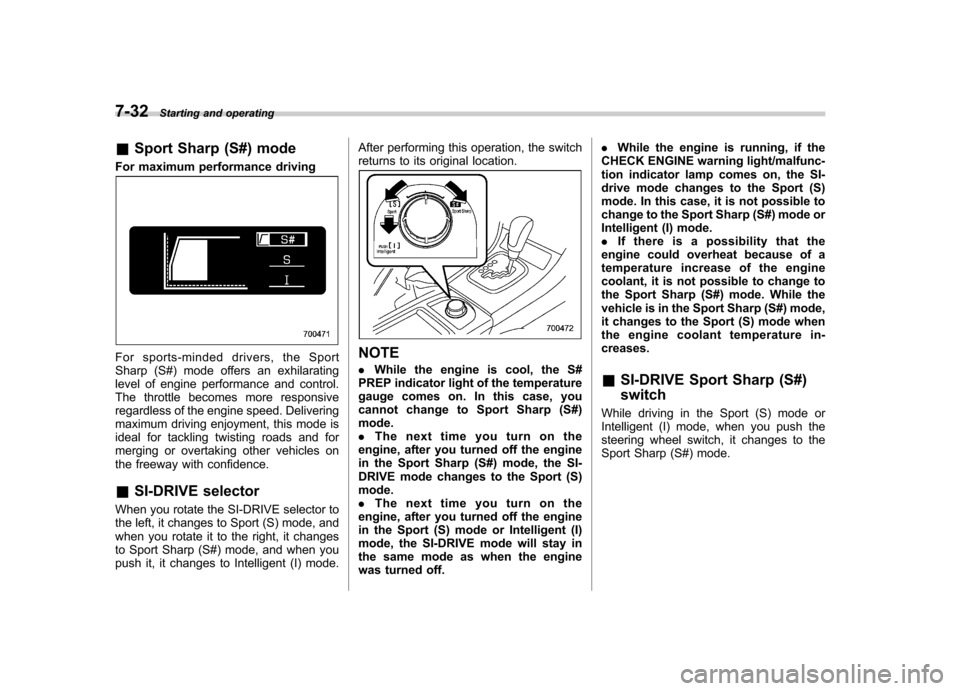
& Sport Sharp (S#) mode
For maximum performance driving
For sports-minded drivers, the Sport
Sharp (S#) mode offers an exhilarating
level of engine performance and control.
The throttle becomes more responsive
regardless of the engine speed. Delivering
maximum driving enjoyment, this mode is
ideal for tackling twisting roads and for
merging or overtaking other vehicles on
the freeway with confidence. & SI-DRIVE selector
When you rotate the SI-DRIVE selector to
the left, it changes to Sport (S) mode, and
when you rotate it to the right, it changes
to Sport Sharp (S#) mode, and when you
push it, it changes to Intelligent (I) mode. After performing this operation, the switch
returns to its original location.NOTE .
While the engine is cool, the S#
PREP indicator light of the temperature
gauge comes on. In this case, you
cannot change to Sport Sharp (S#)mode. . The next time you turn on the
engine, after you turned off the engine
in the Sport Sharp (S#) mode, the SI-
DRIVE mode changes to the Sport (S)mode.. The next time you turn on the
engine, after you turned off the engine
in the Sport (S) mode or Intelligent (I)
mode, the SI-DRIVE mode will stay in
the same mode as when the engine
was turned off. .
While the engine is running, if the
CHECK ENGINE warning light/malfunc-
tion indicator lamp comes on, the SI-
drive mode changes to the Sport (S)
mode. In this case, it is not possible to
change to the Sport Sharp (S#) mode or
Intelligent (I) mode.. If there is a possibility that the
engine could overheat because of a
temperature increase of the engine
coolant, it is not possible to change to
the Sport Sharp (S#) mode. While the
vehicle is in the Sport Sharp (S#) mode,
it changes to the Sport (S) mode when
the engine coolant temperature in-creases. & SI-DRIVE Sport Sharp (S#) switch
While driving in the Sport (S) mode or
Intelligent (I) mode, when you push the
steering wheel switch, it changes to the
Sport Sharp (S#) mode.
Page 279 of 444
7-38Starting and operating
Vehicle Dynamics Control
system (if equipped)
WARNING
Always use the utmost care in driving –overconfidence because
you are driving with a Vehicle Dy-
namics Control system equipped
vehicle could easily lead to a ser-
ious accident.
CAUTION
. Even if your vehicle is equipped
with Vehicle Dynamics Control,
winter tires or snow chains
should be used when driving on
snow-covered or icy roads; in
addition, vehicle speed should
be reduced considerably. Simply
having a Vehicle Dynamics Con-
trol system does not guarantee
that the vehicle will be able to
avoid accidents in any situation.
. Activation of the Vehicle Dy-
namics Control system is an
indication that the road being
travelled on has a slippery sur-
face; since having Vehicle Dy-
namics Control is no guarantee that full vehicle control will be
maintained at all times and under
all conditions, its activation
should be seen as a sign that
the speed of the vehicle should
be reduced considerably.
. Whenever suspension compo-
nents, steering components, or
an axle are removed from a
vehicle equipped with Vehicle
Dynamics Control, have an
authorized SUBARU dealer per-
form an inspection of that sys-tem.
. The following precautions should
be observed in order to ensure
that the Vehicle Dynamics Con-
trol system is operating properly: – All four wheels should be
fitted with tires of the same
size, type, and brand. Further-
more, the amount of wear
should be the same for all
four tires.
– Keep the tire pressure at the
proper level as shown on the
vehicle placard attached to
the driver ’s side door pillar.
– Use only the specified tem-
porary spare tire to replace a
flat tire. With a temporary spare tire, the effectiveness of
the Vehicle Dynamics Control
system is reduced and this
should be taken into account
when driving the vehicle in
such a condition.
In the event of wheelspin and/or skidding
on a slippery road surface and/or during
cornering and/or an evasive maneuver,
the Vehicle Dynamics Control system
adjusts the engine ’s output and the
wheels ’respective braking forces to help
maintain traction and directional control. . Traction Control Function
The traction control function is designed to
prevent spinning of the driving wheels on
slippery road surfaces, thereby helping to
maintain traction and directional control.
Activation of this function is shown by
steady illumination of the Vehicle Dy-
namics Control operation indicator light. . Skid Suppression Function
The skid suppression function is designed
to help maintain directional stability by
suppressing the wheels ’tendency to slide
sideways during steering operations. Acti-
vation of this function is shown by flashing
of the Vehicle Dynamics Control operation
indicator light.
Page 282 of 444

Control system; if any should occur, have
an authorized SUBARU dealer carry out
an inspection of the system at the first
available opportunity. .The warning light does not turn on
when the ignition switch is turned to the
ON position. . The warning light turns on while the
vehicle is being driven.. When a malfunction has occurred in
the Vehicle Dynamics Control electrical
system, only the warning light will turn on.
In such an event, the ABS will still be
operating normally. . The warning light will also turn on when
a problem occurs with the ABS or Vehicle
Dynamics Control electronic control sys- tems.
Because the Vehicle Dynamics Control
system controls each brake through the
ABS, whenever the ABS stops operating
due to a malfunction in that electrical
system, the Vehicle Dynamics Control will
also become unable to control all four
brakes. Thus Vehicle Dynamics Control
system operation halts and the warning
light turns on. Although both the Vehicle
Dynamics Control system and the ABS
will be inoperable in this situation, it will
still be possible to stop the vehicle using
normal braking. The Vehicle Dynamics Control system and the ABS do not
adversely affect operation of the vehicle
in any way when they are inoperable;
however should such a situation occur,
drive with care and have an authorized
SUBARU dealer carry out an inspection of
those systems at the first available oppor-
tunity.
NOTE
When the warning light turns on and off
in the following way, it indicates that
the Vehicle Dynamics Control system
is operating normally. . Although turning on after the engine
has been started, the warning light
quickly turns off and stays off.. The warning light turns on when the
vehicle is being driven; it then turns off
and stays off. ! Vehicle Dynamics Control OFF in-
dicator light
This light comes on to indicate that the
Vehicle Dynamics Control system is in
non-operation mode. This does not con-
stitute failure of the Vehicle Dynamics
Control system. NOTE . The indicator light may stay on for a
while after the engine has been started, especially in cold weather. This occurs
because the engine has not yet
warmed up and is completely normal.
The light will turn off when the engine
has reached a suitable operating tem-perature..
When an engine problem occurs
and the CHECK ENGINE warning light/
malfunction indicator lamp turns on,
the indicator light will also come on.
The following two situations could indicate
malfunction of the Vehicle Dynamics
Control system; if either should occur,
have an authorized SUBARU dealer carry
out an inspection of that system at the first
available opportunity. . The indicator light does not turn on
when the ignition switch is turned to the
ON position. . The indicator light fails to turn off after
the engine is started, even when several
minutes have passed to allow the engine
to heat up sufficiently. Starting and operating
7-41
– CONTINUED –
Page 285 of 444

7-44Starting and operating
four road wheels. Contact your
SUBARU dealer as soon as possible
for tire and sensor replacement and/
or system resetting.
Do not inject any tire liquid or
aerosol tire sealant into the tires,
as this may cause a malfunction of
the tire pressure sensors. If the light
illuminates steadily after blinking for
approximately one minute, promptly
contact a SUBARU dealer to have
the system inspected.
CAUTION
Do not place metal film or any metal
parts under the driver ’s seat. This
may cause poor reception of the
signals from the tire pressure sen-
sors, and the tire pressure monitor-
ing system will not function prop-
erly.
NOTE
This device complies with Part 15 of
the FCC Rules and with RSS-210 of
Industry Canada. Operation is subject
to the following two conditions: (1) This
device may not cause harmful inter-
ference, and (2) this device must
accept any interference received, in- cluding interference that may cause
undesired operation.
Changes or modifications not ex-
pressly approved by the party respon-
sible for compliance could void theuser
’s authority to operate the equip-
ment. Parking your vehicle
WARNING
. Never leave unattended children
or pets in the vehicle. They could
accidentally injure themselves or
others through inadvertent op-
eration of the vehicle. Also, on
hot or sunny days, the tempera-
ture in a closed vehicle could
quickly become high enough to
cause severe or possibly fatal
injuries to them.
. Do not park the vehicle over
flammable materials such as dry
grass, waste paper or rags, as
they may burn easily if they come
near hot engine or exhaust sys-
tem parts.
. Be sure to stop the engine if you
take a nap in the vehicle. If
engine exhaust gas enters the
passenger compartment, occu-
pants in the vehicle could die
from carbon monoxide (CO) con-
tained in the exhaust gas.
Page 289 of 444
7-48Starting and operating
& To turn off the cruise control
There are two ways to turn off the cruise control: . Push the “CRUISE ”main switch button
again.. Turn the ignition switch to the “Acc ”or
“ LOCK ”position (but only when the
vehicle is completely stopped). & To change the cruising speed
! To increase the speed (by button)
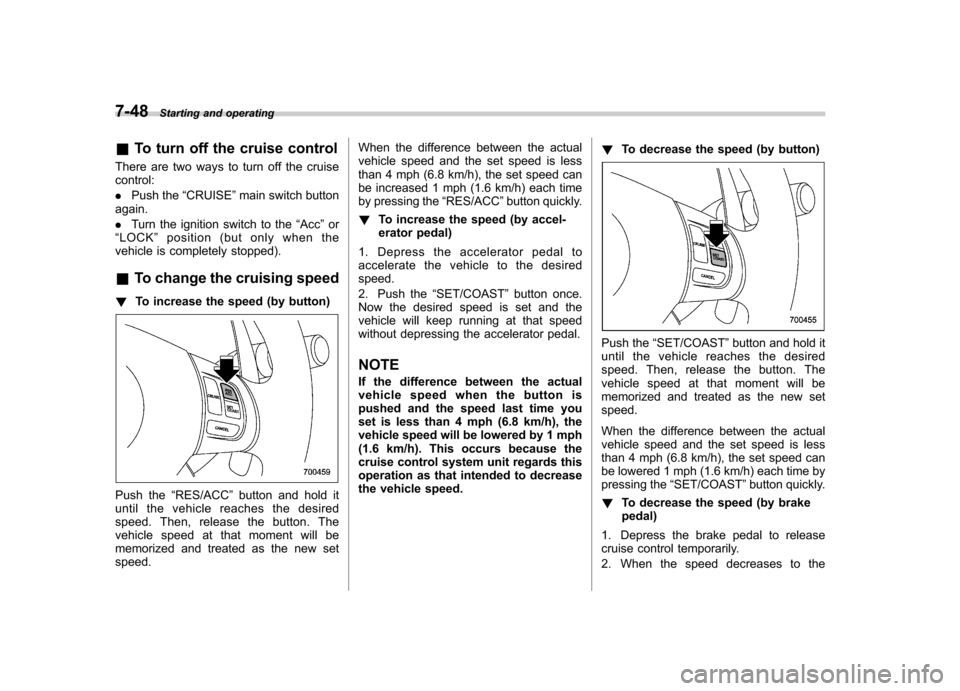
Push the “RES/ACC ”button and hold it
until the vehicle reaches the desired
speed. Then, release the button. The
vehicle speed at that moment will be
memorized and treated as the new setspeed. When the difference between the actual
vehicle speed and the set speed is less
than 4 mph (6.8 km/h), the set speed can
be increased 1 mph (1.6 km/h) each time
by pressing the
“RES/ACC ”button quickly.
! To increase the speed (by accel-
erator pedal)
1. Depress the accelerator pedal to
accelerate the vehicle to the desiredspeed.
2. Push the “SET/COAST ”button once.
Now the desired speed is set and the
vehicle will keep running at that speed
without depressing the accelerator pedal.
NOTE
If the difference between the actual
vehiclespeedwhenthebuttonis
pushed and the speed last time you
set is less than 4 mph (6.8 km/h), the
vehicle speed will be lowered by 1 mph
(1.6 km/h). This occurs because the
cruise control system unit regards this
operation as that intended to decrease
the vehicle speed. !
To decrease the speed (by button)
Push the “SET/COAST ”button and hold it
until the vehicle reaches the desired
speed. Then, release the button. The
vehicle speed at that moment will be
memorized and treated as the new setspeed.
When the difference between the actual
vehicle speed and the set speed is less
than 4 mph (6.8 km/h), the set speed can
be lowered 1 mph (1.6 km/h) each time by
pressing the “SET/COAST ”button quickly.
! To decrease the speed (by brakepedal)
1. Depress the brake pedal to release
cruise control temporarily.
2. When the speed decreases to the