2008 PONTIAC G8 ECU
[x] Cancel search: ECUPage 107 of 334

The following items are part of the
main customization menu.
Exit
Reset settings
Security
Lighting
Trip Computer
Language
Remote key
See the information following for
detailed descriptions of the
items available under each menu
item. There are also help screens
available to explain the features.
When selecting a menu item,
wait for a few seconds and a help
screen pops up with an explanation
of the selected feature.
Exit
To exit the customization menu
scroll to Exit and press
8.
You can also exit the customization
menu by:
Press3at any time to return
to the trip/fuel menu.
Drive the vehicle at more than
6 mph (10 km/h).
Turn the ignition off.
Reset settings
This item will reset all the
customization options to the factory
defaults.
Security
This item will allow you to
customize:
Auto unlock
Auto lock
Flash remote lck (lock)
Beep remote lck (lock)
Flash rem (remote) unlock
2 Stage unlock
Remote Start
Some of these work with your
Remote Keyless Entry (RKE)
transmitter. SeeRemote Keyless
Entry (RKE) System Operation
on page 2-4for more information.
Auto unlock
If you select Auto unlock you will be
able to choose when you want
the doors to unlock automatically.
Off:No automatic unlock of
any doors.
Driver door key out:The driver
door will unlock when the key
is removed.
Driver door in park:The driver
door will unlock when you put
the shift lever into PARK (P).
All doors at key out:All doors will
unlock when the key is removed.
Instruments and Controls 4-33
2008 - Pontiac G8 Owner Manual
Page 110 of 334
OnStar®System
OnStar uses several innovative
technologies and live advisors to
provide a wide range of safety,
security, information, and
convenience services. If the airbags
deploy, the system is designed to
make an automatic call to OnStar
Emergency advisors who can
request emergency services be sent
to your location. If the keys are
locked in the vehicle, call OnStar at
1-888-4-ONSTAR and they can send
a signal to unlock the doors. For
roadside assistance, press the
OnStar button and they can contact
Roadside Service for you.OnStar service is provided to you
subject to the OnStar Terms
and Conditions. OnStar service can
be canceled at any time by
contacting OnStar. A complete
OnStar Owner’s Guide and
the OnStar Terms and Conditions
are included in the vehicle’s OnStar
Subscriber glove box literature.
For more information, visit
onstar.com or onstar.ca, contact
OnStar at 1-888-4-ONSTAR
(1-888-466-7827) or TTY
1-877-248-2080, or press the
OnStar button to speak with an
OnStar advisor 24 hours a day,
7 days a week.
Not all OnStar features are available
on all vehicles. To check if the
vehicle has the services described
below, or for a full description of
OnStar services and system
limitations, see the OnStar Owner’s
Guide in the glove box or visit
onstar.com.
OnStar Services
For new vehicles with OnStar, the
Safe & Sound Plan, or the Directions
& Connections Plan is included for
one year from the date of purchase.
This plan can be extended beyond
the rst year, or can be upgraded to
the Directions & Connections Plan.
For more information, press the
OnStar button to speak with an
advisor. Some OnStar services (such
as Remote Door Unlock or Stolen
Vehicle Location Assistance) are not
available until you register with
OnStar.
Available Services with Safe &
Sound Plan
Automatic Notication of Airbag
Deployment
Advanced Automatic Crash
Notication (AACN) (If equipped)
Link to Emergency Services
Roadside Assistance
Stolen Vehicle Location
Assistance
4-36 Instruments and Controls
2008 - Pontiac G8 Owner Manual
Page 125 of 334

Radio Message
Security Lockout Active:
This message displays when the
coded security system has been
activated. Take the vehicle to your
dealer/retailer for service.
Using the CD Player
The CD player plays standard sized
CDs. Using CDs of a different
size can damage the drive or disc,
even if an adapter is used.
The CD player has a memory
buffer that holds approximately
seven seconds of music to prevent
interruption while driving over
bumpy surfaces. If the interruption
lasts longer than seven seconds, the
memory buffer can become empty
and playback will be interrupted until
the player has time to refocus, read
the disc, and ll the buffer again.When the player reaches the end of
a CD, it automatically returns to
the start and plays the CD again.
CDs can be loaded with the
ignition and the radio on or off.
CDs will stay in the player if the
ignition or radio is turned off.
If the CD was the last source
selected, it resumes playing
when the radio is turned on.
Loading CDs
To load a CD with the radio with a
single CD player:
1. Insert a CD label side up
partway into the slot.
2. The CD player will pull the CD
in and begin playing if the
radio is on.To load CDs with the radio with a
six-disc CD player:
#LOAD:Press to load CDs into
the CD player. The display shows
DISC and six numbers that
correspond to the six CD storage
locations. When a storage location
has no disc loaded a dash
displays.
To insert one CD:
1. Press
#LOAD and Insert Disc
displays.
2. The load indicator light ashes,
and the radio beeps twice.
3. Insert a CD label side up partway
into the slot.
4. The CD player will pull the CD
in and begin playing if the
radio is on.
Infotainment 6-9
2008 - Pontiac G8 Owner Manual
Page 139 of 334

l(Forward):Press to go to the
next track or press
lmultiple times
until the desired track is reached.
g(Reverse):Press to go back to
the start of the current track or
press
gmultiple times until
the desired track is reached.
Theft-Deterrent Feature
The radio has an electronically
coded security system that links the
radio to the vehicle. When the
ignition is off, a ashing red light on
the upper left side of the radio
indicates the security system is on.
If the radio is moved to a different
vehicle, it will not operate and
Security Lockout Active displays.
Contact your dealer/retailer to
unlock the radio.
Audio Steering Wheel
Controls
The vehicle has audio steering
wheel controls.
Some audio controls can be
adjusted at the steering wheel.
Several functions of the audio
system can be operated with the
audio remote control buttons and the
rotary control wheel.
SRCE (Source):Press to select
between FM1, FM2, AM, CD, Front
AUX (auxiliary), or Rear AUX.
QR(Scroll Wheel Control):
Push to select the next disc in the
changer.
Turn the scroll wheel up or down to:
Select the next or previous
preset radio station.
Select the next or previous track.
%(Voice In):Press to interact
with the OnStar®system.
{(Call End):Press to end an
OnStar®phone call.
+−(Scroll Wheel Control):Turn
the scroll wheel control up or
down to increase or decrease the
volume. Press to mute the audio
system, press again to turn
the sound back on.
Infotainment 6-23
2008 - Pontiac G8 Owner Manual
Page 173 of 334

{CAUTION
Coasting downhill in N (Neutral)
or with the ignition off is
dangerous. The brakes will
have to do all the work of
slowing down and they could
get so hot that they would not
work well. You would then have
poor braking or even none
going down a hill. You could
crash. Always have the engine
running and the vehicle in gear
when going downhill.
Stay in your own lane. Do not
swing wide or cut across the
center of the road. Drive at
speeds that let you stay in your
own lane.
Top of hills: Be alert — something
could be in your lane (stalled car,
accident).
Pay attention to special road
signs (falling rocks area, winding
roads, long grades, passing or
no-passing zones) and take
appropriate action.
Winter Driving
Here are some tips for winter driving:
Have your vehicle in good shape
for winter.
You might want to put winter
emergency supplies in your
vehicle.
Include an ice scraper, a small
brush or broom, a supply of
windshield washer uid, a rag,
some winter outer clothing, a small
shovel, a ashlight, a red cloth,
and reective warning triangles.
And, if you will be driving under
severe conditions, include a small
bag of sand, a piece of old carpet, or
a couple of burlap bags to help
provide traction. Be sure you
properly secure these items in
your vehicle.
Also seeTires on page 9-39.
Driving and Operating 8-25
2008 - Pontiac G8 Owner Manual
Page 180 of 334

If you put things inside the
vehicle — like suitcases,
tools, packages, or anything
else — they will go as fast as the
vehicle goes. If you have to
stop or turn quickly, or if there is
a crash, they will keep going.
{CAUTION
Things you put inside the
vehicle can strike and injure
people in a sudden stop or
turn, or in a crash.
Put things in the trunk of
your vehicle. In a trunk,
put them as far forward as
you can. Try to spread the
weight evenly.
(Continued)
CAUTION (Continued)
Never stack heavier
things, like suitcases,
inside the vehicle so that
some of them are above
the tops of the seats.
Do not leave an unsecured
child restraint in the
vehicle.
When you carry something
inside the vehicle, secure it
whenever you can.
Do not leave a seat folded
down unless you need to.
Fuel
Use of the recommended fuel is
an important part of the proper
maintenance of your vehicle.
To help keep the engine clean
and maintain optimum vehicle
performance, we recommend the
use of gasoline advertised as
TOP TIER Detergent Gasoline.
The 8th digit of the Vehicle
Identication Number (VIN) shows
the code letter or number that
identies your vehicle’s engine.
The VIN is at the top left of
the instrument panel. SeeVehicle
Identification Number (VIN) on
page 10-1.
8-32 Driving and Operating
2008 - Pontiac G8 Owner Manual
Page 215 of 334
12. Turn the dust cap clockwise to
lock it into place.
13. For the driver side reinstall the
air cleaner/lter cover.
14. For the passenger side reinstall
the coolant bottle ller neck.
15. Reinstall the radiator support
screws.
Taillamps
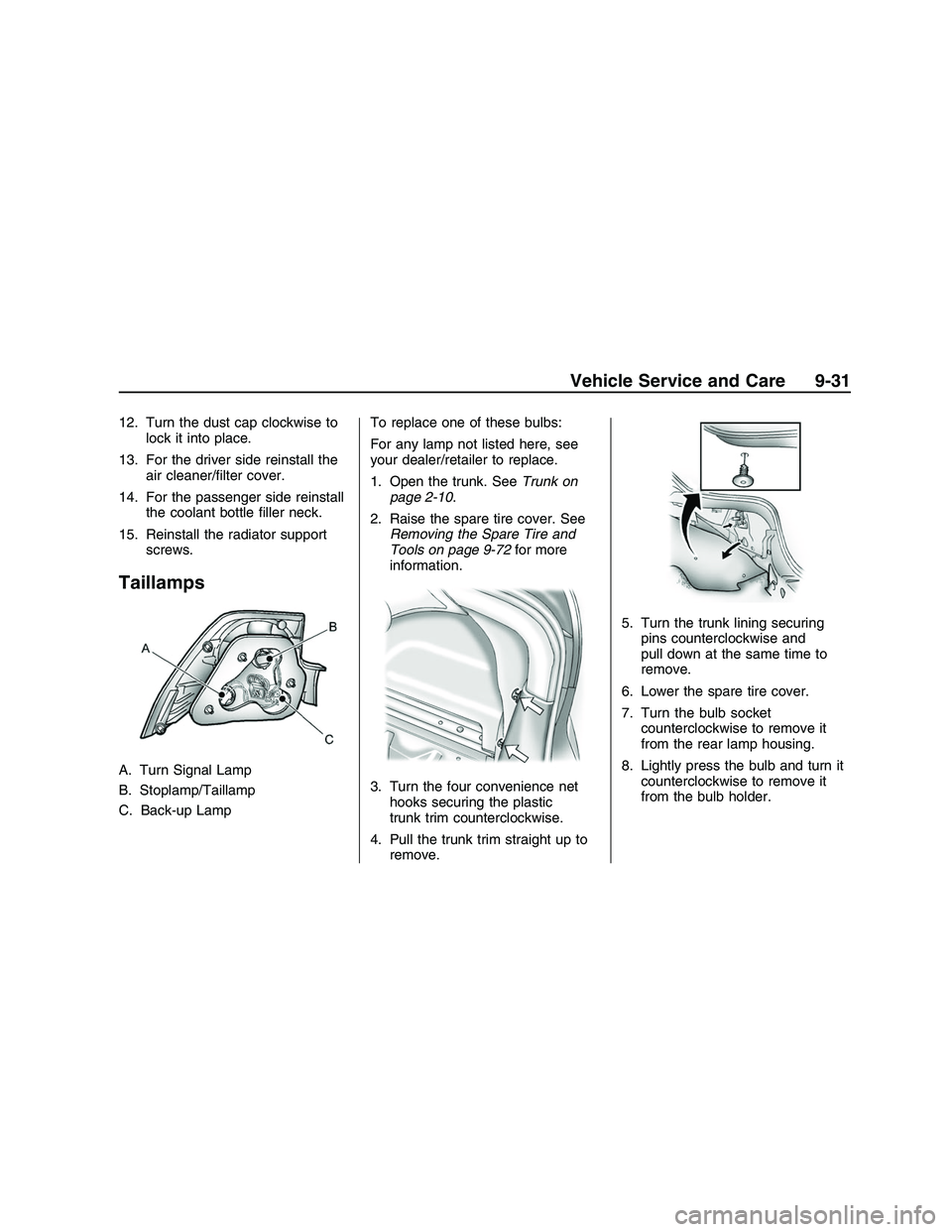
A. Turn Signal Lamp
B. Stoplamp/Taillamp
C. Back-up LampTo replace one of these bulbs:
For any lamp not listed here, see
your dealer/retailer to replace.
1. Open the trunk. SeeTrunk on
page 2-10.
2. Raise the spare tire cover. See
Removing the Spare Tire and
Tools on page 9-72for more
information.
3. Turn the four convenience net
hooks securing the plastic
trunk trim counterclockwise.
4. Pull the trunk trim straight up to
remove.5. Turn the trunk lining securing
pins counterclockwise and
pull down at the same time to
remove.
6. Lower the spare tire cover.
7. Turn the bulb socket
counterclockwise to remove it
from the rear lamp housing.
8. Lightly press the bulb and turn it
counterclockwise to remove it
from the bulb holder.
Vehicle Service and Care 9-31
2008 - Pontiac G8 Owner Manual
Page 216 of 334

9. Push the new bulb into the
socket and turn it clockwise
to lock it into place.
10. Push the bulb socket straight in
and turn it clockwise to lock it
into place.
11. Make sure the seals are applied
to the taillamp assembly and
screws.12. Raise the spare tire cover.
13. Turn the trunk lining securing
pins clockwise to lock into
place.
14. Return the plastic trunk trim to
its original location.
15. Reinstall the plastic
retaining pins.
Replacement Bulbs
Exterior LampBulb
Number
High-Beam
HeadlampH9
Low-Beam
HeadlampH11
Stoplamp/Taillamp P21/5W
Rear Turn
Signal LampPY21W
Back-up Lamp P21W
For replacement bulbs not listed
here, contact your dealer/retailer.
Electrical System
Add-On Electrical
Equipment
Notice:Do not add anything
electrical to your vehicle unless
you check with your
dealer/retailer rst. Some
electrical equipment can damage
your vehicle and the damage
would not be covered by your
warranty. Some add-on electrical
equipment can keep other
components from working as
they should.
Add-on equipment can drain your
vehicle’s battery, even if your vehicle
is not operating.
Your vehicle has an airbag system.
Before attempting to add anything
electrical to your vehicle, see
Servicing Your Airbag-Equipped
Vehicle on page 1-30.
9-32 Vehicle Service and Care
2008 - Pontiac G8 Owner Manual