2008 PONTIAC G8 instrument panel
[x] Cancel search: instrument panelPage 85 of 334
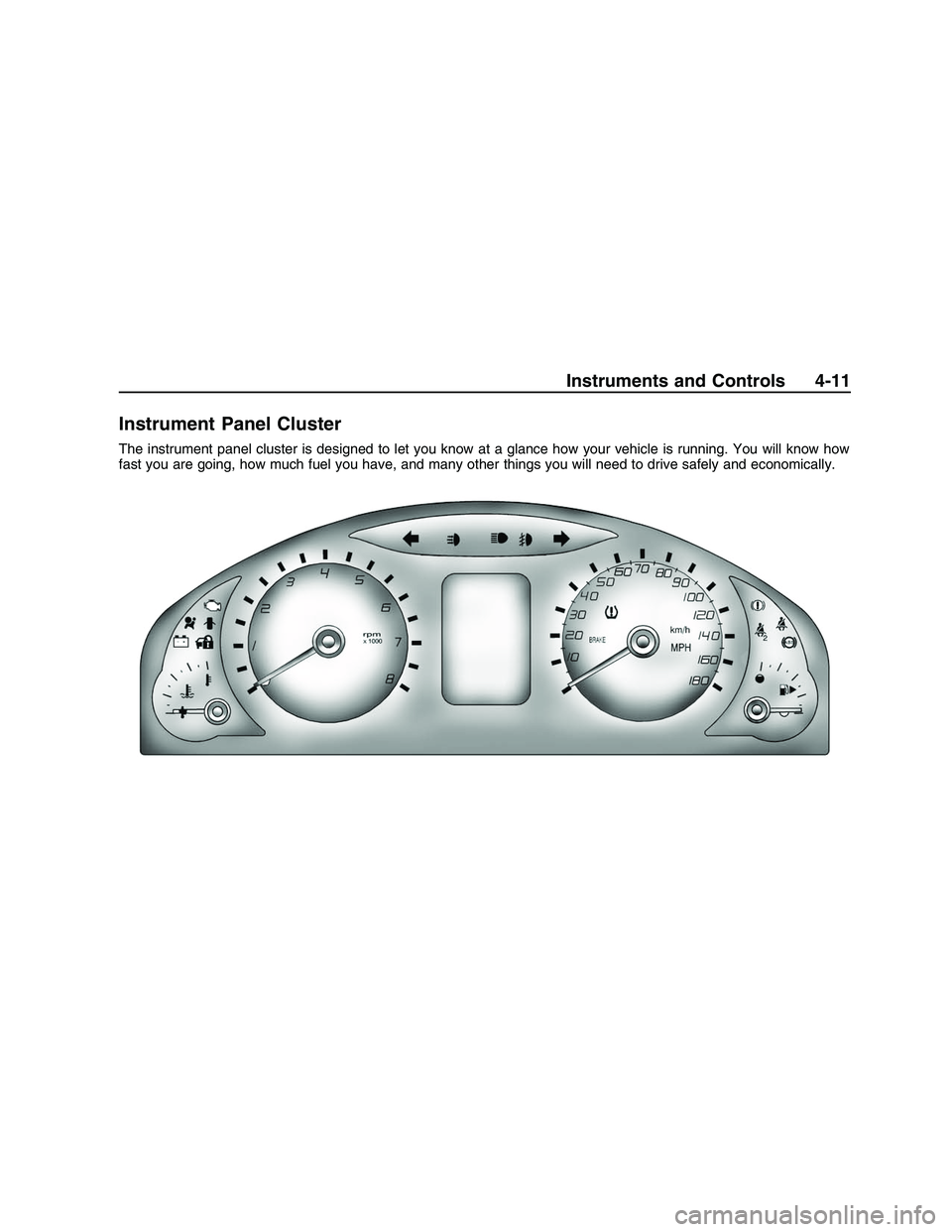
Instrument Panel Cluster
The instrument panel cluster is designed to let you know at a glance how your vehicle is running. You will know how
fast you are going, how much fuel you have, and many other things you will need to drive safely and economically.
Instruments and Controls 4-11
2008 - Pontiac G8 Owner Manual
Page 89 of 334

{CAUTION
Even though the passenger
sensing system is designed to
turn off the right front
passenger’s frontal airbag if the
system detects a rear-facing
child restraint, no system is
fail-safe, and no one can
guarantee that an airbag will
not deploy under some unusual
circumstance, even though it is
turned off. We recommend that
rear-facing child restraints be
secured in the rear seat, even if
the airbag is off.
If the word OFF or the off symbol is
lit on the passenger airbag status
indicator, it means that the
passenger sensing system has
turned off the right front passenger
frontal airbag. SeePassenger
Sensing System on page 1-26for
more information, including
important safety information.If, after several seconds, both status
indicator lights remain on, or if
there are no lights at all, there may
be a problem with the lights or
the passenger sensing system. See
your dealer/retailer for service.
{CAUTION
If the airbag readiness light in
the instrument panel cluster
ever comes on and stays on, it
means that something may be
wrong with the airbag system.
If this ever happens, have the
vehicle serviced promptly,
because an adult-size person
sitting in the right front
passenger’s seat may not have
the protection of the airbag(s).
SeeAirbag Readiness Light on
page 4-13for more on this,
including important safety
information.
Voltmeter Gage
The voltmeter shows the voltage
output of your battery.
It is located in the center of the
instrument panel.
Charging System Light
This light will come on briey when
you turn on the ignition, and the
engine is not running, as a check to
show it is working. Then it should
go out when the engine is started.
If the light comes on and an
Alternator message on the Driver
Information Center (DIC) stays
on, you may have a problem with
the electrical charging system. Have
it checked by your dealer/retailer.
Instruments and Controls 4-15
2008 - Pontiac G8 Owner Manual
Page 96 of 334

Oil Pressure Gage
The gage shows the engine oil
pressure.
It is located in the center of the
instrument panel.
{CAUTION
Do not keep driving if the oil
pressure is low. If you do, your
engine can become so hot that
it catches re. You or others
could be burned. Check your
oil as soon as possible and
have your vehicle serviced.
Notice:Lack of proper engine oil
maintenance may damage the
engine. The repairs would not be
covered by the vehicle warranty.
Always follow the maintenance
schedule in this manual for
changing engine oil.
Fuel Gage
The fuel gage shows about how
much fuel you have left, when the
ignition is on.
When the indicator nears empty, the
low fuel warning light will come
on and along with a chime. There is
still a little fuel left, but you should
refuel soon.Here are four things that some
owners ask about. These are normal
and do not indicate a problem
with your fuel gage:
At the service station, the gas
pump shuts off before the
gage reads full.
It takes a little more or less fuel
to ll up than the gage indicated.
The indicator moves a little when
you turn a corner or speed up.
The gage will continue to show
the remaining fuel when the
ignition is turned off.
4-22 Instruments and Controls
2008 - Pontiac G8 Owner Manual
Page 97 of 334

Driver Information
Center (DIC)
The DIC displays information about
your vehicle. It also displays warning
messages if a system problem is
detected. The DIC also allows some
features to be customized. SeeDIC
Vehicle Customization on page 4-32
for more information. All messages
will appear in the DIC display located
in the center of the instrument panel
cluster.
When the ignition is turned on, a
vehicle system check is performed
and the status is shown on the
DIC display. If there are no warnings
or service reminders, the display
shows a series of welcome screens.
When the ignition is turned off,
the odometer appears on the display
for a short period of time unless a
service reminder is active. Active
service reminders are displayed for
10 seconds before the odometer
appears. The odometer will
reappear on the display when the
driver door is opened. For moreinformation on the warnings and
messages seeDIC Warnings
and Messages on page 4-27.DIC Operation and
Displays
The DIC has different displays
which can be accessed by pressing
the DIC buttons located on the
left side of the steering wheel. The
DIC displays trip, fuel, vehicle
system information, and warning
messages if a system problem
is detected.
DIC Buttons
3(Trip/Fuel):Press this button
to go through the displays and
the select the information.
QR(Thumbwheel):Use the
thumbwheel to scroll through
the available options.
8(ENTER to Reset/Select):Press
the thumbwheel to set or reset
certain functions and to turn off or
acknowledge messages on the DIC.
Trip/Fuel Menu Items
Press3to scroll through the
following menu items:
Speedometer
UNITS
Tire Pressure
Customize Options
Odometer/Trip Odometer
Distance/Time To Go
Range
Avg (Average)Speed/Avg
(Average) Fuel
OverSpeed
Instruments and Controls 4-23
2008 - Pontiac G8 Owner Manual
Page 101 of 334

Underspeed Chime
If an OverSpeed warning appeared
and the vehicle’s speed drops
below the set value, you will hear a
chime. The underspeed chime
can be turned on or off through the
vehicle customization. SeeDIC
Vehicle Customization on page 4-32
for more information.
DIC Warnings and
Messages
Messages are displayed on the DIC
to notify the driver that the status
of the vehicle has changed and that
some action may be needed by
the driver to correct the condition.
Multiple messages may appear one
after another.
Some messages may not require
immediate action, but you can press
3or8to acknowledge that
you received the messages and to
clear them from the display.
Some messages cannot be cleared
from the DIC display becausethey are more urgent. These
messages require action before they
can be cleared. You should take
any messages that appear on
the display seriously and remember
that clearing the messages will
only make the messages disappear,
not correct the problem.
The following are the possible
messages that can be displayed
and some information about them.
!ABS Fault
This message is displayed if there is
a problem with the ABS system.
The ABS light may also turn on in
the instrument panel cluster.
SeeAntilock Brake System (ABS)
Warning Light on page 4-17.
When this message is on, the brake
system will still operate with the
antilock operation disabled.
See your dealer/retailer.
uActive Select On
This message is displayed when the
automatic transmission active
select mode is enabled. See “Active
Select Mode” underAutomatic
Transmission Operation on
page 8-6.
9Airbag Fault
This message is displayed if there is
a problem with the airbag system
or safety belt pretensioner system.
SeeAirbag System on page 1-19
and “Safety Belt Pretensioners”
underLap-Shoulder Belt on
page 1-14. The Airbag Readiness
light may also come on in the
instrument panel cluster. SeeAirbag
Readiness Light on page 4-13.
See your dealer/retailer.
Instruments and Controls 4-27
2008 - Pontiac G8 Owner Manual
Page 102 of 334

{Alarm Activated
This message is displayed when the
content theft-deterrent system
was activated by an attempted
break-in. The messages may also
include the location on the
vehicle where the break-in was
attempted. SeeContent
Theft-Deterrent on page 2-13for
more information.
"Alternator
This message is displayed if there is
a problem with the battery charging
system. The charging system
light may also come on in the
instrument panel cluster. See
Charging System Light on
page 4-15. Driving while this
message is on could drain the
battery. Turn off all unnecessary
accessories. Have the electrical
system checked as soon as
possible. See your dealer/retailer.
Battery Saver Mode On
This message is displayed when the
battery voltage level is low.
$Brake
This message is displayed if there is
a problem with the brake system.
The Brake System Warning
light may also come on in the
instrument panel cluster. SeeBrake
System Warning Light on
page 4-16. When this message is
on, stop the vehicle on the side
of the road. Do not continue driving
until you know that braking is
possible or that the cause of the
problem has been corrected,
see your dealer/retailer. This
message also indicates low brake
uid. Check the brake uid level.
SeeBrakes on page 9-24.
*Check Engine
If this message and the Malfunction
Indicator Lamp come on and
stay on when driving, the system
may require servicing. Although the
vehicle may still be drivable and
not require towing, take the vehicle
to your dealer/retailer as soon
as possible. If this message comes
on when the Malfunction Indicator
Lamp is ashing, reduce the
vehicle’s speed and load until the
lamp stops ashing, then take
the vehicle to your dealer/retailer as
soon as possible. SeeMalfunction
Indicator Lamp on page 4-18
for more information.
:Check Oil
This message is displayed if the oil
pressure or oil level is low. Stop
when safe, turn off the engine and
check the engine oil level. See
Engine Oil on page 9-8. Do not run
the engine when this warning is
4-28 Instruments and Controls
2008 - Pontiac G8 Owner Manual
Page 103 of 334

illuminated. If the oil level is normal,
have the system checked at your
dealer/retailer.
You can press
3or8to
acknowledge that you received the
message, but
:Check Oil will
continue to appear in the bottom of
the DIC display until the vehicle
has been serviced.
X Contact Dealer
This message is displayed when
there is a fault in the instrument
panel, see your dealer/retailer.
You can press
3or8to
acknowledge that you received
the message, butXService will
continue to appear in the bottom of
the DIC display until the vehicle
has been serviced.
ICruise On, Cruise Off,
Cruise Active, and Cruise
Inactive
These messages display the status
of the cruise control system. See
Cruise Control on page 4-5for more
information.
Engine Immobilized Refer to
Owners Manual
This message is displayed when the
engine has been shutdown due to
the theft-deterrent system. See
Immobilizer Operation on page 2-12
for more information.
You can press
3or8to
acknowledge that you received the
message, but
AEng Immo will
continue to appear in the bottom of
the DIC display until the vehicle
has been serviced.
BEngine Temp
(Temperature) Hot
This message is displayed when the
engine coolant temperature is
excessively hot. Stop the vehicle as
soon as it is safe to do so. See
Engine Overheating on page 9-16.
You can press
3or8to
acknowledge that you received the
message, but
BTemp Hot will
continue to appear in the bottom of
the DIC display until the vehicle
has been serviced.
.Low Fuel
This message is displayed when the
fuel level is low.
You can press
3or8to
acknowledge that you received the
message, but
.Low Fuel will
continue to appear in the bottom
of the DIC display until the fuel
tank has been lled above the low
fuel level.
Instruments and Controls 4-29
2008 - Pontiac G8 Owner Manual
Page 113 of 334

Lighting
Lighting
Exterior Lamps Controls.....5-1
Daytime Running
Lamps (DRL)....................5-2
Automatic Headlamp
System.............................5-2
Fog Lamps.........................5-3
Instrument Panel
Brightness.........................5-3
Dome Lamp(s)....................5-4
Perimeter Lighting...............5-4
Reading Lamps..................5-4
Battery Run-Down
Protection.........................5-4
Lighting
Exterior Lamps Controls
The exterior lamps control is located
on the instrument panel to the left
of the steering wheel.
It controls the following systems:
Headlamps
Taillamps
Parking Lamps
License Plate Lamps
Instrument Panel Lights
Sidemarker Lamps
Fog Lamps
The exterior lamps control has four
positions:
9(Off):Turns the headlamps,
parking lamps, and DRL off.
The DRL does not turn off on
vehicles rst sold in Canada.
AUTO (Automatic):Turns the
headlamps on and off automatically.
They come on at normal brightness,
together with the following:
Parking Lamps
Taillamps
License Plate Lamps
Instrument Panel Lights
Sidemarker Lamps
Lighting 5-1
2008 - Pontiac G8 Owner Manual