Page 3 of 154
3
2
1
20
Accesses
KEY
This locks and unlocks the locks on the
vehicle and starts the engine.
REMOTE CONTROL BATTERY
If the diode flashes when one of the remote
control buttons is pressed, the battery must
be changed.
Reference: CR 2032/3 volts.
Changing the remote control battery
- press the button to eject the key,
- turn the screw 1
from the closed padlock
to the open padlock using a screwdriver
with a thin tip, - use the screwdriver as a lever to extract
the battery holder housing 2,
- remove the housing and change the battery 3 observing the polarities,
- put the battery holder housing 2
back
inside the key and secure it by turning
the screw 1.
There is a risk of damage if the
replacement battery does not conform.
Only use batteries which are identical or
of an equivalent type to those recommended
by a PEUGEOT dealer. Take used batteries
to an approved collection point.
Page 35 of 154

51
3
ERGONOMICS AND COMFORT
Ventilation
Comfort value adjustment ring
The graduation ranges between:
- increasing of the interior ambient air
temperature HI (High) which heats to a
maximum graduation of 32,
- cooling of the interior ambient air temperature LO (Low) which cools to a
graduation of 16. increase (+) or reduce (-) the force of the
interior air flow.
Air distribution
Pressing lights the diode on the buttons
which distribute the air flow towards: the windscreen and front side
window vents (demisting/de-icing
of the windows),
the central and side vents (chest
and face),
the vents in the front and rear
areas (feet).
The combination of buttons permits
improvement of air distribution. Air flow
Successive presses of this button Intake of exterior air/
recirculation of interior air
When the diode is lit, the air
recirculates inside the passenger
compartment to prevent the entry of exterior
odours and smoke. This position should be
temporary.
When the ambient air comfort level has been
reached, pressing the button switches the
diode off and reopens the exterior air intake.
Pressing the AUTO button also restores
the intake of exterior air. Returning to this
position permits renewal of the air in the
passenger compartment and demisting.
Pressing the AUTO button again restores
the FULL AUTO function.
Rapid demisting/de-icing
Pressing this control permits
rapid clearing of the windows.
The diode is lit.
The system manages the air conditioning,
the flow and intake of air, the de-icing of
the rear screen and provides optimum
distribution of the air to the windscreen and
front side windows.
If your vehicle is fitted with additional
heating, please switch it off to guarantee
rapid and effective demisting/de-icing.
Page 38 of 154
54
Ventilation
PROGRAMMABLE ADDITIONAL
HEATING
If your vehicle is fitted with autonomous
programmable heating: it gradually brings
the engine up to a good temperature to
facilitate starting. An integrated clock permits programming of
its start time. The passenger compartment
will be heated more quickly. Heating cycle indicator light
Digital programming control
The programmable heating system control
panel is located at the bottom right of the
fascia panel. Display on
Displaying of the number of the
programme selected
Time display button
Time setting buttons
Selection of the stored
programme
Button for immediate switching
on of the heating
Time setting and reading
indicator light
Page 39 of 154

55
3
ERGONOMICS AND COMFORT
Ventilation
Setting the time of the internal clock
Set the clock on the control panel before
programming the deferred switching on of
the heating. Immediate switching on of the
heating
Before switching on the heating, check that:
- the temperature setting control is in the
"Hot air" position (red).
- the air low setting control is in position 2. This symbol or the previous stored time
and the number (e.g. 1) corresponding to
the recalled pre-selection are displayed for
ten seconds.
Note: if you wish to recall the other pre-
selected times, press the SET button several
times before the ten seconds have elapsed.
Press this button.
The display and the associated
indicator light come on.
Within ten seconds, press these two setting
buttons until the correct time is displayed.
Press ">" to increase the hours or
"<" to decrease.
Press and hold the button for
more rapid scrolling of the digits.
Reading the time Press this button.
This indicator light comes
on, the time is displayed for
approximately ten seconds. Press this button.
The display and the heating
cycle indicator light come on
and remain on throughout the
duration of operation.
Switching on the deferred heating
Switching on can be programmed between
one minute and twenty-four hours in
advance.
You can store up to three different start
times, but programme one deferred start
only.
Note: if you wish to start the heating at a
fixed time each day, simply reprogramme
the stored time each day.
Press this button, the display
becomes overbright. Within the ten seconds, press
these two setting buttons to
select the required start time.
Setting of the stored time is
confirmed by clearing of the
start time, displaying of the pre-
selection number (e.g. 1) and
overbrightness of the display
lighting.
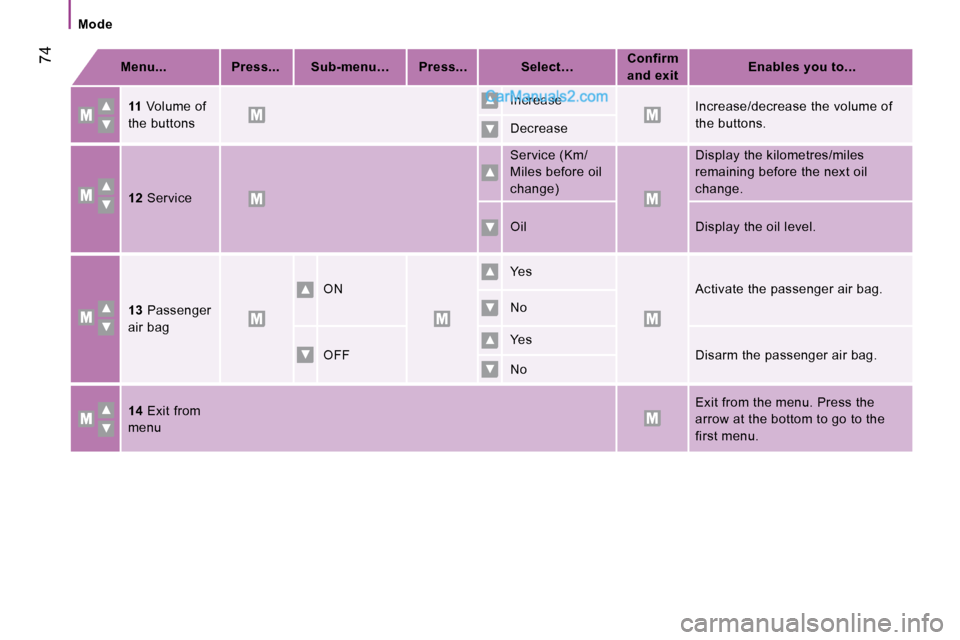
Page 58 of 154
74
ModeMenu... Press... Sub-menu… Press... Select… Confirm
and exit Enables you to...
11 Volume of
the buttons Increase
Increase/decrease the volume of
the buttons.
Decrease
12 Service Service (Km/
Miles before oil
change)
Display the kilometres/miles
remaining before the next oil
change.
Oil Display the oil level.
13 Passenger
air bag ON
Yes
Activate the passenger air bag.
No
OFF Yes
Disarm the passenger air bag.
No
14 Exit from
menu Exit from the menu. Press the
arrow at the bottom to go to the
first menu.
Page 60 of 154
76
Reversing camera
REVERSING CAMERA
If your vehicle is fitted with this camera, it
is located at the rear of the van, next to the
third brake light.
It sends views to the screen installed
in the cab. This rear vision is an aid to
manoeuvring. Screen
The camera sends the images to a 4 inch or
6.5 inch adjustable colour LCD which takes
the place of the interior mirror.
Press the button and place the screen in the
required position.
Activation
With the key in the running position, unfold
the screen.
The camera comes into operation when
reverse gear is engaged and remains active
up to approximately 9 mph (15 km/h). It is
deactivated above 11 mph (18 km/h).
When a forward gear is engaged, the last
image remains displayed for approximately
5 seconds then switches off.
Fold the screen.Buttons
Brightness adjustment.
Back-lighting adjustment.
ON/OFF enables you to see rear
views without engaging reverse
gear.
Page 66 of 154
RADIOAccess to and exit from the menus.
Confirmation and storing of the choices from
the current menu.
Scrolling of the menus.
Selection of the letters (CD NAME).
Increasing or decreasing of an
equaliser band (EQ SET).
Selection of the choices from the current menu.
Switching from one band to another on the
equaliser (EQ SET).
MENU
SELECTING A STATION
Press the source SRC button
several times in succession and
select the radio.
Press the band BN button to
select a waveband: FM1, FM2,
FMt, MW, LW.
Briefly press one of the buttons
to carry out an automatic search
of the radio stations.
Press one of the buttons to carry
out a manual search of the radio
stations.
STORING A STATION Press one of the buttons for
more than 2 seconds to store the
frequency of the current station.
82
Audio equipment
Page 67 of 154
RADIOAccess to and exit from the menus.
Confirmation and storing of the choices from
the current menu.
Scrolling of the menus.
Selection of the letters (CD NAME).
Increasing or decreasing of an
equaliser band (EQ SET).
Selection of the choices from the current menu.
Switching from one band to another on the
equaliser (EQ SET).
MENU
SELECTING A STATION
Press the source SRC button
several times in succession and
select the radio.
Press the band BN button to
select a waveband: FM1, FM2,
FMt, MW, LW.
Briefly press one of the buttons
to carry out an automatic search
of the radio stations.
Press one of the buttons to carry
out a manual search of the radio
stations.
STORING A STATION Press one of the buttons for
more than 2 seconds to store the
frequency of the current station.
82
Audio equipment