2008 PEUGEOT 1007 DAG key
[x] Cancel search: keyPage 94 of 194

5
91
COURTESY LIGHT
1. Front courtesy light
2. Map reading lights In the permanently on posi-
tion, there are different dura-
tions of lighting:
Boot light
The boot light is located in the left
boot trim.
It comes on automatically when the
boot is opened and switches of auto-
matically when the boot is closed.
Front courtesy light Permanently off.
Permanently on.
In this position, the courtesy
light comes on gradually:
- when the vehicle is unlocked,
- when the key is removed from the ignition,
- when the remote control locking button is pressed, in order to
locate your vehicle.
It switches off gradually:
- when the vehicle is locked,
- when the ignition is switched on,
- 30 seconds after the last door is closed. Map reading lights
With the ignition on, press
the corresponding switch 2 .
- when the ignition is off, approxi-
mately ten minutes,
- in energy economy mode, ap- proximately thirty seconds,
- when the engine is running, no limit.
Page 104 of 194

6
100
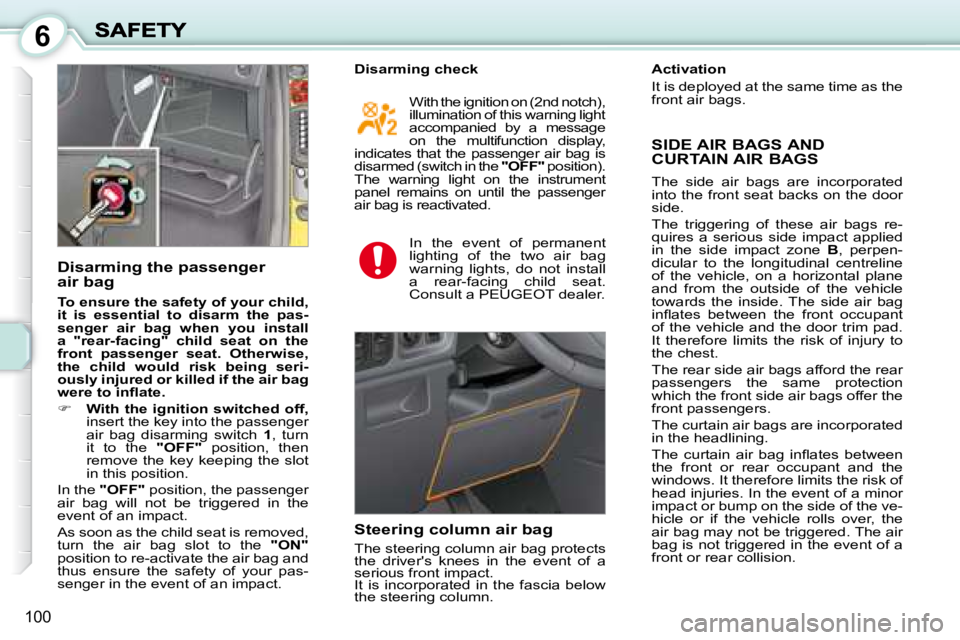
Disarming the passenger
air bag
To ensure the safety of your child,
it is essential to disarm the pas-
senger air bag when you install
a "rear-facing" child seat on the
front passenger seat. Otherwise,
the child would risk being seri-
ously injured or killed if the air bag
were to infl ate.
With the ignition switched off,
insert the key into the passenger
air bag disarming switch 1 , turn
it to the "OFF" position, then
remove the key keeping the slot
in this position.
In the "OFF" position, the passenger
air bag will not be triggered in the
event of an impact.
As soon as the child seat is removed,
turn the air bag slot to the "ON"
position to re-activate the air bag and
thus ensure the safety of your pas-
senger in the event of an impact. With the ignition on (2nd notch),
illumination of this warning light
accompanied by a message
on the multi function display,
indicates that the passenger air bag is
disarmed (switch in the "OFF" position).
The warning light on the instrument
panel remains on until the passenger
air bag is reactivated.
In the event of permanent
lighting of the two air bag
warning lights, do not install
a rear-facing child seat.
Consult a PEUGEOT dealer.
Steering column air bag
The steering column air bag protects
the driver's knees in the event of a
serious front impact.
It is incorporated in the fascia below
the steering column. SIDE AIR BAGS AND
CURTAIN AIR BAGS
The side air bags are incorporated into the front seat backs on the door side.
The triggering of these air bags re-quires a serious side impact applied in the side impact zone B , perpen-dicular to the longitudinal centreline of the vehicle, on a horizontal plane and from the outside of the vehicle towards the inside. The side air bag infl ates between the front occupant of the vehicle and the door trim pad. It therefore limits the risk of injury to the chest.
The rear side air bags afford the rear passengers the same protection which the front side air bags offer the front passengers.
The curtain air bags are incorporated in the headlining.
The curtain air bag infl ates between the front or rear occupant and the windows. It therefore limits the risk of head injuries. In the event of a minor impact or bump on the side of the ve-hicle or if the vehicle rolls over, the air bag may not be triggered. The air bag is not triggered in the event of a front or rear collision.
Disarming check Activation
It is deployed at the same time as the
front air bags.
Page 106 of 194
6
100
Disarming the passenger
air bag
To ensure the safety of your child,
it is essential to disarm the pas-
senger air bag when you install
a "rear-facing" child seat on the
front passenger seat. Otherwise,
the child would risk being seri-
ously injured or killed if the air bag
were to infl ate.
With the ignition switched off,
insert the key into the passenger
air bag disarming switch 1 , turn
it to the "OFF" position, then
remove the key keeping the slot
in this position.
In the "OFF" position, the passenger
air bag will not be triggered in the
event of an impact.
As soon as the child seat is removed,
turn the air bag slot to the "ON"
position to re-activate the air bag and
thus ensure the safety of your pas-
senger in the event of an impact. With the ignition on (2nd notch),
illumination of this warning light
accompanied by a message
on the multi function display,
indicates that the passenger air bag is
disarmed (switch in the "OFF" position).
The warning light on the instrument
panel remains on until the passenger
air bag is reactivated.
In the event of permanent
lighting of the two air bag
warning lights, do not install
a rear-facing child seat.
Consult a PEUGEOT dealer.
Steering column air bag
The steering column air bag protects
the driver's knees in the event of a
serious front impact.
It is incorporated in the fascia below
the steering column. SIDE AIR BAGS AND
CURTAIN AIR BAGS
The side air bags are incorporated into the front seat backs on the door side.
The triggering of these air bags re-quires a serious side impact applied in the side impact zone B , perpen-dicular to the longitudinal centreline of the vehicle, on a horizontal plane and from the outside of the vehicle towards the inside. The side air bag infl ates between the front occupant of the vehicle and the door trim pad. It therefore limits the risk of injury to the chest.
The rear side air bags afford the rear passengers the same protection which the front side air bags offer the front passengers.
The curtain air bags are incorporated in the headlining.
The curtain air bag infl ates between the front or rear occupant and the windows. It therefore limits the risk of head injuries. In the event of a minor impact or bump on the side of the ve-hicle or if the vehicle rolls over, the air bag may not be triggered. The air bag is not triggered in the event of a front or rear collision.
Disarming check Activation
It is deployed at the same time as the
front air bags.
Page 121 of 194

8
115
CHECKING THE LEVELS
There are two marks on
the dipstick:
A = maximum
Never fi ll past this mark.
B = minimum
Dipstick
Oil change
According to the information given in
the servicing booklet. Changing the brake fluid
The brake fl uid must be
changed at the intervals
stated, according to the
manufacturer's servicing
schedule.
Use fl uids recommended by the man-
ufacturer, which fulfi l DOT4 standards. Windscreen and headlamp
wash level
For best quality cleaning and
for your safety, we would ad-
vise that you use products
recommended by PEUGEOT .
When the level is low, this is indicated
by an audible signal and a message
on the multifunction display.
Viscosity selection
In all cases, the oil selected must
meet the manufacturer's require-
ments.
Cooling system
Use the fl uid recommended by the
manufacturer.
When the engine is warm, the tem-
perature of the coolant is controlled
by the engine fan. As this fan can ope
rate with the ignition key removed and
because the cooling system is pres-
surised, wait for at least one hour after
the engine has stopped before carry-
ing out any work.
Slacken the cap by two turns to re-
lease the pressure to prevent any
risk of scalding. When the pressure
has dropped, remove the cap and
top up the level. Diesel additive level (Diesel
with particle emission filter)
Lighting of the service warning light,
accompanied by a message and an
audible signal, indicates that the die-
sel additive level is low.
This additive must be topped up.
Contact a PEUGEOT dealer as soon
as possible.
To maintain the reliability of
engines and emission control
systems, the use of additives
in engine oil is prohibited. Used oil
Avoid prolonged contact of used oil
with the skin.
Brake fl uid is harmful to health and
very corrosive.
Note
: the coolant does not need to
be changed.
The level must always be
above the MIN mark and
close to the MAX mark. Do not dispose of used oil,
brake fl uid or coolant into
drains or into the ground.
Oil level
Check the level regularly
and top up between chang-
es. The maximum consump-
tion is 0.5 l per 600 miles
(1 000 km).
Check the level with the vehicle level,
engine cold, using the oil level gauge
on the instrument panel or the dip-
stick.
Page 150 of 194
143
99
1111
1212
1414
10101313
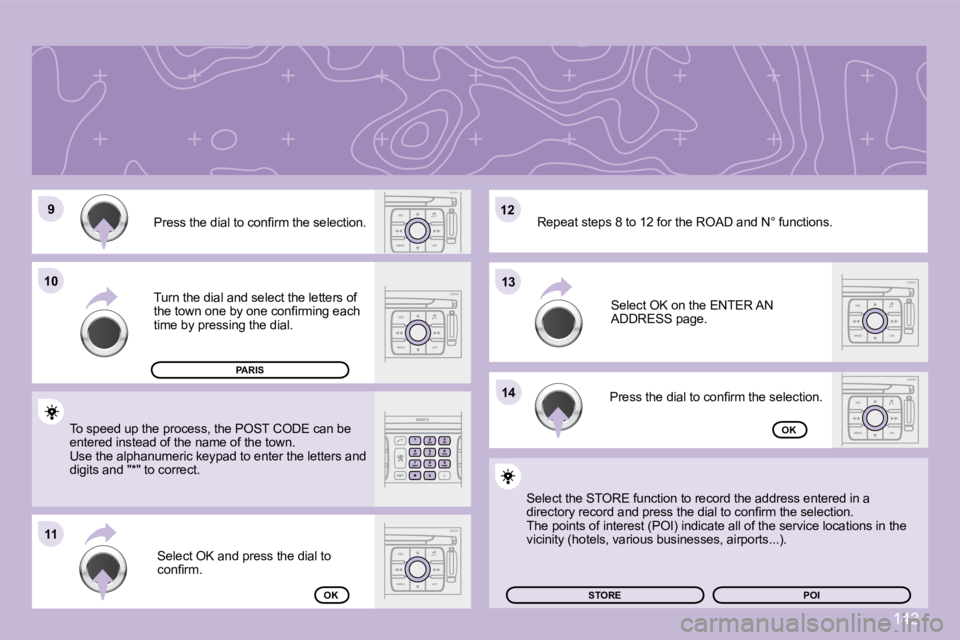
Press the dial to confi rm the selection.
Turn the dial and select the letters of
the town one by one confi rming each
time by pressing the dial. Select OK and press the dial to
confi rm.
To speed up the process, the POST CODE can be
entered instead of the name of the town.
Use the alphanumeric keypad to enter the letters a
nd
digits and "*" to correct. Press the dial to confi rm the selection. Select OK on the ENTER AN
ADDRESS page.
Repeat steps 8 to 12 for the ROAD and N° functions
.
OK
OK
Select the STORE function to record the address entered in a
directory record and press the dial to confi rm the selection.
The points of interest (POI) indicate all of the s ervice locations in the
vicinity (hotels, various businesses, airports...).
STORE
PARIS
POI
Page 162 of 194
155
66
77
55
22
33
44
11
JUKEBOX
RENAME
JUKEBOX MANAGEMENT
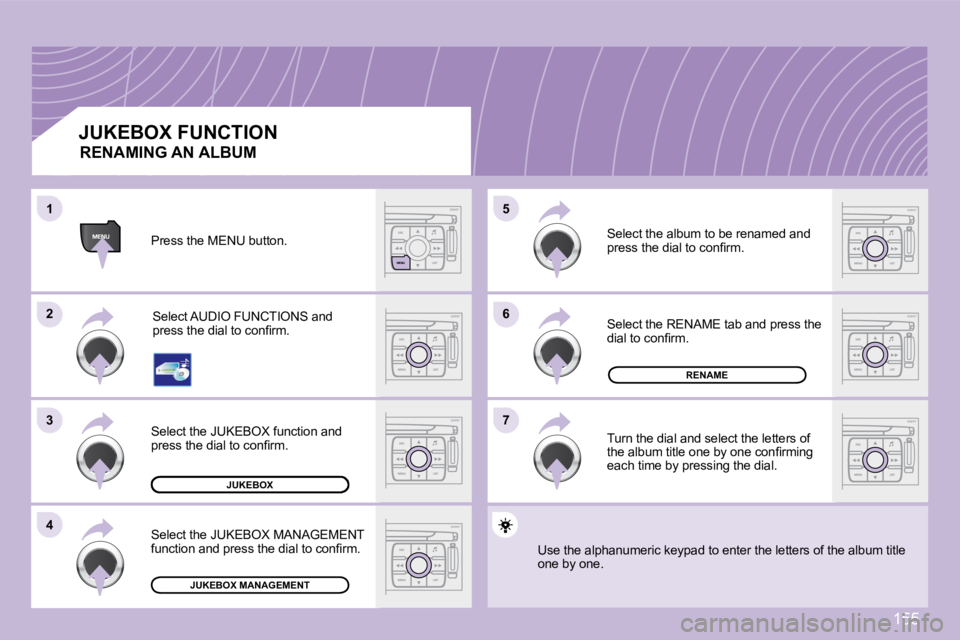
JUKEBOX FUNCTION Press the MENU button. Select AUDIO FUNCTIONS and
press the dial to confi rm.
Select the JUKEBOX function and
press the dial to confi rm.
Select the JUKEBOX MANAGEMENT
function and press the dial to confi rm. Select the album to be renamed and
press the dial to confi rm.
Select the RENAME tab and press the
dial to confi rm.
Turn the dial and select the letters of
the album title one by one confi rming
each time by pressing the dial.
Use the alphanumeric keypad to enter the letters o f the album title
one by one.
RENAMING AN ALBUM
Page 165 of 194
158
11
22
11
33
22
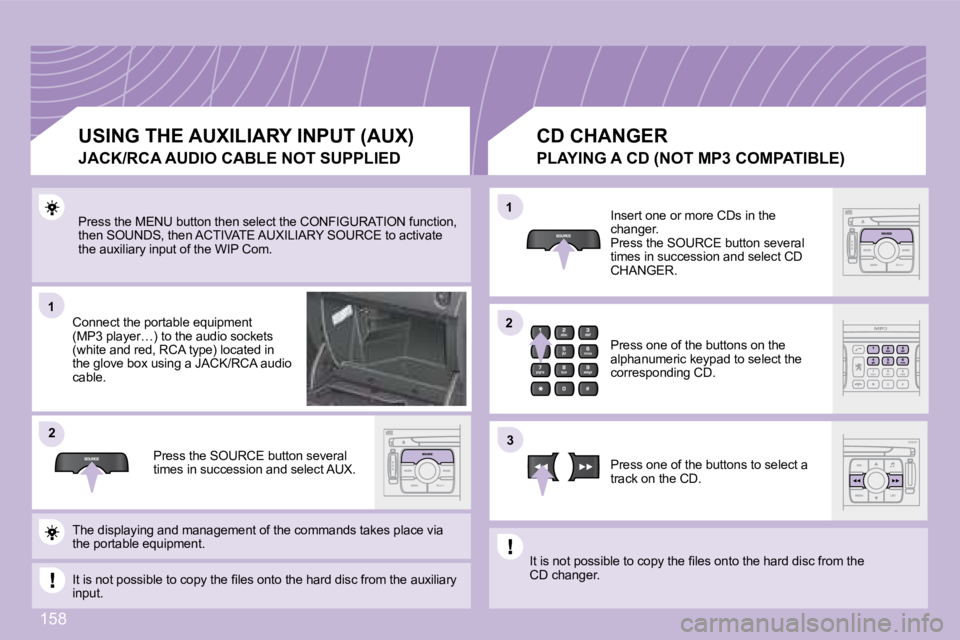
Press the MENU button then select the CONFIGURATION function,
then SOUNDS, then ACTIVATE AUXILIARY SOURCE to acti vate
the auxiliary input of the WIP Com.
Connect the portable equipment
(MP3 player…) to the audio sockets
(white and red, RCA type) located in
the glove box using a JACK/RCA audio
cable.
Press the SOURCE button several
times in succession and select AUX. CD CHANGER
Insert one or more CDs in the
changer.
Press the SOURCE button several
times in succession and select CD
CHANGER.
Press one of the buttons on the
alphanumeric keypad to select the
corresponding CD.
Press one of the buttons to select a
track on the CD.
The displaying and management of the commands take s place via
the portable equipment.
It is not possible to copy the fi les onto the hard disc from the auxiliary
input. It is not possible to copy the fi les onto the hard
disc from the
CD changer.
USING THE AUXILIARY INPUT (AUX)
JACK/RCA AUDIO CABLE NOT SUPPLIED PLAYING A CD (NOT MP3 C
OMPATIBLE)
Page 166 of 194
159
11
22
33
11
22
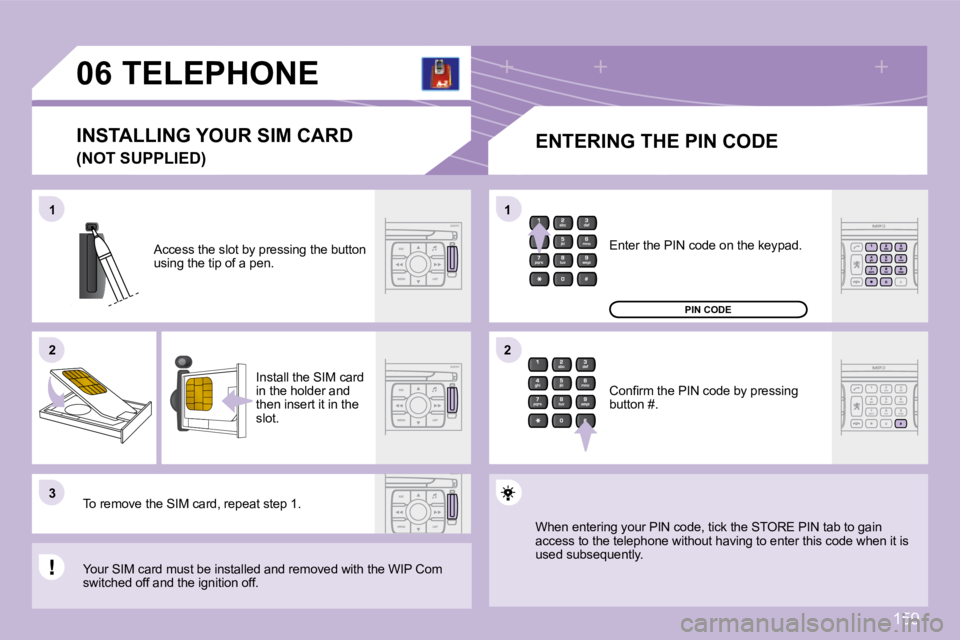
06 TELEPHONE ENTERING THE PIN CODE
Access the slot by pressing the button
using the tip of a pen.
Install the SIM card
in the holder and
then insert it in the
slot.
To remove the SIM card, repeat step 1.
Your SIM card must be installed and removed with t he WIP Com
switched off and the ignition off. Enter the PIN code on the keypad.
Confi rm the PIN code by pressing
button #.
PIN CODE
When entering your PIN code, tick the STORE PIN ta
b to gain
access to the telephone without having to enter thi s code when it is
used subsequently.
INSTALLING YOUR SIM CARD
(NOT SUPPLIED)