2008 PEUGEOT 1007 DAG key
[x] Cancel search: keyPage 73 of 194
4
74
ELECTRONIC ENGINE IMMOBILISER
This locks the engine control system
a few moments after the ignition has
been switched off and therefore pre-
vents starting of the vehicle by anyone
who does not have the key.
The ignition key has an electronic chip
which has a special code. When the
ignition is switched on, the code is
recognised and starting is possible.
If the system does not function
correctly, the service warning light
comes on, accompanied by an au-
dible signal and a message on the
multifunction display.
In this case, your vehicle will not
start. Contact a PEUGEOT dealer as
soon as possible.
Lost keys
Visit a PEUGEOT dealer with the ve-
hicle's V5 registration certifi cate and
your personal identifi cation docu-
ments.
A PEUGEOT dealer will be able to
retrieve the key code and the tran-
sponder code required to order a
replacement key.
Programming the remote
control
Following changing of the remote
control battery or disconnection of
the vehicle battery, the remote con-
trol must be reprogrammed.
Wait at least one minute before
using the remote control.
Switch on the ignition.
Press button B or C for at least
fi ve seconds within the next ten
seconds.
Switch off the ignition.
Wait at least one minute before
using the remote control.
The remote control is now working
again.
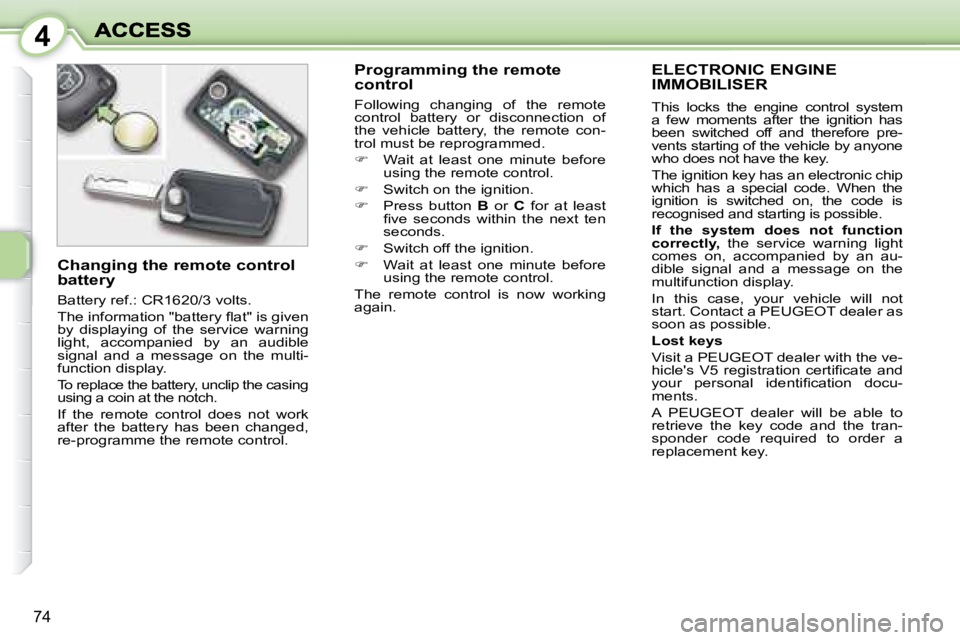
Changing the remote control
battery
Battery ref.: CR1620/3 volts.
The information "battery fl at" is given
by displaying of the service warning
light, accompanied by an audible
signal and a message on the multi-
function display.
To replace the battery, unclip the casing
using a coin at the notch.
If the remote control does not work
after the battery has been changed,
re-programme the remote control.
Page 74 of 194

4
75
Make a careful note of the
number on each key. The
key number is coded on the
label attached to the key.
If the keys are lost, a PEUGEOT
dealer can rapidly supply you with
new keys.
The high frequency remote con-
trol is a sensitive system; do not
operate it while it is in your pocket
as there is a possibility that it may
unlock your vehicle, without you
being aware of it.
The remote control does not oper-
ate when the key is in the ignition,
even when the ignition is switched
off, except for reprogramming.
Do not operate the deadlocking
function if there is anyone inside
the vehicle.
Driving with the doors locked may
make access to the passenger
compartment by the emergency
services more diffi cult in an emer-
gency.
As a safety precaution (with chil-
dren on board), remove the ignition
key when you leave the vehicle,
even for a short time.
Do not repeatedly press the button
of your remote control out of range
and out of sight of your vehicle.
You run the risk of stopping it from
working and the remote control
would have to be reprogrammed.
When purchasing a second-
hand vehicle, have the key codes
memorised by a PEUGEOT dealer
to ensure that the keys in your
possession are the only ones
which can start the vehicle.
Do not throw the remote
control batteries away, they
contain metals which are
harmful to the environment.
Take them to an approved collection
point.
Do not make any modifi cations to
the electronic engine immobiliser
system.
Page 75 of 194
4
76
ALARM
The alarm offers two types of protection.
- external; the alarm sounds if
one of the doors, the bonnet
or the tailgate is opened ,
- internal; the alarm sounds if
there is air movement in the
passenger compartment (a
broken window or movement
within the car).
The alarm also has an anti-tamper
function.
If there is an attempt to tamper with
the following equipment:
- the wires to the siren or the control unit, the siren sounds
accompanied by fl ashing of the
direction indicators.
- the battery, the siren sounds. Complete setting and
disarming of the alarm
Complete disarming of the alarm
Press the unlocking button on the
remote control.
The direction indicators fl ash for
two seconds.
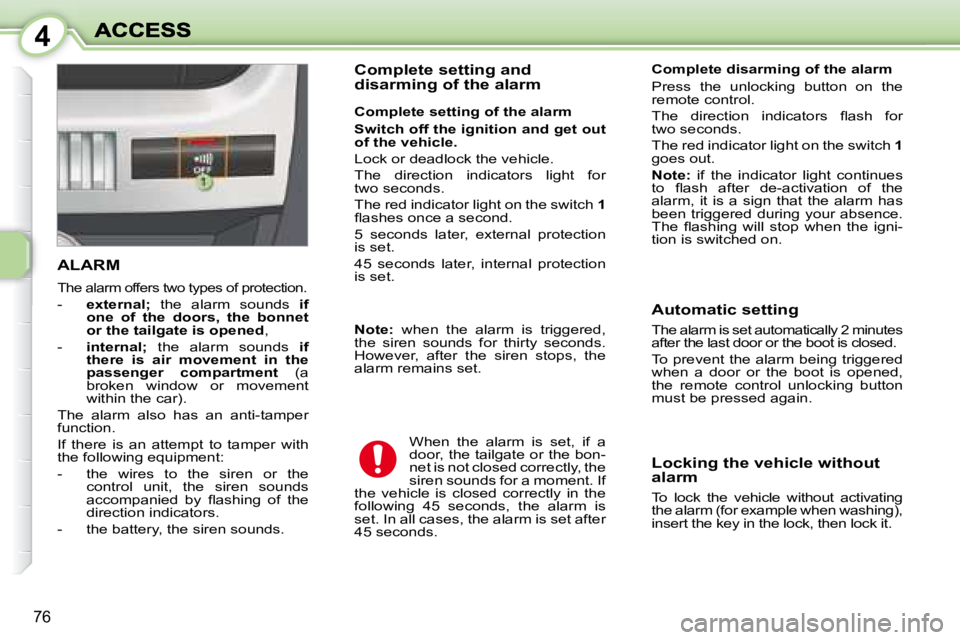
The red indicator light on the switch
1
goes out.
Note: if the indicator light continues
to fl ash after de-activation of the
alarm, it is a sign that the alarm has
been triggered during your absence.
The fl ashing will stop when the igni-
tion is switched on.
When the alarm is set, if a
door, the tailgate or the bon-
net is not closed correctly, the
siren sounds for a moment. If
the vehicle is closed correctly in the
following 45 seconds, the alarm is
set. In all cases, the alarm is set after
45 seconds. Automatic setting
The alarm is set automatically 2 minutes
after the last door or the boot is closed.
To prevent the alarm being triggered
when a door or the boot is opened,
the remote control unlocking button
must be pressed again.
Locking the vehicle without
alarm
To lock the vehicle without activating
the alarm (for example when washing),
insert the key in the lock, then lock it.
Complete setting of the alarm
Switch off the ignition and get out
of the vehicle.
Lock or deadlock the vehicle.
The direction indicators light for
two seconds.
The red indicator light on the switch 1
fl ashes once a second.
5 seconds later, external protection
is set.
45 seconds later, internal protection
is set.
Note: when the alarm is triggered,
the siren sounds for thirty seconds.
However, after the siren stops, the
alarm remains set.
Page 76 of 194
4
77
Selection of the type
of protection Remote control failure
Unlock the doors using the key.
Open the door.
The alarm is triggered.
Switch on the ignition.
The electronic engine immobiliser
system recognises the key.
The siren stops and the alarm is
disarmed.
Do not make any modifi ca-
tions to the alarm system, this
could result in malfunctions.
To de-activate external protection
only
Press the unlocking button on the
remote control.
The direction indicators fl ash for
two seconds.
The red indicator light on the switch
1
goes out. Work on the battery
The alarm must not be set when the
battery is disconnected. Otherwise,
the siren will sound.
After reconnecting the battery:
- lock or deadlock, then unlock the
vehicle using the remote control,
- the alarm will be operational again the next time the vehicle is
locked or deadlocked.
To set the alarm to external
protection only
If you want to leave a window par-
tially open, or a pet inside the vehicle,
you need to select external protection
only:
- switch off the ignition,
- within the next ten seconds,
press the control button 1 until
the warning light comes on
continuously,
- get out of the vehicle,
- lock or deadlock the vehicle,
- the direction indicators light for two seconds,
- the red indicator light on the switch 1 fl ashes once a second.
Page 77 of 194

4
78
ELECTRIC WINDOWS
1. Driver's electric window
switch.
2. Passenger electric window
switch. You can close all of the
windows using the remote
control when locking (refer
to the chapter "Access - §
Remote control key").
The electric window switches are not
active when the door concerned is
open.
The movement of a window stops if
the door is opened. A second action
on the electric window switch will
only be taken into account when the
door is closed.
Safety auto-reverse
In automatic mode, when the window
rises and meets an obstacle, it stops
and partially lowers again. In the case of unwanted
opening of the window on
closing or if the window will
not rise, lower it completely
and raise it again immediately, by
pulling the switch until the window
closes completely. Continue to press
the switch for approximately one
second after closing.
The safety auto-reverse function
is not operational during these
operations.
Electric window
Press or pull switch 1 . The
window stops as soon as the
switch is released.
One-touch electric window
with safety auto-reverse
You have two options: -
Manual mode:
Press or pull switch 1 gently.
The window stops as soon
as the switch is released.
- Automatic mode:
Press or pull switch 1 fully. The win-
dow opens or closes completely
when the switch is released.
Pressing the switch again stops the
movement of the window.
Note: the electrical functions of the
one-touch electric windows are de-
activated approximately one minute
after the ignition is switched off.
Note: the electrical functions of the
electric windows are deactivated
approximately 45 seconds after the
ignition is switched off, or when a
door is opened. Always remove the key from
the ignition when leaving
the vehicle, even for a short
time.
In the event of contact when operating
the windows, you must reverse the
movement of the window. To do this,
press the switch concerned.
When the driver operates the pas-
senger window switches, he must
ensure that no one is preventing cor-
rect closing of the window.
The driver must ensure that passengers
use the electric windows correctly.
Be aware of children when operating
the windows.
Page 78 of 194
4
79
"SESAME" DOORS
The exterior and interior handles
only permit triggering of the electric
movement of the door when it is fully
closed or fully open.
Opening and closing of the doors is
accompanied by an audible signal.
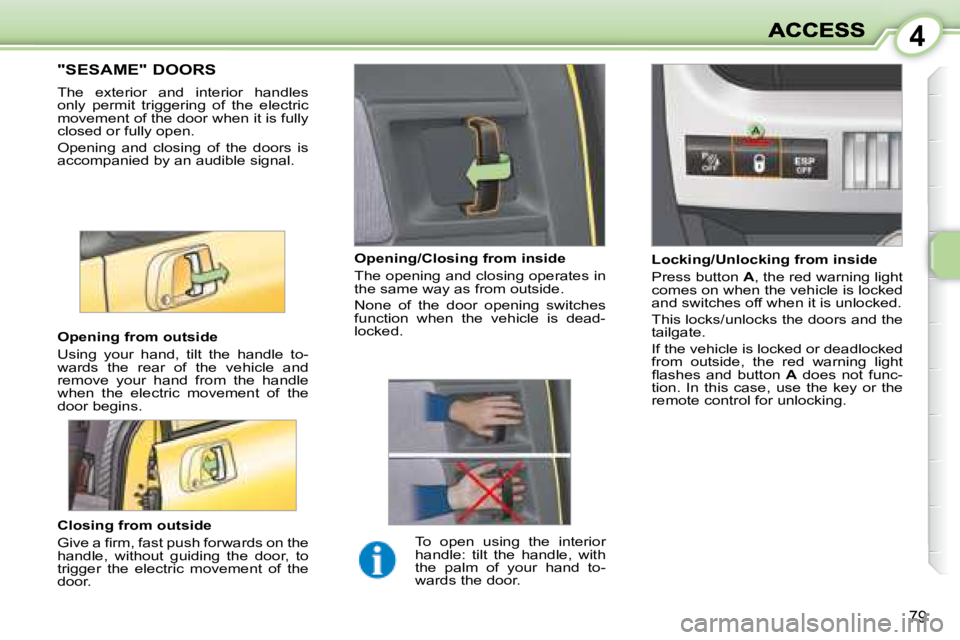
Closing from outside
Give a fi rm, fast push forwards on the
handle, without guiding the door, to
trigger the electric movement of the
door.
Opening from outside
Using your hand, tilt the handle to-
wards the rear of the vehicle and
remove your hand from the handle
when the electric movement of the
door begins.
Locking/Unlocking from inside
Press button
A , the red warning light
comes on when the vehicle is locked
and switches off when it is unlocked.
This locks/unlocks the doors and the
tailgate.
If the vehicle is locked or deadlocked
from outside, the red warning light
fl ashes and button A does not func-
tion. In this case, use the key or the
remote control for unlocking.
Opening/Closing from inside
The opening and closing operates in
the same way as from outside.
None of the door opening switches
function when the vehicle is dead-
locked.
To open using the interior
handle: tilt the handle, with
the palm of your hand to-
wards the door.
Page 84 of 194
4
84
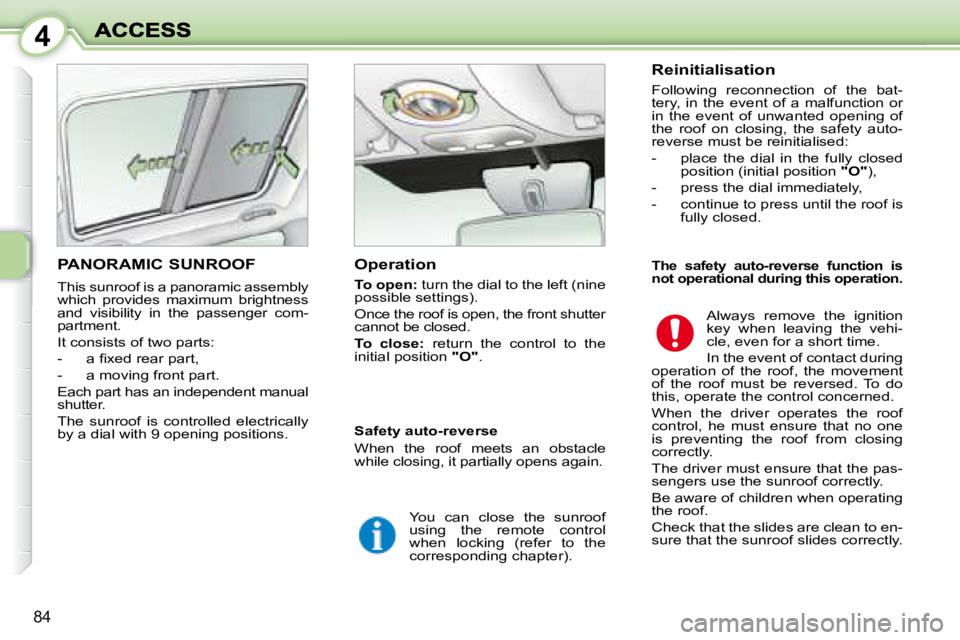
PANORAMIC SUNROOF
This sunroof is a panoramic assembly
which provides maximum brightness
and visibility in the passenger com-
partment.
It consists of two parts:
- a fi xed rear part,
- a moving front part.
Each part has an independent manual
shutter.
The sunroof is controlled electrically
by a dial with 9 opening positions. Operation
To open: turn the dial to the left (nine
possible settings).
Once the roof is open, the front shutter
cannot be closed.
To close: return the control to the
initial position "O" . Reinitialisation
Following reconnection of the bat-
tery, in the event of a malfunction or
in the event of unwanted opening of
the roof on closing, the safety auto-
reverse must be reinitialised:
- place the dial in the fully closed
position (initial position "O" ),
- press the dial immediately,
- continue to press until the roof is fully closed.
Always remove the ignition
key when leaving the vehi-
cle, even for a short time.
In the event of contact during
operation of the roof, the movement
of the roof must be reversed. To do
this, operate the control concerned.
When the driver operates the roof
control, he must ensure that no one
is preventing the roof from closing
correctly.
The driver must ensure that the pas-
sengers use the sunroof correctly.
Be aware of children when operating
the roof.
Check that the slides are clean to en-
sure that the sunroof slides correctly.
Safety auto-reverse
When the roof meets an obstacle
while closing, it partially opens again.
You can close the sunroof
using the remote control
when locking (refer to the
corresponding chapter).
The safety auto-reverse function is
not operational during this operation.
Page 85 of 194
4
85
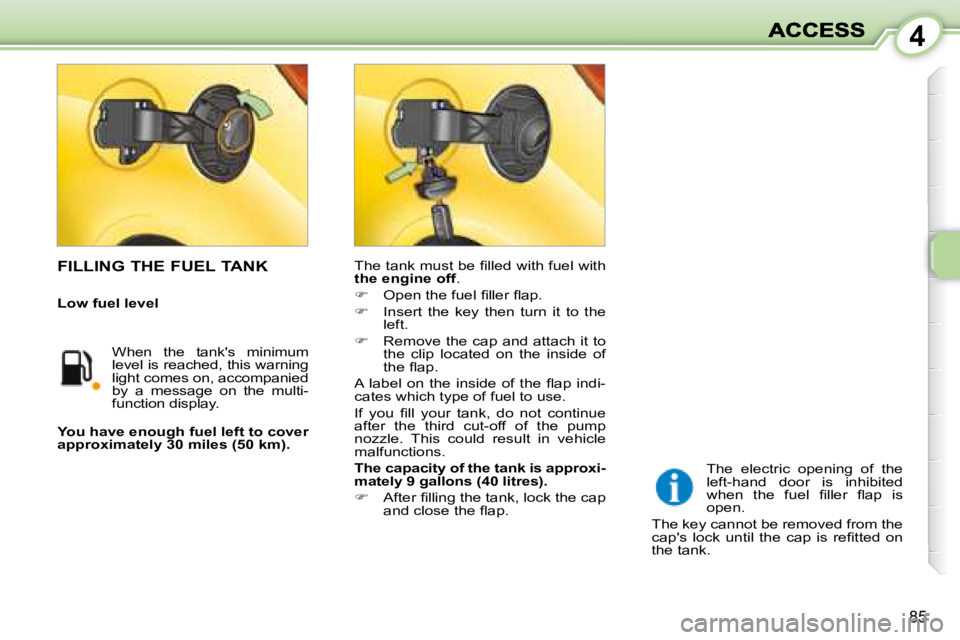
The tank must be fi lled with fuel with
the engine off .
Open the fuel fi ller fl ap.
Insert the key then turn it to the
left.
Remove the cap and attach it to
the clip located on the inside of
the fl ap.
A label on the inside of the fl ap indi-
cates which type of fuel to use.
If you fi ll your tank, do not continue
after the third cut-off of the pump
nozzle. This could result in vehicle
malfunctions.
The capacity of the tank is approxi-
mately 9 gallons (40 litres).
After fi lling the tank, lock the cap
and close the fl ap.
You have enough fuel left to cover
approximately 30 miles (50 km).
The electric opening of the
left-hand door is inhibited
when the fuel fi ller fl ap is
open.
The key cannot be removed from the
cap's lock until the cap is refi tted on
the tank. FILLING THE FUEL TANK
When the tank's minimum
level is reached, this warning
light comes on, accompanied
by a message on the multi-
function display.
Low fuel level