Page 276 of 801

275 Control systems
COMAND automatic climate control
Adjusting air distribution
You can adjust the air distribution sepa-
rately for the driver’s and front passenger’s
side.�
Select climate control settings � Air
distribution, left or right.
�
Changing air distribution:
Rotateymz.
The symbol for air distribution changes.
The direction and size of the arrows
represent the air distribution.
or
�
Switching back to automatic mode:
Rotateymz and select “AUTO”.
�
Exiting menu: Press n, back
buttonL in the center console
(�page 88) or slideomp.
The setting is saved.
Adjusting air volume
Use buttonsQ (
�page 501) in the cen-
ter console or COMAND climate control
settings to separately adjust the air vol-
ume on each side of the passenger com-
partment.
�
Select climate control settings � Air
volume, left or right.
i
When you change the air distribution, the au-
tomatic function of the climate control system is
switched off.
i
When you change the air volume, the auto-
matic function of the climate control system is
switched off.
��
Page 277 of 801

276 Control systemsCOMAND automatic climate control�
Changing air volume: Slide qmr or
rotate ymz.
or
�
Switching back to automatic mode:
Rotateymz and select “AUTO”.
�
Exiting menu: Press n, back
buttonL in the center console
(�page 88) or slideomp.
The setting is saved.Central climate control menu via
COMAND
The central climate control menu is in the
center of the climate control settings.
When the automatic climate control is
switched on, you will see “on” in the cen-
tral menu. The following functions can only
be operated in the central climate control
menu via COMAND:�
Select climate control settings � Cen-
tral menu.Switching cooling on or off
The cooling function, only operational
when the engine is running, cools the vehi-
cle interior down to the selected tempera-
ture. The cooling function also
dehumidifies the air in the vehicle interior,
thus preventing the windows from fogging
up.
Function
Page
Switching off cooling (“AC
OFF”)
276
Central climate control (“Mono”)
277
Footwell temperature
278
Air flow from air vents
279
Rear climate control*
279
��
Page 278 of 801
277 Control systems
COMAND automatic climate control
The “AC
OFF” function is used to permanent-
ly switch off the cooling function of the au-
tomatic climate control system.
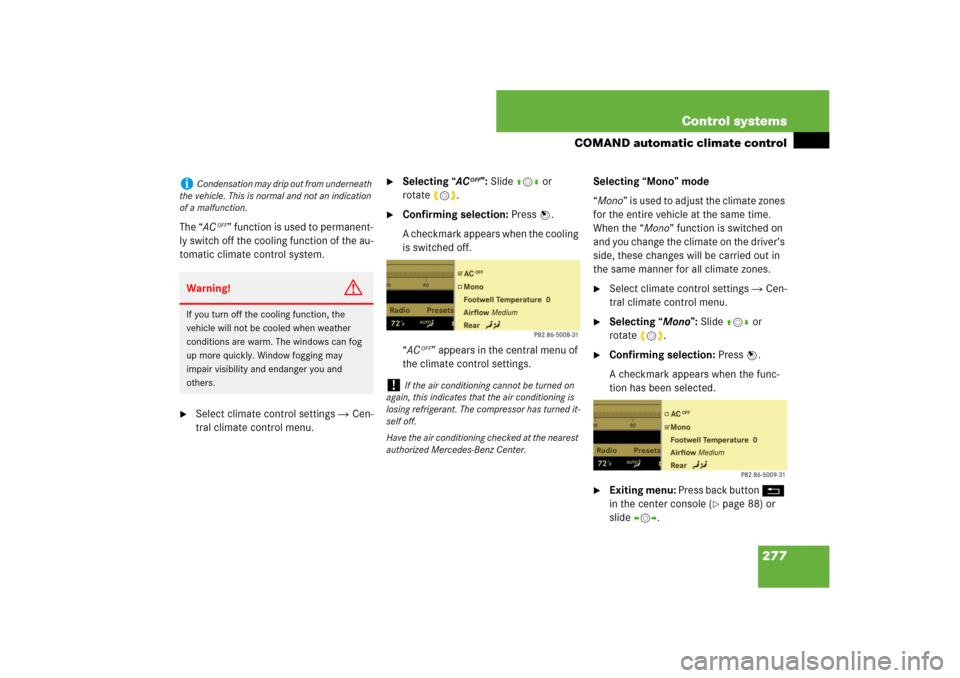
�
Select climate control settings � Cen-
tral climate control menu.
�
Selecting “AC
OFF”: Slide qmr or
rotateymz.
�
Confirming selection: Press n.
A checkmark appears when the cooling
is switched off.
“AC
OFF” appears in the central menu of
the climate control settings.Selecting “Mono” mode
“Mono” is used to adjust the climate zones
for the entire vehicle at the same time.
When the “Mono” function is switched on
and you change the climate on the driver’s
side, these changes will be carried out in
the same manner for all climate zones.
�
Select climate control settings � Cen-
tral climate control menu.
�
Selecting “Mono”: Slide qmr or
rotateymz.
�
Confirming selection: Press n.
A checkmark appears when the func-
tion has been selected.
�
Exiting menu: Press back button L
in the center console (
�page 88) or
slideomp.
i
Condensation may drip out from underneath
the vehicle. This is normal and not an indication
of a malfunction.Warning!
G
If you turn off the cooling function, the
vehicle will not be cooled when weather
conditions are warm. The windows can fog
up more quickly. Window fogging may
impair visibility and endanger you and
others.
!
If the air conditioning cannot be turned on
again, this indicates that the air conditioning is
losing refrigerant. The compressor has turned it-
self off.
Have the air conditioning checked at the nearest
authorized Mercedes-Benz Center.
Page 279 of 801

278 Control systemsCOMAND automatic climate controlThe “Mono” function is automatically
switched off when you:�
change an automatic climate control
setting for the front passenger’s side
using COMAND
�
operate a button from the automatic
climate control for the front passen-
ger’s side
�
operate one of the buttons for the rear
climate control systemAdjusting footwell temperature
The “Footwell Temperature” function is
used to adjust the temperature difference
between the footwell and the rest of the
passenger compartment.
The higher the selected value, the higher
the temperature in the footwell will be.
�
Select climate control settings � Cen-
tral climate control menu.
�
Selecting “Footwell Temperature”:
Slide qmr or rotate ymz and then
pressn.
�
Changing temperature difference:
Slide qmr or rotate ymz.
�
Exiting menu: Press n, back
buttonL in the center console
(�page 88) or slideomp.
The setting is saved.
i
In automatic mode, this setting optimizes
the footwell temperature when outside tempera-
tures are low.
Page 280 of 801

279 Control systems
COMAND automatic climate control
Adjusting air flow from air vents
The “Airflow” setting defines air distribu-
tion and air volume in automatic mode:�
“Focused” (default setting, increased
air flow)
�
“Medium” (reduced air flow)
�
“Diffuse” (minimal air flow)
�
Select climate control settings � Cen-
tral climate control menu � “Airflow”.
A selection list appears.
The current setting is indicated by a
dotR.
�
Changing air flow: Slide qmr or
rotateymz.
�
Confirming selection: Press n.Operating rear climate control* from
the front
The “Rear)” function is used to oper-
ate the rear climate control via COMAND
and the buttons on the center console con-
trol unit (
�page 510).
Switching on rear climate control oper-
ation from the front
�
Select climate control settings � Cen-
tral climate control menu.
�
Selecting “Rear)”: Slide qmr or
rotate ymz.
�
Confirming selection: Press n.
i
In automatic mode, this setting optimizes
the air flow when outside temperatures are high.
i
When the interior ambient temperature of
the vehicle is very hot and the automatic climate
control is cooling the interior, the setting for air
flow is temporarily overridden.
��
Page 313 of 801
312 Control systemsVoice Control introductionSetting volume level�
Activate Voice Control.
�
Speak a command, for example “Help”.
�
Pressæ orç. The volume is in-
creased or decreased during voice out-
put.
or
�
Set volume for voice output using the
COMAND volume thumbwheel on the
lower part of the front center console
(�page 98).
Displays
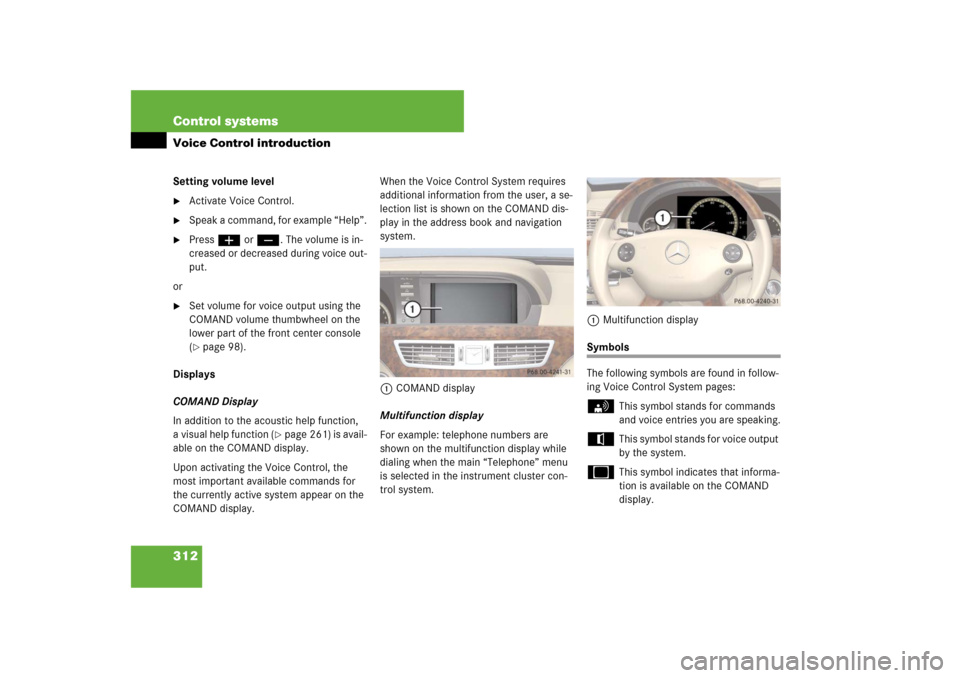
COMAND Display
In addition to the acoustic help function,
a visual help function (
�page 261) is avail-
able on the COMAND display.
Upon activating the Voice Control, the
most important available commands for
the currently active system appear on the
COMAND display.When the Voice Control System requires
additional information from the user, a se-
lection list is shown on the COMAND dis-
play in the address book and navigation
system.
1COMAND display
Multifunction display
For example: telephone numbers are
shown on the multifunction display while
dialing when the main “Telephone” menu
is selected in the instrument cluster con-
trol system.1Multifunction display
Symbols
The following symbols are found in follow-
ing Voice Control System pages:s
This symbol stands for commands
and voice entries you are speaking.
t
This symbol stands for voice output
by the system.
u
This symbol indicates that informa-
tion is available on the COMAND
display.
Page 382 of 801

381 Controls in detailSeats
Folding head restraints back
The rear seat head restraints and the rear
seat power head restraints* can be folded
backward for increased visibility.
1Switch in the front center console�
Switch on the ignition (
�page 370).
�
Press switch1 in the front center con-
sole briefly.
The rear head restraints will fold back-
ward.Placing head restraints upright
�
Pull the rear head restraint upright until
it locks into position.Placing power head restraints* upright
(rear outer seats)
�
Switch on the ignition (
�page 370).
�
Press and hold switch1 in the front
center console (
�page 381).
The rear outer seats head restraints
will place upright.
�
Pull the rear center seat head restraint
upright manually until it locks into posi-
tion.
!
M ake s ure t he h ead re str ain ts e ng ag e w he n
placing them upright manually. Otherwise their
protective function cannot be ensured.
i
When you fasten your seat belt in the rear,
the respective rear outer seat head restraint
places upright automatically.
Page 501 of 801

500 Controls in detailAir ventsOpening and closing air vents
Center air vents�
Opening: Turn thumbwheels 4
and5 upward (
�page 498).
�
Closing: Turn thumbwheels 4 and 5
downward.
Side air vents
�
Opening: Turn thumbwheels next to
side air vents2 and8 upward
(�page 498).
�
Closing: Turn thumbwheels down-
ward.
Rear center console air vents
�
Increasing/decreasing air volume:
Turn thumbwheelsa or d to the left
or right (
�page 498).Ventilated storage compartment
(Canada only)
In vehicles without rear passenger com-
partment climate control*: the storage
compartment under the front armrest can
be ventilated when the automatic climate
control is switched on.1Switching ventilation off
2Switching ventilation on
The air volume is dependent on the setting
of:
�
air distribution control
�
air volume control
�
air vents in the dashboard
The air temperature is about the same as
that of the dashboard air vents. It cannot
be regulated separately.
i
For draft-free ventilation, move the sliders
for the center air vents 3 and 6 (
�page 498)
to the middle position.
i
Vehicles without rear passenger compart-
ment climate control*:
The temperature at the air ventsb andc
(
�page 498) for rear passenger compartment
will be approximately the same as at the dash-
board center air vents.
!
Extreme temperatures can occur in the stor-
age compartment. Switch off the air vents in the
storage compartment while the heating is
switched on if you are transporting heat-sensi-
tive items in the compartment.
Keep the air vents free of obstruction.