Page 131 of 801

130 Control systemsCOMAND AUXVideo AUX
Automatic picture fade-out
If a video is playing when the vehicle is
shifted from park positionP into neutral
positionN, drive positionD or reverse
gearR the picture is faded out automati-
cally and the following message appears in
the display: “In order not to distract driver,
picture is faded out while the vehicle is in
motion”.
When the vehicle is shifted back intoP, the
picture comes on again.
Switching to Video AUX mode�
Select “Video” � “Video”� “AUX”.
The Video AUX menu appears. You will
see the medium in the external audio
source if it has been connected and
switched to play.You can adjust the following settings in
Video AUX mode:
�
Screen settings (
�page 130)
�
Volume (
�page 98)
�
Balance and fader (
�page 100)
�
Treble and bass (
�page 99)
�
Surround sound (
�page 100)Screen settings
Setting brightness, contrast and color
�
Show the menu system, if necessary
(�page 135).
�
Select “Video” � “AUX”� “AUX”.
The menu appears.
�
Select a setting: Slide qmr or turn
ymz.
�
Press n.
i
Please refer to the corresponding operating
instructions for information about how to oper-
ate the external video source.
Page 134 of 801

133 Control systems
COMAND video DVD
Notes about handling DVDs �
Only hold discs by the edge.
�
Handle discs carefully to prevent play-
back problems.
�
Avoid getting scratches, fingerprints
and dust on discs.
�
Clean discs from time to time with a
commercially-available cleaning cloth.
Do not wipe them with a circular mo-
tion, but only in straight lines from the
center outwards.
�
Only use a pen designed for such a pur-
pose to label discs.
�
Place discs back in their boxes after
use.
�
Protect discs from heat and direct sun-
light.
Functional limitations
Depending on the DVD, it is possible that
certain functions or actions may be tempo-
rarily or permanently unavailable. If you try
to utilize such functions or carry out such
actions, you will see the 7 symbol in the
display.
Inserting or ejecting DVDs�
Inserting a DVD (
�page 120).
or
�
Ejecting a DVD (
�page 122).
!
Do not affix stickers or labels to the discs.
These could peel away and damage COMAND.
COMAND is designed to hold discs which com-
ply with the IEC 60908 standard. You can there-
fore only use discs with a maximum thickness of
1.3 mm.
If you insert thicker discs, e.g. those that contain
data on both sides (DVD on one side and audio
data on the other), they cannot be ejected and
can damage COMAND.
Do not use discs with an 8 cm diameter, even if
they have an adapter.
Only use round discs with a 12 cm diameter.
Warning!
G
Only insert or eject a DVD when the vehicle
is stationary. There is a risk of accident by
being distracted from road and traffic condi-
tions if you load a DVD while the vehicle is in
motion.
Bear in mind that at a speed of just 30 mph
(approximately 50 km/h), your vehicle is
covering a distance of 44 feet (approximate-
ly 14 m) every second.
Page 135 of 801
134 Control systemsCOMAND video DVDSubmenu overview of video DVDSwitching to video DVD mode�
Insert a DVD (
�page 120).
or
�
Select “Video” � “Video” � “Video
DVD”.
or
�
Press the M shortcut button once or
twice.
DVD-V
Pause/Play
Stop
Changer
Sound
DVD Functions
Pause playback
Pause Playback
Select medium
Treble
Brightness
Continue playback
Stop playback
Bass
Contrast
Restart playback
Balance/Fader
Color
3D Sound
16:9 Optimized4:3Widescreen
i
The M shortcut button takes you directly
to the previously set disc mode (audio CD/DVD,
MP3-CD/DVD or video DVD). The number of
times you have to press the shortcut button de-
pends on the previously set mode.
Page 140 of 801

139 Control systems
COMAND video DVD
Switching to the next highest DVD menu level�
Press the L back button in the cen-
ter console.
or
�
Select the corresponding menu item in
the DVD menu.
or
�
Select a menu item of your choice from
the DVD menu.
�
Select the menu item “Go up” in the se-
lection menu.
Back to the film�
Press the L back button until you
can see the film.
or
�
Select the corresponding menu item in
the DVD menu.
or
�
Select a menu item of your choice from
the DVD menu.
�
Select the menu item “Back (to the
film)” in the selection menu.
Setting the language and audio format�
Select “Video” � “Video” � “Video
DVD”.
�
Show the menu system, if necessary
(�page 135).
�
Select “DVD-V” � “DVD Functions”.
�
Select “Menu Language” or “Audio Lan-
guage”.
In both cases a selection list will ap-
pear. The dotRin front of an entry
indicates the current language.
i
Depending on the DVD, it is possible the
menu items H and G either have no func-
tion or have no function in certain parts of the
DVD menu.
i
Depending on the DVD, it is possible the
menu item “Go up” either has no function or has
no function in certain parts of the DVD menu.
i
Depending on the DVD, it is possible the
menu item “Back (to the film)” either has no
function or has no function in certain parts of the
DVD menu.
i
This function is not available for all DVDs. If
it is available, you can set the language for the
DVD menu and the audio language and/or the
audio format. The number of settings you can
make is determined by the content of the DVD. It
may also be possible to make the settings in the
DVD menu (
�page 138).
��
Page 145 of 801
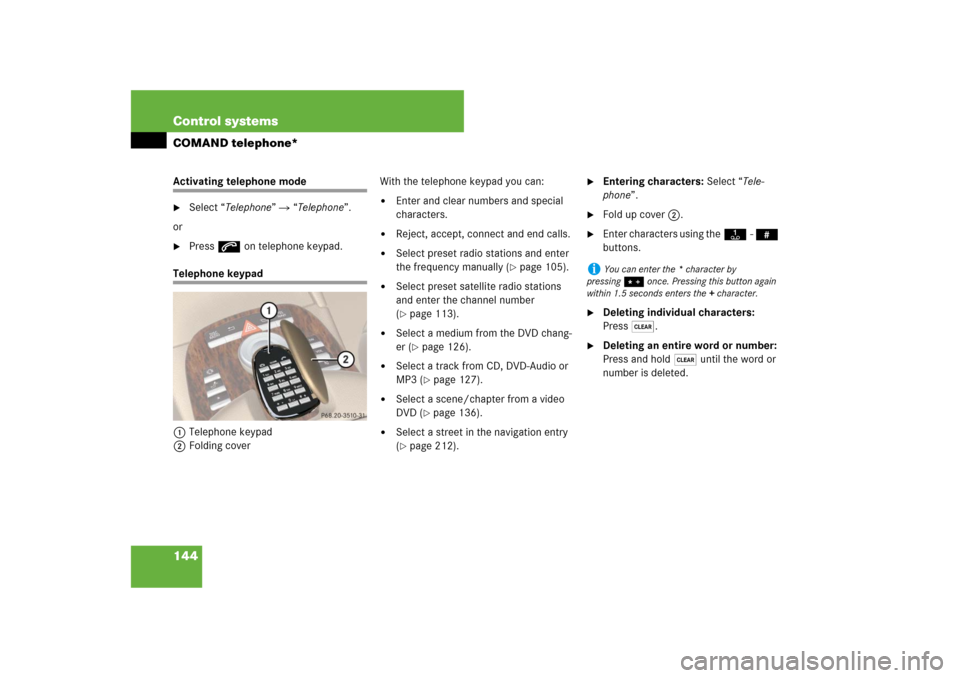
144 Control systemsCOMAND telephone*Activating telephone mode�
Select “Telephone” � “Telephone”.
or
�
Press s on telephone keypad.
Telephone keypad
1Telephone keypad
2Folding coverWith the telephone keypad you can:
�
Enter and clear numbers and special
characters.
�
Reject, accept, connect and end calls.
�
Select preset radio stations and enter
the frequency manually (
�page 105).
�
Select preset satellite radio stations
and enter the channel number
(�page 113).
�
Select a medium from the DVD chang-
er (
�page 126).
�
Select a track from CD, DVD-Audio or
MP3 (
�page 127).
�
Select a scene/chapter from a video
DVD (
�page 136).
�
Select a street in the navigation entry
(�page 212).
�
Entering characters: Select “Tele-
phone”.
�
Fold up cover 2.
�
Enter characters using theA- #
buttons.
�
Deleting individual characters:
Press*.
�
Deleting an entire word or number:
Press and hold * until the word or
number is deleted.
i
You can enter the * character by
pressing> once. Pressing this button again
within 1.5 seconds enters the + character.
Page 191 of 801

190 Control systemsCOMAND navigation (introduction)Updating
After you have loaded the DVD, you will
see a message to the effect that the disc
does not contain a recognizable audio for-
mat.�
Confirming message: Press n.
COMAND checks whether the map
software on the DVD is compatible with
the vehicle’s navigation system and
whether it is compatible with the cur-
rent system software.
Map software is compatible with the
navigation system and the current sys-
tem software
COMAND now checks whether the map
data on the DVD is already installed.
Map data is not yet installed
You will see a comparison of the version
statuses in the display and a prompt will
appear asking whether you want to contin-
ue with the update.
�
Select “Yes” or “No”.
If you select “No”, COMAND automati-
cally ejects the DVD and the map data
is not updated.�
Take DVD out of the slot.
If you select “Yes”, the map data is up-
dated.
Map data is already installed
You will see a message that the map data
is already installed and a prompt will ap-
pear asking you whether you want to con-
tinue with the update.
�
Select “Yes” or “No”.
If you select “No”, COMAND automati-
cally ejects the DVD and the map data
is not updated.�
Take DVD out of slot.
If you select “Yes”, the existing map
data is saved again.Updating the map data
While the update is running, you will see a
message to this effect and a progress bar.
The progress bars fills up from left to right
during the update.
1Progress bar
You can either cancel the update or allow
it to run to the end without canceling.
�
Canceling an update on the DVD
changer: Press corresponding maga-
zine tray button 2 (
�page 189).
The DVD will be ejected in both cases.
�
Take DVD out of slot.
Page 262 of 801

261 Control systems
COMAND system settings
Setting the date�
Select “Vehicle” � “System Settings”
� “Time” � “Date”.
�
Selecting month, day or year:
Slideomp.
�
Setting value: Rotate ymz or
slideqmr.
�
Saving setting: Press n.
Setting the time/date format
�
Select “Vehicle” � “System Settings”
� “Time” � “Format”.
The format list appears. The dots R in
front of the list entries indicate the cur-
rent setting.
�
Changing format setting:
Select desired format.
�
Saving setting and exit the menu:
Slide omp.
Voice Control settings
Switching help window on or off�
Select “Vehicle”� “System Settings”
� “Voice Control”.
�
Select “Help Window”.
You can switch the help window on or
off. A checkmark appears when the
help window is switched on.
Individualization
Using individualization, you can fine-tune
Voice Control to your own voice and thus
improve voice recognition. The ability of
the system to recognize the commands of
other users does not deteriorate as a re-
sult.
Individualization consists of two parts. You
train the system to recognize digits in the
first part and specific commands in the
second part. Starting new individualization
�
Select “Vehicle” � “System Settings”
� “Voice Control” � “Start new indi-
vidualization”.
A prompt appears asking whether you
would like further information.
�
Select “Yes” or “No”.
If you select “No”, the first part of indi-
vidualization begins.
If you select “Yes”, an information dis-
play will be shown with audio instruc-
tion.�
Closing display: Select “OK”.
The first part of individualization be-
gins.
i
It is only possible to start individualization
with the vehicle stationary. After starting the
session, the system will guide you through the in-
dividualization by means of acoustic instruc-
tions.
��
Page 290 of 801
289 Control systems
Instrument cluster control system
Menus
Trip (
�page 291)
Navi (
�page 292)
Audio (
�page 294)
AMG
1 (�page 296)
1S63AMG and S65AMG only.Commands/submenusStandard display
Showing route guidance in-
structions, current direction
traveled
Selecting radio station
Gear currently engaged
Engine oil temperature
Vehicle supply voltage
Fuel consumption statistics since start
Selecting satellite radio
channel
RACETIMER
Fuel consumption statistics since last
reset
Operating DVD changer/
audio CD/ audio DVD/MP3
Overall analysis
Resetting fuel consumption statistics
Operating video DVD
Lap analysis
Distance to emptyDigital speedometer

