2008 MERCEDES-BENZ R-CLASS MPV parking brake
[x] Cancel search: parking brakePage 143 of 373

Driving sys
tems 140 Driving systems
Overview of driving systems
The vehicle's driving systems are described
on the following pages:
R Cruise control, Distronic* and Speedtronic,
which are used to control the speed of the
vehicle
R The rear axle level control*, which regu-
lates the vehicle level at the rear axle
R AIRMATIC package*, consisting of level
control* for individual adjustment of
ground clearance and ADS* (Adaptive
Damping System), for individual adjust-
ment of suspension tuning
R 4*MATIC (permanent four-wheel drive), for
optimum traction
R Parktronic*, which assists you in parking
and manoeuvring
R Reversing camera*, which assists you
when parking and manoeuvring
The ABS, BAS, ESP ®
, EBV vehicle safety sys-
tems and the distance warning system* are
described in the "Safety" section
(Y page 58). Cruise control
Cruise control maintains a constant road
speed for you. It brakes automatically in order
to avoid exceeding the set speed. On long and
steep downhill gradients, especially if the
vehicle is laden or towing a trailer, you must
select shift range 1,2or 3in good time. By
doing so you will make use of the braking
effect of the engine, which relieves the load
on the brake system and prevents the brakes
from overheating and wearing too quickly. G
Risk of accident
Do not change down for additional engine
braking on a slippery road surface. This
could cause the drive wheels to lose their
grip and the vehicle could skid.
Use cruise control only if road and traffic con-
ditions make it appropriate to maintain a
steady speed for a prolonged period. You can
store any road speed above 30 km/h. G
Risk of accident
Cruise control cannot take account of road
and traffic conditions.
Always pay attention to traffic conditions
even when cruise control is activated.
Cruise control is only an aid designed to
assist driving. You are responsible for the vehicle's speed and for braking in good
time.
G
Risk of accident
Do not use cruise control:
R in road and traffic conditions which do
not allow you to maintain a constant
speed (e.g. heavy traffic or winding
roads). You could otherwise cause an
accident.
R on slippery roads. Braking or accelerat-
ing could cause the drive wheels to lose
traction and the vehicle could then skid.
R when there is poor visibility, e.g. due to
fog, heavy rain or snow
Cruise control lever You can operate cruise control and variable
Speedtronic with the cruise control lever.
The LIM indicator lamp on the cruise control
lever indicates which system you have selec-
ted:
R
LIM indicator lamp off:
Cruise control is selected.
R LIM indicator lamp lit:
Variable Speedtronic is selected. Controls
* optional
251_AKB; 5; 7, en-GB
wobuchh
,V ersion: 2.10.6
2008-05-11T14:51:51+02:00 - Seite 140 Dateiname: 6515_1825_02_buchblock.pdf; preflight
Page 145 of 373

Driving sys
tems 142
X
Briefly pull the cruise control lever towards
you 3.
X Remove your foot from the accelerator
pedal.
The first time cruise control is activated it
stores the current speed or regulates the
speed of the vehicle to the previously
stored speed.
Setting a speed X
Press the cruise control lever to the pres-
sure point, up 1for a higher speed or
down 4for a lower speed.
X Keep the cruise control lever pressed until
the desired speed is reached.
X Release the cruise control lever.
The new speed is stored.
i Cruise control is not deactivated if you
depress the accelerator pedal. For exam-
ple, if you accelerate briefly to overtake,
cruise control adjusts the vehicle's speed
to the last speed stored after you have fin-
ished overtaking. Making fine adjustments in 1 km/h
increments X
Briefly press the cruise control lever to the
pressure point, up 1for a higher speed or
down 4for a lower speed.
The last speed stored is increased or
reduced.
Making adjustments in 10 km/h incre-
ments X
Briefly press the cruise control lever
beyond the pressure point, up 1for a
higher speed or down 4for a lower speed.
The last speed stored is increased or
reduced.
Deactivating cruise control There are several ways to deactivate cruise
control:
X
Briefly press the cruise control lever for-
wards 6.
or
X Brake.
or X
Briefly press the cruise control lever in the
direction of arrow 5.
Variable Speedtronic is selected. LIM indi-
cator lamp 2in the cruise control lever
lights up.
Cruise control is automatically deactivated if,
for example:
R you depress the parking brake
R you are driving at less than 30 km/h
R ESP ®
is intervening or you deactivate
ESP ®
.
R you shift the automatic transmission to N
while driving
If cruise control is deactivated, you will hear
a warning tone. You will see the Cruise con-
trol Off message in the multi-function dis-
play for approximately five seconds.
i The last speed stored is cleared when you
switch off the engine. Controls
251_AKB; 5; 7, en-GB
wobuchh
,V ersion: 2.10.6
2008-05-11T14:51:51+02:00 - Seite 142 Dateiname: 6515_1825_02_buchblock.pdf; preflight
Page 148 of 373

Driving sys
tems 145
R
when the parking brake is applied
R if ESP ®
is deactivated (Y page 60)
R when the automatic transmission is in posi-
tion P,Ror N
X Accelerate the vehicle to the desired
speed.
X Briefly press the cruise control lever up
1 or down 5to the pressure point.
X Remove your foot from the accelerator
pedal.
Distronic is activated. The vehicle main-
tains the stored speed until the distance to
the vehicle in front becomes too small.
i If you do not fully release the accelerator
pedal, the DISTRONIC Override message
appears in the multi-function display. The
distance to a slower-moving vehicle in front
will then not be governed. You will be driv-
ing at the speed you determine with the
accelerator pedal. Setting a speed X
Press the cruise control lever to the pres-
sure point, up 1for a higher speed or
down 5for a lower speed.
X Keep the cruise control lever pressed until
the desired speed is reached.
X Release the cruise control lever.
The new speed is stored.
i Deceleration of the vehicle by means of
the cruise control lever is assisted by auto-
matic application of the brakes. On long
downhill gradients, the automatic trans-
mission also shifts down.
Making adjustments in 1 km/h incre-
ments X
Briefly press the cruise control lever to the
pressure point, up 1for a higher speed or
down 5for a lower speed.
The last speed stored is increased or
reduced. Making adjustments in 10 km/h incre-
ments X
Briefly press the cruise control lever to the
pressure point, up 1for a higher speed or
down 5for a lower speed.
The last speed stored is increased or
reduced.
Storing the current speed or calling up
the last stored speed G
Risk of accident
Only select a stored speed if you know what
that speed is and whether it is suitable for
the current situation. Otherwise, sudden
acceleration or braking could endanger you
or others.
X Briefly pull the cruise control lever towards
you 4.
X Remove your foot from the accelerator
pedal.
Distronic is activated and accepts the cur-
rent speed if it is activated for the first time,
or adjusts the vehicle's speed to the last
speed stored. Controls
251_AKB; 5; 7, en-GB
wobuchh
,V ersion: 2.10.6
2008-05-11T14:51:51+02:00 - Seite 145 ZDateiname: 6515_1825_02_buchblock.pdf; preflight
Page 150 of 373

Driving sys
tems 147
Distronic displays in the multi-function
display X
Select the Distronic menu on the on-board
computer (Y page 128).
Display when Distronic is deactivated
When Distronic is deactivated, you will see
the following in the multi-function display: 1
Vehicle in front, if detected
2 Distance indicator, displaying current dis-
tance to the vehicle in front
3 Specified minimum distance to the vehi-
cle in front, adjustable
4 Own vehicle
Display when Distronic is activated
When Distronic is activated, you will see the
following in the multi-function display: 1
Distronic activated
2 Stored speed
When activating Distronic and when setting
the speed, stored speed 2appears for
around 5 seconds.
Deactivating Distronic 1
To deactivate Distronic
2 LIM indicator lamp
3 To switch between Distronic and variable
Speedtronic There are several ways to deactivate Dis-
tronic:
X
Briefly press the cruise control lever for-
wards 1.
or
X Brake.
or
X Briefly press the cruise control lever in the
direction of arrow 3.
Variable Speedtronic is selected. LIM indi-
cator lamp 2in the cruise control lever
lights up.
i The last speed stored remains stored until
you switch off the engine.
i Distronic is not deactivated if you depress
the accelerator pedal. If you accelerate
briefly to overtake, Distronic adjusts the
vehicle's speed to the last speed stored
after you have finished overtaking.
Distronic is automatically deactivated if:
R you depress the parking brake
R you are driving at less than 25 km/h Controls
251_AKB; 5; 7, en-GB
wobuchh
,V ersion: 2.10.6
2008-05-11T14:51:51+02:00 - Seite 147 ZDateiname: 6515_1825_02_buchblock.pdf; preflight
Page 158 of 373

Driving sys
tems 155If a drive wheel spins due to insufficient
grip:
R Only depress the accelerator pedal as far
as necessary when pulling away.
R Accelerate less when driving.
R Adapt your driving style to suit road and
traffic conditions.
i In wintry driving conditions, the maximum
effect of 4MATIC can only be achieved if
you use winter tyres (M+S tyres), with snow
chains if necessary.
! When testing the parking brake, operate
the vehicle only briefly (for a maximum of
ten seconds) on a brake dynamometer.
When doing this, turn the key to position
0 or 1in the ignition. Failure to do this can
cause damage to the drive train or the
brake system.
! A function or performance test should
only be carried out on a twin-axle dyna-
mometer. If you wish to operate the vehicle
on such a dynamometer, please consult a
Mercedes-Benz Service Centre in advance.
You could otherwise damage the drive train
or the brake system. Parktronic*
G
Risk of accident
Parktronic is only an aid and may not detect
all obstacles. It is not a substitute for atten-
tive driving.
You are always responsible for safety and
must continue to pay attention to your
immediate surroundings when parking and
manoeuvring. You could otherwise endan-
ger yourself and others. G
Risk of injury
Make sure that no persons or animals are
in the manoeuvring range. Otherwise, they
could be injured.
Parktronic is an electronic parking aid. It indi-
cates visually and audibly the distance
between your vehicle and an object.
Parktronic is activated automatically when
you:
R switch on the ignition
R release the parking brake
R shift the automatic transmission to D,Ror
N
Parktronic is deactivated at speeds above
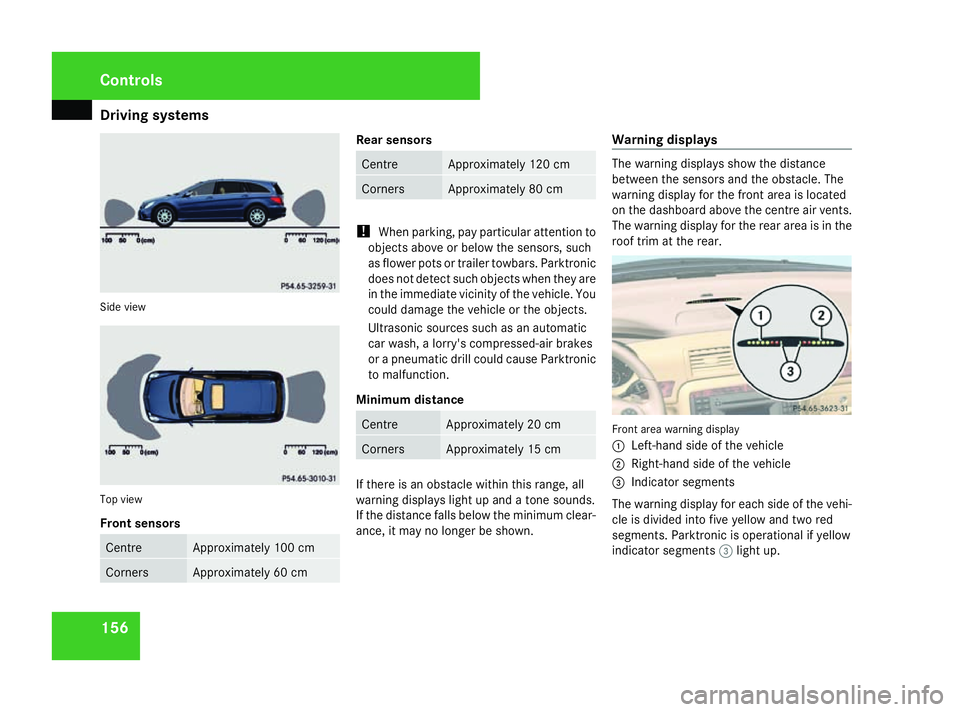
18 km/h. It is reactivated at lower speeds. Parktronic monitors the area around your
vehicle using six sensors in the front bumper
and four sensors in the rear bumper.
1
Example: sensors in the front bumper,
left-hand side
Range of the sensors The sensors must be free of dirt, ice and
slush, otherwise they may not function cor-
rectly. Clean the sensors regularly, taking
care not to scratch or damage them
(Y
page 247). Controls
* optional
251_AKB; 5; 7, en-GB
wobuchh
, Version: 2.10.6 2008-05-11T14:51:51+02:00 - Seite 155 ZDateiname: 6515_1825_02_buchblock.pdf; preflight
Page 159 of 373
Driving sys
tems 156Side view
Top view
Front sensors
Centre Approximately 100 cm
Corners Approximately 60 cm Rear sensors
Centre Approximately 120 cm
Corners Approximately 80 cm
!
When parking, pay particular attention to
objects above or below the sensors, such
as flower pots or trailer towbars. Parktronic
does not detect such objects when they are
in the immediate vicinity of the vehicle. You
could damage the vehicle or the objects.
Ultrasonic sources such as an automatic
car wash, a lorry's compressed-air brakes
or a pneumatic drill could cause Parktronic
to malfunction.
Minimum distance Centre Approximately 20 cm
Corners Approximately 15 cm
If there is an obstacle within this range, all
warning displays light up and a tone sounds.
If the distance falls below the minimum clear-
ance, it may no longer be shown.Warning displays The warning displays show the distance
between the sensors and the obstacle. The
warning display for the front area is located
on the dashboard above the centre air vents.
The warning display for the rear area is in the
roof trim at the rear.
Front area warning display
1
Left-hand side of the vehicle
2 Right-hand side of the vehicle
3 Indicator segments
The warning display for each side of the vehi-
cle is divided into five yellow and two red
segments. Parktronic is operational if yellow
indicator segments 3light up. Controls
251_AKB; 5; 7, en-GB
wobuchh
, Version: 2.10.6
2008-05-11T14:51:51+02:00 - Seite 156 Dateiname: 6515_1825_02_buchblock.pdf; preflight
Page 240 of 373

Trailer towing*
2371
Key
2 Protective cap
5 Green area on the handwheel
6 White dot on the ball coupling
X Handwheel 4turns automatically, aligning
green area 5on handwheel 4with white
dot 6on the ball coupling.
X Turn key 1to the stop in the direction of
the arrow (lock).
X Remove key 1.
X Press protective cap 2onto the lock. G
Risk of accident
The ball coupling is only securely mounted
when the green area on the handwheel is
aligned with the white dot on the ball cou-
pling and the key can be removed. If the ball coupling is not securely mounted, it may
come loose.
The ball coupling must be locked and the
key must be removed when towing a trailer.
This is the only way to guarantee that the
ball coupling is secured and cannot come
loose while the vehicle is in motion. If the
ball coupling cannot be locked and the key
cannot be removed, remove the ball cou-
pling and clean it.
If the ball coupling can still not be fitted
(locked) after it has been cleaned, remove
the ball coupling. The trailer tow hitch must
then not be used to tow a trailer, as safe
operation is not guaranteed.
Have the entire trailer tow hitch checked at
a qualified specialist workshop. Mercedes-
Benz recommends that you use a
Mercedes-Benz Service Centre for this pur-
pose. In particular, work relevant to safety
or on safety-related systems must be car-
ried out at a qualified specialist workshop. 1
Socket Coupling up and uncoupling a trailer
Coupling up a trailer Steel-spring vehicles
X
Make sure the selector lever is set to P.
X Depress the parking brake.
X Position the trailer level behind the vehicle.
X Couple up the trailer.
X Establish the electrical connection
between the vehicle and the trailer. Operation
* optional
251_AKB; 5; 7, en-GB
wobuchh
, Version: 2.10.6 2008-05-11T14:51:51+02:00 - Seite 237 ZDateiname: 6515_1825_02_buchblock.pdf; preflight
Page 241 of 373

Trailer towing*
238
Vehicles with rear axle level control* G
Risk of injury
Never lock, unlock, open or close a vehicle
door or tailgate when coupling up or decou-
pling a trailer. The vehicle level could
change and you could endanger yourself or
others.
Never press the ADS button* or operate the
level control* while you are coupling up or
decoupling a trailer.
X Make sure the selector lever is set to P.
X Depress the parking brake.
X Close the doors and tailgate.
X Position the trailer level behind the vehicle.
X Couple up the trailer.
X Establish the electrical connection
between the vehicle and the trailer.
X Start the engine.
Vehicles with the AIRMATIC package* G
Risk of injury
Never lock, unlock, open or close a vehicle
door or tailgate when coupling up or decou-
pling a trailer. The vehicle level could
change and you could endanger yourself or
others. Never press the ADS button* or operate the
level control* while you are coupling up or
decoupling a trailer.
X Make sure the selector lever is set to P.
X Depress the parking brake.
X Start the engine.
X Set the vehicle to highway level
(Y page 152).
X Switch off the engine.
X Close the doors and tailgate.
X Position the trailer level behind the vehicle.
X Couple up the trailer.
X Establish the electrical connection
between the vehicle and the trailer.
i If you have coupled a trailer, the vehicle
will remain at highway level.
The vehicle automatically lowers to high-
way level if you drive faster than 8 km/h
with a trailer. The vehicle is not lowered to
the high-speed level even if you are travel-
ling at higher speeds.
This also applies when using accessories
that are plugged into the socket of the
trailer coupling (e.g. a bicycle rack). Decoupling a trailer G
Risk of injury
Do not connect a trailer with an engaged
overrun brake. Otherwise, your hand could
become trapped between the bumper and
drawbar.
! Do not uncouple a trailer with overrun
brake between the bumper and drawbar,
otherwise your vehicle could be damaged
by the spring action of the overrun brake.
Steel-spring vehicles
X Make sure the selector lever is set to P.
X Depress the parking brake.
X Secure the trailer against rolling away.
X Remove the trailer cable and decouple the
trailer.
Vehicles with rear axle level control*
X Make sure the selector lever is set to P.
X Depress the parking brake.
X Start the engine.
X Close the doors and tailgate.
X Secure the trailer against rolling away.
X Remove the trailer cable. Operation
* optional
251_AKB; 5; 7, en-GB
wobuchh
,V ersion: 2.10.6
2008-05-11T14:51:51+02:00 - Seite 238 Dateiname: 6515_1825_02_buchblock.pdf; preflight