2008 MERCEDES-BENZ GLK SUV brakes
[x] Cancel search: brakesPage 8 of 261
Selector lever positions.
...................85
Shift ranges. ..................................... 86
Trailer towing. ................................... 88
Axle load, permissible
Rear (trailer towing) ........................254 B
Bag hook............................................. 136
Ball coupling Fitting ............................................. 162
Removing....................................... .165
BAS (Brake Assist)............................... 52
Battery Changing (key).. .............................. 216
Charging. ........................................ 234
Checking (key). ............................... 216
Check lamp (key). ........................... 216
Disconnecting ................................. 233
Display message ............................. 184
Jump-starting. ................................. 234
Maintenance (vehicle)..................... 232
Reconnecting.................................. 234
Removing/fitting. ........................... 233
Vehicle battery. .............................. 232
Belt force limiters
Activation.......................................... 35
Belt height adjustment ........................72
Belt tensioners Activation.......................................... 35
Belt warning.......................................... 72
Bonnet
Bonnet catch .................................. 147
Display message ............................. 183
Opening/closing ............................ 146
Bonnet release lever
Release leve r.................................. 147
Boot
Automatic opening. ....................60, 61
Boot lid
Opening/closing. .............................. 59
Brake Assist
see BAS
Brake fluid .......................................... 248
Display message (luxury multi-
function steering wheel) .................185
Display message (multi-function
steering wheel). .............................. 180Brake lamps
Adaptive............................................ 52
Display message..................... 188, 191
Brakes
Parking brake................................... .84
Warning lamp..................................2 02
Brake system
Display message ............................. 185
Bulb
see Lamp
Bulbs
Brake lamp. .................................... 220
Display messages (multi-function
steering wheel). .............................. 194
Licence plate lamp.......................... 220
Overview. ........................................ 218
Rear foglamp. ................................. 220
Replacing. ....................................... 219
Reversing lamp. .............................. 220
Tail lamp ......................................... 220
Turn signal lamp. ....................219, 220 C
Care..................................................... 167
Automatic car wash. .......................168
Dashboard. ..................................... 170
Headlamps. .................................... 169
High-pressure cleaners. ..................168
Panorama sliding sunroo f............... 170
Parktronic. ...................................... 171
Plastic trim. .................................... 170
Rear window. .................................. 169
Reversing camera. ..........................172
Seat covers.................................... .170
Side windows ................................. 169
Steering wheel boss. ......................170
Tail pipes ........................................ 171
Trailer tow hitch. ............................. 172
Trim strips ...................................... 171
Windscreen. .................................... 169
Wiper blades.. ................................. 169
Wooden strips................................. 171
CD player/CD changer
Operating (on-board computer,
luxury multi-function steering
wheel). .............................................. 99 Index
5 X204_AKB; 1; 5, en-GB
wobuchh,
Version: 2.11.4
2008-10-15T13:20:56+02:00 - Seite 5 Dateiname: 6515_0671_02_buchblock.pdf; preflight
Page 12 of 261
H
Headlamp cleaning system............... 149
Headlamps Cleaning. ........................................ 169
Cleaning system. .............................. 77
Misting up. ...................................... 210
Head restraint
Adjusting (front).......................... 63, 64
NECK-PRO. ....................................... 40
Removing (rear). ............................... 64
Resetting triggered head
restraints. ....................................... 215
Head restraints
Adjusting (rear). ................................ 64
Heating
see Air conditioning
High-pressure cleaners..................... 168
Hill start assist..................................... 84
Hook.................................................... 136I
Immobiliser........................................... 54
Indicator and warning lamp Automatic child seat recognition
(malfunction). ................................. 200
Brakes (red). ................................... 202
Coolant. .......................................... 202
Engine diagnostics ..........................203
PASSENGER AIRBAG OFF .........43, 200
Reserve fuel. ................................... 204
Seat belt. ........................................ 203
SRS........................................... 35, 202
Thermotronic (malfunction) ............199
Indicator and warning lamps............ 201
Indicator lamps see Warning and indicator lamps
Instrument cluster ............................... 90
On-board computer (luxury multi-
function steering wheel) .................101
Overview (luxury multi-function
steering wheel). ................................ 26
Overview (multi-function steering
wheel). .............................................. 24Intelligent Light System
......................77
Display message (luxury multi-
function steering wheel) .................192
On-board computer (luxury multi-
function steering wheel) .................103
Interior lighting
Automatic control system .................79
Emergency lighting. ..........................79
Manual control.................................. 79
On-board computer (luxury multi-
function steering wheel) .................103
Reading lamp .................................... 79
Interior motion sensor......................... 55
ISOFIX child seat securing system .....49 J
Jack...................................................... 175 Operation........................................ 227
Jump-starting ...................................... 234
Jump leads ...................................... 234 K
Key......................................................... 58 Changing the battery ......................216
Checking the battery ......................216
Display message (multi-function
steering wheel). .............................. 181
Loss. ............................................... 212
Malfunction..................................... 212
Modifying the programming. .............58
Key positions
Key. .................................................. 61
Kickdown........................................ 88, 89 L
Lamps see Warning and indicator lamps
Lashing eyelets.................................. 133
Licence plate lighting Display message ............................. 192
Lighting
see Lights
Lights
Active light function ..........................77
Automatic headlamp mode. ..............75
Cornering light function ....................78 Index
9 X204_AKB; 1; 5, en-GB
wobuchh,
Version: 2.11.4
2008-10-15T13:20:56+02:00 - Seite 9 Dateiname: 6515_0671_02_buchblock.pdf; preflight
Page 55 of 261
effect achieved in the process reduces the
stopping distance on off-road terrain. This
limits steering capability. BAS (Brake Assist)
BAS operates in emergency braking situa-
tions. If you depress the brake pedal quickly,
BAS automatically boosts the braking force,
thus shortening the stopping distance.
X Keep the brake pedal firmly depressed until
the emergency braking situation is over.
ABS prevents the wheels from locking.
The brakes will function as usual once you
release the brake pedal. BAS is deactivated. G
Risk of accident
If BAS has malfunctioned, the braking system
remains available with full brake boosting
effect. However, braking force is not auto-
matically increased in emergency braking sit-
uations and the stopping distance may
increase. Adaptive brake lamps
i Adaptive brake lamps are only available in
certain countries.
If you brake sharply from a speed of more
than 50 km/h or if braking is assisted by BAS,
the brake lamps flash rapidly. In this way,
traffic travelling behind you is warned in an
even more noticeable manner.
If you brake sharply from a speed of more
than 70 km/ht o a standstill, the hazard warn-
ing lamps are activated automatically. If the
brakes are applied again, the brake lamps
light up continuously. The hazard warning
lamps switch off automatically if you travel
faster than 10 km/h. You can also switch off
the hazard warning lamps using the hazard
warning switch button (Y page 76). ESP
®
(Electronic Stability Program)
ESP ®
monitors driving stability and traction,
i.e. power transmission between tyres and
the road surface.
If ESP ®
detects that the vehicle is deviating
from the direction desired by the driver, one
or more wheels are braked to stabilise the
vehicle. If necessary, the engine output is also
modified to keep the vehicle on the desired
course within physical limits. ESP ®
assists
the driver when pulling away on wet or slip-
pery roads. ESP ®
can also stabilise the vehi-
cle during braking.
When ESP ®
intervenes, the dwarning
lamp flashes in the instrument cluster. G
Risk of accident
If the d warning lamp in the instrument
cluster flashes, proceed as follows:
R do not deactivate ESP ®
under any circum-
stances.
R only depress the accelerator pedal as far as
necessary when pulling away.
R adapt your driving style to suit the prevail-
ing road and weather conditions.
Otherwise, the vehicle could go into a skid.
ESP ®
cannot reduce the risk of an accident if
you drive too fast. ESP ®
cannot override the
laws of physics.
! If:
R the vehicle is being towed with the front
or rear axle raised,
R the parking brake is being tested using a
dynamometer,
the ignition must be switched off (key in
position 0or 1in the ignition lock). Other-
wise, application of the brakes by ESP ®
could destroy the brake system on the front
or rear axle.
! Vehicles with 4MATIC* may not be towed
with the front or rear axle raised. 52 Driving safety systemsSafety
* optional
X204_AKB; 1; 5, en-GB
wobuchh,
Version: 2.11.4 2008-10-15T13:20:56+02:00 - Seite 52Dateiname: 6515_0671_02_buchblock.pdf; preflight
Page 56 of 261
i
Only use wheels with the recommended
tyre sizes. Only then will ESP ®
function
properly.
ESP ®
trailer stabilisation If your trailer begins to lurch, you can only
stabilise the vehicle/trailer combination by
depressing the brake firmly.
In this situation, ESP
®
assists you and detects
if the trailer begins to lurch. ESP ®
slows the
vehicle down by braking and limiting the
engine output until the vehicle/trailer com-
bination has stabilised.
Trailer stabilisation is active above speeds of
about 65 km/h. G
Risk of accident
If road and weather conditions are bad, trailer
stabilisation will not be able to prevent the
trailer from swerving and thereby reduce the
risk of accident. Trailers with a high centre of
gravity can tip over before ESP ®
can detect
this.
Trailer stabilisation does not work if ESP ®
is
deactivated or disabled because of a mal-
function.
ETS (Electronic Traction Support) Traction control is part of ESP
®
.
Traction control brakes the drive wheels indi-
vidually if they spin. This enables you to pull
away and accelerate on slippery surfaces, for
example, if the road surface is slippery on one
side.
Traction control remains active when you
deactivate ESP ®
. G
Risk of accident
Traction control cannot reduce the risk of an
accident if you drive too fast. Traction control
cannot override the laws of physics.
i If heavy demands are made on the brakes,
traction control switches off automatically
for a brief period so that the brakes do not heat up even further. If traction control
does not intervene for this reason, the
d
warning lamp in the instrument clus-
ter lights up. In addition the multi-function
display shows one of the following mes-
sages: ESP inoperative (vehicles with 4-
button multi-function steering wheel) or
ESP currently unavail. See Owner's
Manual (vehicles with 12-button luxury
multi-function steering wheel)*.
Activating/deactivating ESP ® ESP
®
is activated automatically when the
engine is running.
It may be best to deactivate ESP ®
in the fol-
lowing situations:
R when using snow chains
R in deep snow
R on sand or gravel G
Risk of accident
Activate ESP ®
as soon as the situations
described above no longer apply. ESP ®
will
otherwise not be able to stabilise the vehicle
if the vehicle starts to skid or a wheel starts
to spin.
If you deactivate ESP ®
:
R ESP ®
no longer improves driving stability.
R the engine's torque is no longer limited and
the drive wheels can spin. Spinning of the
wheels results in a cutting action, which
provides better grip.
R traction control is still activated.
R ESP ®
still provides support when you
brake.
i If ESP ®
is deactivated and one or more
wheels start to spin, the dwarning lamp
in the instrument cluster flashes. In such
situations, ESP ®
will not stabilise the vehi-
cle. Driving safety systems
53Safety
* optional
X204_AKB; 1; 5, en-GB
wobuchh,
Version: 2.11.4 2008-10-15T13:20:56+02:00 - Seite 53 ZDateiname: 6515_0671_02_buchblock.pdf; preflight
Page 88 of 261
X
To release: depress the brake pedal and
keep it depressed.
X Pull release handle :.
The J warning lamp in the instrument
cluster goes out. Switching off the engine
G
Risk of accident
If the engine is not running, there is no power
assistance for the steering and brakes. Steer-
ing and braking will then require significantly
greater effort.
As a result, you might lose control of the vehi-
cle, cause an accident and injure yourself and
others.
Do not switch off the engine while driving.
X Move the selector lever to P.
X Turn the key to position 0(Y page 61) in
the ignition lock and remove it.
The immobiliser is activated.
i The key can only be removed when the
selector lever is in position P.Transmission
Notes on the transmission
G
Risk of accident
The movement of the pedals must not be
impaired in any way. Do not keep any objects
in the driver's footwell. Make sure that floor-
mats or carpets are correctly secured and
that there is sufficient clearance for the ped-
als.
Do not place several floormats on top of one
another. G
Risk of accident
Do not change down for additional engine
braking on a slippery road surface. This could
cause the drive wheels to lose their grip and the vehicle could skid. This could cause you
to lose control of your vehicle and cause an
accident.
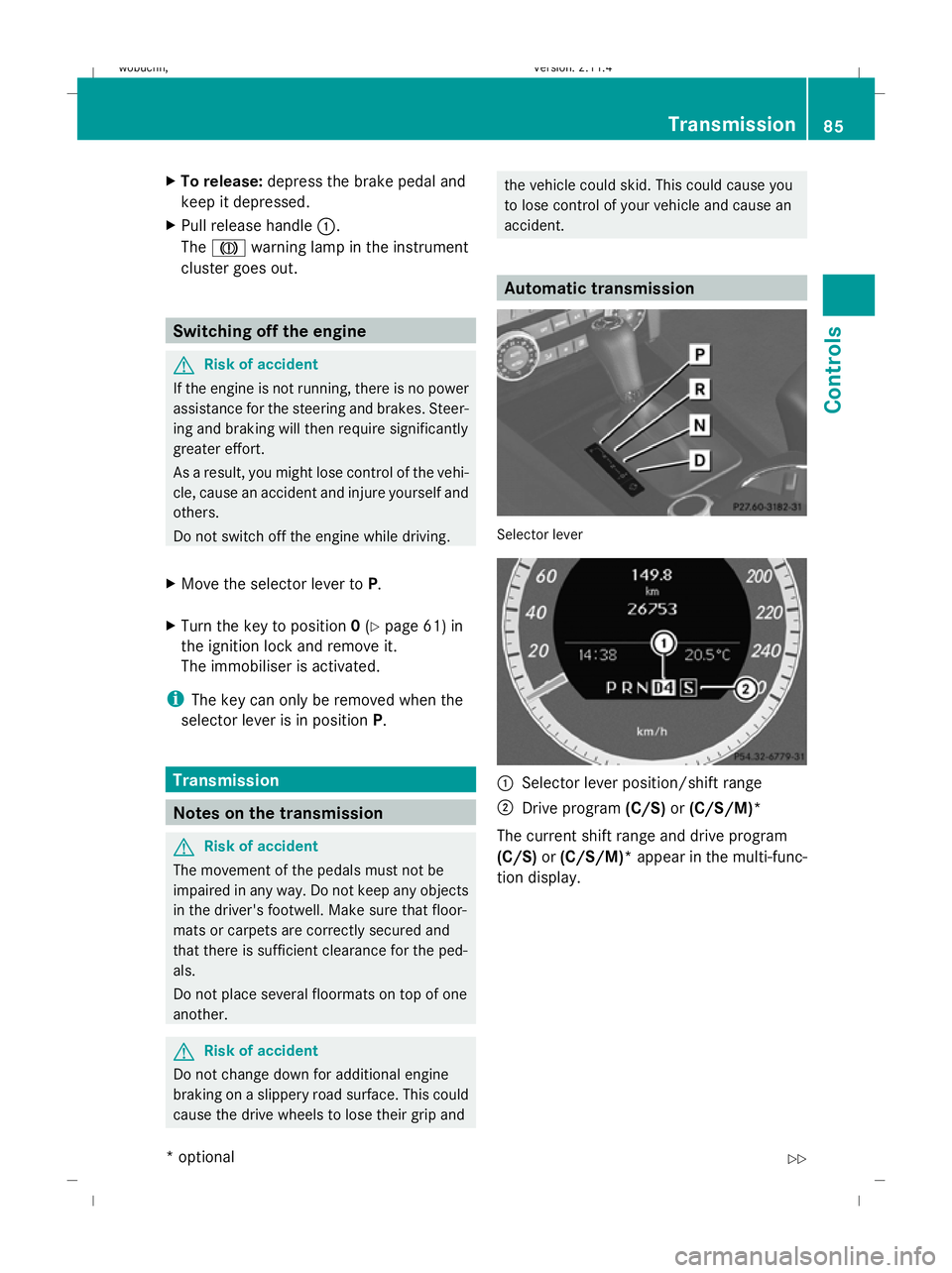
Automatic transmission
Selector lever
:
Selector lever position/shift range
; Drive program (C/S)or(C/S/M)*
The current shift range and drive program
(C/S) or(C/S/M)* appear in the multi-func-
tion display. Transmission
85Controls
* optional
X204_AKB; 1; 5, en-GB
wobuchh
,V ersion: 2.11.4
2008-10-15T13:20:56+02:00 - Seite 85 ZDateiname: 6515_0671_02_buchblock.pdf; preflight
Page 89 of 261
Selector lever positions
B
Park position
Prevents the vehicle from rolling
away when stopped. Only move the
selector lever to
Pwhen the vehicle
is stationary.
i The key can only be removed
when the selector lever is in posi-
tion P. If the key is removed from
the ignition lock, the selector
lever is locked in position P.C
Reverse gear
Only move the selector lever to
R
when the vehicle is stationary. A
Neutral
Releasing the brakes will allow you
to move the vehicle freely, e.g. to
push it or tow it.
Do not move the selector lever to
N while you are driving. Otherwise,
the automatic transmission could
be damaged.
If ESP ®
is deactivated or faulty:
only move the selector lever to Nif
the vehicle is in danger of skidding,
e.g. on icy roads. 7
Drive
The automatic transmission
changes gear automatically. All
forward gears are available.
Touchshift in vehicles with a selector
lever When the selector lever is in position
D, you
can influence the gearshifts made by the
automatic transmission by:
R changing gear yourself using the selector
lever or the steering wheel gearshift pad-
dles*
R restricting/derestricting the shift range X
To shift up/down: briefly push the selec-
tor lever to the right towards D+or to the
left towards D–(Ypage 85).
The automatic transmission shifts to the
next gear up/down depending on the gear
currently selected. This also restricts/
derestricts the shift range.
i To prevent the engine from overrevving,
the automatic transmission does not shift
down if you push the selector lever towards
D– while driving at too high a speed.
X To derestrict the shift range: press and
hold the selector lever towards D+until D
is shown once more in the multi-function
display.
The automatic transmission shifts from the
current shift range directly to D.
X To select the most effective shift
range: press and hold the selector lever to
the left towards D–.
The automatic transmission will shift to a
range which allows ideal acceleration and
deceleration. To do this, the automatic
transmission will shift down one or more
gears.
Shift ranges When the selector lever is in position
D, it is
possible to restrict or derestrict the shift
range for the automatic transmission.
X Briefly push the selector lever to the left/
right towards D+/D–.
The shift range selected is shown in the
multi-function display. The automatic
transmission shifts only as far as the selec-
ted gear.
i If the maximum engine speed for the shift
range is reached and you continue to accel-
erate, the automatic transmission shifts up
in order to prevent the engine from over-
revving, even if the shift range is restricted. 86 TransmissionControls
* optional
X204_AKB; 1; 5, en-GB
wobuchh,
Version: 2.11.4 2008-10-15T13:20:56+02:00 - Seite 86Dateiname: 6515_0671_02_buchblock.pdf; preflight
Page 109 of 261
gradient, the DSR braking effect is minimal or
non-existent. G
Risk of accident
DSR is only an aid designed to assist you when
driving downhill. You are responsible for keep-
ing control of the vehicle and for assessing
whether the downhill gradient can be man-
aged.
When activating DSR the vehicle may brake
suddenly due to DSR intervening. This is
dependent on the downhill gradient and the
difference between the current speed and the
speed set. DSR may not always be able to
keep to the set speed, depending on road sur-
face and tyre conditions. You could lose con-
trol of the vehicle and cause an accident.
Select a set speed suitable for the prevailing
conditions and when necessary, apply the
brakes manually.
DSR controls the vehicle’s speed in the D,R
and Nselector lever positions. You can drive
at a higher or a lower speed than that set on
the on-board computer at any time by accel-
erating or braking. G
Risk of accident
If you depress the accelerator pedal with DSR
activated, then the set speed can be excee-
ded. Drive downhill with special care and
always keep in mind that DSR brakes the vehi-
cle as soon as you remove your foot from the
accelerator pedal. The vehicle may be heavily
braked by DSR depending on the gradient and
the difference between the vehicle's road
speed and the set speed. You could lose con-
trol of the vehicle and cause an accident.
Activating/deactivating DSR Activating
You can only activate DSR when driving at a
speeds below 30 km/h. X
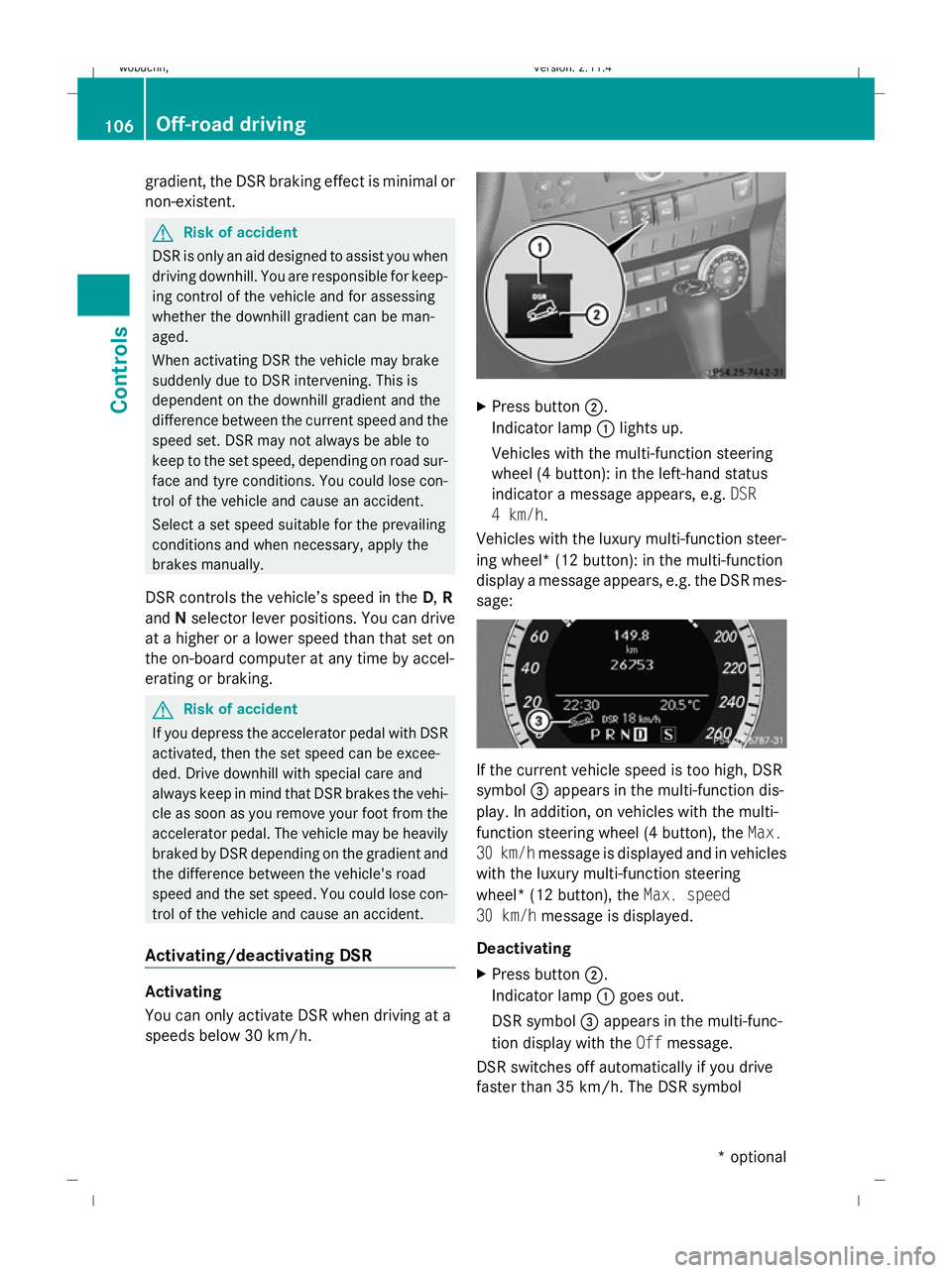
Press button ;.
Indicator lamp :lights up.
Vehicles with the multi-function steering
wheel (4 button): in the left-hand status
indicator a message appears, e.g. DSR
4 km/h.
Vehicles with the luxury multi-function steer-
ing wheel* (12 button): in the multi-function
display a message appears, e.g. the DSR mes-
sage: If the current vehicle speed is too high, DSR
symbol =appears in the multi-function dis-
play. In addition, on vehicles with the multi-
function steering wheel (4 button), the Max.
30 km/h message is displayed and in vehicles
with the luxury multi-function steering
wheel* (12 button), the Max. speed
30 km/h message is displayed.
Deactivating
X Press button ;.
Indicator lamp :goes out.
DSR symbol =appears in the multi-func-
tion display with the Offmessage.
DSR switches off automatically if you drive
faster than 35 km/h. The DSR symbol 106 Off-road drivingControls
* optional
X204_AKB; 1; 5, en-GB
wobuchh,
Version: 2.11.4 2008-10-15T13:20:56+02:00 - Seite 106Dateiname: 6515_0671_02_buchblock.pdf; preflight
Page 111 of 261
Driving systems
Overview of driving systems
The vehicle's driving systems are described
on the following pages:
R cruise control* and Speedtronic*, which
are used to control the speed of the vehicle
R Parktronic*, which assists you in parking
and manoeuvring
R reversing camera*, which assists you when
parking and manoeuvring
The ABS, BAS, adaptive brake lights, ESP ®
and EBV (electronic brake-power distribution)
driving safety systems are described in the
"Driving safety systems" section
(Y page 51). Cruise control*
Cruise control maintains a constant road
speed for you. It brakes automatically in order
to avoid exceeding the set speed. On long and
steep downhill gradients, especially if the
vehicle is laden or towing a trailer, you must
select shift range 1,2or3 in good time. By
doing so, you will make use of the braking
effect of the engine, which relieves the load
on the brake system and prevents the brakes
from overheating and wearing too quickly. G
Risk of accident
Do not change down for additional engine
braking on a slippery road surface. This could
cause the drive wheels to lose their grip and
the vehicle could skid.
Use cruise control only if road and traffic con-
ditions make it appropriate to maintain a
steady speed for a prolonged period. You can
store any road speed above 30 km/h. G
Risk of accident
Cruise control cannot take account of road
and traffic conditions. Always pay attention to traffic conditions
even when cruise control is activated.
Cruise control is only an aid designed to assist
driving. You are responsible for the vehicle's
speed and for braking in good time. G
Risk of accident
Do not use cruise control:
R in road and traffic conditions which do not
allow you to maintain a constant speed (e.g.
heavy traffic or winding roads). You could
otherwise cause an accident.
R on slippery roads. Braking or accelerating
could cause the drive wheels to lose trac-
tion and the vehicle could then skid.
R when there is poor visibility, e.g. due to fog,
heavy rain or snow
Cruise control display in the speedom-
eter (vehicles with the luxury multi-
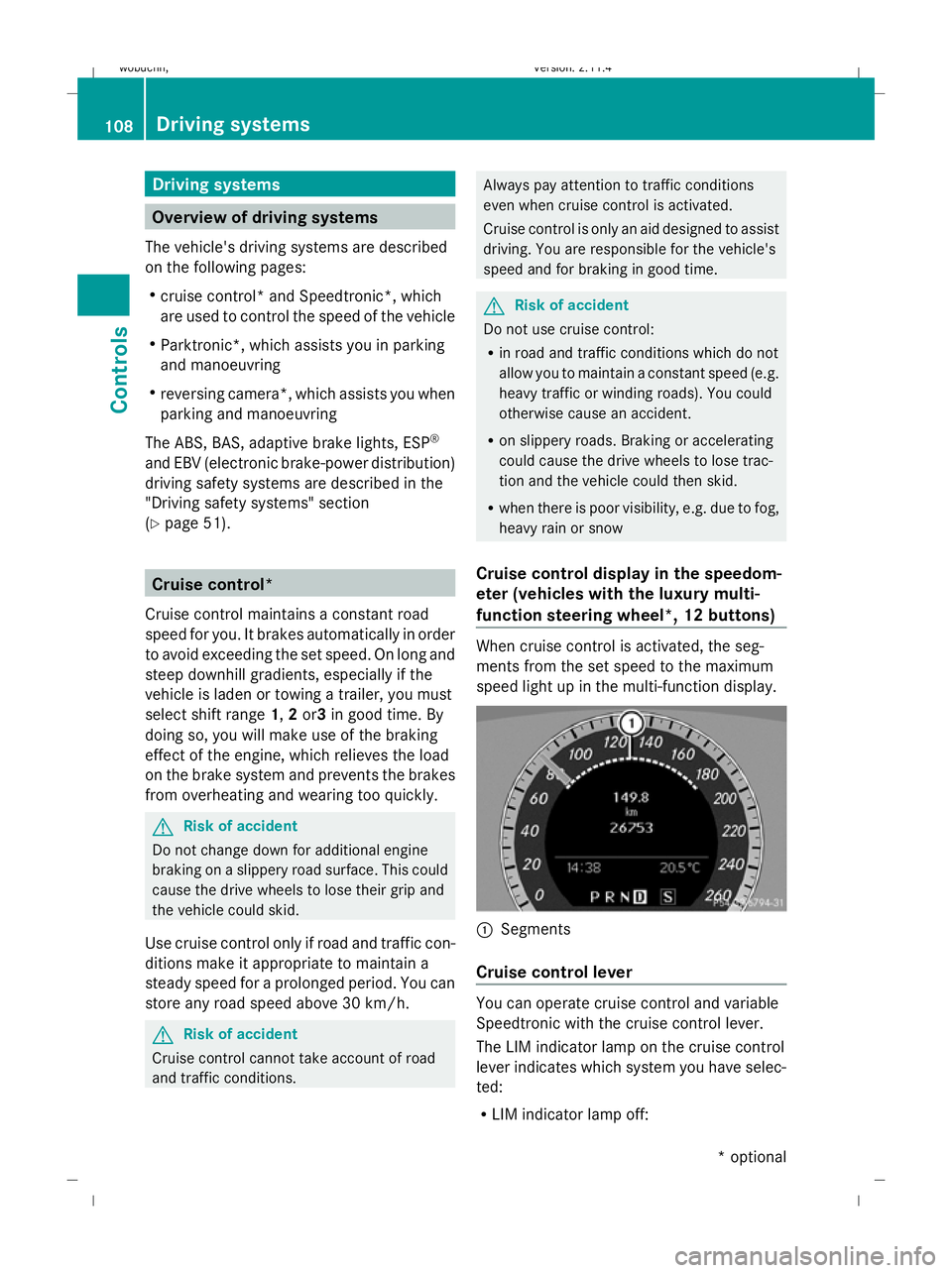
function steering wheel *,12 buttons) When cruise control is activated, the seg-
ments from the set speed to the maximum
speed light up in the multi-function display.
:
Segments
Cruise control lever You can operate cruise control and variable
Speedtronic with the cruise control lever.
The LIM indicator lamp on the cruise control
lever indicates which system you have selec-
ted:
R
LIM indicator lamp off: 108 Driving systemsControls
* optional
X204_AKB; 1; 5, en-GB
wobuchh,
Version: 2.11.4 2008-10-15T13:20:56+02:00 - Seite 108Dateiname: 6515_0671_02_buchblock.pdf; preflight