Page 249 of 401

Care
246R
battery
R connectors
R lights
R seals
Damaged seals or electrical components
can lead to failures or leaks.
Cleaning the wiper blades and the out-
side of the windscreen G
Risk of injury
Turn the key to position 0in the ignition
lock before cleaning the windscreen or the
wiper blades. There is otherwise a risk of
the windscreen wipers being set in motion
and causing injury.
X Turn the key to position 1in the ignition
lock (Y page 76).
X Set the windscreen wipers to position
u on the combination switch
(Y page 105).
X Turn the key to position 0or remove it when
the wiper arms are vertical (Y page 76).!
Only fold the wiper arms away from the
windscreen when they are in a vertical posi-
tion, otherwise you will damage the bonnet.
X Fold the wiper arms away from the wind-
screen until you feel them engage.
X Clean the windscreen and the wiper blades.
X Fold the windscreen wipers back again
before the ignition is switched on.
! Do not clean the wiper blades too often,
otherwise the rubber may become porous,
resulting in wiper noise.
Cleaning the windows !
Do not use dry cloths, abrasive products,
solvents or cleaning agents containing sol-
vents to clean the inside of the windows.
Clean the insides of the windows with a
damp cloth or commercially-available glass
cleaner. Avoid touching the inside of the
rear windscreen and the side windows with
hard objects, e.g. ice scrapers or rings. You
could otherwise cause damage to the win-
dows, rear window heating or aerial on the
rear window. i
Anti-glare film retrofitted to the insides of
the windows could interfere with radio or
mobile phone reception, especially if it is
conductive or metal-coated film. Informa-
tion about anti-glare film can be obtained
from any Mercedes-Benz Service Centre.
Cleaning the headlamps X
Clean the headlamp lenses with a wet
sponge.
! Only use washer fluid which is suitable
for plastic lenses. Unsuitable washer fluid
could damage the plastic lenses of the
headlamps.
Do not use the following:
R dry cloths
R abrasive cleaning agents
R solvents
R cleaning agents containing solvent
You could otherwise scratch or damage the
surface of the lenses. Operation
211_AKB; 2; 5, en-GB
mkalafa,
Version: 2.9.4 2008-02-29T16:57:07+01:00 - Seite 246Dateiname: 6515_3416_02_buchblock.pdf; preflight
Page 254 of 401
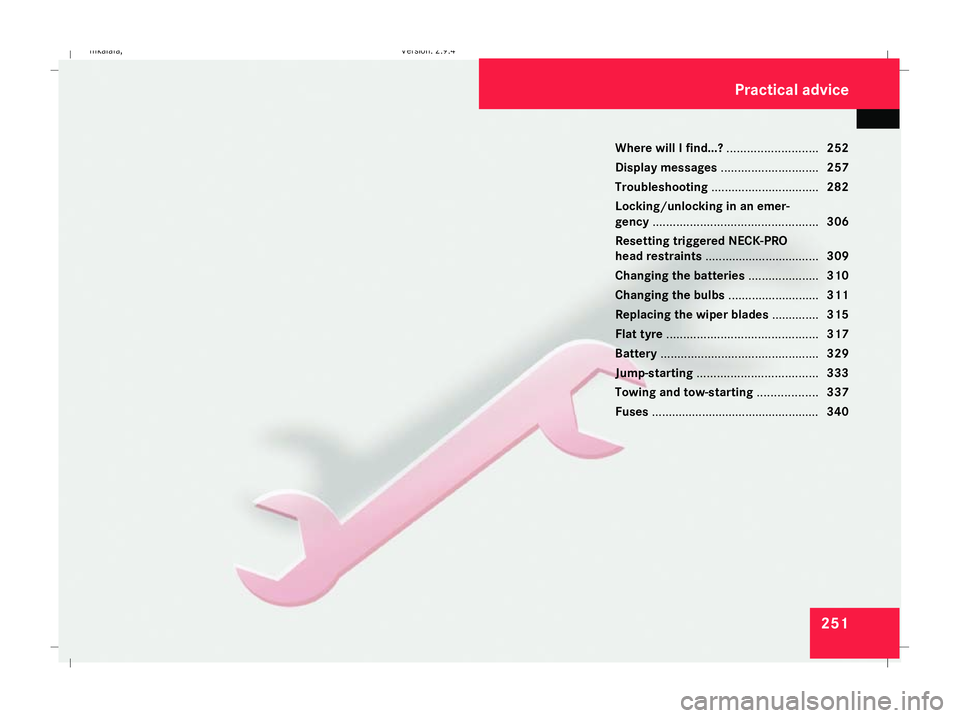
251
Where will I find...?
...........................252
Display messages ............................. 257
Troubleshooting ................................ 282
Locking/unlocking in an emer-
gency ................................................. 306
Resetting triggered NECK-PRO
head restraints .................................. 309
Changing the batteries .....................310
Changing the bulbs ...........................311
Replacing the wiper blades ..............315
Flat tyre ............................................. 317
Battery ............................................... 329
Jump-starting .................................... 333
Towing and tow-starting ..................337
Fuses .................................................. 340 Practical advice
211_AKB; 2; 5, en-GB
mkalafa,
Version: 2.9.4 2008-02-29T16:57:07+01:00 - Seite 251Dateiname: 6515_3416_02_buchblock.pdf; preflight
Page 269 of 401
Display
messages 266 Symbol messages
G
Risk of accident and injury
The operating safety of the vehicle could be impaired if service work is carried out incorrectly. There is a risk that you could lose control of
the vehicle and cause an accident. The safety systems may no longer be able to protect you or others as they are designed to do.
Always have maintenance work carried out at a qualified specialist workshop which has the necessary specialist knowledge and tools to
carry out the work required.
Mercedes-Benz recommends that you use a Mercedes-Benz Service Centre for this purpose.
In particular, work relevant to safety or on safety-related systems must be carried out at a qualified specialist workshop. Display messages Possible cause/consequence Possible solution
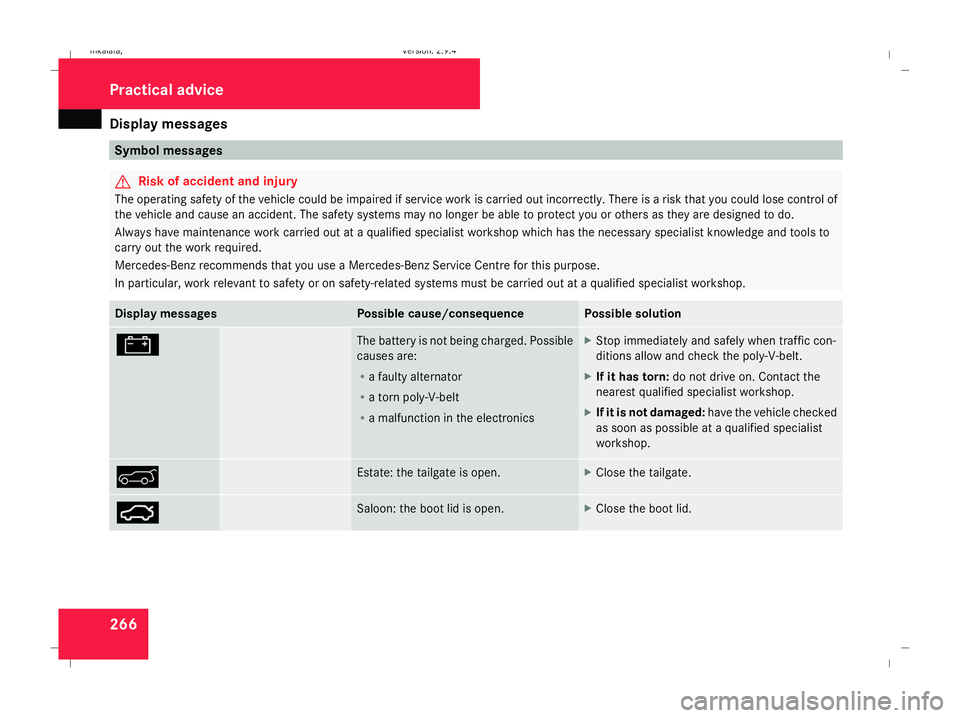
# The battery is not being charged. Possible
causes are:
R
a faulty alternator
R a torn poly-V-belt
R a malfunction in the electronics X
Stop immediately and safely when traffic con-
ditions allow and check the poly-V-belt.
X If it has torn: do not drive on. Contact the
nearest qualified specialist workshop.
X If it is not damaged: have the vehicle checked
as soon as possible at a qualified specialist
workshop. & Estate: the tailgate is open. X
Close the tailgate. Ê Saloon: the boot lid is open. X
Close the boot lid. Practical advi
ce
211_AKB; 2; 5, en-GB
mkalafa,
Version: 2.9.4 2008-02-29T16:57:07+01:00 - Seite 266Dateiname: 6515_3416_02_buchblock.pdf; preflight
Page 283 of 401
Display
messages 280 Display messages Possible cause/consequence Possible solution
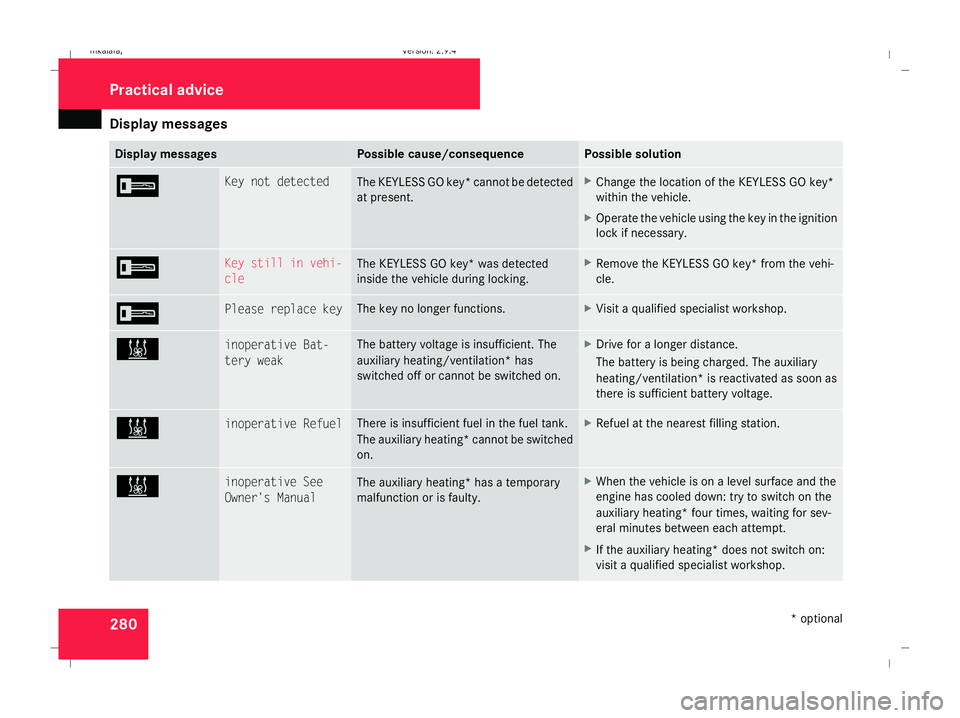
I Key not detected
The KEYLESS GO key* cannot be detected
at present. X
Change the location of the KEYLESS GO key*
within the vehicle.
X Operate the vehicle using the key in the ignition
lock if necessary. I Key still in vehi-
cle
The KEYLESS GO key* was detected
inside the vehicle during locking. X
Remove the KEYLESS GO key* from the vehi-
cle. I Please replace key The key no longer functions. X
Visit a qualified specialist workshop. X inoperative Bat-
tery weak The battery voltage is insufficient. The
auxiliary heating/ventilation* has
switched off or cannot be switched on. X
Drive for a longer distance.
The battery is being charged. The auxiliary
heating/ventilation* is reactivated as soon as
there is sufficient battery voltage. X inoperative Refuel There is insufficient fuel in the fuel tank.
The auxiliary heating* cannot be switched
on. X
Refuel at the nearest filling station. X inoperative See
Owner's Manual
The auxiliary heating* has a temporary
malfunction or is faulty. X
When the vehicle is on a level surface and the
engine has cooled down: try to switch on the
auxiliary heating* four times, waiting for sev-
eral minutes between each attempt.
X If the auxiliary heating* does not switch on:
visit a qualified specialist workshop. Practical advi
ce
* optional
211_AKB; 2; 5, en-GB
mkalafa,
Version: 2.9.4 2008-02-29T16:57:07+01:00 - Seite 280Dateiname: 6515_3416_02_buchblock.pdf; preflight
Page 298 of 401
Troubleshooting
295Engine
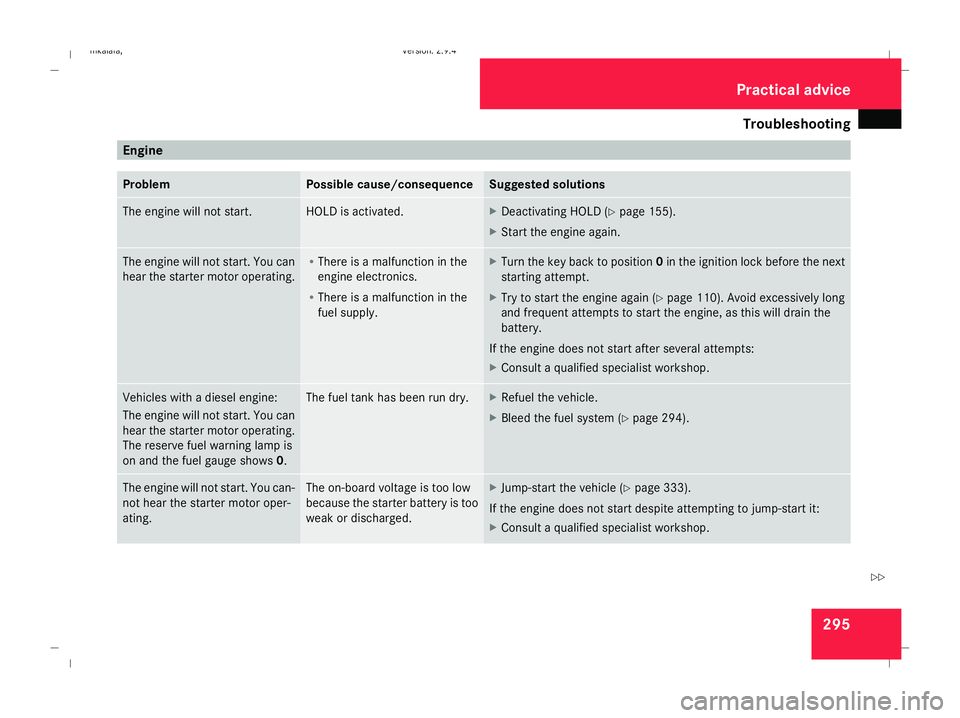
Problem Possible cause/consequence Suggested solutions
The engine will not start. HOLD is activated. X
Deactivating HOLD (Y page 155).
X Start the engine again. The engine will not start. You can
hear the starter motor operating. R
There is a malfunction in the
engine electronics.
R There is a malfunction in the
fuel supply. X
Turn the key back to position 0in the ignition lock before the next
starting attempt.
X Try to start the engine again (Y page 110). Avoid excessively long
and frequent attempts to start the engine, as this will drain the
battery.
If the engine does not start after several attempts:
X Consult a qualified specialist workshop. Vehicles with a diesel engine:
The engine will not start. You can
hear the starter motor operating.
The reserve fuel warning lamp is
on and the fuel gauge shows
0. The fuel tank has been run dry. X
Refuel the vehicle.
X Bleed the fuel system (Y page 294).The engine will not start. You can-
not hear the starter motor oper-
ating. The on-board voltage is too low
because the starter battery is too
weak or discharged. X
Jump-start the vehicle (Y page 333).
If the engine does not start despite attempting to jump-start it:
X Consult a qualified specialist workshop. Practical advice
211_AKB; 2; 5, en-GB
mkalafa
,V ersion: 2.9.4
2008-02-29T16:57:07+01:00 - Seite 295 ZDateiname: 6515_3416_02_buchblock.pdf; preflight
Page 304 of 401
Troubleshooting
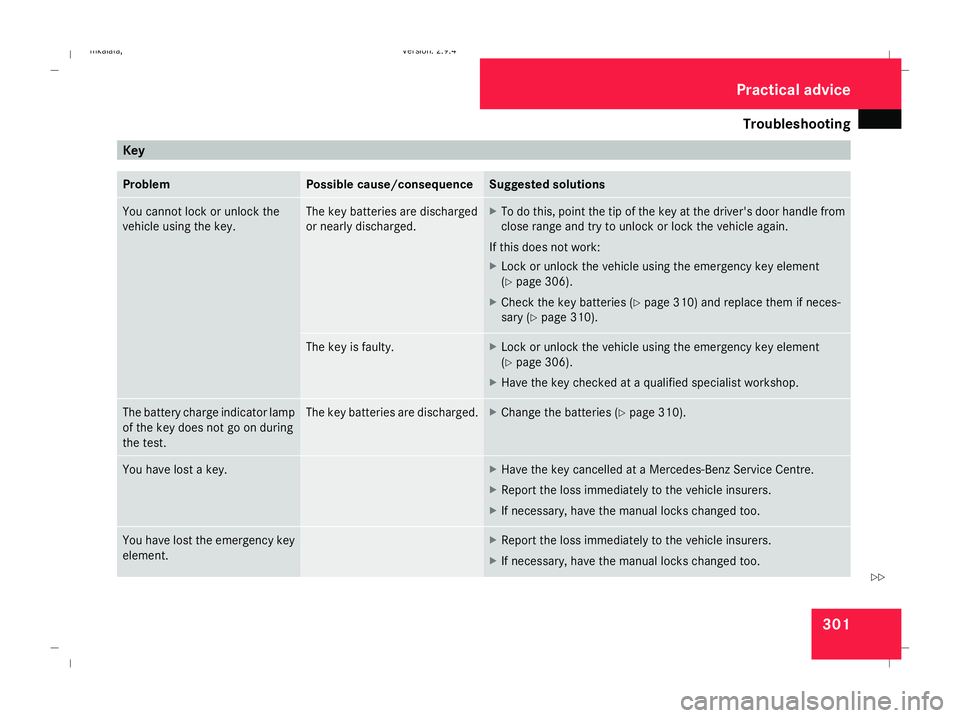
301Key
Problem Possible cause/consequence Suggested solutions
You cannot lock or unlock the
vehicle using the key. The key batteries are discharged
or nearly discharged. X
To do this, point the tip of the key at the driver's door handle from
close range and try to unlock or lock the vehicle again.
If this does not work:
X Lock or unlock the vehicle using the emergency key element
(Y page 306).
X Check the key batteries (Y page 310) and replace them if neces-
sary (Y page 310). The key is faulty. X
Lock or unlock the vehicle using the emergency key element
(Y page 306).
X Have the key checked at a qualified specialist workshop. The battery charge indicator lamp
of the key does not go on during
the test. The key batteries are discharged. X
Change the batteries (Y page 310).You have lost a key. X
Have the key cancelled at a Mercedes-Benz Service Centre.
X Report the loss immediately to the vehicle insurers.
X If necessary, have the manual locks changed too. You have lost the emergency key
element. X
Report the loss immediately to the vehicle insurers.
X If necessary, have the manual locks changed too. Practical advice
211_AKB; 2; 5, en-GB
mkalafa
,V ersion: 2.9.4
2008-02-29T16:57:07+01:00 - Seite 301 ZDateiname: 6515_3416_02_buchblock.pdf; preflight
Page 305 of 401
Troubleshooting
302 Problem Possible cause/consequence Suggested solutions
The key cannot be turned in the
ignition lock. The key has been in position
0for
a considerable time. X
Remove the key and reinsert it into the ignition lock.
X Check the starter battery and recharge it if necessary
(Y page 329).
X Start the engine. The on-board voltage is too low. X
Switch off non-essential consumers, e.g. seat heating* or interior
lighting, and try to turn the key again.
If this does not work:
X Check the starter battery and recharge it if necessary
(Y page 329).
or
X Jump-start the vehicle (Y page 333).
or
X Consult a qualified specialist workshop. Practical advice
* optional
211_AKB; 2; 5, en-GB
mkalafa
,V ersion: 2.9.4
2008-02-29T16:57:07+01:00 - Seite 302 Dateiname: 6515_3416_02_buchblock.pdf; preflight
Page 306 of 401
Troubleshooting
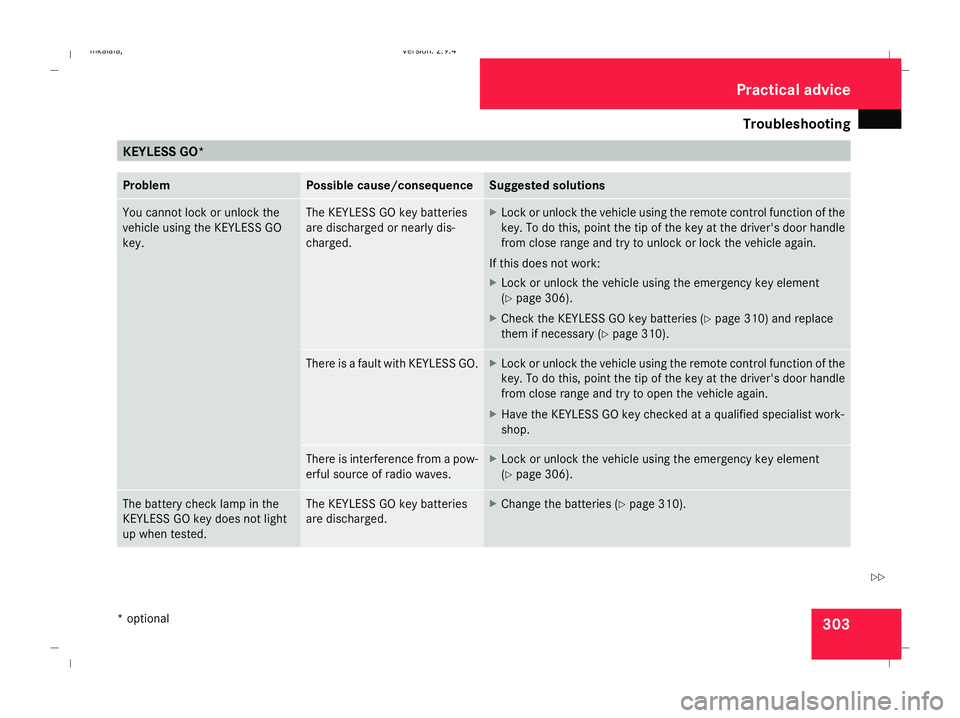
303KEYLESS GO*
Problem Possible cause/consequence Suggested solutions
You cannot lock or unlock the
vehicle using the KEYLESS GO
key. The KEYLESS GO key batteries
are discharged or nearly dis-
charged. X
Lock or unlock the vehicle using the remote control function of the
key. To do this, point the tip of the key at the driver's door handle
from close range and try to unlock or lock the vehicle again.
If this does not work:
X Lock or unlock the vehicle using the emergency key element
(Y page 306).
X Check the KEYLESS GO key batteries (Y page 310) and replace
them if necessary (Y page 310). There is a fault with KEYLESS GO. X
Lock or unlock the vehicle using the remote control function of the
key. To do this, point the tip of the key at the driver's door handle
from close range and try to open the vehicle again.
X Have the KEYLESS GO key checked at a qualified specialist work-
shop. There is interference from a pow-
erful source of radio waves. X
Lock or unlock the vehicle using the emergency key element
(Y page 306). The battery check lamp in the
KEYLESS GO key does not light
up when tested. The KEYLESS GO key batteries
are discharged. X
Change the batteries (Y page 310). Practical advice
* optional
211_AKB; 2; 5, en-GB
mkalafa
,V ersion: 2.9.4
2008-02-29T16:57:07+01:00 - Seite 303 ZDateiname: 6515_3416_02_buchblock.pdf; preflight