2008 MERCEDES-BENZ E-CLASS SALOON phone
[x] Cancel search: phonePage 40 of 401

Stowage compartments
37Function Page
1 Glove compartment
205
2 Front-passenger seat stow-
age compartment with first-
aid kit 253
3 Door stowage pocket
4
Ashtray* 209
5 Ruffled pocket
6 Door stowage pocket
7 Luggage net
8 Stowage well under the
boot floor
192
9 Hooks at the top of the boot
195
a Door stowage pocket
b Ruffled pocket
c
Ashtray* 209
d Door stowage pocket Function Page
e Driver's seat stowage com-
partment with fire extin-
guisher*
253
f Sun visor card clip
207
g Stowage compartment in
the centre console
206
Socket 210
Ashtray* 209
Cigarette lighter* 209
h Spectacles compartment/
mobile phone compart-
ment
206
j Luggage net in the front-
passenger footwell
190
k Stowage compartment in
front of the armrest
206
Cup holder* in the centre
console
186 Function Page
l Stowage compartment/
telephone compartment
under the armrest
206
m Stowage compartment in
the centre console at the
rear
207
Socket 210
n Cup holder in the rear seat
armrest
186
o Stowage compartment in
the rear seat armrest
207At a glance
* optional
211_AKB; 2; 5, en-GB
mkalafa,
Version: 2.9.4 2008-02-29T16:57:07+01:00 - Seite 37Dateiname: 6515_3416_02_buchblock.pdf; preflight
Page 53 of 401

Occupant safety
50
The front-passenger seat sensor system for
child restraint systems detects whether a
special Mercedes-Benz child seat with auto-
matic child seat recognition has been fitted.
In such cases, 5PASSENGER AIRBAG
OFF indicator lamp 1lights up. The front-
passenger airbag is deactivated. G
Risk of injury
If the 5 PASSENGER AIRBAG OFF warn-
ing lamp does not light up when the child
restraint system is fitted, the front-
passenger front airbag has not been disa-
bled. If the front-passenger front airbag is
deployed, the child could be seriously or
even fatally injured.
Proceed as follows:
R do not use a rearward-facing child
restraint system on the front-passenger
seat.
R fit a rearward-facing child restraint sys-
tem on a suitable rear seat. or
R
only use a forward-facing child restraint
system on the front-passenger seat and
move the front-passenger seat to its rear-
most position.
R have the automatic child seat recognition
checked at a qualified specialist work-
shop.
To ensure that the automatic child seat rec-
ognition on the front-passenger seat func-
tions correctly, never place objects (such
as a cushion) under the child restraint sys-
tem. The entire base of the child restraint
system must always rest on the seat cush-
ion. An incorrectly fitted child restraint sys-
tem cannot perform its intended protective
function in the event of an accident, and
could lead to injuries.
i The windowbag, the sidebag and the belt
tensioner on the front-passenger side are still active even when the front-passenger
front airbag is disabled. G
Risk of injury
Do not place items of electronic equipment
on the front-passenger seat, e.g.:
R laptops, when switched on
R mobile phones
R cards with transponders, e.g. ski passes
or access cards
Signals from electronic equipment can
cause interference in the automatic child
seat recognition sensor system. This can
lead to a system malfunction. This may
cause the 5PASSENGER AIRBAG OFF
warning lamp to light up without there
being a child seat with automatic child seat
recognition fitted. This means that the
front-passenger airbag is not deployed dur-
ing an accident. It is also possible that the
5 PASSENGER AIRBAG OFF warning
lamp will not light up briefly if you turn the
key in the ignition lock to position 2.Safety
211_AKB; 2; 5, en-GB
mkalafa,
Version: 2.9.4 2008-02-29T16:57:07+01:00 - Seite 50Dateiname: 6515_3416_02_buchblock.pdf; preflight
Page 125 of 401
On-board computer
122 Multi-function steering wheel
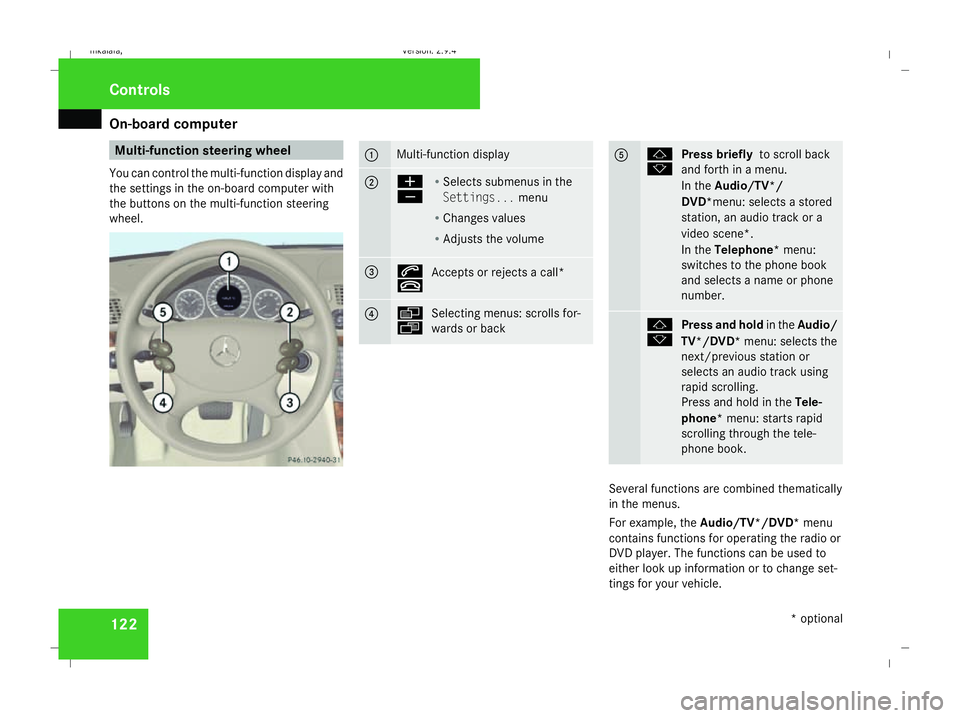
You can control the multi-function display and
the settings in the on-board computer with
the buttons on the multi-function steering
wheel. 1 Multi-function display
2 æ
ç
R
Selects submenus in the
Settings... menu
R Changes values
R Adjusts the volume 3 s
t
Accepts or rejects a call* 4 è
ÿ
Selecting menus: scrolls for-
wards or back 5 j
k
Press briefly
to scroll back
and forth in a menu.
In the Audio/TV*/
DVD*menu: selects a stored
station, an audio track or a
video scene*.
In the Telephone* menu:
switches to the phone book
and selects a name or phone
number. j
k
Press and hold
in theAudio/
TV*/DVD* menu: selects the
next/previous station or
selects an audio track using
rapid scrolling.
Press and hold in the Tele-
phone* menu: starts rapid
scrolling through the tele-
phone book. Several functions are combined thematically
in the menus.
For example, the Audio/TV*/DVD* menu
contains functions for operating the radio or
DVD player. The functions can be used to
either look up information or to change set-
tings for your vehicle. Controls
* optional
211_AKB; 2; 5, en-GB
mkalafa,
Version: 2.9.4 2008-02-29T16:57:07+01:00 - Seite 122Dateiname: 6515_3416_02_buchblock.pdf; preflight
Page 128 of 401

On-board computer
125Function
1 Basic display
menu (Ypage 125)
R Digital speedometer 17
(Y page 126)
R Outside tempera-
ture 17
(Y page 126)
R ASSYST PLUS service display
(Y page 243)
R Engine oil level* (Y page 223)
R Tyre pressure loss warning system
(Y page 230) or tyre pressure mon-
itor* (Y page 232) 2
AMG* menu (Y
page 126) 3
Audio/TV*/DVD*
(Ypage 129)
menu
R Radio station ( Ypage 129)
R Audio drive or media (Y page 129)
R TV* (Y page 130)
R DVD video* (Y page 130) Function
4
Navigation* menu (Y
page 130) 5
Distronic
* menu (distance display)
(Y page 145) 6
Message memory
menu18
(fault and
warning messages) (Y page 131) 7 Settings
menu (Ypage 131)
R Resetting to factory settings
(Y page 132)
R Selecting a submenu (Y page 132) 8 Trip computer
menu
R Consumption statistics
(Y page 140)
R Range (Y page 140) 9
Telephone*
menu (Ypage 141) This is what the displays look like when you
scroll through the menus.
The generic terms in the table overview are
intended to help you navigate through themenus. The terms themselves are not always
displayed in the multi-function display.
The Audio, Navi* and Tel* menus are dis-
played slightly differently in vehicles with
audio equipment and vehicles with COMAND
APS*. The examples given in this Owner's
Manual apply to vehicles equipped with
COMAND APS*. Standard display menu
i Menu overview: (Y page 124).
Use the buttons on the multi-function steer-
ing wheel.
X Press the èor· button to select the
basic display.
17 The sequence of the digital speedometer and the outside temperature display depends on the settings in the "Basic display" submenu.
18 This menu is only visible if there is a display message available. Controls
* optional
211_AKB; 2; 5, en-GB
mkalafa,
Version: 2.9.4
2008-02-29T16:57:07+01:00 - Seite 125 ZDateiname: 6515_3416_02_buchblock.pdf; preflight
Page 144 of 401
On-board computer
141Telephone menu*
Functions and displays are dependent on the
optional equipment installed in your vehicle.
You can place your mobile phone in the
mobile phone bracket* (Y page 211), or set
up a Bluetooth connection to the audio sys-
tem or COMAND APS* (see the separate
operating instructions). G
Risk of accident
Observe the legal requirements of the
country in which you are currently driving
regarding the use of mobile phones in the
vehicle.
If it is permitted to use mobile phones while
the vehicle is in motion, you should only use
them when the road and traffic conditions
allow. You may otherwise be distracted
from the traffic conditions, cause an acci-
dent and injure yourself and others.
i Menu overview: (Y page 124).
Use the buttons on the multi-function steer-
ing wheel. X
Switch on the mobile phone and audio sys-
tem or COMAND APS*; see the separate
operating instructions.
X Press the èor· button to select the
Telephone menu.
Mobile phone on PIN code not yet entered
Once you have inserted the mobile phone into
the mobile phone bracket*, the following
message appears in the multi-function dis-
play Please enter PIN.
X Enter the PIN using the mobile phone, Lin-
guatronic*, the audio systemor COMAND
APS*.
The mobile phone will search for a network.
Mobile phone operational
The multi-function display shows Readyor
the name of the GSM network provider. If the
operational readiness symbol goes out, your
vehicle is outside the transmission and recep-
tion range. In this case, No Serviceappears
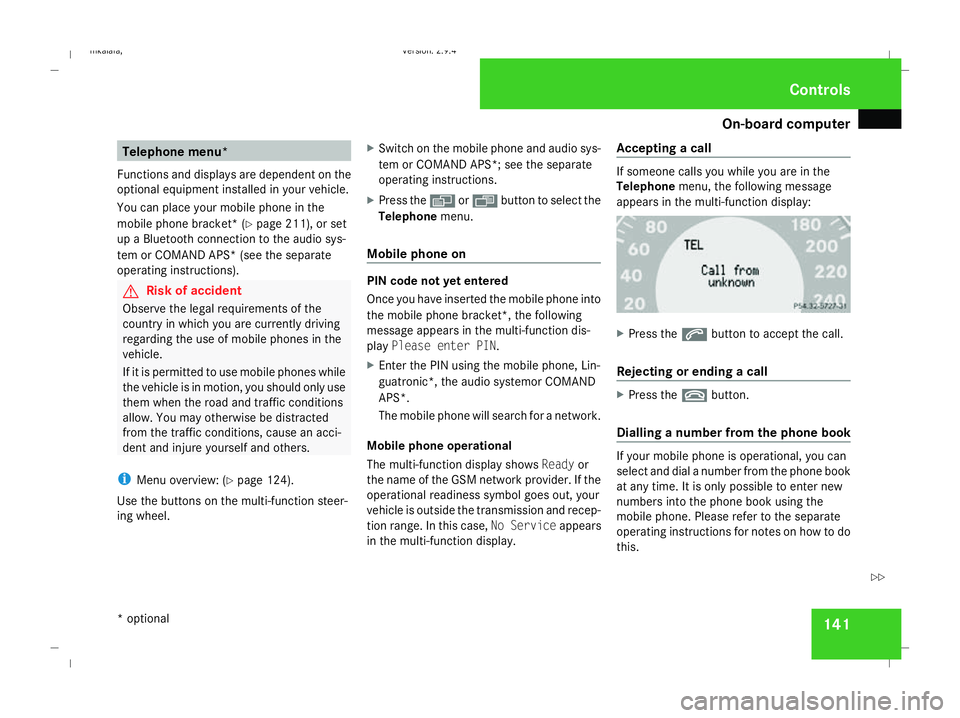
in the multi-function display. Accepting a call If someone calls you while you are in the
Telephone
menu, the following message
appears in the multi-function display: X
Press the sbutton to accept the call.
Rejecting or ending a call X
Press the tbutton.
Dialling a number from the phone book If your mobile phone is operational, you can
select and dial a number from the phone book
at any time. It is only possible to enter new
numbers into the phone book using the
mobile phone. Please refer to the separate
operating instructions for notes on how to do
this. Controls
* optional
211_AKB; 2; 5, en-GB
mkalafa,
Version: 2.9.4 2008-02-29T16:57:07+01:00 - Seite 141 ZDateiname: 6515_3416_02_buchblock.pdf; preflight
Page 145 of 401
Driving sys
tems 142
X
Press the èor· button to select the
Telephone menu.
X Press the jork button to call up
the phone book.
X Press the jork button to select the
desired name. To scroll through the tele-
phone book faster, press and hold the
j ork button for longer than 1 sec-
ond.
X Press the sbutton to start dialling.
The multi-function display shows the Con-
necting call...message.
The number dialled is stored in the redial
memory.
When there is a connection, the name of
the person called – if stored in the phone
book – or the number dialled appears in the
multi-function display.
or
X If you do not wish to make a call, press the
t button.
Redialling The on-board computer stores the last phone
numbers which were dialled. X
Press the èor· button to select the
Telephone menu.
X Press the sbutton to call up the most
recently dialled number in the redial mem-
ory.
X Press the jork button to select the
desired name or number.
X Press the sbutton to start dialling. Driving systems
Overview of driving systems
The vehicle's driving systems are described
on the following pages:
R Cruise control, Distronic* and Speedtronic,
which are used to control the speed of the
vehicle
R HOLD, which makes pulling away easier,
particularly on steep uphill gradients
R Vehicle level setting and AIRMATIC DC*,
which are used to adjust the vehicle's sus-
pension system
R 4*MATIC (permanent four-wheel drive), for
optimum traction
R Parktronic*, which assists you in parking
and manoeuvring
The ABS, BAS, adaptive brake lights, ESP ®
,
EBV (electronic brake-power distribution) and
ADAPTIVE BRAKE driving safety systems are
described in the "Driving safety systems" sec-
tion (Y page 58). Controls
* optional
211_AKB; 2; 5, en-GB
mkalafa
,V ersion: 2.9.4
2008-02-29T16:57:07+01:00 - Seite 142 Dateiname: 6515_3416_02_buchblock.pdf; preflight
Page 208 of 401
Loading and stowing
205
Installing the stowage box
X
Fold the two backrests 3forward
(Y page 198).
X Guide stowage box 1into the luggage
compartment through one of the rear doors
with the opening facing towards the front
of the vehicle.
X Press catches 4on stowage box 1into
the gap between backrest 3and the lug-
gage compartment floor.
X Fold backrest 3back (Y page 200).
i Stowage box 1is also held in place from
above by the combined luggage cover and
net.
Loading the stowage box
X Fold backrest 3forward (Y page 198).
X Load stowage box 1through the opening
on the front.
i Stowage box 1in the luggage compart-
ment is closed off by the rear bench seat
and can carry a maximum load of 20 kg.
X Fold backrest 3back (Y page 200). Removing the stowage box
X
Fold double backrest 3forward
(Y page 198).
X Slide stowage box 1with catches 4for-
wards to remove it from the mountings.
X Remove stowage box 1sideways through
a rear door.
X Fold backrest 3back (Y page 200). Stowage compartments
G
Risk of injury
The stowage compartments must be closed
when items are stored in them. Luggage
nets are not designed to secure heavy
items of luggage.
You or other vehicle occupants could be
injured by objects being thrown around if
you:
R brake sharply
R change direction suddenly
R have an accident
Sharp-edged and fragile objects must not
be carried in the luggage net. Do not carry hard objects in the ruffled
pockets. Objects must not protrude over
the top of the ruffled pockets.
i You will find an overview of the stowage
compartments on (Y page 36).
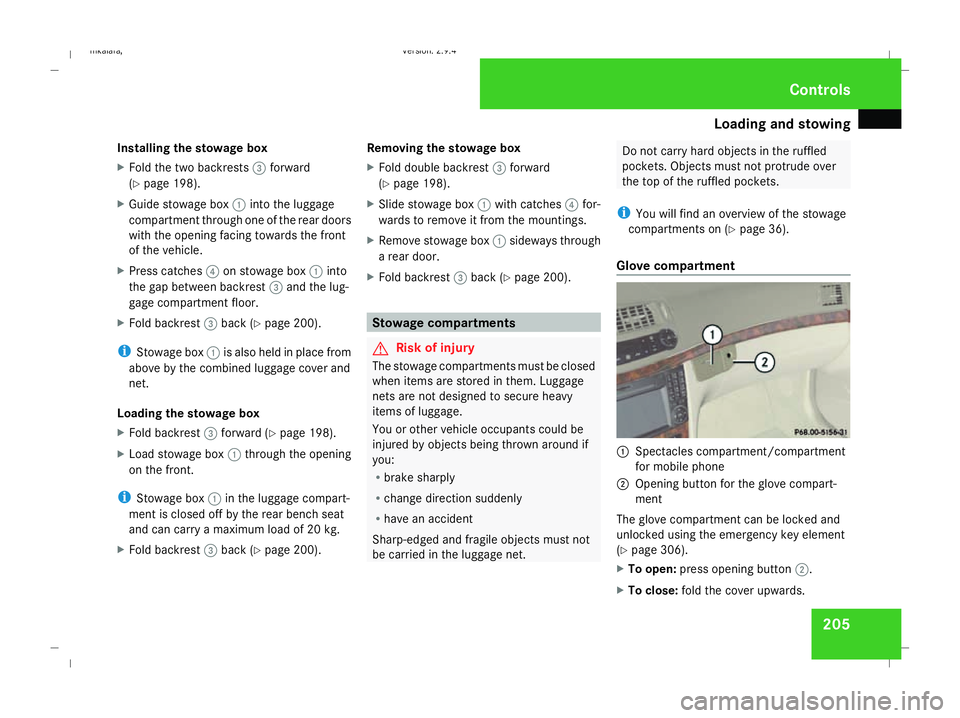
Glove compartment 1
Spectacles compartment/compartment
for mobile phone
2 Opening button for the glove compart-
ment
The glove compartment can be locked and
unlocked using the emergency key element
(Y page 306).
X To open: press opening button 2.
X To close: fold the cover upwards. Controls
211_AKB; 2; 5, en-GB
mkalafa,
Version: 2.9.4 2008-02-29T16:57:07+01:00 - Seite 205 ZDateiname: 6515_3416_02_buchblock.pdf; preflight
Page 209 of 401
Loading and stowing
206
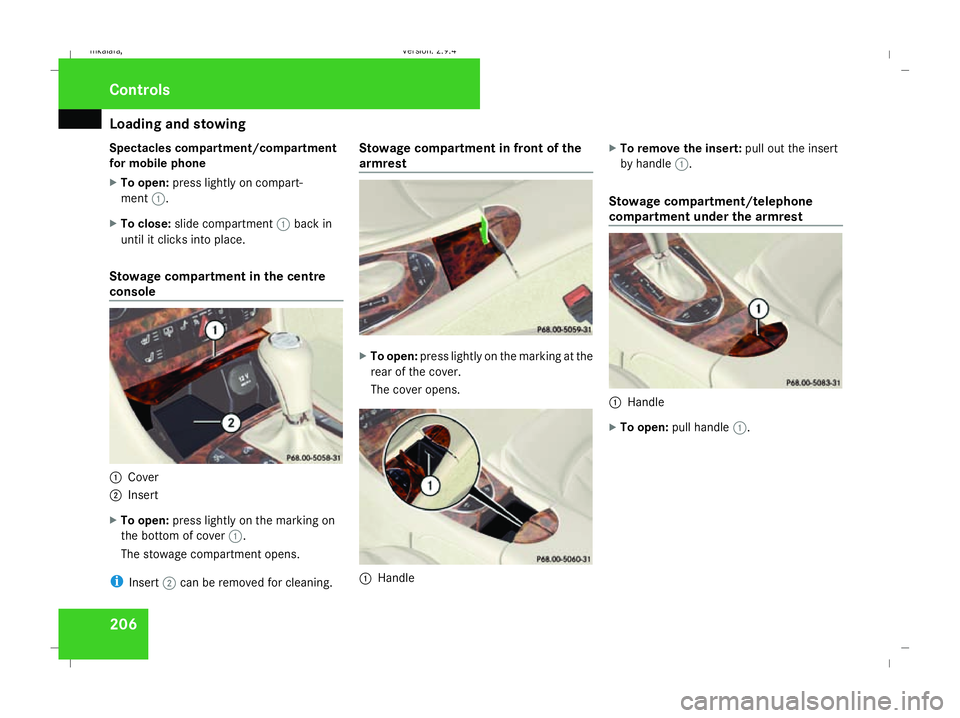
Spectacles compartment/compartment
for mobile phone
X To open: press lightly on compart-
ment 1.
X To close: slide compartment 1back in
until it clicks into place.
Stowage compartment in the centre
console 1
Cover
2 Insert
X To open: press lightly on the marking on
the bottom of cover 1.
The stowage compartment opens.
i Insert 2can be removed for cleaning. Stowage compartment in front of the
armrest
X
To open: press lightly on the marking at the
rear of the cover.
The cover opens. 1
Handle X
To remove the insert: pull out the insert
by handle 1.
Stowage compartment/telephone
compartment under the armrest 1
Handle
X To open: pull handle 1. Controls
211_AKB; 2; 5, en-GB
mkalafa,
Version: 2.9.4 2008-02-29T16:57:07+01:00 - Seite 206Dateiname: 6515_3416_02_buchblock.pdf; preflight