2008 MERCEDES-BENZ B-CLASS HATCHBACK phone
[x] Cancel search: phonePage 188 of 305

Driving ab
road 185Driving on wet roads
If water has accumulated to a certain depth
on the road surface, there is a danger of aqua-
planing occurring, even if:
R you drive at low speeds
R the tyres have adequate tread depth
For this reason, do not drive in tyre ruts, and
brake carefully. Driving on flooded roads
If you have to drive on stretches of road on
which water has collected, please bear in
mind that:
R the maximum permitted still water depth is
25 cm.
R you should drive no faster than at walking
pace.
! Bear in mind that vehicles travelling in
front or in the opposite direction create
waves. This may cause the maximum per-
missible water depth to be exceeded.
Failure to observe these notes may result
in damage to the engine, electrical systems
and transmission. Driving abroad
Points to remember
An extensive Mercedes-Benz Service network
is also available in other countries. The
Service Hotline's current telephone numbers
for use when you are abroad are to be found
in the "Service24h" chapter of the Service
Booklet.
Only low-octane fuel is available in certain
countries.
You can find further information about fuel
grades on (Y page 168). Symmetrical dipped beam
If your journey takes you to countries where
vehicles are driven on sides of the road oppo-
site to the country in which the vehicle is reg-
istered, your headlamps must be switched to
symmetrical dipped beam. Oncoming traffic
will be dazzled less.
X Have the headlamps switched over at a
qualified specialist workshop, e. g. a
Mercedes-Benz Service Centre. G
Risk of accident
Remember to set the headlamps back to
asymmetrical dipped beam when you return to driving on the same side of the
road as that of the country in which your
vehicle was registered. You may otherwise
dazzle the oncoming traffic and could cause
an accident. Operation
245_AKB; 2; 7, en-GB
wdomann,
Version: 2.11.4
2008-10-17T11:22:31+02:00 - Seite 185 ZDateiname: 6515_1640_02_buchblock.pdf; preflight
Page 196 of 305

Care
193H
Environmental note
Dispose of empty packaging, cleaning
cloths and polishing wads in an environ-
mentally responsible manner.
! Do not affix to painted surfaces or plastic
surfaces:
R stickers
R films
R magnetic plates
R scented oil bottles or similar items
Otherwise, you could damage the paint fin-
ish or plastic.
! Clean the water drainage channels of the
windscreen and the rear window at regular
intervals. Under certain circumstances,
deposits such as leaves, petals and pollen
may prevent water from draining away
leading to corrosion damage. Vehicle care
! Do not park the vehicle for a long period
of time directly after cleaning, especially if
the wheels have just been cleaned with a
wheel cleaner. Wheel cleaners could cause
rapid corrosion of the brake discs and
brake pads/linings. After cleaning, park
the vehicle when it is at normal operating
temperature.
Automatic car wash You can wash the vehicle in an automatic car
wash from the beginning.
!
Do not use a touch-free automatic car
wash that uses chemical agents to wash
the vehicle.
Preferably use automatic car washes with
high-pressure jets for pre-washing.
If the vehicle is very dirty, pre-wash it before
cleaning it in an automatic car wash.
X Remove the radio/telephone aerial.
! If you do not remove the radio/telephone
aerial, the automatic car wash may damage
it or the vehicle.
! Make sure that the automatic car wash is
suitable for the size of the vehicle. Fold in the exterior mirrors before the vehicle is
washed. There is otherwise a risk of dam-
age to the exterior mirrors.
! Make sure that the side windows are com-
pletely closed, that the ventilation/heater
blower is turned off and that the wind-
screen wiper switch is set to 0. Otherwise,
the rain sensor may be activated, triggering
unintended wiper movements. This could
cause damage to the vehicle.
After using an automatic car wash, wipe off
wax and drying agents from the windscreen
and the wiper blades. This will prevent smears
and reduce wiping noises caused by residue
on the windscreen.
High-pressure cleaners G
Risk of accident
Do not use high-pressure cleaners with cir-
cular-jet nozzles (dirt grinders) to clean
your vehicle, in particular the tyres. Other-
wise, you could damage the tyres and
cause an accident.
! Observe the instructions issued by the
equipment manufacturer concerning the
distance to be maintained between the Operation
245_AKB; 2; 7, en-GB
wdomann
,V ersion: 2.11.4
2008-10-17T11:22:31+02:00 - Seite 193 ZDateiname: 6515_1640_02_buchblock.pdf; preflight
Page 197 of 305

Care
194nozzle of the high-pressure cleaner and the
vehicle (at least 30 cm).
Move the high-pressure cleaner nozzle
around when cleaning your vehicle.
Do not aim directly at any of the following:
R tyres
R door joint
R electrical components
R battery
R connectors
R lights
R seals
R trim elements
Damaged seals or electrical components
can lead to failures or leaks.
Cleaning the wiper blades and the out-
side of the windscreen G
Risk of injury
Before cleaning the windscreen or wiper
blades, turn the key in the ignition to 0.
Otherwise, the windscreen wipers may
move and injure you. X
Turn the key to position 1(Y page 62) in
the ignition lock.
X Set the windscreen wipers to position
I(Y page 82) on the combination switch.
X Turn the key to position 0(Y page 62) or
remove it when the wiper arms are vertical.
! Only fold the windscreen wipers away
from the windscreen when vertical. Other-
wise, you will damage the bonnet.
X Fold the wiper arms away from the wind-
screen.
X Wipe the windscreen and wiper blades with
a damp, lint-free cloth (e.g. a microfibre
cloth) and cleaning agent.
X Fold the wiper arms back on to the wind-
screen before the ignition is switched on.
! Do not clean the wiper blades too often
as this will result in damage to the surface
coating, leading to wiper noise.
Cleaning the windows !
Do not use dry cloths, abrasive products,
solvents or cleaning agents containing sol-
vents to clean the inside of the windows.
Clean the insides of the windows with a
damp cloth or commercially-available glass cleaner. Avoid touching the inside of the
rear windscreen and the side windows with
hard objects, e.g. ice scrapers or rings. You
could otherwise cause damage to the win-
dows, rear window heating or aerial on the
rear window.
i Anti-glare film retrofitted to the insides of
the windows could interfere with radio or
mobile phone reception, especially if it is
conductive or metal-coated film. Informa-
tion about anti-glare film can be obtained
from any Mercedes-Benz Service Centre.
Cleaning the headlamps X
Clean the plastic lenses of the headlamps
with a damp sponge.
! Only use washer fluid which is suitable
for plastic lenses. Unsuitable washer fluid
could damage the plastic lenses of the
headlamps.
Do not use the following:
R dry cloths
R abrasive cleaning agents
R solvents
R cleaning agents containing solvent Operation
245_AKB; 2; 7, en-GB
wdomann
,V ersion: 2.11.4
2008-10-17T11:22:31+02:00 - Seite 194 Dateiname: 6515_1640_02_buchblock.pdf; preflight
Page 224 of 305

Display
messages 221Display messages Possible cause/consequence Possible solution
¿ There is only a small amount of fuel in the
fuel tank. X
Refuel at the nearest filling station. 4 Reserve fuel level The fuel level has fallen below the reserve
range. X
Refuel at the nearest filling station. t Enter PIN You have not yet logged on to your mobile
phone*. X
Enter the PIN for the SIM card. t Bluetooth ready The Bluetooth connection between your
mobile phone and the audio system* or
COMAND APS* is not activated. X
If desired, activate the Bluetooth connection
between the mobile phone and the audio sys-
tem* or COMAND APS* (see separate operat-
ing instructions). t No telephone Your mobile phone is not inserted in the
bracket*. X
Insert the mobile phone into the
bracket* ( Ypage 163). W Top up washer fluid
Vehicles with bi-xenon headlamps*: The
washer fluid level in the washer fluid res-
ervoir has dropped below the minimum. X
Top up the windscreen washer fluid
(Y page 175). Practical advi
ce
* optional
245_AKB; 2; 7, en-GB
wdomann,
Version: 2.11.4 2008-10-17T11:22:31+02:00 - Seite 221 ZDateiname: 6515_1640_02_buchblock.pdf; preflight
Page 226 of 305

Troubleshooting
223Problem Possible cause/consequence Suggested solutions
The indicator lamp in the
F/
1 rear-window heating button
is flashing. The rear-window heat-
ing has switched itself off prema-
turely or cannot be switched on. The on-board voltage is too low,
because too many consumers are
switched on. X
Switch off consumers that are not required, e. g. reading lamp or
interior lighting.
Once the battery is sufficiently charged, the rear window heating
will switch back on automatically. Vehicles with automatic child
seat recognition on the front-
passenger seat:
The
5 PASSENGER AIRBAG
OFF warning lamp on the centre
console is lit. A special Mercedes-Benz child
seat with automatic child seat
recognition has been fitted to the
front-passenger seat. The front-
passenger airbag has therefore
been disabled as desired.
G
Risk of injury
There is no child seat fitted to the
front-passenger seat. The auto-
matic child seat recognition is
malfunctioning. X
Remove electronic equipment from the front-passenger seat, for
example
R
notebook
R mobile phone
R cards with transponders, e.g. ski passes or access passes
If the 5 PASSENGER AIRBAG OFF warning lamp is still lit:
X Visit a qualified specialist workshop. You have started the engine with
the key. The indicator lamp in the
ECO start/stop function* button
does not light up or goes out
again after a short time. You have deactivated the ECO
start/stop function*. X
Activate the ECO start/stop function* again. The ECO start/stop function*is
not available due to a fault. X
Visit a qualified specialist workshop. Practical advice
* optional
245_AKB; 2; 7, en-GB
wdomann,
Version: 2.11.4
2008-10-17T11:22:31+02:00 - Seite 223 ZDateiname: 6515_1640_02_buchblock.pdf; preflight
Page 279 of 305
Vehicle identification plates
276phones/wireless devices in the vehicle.
This also ensures that interference
between these devices and the vehicle's
electronics is kept to a minimum. If instal-
led, the exterior aerial conducts the elec-
tromagnetic fields transmitted by a mobile
phone to the exterior of the vehicle. Frequency range Maximum trans-
mission output
(watts)
Short wave
(< 50 MHz) 100
4 m waveband 20
2 m waveband 50
70 cm waveband 35
25 cm waveband 10
!
If electrical or electronic equipment
which does not comply with the above
installation conditions is operated inside
the vehicle, the vehicle's operating permit
may be invalidated (EU Directive
95/54/EC - Automotive EMC directive). Vehicle identification plates
Vehicle identification plate with vehi-
cle identification number (VIN) and
paint code number
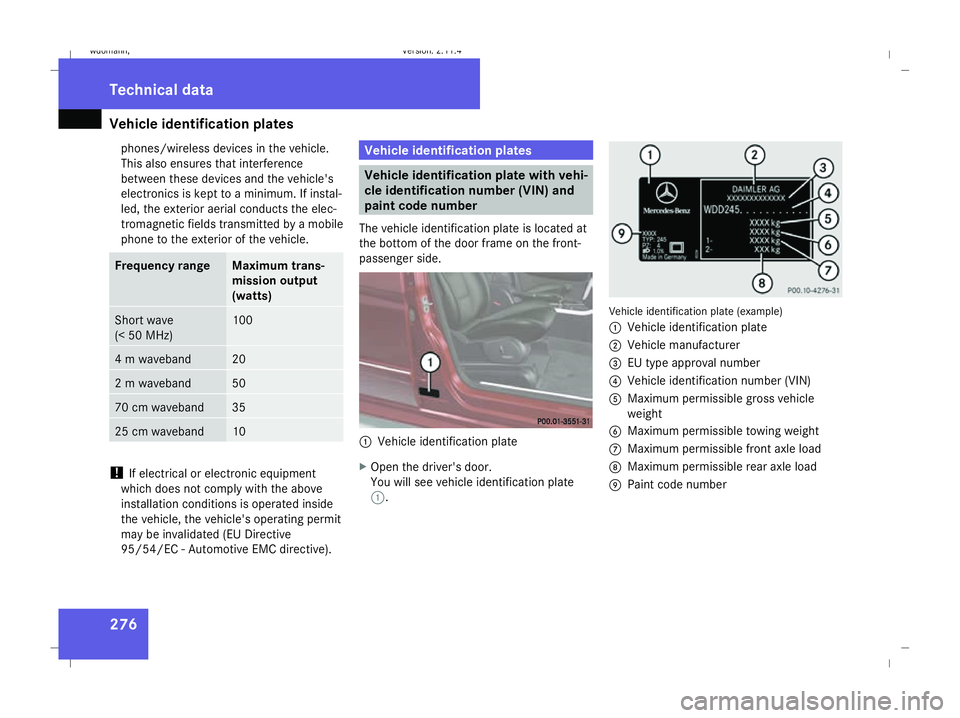
The vehicle identification plate is located at
the bottom of the door frame on the front-
passenger side. 1
Vehicle identification plate
X Open the driver's door.
You will see vehicle identification plate
1. Vehicle identification plate (example)
1
Vehicle identification plate
2 Vehicle manufacturer
3 EU type approval number
4 Vehicle identification number (VIN)
5 Maximum permissible gross vehicle
weight
6 Maximum permissible towing weight
7 Maximum permissible front axle load
8 Maximum permissible rear axle load
9 Paint code number Technical data
245_AKB; 2; 7, en-GB
wdomann,
Version: 2.11.4 2008-10-17T11:22:31+02:00 - Seite 276Dateiname: 6515_1640_02_buchblock.pdf; preflight