2008 MERCEDES-BENZ B-CLASS HATCHBACK buttons
[x] Cancel search: buttonsPage 14 of 305

11S
Seat Adjusting. ................................... 63, 65
Correct driver's seat position. ..........75
Folding the rear bench seat
forward. .......................................... 149
Removing/fitting the front-
passenger seat. .............................. 155
Removing/fitting the rear seat
backrest. ........................................ 151
Removing/fitting the rear seat
cushion. .......................................... 150
Seat belt
Adjusting the height.......................... 74
Display message .......................74, 212
Fastening. ......................................... 72
Warning lamp. .......................... 74, 228
Seat cushion
Removing (rear bench seat). ...........150
Seat heating......................................... .68
Seat ventilation Malfunction indicator lamp. ............222
Securing a load................................... 146
Selector lever Positions. .......................................... 93
Service indicator................................ 191
Service products................................ 291
Brake fluid. ..................................... 299Coolant.
.......................................... 297
Windscreen washer fluid. ................299
Settings
Factory (on-board computer). .........105
Setting the unit (on-board computer)
Speedometer. ................................. 107
Sidebags................................................ 41
Side window
Fault. .............................................. 238
Side windows
Cleaning. ........................................ 194
Opening/closing. .............................. 83
resetting ........................................... 84
Ski rack............................................... 143
Snow chains....................................... 182
Socket Cockpit. .......................................... 162
Luggage compartment. ...................163
Rear compartment. .........................163
Spare wheel
Fitting ............................................. 258
Storage location. ............................ 200
Technical data. ............................... 285
Speed
Technical data. ............................... 280
Speed limiter
Speedtronic. ................................... 116Speedometer
Additional speedometer (on-
board computer). ............................ 102
Setting the unit (on-board com-
puter). ............................................. 107
Speedtronic........................................ 116
Display message ............................. 220
Permanent. ..................................... 119
Variabl e.......................................... 117
SRS (Supplemental Restraint Sys-
tem)....................................................... 37
Display message ............................. 211
Warning lamp. .......................... 37, 226
Standard display (on-board com-
puter) ................................................... 102
Station see Radio
Status line (on-board computer)......... 99
Selecting the display....................... 107
Steering
Display message ............................. 215
Steering assistant STEER CONTROL ...56
Steering wheel Adjusting .......................................... 69
Buttons (on-board computer)............ 98
Gearshift buttons. ............................. 95
Stowage compartment ......................158
Armrest (front) ................................ 159
Armrest (under) .............................. 160
Backrest ......................................... 161 Index
245_AKB; 2; 7, en-GB
wdomann,
Version: 2.11.4
2008-10-17T11:22:31+02:00 - Seite 11 Dateiname: 6515_1640_02_buchblock.pdf; preflight
Page 63 of 305

Opening and closing
60 Opening and closing
Key
The key centrally locks/unlocks:
R the doors
R the tailgate
R the fuel filler flap G
Risk of accident
If children are left unsupervised in the vehi-
cle, they could:
R open a door from the inside at any time,
even if it has been locked
R start the vehicle using a key which has
been left in the vehicle
R release the parking brake
They could, thereby, endanger themselves
and others. Never leave children unsuper-
vised in the vehicle. Always take the key
with you when leaving the vehicle, even if
you are only leaving it for a short time. 1
Battery check lamp
2 j To lock the vehicle
3 Emergency key element release catch
4 k To unlock the vehicle
When unlocking, the turn signals flash once.
When locking, they flash three times.
If you do not open either a door or the tailgate
after you have unlocked the vehicle, it will
automatically relock after approximately 40
seconds.
Individual settings You can change the setting of the locking
system in such a way that only the driver's
door and the fuel filler flap are unlocked. This
could be useful if you frequently travel on your
own.X
To change the setting: press thek
and j buttons simultaneously for
approximately six seconds until the battery
check lamp flashes twice.
The key now functions as follows:
X To unlock the driver's door: press the
k button once.
X To unlock centrally: press thekbut-
ton twice.
X To lock centrally: press thejbutton.
Restoring the factory settings X
Press the kandj buttons simulta-
neously for approximately six seconds until
the battery check lamp flashes twice.
Additional information R
Convenience closing (Y page 85)
R Convenience opening (Y page 84)
R Opening and closing in an emergency
(Y page 241) Controls
245_AKB; 2; 7, en-GB
wdomann,
Version: 2.11.4 2008-10-17T11:22:31+02:00 - Seite 60Dateiname: 6515_1640_02_buchblock.pdf; preflight
Page 84 of 305

Lights
81Front overhead control panel (vehicles with but-
tons*)
1 £ To switch the rear interior lighting
on/off
2 ¥ To switch the automatic interior
lighting control on/off
3 X To switch the right-hand reading
lamp on/off
4 X To switch the left-hand reading lamp
on/off
5 ð To switch the front interior lighting
on/off Rear-compartment overhead control panel
1
To switch the reading lamp* off
2 To switch the reading lamp* on
Automatic interior lighting control X
To switch on (vehicles with a rocker
switch): set the rocker switch to centre
position 3.
X To switch on (vehicles with buttons*):
press the ¥button.
X To switch off (vehicles with a rocker
switch): set the rocker switch to
the ¥ position.
X To switch off (vehicles with buttons*):
press the ¥button.
The interior lighting automatically switches
on when it is dark, when you unlock the vehi- cle, open a door or remove the key from the
ignition lock.
The interior lighting switches off after a delay.
You can set the delayed switch-off using the
on-board computer (Y
page 109). If the door
is left open, the interior lighting goes out after
approximately five minutes.
Emergency accident lighting If the interior lighting is set to automatic, the
interior lighting is activated automatically if
the vehicle is involved in an accident.
X
To deactivate: press the hazard warning
lamp button (Y page 79).
or
X Lock and then unlock the vehicle using the
key. Controls
* optional
245_AKB; 2; 7, en-GB
wdomann,
Version: 2.11.4 2008-10-17T11:22:31+02:00 - Seite 81 ZDateiname: 6515_1640_02_buchblock.pdf; preflight
Page 98 of 305

Transmission
95
R
the vehicle pulling away more gently in
forward and reverse gears, unless the
accelerator pedal is depressed fully.
R an increase in traction: this improves the
driving stability of the vehicle on slippery
road surfaces, for example.
R the transmission shifting up sooner: the
vehicle is driven at lower engine speeds
and the wheels are less likely to spin.
Driving tips Accelerator pedal position
Your style of driving influences how AUTO-
TRONIC shifts gear:
R little throttle: early upshifts
R more throttle: late upshifts
Kickdown
Use kickdown for maximum acceleration.
X Depress the accelerator pedal beyond the
pressure point.
The transmission shifts to a lower gear
depending on the engine speed.
X Ease off the accelerator pedal once the
desired speed is reached.
The transmission shifts back up. Trailer towing
X
Drive in the middle of the engine speed
range on uphill gradients.
X Shift down to 3rdor2nd gear depending
on the incline of the uphill or downhill gra-
dient( Ypage 93), even if cruise control is
activated.
Working on the vehicle G
Risk of accident
Apply the handbrake and move the selector
lever to Pwhen working on the vehicle.
Otherwise, the vehicle could roll away. Steering wheel gearshift buttons
(manual operation)
It is possible to shift gear using either the
steering wheel gearshift buttons or the selec-
tor lever. The steering wheel gearshift buttons are on
the right and left-hand side of the steering
wheel. 1
Right-hand button: to shift up
2 Left-hand button: to shift down
Activating manual operation X
Press right-hand button 1or left-hand but-
ton 2on the steering wheel.
M is shown in the multi-function display.
Manual operation is activated.
Downshifting G
Risk of accident
Do not change down for additional engine
braking on a slippery road surface. This Controls
245_AKB; 2; 7, en-GB
wdomann,
Version: 2.11.4
2008-10-17T11:22:31+02:00 - Seite 95 ZDateiname: 6515_1640_02_buchblock.pdf; preflight
Page 101 of 305

On-board computer
98 Clock
On vehicles without an audio system or with
Audio 5*/Audio 20*, you can set the time
using the on-board computer (Y page 108).Outside temperature display
G
Risk of accident
The road surface may be icy, especially in
wooded areas or on bridges, even if tem-
peratures are just above freezing point. The
vehicle could skid if you fail to adapt your
driving style. You should therefore always
adapt your driving style and speed to suit
the weather conditions.
Changes in the outside temperature are dis-
played after a short delay. On-board computer
Points to remember
The on-board computer is activated as soon
as you turn the key to position 1in the ignition
lock. You can use the on-board computer to
call up information relating to your vehicle
and to make and adjust settings. G
Risk of accident
Only use the on-board computer when road
and traffic conditions permit. You would
otherwise be distracted and unable to con-
centrate properly on driving, and could
cause an accident. Multi-function steering wheel
You can control the multi-function display and
the settings in the on-board computer using
the buttons on the multi-function steering
wheel. 1
Multi-function display
2
æç
R
Selects submenus in the Set-
tings menu
R Changes values
R Adjusts the volume 3
st
Accepts or rejects/ends a call*Controls
* optional
245_AKB; 2; 7, en-GB
wdomann,
Version: 2.11.4 2008-10-17T11:22:31+02:00 - Seite 98Dateiname: 6515_1640_02_buchblock.pdf; preflight
Page 104 of 305

On-board computer
101Function
1
Operation
menu (Ypage 101)
R trip meter and total distance
recorder (standard display)
(Y page 102)
R tyre pressure loss warning
(Y page 179)
R digital speedometer or outside tem-
perature (Y page 102)
R ASSYST PLUS service interval dis-
play (Y page 191)
R Engine oil level* (Y page 172) 2
Audio*/DVD*
menu (Ypage 102)
R radio station (Y page 102)
R CD player* (Y page 103)
R audio drive or
media* ( Ypage 103)
R DVD video* (Y page 104) 3
Navigation* menu (NAV)
(Y
page 104) Function
4
Message memory
10
menu (Display
messages) ( Ypage 105) 5
Settings
menu (Ypage 105)
R resetting to factory settings
(Y page 105)
R selecting submenus (Y page 106) 6
Trip computer
menu (Ypage 111)
R consumption statistics
(Y page 111)
R range (Y page 112) 7
Telephone
* menu (Ypage 112) The number of menus shown depends on the
optional equipment in the vehicle.
The generic terms in the table overview are
intended to help you navigate through the
menus. The terms themselves are not always
displayed in the multi-function display.
For the Audio 5*, the on-board computer dis-
plays the Audio* and Telephone* menus in
English. The language for these menus is not dependent on the language selected for the
multi-function display.
Audio 20*, Audio 50 APS* and COMAND
APS*:
Depending on the audio system* fitted, the
Audio*,
Navigation* and Telephone*
menus are slightly different. The examples
given in this Owner's Manual apply to vehicles
equipped with COMAND APS*. Operation menu
i Please refer to the menu overview
(Y page 100).
Use the buttons on the multi-function steer-
ing wheel.
X Press the èor· button to select the
standard display.
You can select the following functions in the
Operation menu by pressing the jor
k button:
R trip meter and total distance recorder
(standard display)
R tyre pressure loss warning (Y page 179)
10 The menu is only visible when there is a display message. Controls
* optional
245_AKB; 2; 7, en-GB
wdomann
,V ersion: 2.11.4
2008-10-17T11:22:31+02:00 - Seite 101 ZDateiname: 6515_1640_02_buchblock.pdf; preflight
Page 105 of 305
On-board computer
102
R
digital speedometer or outside tempera-
ture
R ASSYST PLUS service interval display
(Y page 191)
R engine oil level* (Y page 172)
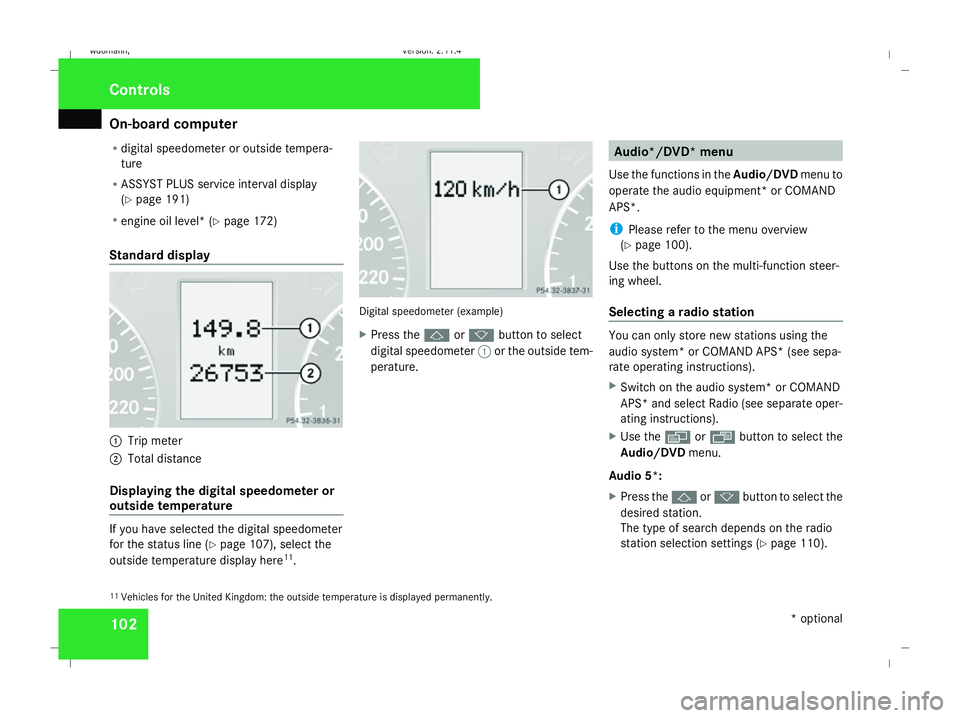
Standard display 1
Trip meter
2 Total distance
Displaying the digital speedometer or
outside temperature If you have selected the digital speedometer
for the status line (Y
page 107), select the
outside temperature display here 11
. Digital speedometer (example)
X
Press the jork button to select
digital speedometer 1or the outside tem-
perature. Audio*/DVD* menu
Use the functions in the Audio/DVDmenu to
operate the audio equipment *or COMAND
APS*.
i Please refer to the menu overview
(Y page 100).
Use the buttons on the multi-function steer-
ing wheel.
Selecting a radio station You can only store new stations using the
audio system* or COMAND APS* (see sepa-
rate operating instructions).
X Switch on the audio system* or COMAND
APS* and select Radio (see separate oper-
ating instructions).
X Use the èor· button to select the
Audio/DVD menu.
Audio 5*:
X Press the jork button to select the
desired station.
The type of search depends on the radio
station selection settings (Y page 110).
11 Vehicles for the United Kingdom: the outside temperature is displayed permanently. Controls
* optional
245_AKB; 2; 7, en-GB
wdomann,
Version: 2.11.4 2008-10-17T11:22:31+02:00 - Seite 102Dateiname: 6515_1640_02_buchblock.pdf; preflight
Page 107 of 305
On-board computer
104medium (see separate operating instruc-
tions).
X Use the èor· button to select the
Audio/DVD menu.
X To select next/previous track: briefly
press the jork button.
X To select a track from the track list
(rapid scrolling): press and hold the
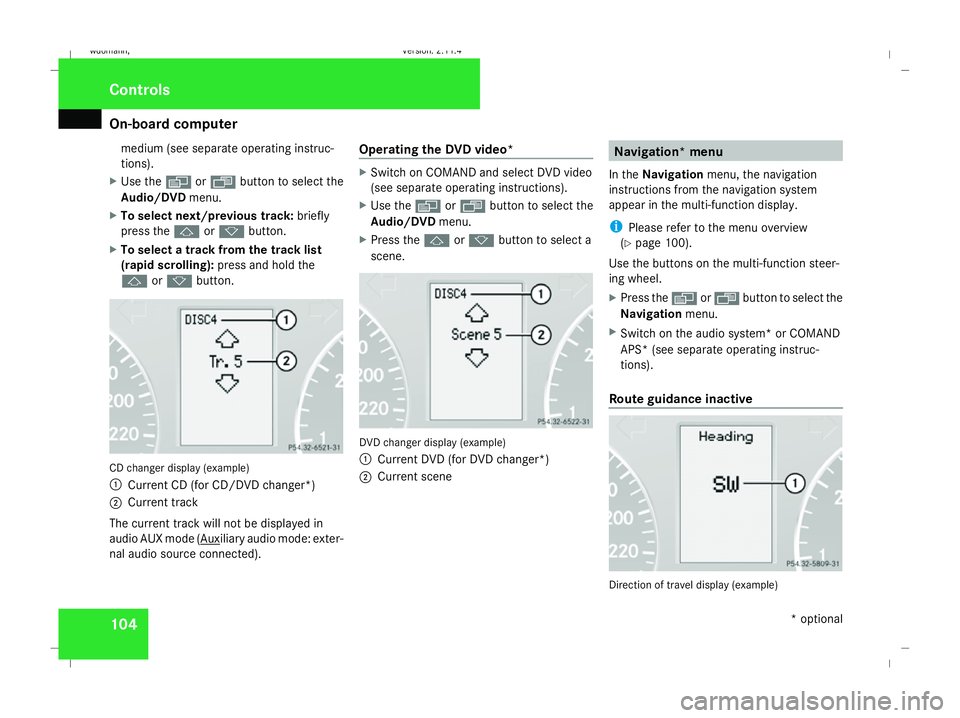
j ork button. CD changer display (example)
1
Current CD (for CD/DVD changer*)
2 Current track
The current track will not be displayed in
audio AUX mode ( Auxiliary audio mode: exter-
nal audio source connected). Operating the DVD video* X
Switch on COMAND and select DVD video
(see separate operating instructions).
X Use the èor· button to select the
Audio/DVD menu.
X Press the jork button to select a
scene. DVD changer display (example)
1
Current DVD (for DVD changer*)
2 Current scene Navigation* menu
In the Navigation menu, the navigation
instructions from the navigation system
appear in the multi-function display.
i Please refer to the menu overview
(Y page 100).
Use the buttons on the multi-function steer-
ing wheel.
X Press the èorÿ button to select the
Navigation menu.
X Switch on the audio system* or COMAND
APS* (see separate operating instruc-
tions).
Route guidance inactive Direction of travel display (example)Controls
* optional
245_AKB; 2; 7, en-GB
wdomann
, Version: 2.11.4 2008-10-17T11:22:31+02:00 - Seite 104Dateiname: 6515_1640_02_buchblock.pdf; preflight