Page 35 of 72
AUDIO/VIDEO SYSTEM
219 �
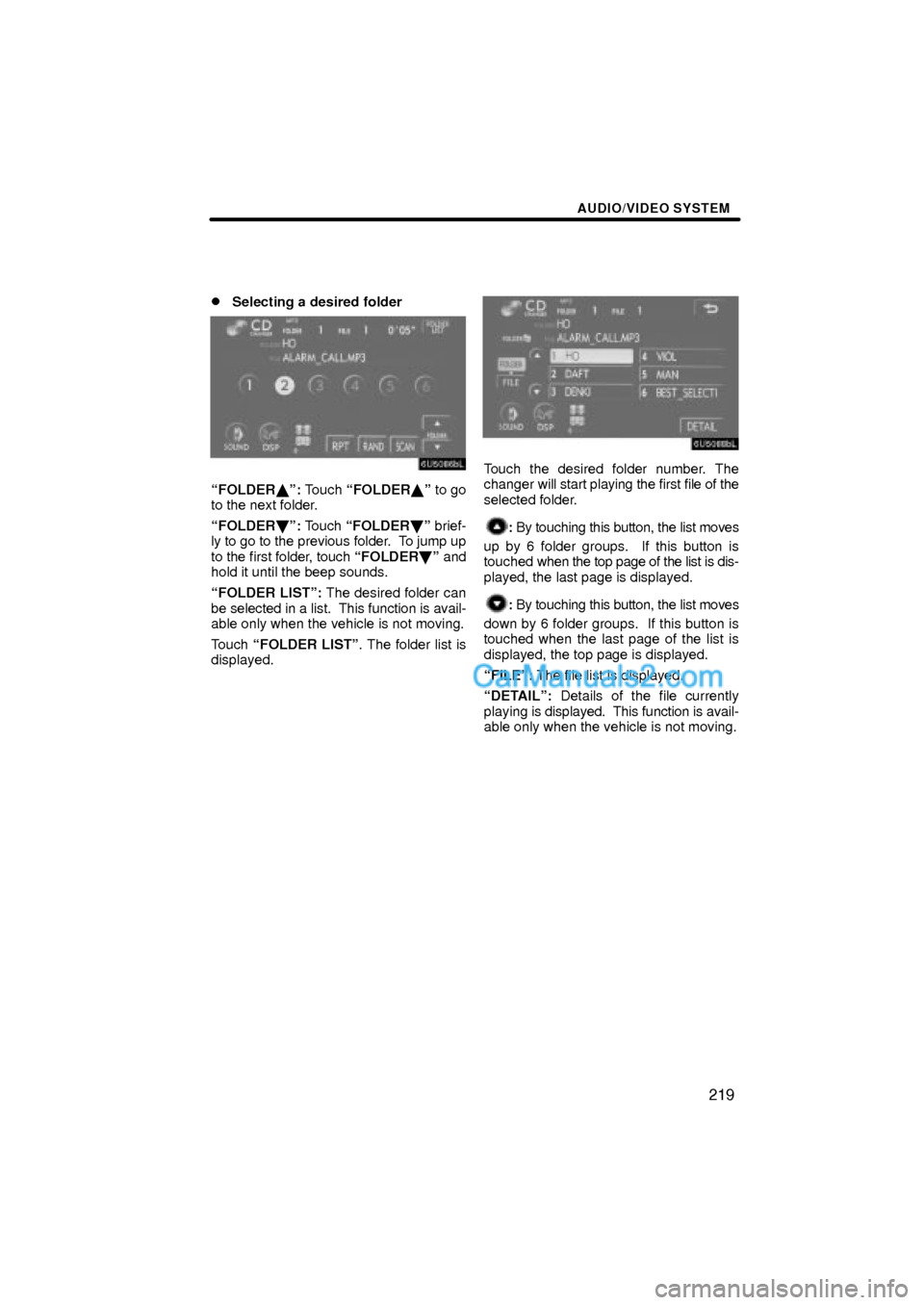
Selecting a desired folder
FOLDER�º: Touch FOLDER�º to go
to the next folder.
FOLDER�º: Touch FOLDER�º brief-
ly to go to the previous folder. To jump up
to the first folder, touch FOLDER�º and
hold it until the beep sounds.
FOLDER LISTº: The desired folder can
be selected in a list. This function is avail-
able only when the vehicle is not moving.
Touch FOLDER LISTº. The folder list is
displayed.
Touch the desired folder number. The
changer will start playing the first file of the
selected folder.
: By touching this button, the list moves
up by 6 folder groups. If this button is
touched when the top page of the list is dis-
played, the last page is displayed.
: By touching this button, the list moves
down by 6 folder groups. If this button is
touched when the last page of the list is
displayed, the top page is displayed.
FILEº: The file list is displayed.
DETAILº: Details of the file currently
playing is displayed. This function is avail-
able only when the vehicle is not moving.
Page 36 of 72

AUDIO/VIDEO SYSTEM
220 �
Selecting a desired file
SEEK/TRACKº button: Use for direct
access to a desired file.
Push the
º or º button of SEEK/
TRACKº and repeat it until the desired file
number appears on the display. As you re-
lease the button, the changer will start
playing the selected file from the begin-
ning. When RANDº or FLD´RPTº is on,
the file number within the folder you are
currently being listened to appears.
Fast forward: Push the
º button of
SEEK/TRACKº and hold it to fast for-
ward the disc. When you release the but-
ton, the changer will resume playing from
that position.
Reverse: Push the
º button of SEEK/
TRACKº and hold it to reverse the disc.
When you release the button, the changer
will resume playing.
TUNE´FILEº knob: Use for direct access
to a desired file in the disc.
Turn the TUNE´FILEº knob to step up or
down all the files in the disc you are cur-
rently listening to. The file number ap-
pears on the display. When RANDº or
FLD´RPTº is on, all the files in the folder
you are currently being listened to can be
stepped up or down.
Page 38 of 72
AUDIO/VIDEO SYSTEM
222 �
Searching for a desired file
While the disc is playing, touch
SCANº on the screen briefly.
SCANº appears on the screen. The
changer will play the next file in the folder
for 10 seconds, then scan again. To select
a file, touch SCANº on the screen once
again. If the changer reaches the end of
the folder, it will continue scanning from file
1.
After all the files are scanned in one pass,
normal play resumes.
�Searching for a desired folder
While the disc is playing, touch
SCANº on the screen and hold it until
the FLD´SCANº appears on the
screen.
The program at the beginning of each fold-
er will be played for 10 seconds. To contin-
ue listening to the program of your choice,
touch SCANº on the screen once again.
After all the folders are scanned in one
pass, normal play resumes.
Page 39 of 72

AUDIO/VIDEO SYSTEM
223 �
Other functions
RPTº: Use it for automatic repeat of the
file or folder you are currently listening to.
Repeating a file Ð
While the file is playing, touchRPTº
briefly.
RPTº appears on the screen. When the
file is finished, the changer will automati-
cally go back to the beginning of the file
and play the file again. To cancel it, touch
RPTº button once again.
Repeating a folder Ð
While the folder is playing, touch RPTº
and hold it until the FLD´RPTº appears
on the screen.
When the folder is finished, the changer
will automatically go back to the beginning
of the folder and play the folder again. To
cancel it, touch RPTº once again.RANDº: Use it for automatic and random
selection of the folder or the disc which you
are currently listening to.
Playing the files in one folder in random
order Ð
While the disc is playing, touch
RANDº briefly.
RANDº appears on the screen. The sys-
tem selects a file in the folder you are cur-
rently listening to. To cancel it, touch
RANDº once again.
Playing the files in all the folders on one
disc in random order Ð
While the disc is playing, touch
RANDº and hold it until the
FLD´RANDº appears on the screen.
The system selects a file in all the folders.
To cancel it, touch RANDº once again.
When a file is skipped or the system is in-
operative, touch RANDº to reset.
Page 40 of 72

AUDIO/VIDEO SYSTEM
224
(f) If the changer malfunctions
If the changer or another unit equipped
with the changer malfunctions, your audio
system will display following messages.
If No CDº appears on the display: It in-
dicates that there is no disc in the CD
changer.
If CD �� Checkº appears on the dis-
play: It indicates that the disc dirty, dam-
aged, or it was inserted upside down.
Clean the disc or insert it correctly. If a disc
which is not playable is inserted, CD ��
Checkº will also appear on the screen. For
appropriate discs for this player, see Au-
dio/video system operating hintsº on page
248.
If CD Errorº appears on the display:
The following causes are possible.
�There is a trouble inside the system.
Eject the disc.
�The inside of the changer unit may be
too hot due to the very high ambient
temperature. Eject the disc and allow
the changer to cool down.
If NO MUSIC FILEº appears on the dis-
play: It indicates that the disc has no play-
able data.
If the malfunction is not rectified: Take
your vehicle to your dealer.
If an MP3/WMA disc contains CD-DA
files, only CD-DA files are played. If an
MP3/WMA disc contains files other than
CD-DA, only MP3/WMA files are played.The DVD changer can play audio CDs,
video CDs, CD text, WMA discs, MP3
discs, DVD video discs and DVD audio
discs.
�Audio CD, CD text 215. . . . . . . . .
�MP3/WMA disc 218. . . . . . . . . . .
�DVD video, DVD audio 229. . . . .
�Video CD 241. . . . . . . . . . . . . . . . .
For appropriate discs for this changer, see
Audio/video system operating hintsº on
page 248.
For safety reasons, you can enjoy DVD
video discs, DVD audio discs and video
CDs only when the vehicle is completely
stopped with the ENGINE START STOPº
switch is in the ACCESSORY or IGNITION
ON mode and the parking brake applied.
While you are driving, you can hear audio
alone even in the DVD video, DVD audio
or video CD mode.
Ð DVD changer operation
Page 41 of 72
AUDIO/VIDEO SYSTEM
225
(a) Inserting or ejecting discs
The ENGINE START STOPº switch must
be in the ACCESSORY or IGNITION ON
mode.
Your DVD changer can store up to 6 discs.
�Setting a single disc:
1. Push the LOADº button briefly.
The amber indicators at both ends of the
slot start blinking. After the amber indica-
tors change to green and stay on, the DVD
changer door will open.
2. Insert only one disc while the DVD
changer door is open.
You can set a disc at the lowest empty disc
number.
After insertion, the set disc is automatically
loaded.
If the label faces down, the disc cannot be
played. In this case, DISC � Checkº ap-
pears on the screen.
If you do not insert the disc within 15 sec-
onds after pushing the LOADº button, the
beep will sound and the operation will be
canceled automatically.
If you need to insert the next disc, repeat
the same procedure to insert another disc.
Page 42 of 72
AUDIO/VIDEO SYSTEM
226 �
Setting all the discs:
1. Push the LOADº button until you
hear a beep.
The amber indicators at both ends of the
slot start blinking. After the amber indica-
tors change to green and stay on, the DVD
changer door will open.
2. Insert only one disc while the DVD
changer door is open.
The DVD changer door closes and the am-
ber indicators start blinking.3. Insert the next disc after the amber
indicators change to green and stay on
and the DVD changer door opens.
4. Repeat this procedure until you in-
sert all the discs.
To cancel the operation, push the LOADº
or DISC´AUXº button.
If you do not insert the discs within 15 sec-
onds after pushing the LOADº button, the
beep will sound and the operation will be
canceled automatically.
NOTICE
Do not insert one disc stacked on top
of another one or feed them in contin-
uously, to prevent discs from getting
stuck in the changer.
Page 44 of 72

AUDIO/VIDEO SYSTEM
228
(b) Playing a disc
Push the DISC´AUXº button if the disc
are already loaded in the DVD changer.
The DVD CHANGERº screen will be dis-
played.
The discs set in the DVD changer are
played continuously, starting with the last
disc you inserted. The disc number of the
disc currently being played, the track or
title and chapter number and the time from
the beginning of the program are shown on
the display.
Audio disc and MP3/WMA disc only Ð
When play of one disc ends, the first track
of the following disc starts. When play of
the final disc ends, play of the first disc
starts again.
The changer will skip any empty disc trays.(c) Selecting a desired disc
On the screen:
Touch the desired disc number.
The selected disc number is highlighted.
The changer will start playing the selected
disc from the first track.
On the audio panel:
Push the
º or º button of CH/
DISCº.
When you release the button, the changer
will start playing the selected disc from the
first track.


