Page 145 of 490

In this mode, ESP and TCS, except for the ªlimited slipº
feature described in the TCS section, are turned off until
the vehicle reaches a speed of 40 mph (64 km/h). At 40
mph (64 km/h) the system returns to ªPartial Offº mode,
described above. When the vehicle speed drops below 35
mph (56 km/h) the ESP system shuts off. ESP is deacti-
vated at low vehicle speeds so that it will not interfere
with off-road driving but ESP function returns to provide
the stability feature at speeds above 40 mph (64 km/h).
The ªESP/TCS Indicator Lightº will always be illumi-
nated when ESP is off. To turn ESP on again, momen-
tarily depress the ªESP OFFº switch. This will restore the
normal ªESP Onº mode of operation.
NOTE:The ªESP OFFº message will display and the
audible chime will sound when the gear selector is
placed into the ªPº (Park) position from any other
position, and then moved out of the ªPº (Park) position.
This will occur even if the message was previously
cleared.WARNING!
With the ESP switched off, the enhanced vehicle
stability offered by ESP and ERM are unavailable. In
an emergency evasive maneuver, the ESP and ERM
systems will not engage to assist in maintaining
stability. The ªFull Offº ESP mode is intended for
off-road use only.
4WD Low Range
Full Off
This is the normal operating mode for ESP in 4WD low
range. Whenever the vehicle is started in 4WD low range,
or the transfer case (if equipped) is shifted from 4WD
high range or neutral to 4WD low range, the ESP system
will be in this ªFull Offº mode. In 4WD low range, ESP
and TCS, except for the ªlimited slipº feature described
in the TCS section, are turned off until the vehicle reaches
UNDERSTANDING THE FEATURES OF YOUR VEHICLE 145
3
Page 146 of 490

a speed of 40 mph (64 km/h). At 40 mph (64 km/h), the
normal ESP stability function returns but TCS remains
off. When the vehicle speed drops below 35 mph (56
km/h), the ESP system shuts off. ESP is deactivated at
low vehicle speeds in 4WD low range so that it will not
interfere with off-road driving but ESP function returns
to provide the stability feature at speeds above 40 mph
(64 km/h). The9ESP/TCS Indicator Light9will always be
illuminated in 4WD low range when ESP is off.
NOTE:The ªESP OFFº message will display and the
audible chime will sound when the gear selector is
placed into the ªPº (Park) position from any other
position, and then moved out of the ªPº (Park) position.
This will occur even if the message was previously
clearedWARNING!
With the ESP switched off, the enhanced vehicle
stability offered by ESP and ERM are unavailable. In
an emergency evasive maneuver, the ESP and ERM
systems will not engage to assist in maintaining
stability. The ªFull Offº mode is intended for off-
road use only.
TSC (Trailer Sway Control)
TSC uses sensors in the vehicle to recognize an exces-
sively swaying trailer and will take the appropriate
actions to attempt to stop the sway. The system may
reduce engine power and apply the brake of the appro-
priate wheel(s) to counteract the sway of the trailer. TSC
will become active automatically once an excessively
swaying trailer is recognized. No driver action is re-
quired. Note that TSC cannot stop all trailers from
146 UNDERSTANDING THE FEATURES OF YOUR VEHICLE
Page 153 of 490
Rear Park Assist Warning Display
The Rear Park Assist Warning Display, located in the
headliner near the flipper glass, provides both visual and
audible warnings to indicate the distance between the
rear fascia and the detected obstacle.When the ignition is changed to the RUN/ON position,
the warning display will turn ON all of its LEDs for
about 1 second. Each side of the warning display has 6
yellow and 2 red LEDs. The vehicle is close to the obstacle
when the red LED is ON.
The system dimly illuminates the two outer most yellow
LED's when it is ON and detecting no obstacles. The
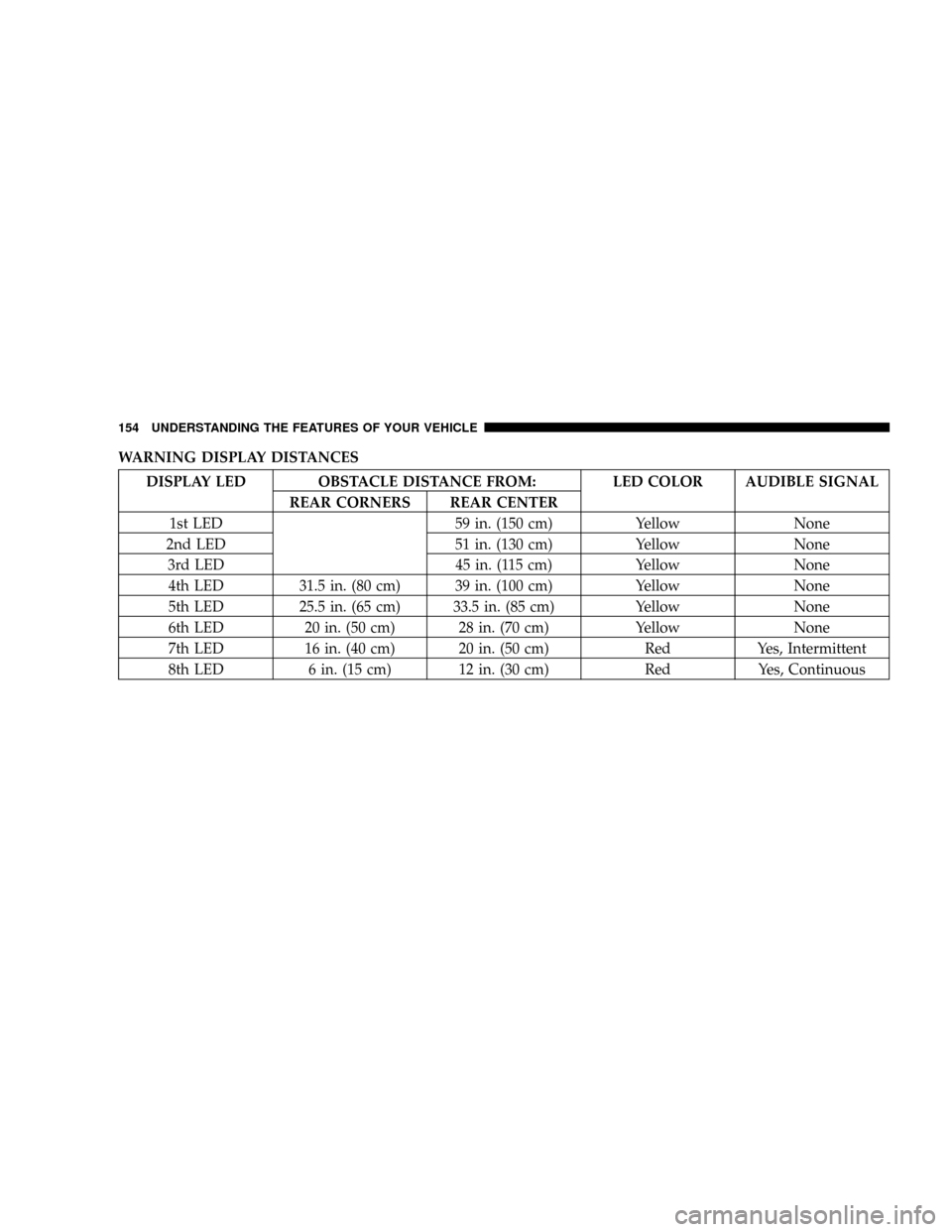
following chart shows the warning display operation
when the system is detecting an obstacle:
Rear Park Assist Display
UNDERSTANDING THE FEATURES OF YOUR VEHICLE 153
3
Page 154 of 490
WARNING DISPLAY DISTANCES
DISPLAY LED OBSTACLE DISTANCE FROM: LED COLOR AUDIBLE SIGNAL
REAR CORNERS REAR CENTER
1st LED 59 in. (150 cm) Yellow None
2nd LED 51 in. (130 cm) Yellow None
3rd LED 45 in. (115 cm) Yellow None
4th LED 31.5 in. (80 cm) 39 in. (100 cm) Yellow None
5th LED 25.5 in. (65 cm) 33.5 in. (85 cm) Yellow None
6th LED 20 in. (50 cm) 28 in. (70 cm) Yellow None
7th LED 16 in. (40 cm) 20 in. (50 cm) Red Yes, Intermittent
8th LED 6 in. (15 cm) 12 in. (30 cm) Red Yes, Continuous
154 UNDERSTANDING THE FEATURES OF YOUR VEHICLE
Page 155 of 490

NOTE:The Rear Park Assist system will MUTE the
radio, if on, when the system is sounding an audio tone.
Enable/Disable the Rear Park Assist System
The Rear Park Assist System can be enabled and disabled
with a switch located on the upper switch bank of the
instrument panel.When the switch is pressed to disable the system, the
instrument cluster will display the9PARK ASSIST DIS-
ABLED9message. Refer to ªElectronic Vehicle Informa-
tion Center (EVIC)º in Section 4 of this manual. When the
shifter is changed to R (Reverse) and the system is
disabled, the instrument cluster will actuate a single
chime, once per ignition cycle, and it will display the
message.
The Rear Park Assist Switch LED will be ON when the
Rear Park Assist System is disabled or defective. The
Rear Park Assist Switch LED will be OFF when the
system is enabled.
Service the Rear Park Assist System
When the Rear Park Assist System is defective, the
instrument cluster will actuate a single chime, once per
ignition cycle, and it will display the9SERVICE PARK
ASSIST SYSTEM9message. Refer to ªElectronic Vehicle
Information Center (EVIC)º in Section 4 of this manual.
Rear Park Assist Switch
UNDERSTANDING THE FEATURES OF YOUR VEHICLE 155
3
Page 160 of 490

Programming HomeLinkT
Before You Begin
If you have not trained any of the HomeLinktbuttons,
erase all channels before you begin training.
To do this, press and hold the two outside buttons for 20
seconds. The EVIC will display ªCLEARING CHAN-
NELS.º Release the buttons when the EVIC message
states ªCHANNELS CLEARED.º
It is recommended that a new battery be placed in the
hand-held transmitter of the device being programmed
to HomeLinktfor more efficient training and accurate
transmission of the radio-frequency signal.
Your vehicle should be parked outside of the garage
while training.
1. Turn the ignition switch to the ON/RUN position.2. Place the hand-held transmitter 1±3 inches (3±8 cm)
from the HomeLinktbuttons while keeping the EVIC
display in view.
For optimal training, point the battery end of the hand-
held transmitter away from the HomeLinkt.
3. Simultaneously press and hold both the chosen
HomeLinktbutton and the hand-held transmitter button
until the EVIC display changes from ªCHANNEL #
TRAININGº to ªCHANNEL # TRAINED.º
Then release both the HomeLinktand hand-held trans-
mitter buttons.
If the EVIC display states ªDID NOT TRAINº repeat Step
3. If the signal is too weak, replace the battery in the
original hand-held transmitter.
It may take up to 30 seconds, or longer in rare cases. The
garage door may open & close while you train.
160 UNDERSTANDING THE FEATURES OF YOUR VEHICLE
Page 161 of 490

NOTE:Some gate operators and garage door openers
may require you to replace Step #3 with procedures
noted in the ªGate Operator/Canadian Programmingº
section.
4. Press and hold the just-trained HomeLinktbutton. If
the channel has been trained, the EVIC display will now
state ªCHANNEL # TRANSMIT.º
If the EVIC display still states ªCHANNEL # TRAIN-
INGº repeat Step 3.
NOTE:After training a HomeLinktchannel, if the
garage door does not operate with HomeLinktand the
garage door opener was manufactured after 1995, the
garage door opener may have rolling code. If so, proceed
to the heading ªProgramming A Rolling Code System.º
5. PROGRAMMING A ROLLING CODE SYSTEM
At the garage door opener motor (in the garage), locate
the ªlearnº or ªtrainingº button.This can usually be found where the hanging antenna
wire is attached to the garage door opener motor (it is
NOT the button normally used to open & close the door).
1 Ð Garage Door Opener
2 Ð Training ButtonUNDERSTANDING THE FEATURES OF YOUR VEHICLE 161
3
Page 162 of 490

6. Firmly press and release the ªlearnº or ªtrainingº
button. The name and color of the button may vary by
manufacturer.
NOTE:There are 30 seconds in which to initiate the next
step after the ªLearnº button has been pressed.
7. Return to the vehicle and press the programmed
HomeLinktbutton twice (holding the button for 2 sec-
onds each time). If the device is plugged in and activates,
programming is complete.
If the device does not activate, press the button a third
time (for 2 seconds) to complete the training.
If you are have any problems, or require assistance,
please call toll-free 1±800±355±3515 or, on the Internet at
www.HomeLink.com for information or assistance.
To program the remaining two HomeLinktbuttons,
repeat each step for each remaining button. DO NOT
erase the channels.Gate Operator/Canadian Programming
Canadian radio-frequency laws require transmitter sig-
nals to ªtime-outº (or quit) after several seconds of
transmission ± which may not be long enough for
HomeLinktto pick up the signal during programming.
Similar to this Canadian law, some U.S. gate operators are
designed to ªtime-outº in the same manner.
It may be helpful to unplug the device during the cycling
process to prevent possible overheating of the garage
door or gate motor.
If you are having difficulties programming a garage door
opener or a gate operator, replace ªProgramming
HomeLinkº Step 3 with the following:
3. Continue to press and hold the HomeLinktbutton
while you press and release - every two seconds
(ªcycleº) your hand-held transmitter until HomeLinkt
has successfully accepted the frequency signal. The
EVIC display will change from ªCHANNEL # TRAIN-
INGº to ªCHANNEL # TRAINED.º
162 UNDERSTANDING THE FEATURES OF YOUR VEHICLE