Page 112 of 393
Features of your vehicle96 3Why didn’t my air bag go off in a
collision? (Inflation and non-inflation conditions
of the air bag)There are many types of accidents in
which the air bag would not be expect-
ed to provide additional protection.
These include rear impacts, second or
third collisions in multiple impact
accidents, as well as low speed
impacts. In other words, just because
your vehicle is damaged and even if it
is totally unusable, don’t be surprised
that the air bags did not inflate.
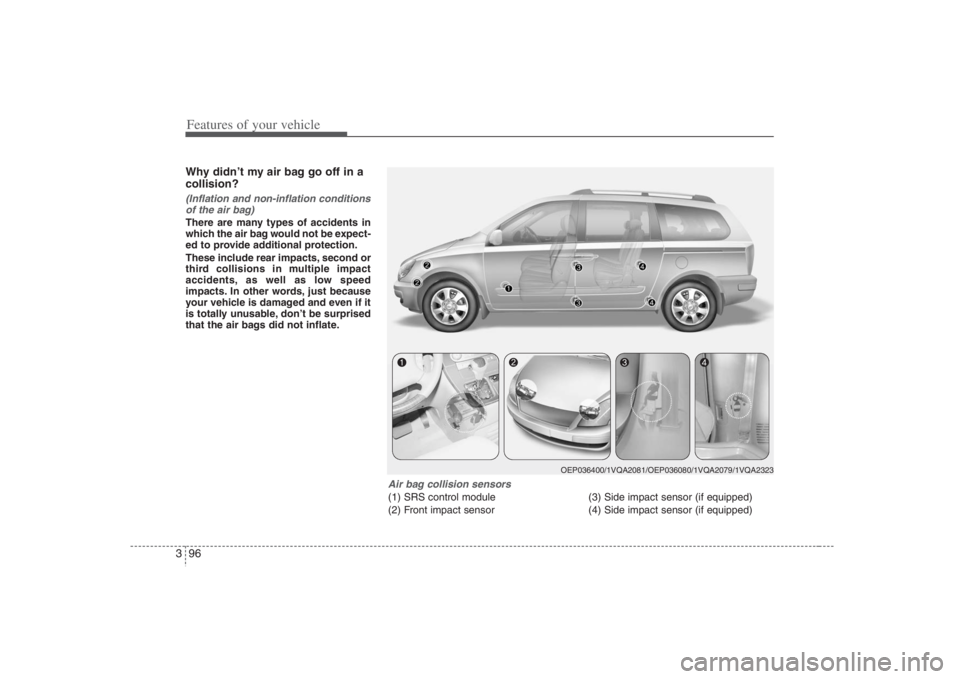
Air bag collision sensors(1) SRS control module
(2) Front impact sensor(3) Side impact sensor (if equipped)
(4) Side impact sensor (if equipped)
OEP036400/1VQA2081/OEP036080/1VQA2079/1VQA2323
Page 113 of 393
397
Features of your vehicle
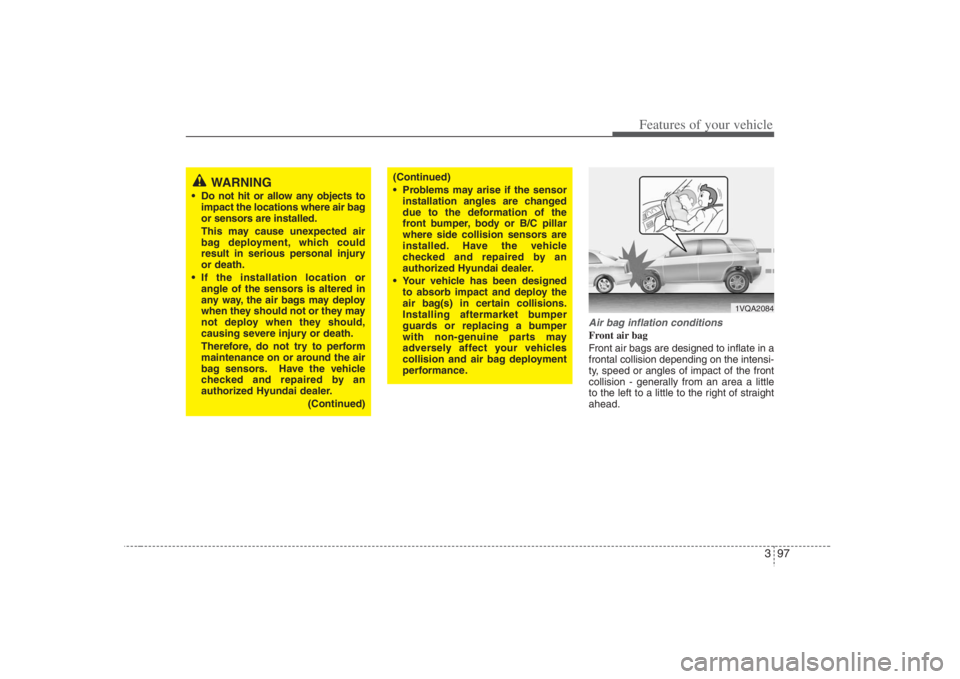
Air bag inflation conditionsFront air bag
Front air bags are designed to inflate in a
frontal collision depending on the intensi-
ty, speed or angles of impact of the front
collision - generally from an area a little
to the left to a little to the right of straight
ahead.
1VQA2084
WARNING
Do not hit or allow any objects to
impact the locations where air bag
or sensors are installed.
This may cause unexpected air
bag deployment, which could
result in serious personal injury
or death.
If the installation location or
angle of the sensors is altered in
any way, the air bags may deploy
when they should not or they may
not deploy when they should,
causing severe injury or death.
Therefore, do not try to perform
maintenance on or around the air
bag sensors. Have the vehicle
checked and repaired by an
authorized Hyundai dealer.
(Continued)
(Continued)
Problems may arise if the sensor
installation angles are changed
due to the deformation of the
front bumper, body or B/C pillar
where side collision sensors are
installed. Have the vehicle
checked and repaired by an
authorized Hyundai dealer.
Your vehicle has been designed
to absorb impact and deploy the
air bag(s) in certain collisions.
Installing aftermarket bumper
guards or replacing a bumper
with non-genuine parts may
adversely affect your vehicles
collision and air bag deployment
performance.
Page 114 of 393
Features of your vehicle98 3Side impact air bags (if equipped)
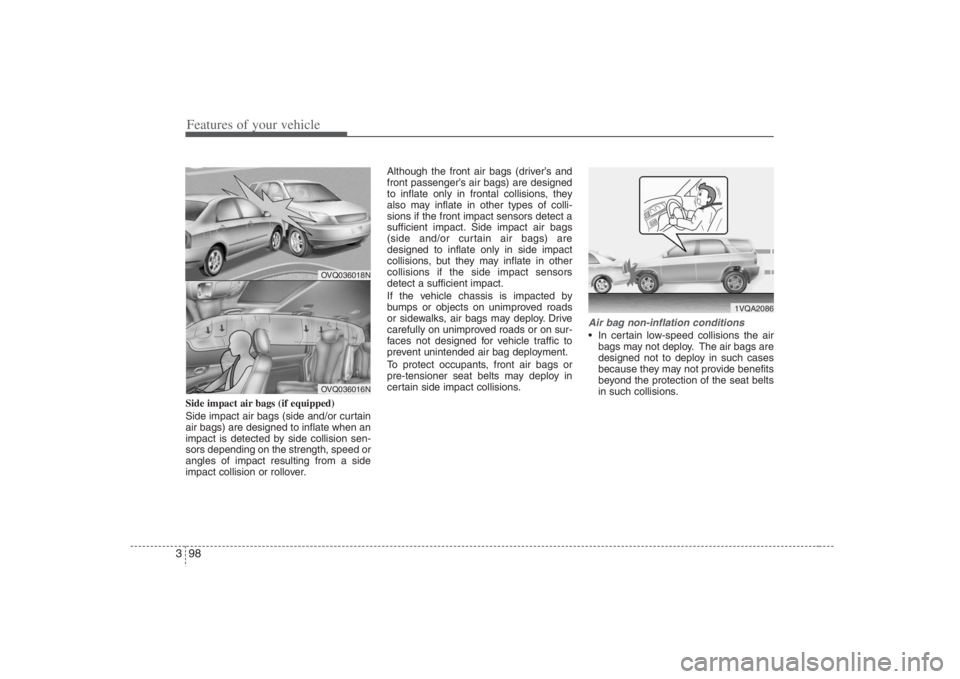
Side impact air bags (side and/or curtain
air bags) are designed to inflate when an
impact is detected by side collision sen-
sors depending on the strength, speed or
angles of impact resulting from a side
impact collision or rollover.Although the front air bags (driver’s and
front passenger’s air bags) are designed
to inflate only in frontal collisions, they
also may inflate in other types of colli-
sions if the front impact sensors detect a
sufficient impact. Side impact air bags
(side and/or curtain air bags) are
designed to inflate only in side impact
collisions, but they may inflate in other
collisions if the side impact sensors
detect a sufficient impact.
If the vehicle chassis is impacted by
bumps or objects on unimproved roads
or sidewalks, air bags may deploy. Drive
carefully on unimproved roads or on sur-
faces not designed for vehicle traffic to
prevent unintended air bag deployment.
To protect occupants, front air bags or
pre-tensioner seat belts may deploy in
certain side impact collisions.
Air bag non-inflation conditions In certain low-speed collisions the air
bags may not deploy. The air bags are
designed not to deploy in such cases
because they may not provide benefits
beyond the protection of the seat belts
in such collisions.
OVQ036018NOVQ036016N
1VQA2086
Page 154 of 393
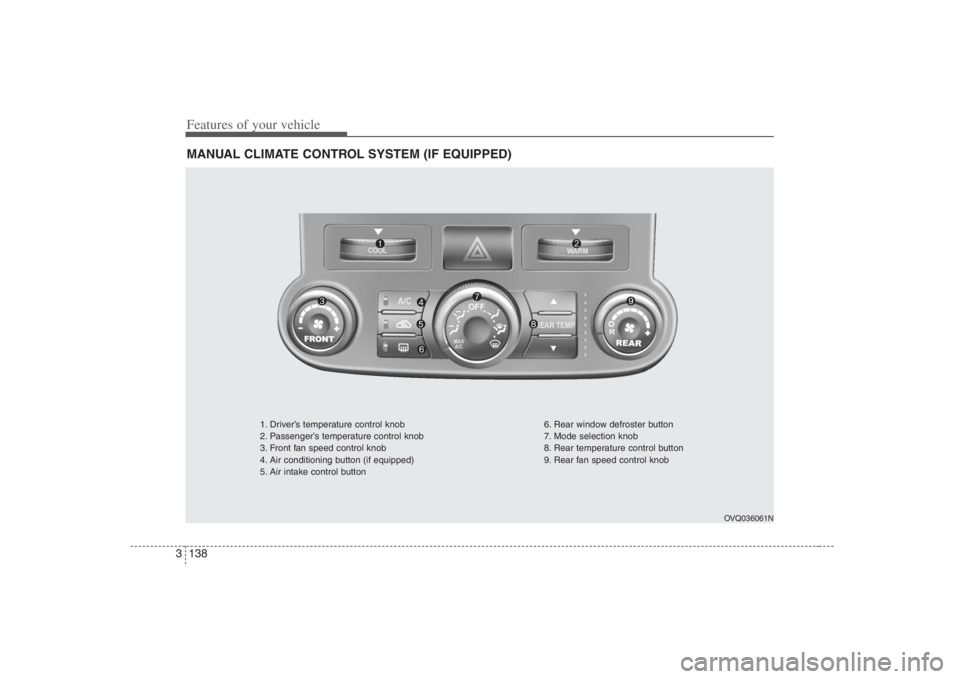
Features of your vehicle138 3MANUAL CLIMATE CONTROL SYSTEM (IF EQUIPPED)
OVQ036061N
1. Driver’s temperature control knob
2. Passenger’s temperature control knob
3. Front fan speed control knob
4. Air conditioning button (if equipped)
5. Air intake control button6. Rear window defroster button
7. Mode selection knob
8. Rear temperature control button
9. Rear fan speed control knob
Page 156 of 393
Features of your vehicle140 3✽
✽
NOTICEIt should be noted that prolonged oper-
ation of the heating in recirculated air
position will cause fogging of the wind-
shield and side windows and the air
within the passenger compartment will
become stale.
In addition, prolonged use of the air
conditioning with the “recirculated air
position” selected, will result in exces-
sively dry air in the passenger compart-
ment.
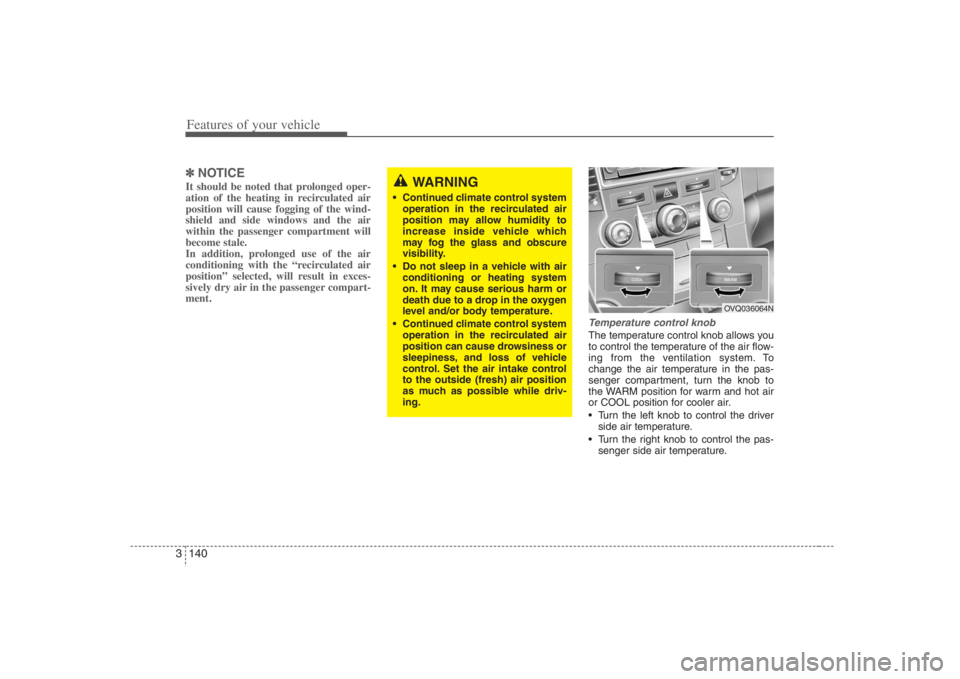
Temperature control knobThe temperature control knob allows you
to control the temperature of the air flow-
ing from the ventilation system. To
change the air temperature in the pas-
senger compartment, turn the knob to
the WARM position for warm and hot air
or COOL position for cooler air.
Turn the left knob to control the driver
side air temperature.
Turn the right knob to control the pas-
senger side air temperature.
WARNING
Continued climate control system
operation in the recirculated air
position may allow humidity to
increase inside vehicle which
may fog the glass and obscure
visibility.
Do not sleep in a vehicle with air
conditioning or heating system
on. It may cause serious harm or
death due to a drop in the oxygen
level and/or body temperature.
Continued climate control system
operation in the recirculated air
position can cause drowsiness or
sleepiness, and loss of vehicle
control. Set the air intake control
to the outside (fresh) air position
as much as possible while driv-
ing.
OVQ036064N
Page 159 of 393
3 143
Features of your vehicle
Air conditioning button
(if equipped) Push the A/C button to turn the air condi-
tioning system on (indicator light will illu-
minate). Push the button again to turn the
air conditioning system off.
1VQA2335/1VQA2168
■Front
■Rear
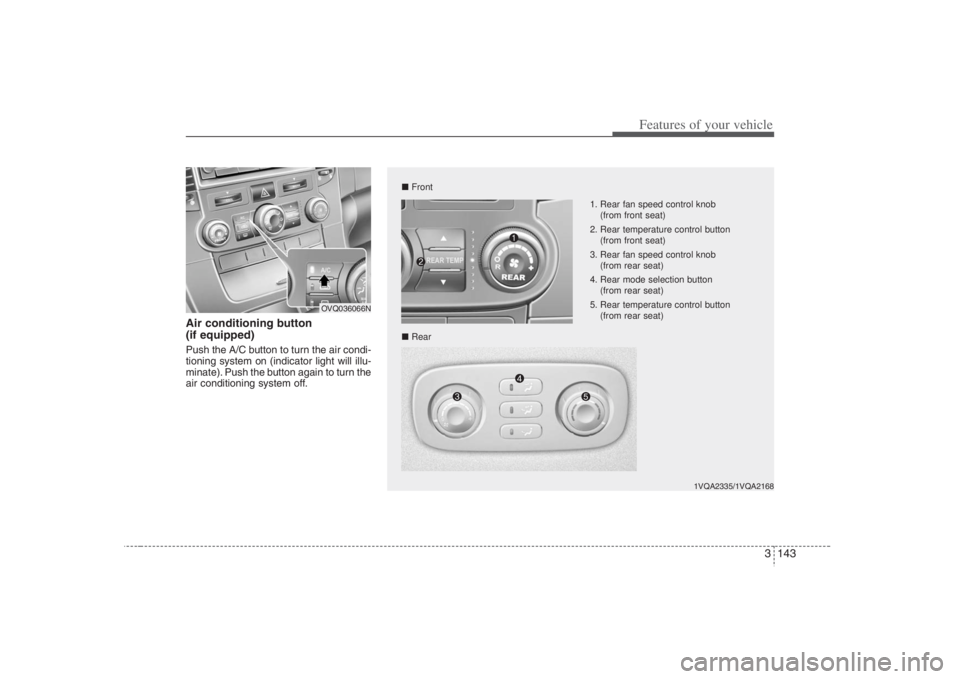
1. Rear fan speed control knob
(from front seat)
2. Rear temperature control button
(from front seat)
3. Rear fan speed control knob
(from rear seat)
4. Rear mode selection button
(from rear seat)
5. Rear temperature control button
(from rear seat)
OVQ036066N
Page 160 of 393
Features of your vehicle144 3Ventilation (rear)Temperature, fan speed and mode of the
rear climate control system can be con-
trolled independently regardless of the
front climate control system operation.
However, the front climate control system
should be operated together for rear air
conditioning as follows;
1. Set the front fan speed to the desired
position.
2. Push the air conditioning button.
3. Set the rear temperature, fan speed
and mode to the desired position.
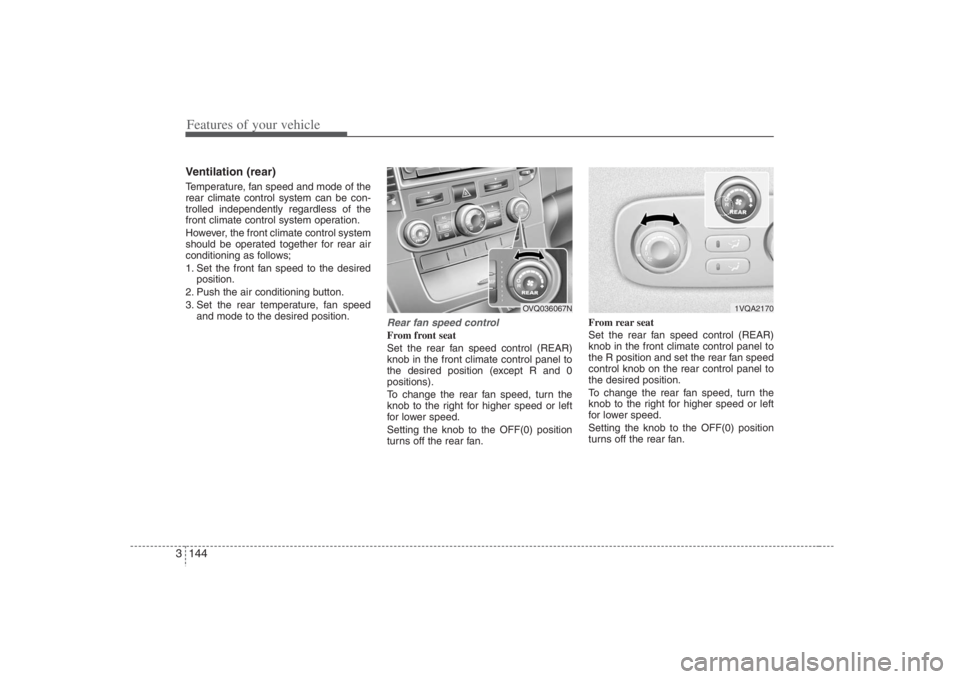
Rear fan speed controlFrom front seat
Set the rear fan speed control (REAR)
knob in the front climate control panel to
the desired position (except R and 0
positions).
To change the rear fan speed, turn the
knob to the right for higher speed or left
for lower speed.
Setting the knob to the OFF(0) position
turns off the rear fan.From rear seat
Set the rear fan speed control (REAR)
knob in the front climate control panel to
the R position and set the rear fan speed
control knob on the rear control panel to
the desired position.
To change the rear fan speed, turn the
knob to the right for higher speed or left
for lower speed.
Setting the knob to the OFF(0) position
turns off the rear fan.
1VQA2170
OVQ036067N
Page 163 of 393

3 147
Features of your vehicle
Heating1. Set the mode to the position.
2. Set the air intake control to the outside
(fresh) air position.
3. Set the temperature control to the
desired position.
4. Set the fan speed control to the
desired speed.
5. If dehumidified heating is desired, turn
the air conditioning system (if
equipped) on.
If the windshield fogs up, set the mode
to the or position.
Air conditioning (if equipped) All Hyundai Air Conditioning Systems
use R-134a refrigerant which is not dam-
aging to the ozone layer.
1. Start the engine. Push the air condi-
tioning button.
2. Set the mode to the position.
3. Set the air intake control to the outside
air or recirculated air position.
4. Set the temperature control to the
desired position.
5. Set the fan speed control to the
desired speed.
6. Adjust the fan speed control and tem-
perature control to maintain maximum
comfort.
When maximum cooling is desired, set
the temperature control to the COOL
position, set the air intake control to the
recirculated air position, then set the
fan speed control to the highest speed.
CAUTION
When using the air conditioning
system, monitor the temperature
gauge closely while driving up
hills or in heavy traffic when out-
side temperatures are high. Air
conditioning system operation
may cause engine overheating.
Continue to use the blower fan by
turning the air conditioning sys-
tem off if the engine temperature
gauge indicates engine overheat-
ing.
When opening the windows in
humid weather, the air condition-
ing system may cause condensa-
tion inside the vehicle. Since
excessive condensation (water)
may cause damage to electrical
equipment, the air conditioning
should only be run with the win-
dows closed.