Page 142 of 413

Each trip meter works independently,
so you can keep track of two
dif f erent distances.
There are two trip meters: TRIP A
and TRIP B. Switch between these
displays by pressing the SEL/
RESET button repeatedly. This shows how much f uel you have.
It may show slightly more or less
than the actual amount.
To reset a trip meter, display it, and
then press and hold the SEL/RESET
button until the number resets to‘‘0.0.’’
This meter shows the number of
miles or kilometers driven since you
last reset it.
This shows the temperature of the
engine’s coolant. During normal
operation, the reading should rise to
about the middle of the gauge. In
severe driving conditions, such as
very hot weather or a long period of
uphill driving, the reading may rise
into the upper half of the gauge. If it
reaches the red (Hot) mark, pull
safely to the side of the road. See
page f or instructions and
precautions on checking the engine
cooling system.275
Trip Meter Fuel Gauge Temperature Gauge
Gauges
Inst rument s and Cont rols
67
Avoid driving with an extremely low
f uel level. Running out of f uel could
cause the engine to misf ire, damaging
the catalytic converter.
�����—�����—�����y���������������y���
�(�#���������y���������y
Page 143 of 413

�¶�¶�µ
�µ�µ�µ�µ �µ�µ�µ
If equipped
The temperature sensor is in the
f ront bumper. Theref ore, the
temperature reading can be af f ected
by heat ref lection f rom the road
surf ace, engine heat, and the
exhaust f rom surrounding traf f ic.
This can cause an incorrect
temperature reading when your
speed is under 19 mph (30 km/h).
The sensor delays the display update
until it reaches the correct outside
temperature. This may take several
minutes. If the outside temperature is
incorrectly displayed, you can adjust
it up to 5°F ( 3°C) warmer or
cooler.
NOTE: The temperature must be
stabilized bef ore doing this
procedure.
This indicator displays the outside
temperature in Fahrenheit (U.S.
models) or Centigrade (Canadian
models). To see the outside
temperature, press and release the
SEL/RESET button until the
temperature is shown on the
inf ormation display. Select the outside temperature
display, then press and hold the
SEL/RESET button f or 10 seconds.
The f ollowing sequence will appear
for1secondeach:0,1,2,3,4,5, 5,4, 3, 2, 1, 0 (U.S.) or 0, 1, 2,
3, 3, 2, 1, 0 (Canada).
When it reaches the desired value,
release the SEL/RESET button. You
should see the new outside
temperature displayed.
In certain weather conditions,
temperature readings near f reezing
(32°F, 0°C) could mean that ice is
f orming on the road surf ace. Your vehicle’s onboard diagnostic
system will detect a loose or missing
f uel f ill cap as an evaporative system
leak. The f irst time a leak is detected
a ‘‘CHECK FUEL CAP’’ message
appears on the information display.
Turn the engine of f , and conf irm the
f uel f ill cap is installed. If it is, loosen
it, then retighten it until it clicks at
least once. The message should go
off after several days of normal
driving once you tighten or replace
the f uel f ill cap. To scroll to another
display, press the SEL/RESET
button. The ‘‘CHECK FUEL CAP’’
message will appear each time you
restart the engine until the system
turns the message of f .
Outside Temperature Indicator
Check Fuel Cap Message
Gauges
68
�����—�����—�����y���������������y���
�(�#���������y���������y
Page 153 of 413

CONT INUED
The system may not recognize your
key’s coding if another immobilizer
key or other metal object (i.e. key
f ob) is near the ignition switch when
you insert the key.
If the system repeatedly does not
recognize the coding of your key,
contact your dealer.
Do not attempt to alter this system
or add other devices to it. Electrical
problems could result that may make
your vehicle undrivable.
If you have lost your key and cannot
start your engine, contact your
dealer.
These keys contain electronic
circuits that are activated by the
immobilizer system. They will not
work to start the engine if the
circuits are damaged.
Protect the keys f rom direct
sunlight, high temperature, and
high humidity.
Donotdropthekeysorsetheavy
objects on them.
Keep the keys away f rom liquids.
If they get wet, dry them
immediately with a sof t cloth. When you turn the ignition switch to
the ON (II) position, the immobilizer
system indicator should come on
brief ly, then go of f . If the indicator
starts to blink, it means the system
does not recognize the coding of the
key. Turn the ignition switch to the
LOCK (0) position, remove the key,
reinsert it, and turn the ignition
switch to the ON (II) position again.
The immobilizer system protects
your vehicle f rom thef t. If an
improperly-coded key (or other
device) is used, the engine’s f uel
system is disabled.
The keys without a remote
transmitter do not contain batteries.
Do not try to take them apart.
Keys and Locks, Immobilizer System
Immobilizer System
Inst rument s and Cont rols
77
Always take the ignition key with you
whenever you leave the vehicle alone.
�����—�����—�����y���������������y���
�(�#���������y���������y
Page 154 of 413

CONT INUED
The system may not recognize your
key’s coding if another immobilizer
key or other metal object (i.e. key
f ob) is near the ignition switch when
you insert the key.
If the system repeatedly does not
recognize the coding of your key,
contact your dealer.
Do not attempt to alter this system
or add other devices to it. Electrical
problems could result that may make
your vehicle undrivable.
If you have lost your key and cannot
start your engine, contact your
dealer.
These keys contain electronic
circuits that are activated by the
immobilizer system. They will not
work to start the engine if the
circuits are damaged.
Protect the keys f rom direct
sunlight, high temperature, and
high humidity.
Donotdropthekeysorsetheavy
objects on them.
Keep the keys away f rom liquids.
If they get wet, dry them
immediately with a sof t cloth. When you turn the ignition switch to
the ON (II) position, the immobilizer
system indicator should come on
brief ly, then go of f . If the indicator
starts to blink, it means the system
does not recognize the coding of the
key. Turn the ignition switch to the
LOCK (0) position, remove the key,
reinsert it, and turn the ignition
switch to the ON (II) position again.
The immobilizer system protects
your vehicle f rom thef t. If an
improperly-coded key (or other
device) is used, the engine’s f uel
system is disabled.
The keys without a remote
transmitter do not contain batteries.
Do not try to take them apart.
Keys and Locks, Immobilizer System
Immobilizer System
Inst rument s and Cont rols
77
Always take the ignition key with you
whenever you leave the vehicle alone.
�����—�����—�����y���������������y���
�(�#���������y���������y
Page 171 of 413
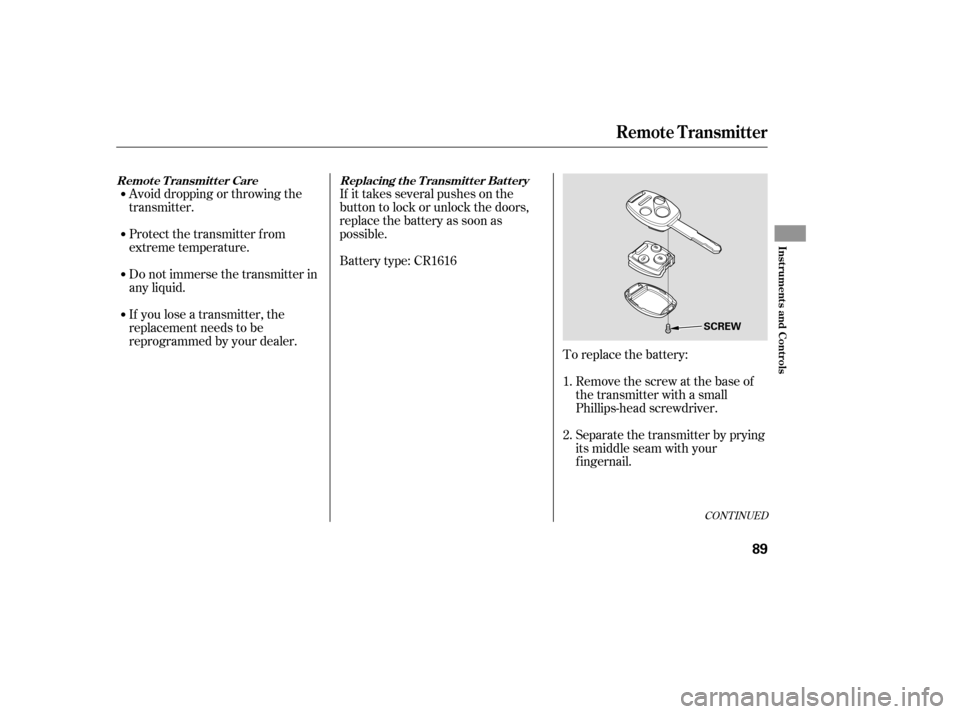
Avoid dropping or throwing the
transmitter.If it takes several pushes on the
button to lock or unlock the doors,
replace the battery as soon as
possible.
Battery type: CR1616
To replace the battery:Remove the screw at the base of
the transmitter with a small
Phillips-head screwdriver.
Separate the transmitter by prying
its middle seam with your
f ingernail.
If you lose a transmitter, the
replacement needs to be
reprogrammed by your dealer.
Do not immerse the transmitter in
any liquid.
Protect the transmitter from
extreme temperature.
1. 2.
CONT INUED
Replacing the Transmitter Battery
Remote Transmitter Care
Remote Transmitter
Inst rument s and Cont rols
89
SCREW
�����—�����—�����y�������������
�y���
�(�#���������y���������y
Page 180 of 413
Follow these precautions whenever
you use the seat heaters:Use the HI setting only to heat the
seats quickly, because it draws
large amounts of current f rom the
battery.
If the engine is lef t idling f or an
extended period, do not use the
seat heaters, even on the LO
setting. It can weaken the battery,
causing hard starting.
In the LO setting, the heater runs
continuously. It does not cycle with
temperature changes.
In the HI setting, the heater turns off
when the seat gets warm, and turns
back on after the seat’s temperature
drops.
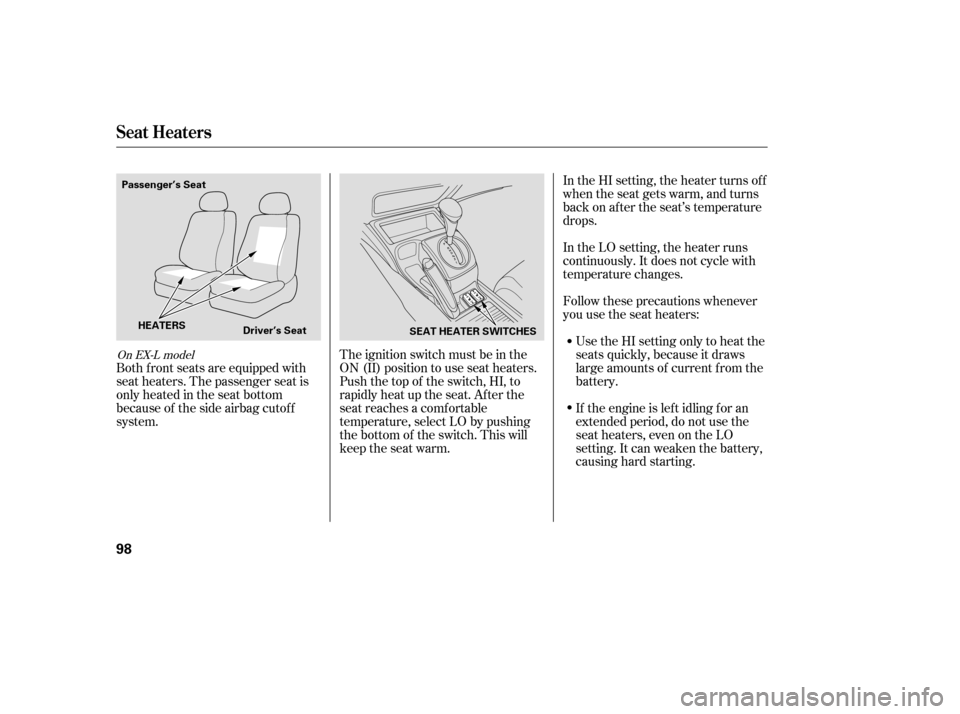
The ignition switch must be in the
ON (II) position to use seat heaters.
Push the top of the switch, HI, to
rapidly heat up the seat. Af ter the
seat reaches a comfortable
temperature, select LO by pushing
the bottom of the switch. This will
keep the seat warm.
Both f ront seats are equipped with
seat heaters. The passenger seat is
only heated in the seat bottom
because of the side airbag cutof f
system.
On EX-L model
Seat Heaters
98
Passenger’s Seat
Driver’s Seat SEAT HEATER SWITCHES
HEATERS
�����—�����—�����y���������������y���
�(�#���������y���
�����y
Page 184 of 413

To close the moonroof f ully, push
the moonroof switch f orward to the
second detent, then release it. The
moonroof closes all the way. To stop
the moonroof f rom closing all the
way, brief ly move the switch in
either direction.The moonroof has a key-of f delay.
You can open and close the
moonroof f or up to 10 minutes af ter
you turn of f the ignition switch. The
key-of f delay cancels as soon as you
open either f ront door. You must
then turn the ignition switch to the
ON (II) position f or the moonroof to
operate.If the moonroof runs into any
obstacle while it is closing
automatically, it will reverse
direction, and then stop. To close the
moonroof , remove the obstacle, then
use the moonroof switch again.
Auto reverse stops sensing when the
moonroof is almost closed. You
should always check that all
passengers and objects are away
f rom the moonroof bef ore closing it.
Auto Reverse
Moonroof
Inst rument s and Cont rols
101
Opening or closing the
moonroof on someone’s hands
or fingers can cause seriousinjury.
Make sure all hands and fingers
are clear of the moonroof
before opening or closing it.
If you try to open the moonroof in
below-f reezing temperatures, or when
it is covered with snow or ice, you can
damage the moonroof panel or motor.
�����—�����—�����y�����������
���y���
�(�#���������y���
�����y
Page 192 of 413
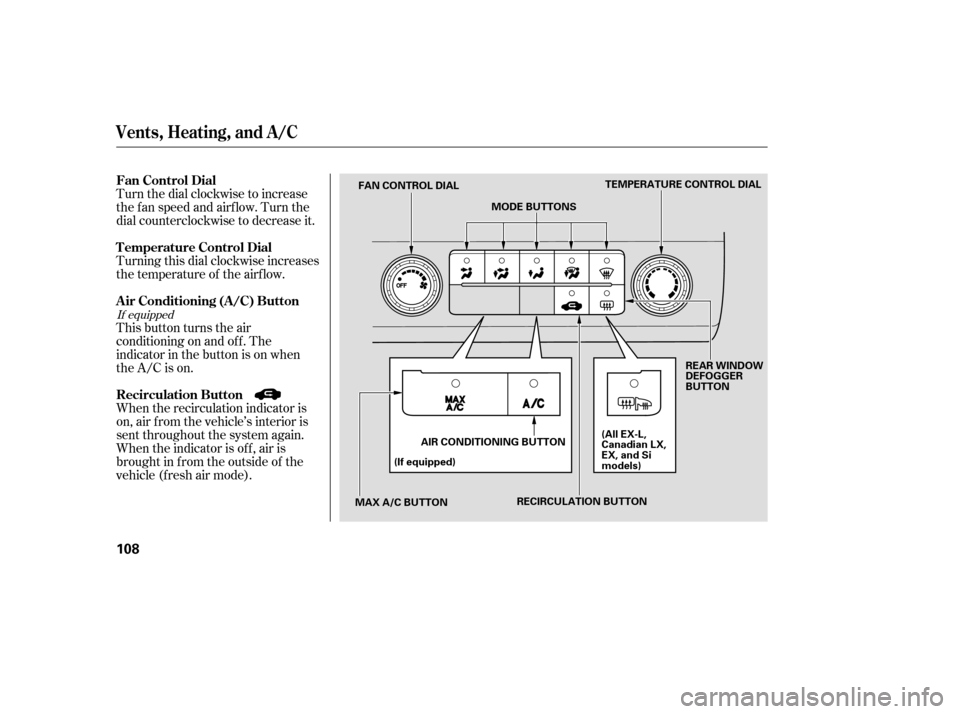
Turn the dial clockwise to increase
the fan speed and airflow. Turn the
dial counterclockwise to decrease it.
Turning this dial clockwise increases
the temperature of the airflow.
This button turns the air
conditioning on and of f . The
indicatorinthebuttonisonwhen
the A/C is on.
When the recirculation indicator is
on, air f rom the vehicle’s interior is
sent throughout the system again.
When the indicator is off, air is
brought in f rom the outside of the
vehicle (fresh air mode).
If equipped
Vents, Heating, and A/C
Air Conditioning (A/C) Button
Fan Control Dial
Recirculation Button
T emperature Control Dial
108
TEMPERATURE CONTROL DIAL
MODE BUTTONS
FAN CONTROL DIAL
MAX A/C BUTTON (If equipped)
AIR CONDITIONING BUTTON REAR WINDOW
DEFOGGER
BUTTON
(All EX-L,
Canadian LX,
EX, and Si
models)
RECIRCULATION BUTTON
�����—�����—�����y�����������
���y���
�(�#���������y���
�
���y