Page 192 of 413
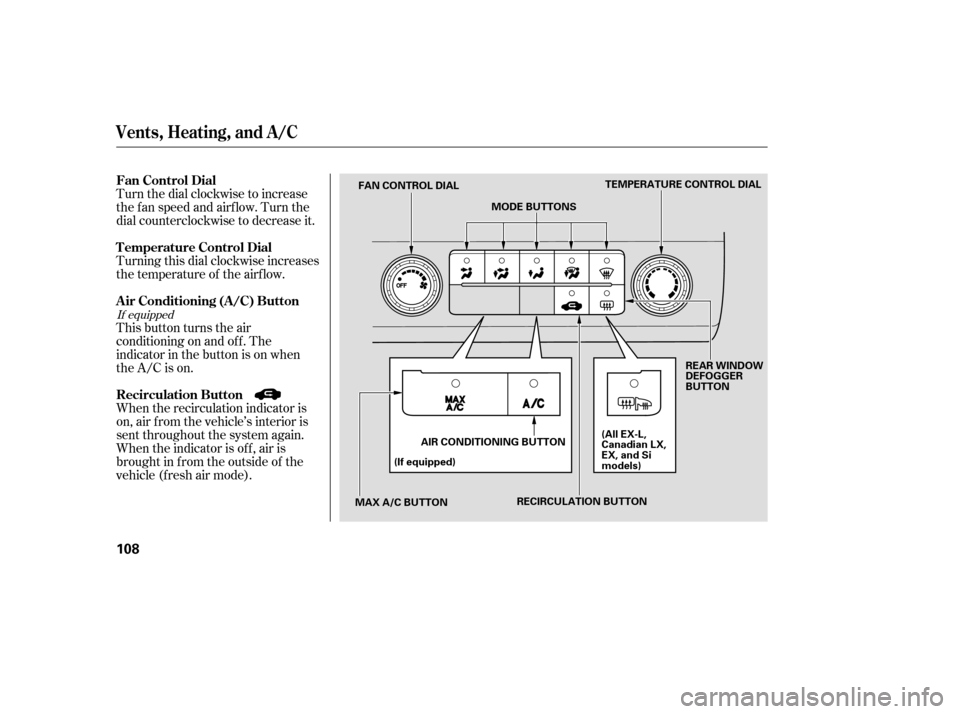
Turn the dial clockwise to increase
the fan speed and airflow. Turn the
dial counterclockwise to decrease it.
Turning this dial clockwise increases
the temperature of the airflow.
This button turns the air
conditioning on and of f . The
indicatorinthebuttonisonwhen
the A/C is on.
When the recirculation indicator is
on, air f rom the vehicle’s interior is
sent throughout the system again.
When the indicator is off, air is
brought in f rom the outside of the
vehicle (fresh air mode).
If equipped
Vents, Heating, and A/C
Air Conditioning (A/C) Button
Fan Control Dial
Recirculation Button
T emperature Control Dial
108
TEMPERATURE CONTROL DIAL
MODE BUTTONS
FAN CONTROL DIAL
MAX A/C BUTTON (If equipped)
AIR CONDITIONING BUTTON REAR WINDOW
DEFOGGER
BUTTON
(All EX-L,
Canadian LX,
EX, and Si
models)
RECIRCULATION BUTTON
�����—�����—�����y�����������
���y���
�(�#���������y���
�
���y
Page 193 of 413

The outside air intakes f or the
heating and cooling system are at
the base of the windshield. Keep this
area clear of leaves and other debris.
Thesystemshouldbeleftinfresh
air mode under almost all conditions.
Keeping the system in recirculation
mode, particularly with the A/C of f ,
can cause the windows to fog up.
Switch to recirculation mode when
driving through dusty or smoky
conditions, then return to fresh air
mode.
This button turns the rear window
def ogger of f and on (see page ).
Use the mode control buttons to
select the vents air flows from. Some
air will f low f rom the dashboard
corner vents in all modes.Air flows from the center
and corner vents in the dashboard.
Airf low is divided between
the vents in the dashboard and the
f loor vents.
Air f lows f rom the f loor
vents. When you select , the
system automatically switches to
f resh air mode.
Airf low is divided between
the f loor vents and def roster vents at
the base of the windshield.
Air f lows f rom the def roster
vents at the base of the windshield.
When you select or ,
the system automatically switches to
f resh air mode and turns on the A/C
(if equipped). The system automatically
turns on the A/C, selects , and
switches to recirculation mode. Each
indicatorinthebuttonisonwhen
the MAX A/C is turned on.
The f low-through ventilation system
draws in outside air, circulates it
through the interior, then exhausts it
through vents near the rear side
panels.
Set the temperature to the lower
limit.
Make sure the A/C is of f .
Select and fresh air mode.
Set the f an to the desired speed.
1. 2. 3.4.
74
If equipped
Vents, Heating, and A/C
Rear Window Def ogger Button
Mode Control MAX A/C Button
Ventilation
Features
109
�����—�����—�����y���������������y���
�(�#���������y���
�
���y
Page 200 of 413
CONT INUED
Audio System (Models without navigation system)
Playing the Radio
Features
115
TUNE/SOUND KNOBAUTO SELECT BUTTON
AM/FM BUTTON
AM
BUTTON FM
BUTTON
SCAN
BUTTON
TUNE/SOUND KNOB
SCAN
BUTTON
SEEK BUTTON
Si model
PRESET BUTTONS SEEK BUTTON
PWR/VOL KNOB AUTO SELECT BUTTON
PWR/VOL KNOBPRESET BUTTONS
All models except Si
�����—�����—�����y���������������y���
�(�#���������y���
�����y
Page 201 of 413

�µ
�µ
�µ�µ
�µ
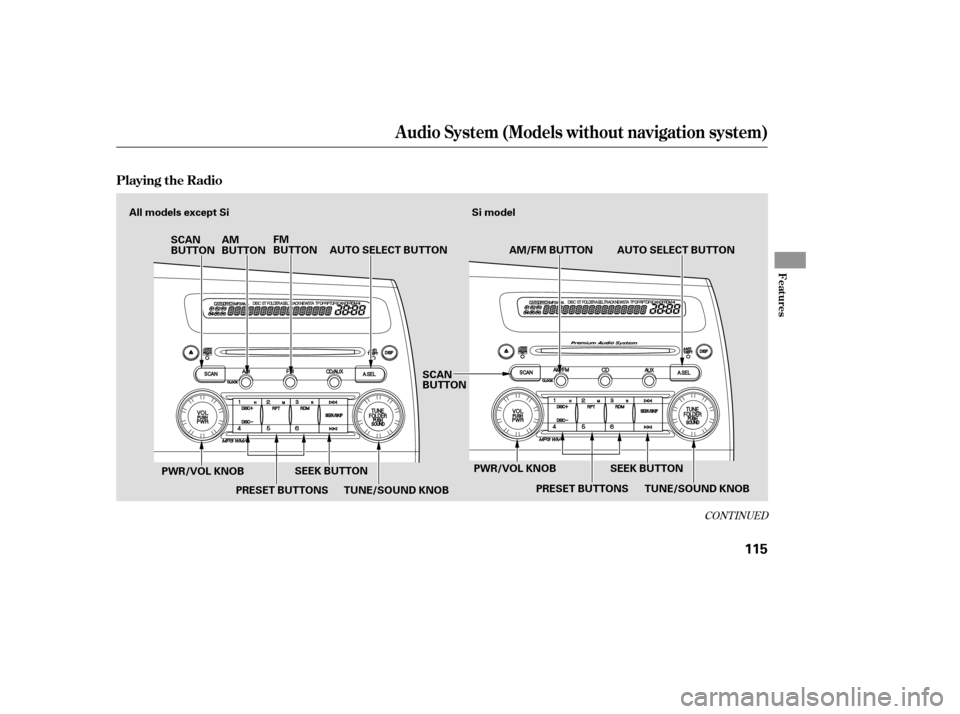
If you do nothing, the system will
then scan f or the next strong station
and play it f or 10 seconds. When it
plays a station you want to listen to,
press the SCAN button again.
Use the TUNE knob to
tune the radio to a desired f requency.
Turn the knob right to tune to a
higher f requency, or lef t to tune to a
lower f requency.
The scan f unction samples
all stations with strong signals on the
selected band. To activate it, press
the SCAN button, then release it.
You will see SCAN in the display.
The system will scan f or a station
with a strong signal. When it f inds
one, it will stop and play that station
f or about 10 seconds. The SEEK f unction
searches up and down f rom the
current f requency to f ind a station
with a strong signal. To activate it,
press the or side of the
SEEK button, then release it. Each side of the buttons
(1 through 6) can store one
f requency on AM, and two
f requencies on FM.
Repeat steps 1 through 3 to store a
total of six stations on AM and
twelve stations on FM.
Pick a preset number (1 6), and
hold it until you hear a beep.
Usethetune,seek,orscan
function to tune the radio to a
desired station.
Select the desired band, AM or
FM. FM1 and FM2 let you store
twelve stations.
The ignition switch must be in the
ACCESSORY (I) or ON (II) position.
Turn the system on by pushing the
power/volume knob or the AM or
FM button (the AM/FM button).
Adjust the volume by turning the
power/volume knob.
The band and f requency that the
radio was last tuned to is displayed.
To change bands, press the AM/FM
button (AM or FM button). On the
FM band, ST will be displayed if the
stationisbroadcastinginstereo.
Stereo reproduction in AM is not
available.
You can use any of f ive methods to
f ind radio stations on the selected
band: tune, seek, scan, the preset
buttons, and auto select.
1. 2.3. 4.
TUNE
SCAN
SEEK Preset
To Select a Station
Audio System (Models without navigation system)
116
�����—�����—�����y���������������y���
�(�#���������y���
���
�y
Page 202 of 413

�µ
To turn of f auto select,pressthe
A. SEL (auto select) button. This
restores the presets you originally
set. Press the SOUND (TUNE) knob
repeatedly to display the bass (BAS),
treble (TRE), fader (FAD), balance
(BAL), and speed-sensitive volume
compensation (SVC) settings.
Eachmodeisshowninthedisplayas
it changes. Turn the SOUND
(TUNE) knob to adjust the setting to
your liking. When the level reaches
the center, you will see ‘‘ ’’ in
the display. The system will
automatically return the display to
the selected audio mode about 5
seconds af ter you stop adjusting a
mode.
If you are
traveling far from home and can no
longer receive your preset stations,
you can use the auto select feature to
find stations in the local area.
Press the A. SEL button. ‘‘A.SEL’’
f lashes in the display, and the system
goes into scan mode f or several
seconds. It stores the f requencies of
six AM, and twelve FM stations in
the preset buttons. You will see a ‘‘0’’ displayed af ter
pressing a preset button if auto
select cannot f ind a strong station f or
every preset button.
If you do not like the stations auto
select has stored, you can store
other f requencies on the preset
buttons as previously described.
CONT INUED
Adjusting the Sound
AUTO SELECT
Audio System (Models without navigation system)
Features
117
�����—�����—�����y���������������y���
�(�#���������y���
�����y
Page 203 of 413

�µ�µ
�µ
These two
modes adjust the strength of the
sound coming f rom each speaker.
BALANCE adjusts the side-to-side
strength, while FADER adjusts the
front-to-back strength. You can use the instrument panel
brightness control buttons to adjust
the illumination of the audio system
(see page ). The audio system
illuminates when the parking lights
are on, even if the radio is of f .
The SVC
mode controls the volume based on
vehicle speed. The f aster you go, the
louder the audio volume becomes.
As you slow down, the audio volume
decreases.
The SVC has f our modes; SVC OFF,
SVC LOW, SVC MID, and SVC
HIGH. The def ault setting is MID.
Turn the SOUND (TUNE) knob to
adjust the setting to your liking.
If you f eel the sound is too loud,
choose low. If you f eel the sound is
too quiet, choose high.
Use the TREBLE/
BASS modes to adjust the tone to
your liking.
73
Balance/Fader A udio System L ighting
Speed-sensitive volume
compensation (SVC)
Treble/Bass
Audio System (Models without navigation system)
118
�����—�����—�����y���������������y���
�(�#���������y���
�����y
Page 204 of 413
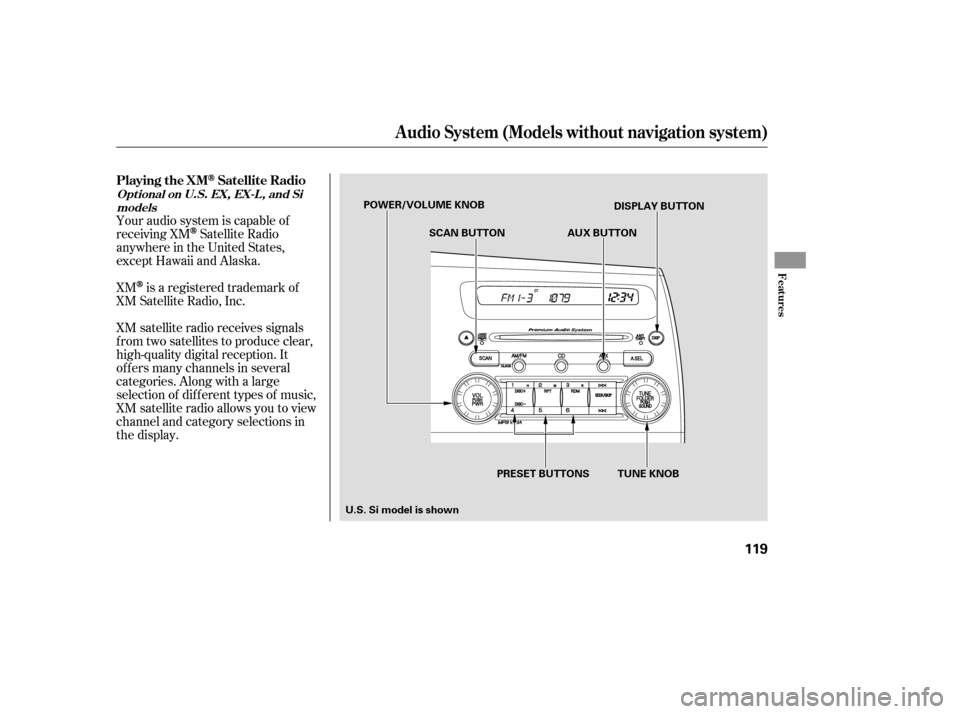
XM satellite radio receives signals
f rom two satellites to produce clear,
high-quality digital reception. It
of f ers many channels in several
categories. Along with a large
selection of dif f erent types of music,
XM satellite radio allows you to view
channel and category selections in
the display.
XM
is a registered trademark of
XM Satellite Radio, Inc.
Your audio system is capable of
receiving XM
Satellite Radio
anywhere in the United States,
except Hawaii and Alaska.
Playing the XM
Satellite Radio
Audio System (Models without navigation system)
Features
Opt ional on U.S. EX, EX-L , and Si
models
119
DISPLAY BUTTON
POWER/VOLUME KNOB
SCAN BUTTON
PRESET BUTTONS TUNE KNOB AUX BUTTON
U.S.Simodelisshown
�����—�����—�����y���������������y���
�(�#���������y���
�����y
Page 217 of 413
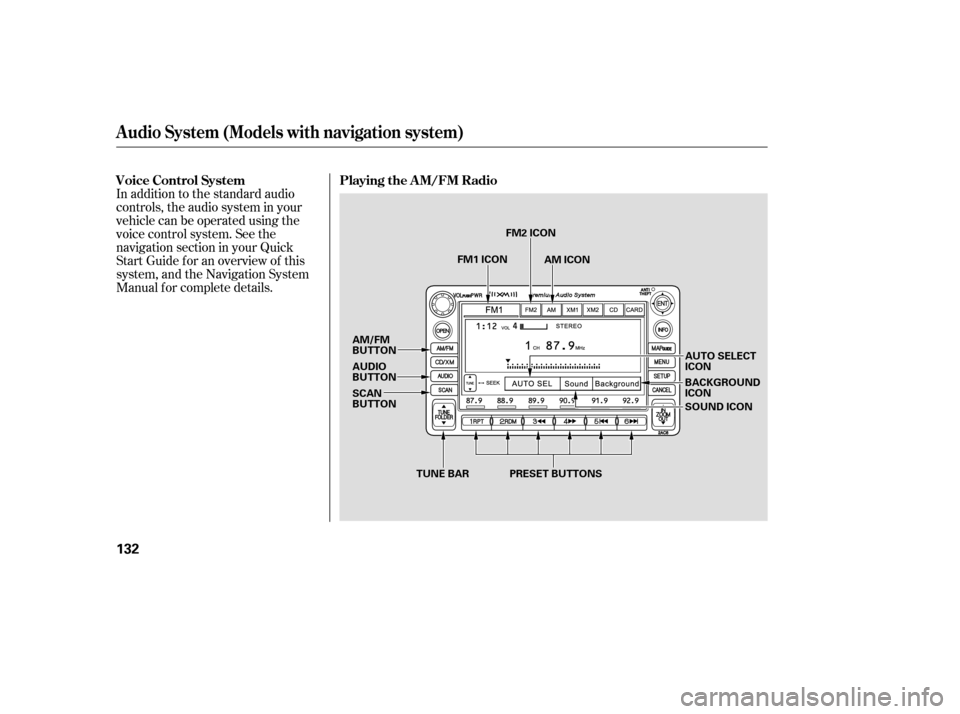
In addition to the standard audio
controls, the audio system in your
vehicle can be operated using the
voice control system. See the
navigation section in your Quick
Start Guide f or an overview of this
system, and the Navigation System
Manual f or complete details.
Audio System (Models with navigation system)
Playing the AM/FM Radio
Voice Control System
132
TUNE BAR AUTO SELECT ICON
BACKGROUNDICON
AM/FM
BUTTON
AUDIO
BUTTON
SCAN
BUTTON
PRESET BUTTONS
FM2 ICON
AM ICON
FM1 ICON
SOUND ICON
�����—�����—�����y���������������y���
�(�#���������y���
�����y