2008 FORD SUPER DUTY ECO mode
[x] Cancel search: ECO modePage 13 of 368

bulbs work. If any light remains on after starting the vehicle, refer to the
respective system warning light description for additional information.
Note:Some Warning Lights are reconfigurable telltale (RTT) indicator
lights and will illuminate in the Message Center Display and function the
same as the warning light.
Check engine:TheCheck engine
indicator light illuminates when the
ignition is first turned to the RUN
position to check the bulb. Solid
illumination after the engine is started indicates the On Board
Diagnostics System (OBD-II) has detected a malfunction. Refer toOn
board diagnostics (OBD-II)in theMaintenance and Specifications
chapter. If the light is blinking, engine misfire is occurring which could
damage your catalytic converter. Drive in a moderate fashion (avoid
heavy acceleration and deceleration) and have your vehicle serviced
immediately.
Under engine misfire conditions, excessive exhaust temperatures
could damage the catalytic converter, the fuel system, interior
floor coverings or other vehicle components, possibly causing a fire.
Brake system warning light:To
confirm the brake system warning
light is functional, it will
momentarily illuminate when the
ignition is turned to the RUN
position when the engine is not running, or in a position between RUN
and START, or by applying the parking brake when the ignition is turned
to the RUN position. If the brake system warning light does not
illuminate at this time, seek service immediately from your authorized
dealer. Illumination after releasing the parking brake indicates low brake
fluid level and the brake system should be inspected immediately by
your servicing authorized dealer.
Driving a vehicle with the brake system warning light on is
dangerous. A significant decrease in braking performance may
occur. It will take you longer to stop the vehicle. Have the vehicle
checked by your authorized dealer immediately. Driving extended
distances with the parking brake engaged can cause brake failure and
the risk of personal injury.
P!
BRAKE
2008 F-250/350/450/550(f23)
Owners Guide (post-2002-fmt)
USA(fus)
Instrument Cluster
13
Page 26 of 368
FADE:Press MENU to reach the fade setting.
Use
//SEEK, SEEKto adjust the audio between the back
(B) and front (F) speakers.
SPEEDVOL (Speed sensitive volume, if equipped):Press MENU to
reach the SPEEDVOL setting. Radio volume automatically gets louder
with increasing vehicle speed to compensate for road and wind noise.
Use
//SEEK, SEEKto adjust.
The default setting isoff;increasing your vehicle speed will not change
the volume level.
Adjust1–7:Increasing this setting from 1 (lowest setting) to 7 (highest
setting) allows the radio volume to automatically change slightly with
vehicle speed to compensate for road and wind noise.
Recommended level is1–3;SPEED OFF turns the feature off and level 7
is the maximum setting.
Track/Folder mode:Available only on MP3 discs in CD mode. In Track
mode, pressing
SEEK, SEEKwill scroll through all tracks on the
disc
In Folder mode, pressing
SEEK, SEEKwill scroll only through
tracks within the selected folder.
Press
FOLDER, FOLDERto access the previous/next folder (if
available).
COMPRESS (Compression):Available only in CD/MP3 mode. Press
MENU until COMPRESS ON/OFF appears in the display.
Use
//SEEK, SEEKto toggle ON/OFF. When COMPRESS
is ON, the system will bring the soft and loud CD passages together for a
more consistent listening level.
4.AUX:Press repeatedly to cycle
through FES/DVD (if equipped),
LINE IN (auxiliary audio mode, if
equipped) and SAT1, SAT2 and SAT3 modes (satellite radio, if
equipped).
For location and further information on auxiliary audio mode, refer to
Auxiliary input jacklater in this chapter.
Satellite radio is available only with a valid SIRIUS radio
subscription. Check with your authorized dealer for availability.
2008 F-250/350/450/550(f23)
Owners Guide (post-2002-fmt)
USA(fus)
Entertainment Systems
26
Page 32 of 368

To view the station name or type:When the desired category appears
in the display, press TEXT/SCAN to toggle between displaying the station
type (COUNTRY, ROCK, etc.) or the station name (WYCD, WXYZ, etc.).
BASS:Press MENU to reach the bass setting.
Use
//SEEK, SEEKto adjust.
TREB (Treble):Press MENU to reach the treble setting.
Use
//SEEK, SEEKto adjust.
BAL (Balance):Press MENU to reach the balance setting.
Use
//SEEK, SEEKto adjust the audio between the left
(L) and right (R) speakers.
FADE:Press MENU to reach the fade setting.
Use
//SEEK, SEEKto adjust the audio between the back
(B) and front (F) speakers.
ALL SEATS (Occupancy mode)(Available on Audiophile radios only):
Press MENU repeatedly to access. Press
//SEEKto
optimize sound for ALL SEATS, DRIVERS SEAT or REAR SEATS.
SPEEDVOL (Speed sensitive volume, if equipped):Press MENU to
reach the SPEEDVOL setting. Radio volume automatically gets louder
with increasing vehicle speed to compensate for road and wind noise.
Use
//SEEK, SEEKto adjust.
The default setting isoff;increasing your vehicle speed will not change
the volume level.
Adjust1–7:Increasing this setting from 1 (lowest setting) to 7 (highest
setting) allows the radio volume to automatically change slightly with
vehicle speed to compensate for road and wind noise.
Recommended level is1–3;SPEED OFF turns the feature off and level 7
is the maximum setting.
Track/Folder Mode:Available only on MP3 discs in CD mode. In Track
Mode, pressing
SEEKwill scroll through all tracks on the disc.
In Folder mode, pressing
SEEKwill scroll only through tracks
within the selected folder.
Press
FOLDER, FOLDERto access the previous/next folder (if
available).
2008 F-250/350/450/550(f23)
Owners Guide (post-2002-fmt)
USA(fus)
Entertainment Systems
32
Page 34 of 368

7.SHUFFLE:In CD/MP3 mode,
press SHUFFLE to engage shuffle
mode. SHUFFLE ON will appear in
the display. If you wish to engage shuffle mode right away, press SEEK
to begin random play. Otherwise, random play will begin when the
current track is finished playing. CD SHUF will appear in the display. To
disengage, press SHUFFLE again. SHUFFLE OFF will appear in the
display.
Note:In track mode, all tracks on thecurrentdisc will shuffle in
random order. In MP3 folder mode, the system will randomly play all
tracks within the current folder.
8.FOLDER
: In folder mode,
press FOLDER
to access next
folder on MP3 discs, if available.
9.
FOLDER:In folder mode,
press
FOLDER to access the
previous folder on MP3 discs, if
folders are available.
10.FF (Fast forward):Press FF
to manually advance in a CD/MP3
track.
11.REW (Rewind):Press REW to
manually reverse in a CD/MP3 track.
12.Memory presets:To set a
station: Select frequency band
AM/FM1/FM2; tune to a station,
press and hold a preset control until sound returns. You may store up to
six stations in each frequency band for a total of 18.
In satellite radio mode (if equipped), there are 18 available presets,
six each for SAT1, SAT2 and SAT3. To save satellite channels in your
memory presets, tune to the desired channel then press and hold a
preset control until sound returns.
Satellite radio is available only with a valid SIRIUS radio
subscription. Check with your authorized dealer for availability.
13.TEXT/SCAN: In radio and
CD/MP3 mode, press and hold for
2 seconds to activate mode to hear
a brief sampling of radio stations or CD tracks. Press again to stop.
2008 F-250/350/450/550(f23)
Owners Guide (post-2002-fmt)
USA(fus)
Entertainment Systems
34
Page 35 of 368
In CD/MP3 mode,press and release to display track title, artist name,
and disc title and file name (if available).
In satellite radio mode (if equipped),press and release to enter
TEXT MODE and display the current song title. While in TEXT MODE,
press again to scroll through the current song title, artist, channel
category and the SIRIUS long channel name.
In TEXT MODE, sometimes the display requires additional text to be
displayed. When the “>” indicator is active, press SEEK
to view the
additional display text. When the “>” indicator is active, press
SEEK
to view the previous display text.
In satellite radio mode (if equipped),press and hold to hear a brief
sampling of the next channels. Press again to stop.
In CATEGORY MODE, press SCAN to hear a brief sampling of channels
in the selected category. Press again to stop.Satellite radio is available
only with a valid SIRIUS subscription. Check with your authorized
dealer for availability.
14.AM/FM:Press to select
AM/FM1/FM2 frequency band.
15.ON/OFF/Volume:Press to turn
ON/OFF. Turn to increase/decrease
volume.
Note:If the volume is set above a
certain level and the ignition is
turned off, the volume will come back on at a “nominal” listening level
when the ignition switch is turned back on.
16.CD:Press to enter CD/MP3
mode. If a CD/MP3 is already loaded
into the system, CD/MP3 play will
begin where it ended last.
17.LOAD:Toloadadiscintothe
system, press LOAD. Select a slot
number using memory presets 1–6.
When the display reads LOAD CD#,
load the desired disc, label side up.
If you do not choose a slot within 5 seconds, the system will choose for
you. Once loaded, the first track will begin to play.
To auto load up to 6 discs,press and hold LOAD until the display
reads AUTOLOAD#. Load the desired disc, label side up. The system will
prompt you to load discs for the remaining available slots. Insert the
2008 F-250/350/450/550(f23)
Owners Guide (post-2002-fmt)
USA(fus)
Entertainment Systems
35
Page 39 of 368

incompatibility, certain homemade compact discs may not
function correctly when used in Ford CD players.
Do not use any irregular shaped
CDs or discs with a scratch
protection film attached.
CDs with homemade paper
(adhesive) labels should not be
inserted into the CD player as
the label may peel and cause the
CD to become jammed. It is
recommended that homemade
CDs be identified with
permanent felt tip marker rather
than adhesive labels. Ballpoint pens may damage CDs. Please
contact your authorized dealer for further information.
Audio system warranty and service
Refer to theWarranty Guidefor audio system warranty information. If
service is necessary, see your authorized dealer.
MP3 track and folder structure
Your MP3 system recognizes MP3 individual tracks and folder structure
as follows:
•There are two different modes for MP3 disc playback: MP3 track mode
(system default) and MP3 folder mode. For more information on track
and folder mode, refer toSample MP3 structurein the following
section.
•MP3 track mode ignores any folder structure on the MP3 disc. The
player numbers each MP3 track on the disc (noted by the .mp3 file
extension) from T001 to T255.
•MP3 folder mode represents a folder structure consisting of one level
of folders. The CD player numbers all MP3 tracks on the disc (noted
by the .mp3 file extension) and all folders containing MP3 files, from
F001 (folder) T001 (track) to F253 T255.
•Creating discs with only one level of folders will help with navigation
through the disc files.
2008 F-250/350/450/550(f23)
Owners Guide (post-2002-fmt)
USA(fus)
Entertainment Systems
39
Page 46 of 368

To play an auxiliary source through the DVD system
The DVD system can be used to connect and play auxiliary electronic
devices such as game systems, personal camcorders, video cassette
recorders, etc.
1. Ensure that the vehicle ignition is in the RUN or ACCESSORY
position.
2. Press the power button to turn
the DVD system on. The indicator
light next to the power button will
illuminate.
3. Connect an auxiliary audio/video
source by connecting RCA cords
(not included) to the RCA jacks on
the left hand side of the system.
•Yellow (1) — video input
•White (2) — left channel audio
input
•Red (3) — right channel audio
input
4. Press MEDIA on the DVD system to change the media source to AUX.
5. Press VIDEO on the DVD system to change the video source to
DVD-AUX. If your source is properly plugged in, it will appear on the
LCD (Liquid Crystal Display) screen. If your auxiliary source does not
have a video signal, or if the DVD system does not detect a video signal
from the auxiliary source, the screen will remain black. If the video
source is set to DVD-AUX, the display will automatically turn on if a
video signal is detected.
To listen to audio over the headphones (Dual play mode):
1. You may listen to channels A and B over wired or wireless
headphones. Refer toUsing the infrared wireless headphonesand
Using wired headphonesfor further information.
•Black (4) — wired headphone output (wired headphones not
included)
2. Press the headphone/speaker
button on the DVD player.
2008 F-250/350/450/550(f23)
Owners Guide (post-2002-fmt)
USA(fus)
Entertainment Systems
46
Page 48 of 368
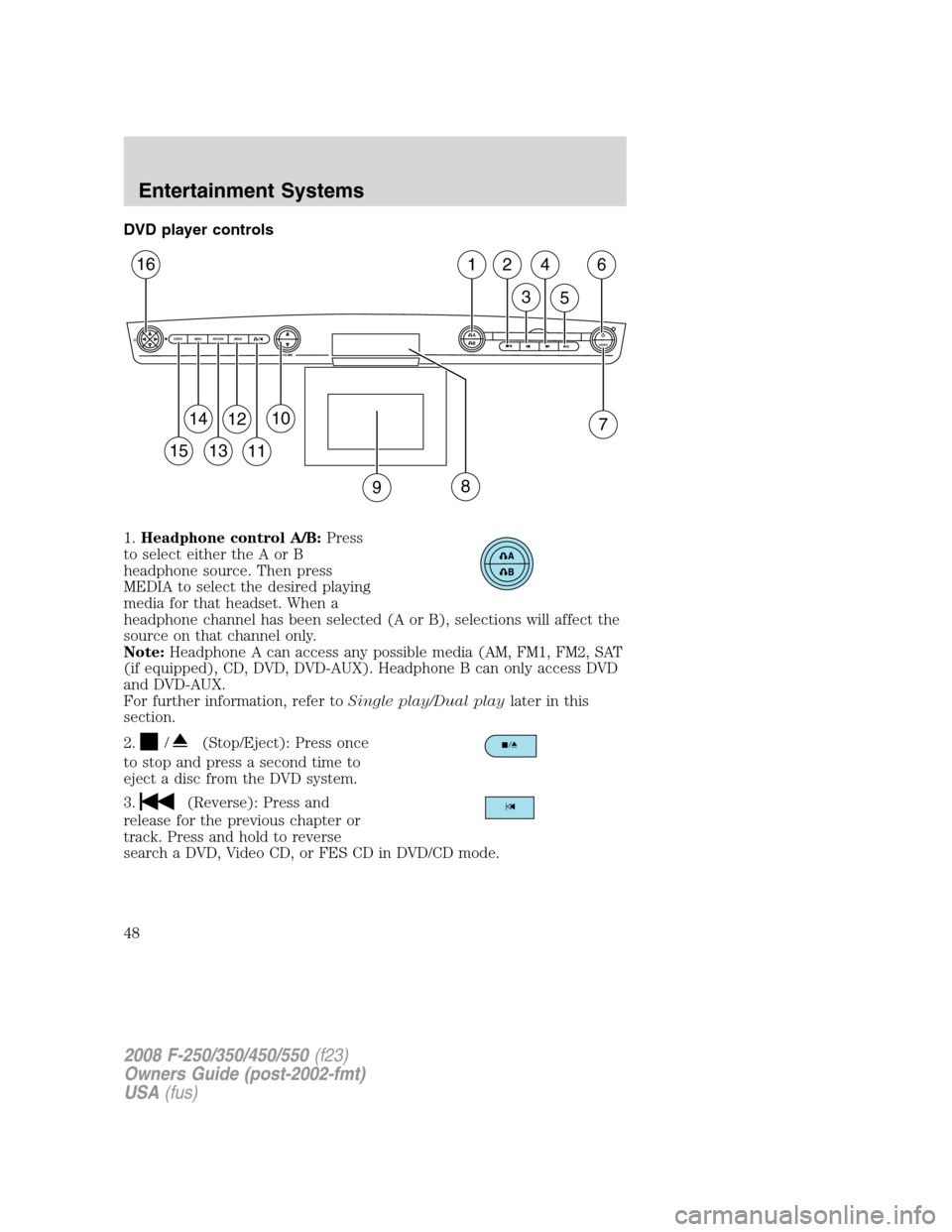
DVD player controls
1.Headphone control A/B:Press
to select either the A or B
headphone source. Then press
MEDIA to select the desired playing
media for that headset. When a
headphone channel has been selected (A or B), selections will affect the
source on that channel only.
Note:Headphone A can access any possible media (AM, FM1, FM2, SAT
(if equipped), CD, DVD, DVD-AUX). Headphone B can only access DVD
and DVD-AUX.
For further information, refer toSingle play/Dual playlater in this
section.
2.
/(Stop/Eject): Press once
to stop and press a second time to
eject a disc from the DVD system.
3.
(Reverse): Press and
release for the previous chapter or
track. Press and hold to reverse
search a DVD, Video CD, or FES CD in DVD/CD mode.
A
BVIDEOVOLUME MEDIA RETURN MENU ENTER
1
7
2
3
4
5
6
9
10
11
12
13
14
15
16
8
2008 F-250/350/450/550(f23)
Owners Guide (post-2002-fmt)
USA(fus)
Entertainment Systems
48