Page 547 of 666
545 Practical hints
Replacing the wiper blades
5
\3 Replacing the wiper blades
\1
Apply the handbrake (
\2
page 191).
1Wiper blade
2Retaining clips
3Wiper arm\1
Fold the wiper arms away from the
windshield.
!
CAUTION
Do not open the hood while the wiper
arms are folded away from the wind-
shield. You would damage the hood
and the wiper arms.
Do not fold the wiper arms onto the
windshield without wiper blades be-
ing attached. You could scratch the
windshield.
For your own convenience, have this
work carried out at an authorized
Sprinter Dealer.
Removing the wiper bladesWarning
G
When the windshield wipers are set to in-
termittent wipe or the rain sensor is ac-
tive, the windshield wipers could move at
any time and injure yourself or others
upon contact with them.
Always remove the key from the ignition
lock before replacing the wiper blades.
nf_BA.book Page 545 Friday, January 25, 2008 3:53 PM
Page 577 of 666
575 Practical hints
Battery
5
\1
Switch off all electrical consumers.
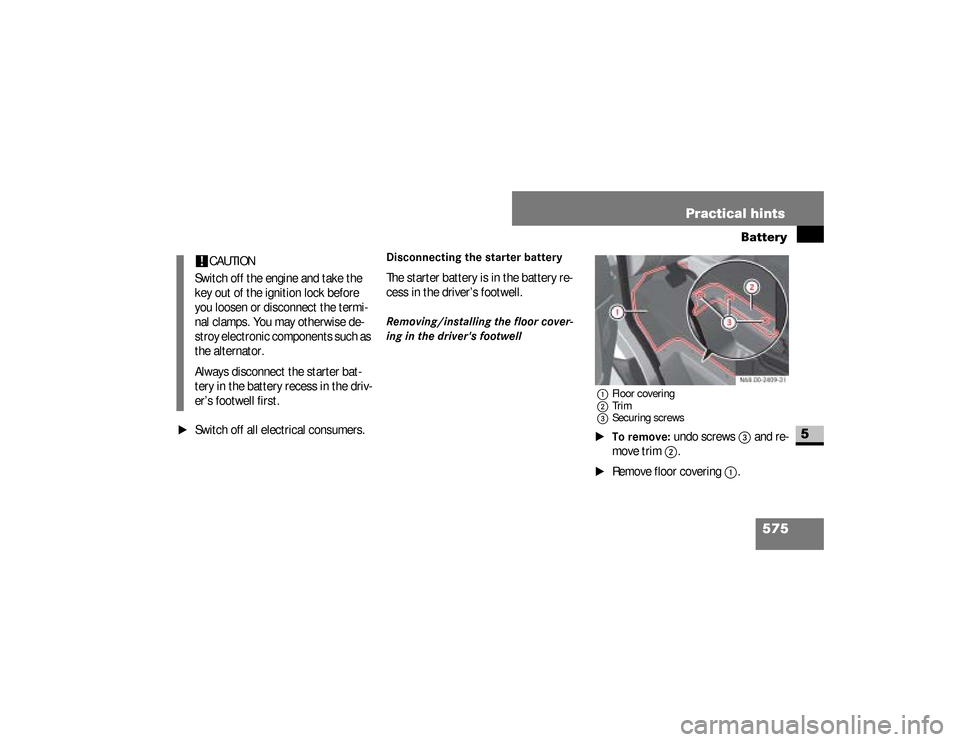
Disconnecting the starter batteryThe starter battery is in the battery re-
cess in the driver’s footwell.Removing/installing the floor cover-
ing in the driver's footwell
1Floor covering
2Trim
3Securing screws\1To remove:
undo screws
3
and re-
move trim
2
.
\1
Remove floor covering
1
.
!
CAUTION
Switch off the engine and take the
key out of the ignition lock before
you loosen or disconnect the termi-
nal clamps. You may otherwise de-
stroy electronic components such as
the alternator.
Always disconnect the starter bat-
tery in the battery recess in the driv-
er’s footwell first.
nf_BA.book Page 575 Friday, January 25, 2008 3:53 PM
Page 584 of 666

582 Practical hintsJump-starting
5
\1
Make sure that the two vehicles do
not touch.
\1
Apply the handbrake or move the se-
lector lever to position
P.
\1
Switch off all electrical consumers.
\1
Switch on the battery isolating
switch* if necessary (
\2
page 338).
\1
Remove the key from the ignition
lock.
\1
Open the hood (
\2
page 318).
The jump-starting connection point is on
the left-hand side of the air cleaner in
the engine compartment when looking
in the direction of travel.
Jump-starting connection point
1Positive terminal clamp of jumper cable\1
Remove the positive terminal cover
from the donor battery.
\1
Connect positive terminal of donor
battery
2
to jump-starting connec-
tion point 1
with the jumper cable.
Start with the donor battery.
\1
Using red positive terminal clamp
1
of the jumper cable, slide the red
protective cap of the jump-starting
connection point back with a clock-
wise turn and connect the positive
terminal clamp of the jumper cable
to the positive terminal of the jump-
starting connection point.
nf_BA.book Page 582 Friday, January 25, 2008 3:53 PM
Page 587 of 666

585 Practical hints
Towing
5
\3 Towing
Comply with legal regulations when tow-
ing.Having the vehicle carried away on a
transporter or trailer is preferable to
towing it away. We recommend the use
of a rigid towing bar if towing is neces-
sary.
The fixture for the front towing eye is lo-
cated behind the cover in the bumper on
the right-hand side when viewed in the
direction of travel.
Warning
G
Tow the vehicle using a rigid towing bar if:the engine is not running,there is a malfunction in the power supply
or the vehicle’s electrical system.There is no power assistance for the
steering and braking when the engine is
not running. You must then use signifi-
cantly greater force to steer the vehicle
and brake.
Continued
Warning (Continued)
G
Do not tow the vehicle if the key cannot
be turned in the ignition lock. The steering
is then locked and it will not be possible
to steer the vehicle.When towing another vehicle, its weight
should not be greater than the permissi-
ble gross weight of your vehicle.
Installing / removing the towing
eye
nf_BA.book Page 585 Friday, January 25, 2008 3:53 PM
Page 589 of 666

587 Practical hints
Towing
5
\1
Switch on the ignition (
\2
page 111).
\1
For a distance of up to 30 miles
(50 km), move the selector lever to
position
N.
\1
For a distance greater than 30 miles
(50 km), remove the propeller shafts
to the driven axles.
Take great care when attempting to tow
the vehicle free if its drive wheels have
become embedded in loose earth or
mud, particularly if the vehicle is loaded.
Tow the vehicle smoothly and straight-
ahead. The chassis could otherwise be
damaged.
Do not attempt to tow out the vehicle if
a trailer is coupled up.Where possible, tow the vehicle out
backwards along the track made by the
vehicle previously.
With transmission damage
\1
Always remove the propeller shafts
to the driven axles.
iDeactivate the automatic locking
while driving function when towing .
You could otherwise become locked
out when pushing or towing the vehi-
cle.!
CAUTION
Do not exceed a towing speed of
50 km / h, otherwise the transmis-
sion could be damaged.
Towing out a vehicle that is stuck
Towing the vehicle in the event of
particular malfunctions!
CAUTION
Use new self-securing nuts when in-
stalling the propeller shafts.
nf_BA.book Page 587 Friday, January 25, 2008 3:53 PM
Page 590 of 666

588 Practical hintsTowing
5
With front axle damage
\1
Turn the key to position
1 in the igni-
tion lock(
\2
page 111).
In the event of a malfunction in the
electrical systemIf the battery is malfunctioning, the auto-
matic transmission will be locked in
position
P. To shift the automatic trans-
mission to position
N, you must provide
power to the vehicle’s electrical system
in the same way as jump-starting
(
\2
page 581).
Have the vehicle transported on a trans-
porter or trailer.The towing eye can be used to pull the
vehicle onto a special transporter or
trailer for transportation.
\1
Shift the transmission to neutral or
move the selector lever to
position
N.
!
CAUTION
The vehicle must not be towed with
its front wheels raised and with the
key in position
2 in the ignition lock.
Active brake intervention by ESP
® or
ASR could otherwise lock the wheels
and damage the brake system.
Transporting the vehicle!
CAUTION
Only secure the vehicle at the
wheels / rims. Your vehicle could oth-
erwise be damaged.
nf_BA.book Page 588 Friday, January 25, 2008 3:53 PM
Page 591 of 666
589 Practical hintsFuses
5
\3 Fuses
The fuses and relays for the standard
equipment are in the main fuse box in
the footwell on the left-hand side of the
vehicle.\1
Switch off the ignition and electrical
consumers before replacing fuses.The fuse box is in the footwell on the left-
hand side of the vehicle.
Warning
G
Only use fuses of the amperage recom-
mended by the manufacturer. Any autho-
rized Sprinter Dealer will be happy to
advise you.
Do not attempt to repair or bridge blown
fuses.
Have the cause determined and rectified
at a qualified specialist workshop, e.g. an
authorized Sprinter Dealer.
iAdditional fuses and relays for the
optional equipment are in the fuse
box in the driver’s seat.
Main fuse boxiThe fuse allocation chart for the fuse
boxes is in the vehicle document wal-
let in the glove box and names all the
numbered fuses.
nf_BA.book Page 589 Friday, January 25, 2008 3:53 PM
Page 594 of 666

592 Practical hintsFuses
5
No.
Consumer
Amp.
1
Horn
15 A
2
Electric steering lock ESTL
(electronic ignition switch
EIS)
25 A
3
Terminal 30 Z, vehicles
with gasoline engine/
electronic ignition switch
EIS
10 A
4
Light switch/center con-
sole switch unit
5A
5
Windshield wipers
30 A
6
Fuel pump
15 A
7
MRM (jacket tube mod-
ule)
5A
8
Terminal 87 (2)
20 A
No.
Consumer
Amp.
9
Terminal 87 (3)
20 A
10
Terminal 87 (4)
10 A
11
Terminal 15 R vehicle
15 A
12
Airbag control unit
10 A
13
Cigarette lighter/glove
box lighting/radio*
15 A
14
Diagnostic socket/light
switch/instrument cluster
5A
15
Front heating system*
5A
16
Terminal 87 (1)
10 A
17
Airbag control unit
10 A
18
Terminal 15 vehicle, brake
lamp switch
7,5 A
No.
Consumer
Amp.
19
Interior lights
7,5 A
20
Power window co-driver’s
side/terminal 30/2 signal
acquisition and actuation
module
25 A
21
Engine control unit
5A
22
Antilock Brake System
(ABS), brake lamp switch
5A
23
Starter motor
25 A
24
Diesel engine
components
10 A
25
12V socket on the bottom
of the center console
25 A
nf_BA.book Page 592 Friday, January 25, 2008 3:53 PM