Page 166 of 554

WARNING!
²Never leave children alone in a vehicle. Leaving
unattended children in a vehicle is dangerous for a
number of reasons. A child or others could be
seriously or fatally injured. Don't leave the key in
the ignition. A child could operate power win-
dows, other controls, or move the vehicle.
²In an accident, there is a greater risk of being
thrown from a vehicle with an open sunroof. You
could also be seriously injured or killed. Always
fasten your seat belt properly and make sure all
passengers are properly secured too.
²Do not allow small children to operate the sun-
roof. Never allow fingers or other body parts, or
any object to project through the sunroof opening.
Injury may result.
Open Sunroof - Express Mode
Momentarily pressing the switch rearward will activate
the Express Open Feature, causing the sunroof to open
automatically. During the Express Open operation, any
movement of the switch will stop the sunroof and it will
remain in a partial open position. Again, momentarily
pressing the switch rearward will activate the Express
Open Feature.
Closing Sunroof - Express
Press the switch forward and release, and the sunroof
will close automatically from any position. The sunroof
will close fully and stop automatically. This is called
Express Close. During Express Close operation, any
movement of the switch will stop the sunroof.
164 UNDERSTANDING THE FEATURES OF YOUR VEHICLE
Page 169 of 554
The outlet(s) has/have a fused direct feed from the
battery so it/they receive power whether the ignition is
ON or OFF.
All accessories connected to this/these outlet(s) should
be removed or turned OFF when the vehicle is not in use
to protect the battery against discharge.
NOTE:If desired, all of the power outlets can be
converted by your authorized dealer to provide power
with the ignition switch in the ON position only.CAUTION!
Electrical Outlet Use With Engine Off
²Many accessories that can be plugged in draw
power from the vehicle's battery, even when not in
use (i.e., cellular phones, etc.). Eventually, if
plugged in long enough, the vehicle's battery will
discharge sufficiently to degrade battery life
and/or prevent engine starting.
²Accessories that draw higher power (i.e., coolers,
vacuum cleaners, lights, etc.), will discharge the
battery even more quickly. Only use these inter-
mittently and with greater caution.
²After the use of high power draw accessories, or
long periods of the vehicle not being started (with
accessories still plugged in), the vehicle must be
driven a sufficient length of time to allow the
generator to recharge the vehicle's battery.
UNDERSTANDING THE FEATURES OF YOUR VEHICLE 167
3
Page 170 of 554
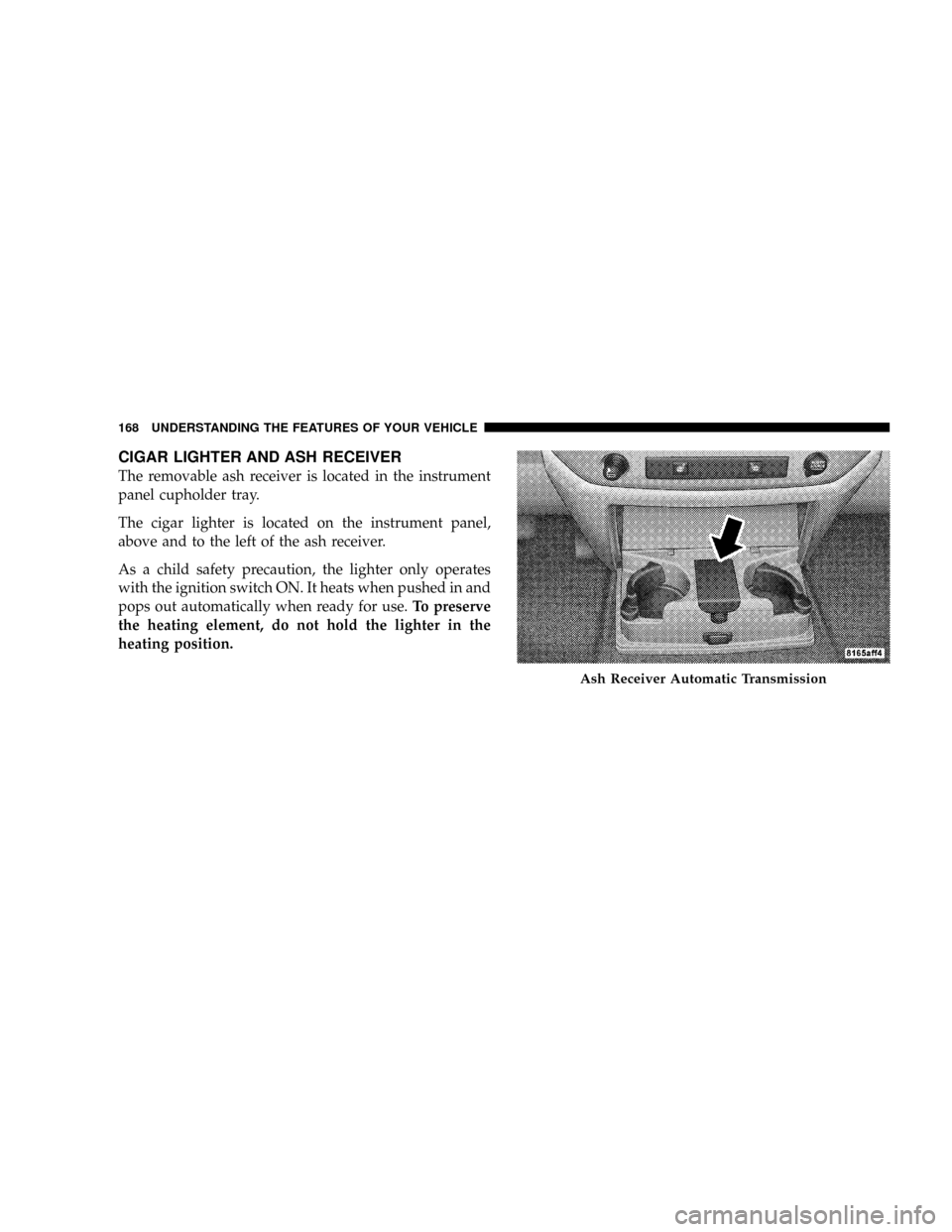
CIGAR LIGHTER AND ASH RECEIVER
The removable ash receiver is located in the instrument
panel cupholder tray.
The cigar lighter is located on the instrument panel,
above and to the left of the ash receiver.
As a child safety precaution, the lighter only operates
with the ignition switch ON. It heats when pushed in and
pops out automatically when ready for use.To preserve
the heating element, do not hold the lighter in the
heating position.
Ash Receiver Automatic Transmission
168 UNDERSTANDING THE FEATURES OF YOUR VEHICLE
Page 184 of 554
REAR WINDOW FEATURES
Electric Rear Window Defroster and Heated
Sideview Mirrors Ð If Equipped
The Electric Rear Window Defroster and Heated
Sideview Mirrors are activated by pressing the
heated grid button, located on the Climate Control panel,
with the ignition ON. Turning OFF the ignition will
deactivate the Electric Rear Window Defroster and
Heated Sideview Mirrors feature. These features also
turn off after activation, when 15 minutes have elapsed.
For ten more minutes of operation, push the button
again.
Power Sliding Rear Window Ð If Equipped
The power sliding rear window switch is located on the
instrument panel below the climate controls. Press the
right side of the switch to open the glass and the left side
of the switch to close the glass.
Power Sliding Rear Window Switch
182 UNDERSTANDING THE FEATURES OF YOUR VEHICLE
Page 198 of 554

INSTRUMENT CLUSTER DESCRIPTION
1. Check Gauges ± Premium Cluster Only
This light illuminates when the Voltmeter, Engine
Oil Pressure or Engine Coolant Temperature
gauges indicate a reading either too high or too low.
Examine the gauges carefully, and follow the instructions
contained below for each indicated problem.
NOTE:When the ignition switch is turned to OFF, the
Fuel Gauge, Voltmeter, Oil Pressure and Engine Coolant
Temperature gauges may not show accurate readings.
When the engine is not running, turn the ignition switch
to ON to obtain accurate readings.
2. Voltmeter
When the engine is running, the gauge indicates
the electrical system voltage. The pointer should
stay within the normal range if the battery is charged. Ifthe pointer moves to either extreme left or right and
remains there during normal driving, the electrical sys-
tem should be serviced.
NOTE:If the gauge pointer moves to either extreme of
the gauge, the ªCheck Gaugesº indicator will illuminate
and a single chime will sound. The ªCheck Gaugesº
indicator may also illuminate prior to the voltage gauge
moving out of normal range. In either case, see you local
authorized Dealer for system service.
3. Turn Signal Indicators
Lights in instrument cluster flash when outside turn
signals are operating.
4. Tachometer
The Tachometer indicates engine speed in revolutions per
minute.
196 UNDERSTANDING YOUR INSTRUMENT PANEL
Page 199 of 554

CAUTION!
Do not operate the engine with the tachometer
pointer at high rpm for extended periods. Engine
damage may occur.
5. Airbag Indicator Light
The indicator lights and remains lit for six to eight
seconds when the ignition is first turned ON. If the light
stays on, flickers or comes on while driving, have the
airbag system checked by an authorized dealer.
6. High Beam Indicator
This indicator shows that headlights are on high
beam.
7. Seat Belt Reminder Light
When the ignition switch is first turned ON, this
light will turn on for five to eight seconds as a bulbcheck. During the bulb check, if the driver's seat belt is
unbuckled, a chime will sound. After the bulb check or
when driving, if the driver's seat belt remains unbuckled,
the Seat Belt Warning Light will flash or remain on
continuously. Refer to9Enhanced Driver Seat Belt Re-
minder System (BeltAlertt)9in the Occupant Restraints
section for more information.(See page 46 for more
information.)
8. Speedometer
The Speedometer shows the vehicle speed in miles per
hour and/or kilometers per hour (mph/kph).
9. Oil Pressure Gauge Ð Premium Cluster Only
The pointer should always indicate some oil pres-
sure when the engine is running. A continuous
high or low reading, under normal driving conditions,
may indicate a lubrication system malfunction. Immedi-
ate service should be obtained from an authorized dealer.
UNDERSTANDING YOUR INSTRUMENT PANEL 197
4
Page 201 of 554

CAUTION!
Do not leave your vehicle unattended with the en-
gine running as you would not be able to react to the
temperature indicator if the engine overheats.
NOTE:Engine idle speed will automatically increase to
1000 rpm at elevated coolant temperatures to improve
engine cooling.
NOTE:If the gauge pointer moves to either extreme of
the gauge, the ªCheck Gaugesº indicator will illuminate
and a single chime will sound.
14. Security Light
This light will flash rapidly for approximately 15 seconds
when the Vehicle Security Alarm is arming. The light will
flash at a slower speed continuously after the alarm is set.
The Security light will also come on for about three
seconds when the ignition is first turned on.15. Transmission Range Indicator (Automatic
Transmissions Only)
When the gear selector lever is moved, this indicator
shows the automatic transmission gear range selected.
16. Odometer/Trip Odometer
The odometer shows the total distance the vehicle has
been driven. U.S. federal regulations require that upon
transfer of vehicle ownership, the seller certify to the
purchaser the correct mileage that the vehicle has been
driven. Therefore, if the odometer reading is changed
during repair or replacement, be sure to keep a record of
the reading before and after the service so that the correct
mileage can be determined.
The two trip odometers show individual trip mileage. To
switch from odometer to trip odometers, press and
release the Trip Odometer button.
UNDERSTANDING YOUR INSTRUMENT PANEL 199
4
Page 202 of 554
To reset a trip odometer, display the desired trip odom-
eter to be reset then push and hold the button until the
display resets (approximately two seconds).
Vehicle Warning Messages
When the appropriate conditions exist, messages such as
ªdoorº (indicates that a door(s) may be ajar), ªhoodº (if
the hood is open or ajar, on vehicles with remote start),
ªgASCAPº (which indicates that your gas cap is possibly
loose or damaged),9CHANgE OILº (indicates that the
engine oil should be change), ªLoWASHº (low washer
fluid), ªESPOFFº (indicates that ESP is turned off), and
ªnoFUSEº (indicates that the IOD fuse is removed from
the Integrated Power Module), will display in the odom-
eter.
NOTE:There is also an engine hour function. This
indicates the total number of hours the engine has been
running. To display the engine hours perform the follow-
ing: Place the ignition in RUN, but do not start theengine. With the odometer value displayed, hold the trip
button down for a period of six seconds. The odometer
will change to trip value first, then it will display the
engine hour value. The engine hours will be displayed
for a period of 30 seconds until the ignition is turned OFF
or the engine is started.
Change Oil Message
Your vehicle is equipped with an engine oil change
indicator system. The ªCHANgE OILº message will flash
in the instrument cluster odometer for approximately 12
seconds after a single chime has sounded to indicate the
next scheduled oil change interval. The engine oil change
indicator system is duty cycle based, which means the
engine oil change interval may fluctuate dependent upon
your personal driving style.
Unless reset, this message will continue to display each
time you turn the ignition switch to the ON/RUN
position. To turn off the message temporarily, press and
200 UNDERSTANDING YOUR INSTRUMENT PANEL