Page 185 of 467
Press and release the RESET button to accept a
selection. The RESET button also resets various
Trip Functions.
EVIC DISPLAYS
When the appropriate conditions exist, the Electronic
Vehicle Information Center (EVIC) displays the following
messages.
² Turn Signal On (with a continuous warning chime)
² Left Front Turn Signal Light Out (with a single chime)
² Left Rear Turn Signal Light Out (with a single chime)
² Right Front Turn Signal Light Out (with a single
chime)
² Right Rear Turn Signal Light Out (with a single chime) ² RKE (Remote Keyless Entry) Battery Low (with a
single chime)
² Personal Settings Not Available ± Vehicle Not In
PARK.
² Left/Right Door Ajar (one or more, with a single
chime if speed is above 1 mp h/1kmh)
² Door(s) Ajar (with a single chime if vehicle is in
motion)
² Trunk Ajar (with a single chime)
² Headlights On
² Key In Ignition
² Speed Too High (with a single chime)
² Oil Change Required (with a single chime)RESET
Button UNDERSTANDING YOUR INSTRUMENT PANEL 183
4
Page 229 of 467

2. Touch the screen where the time is displayed. The
clock setting menu will appear on the screen.
3. When this feature is on, a check mark will appear in
the box next to the words ªShow Time if Radio is Off.º
Touch the screen where the words ªShow Time if Radio is
Offº are displayed to change the current setting.
UNIVERSAL CONSUMER INTERFACE (UCI) Ð IF
EQUIPPED
NOTE: This section is for sales code RES/REL and
REQ/RET radios only with UConnect t . For sales code
REN/REZ touch screen radio and REU/REX/RE1 radio,
refer to the separate User's Manual.
This feature allows you to plug an iPod t mobile digital
device into the vehicle's sound system through a connec-
tor (UCI connector) using an optional connection cable
(available through MOPAR t ). See your authorized dealer
for details. Using this feature,
² the iPod t audio can be played on the vehicle's sound
system, providing metadata (Track Title, Artist, Al-
bum, etc.) information display on radio.
² the iPod t can be controlled using the radio buttons to
Play, Browse and List the iPod t contents.
² the iPod t battery charges when plugged into the UCI
connector.
Connecting The iPod T Device
Use the optional connection cable to connect an iPod t to
the vehicle's UCI connector (which is located in the glove
box or center console on some vehicles. This location may
vary with vehicle). Once the iPod t is connected and
synchronized to the vehicle system (this may take a few
seconds to connect), the vehicle brand logo appears on
the iPod t display, and it starts charging and is ready for
use by pressing radio switches as described below. UNDERSTANDING YOUR INSTRUMENT PANEL 227
4
Page 242 of 467
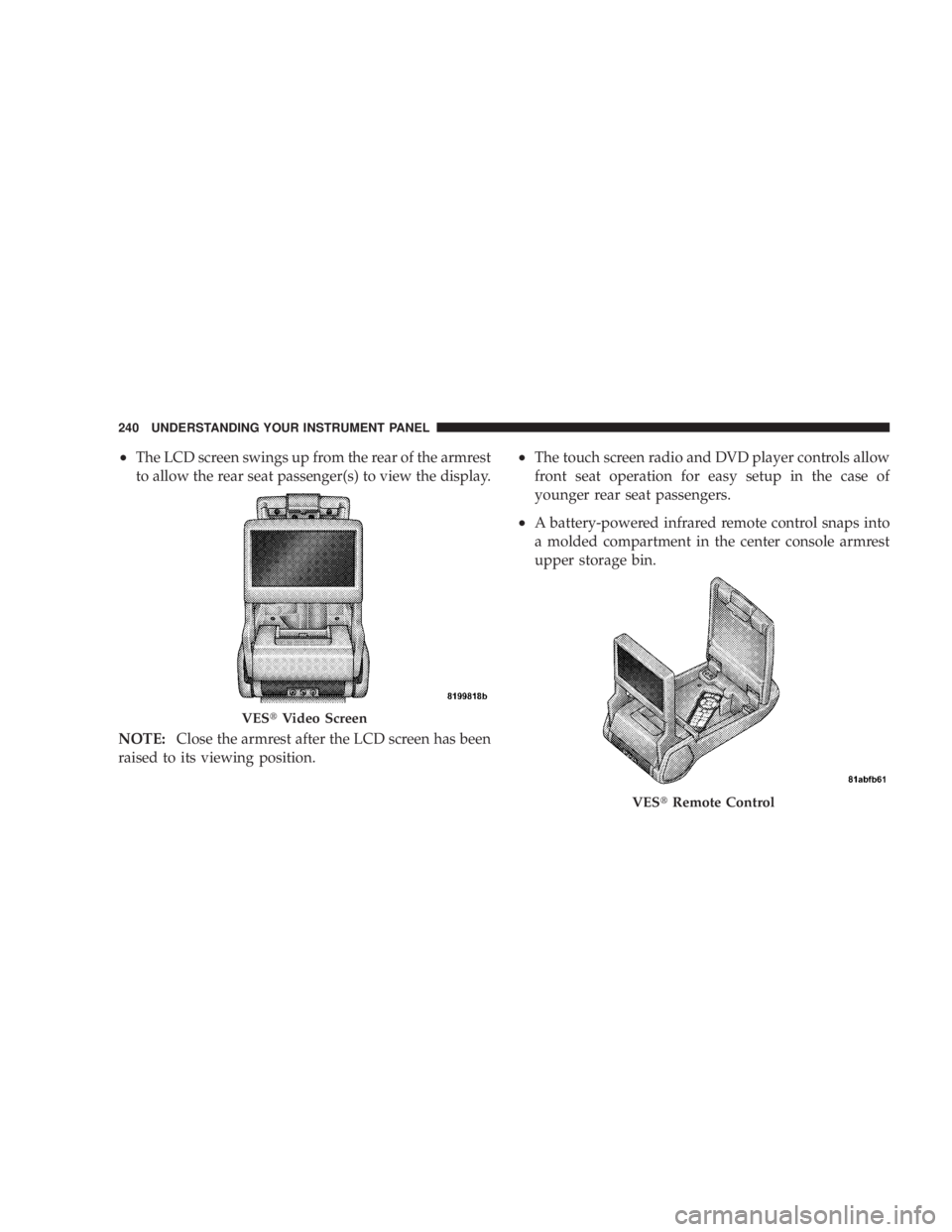
² The LCD screen swings up from the rear of the armrest
to allow the rear seat passenger(s) to view the display.
NOTE: Close the armrest after the LCD screen has been
raised to its viewing position. ² The touch screen radio and DVD player controls allow
front seat operation for easy setup in the case of
younger rear seat passengers.
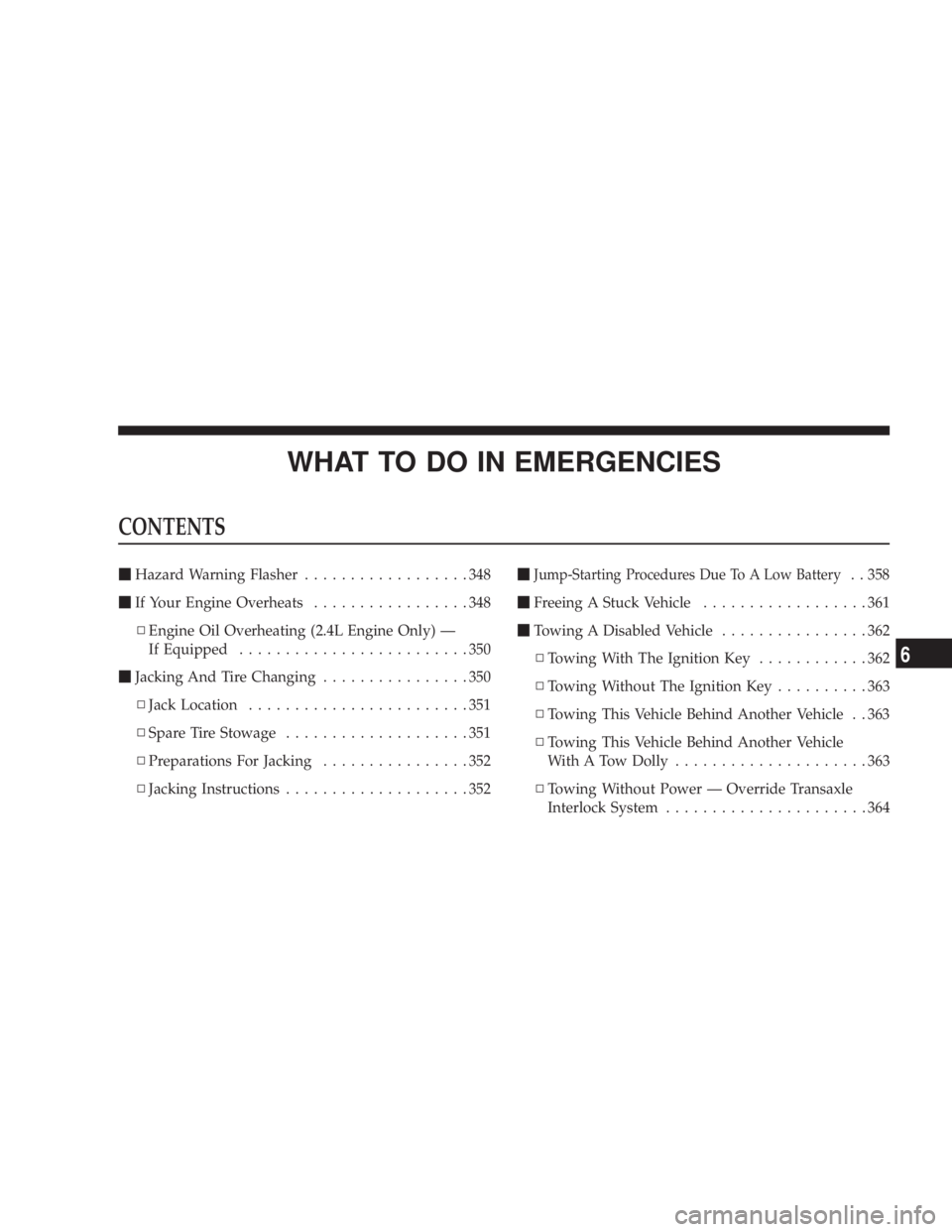
² A battery-powered infrared remote control snaps into
a molded compartment in the center console armrest
upper storage bin.
VES t Video Screen
VES t Remote Control240 UNDERSTANDING YOUR INSTRUMENT PANEL
Page 264 of 467
Normal Starting
Normal Starting of either a cold or a warm engine does
not require pumping or depressing the accelerator pedal.
Simply turn the ignition switch to the START position
and release when the engine starts. If the engine fails to
start within 15 seconds, turn the ignition switch to the
LOCK position, wait 10 to 15 seconds, then repeat the
normal starting procedure. WARNING!Do not attempt to push or tow your vehicle to get it
started. Vehicles equipped with an automatic trans-
axle cannot be started this way. Unburned fuel could
enter the catalytic converter and once the engine has
started, ignite and damage the converter and vehicle.
If the vehicle has a discharged battery, booster cables
may be used to obtain a start from another vehicle.
This type of start can be dangerous if done improp-
erly, so follow the procedure carefully. See section 6
of this manual for jump starting instructions.
Tip Start Ð Automatic Transaxle Only
Do not press the accelerator. Turn the ignition key briefly
to START position, and release it. The starter motor will
continue to run, but will automatically disengage itself
when the engine is running.262 STARTING AND OPERATING
Page 268 of 467
The following conditions must be met before the engine
will remote start:
² Automatic Transaxle in PARK
² All doors are closed
² Hood is closed
² Hazard Switch is off
² Brake Switch is inactive
² Key is not in the ignition
² Battery is at an acceptable charge level
² PANIC button on key fob is not depressed ENGINE BLOCK HEATER Ð IF EQUIPPED
The engine block heater warms engine coolant and
permits quicker starts in cold weather. Connect the cord
to a standard 110-115 Volt AC electrical outlet with a
grounded, three-wire extension cord.
The engine block heater cord is bundled under the hood
between the headlight assembly and the Totally Inte-
grated Power Module (Fuse Box) on the driver's side of
the vehicle.
WARNING!Remember to disconnect the cord before driving.
Damage to the 110-115 Volt electrical cord could cause
electrocution.266 STARTING AND OPERATING
Page 271 of 467
Brake/Transaxle Interlock System
This system prevents you from moving the gear selector
lever out of PARK and into any gear unless the brake
pedal is pressed. This system is active only while the
ignition switch is in the ON position. Always press the
brake pedal first, before moving the gear selector out of
PARK.
NOTE: If a malfunction occurs, the transaxle will not
shift out of park. Battery power is required to release the
brake/transaxle interlock system. However, there is an
override system that allows you to shift out of Park in
case of loss of power. To activate the override system:
² Firmly apply the parking brake
² Insert the ignition key and rotate it to the ON position
² Remove the cup holder liner ² Insert a key, screwdriver, or finger into the front hole
then push and hold the manual override release lever
forward.
² While holding the release lever forward, move the
gear selector lever from PARK to NEUTRAL. Release
the override
NOTE: If this occurs, even if the override is successful,
it is recommended that you visit a dealer at your earliest
possible convenience. Your dealer has diagnostic equip-
ment to determine if the problem could recur.
Automatic Transaxle Ignition Interlock System
This system prevents the key from being removed unless
the shift lever is in PARK. It also prevents shifting out of
PARK unless the key is in the ON position and the brake
pedal is applied.
NOTE: If a malfunction occurs, the system will trap the
key in the ignition cylinder to warn you that this safety STARTING AND OPERATING 269
5
Page 349 of 467
WHAT TO DO IN EMERGENCIESCONTENTS m Hazard Warning Flasher ..................348
m If Your Engine Overheats .................348
N Engine Oil Overheating (2.4L Engine Only) Ð
If Equipped .........................350
m Jacking And Tire Changing ................350
N Jack Location ........................351
N Spare Tire Stowage ....................351
N Preparations For Jacking ................352
N Jacking Instructions ....................352 m Jump-Starting Procedures Due To A Low Battery . . 358
m Freeing A Stuck Vehicle ..................361
m Towing A Disabled Vehicle ................362
N Towing With The Ignition Key ............362
N Towing Without The Ignition Key ..........363
N Towing This Vehicle Behind Another Vehicle . . 363
N Towing This Vehicle Behind Another Vehicle
With A Tow Dolly .....................363
N Towing Without Power Ð Override Transaxle
Interlock System ......................364
6
Page 350 of 467
HAZARD WARNING FLASHER
The flasher switch is located on the instrument
panel, below the radio. Depress the switch and
both cluster indicators and all front and rear direc-
tional signals will flash. Depress the switch again to turn
Hazard Warning Flashers off.
Do not use this emergency warning system when the
vehicle is in motion. Use it when your vehicle is disabled
and it is creating a safety hazard for other motorists.
If it is necessary to leave the vehicle to go for service, the
flasher system will continue to operate with the ignition
key removed and the vehicle locked.
NOTE: With extended use, the flasher may wear down
your battery. IF YOUR ENGINE OVERHEATS
In any of the following situations, you can reduce the
potential for overheating by taking the appropriate ac-
tion.
² On the highways Ð Slow down.
² In city traffic Ð While stopped, put transaxle in
NEUTRAL, but do not increase engine idle speed.
If the pointer rises to the H (red) mark, the instrument
cluster will sound a chime. Pull over and stop the vehicle
with the engine at idle, when safe. Turn off the air
conditioning and wait until the pointer drops back into
the normal range. If the pointer remains on the H (red)
mark for more than a minute, turn the engine off imme-
diately and call for service.348 WHAT TO DO IN EMERGENCIES