2008 CHRYSLER TOWN AND COUNTRY steering wheel
[x] Cancel search: steering wheelPage 57 of 531
OCCUPANT RESTRAINTS
Some of the most important safety features in your
vehicle are the restraint systems:
²Three-point lap and shoulder belts for all seating
positions
²Pretensioning and load-limiting retractors for the front
seat belts
²Advanced multistage driver and new active-vent front
passenger airbags
²An energy-absorbing steering column and steering
wheel
²Knee Bolsters/Blockers for front seat occupants
²Front seat belt retractors incorporate pretensioners to
enhance occupant protection by managing occupant
energy during an impact event.
²All seat belt systems (except the driver's, Swivel n' Go,
and third row center position) include Automatic
Locking Retractors (ALRs), which lock the seat belt
webbing into position by extending the belt all the
way out and then adjusting the belt to the desired
length to restrain a child seat or secure a large item in
a seat.
If you will be carrying children too small for adult-size
seat belts, your seat belts or the Lower Anchors and
Tether for CHildren (LATCH) feature also can be used to
hold infant and child restraint systems.
NOTE:The front airbags have a multistage inflator
design. This allows the airbag to have different rates of
inflation that are based on collision severity.
Please pay close attention to the information in this
section. It tells you how to use your restraint system
properly to keep you and your passengers as safe as
possible.
THINGS TO KNOW BEFORE STARTING YOUR VEHICLE 55
2
Page 68 of 531

Supplemental Restraint System (SRS) - Airbag
This vehicle has airbags for both the driver and front
passenger as a supplement to the seat belt restraint
systems. The driver's front airbag is mounted in the
center of the steering wheel. The passenger's front airbag
is mounted in the instrument panel, above the glove
compartment. The words SRS AIRBAG are embossed on
the airbag covers.
NOTE:The front airbags are certified to the Federal
regulations that allow less forceful deployment.
The front airbags have a multistage inflator design. This
may allow the airbag to have different rates of inflation
that are based on collision severity and occupant size.
This vehicle may also be equipped with Supplemental
Seat Side Airbag Inflatable Curtains (SABIC) to protect
the driver, front, and rear passengers sitting next to awindow. If the vehicle is equipped with SABIC air bags,
they are located above the side windows and their covers
are also labeled: SRS AIRBAG.
NOTE:Airbag covers may not be obvious in the interior
trim; but they will open to allow airbag deployment.
Airbag System Components
The airbag system consists of the following:
²Occupant Restraint Controller (ORC)
²Airbag Telltale Light
²Driver Airbag
²Front Passenger Airbag
²Front and Side Impact Sensors
²Steering Wheel and Column
²Instrument Panel
66 THINGS TO KNOW BEFORE STARTING YOUR VEHICLE
Page 74 of 531
WARNING!
²Being too close to the steering wheel or instrument
panel during front airbag deployment could cause
serious injury. Airbags need room to inflate. Sit
back, comfortably extending your arms to reach
the steering wheel or instrument panel.
²Side airbags also need room to inflate. Do not lean
against the door. Sit upright in the center of the
seat.
Airbag Deployment Sensors and Controls
Occupant Restraint Controller (ORC)
TheORCis part of a Federally regulated safety system
required for this vehicle.
The ORC determines if a frontal or side collision is severe
enough to require the airbags to inflate. Based on theimpact sensors signals, a central electronic ORC deploys
the front airbags, side inflatable airbag curtains, side seat
thorax airbags, and front seat belt pretensioners as re-
quired for each type of impact.
The ORC monitors the readiness of the electronic parts of
the system whenever the ignition switch is in the START
or ON position. These include all of the components
listed above except the steering wheel and column,
instrument panel, and seat belt reminder light. If the key
is in the OFF position, in the ACC position, or not in the
ignition, the airbags are not on and will not inflate.
The ORC contains a backup power supply system that
will deploy the airbags even if the battery loses power or
it becomes disconnected prior to deployment.
Also, the ORC turns on the AIRBAG warning
light in the instrument panel for approximately
four to six seconds for a self-check when the
ignition is first turned on. After the self-check,
72 THINGS TO KNOW BEFORE STARTING YOUR VEHICLE
Page 78 of 531
Maintaining Your Airbag System
WARNING!
²Modifications to any part of the airbag system
could cause it to fail when you need it. You could
be injured if the airbag system is not there to
protect you. Do not modify the components or
wiring, including adding any kind of badges or
stickers to the steering wheel hub trim cover or the
upper right side of the instrument panel. Do not
modify the front bumper, vehicle body structure,
or add aftermarket side steps or running boards.
²It is dangerous to try to repair any part of the
airbag system yourself. Be sure to tell anyone who
works on your vehicle that it has an airbag system.
WARNING!
Do not attempt to modify any part of your advanced
airbag system. The airbag may inflate accidentally or
may not function properly if modifications are made.
Take your vehicle to an authorized dealer for any
advanced airbag system service. If your seat, includ-
ing your trim cover and cushion, needs to be serviced
in any way (including removal or loosening/
tightening of seat attachment bolts), take the vehicle
to your authorized dealer. Only manufacturer ap-
proved seat accessories may be used. If it is necessary
to modify an advanced airbag system for persons
with disabilities, contact your authorized dealer.
NOTE:
Perchlorate Material Ð special handling may
apply. See: www.dtsc.ca.gov/hazardouswaste/perchlorate.
76 THINGS TO KNOW BEFORE STARTING YOUR VEHICLE
Page 96 of 531

PERIODIC SAFETY CHECKS YOU SHOULD MAKE
OUTSIDE THE VEHICLE
Tires
Examine tires for excessive tread wear or uneven wear
patterns. Check for stones, nails, glass, or other objects
lodged in the tread. Inspect tread and sidewall for cuts or
cracks. Check wheel nuts for tightness, and tires (includ-
ing spare) for proper pressure.
Lights
Have someone observe the operation of exterior lights
while you work the controls. Check turn signal and high
beam indicator lights on the instrument panel.
Fluid Leaks
Check area under vehicle after overnight parking for fuel,
engine coolant, oil or other fluid leaks. Also, if gasoline
fumes are detected or fuel, power steering fluid, trans-
mission fluid or brake fluid leaks are suspected, the cause
should be located and corrected immediately.
Exhaust Gas
WARNING!
Exhaust gases can injure or kill. They contain carbon
monoxide (CO) which is colorless and odorless.
Breathing it can make you unconscious and can
eventually poison you. To avoid breathing (CO)
follow the safety tips below.
Do not run the engine in a closed garage or in confined
areas any longer than needed to move your vehicle in or
out of the area.
If it is necessary to sit in a parked vehicle with the engine
running, adjust your heating or cooling controls to force
outside air into the vehicle. Set the blower at high speed.
94 THINGS TO KNOW BEFORE STARTING YOUR VEHICLE
Page 108 of 531
The UConnecttsystem can be used with any Hands-Free
Profile certified Bluetoothtcellular phone. See the
UConnecttwebsite for supported phones. If your cellu-
lar phone supports a different profile (e.g., Headset
Profile) you may not be able to use any UConnectt
features. Refer to your cellular service provider or the
phone manufacturer for details.
The UConnecttsystem is fully integrated with the vehi-
cle's audio system. The volume of the UConnecttsystem
can be adjusted either from the radio volume control
knob or from the steering wheel radio control (right
switch), if so equipped.
The radio display will be used for visual prompts from
the UConnecttsystem such as9CELL9or caller ID on
certain radios.Operation
Voice commands can be used to operate the UConnectt
system and to navigate through the UConnecttmenu
structure. Voice commands are required after most
UConnecttsystem prompts. You will be prompted for a
specific command and then guided through the available
options.
²Prior to giving a voice command, one must wait for
the beep, which follows the9Ready9prompt or another
prompt.
²For certain operations, compound commands can be
used. For example, instead of saying9Setup9and then
9Phone Pairing,9the following compound command
can be said:9Setup Phone Pairing.9
²For each feature explanation in this section, only the
combined form of the voice command is given. You
can also break the commands into parts and say each
part of the command when you are asked for it. For
106 UNDERSTANDING THE FEATURES OF YOUR VEHICLE
Page 171 of 531
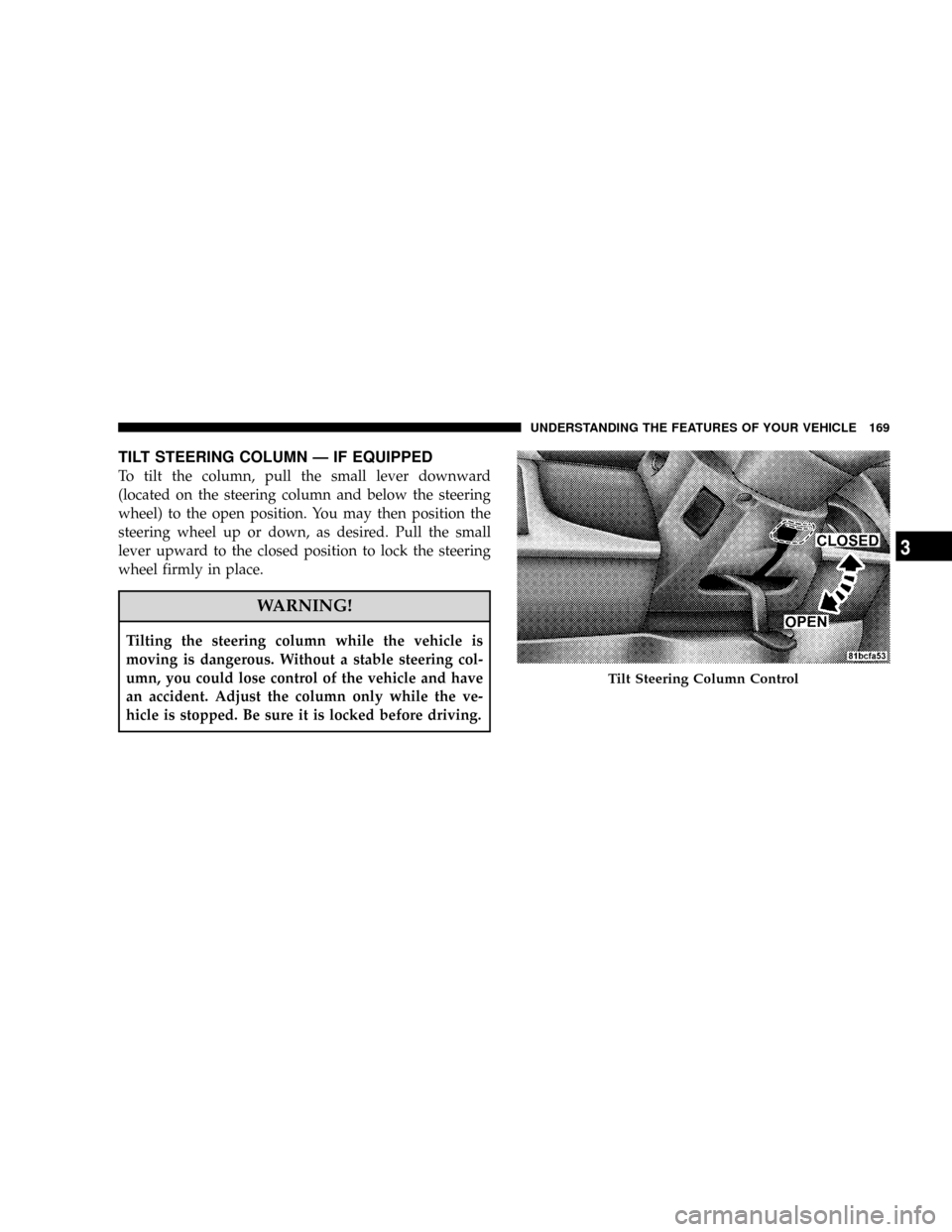
TILT STEERING COLUMN Ð IF EQUIPPED
To tilt the column, pull the small lever downward
(located on the steering column and below the steering
wheel) to the open position. You may then position the
steering wheel up or down, as desired. Pull the small
lever upward to the closed position to lock the steering
wheel firmly in place.
WARNING!
Tilting the steering column while the vehicle is
moving is dangerous. Without a stable steering col-
umn, you could lose control of the vehicle and have
an accident. Adjust the column only while the ve-
hicle is stopped. Be sure it is locked before driving.
Tilt Steering Column Control
UNDERSTANDING THE FEATURES OF YOUR VEHICLE 169
3
Page 177 of 531
If(SERVICE PARK ASSIST SYSTEM(appears in the
Electronic Vehicle Information Center (EVIC), after mak-
ing sure the rear bumper is clean, please see your
authorized dealer.
Should this wrench symbol display with the
letterPnext to it, your Park Sense System
needs servicing. Contact your authorized
dealer.
Cleaning The Rear Park Assist System
Clean the Rear Park Assist Sensors with water, car wash
soap and a soft cloth. Do not use rough or hard cloths. Do
not scratch or poke the sensors, otherwise, you could
damage the sensors.
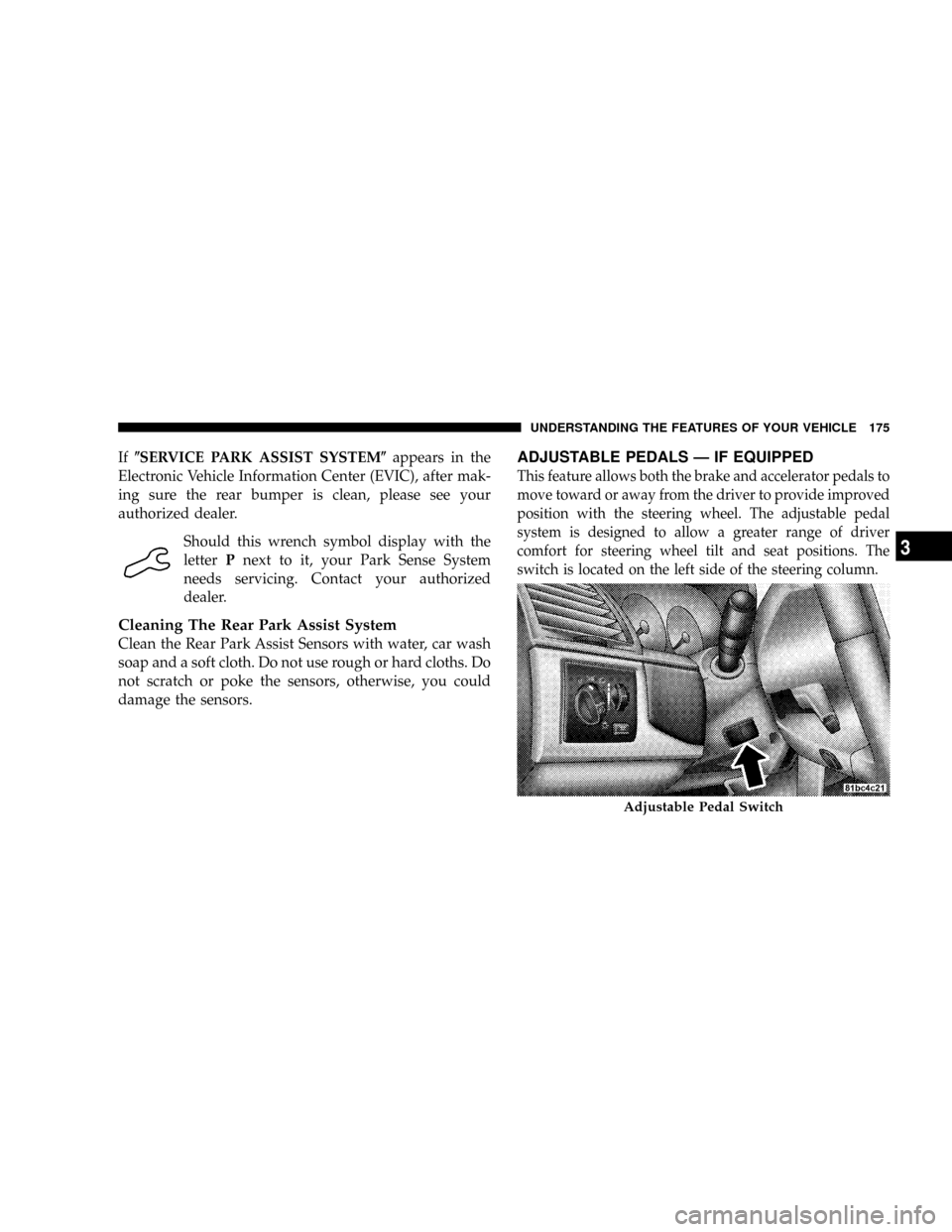
ADJUSTABLE PEDALS Ð IF EQUIPPED
This feature allows both the brake and accelerator pedals to
move toward or away from the driver to provide improved
position with the steering wheel. The adjustable pedal
system is designed to allow a greater range of driver
comfort for steering wheel tilt and seat positions. The
switch is located on the left side of the steering column.
Adjustable Pedal Switch
UNDERSTANDING THE FEATURES OF YOUR VEHICLE 175
3