Page 21 of 494

To Arm The System:
1. Remove the keys from the ignition switch and get out
of the vehicle.
2. Lock the doors by pressing the power door lock switch
or the LOCK button on the Remote Keyless Entry (RKE)
transmitter.
NOTE:The system will not arm if you lock the doors
with the manual door lock plungers.
3. The indicator light in the instrument cluster will flash
rapidly for 16 seconds. This shows that the system is
arming. During this period, if a door is opened, the
ignition switch is turned ON, or the power door locks are
unlocked in any manner, the system will automatically
disarm. After 16 seconds, the indicator light will flash
slowly. This shows that the system is fully armed.NOTE:•During the 16–second arming period, if a door is
opened or the ignition switch is turned ON, the system
will automatically disarm.
•Once armed, the system disables the unlock switch on
the driver door trim panel and passenger door trim
panel, the trunk release button on the instrument
panel, and the HomeLink�/Garage Door Opener (if
equipped).
To Disarm The System:
Either press the UNLOCK button on the remote keyless
entry transmitter or insert a valid sentry key into the
ignition lock cylinder and turn the key to the ON/START
position.
NOTE:
•The driver’s door key cylinder and the trunk button on
the keyless entry transmitter cannot arm or disarm the
system.
THINGS TO KNOW BEFORE STARTING YOUR VEHICLE 19
2
Page 62 of 494

OFF position, in the ACC position, or not in the ignition,
the airbags are not on and will not inflate.
The ORC contains a backup power supply system that
will deploy the airbags even if the battery loses power or
it becomes disconnected prior to deployment.
Also, the ORC turns on the Airbag Warning
Light in the instrument panel for six to eight
seconds for a self-check when the ignition is
first turned on. After the self-check, the Airbag
Warning Light will turn off. If the ORC detects a mal-
function in any part of the system, it turns on the Airbag
Warning Light either momentarily or continuously. A
single chime will sound if the light comes on again after
initial start up.
It also includes diagnostics that will illuminate the instru-
ment cluster Airbag Warning Light if a malfunction is
noted. The diagnostics also record the nature of the
malfunction.WARNING!
Ignoring the AIRBAG light in your instrument panel
could mean you won’t have the airbags to protect you
in a collision. If the light does not come on, stays on
after you start the vehicle, or if it comes on as you
drive, have the airbag system checked right away.
Impact Sensors
Two sensors, located on the front body structure, trigger
airbag deployment in direct frontal impacts and aid the
Occupant Restraint Controller (ORC) in determining
appropriate response to frontal impact events. Additional
sensors in the ORC determine the level of airbag deploy-
ment and provide deployment verification.
60 THINGS TO KNOW BEFORE STARTING YOUR VEHICLE
Page 106 of 494
NOTE:
•You may not hear all of the tones due to cellular phone
network configurations; this is normal.
•Some paging and voice mail systems have system time
out settings that are too short and may not allow the
use of this feature.
Barge In - Overriding Prompts
The “Voice Recognition” button can be used when you
wish to skip part of a prompt and issue your voice
recognition command immediately. For example, if a
prompt is asking�Would you like to pair a phone, clear
a�,�you could press the “Voice Recognition” button and
say,�Pair a Phone�to select that option without having to
listen to the rest of the voice prompt.
Turning Confirmation Prompts On/Off
Turning confirmation prompts off will stop the system
from confirming your choices (e.g., the UConnect�sys-
tem will not repeat a phone number before you dial it).
•Press the PHONE button to begin.
•After the�Ready�prompt and the following beep, say
�Setup Confirmations.�The UConnect�system will
play the current confirmation prompt status and you
will be given the choice to change it.
Phone and Network Status Indicators
If available on the radio and/or on a premium display
such as the instrument panel cluster, and supported by
your cell phone, the UConnect�system will provide
notification to inform you of your phone and network
status when you are attempting to make a phone call
using UConnect�. The status is given for roaming, net-
work signal strength, phone battery strength, etc.
Dialing Using the Cellular Phone Keypad
You can dial a phone number with your cellular phone
keypad and still use the UConnect�system (while dial-
ing via the cell phone keypad, the user must exercise
caution and take precautionary safety measures). By
104 UNDERSTANDING THE FEATURES OF YOUR VEHICLE
Page 137 of 494
NOTE:The front fog lights will only operate with the
headlights on low beam. Selecting high beam headlights
will turn off the front fog lights.
Turn Signals
Move the Multifunction Control Lever up or down and
the arrows on each side of the instrument cluster flash to
show proper operation of the front and rear turn signal
lights. You can signal a lane change by moving the lever
partially up or down without moving beyond the detent.
Front Fog Light Control
Turn Signal Control
UNDERSTANDING THE FEATURES OF YOUR VEHICLE 135
3
Page 144 of 494
ELECTRONIC SPEED CONTROL OPERATION
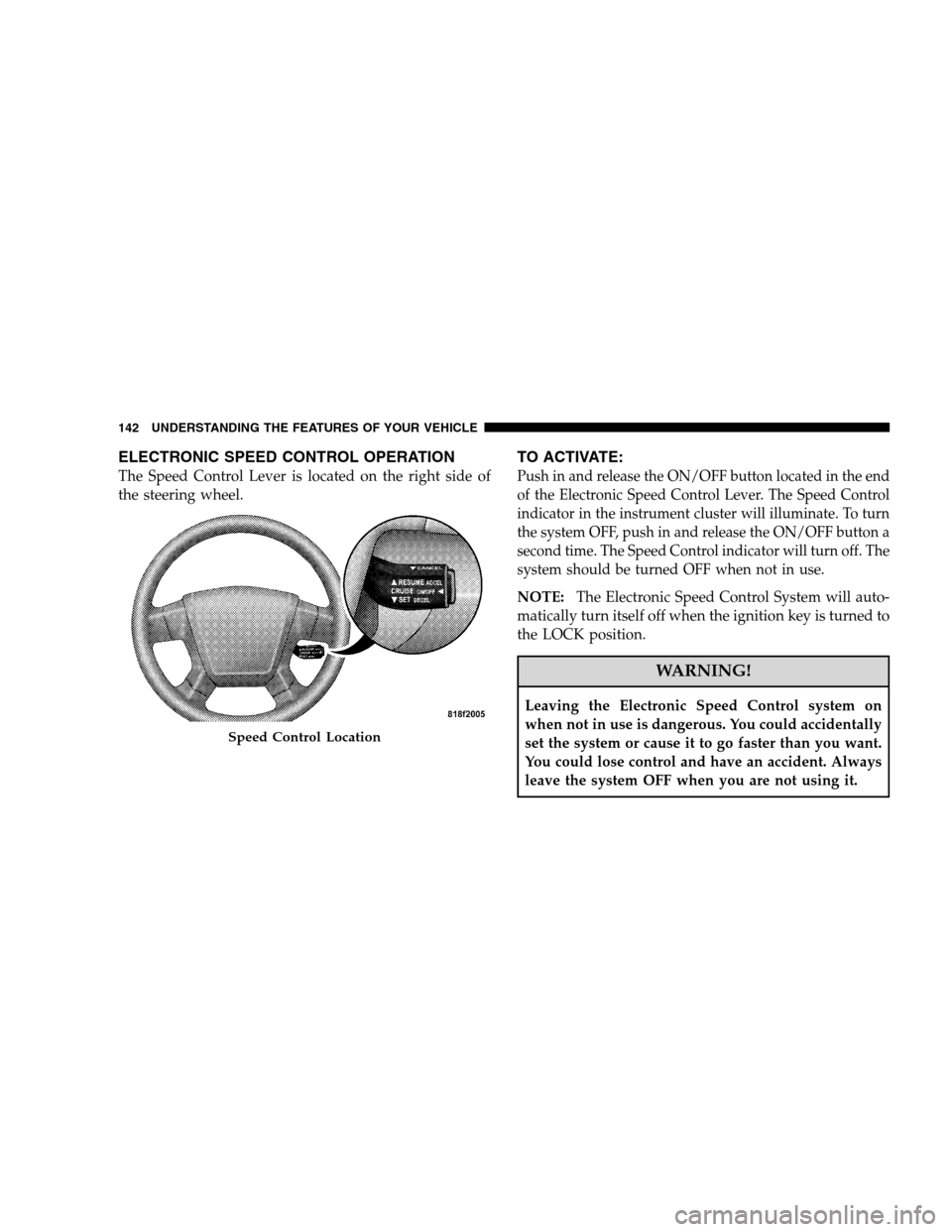
The Speed Control Lever is located on the right side of
the steering wheel.
TO ACTIVATE:
Push in and release the ON/OFF button located in the end
of the Electronic Speed Control Lever. The Speed Control
indicator in the instrument cluster will illuminate. To turn
the system OFF, push in and release the ON/OFF button a
second time. The Speed Control indicator will turn off. The
system should be turned OFF when not in use.
NOTE:The Electronic Speed Control System will auto-
matically turn itself off when the ignition key is turned to
the LOCK position.
WARNING!
Leaving the Electronic Speed Control system on
when not in use is dangerous. You could accidentally
set the system or cause it to go faster than you want.
You could lose control and have an accident. Always
leave the system OFF when you are not using it.
Speed Control Location
142 UNDERSTANDING THE FEATURES OF YOUR VEHICLE
Page 167 of 494
UNDERSTANDING YOUR INSTRUMENT PANEL
CONTENTS
�Instrument Panel Features.................169
�Base Instrument Cluster..................170
�Premium Instrument Cluster...............171
�Instrument Cluster Descriptions............172
�Electronic Vehicle Information Center (EVIC) –
If Equipped...........................183
▫Electronic Vehicle Information Center (EVIC)
Displays............................184
▫Oil Change Required...................185
▫Trip Functions.......................186▫Compass Display.....................187
▫Personal Settings (Customer Programmable
Features)...........................190
�Setting The Analog Clock.................193
�Radio General Information................193
▫Radio Broadcast Signals.................193
▫Two Types Of Signals..................193
▫Electrical Disturbances..................193
▫AM Reception.......................1944
Page 171 of 494
INSTRUMENT PANEL FEATURES
1 — Air Outlet 6 — Radio 11 — Storage Compartment
2 — Side Window Demister Outlet 7 — Passenger Airbag 12 — Climate Control
3 — Instrument Cluster 8 — Glove Box 13 — Trunk Release Switch
4 — Ignition Switch 9 — Heated Seat Switch*
5 — Analog Clock 10 — Hazard Switch * If Equipped
UNDERSTANDING YOUR INSTRUMENT PANEL 169
4
Page 172 of 494
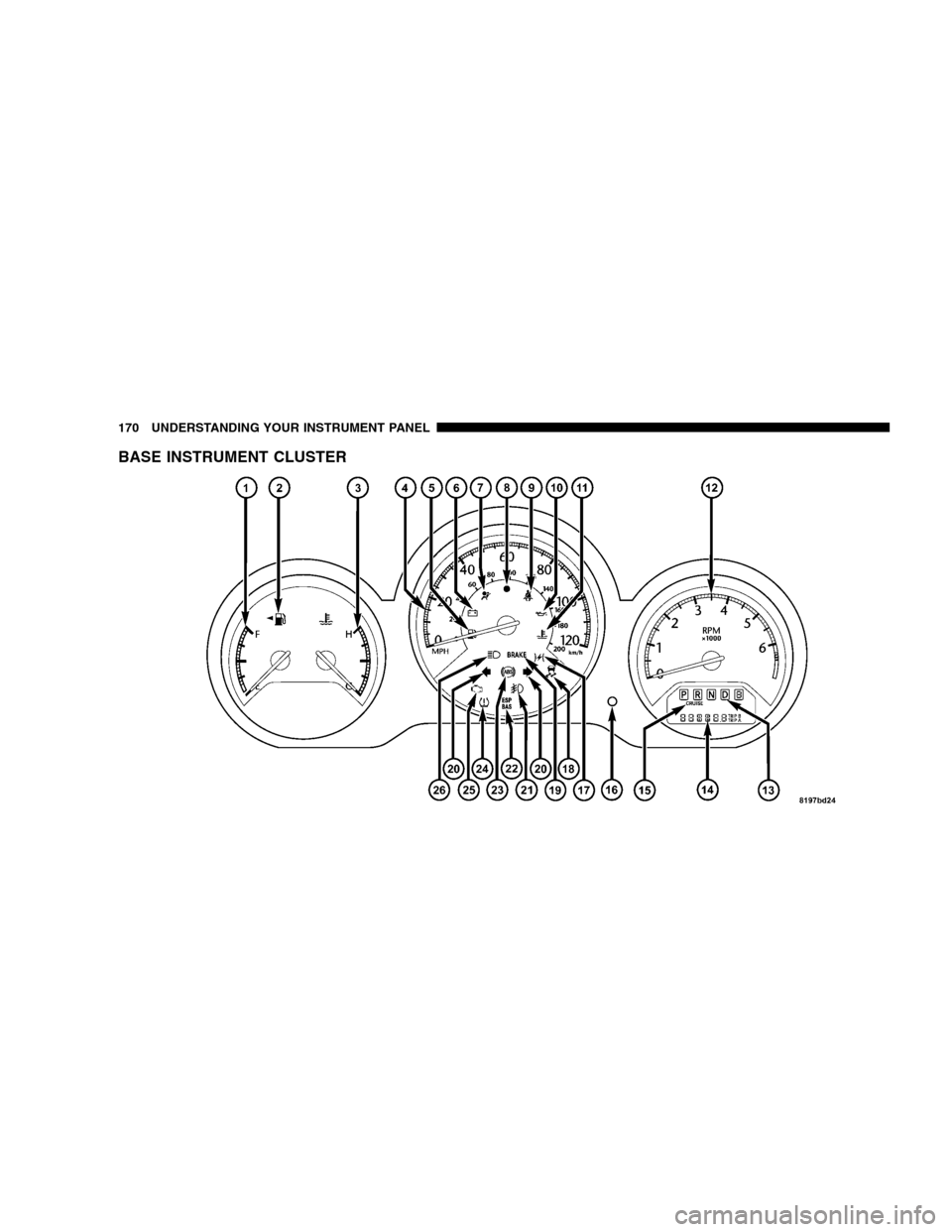
BASE INSTRUMENT CLUSTER
170 UNDERSTANDING YOUR INSTRUMENT PANEL